• Hey Guest. Check out your NeoGAF Wrapped 2025 results here!

NVIDIA DLSS 4.5 to feature 2nd Gen Transformer model and Dynamic 6x Frame Generation

Is any of these still necessary if I use the option on Nvidia app to force the latest preset letter??
You can use the nvidia app to apply the preset K to all games in global settings and it will do so for every game that supports it, so no, you dont need inspector for this specific thing, unless he meant something else.
 
Is any of these still necessary if I use the option on Nvidia app to force the latest preset letter??
Many older games still havent been white listed by the nvidea app. If a game says "unsupported" in the dlss section of the nvidea app then use NVPI to force it.
 
can't wait to try it out.

i get all the AI hate but i like DLSS. people just want to hate on anything with AI in it.

it used to suck but you can easily get away playing at performance level now and the frame gen doesn't look or feel any different from frames being rendered.

they might be fake frames but i'll take them.
 
AI is like nuclear bomb, it has its uses and can be very good for humanity(threat of mutual destruction is the only reason we dont have ww3 even 70 years after ww2 ended), but in wrong hands it can be used towards really nasty things.
Terminator 2 already showed us what the future could look like. AI can't be trusted 😁

 
Download the latest Nvidia Profile Inspector


Set these settings in global to force transformer model in all DLSS games

CdQzOyF9ie3REbMs.png
How does this work? It downloads the latest dll? Don't you need to do this manually? Isn't Dlss Swapper better for this job?
 
Welp, I don't see myself using DLSS4.5

I am glad that they have made an effort to fix ghosting, which to me is still where DLSS4 had issues, but I am not sure I want the performance hit.
 
We need more comparisons of Balanced & Quality (Preset K) vs Performance (Preset M)

Balanced and Quality might not even be necessary anymore.
 
Not sure what to think about this whole 4.5 DLSS...

Performance between L and M seems the same (bit better on M), K and J as well:

0d7i58i.jpeg
YY5tL59.jpeg
yWTWxEf.jpeg
 
Did a very quick comparison (all same res) between 4.5 and 4 for upscaling, FG (not like youll see it on a screenshot) and ray recon:
Expedition 33
Cyberpunk

Hair looks indeed a lot better when panning camera, not sure if thats because fg, upscaling or both.

Not sure if i should be using preset E or D for RR, latest defaults to D it seems.
 
Last edited:
This video I found shows very well how stable DLSS 4.5 is. There is less noise and ghosting for a small price in performance, at least in my case. Please watch it in a proper 4k TV and not in the phone lol

 
Last edited:
The biggest difference is in Doom Dark Ages with PT. DLSS4 in performance mode filtered (removed) the rain, while DLSS 4.5 kept it. I also noticed that DLSS FG has less ghosting.
 
Last edited:
In the end, it seems like most if not all users would choose to stay on 4.0 and keep the performance, given the already excellent quality it provides.
 
Am I correct to say that DLSS is there to upscale lower resolution to a higher resolution so that it doesnt cost that much raw power? And you can dial up other settings to higher tiers? Im not into PC gaming but bought my son a PC (5080) last year.
 
This video I found shows very well how stable DLSS 4.5 is. There is less noise and ghosting for a small price in performance, at least in my case. Please watch it in a proper 4k TV and not in the phone lol


Reduced ghosting and large reduction of shimmer is worth it for a few frames lost imo. Pretty decent update.
 
psa-do-not-force-latest-preset-with-dlss-4-5-aka-how-to-v0-snwm2453dqbg1.jpeg


image.png


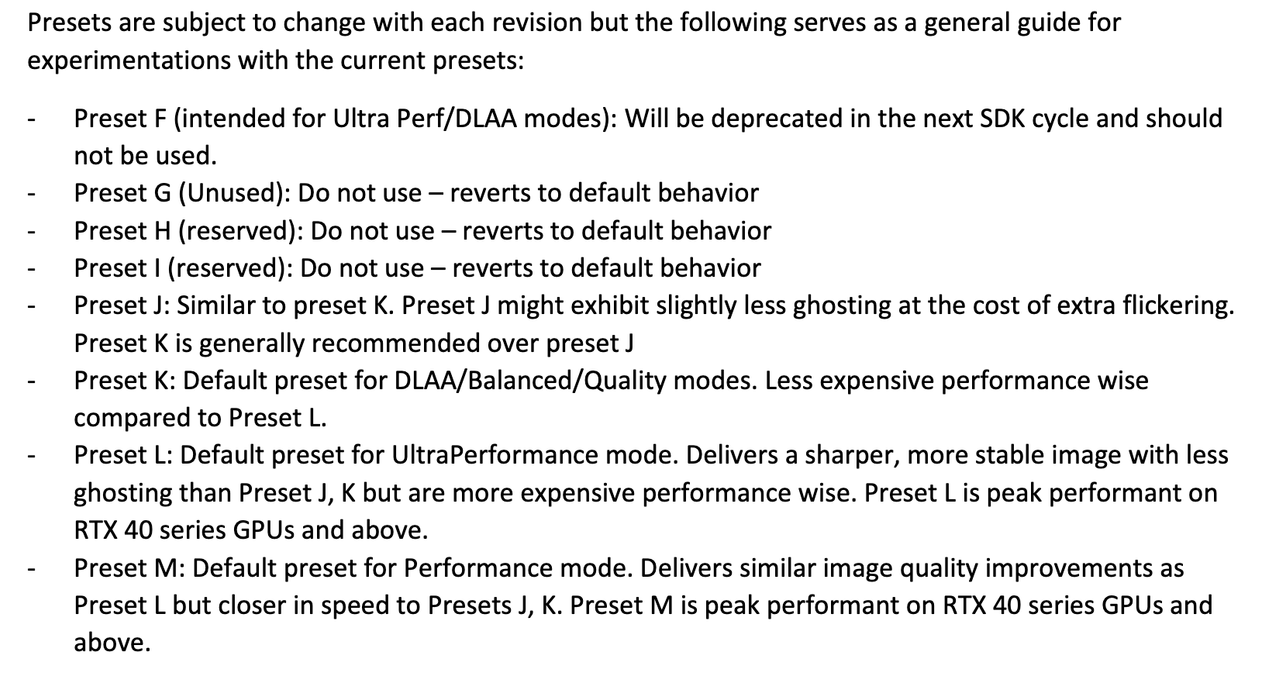
Do not use "latest" in nvidia app anymore. You have to select depending on what quality you expect to run the games.

DLSS Override - Model Presets: set to K for DLSS DLAA/Balanced/Quality, set to M for DLSS Performance, set to L for DLSS Ultra Performance

OR

DLSS Override - Model Presets: set to Latest

DLSS Override - Super Resolution Mode: set to desired DLSS quality preset (DLAA/Q/B/P/UP) and the optimal K/L/M letter will be applied automatically.
 
KCD 2 at 2560x1440 @ DLSS balanced went from 60 to 43
when switching to L preset
looks oversharped

will try M preset with performance
 
Last edited:
KCD 2 at 2560x1440 @ DLSS balanced went from 60 to 43
when switching to L preset
looks oversharped

will try M preset with performance

L is for ultra performance

M is for performance

See my post above, for balanced, preset K should be preferred.

edit - Seems there's conflicting information on that as well

it seems M is for all modes outside ultra performance, so quality/balanced/performance

''With today's NVIDIA app beta update, all GeForce RTX users can experience the new DLSS 4.5 Super Resolution model in over 400 titles. Simply select "DLSS Override feature - Model Presets" in the Graphics tab, and choose "Latest". This sets our new Model M across all modes. You can also try out Model L under "Custom", which is optimized for Ultra Performance Mode at 4K. Ultimately, you decide which balance of image quality and performance is right for your PC.''

 
Last edited:
So this is net overall worse in performance?

It's not clear to me.

What I'm accustomed to is better performance and better image quality. Is there an option here that does both of those things?

Or if I was already using performance or ultra-performance then it's a loss in performance for image quality?
 
psa-do-not-force-latest-preset-with-dlss-4-5-aka-how-to-v0-snwm2453dqbg1.jpeg


image.png


Do not use "latest" in nvidia app anymore. You have to select depending on what quality you expect to run the games.


OR

Seems like preset M impact on 4 and 5 series is tolerable. Not so much on 2 and 3.

I have to test L with ultra performance and see how it looks...
 
If gaming at 4K, M with DLSS performance seems to give the best quality and performance mix. Not the best in either, but I believe a really good balance.
 
There's strange reports on reddit that the drivers might be faulty

"Arc raiders drops by 30 fps before even touching dlss 4.5 on the latest driver, enabling latest further reduces it another 20. Reinstalling previous driver, fps is back to what it originally was, think I'll give this driver a miss for now"
 
There's strange reports on reddit that the drivers might be faulty

"Arc raiders drops by 30 fps before even touching dlss 4.5 on the latest driver, enabling latest further reduces it another 20. Reinstalling previous driver, fps is back to what it originally was, think I'll give this driver a miss for now"

Officially all this is in beta so maybe there is some bug or something. What I tested in the morning in rdr2 was fine performance wise, I didn't see anything weird
 
Officially all this is in beta so maybe there is some bug or something. What I tested in the morning in rdr2 was fine performance wise, I didn't see anything weird

Yea, seems that this driver is to be observed, by the next 48h everyone will have found the little quirks :)
 
DLSS Swapper is far more reliable than the nvidia app in getting the lastest DLSS modes into games.

Use that instead of the App.
letter preset is still dependent on the game DLSS dll version? if I force latest on the Nvidia app it will only work on whatever latest letter the game dll supports?
 
Last edited:
L is for ultra performance

M is for performance

See my post above, for balanced, preset K should be preferred.

edit - Seems there's conflicting information on that as well

it seems M is for all modes outside ultra performance, so quality/balanced/performance

''With today's NVIDIA app beta update, all GeForce RTX users can experience the new DLSS 4.5 Super Resolution model in over 400 titles. Simply select "DLSS Override feature - Model Presets" in the Graphics tab, and choose "Latest". This sets our new Model M across all modes. You can also try out Model L under "Custom", which is optimized for Ultra Performance Mode at 4K. Ultimately, you decide which balance of image quality and performance is right for your PC.''
Just tested Below
1440P balanced K preset -52 fps
with 1440P Performance M preset - 49 fps

performance looks sharper than Balanced but frames less damn!!
 
Last edited:
letter preset is still dependent on the game DLSS dll version? if I force latest on the Nvidia app to latest it will only work on whatever latest letter the game dll supports?

Using latest will get you M profile.

You can manually select K. L is missing from Nvidia app for some reason...
 
Yea, seems that this driver is to be observed, by the next 48h everyone will have found the little quirks :)
My whole system got fucked and started flickering with ui flying all over the place after the new driver update, had to restart the system, never happened on a prior update to me, so hope it won't come back. Probably best to wait with updates for now.
 
Did a very quick comparison (all same res) between 4.5 and 4 for upscaling, FG (not like youll see it on a screenshot) and ray recon:
Expedition 33
Cyberpunk

Hair looks indeed a lot better when panning camera, not sure if thats because fg, upscaling or both.

Not sure if i should be using preset E or D for RR, latest defaults to D it seems.

Cyberpunk looks noticeably better. Don't really see a difference with E33
 
.
 
Last edited:
Cyberpunk looks noticeably better. Don't really see a difference with E33
I can't tell a difference either, but i think thats useful to know, game is not detailed enough for differences to show and i am running it with custom settings above the maximum and sharpening disabled. Only the camera motion + hair feels more stable.

Gonna try it in Avatar and Anno 177 with lower resolutions once i have time, it should be more noticeable in something with more small details.
 
Last edited:
Using latest will get you M profile.

You can manually select K. L is missing from Nvidia app for some reason...
it's not missing for me
i also learned that if you use latest and override the quality level manually, you get preset K for quality, preset L for ultra performance and preset M for performance
 
it's not missing for me
i also learned that if you use latest and override the quality level manually, you get preset K for quality, preset L for ultra performance and preset M for performance

That automatic selector sounds quite fucking awesome.

I will have to try it when return home, but I really don't have M and L presets in app, lol.
 
Last edited:
Is that the reason why Preset L is recommended for "4K ultra" settings and Preset M for everybody else?

Yes. People are mistakenly applying M (latest) but enabling it in-game like for like with their usual balanced or quality presets - when M is designed for Performance mode, which presumably comes with enhanced sharpening by design. It's Nvidia's fault really, but then again this is a beta.

Edit: just use M for all unless you're experimenting with ultra performance mode.
 
Last edited:
Top Bottom