• Hey Guest. Check out your NeoGAF Wrapped 2025 results here!

NVIDIA DLSS 4.5 to feature 2nd Gen Transformer model and Dynamic 6x Frame Generation

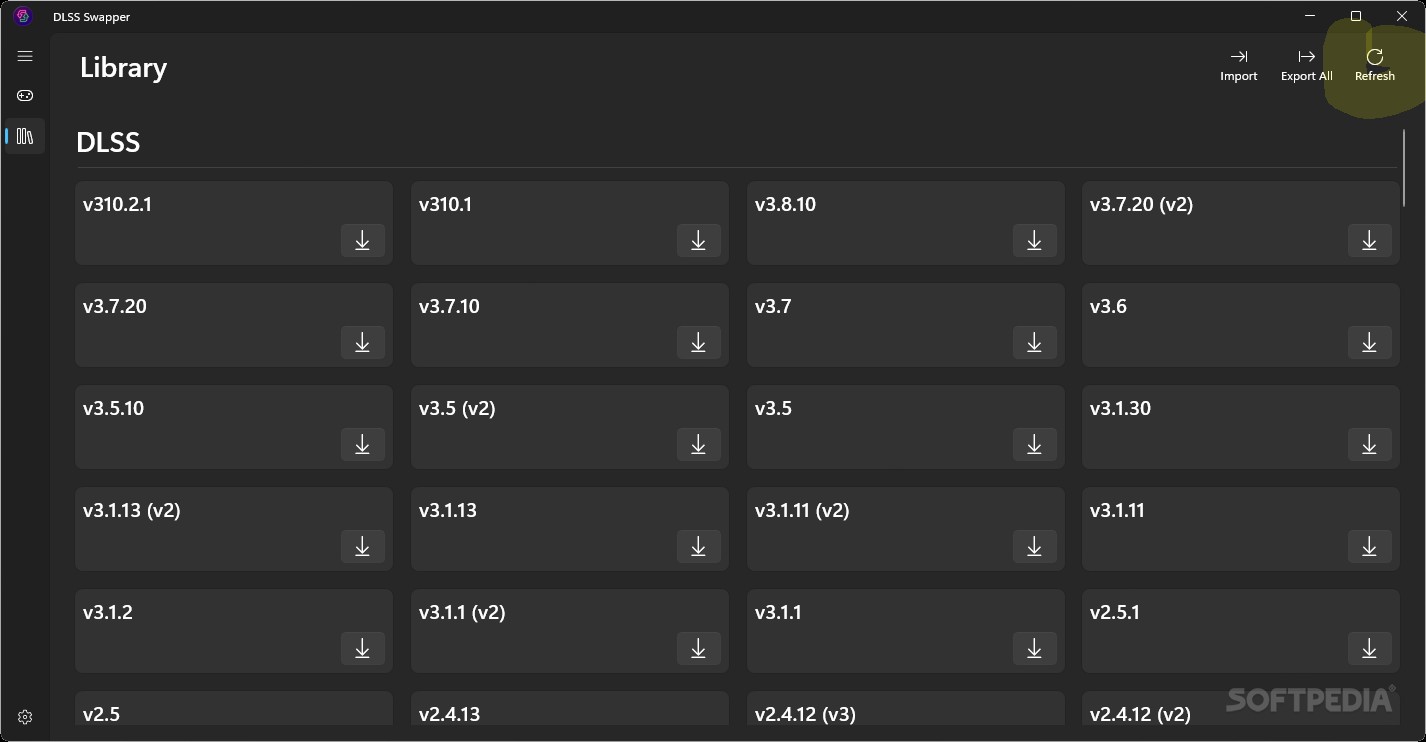
When I opened DLSS swapper it indicated that that game and a handful of others just didnt update to 4.5. So I used the swapper to do it. I havent had a chance to try it back at what it was.
Ah fair enough. Not used swapper for a while so can't judge. Maybe the app needs an update or DLSS 4.5 being kaput on certain games idk.
 
Last edited:
krxTZizL41fiGsiW.png


You need to take higher resolution screenshots.

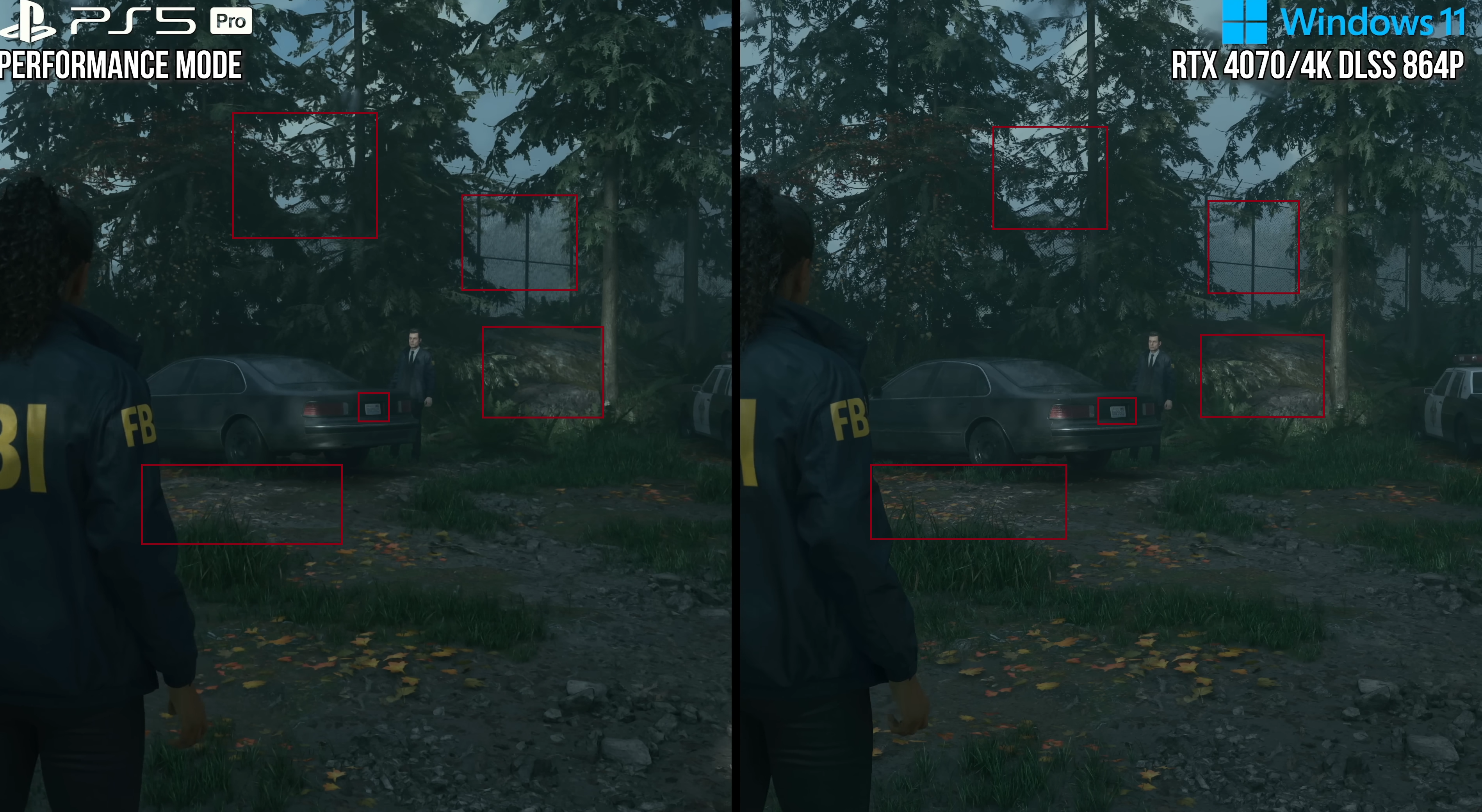
I'm not sure what to say, DLSS clearly does better details, like the number plate, preserves texture resolution better, such as the rocks and ground clutter, handles fine geometry better as the already mentioned fence, and has less (but still some) of the issues that PSSR occasionally has like noise and flickering. Especially noise, which plagues a lot of titles.

You can say PSSR perhaps does tree foliage better, although even that is up in the air. DLSS once again better with the fine detail preservation, but PSSR is doing a much better job of cleaning up the aliasing. So it's not a 100% DLSS win, but certainly not anything like 50/50.

That being said, all this is comparing DLSS 3.5 which got superseded by 3.7, then 4, and now 4.5.

Remedy patched the game PS5 Pro version of the game so that users can switch back to FSR because so many people were complaining. And again, Sony is heavily investing in PSSR2 with the work done on FSR4, because they are well aware that the first version simply doesn't hold up.

Good points, but bear in mind that Alan Wake 2 uses stong lens filter that blur the whole image, making anti-aliasing (AA) comparisons much more difficult. Ray Reconstruction also blurs the image significantly in this game, so it's possible that the 4070 segment in the video employed this feature. With thar ugly lens filter and Ray Reconstruction activated, this game appears blurry and resembles an upscaled image, even at 4K DLAA. Without these features, even 4K DLSS-P produces razor sharp and detailed image (4K like). I think DLSS Ultra Performance should deliver a reasonably sharp image without these filters, especially with the latest L or M presets. I might download Alan Wake 2 just to test it out!
 
Good points, but bear in mind that Alan Wake 2 uses stong lens filter that blur the whole image, making anti-aliasing (AA) comparisons much more difficult. Ray Reconstruction also blurs the image significantly in this game, so it's possible that the 4070 segment in the video employed this feature. With thar ugly lens filter and Ray Reconstruction activated, this game appears blurry and resembles an upscaled image, even at 4K DLAA. Without these features, even 4K DLSS-P produces razor sharp and detailed image (4K like). I think DLSS Ultra Performance should deliver a reasonably sharp image without these filters, especially with the latest L or M presets. I might download Alan Wake 2 just to test it out!
That comparison is matching settings, no RR. Not even updated to 3.7, just everything at stock. I'd imagine 4.5 makes it look, way, way better. Especially upscaled from 864p.
 
This is just absurd how good this stuff works. Turns out DLSS 4.5 takes "garbage" and makes it beautiful.

720p has no right looking this good on a 4k screen:


Say what you want about Nvidia, but these dudes are smart as hell and they know what they are doing. They literally just extended the life of every card they've released the last two gens and extended the gap between them and AMD, and they did it with random driver update out of nowhere.


Lower internal resolutions in black myth wukong result in fewer rays, which causes GI noise that is especially visible around foliage. I can't see that noise with DLAA and DLSS Ultra Quality (77% resolution scaling), but it starts to become visible with Standard DLSS Quality (67%), and becomes particularly noticeable with DLSS Performance. Lowering full RT to medium also increase that GI noise. This game would benefit greatly from RR.
You can try the Ultra Plus mod, it adds RR and improves the RT and lighting, as well as a bunch of other stuff, but then again, until (if?) they update RR for 4.5 you'd be using 4.0 with it anyway.
 
I've got DLSS 4.5 installed, just haven't messed with it yet. With all this feedback, looks like that's tonight's project after work for sure.
 
M profile in DS Remake and FFXVI (1080p base, 4k Output):

sYoqoFQ.jpeg
ZzHYTah.jpeg
3IA7I9G.jpeg
nW86fC5.jpeg
G0FSm2Z.jpeg
I must test Dead Space Remake as well because the DLSS that came with this game made the image look very blurry. Your screenshots definitely look much better. I wonder did you use DLSS settings in nvidia inspector from the link below?


I must test Dead Space Remake as well because the DLSS that came with this game made the image look very blurry. Your screenshots definitely look much better. I wonder did you use DLSS settings in nvidia inspector from the link below?


No, just DLSS Swapper (Nvidia App don's support this game for some reason) - vanilla settings.
 
Todays the day 4.5 It gets officially released. I can finally see what all the fuss is about. (I didn't want to enable any preview/developer mode)

Is this totally busted in
Hogwarts legacy? Updated everything via dlss swapper and it looks bugged out.
I've been playing Hogwarts Legacy since Epic store made it free a few weeks back.
I think Raytracing is busted in this game. It looks bad, everything is super shiny and sometimes pixels comes off the model shimmering.

I turned off Raytracing completely and I think the game looks much better.
 
Last edited:
Take a look at the difference.


The texture quality has improved massively after this simple tweak.


foIDE8dI2EmdxqoZ.jpg
These values are conservative. Official Nvidia formula suggests -2.0 for Performance.
The optimal value is content dependent though, high frequency regular patterned textures can show moire like patterns when the MIP LOD is too low.
Basically you should try -3, -2, -1.5 and -1 for UP, P, B and Q respectively and if there are no obvious moire patterns on distant textures then these are fine.
 
indiana jones is another game where preset M increases flickering with certain foliage. these foliage already faintly flicker even with preset E but their flickering intensity increases with the new preset M

in order,

preset E
preset K
preset M

 
Take a look at the difference.


The texture quality has improved massively after this simple tweak.


foIDE8dI2EmdxqoZ.jpg

These values are conservative. Official Nvidia formula suggests -2.0 for Performance.
The optimal value is content dependent though, high frequency regular patterned textures can show moire like patterns when the MIP LOD is too low.
Basically you should try -3, -2, -1.5 and -1 for UP, P, B and Q respectively and if there are no obvious moire patterns on distant textures then these are fine.

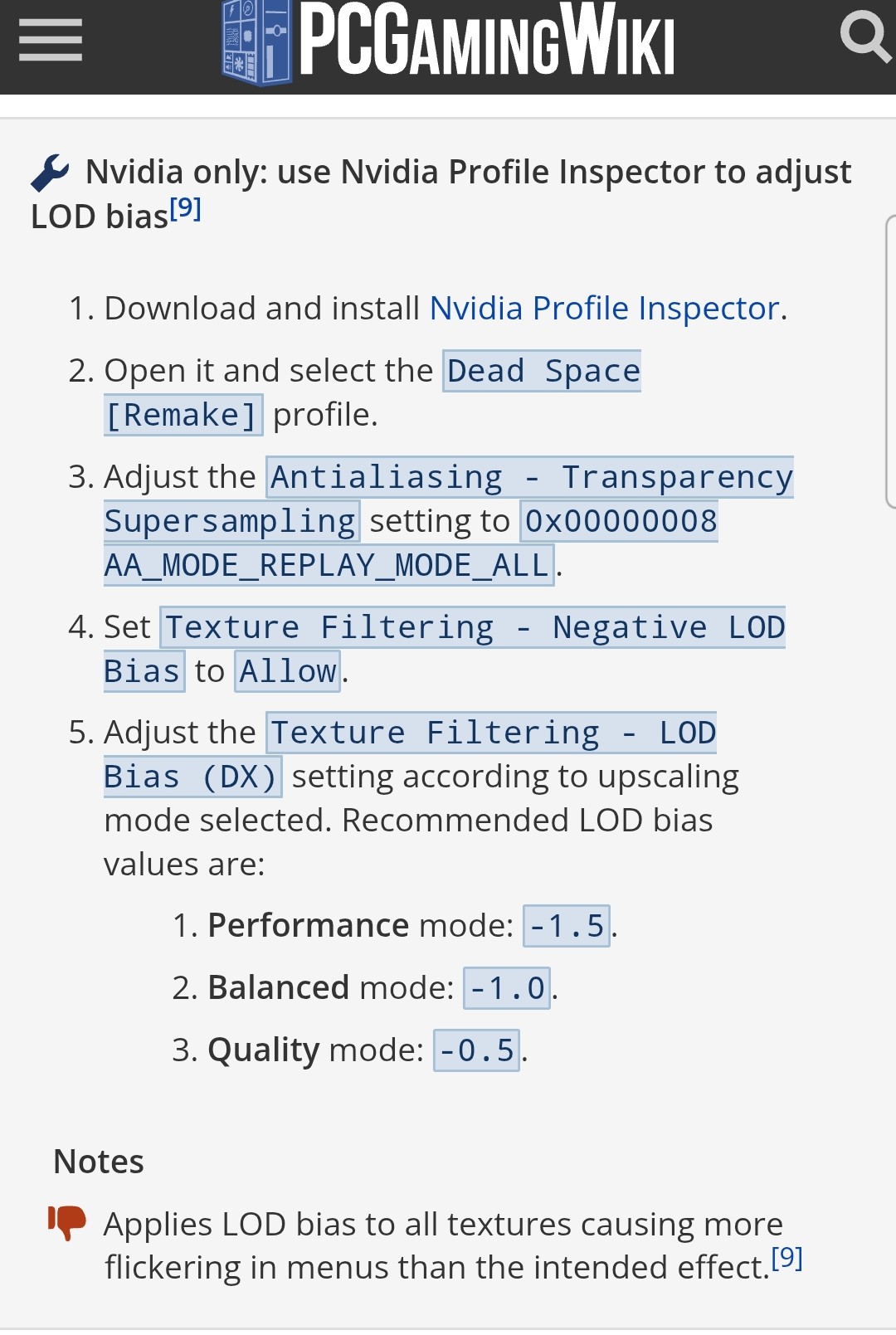
Normally games should do those negative LOD switches automatically when changing presets but looks like EA fucked up with Dead Space. I heard game also benefits from forced on ReBar.

Metro Exodus and Uncharted:

1GNPL83.jpeg
wLqduSj.jpeg
Kw2tSsX.jpeg


What is weird that in Uncharted I selected preset M in Swapper but game only applies it to performance mode, balanced and quality are K for some reason...
 
Normally games should do those negative LOD switches automatically when changing presets but looks like EA fucked up with Dead Space. I heard game also benefits from forced on ReBar.
It's not just Dead Space. Other games, including Cyberpunk and The Witcher 3, have the same problem. That's why, in my DLSS 4.5 comparison in Cyberpunk, I showed two screenshots: one with negative LOD bias and one with the default lod bias settings. Without the fix, TAA native had much better texture clarity. However, with the fix, DLSS now wins, even in performance mode.
These values are conservative. Official Nvidia formula suggests -2.0 for Performance.
The optimal value is content dependent though, high frequency regular patterned textures can show moire like patterns when the MIP LOD is too low.
Basically you should try -3, -2, -1.5 and -1 for UP, P, B and Q respectively and if there are no obvious moire patterns on distant textures then these are fine.
Thanks for the recommended lod bias values. I was looking for them.
 
Ill be honest, I feel the 4.5 causes more confusion than it helps. I selected preset M and it looked fine, but I can't say it looked any better or worse than K.

I feel like I read that titles with Ray Reconstruction can't use M at the moment anyway.
 
Todays the day 4.5 It gets officially released. I can finally see what all the fuss is about. (I didn't want to enable any preview/developer mode)


I've been playing Hogwarts Legacy since Epic store made it free a few weeks back.
I think Raytracing is busted in this game. It looks bad, everything is super shiny and sometimes pixels comes off the model shimmering.

I turned off Raytracing completely and I think the game looks much better.
The game looks completely busted for me ever since I upgraded dlss via dlss swapper.
 
krxTZizL41fiGsiW.png


You need to take higher resolution screenshots.

I'm not sure what to say, DLSS clearly does better details, like the number plate, preserves texture resolution better, such as the rocks and ground clutter, handles fine geometry better as the already mentioned fence, and has less (but still some) of the issues that PSSR occasionally has like noise and flickering. Especially noise, which plagues a lot of titles.

You can say PSSR perhaps does tree foliage better, although even that is up in the air. DLSS once again better with the fine detail preservation, but PSSR is doing a much better job of cleaning up the aliasing. So it's not a 100% DLSS win, but certainly not anything like 50/50.

That being said, all this is comparing DLSS 3.5 which got superseded by 3.7, then 4, and now 4.5.

Remedy patched PS5 Pro version of the game so that users can switch back to FSR because so many people were complaining. And again, Sony is heavily investing in PSSR2 with the work done on FSR4, because they are well aware that the first version simply doesn't hold up.
I don't agree with you take that harsh aliased edges in the back ground where they should be at the very least softened by depth cueing fog at the very minimum - never mind anti-aliasing softening - is a superior result from DLSS compared to PSSR's more coherent sharpness in the foreground and softness at the background and I'm inclined to think that your "more detail" is actually just a side effect of lower quality fixed value ambient lighting terms being used on the DLSS version background objects causing the oversaturation on the car and other things giving them more contrast and artificial sharpening, when they should be softer.

But either way, even though this is the poster boy game for bad source material for PSSR - an Xbox one ESRAM optimised resolution 864p - this discussion of you already reaching for DLSS 3.7, 4.0, and 4.5 is interesting, because it would now make your comments disingenuous if you tell me you agreed with Bojji's opening comment that kicked this exchange off: that PSSR was being bested by DLSS2 out the gate, when this parity on an ugly AA looking game that is unstable with PSSR and hardly any more stable on DLSS3.5 at 864p and ultra performance, So DLSS2 is certainly not going to cut it and outclass PSSR, yes?
 
Ill be honest, I feel the 4.5 causes more confusion than it helps. I selected preset M and it looked fine, but I can't say it looked any better or worse than K.

I feel like I read that titles with Ray Reconstruction can't use M at the moment anyway.
I've been messing with it all afternoon. I ended up setting the Nvidia app global to 3d app settings and setting each game individually. Cyberpunk looks better with K and Ray Reconstruction.

Has anyone tried to force Avatar Pandora into an Ultra Performance with L?
The Nvidia app doesn't say what mode while in that game. I can't tell a difference in Avatar switching to global ultra performance, I think Avatar might be missing some DLSS settings.
Ray reconstruction on or off the picture in Avatar looks identical to me. I don't think the modes are switching.

Now I see why people were installing that DLSS Swapper thing, that would have been much easier than restarting games over and over all afternoon.
 
Dead Space Remake

I applied a negative LOD bias fix to all sub-native resolutions because it makes the textures much sharper.

DLAA 4.0


DLAA 4.5 (28% worse performance compared to 4.0)


DLSS-Q 4.0


DLSS-Q 4.5


DLSS-P 4.5


DLSS-UP 4.5


TAA


FSR3 Quality


In my opinion, even DLSS-P 4.5 adds more detail than both TAA native and DLSS-Q 4.0. The new DLSS also makes small lights and fine details brighter in HDR. However, there is one problem. DLSS 4.5 has stronger SSR noise and shimmering, even compared to 4.0. Also lower inrernal resolution increase that noise even further.

I have also included an FSR3-Q screenshot because I thought it's image quality looked great too.
 
Last edited:
Normally games should do those negative LOD switches automatically when changing presets
It's not automatic, it must be implemented for upscaled rendering specifically by the developers, and some games omit this. CODs are not doing this up till this day for example I think.

Thanks for the recommended lod bias values. I was looking for them.
To be clear only the -2.0 for Performance is recommended, and there's a formula for other base resolutions which I never had time to run for other modes so these are just my suggestions based on the ratio differences to Performance:
Code:
DlssMipLevelBias = NativeBias + log2(Render XResolution / Display XResolution) - 1.0 + epsilon
 
I don't agree with you take that harsh aliased edges in the back ground where they should be at the very least softened by depth cueing fog at the very minimum - never mind anti-aliasing softening - is a superior result from DLSS compared to PSSR's more coherent sharpness in the foreground and softness at the background and I'm inclined to think that your "more detail" is actually just a side effect of lower quality fixed value ambient lighting terms being used on the DLSS version background objects causing the oversaturation on the car and other things giving them more contrast and artificial sharpening, when they should be softer.

But either way, even though this is the poster boy game for bad source material for PSSR - an Xbox one ESRAM optimised resolution 864p - this discussion of you already reaching for DLSS 3.7, 4.0, and 4.5 is interesting, because it would now make your comments disingenuous if you tell me you agreed with Bojji's opening comment that kicked this exchange off: that PSSR was being bested by DLSS2 out the gate, when this parity on an ugly AA looking game that is unstable with PSSR and hardly any more stable on DLSS3.5 at 864p and ultra performance, So DLSS2 is certainly not going to cut it and outclass PSSR, yes?
ESRAM optimized? The game isn't even on Xbox One. 864p is the chosen resolution as it is the lowest resolution PSSR currently supports for upscaling to 4K. You can try and reason as much as you want, but make a blind poll and I'd wager by far most people would like the DLSS image. So would Sony themselves, considering PSSR2.

And I agree with Boji regarding DLSS 2 (well DLSS 2.3 on), Alan Wake 2 in that screenshot uses DLSS Preset D which was introduced with DLSS 2.3. 3.7 (preset E), is actually the first major update to the CNN model that Nvidia made is a while, and Alan Wake 2 doesn't even have that.
 
Last edited:
Dead Space Remake

I applied a negative LOD bias fix to all sub-native resolutions because it makes the textures much sharper.

DLSS-Q 4.5 "M" preset


DLSS-Q 4.0 "K" preset


DLSS-P 4.5 "M" preset


DLSS-UP 4.5 "L" preset


TAA


FSR3 Quality


In my opinion, even DLSS-P 4.5 adds more detail than both TAA native and DLSS-Q 4.0. The new DLSS also makes small lights and fine details brighter in HDR. However, there is one problem. DLSS 4.5 has stronger SSR noise and shimmering, even compared to 4.0. Also lower inrernal resolution increase that noise even further.

I have also included an FSR3-Q screenshot because I thought it's image quality looked great too.

Can you try forcing DLAA for DLSS 4.0 and 4.5. should be no SSR noise or significantly less. I ran the game in ultra quality (75% internal res) + smooth motion, it looks incredible except there is some bug with smooth motion that causes visual artifacts on all the light sources
 
Well, even 4.5 quality is not oversharpened at all in cyberpunk and definitely look better than perf mode so if you have power to spare and your monitor is not overly sharp, you really wanna try quality mode.
 
ESRAM optimized? The game isn't even on Xbox One. 864p is the chosen resolution as it is the lowest resolution PSSR currently supports for upscaling to 4K. You can try and reason as much as you want, but make a blind poll and I'd wager by far most people would like the DLSS image. So would Sony themselves, considering PSSR2.

And I agree with Boji regarding DLSS 2 (well DLSS 2.3 on), Alan Wake 2 in that screenshot uses DLSS Preset D which was introduced with DLSS 2.3. 3.7 (preset E), is actually the first major update to the CNN model that Nvidia made is a while, and Alan Wake 2 doesn't even have that.
Regardless of the age of the model, DLSS versions are more than just inferencing to produce the final pixel, so just because it is a earlier model doesn't mean the image quality it generates is the same as DLSS 3.5 using that model, well not unless Nvidia are reverting versions by model and foregoing improvements in the runtime cost of combining, denoising, etc of the new version, which I highly doubt.
 
Regardless of the age of the model, DLSS versions are more than just inferencing to produce the final pixel, so just because it is a earlier model doesn't mean the image quality it generates is the same as DLSS 3.5 using that model, well not unless Nvidia are reverting versions by model and foregoing improvements in the runtime cost of combining, denoising, etc of the new version, which I highly doubt.
Nvidia updates DLSS versions all the time, but it doesn't mean the models themselves change. Preset E for example is the exact same on 3.7, 4, and 4.5.
 
Can you try forcing DLAA for DLSS 4.0 and 4.5. should be no SSR noise or significantly less. I ran the game in ultra quality (75% internal res) + smooth motion, it looks incredible except there is some bug with smooth motion that causes visual artifacts on all the light sources
I tried both DLAA and TAA. Although SSR pixelation goes away, the noise still remains. It seems that SSR quality is tied to render resolution. Negative LOD bias allows textures to load in higher quality when DLSS is enabled, but that doesn't work for screen space reflections. As a result of that even DLSSQ is clear compromise in this game compared to DLAA, because that SSR noise and pixelation is clearly increased at lower internal resolutions.

Take a look at the light reflections on the wall. The reflections become much more pixelated with DLSSP.

DLAA


DLSSP


Or pixelation on the floor in this comparison. In motion that difference is even bigger, because that noise move.

DLAA


DLSSP


Do this work for cyberpunk with texttures overhaul mod?
What should i do exactly?
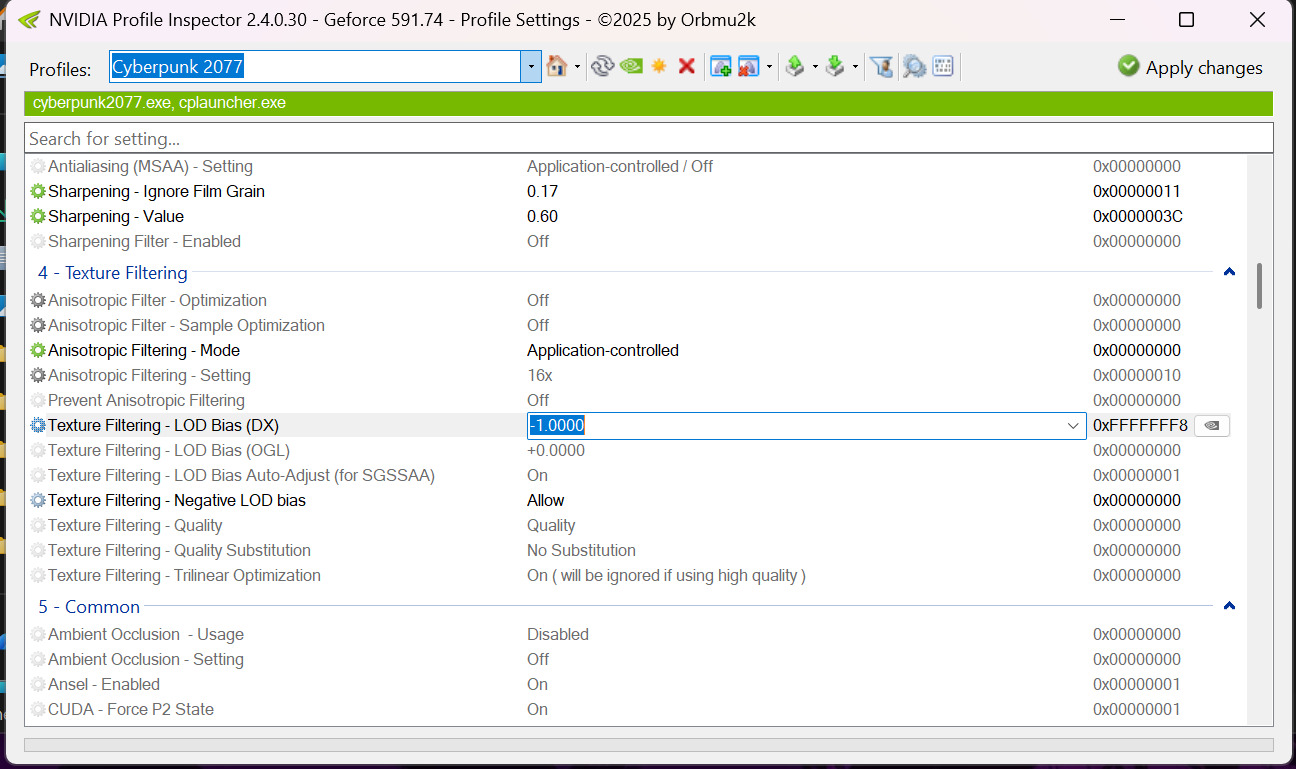
It's possible that the mod author implemented a negative LOD bias via INI tweaks, but it's more likely that he didn't do that. To be sure you must run the game and test TAA and DLSS-P. Pick a scene where there will be small text at the distance and see if TAA render the text more clearly If that's the case you need to change negative texture lod bias in the driver settings via nv inspector.

  • Open nv inspector
  • Find Cyberpunk 2077 profile
  • Change texture filtering Negative LOD bias to "allow"
  • Change texture filtering LOD Bias (DX) to -1.0000 if you want to use DLSSQ. For DLSSP use -2.0000.
  • Click Apply changes button
  • This is an optional step. You can ignore all these steps if you play with DLAA 😆
rxbRjA4X9AXcNJum.jpg
 
Last edited:
DLSS Swapper still shows 310.4 as the latest version downloaded.

Is that normal? Should i do something or does the program find newer versions automatically when it's the right time?
 
Thanks!

Is 310.5 the DLSS 4.5 version?


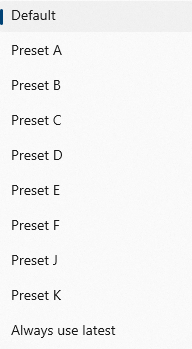
These are the presets i'm getting

VtADi7UHgaOlIfz6.png


I don't see M or L that are mentioned in this thread. I wonder if i'm missing something.

Either way, what's the best preset to use if i only want 1080p output and quality mode?
 
Last edited:
So it seems Nvidia app just got updated and now the override option says recommended instead of latest, and it does indeed auto change the preset now like M for performance, L for ultra perf, and K for balanced/quality.
 
So it seems Nvidia app just got updated and now the override option says recommended instead of latest, and it does indeed auto change the preset now like M for performance, L for ultra perf, and K for balanced/quality.

Great, how it should be.
 
Thanks!

Is 310.5 the DLSS 4.5 version?


These are the presets i'm getting

VtADi7UHgaOlIfz6.png


I don't see M or L that are mentioned in this thread. I wonder if i'm missing something.

Either way, what's the best preset to use if i only want 1080p output and quality mode?
Yes, 310.5 is the latest version, but there are no M/L presets in that list, which is strange. I guess you need to download the latest version of the app.
 
So..... how do I back out of the beta mode? I unchecked the beta in the about section, rebooted my PC was running with no Nvidia drivers installed, I reinstalled the drivers but when it was finished it was still showing no drivers installed.
I rechecked back into the beta, rebooted and now I have drivers again. Am I stuck?

edit-looks like I just had to rollback to an earlier driver.
 
Last edited:
The new 4.5 presets definitely make a big difference. I've found Preset M is too sharp so I've been using L and though it's still a bit too sharpened in some games, it looks amazing in others. The AA solution is really crisp and clean, the textures have more clarity and the lighting is improved. I'm using it with higher DLSS settings though - not performance.
 
Nvidia updates DLSS versions all the time, but it doesn't mean the models themselves change. Preset E for example is the exact same on 3.7, 4, and 4.5.
Model E (the last CNN one) is deprecated and has been removed once model K was out of beta (SDK 310.4) so back in DLSS 4.0, it's obviously missing in 4.5 as well.
Also there can be changes in existing models between SDK versions, the docs clearly say so. Minor improvements (or regressions) will not be visible though.
 
Last edited:
Tried it on Silent Hill 2, on a 5060ti 16GB.

1080p final output, DLSS quality mode, frame generation ON at 80fps (VRR monitor).

Game runs at target 80fps with no drops (other than the UE5 traversal stutters) max settings and Ray Tracing ON. And looks sharper than previous DLSS versions.

GPU doesn't even go above 85% usage in any scenario so i don't have to listen to the fans maxing out.

Ads much as i dislike Nvidia's tactics, this is magic.
 
Top Bottom