Figured I'd throw in a curve ball to the thread, and cover an entirely different kind of controller:
Flight Sticks
This got a bit long, lol...but it was fun learning experience I wanted to share.
Around Black Friday last year I ended up trying out a
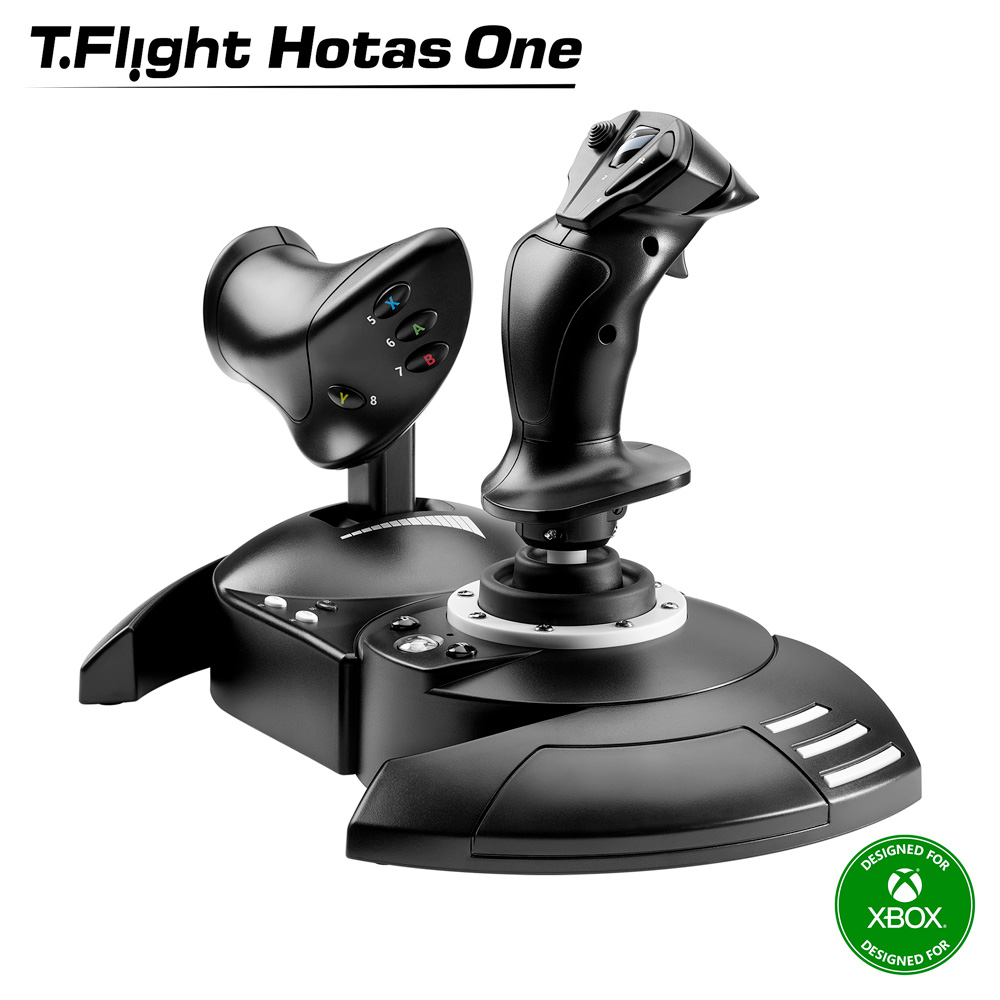
Thrustmaster HOTAS One (pic above). It was a decent device for $60 that made games like these...
(such a good game)
...just a
much better experience vs any gamepad or mouse I've ever used on them. Second impression was that it had the same problems as cheaper controllers, where it uses plastic internals w/ potentiometers that rub to create stick drift over time, and I had enough fun that I returned to invest in something better.
So, I went researching
for a while until I could find that best bang for buck option that will last, and ended up with this
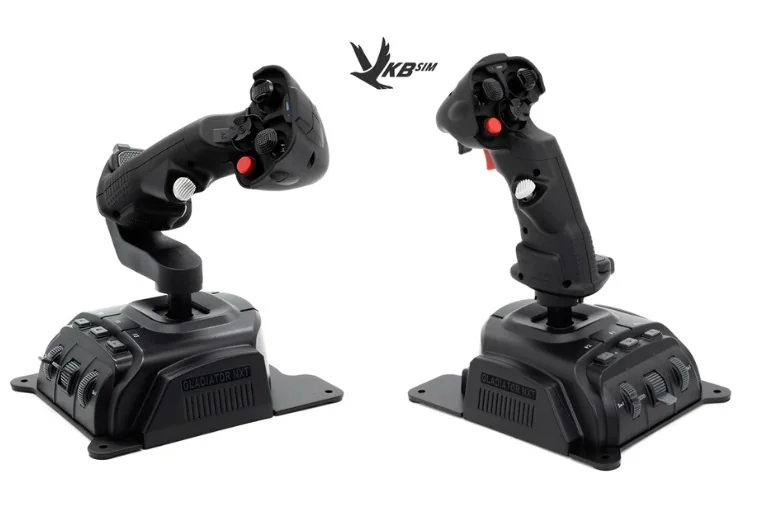
VKB Gladiator NXT EVO [
shop link] (left omni-throttle, right Space Combat) combo:
Right away opening these up, I could see they were gonna be better down to the packaging. Metal bottom to make the base sturdy with drill holes (
important later), sticks more comfortable to hold, better quality buttons,
great feeling triggers. I had to slide the stick into the base though, because these bases can fit 2 other stick shapes themed after aircrafts (F-14 & WW2 bomber one).
Instead of a plastic cup-and-ball measuring movement via potentiometers like Thrustmaster, these use a fiberglass nylon gimbal with their own
MaRS sensors. The sensors are essentially magnet-based like hall effect/TMR, so contactless for no drift.
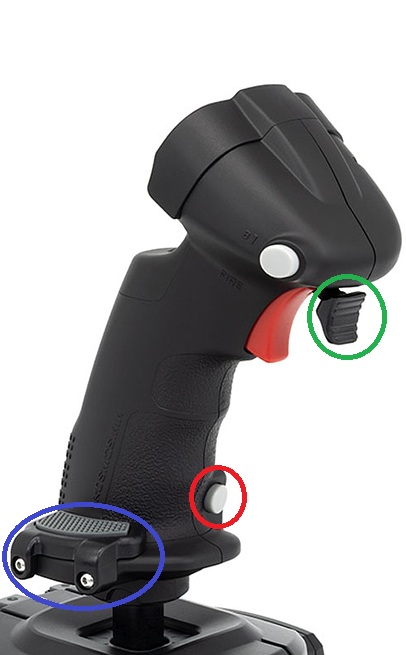
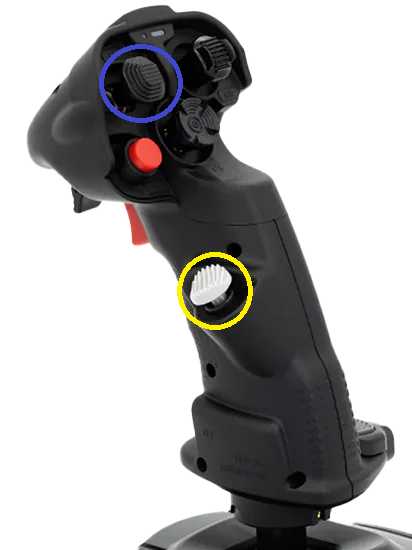
Immediately I can feel the improved precision motion just like a good hall-effect/tmr analog stick, the better quality textured plastic, 2 different sized palm-wrests (
circled in blue) to accommodate hand sizes, and a nice measured resistance to move. I could aim better, fly better, control thrust more exactly, and it just felt even more tactile. This alone sold me on them.
The red triggers on both are
dual-stage, so you can feel pressing down where the next input can be read if bound to anything. A small white button (
circled in red), which on the left thruster great as a
boost button. At the top on the front you can see multiple different shaped hat switches (4-way d-pad + center press), with one mini-analog stick (
circled in blue) that is great for menu navigation or looking around your cockpit.
The rest of the buttons on the base are just an auto-centering switch, mini throttle wheel, rotary scroll dial, and the 3 buttons. Mainly useful for menus and if you only get one stick the mini-throttle is nice.
Many times you'll see all stick setups shorthanded to
HOTAS, but only some are because it means
Hands on Throttle-and-Stick, typically used for controlling planes/jets, and having more granular throttle control.
If you're right handed, typically the left is a throttle going forward/backwards (no y-axis), and you can control
exactly where this stops to control thrust rather than the stick
auto-centering when you take your hand off. While the right stick does analog motion. Typically that right stick will control
roll (x-axis) to bank left/right,
pitch raises the nose up/down (usually inverted), and either you twist the stick left/right (or use rudder pedals) for
yaw rotating the plane along its vertical axis.
For a space sim (
Elite Dangerous), or any arcadey flight game where the vehicle can hover + strafe...that left thruster isn't enough.
HOSAS or
Hands on Stick-and-Stick solves this by just having the left side be another stick, where forward/backward is still thrust, but left/right now strafes, and twisting the stick up/down for hover since the handle is slanted horizontally.
6 Degrees-of-Freedom shooters like the
Descent series also great for this, and the original devs of that series released an indie game in 2018 called I'd recommend greatly
(awesome music)
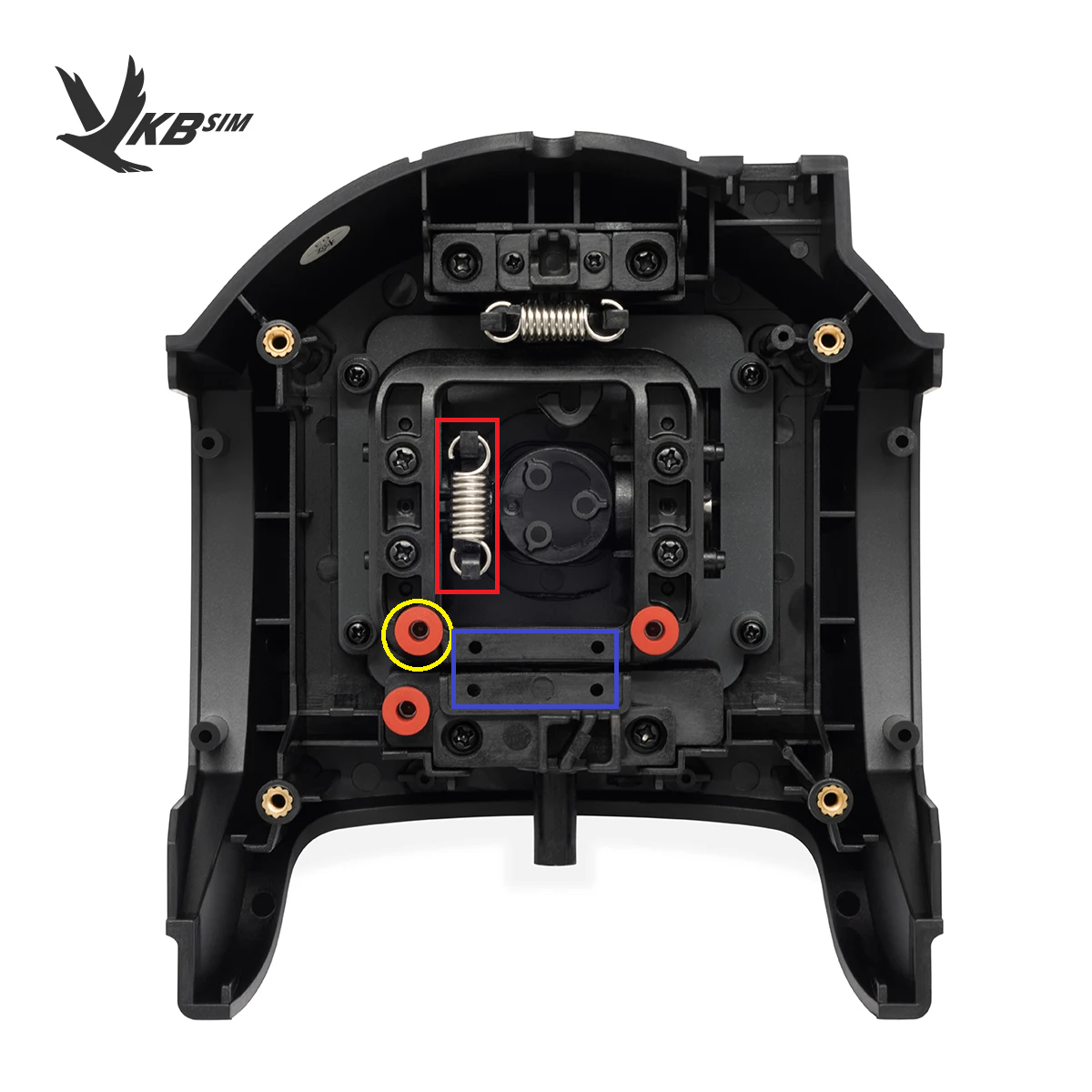
See, the left stick from that picture above is actually the same as the right, just a different handle. You can use it like a normal stick for HOSAS with full thrust/strafe/hover movement, but you can customize it to just be a thruster only. If you open up the bottom here:
To keep the stick locked to only move forward and back, you can easily use an included hex-wrench to screw in a plate where that
blue rectangle (above) is to lock out the horizontal x-axis entirely. Then remove the spring (
red rectangle in pic) so it doesn't rebound to the center, and with a hex wrench adjust the tension (
yellow circle above) based on how much force you want to move it back/forward.
It takes only about 5 mins to do, and worth it to me. You get that tactile immersion of gunning forward a throttle that takes force, and chasing after an enemy in Ace Combat 7 in a dogfight. Then make it a stick again, play Everspace 2 where I get to strafe dodge shots in a fight, or delicately maneuver my hovering vehicle through wreckage. The immersion of having your whole hand move you, holding down a beefier trigger to blast an enemy you're tailing, then they try to get away, but I build a lock, and move my finger to hit another trigger in front for my secondary fire missile...
just makes it feel like one of my best peripheral purchases in years.
So learning to use the sticks isn't bad, that part is like any controller, just practice. More so that flight sticks are pretty varied without the benefit of a standard Xbox layout. So most games won't come with presets made for you ([X4: Foundations](https://store.steampowered.com/app/392160/X4_Foundations/) an exception), especially given that these two sticks are read as *separate* inputs. You will have to rebind everything for each game, which isn't a big deal, but inconvenient.
Given Ace Combat is an historically console-only series, it really only bakes in support for the few (just okay-ish) console-certified flight sticks. The Thrustmaster I had is one of the few that does, so it had a preset for this game automatically on PC too, and it's connected together as
one USB device.
My VKBs did not work, since consoles expect one pad input per person...the PC version never supported both inputs at once, it expects a controller or keyboard/mouse input only. Older PC games even have this problem, but I found a pretty easy solution, combine them into one
virtual input:
VJoy + Joystick Gremlin + Steam Input
- Vjoy [download link] is the virtual controller driver that will be the controller Steam Input sees.
- Joystick Gremlin [download link] is the GUI program to merge the two joysticks inputs together, do custom curves, etc.
- Steam Input then reads that virtual controller, and lets you rebind anything per-game.
Joyful + Steam Input
- Joyful [download link] is similar in that it can merge multiple joysticks to form a virtual controller, using config yaml files (no gui yet) for the bindings.
- Steam Input then can use that virtual controller, and do per-game changes.
- (optional) AntiMicroX [download link] was also recommended, mainly just for games where Steam Input fails, and it can do scripts + complex macros.
After trying this out, the VKB sticks controlled like they were designed for the game, and I was happy to get them working even with games that don't have great support for them.
I've been typing up my thoughts for the past days during free time, and this has been a fun rabbit-hole to go down. These things
feel premium, easily adjustable if I want to dial them in more, and most places I looked recommended as the best mid-tier entry point.
Even decided to add on these
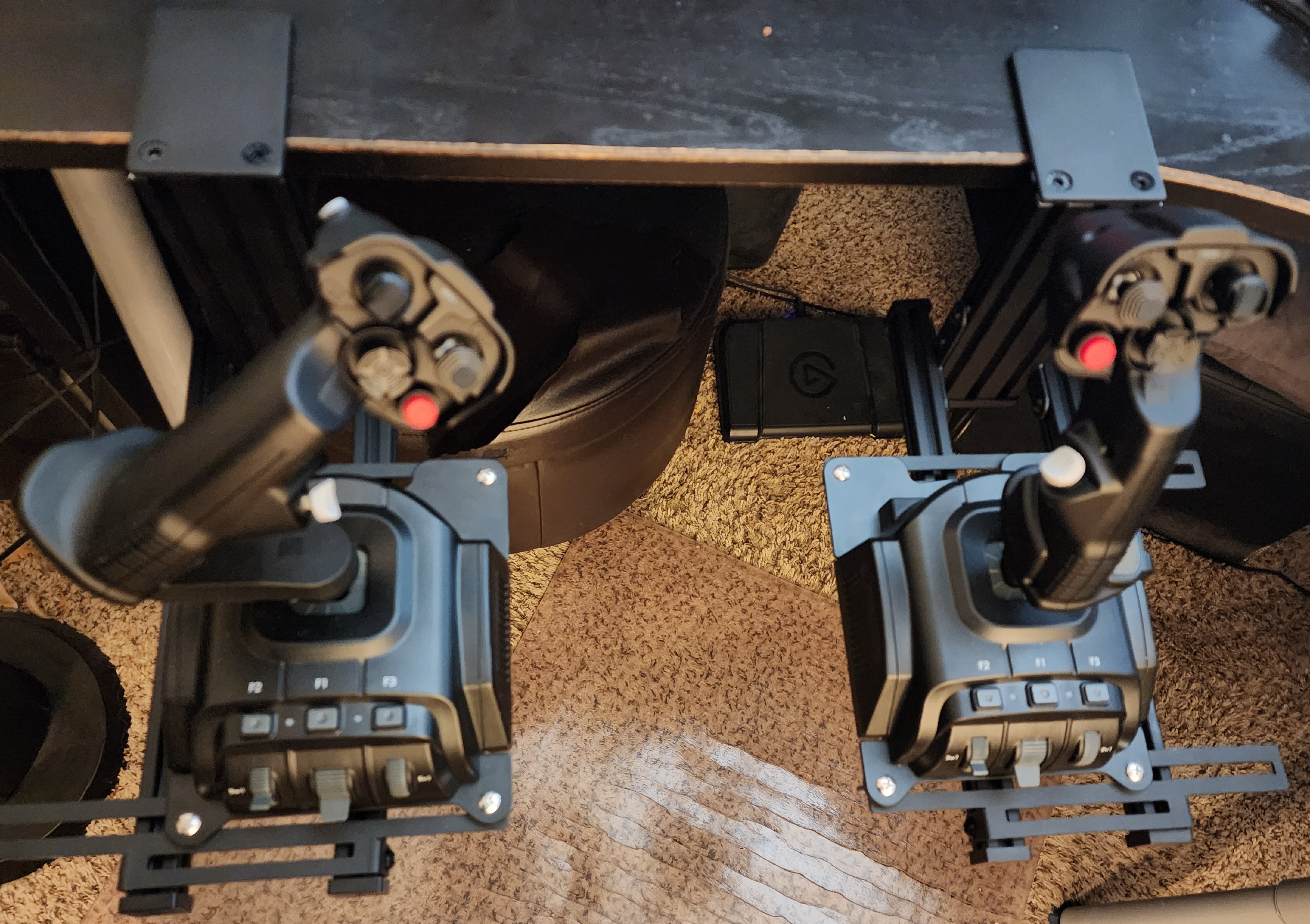
Hikig Desk Mounts for $58, so the sticks are stable, and I can have the best chair hand-rest level position for comfort.
Easily felt like these 2 VKB sitcks were worth the $280 price, and weren't effected by tariffs due to a US-based plant. That said, they are
more expensive for the Euro-bros out there, but if my words have intrigued you there is an another option. The WinWing URSA Minor [
shop link]) was recommended as a near feature-identical alternative, at €198.21 on sale still.
So that's it, thanks for reading! This thread is one of my favorites here, so I wanted to shout out another
controller type I'm getting into.



 .
.