• Hey Guest. Check out your NeoGAF Wrapped 2025 results here!

Controllers |OT| It's the Hall-Effect Life!

That Ultimate 3E controller looks very sleek and premium to my eyes. Wish 8Bitdo would update the shape though, it's not as comfy in my hands as the Gamesir G7 Pro x ZZZ.

You can see some hands-on footage from the CES2026 showfloor here (start at 3:00):


They actually did update the shape:

grip.svg
 
I'm still enjoying my Wolverine V3 Pro 8k quite a bit. No real complaints.

I think the only controller that could convince me to switch would be the Steam Controller. Wish Valve would release it/announce a price already. "Early 2026" is so vague.
 
I'm still enjoying my Wolverine V3 Pro 8k quite a bit. No real complaints.

I think the only controller that could convince me to switch would be the Steam Controller. Wish Valve would release it/announce a price already. "Early 2026" is so vague.

This could prove useful for you since you joined the Linux gang, lmao.


BTW
Soodanim Soodanim Durin Durin yet_another_alt yet_another_alt Astray Astray

I picked up TT "Pro" which actually turned out to be Max PS Grey inspired version, lmao. So I guess I will be reviewing Max... Instead.

yet_another_alt yet_another_alt It would be funny if you received my Pro instead... Which color of TT Max did you order?? 🤣.
 
Last edited:
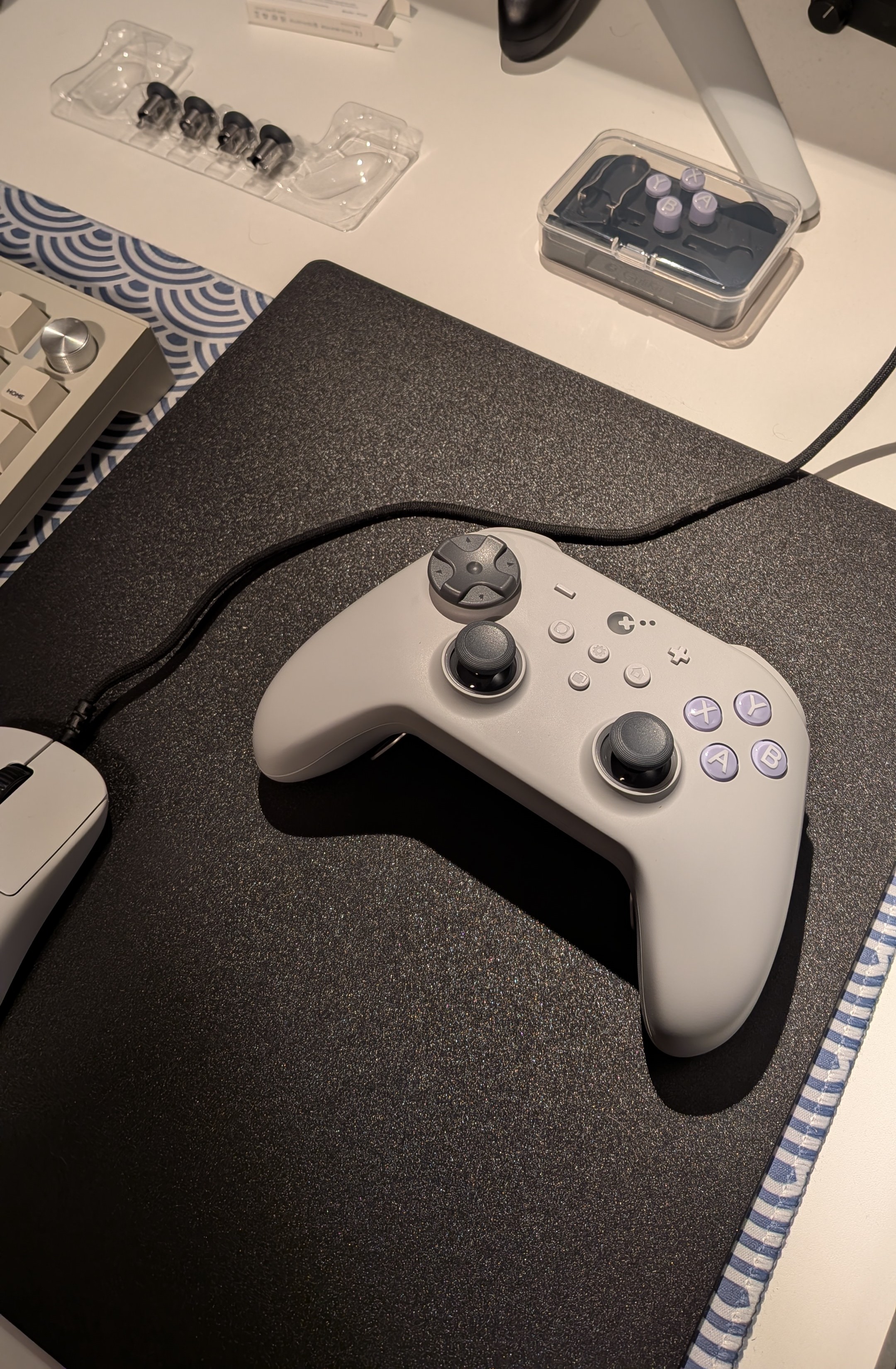
GuliKit TT MAX

First impressions


Y7S7tkp7RbmkEcCp.jpg


The Accessiories

2 sets of dpads. 4 additional thumbsticks, ABXY and BAYX buttons plus button puller and stick adjustment tension adjustment "key".
Hyperlink Gen 2 wireless controller adapter is also included.

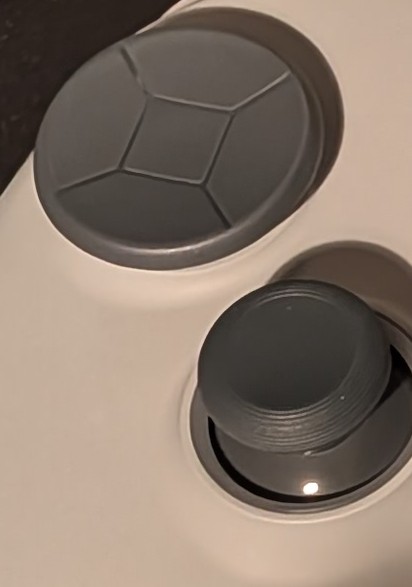
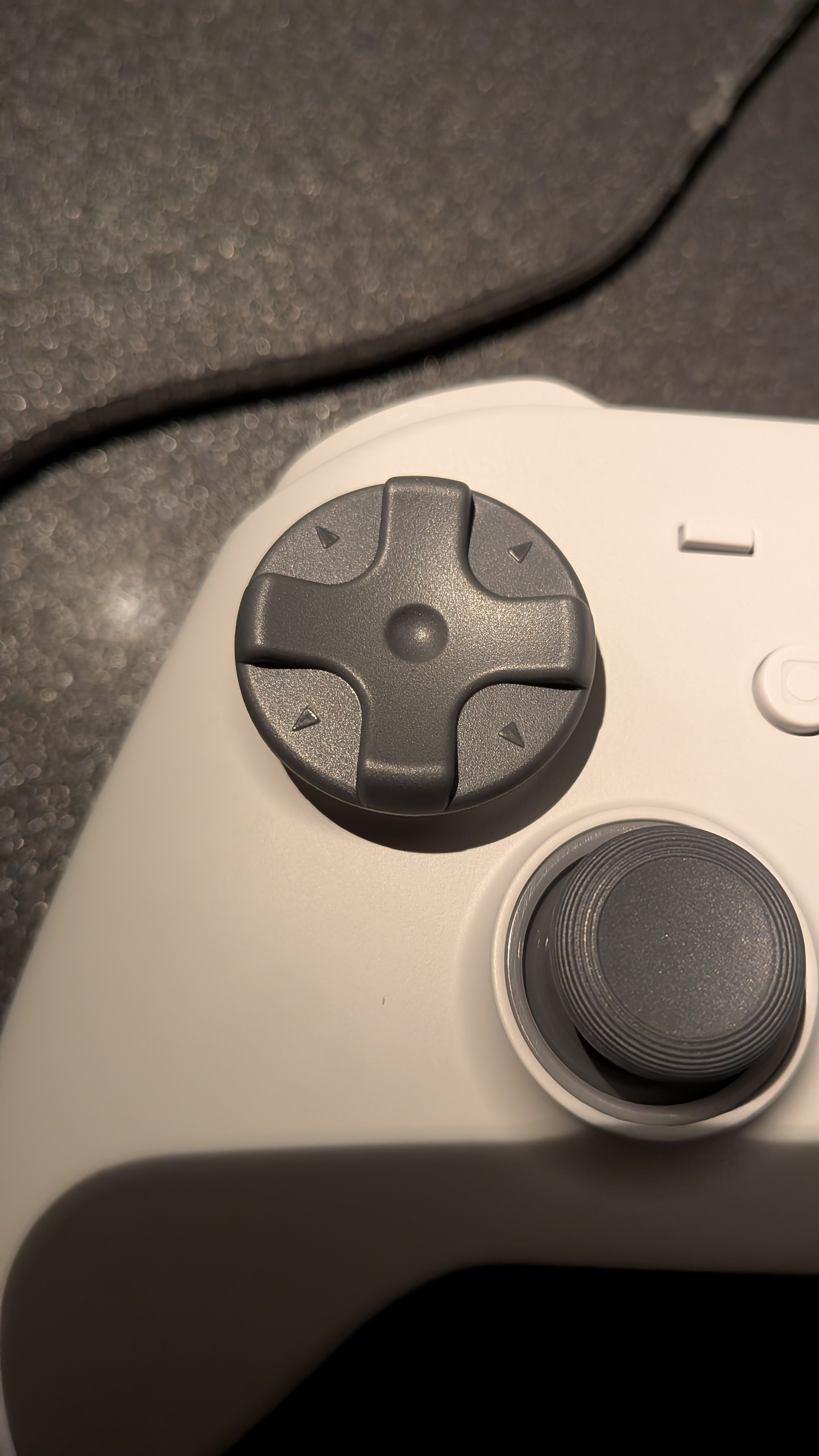
Dpad


K1ZO5K0a2sTi5yKv.jpg
RLgu9DlDFd7vyJck.jpg

Amazing! No accidental miss clicks so far. Such a nice retro feeling, so floaaty and dead quiet at that.

Sticks

Sticks have less dead zone than ES Pro, they are as smooth as G7 Pro! Which was surprise. I expected them to have similar deadzone as ES Pro but I guess since they introduced the Adjustable Tension mechanism they might have changed something.

Bumpers

I think are kinda improved? I think there's more actuation than on ES Pro and it's leaning more towards it rather than KK3 which is nice.

Triggers
zuSmv3rwXfuWXKWM.jpg
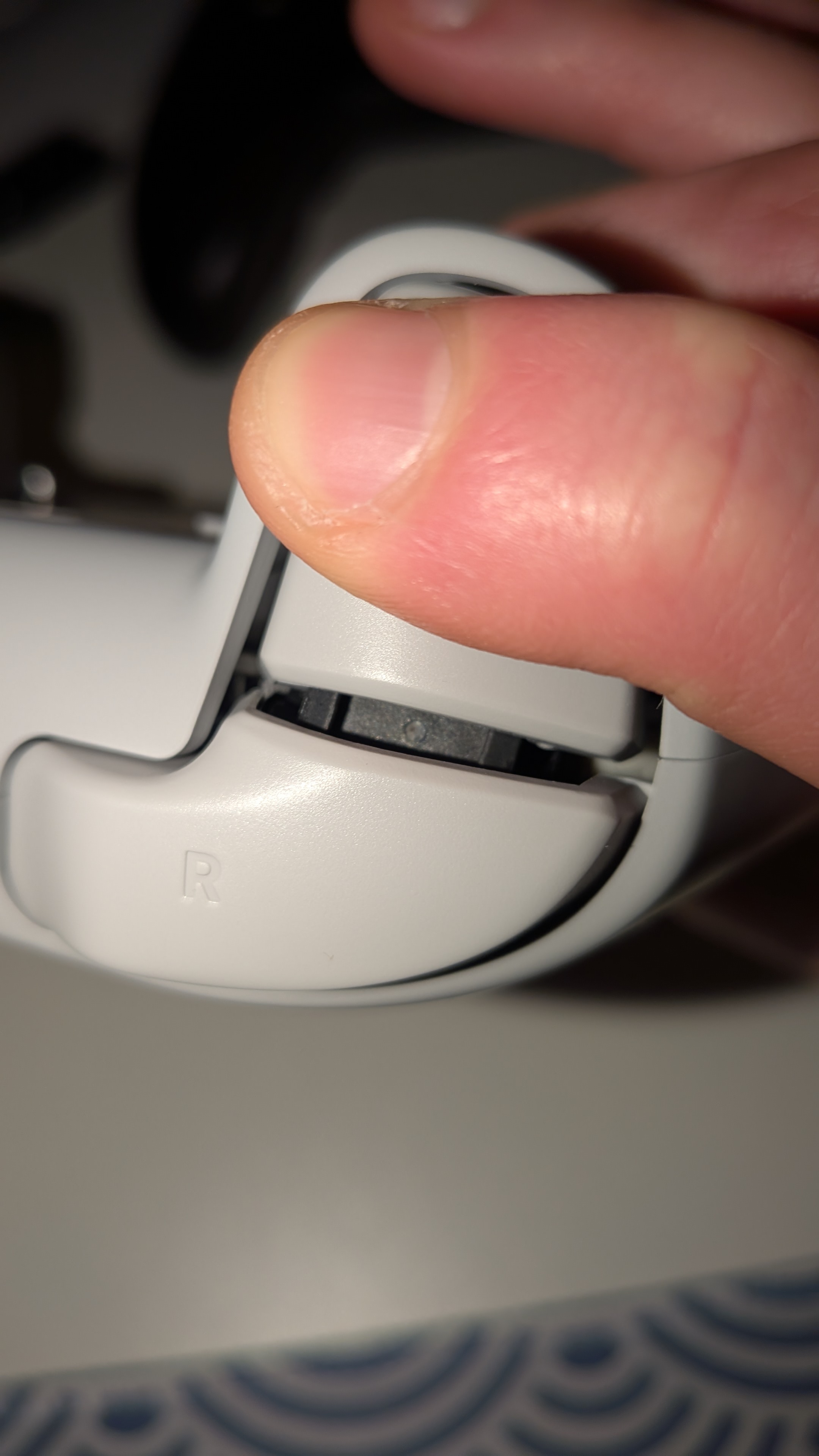
They could be the weakest link, they feel almost exactly the same as ES Pro, from what I see even if they say the axis is metal, the mechanism is the exact same as in ES Pro with the same bit of plastic that obstructs everything. They might be slightly more damped than the one on ES Pro. But so far they haven't have broken in my ES Pro so fingers crossed here. But this should be noted nontheless.

Overall shell build and feel

Shell is better quality than ES Pro but nothing higher than DualSense or KK3. Some cracking is present here and there. Which reminds me of DualSense to be honest, lmao.

The matte surface is nice to touch, it's smooth but it's coated similar to DualSense so it's not slippery and feels much better to touch than ES Pro.

Laser cut grips are decent, honestly I've held worse – like the ones in Ultimate 1 or Ultimate 2C Soodanim Soodanim should be pleased, since no rubber was used.

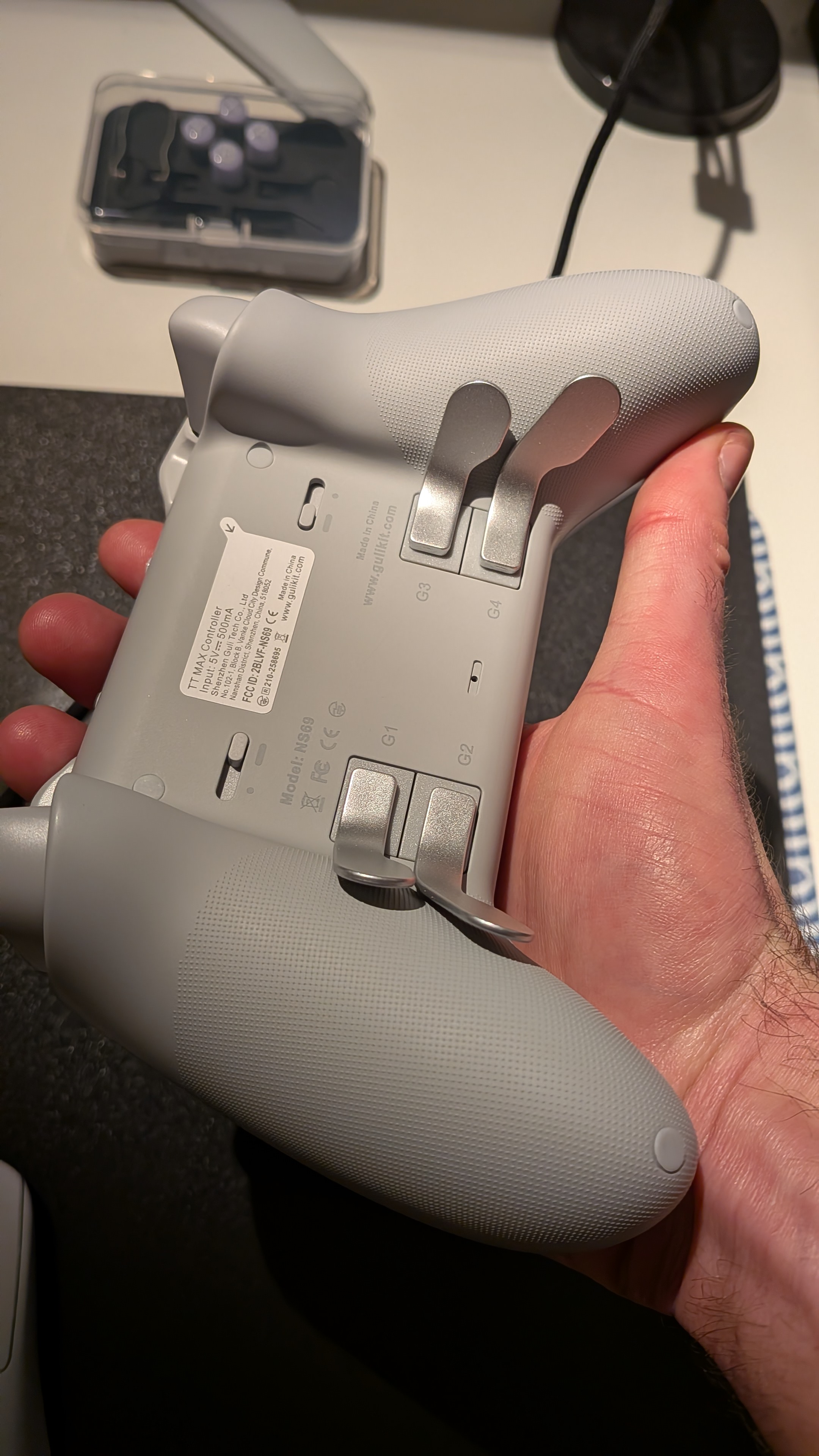
Back buttons
VaP1R3VMVfy98oMb.jpg
They feel like they are higher quality than FlyDigi Vader 5! And the trigger stop switches are placed like I would want Elite 3 to have them placed and ZD Ultimate, lmao. No issues here.

Maglev Motors

Amazing vibrations remind me of DualSense in that regard. No issues here, I'm quite happy with it.


*What I haven't tested yet is Gyro and Adjustable Tension plus additional thumbsticks.
 
Last edited:
GuliKit TT MAX

First impressions


Y7S7tkp7RbmkEcCp.jpg


The Accessiories

2 sets of dpads. 4 additional thumbsticks, ABXY and BAYX buttons plus button puller and stick adjustment tension adjustment "key".
Hyperlink Gen 2 wireless controller adapter is also included.

Dpad


K1ZO5K0a2sTi5yKv.jpg
RLgu9DlDFd7vyJck.jpg

Amazing! No accidental miss clicks so far. Such a nice retro feeling, so floaaty and dead quiet at that.

Sticks

Sticks have less dead zone than ES Pro, they are as smooth as G7 Pro! Which was surprise. I expected them to have similar deadzone as ES Pro but I guess since they introduced the Adjustable Tension mechanism they might have changed something.

Bumpers

I think are kinda improved? I think there's more actuation than on ES Pro and it's leaning more towards it rather than KK3 which is nice.

Triggers
zuSmv3rwXfuWXKWM.jpg
They could be the weakest link, they feel almost exactly the same as ES Pro, from what I see even if they say the axis is metal, the mechanism is the exact same as in ES Pro with the same bit of plastic that obstructs everything. They might be slightly more damped than the one on ES Pro. But so far they haven't have broken in my ES Pro so fingers crossed here. But this should be noted nontheless.

Overall shell build and feel

Shell is better quality than ES Pro but nothing higher than DualSense or KK3. Some cracking is present here and there. Which reminds me of DualSense to be honest, lmao.

The matte surface is nice to touch, it's smooth but it's coated similar to DualSense so it's not slippery and feels much better to touch than ES Pro.

Laser cut grips are decent, honestly I've held worse – like the ones in Ultimate 1 or Ultimate 2C Soodanim Soodanim should be pleased, since no rubber was used.

Back buttons
VaP1R3VMVfy98oMb.jpg
They feel like they are higher quality than FlyDigi Vader 5! And the trigger stop switches are placed like I would want Elite 3 to have them placed and ZD Ultimate, lmao. No issues here.

Maglev Motors

Amazing vibrations remind me of DualSense in that regard. No issues here, I'm quite happy with it.


*What I haven't tested yet is Gyro and Adjustable Tension plus additional thumbsticks.
That looks very very nice. You lucked out there, and the colour choice is excellent. I'm half tempted to order one myself, but I'm such a fussy bugger that I'm not sure it's a great idea.

One thing reading your write up reminded me of, I don't think I've ever asked anyone about it:
Does anyone know what I mean when I say it annoys me when a stick sort of ticks at about 30% tilt? You can hear and feel it. Had it on a brand new DS5, which is why I returned it (and the parcel disappeared so I was stung out of £70). I've also noticed it a tiny amount on my T3 Lite, but not in all directions. Doesn't seem to be limited to one stick type, and I don't know if it's something that comes or goes.
 

This could prove useful for you since you joined the Linux gang, lmao.


BTW
Soodanim Soodanim Durin Durin yet_another_alt yet_another_alt Astray Astray

I picked up TT "Pro" which actually turned out to be Max PS Grey inspired version, lmao. So I guess I will be reviewing Max... Instead.

yet_another_alt yet_another_alt It would be funny if you received my Pro instead... Which color of TT Max did you order?? 🤣.
LOL I ordered black. That's actually the only reason I didn't bother getting an 8bitdo Pro 3, they didn't have it in black. My TT Max hasn't even shipped yet, dunno what's up with Amazon taking so long since their estimate was tomorrow.

Thanks for the impressions so far. Since you might have a lot of controllers, do you happen to have a case that can fit the TT Max/Pro with the back paddles attached? It seems like a hassle to me that they need to be removed for transport and I do travel quite a bit.
 
Does anyone know what I mean when I say it annoys me when a stick sort of ticks at about 30% tilt? You can hear and feel it. Had it on a brand new DS5, which is why I returned it (and the parcel disappeared so I was stung out of £70). I've also noticed it a tiny amount on my T3 Lite, but not in all directions. Doesn't seem to be limited to one stick type, and I don't know if it's something that comes or goes.
That's what I mean by deadzone also.

In ES Pro, same with Gamesir Super Nova it skips a bit an it ticks. I find it a combination of both deadzone and spring strength, lubrication, snap back etc but it not as bad as Apex 5 was** (I confused it with Vader 5 in my TT post)

In my experience with controllers I opened up generally, Sony tends to over lubricate their sticks or Alps is - makes sense since there are actual rubbing parts in there to put a grease in there. But sometimes it's just too much to the point that it's slushing about, lmao.

And Hall Effect, TMR manufacturer's don't lubricate them at all even on moving axis, like they didn't thought they need any type of grease at all since there aren't any type of rubbing parts in there. But any type of misalignment can add pressure on axis so grease or a bit of mineral oil on axis would do wonders imho. I tested it a bit on Pro 3. That's what I meant by "that it improved a motion of sticks".

G7 Pro doesn't have this issue but stick module looks nothing like anything I've seen so far, you can't even see axis in there. It's like fully encased in.

TT Max/Pro have Gulikits/HallPi new tension adjustable TMRs so whatever mechanism they use to adjust spring strength may be at play here so the spring doesn't tick like it is an other regular modules.

But that's just my shower thoughts honestly, lmao.

BTW 8BitDo Pro 3 had the worst tick after Apex 5 squicky tick in any controllers I currently have, lmao.

TT Max is smooth and quiet in comparison.
 
Last edited:
Thanks for the impressions so far. Since you might have a lot of controllers, do you happen to have a case that can fit the TT Max/Pro with the back paddles attached? It seems like a hassle to me that they need to be removed for transport and I do travel quite a bit
Sorry! I'm my man cave dweller and don't travel that much with my controllers so I don't actually own any case. So I can't help here.

The only time I had a case with controller was, when Mobapad included one with HuBen 2, lmao.
 
Sorry! I'm my man cave dweller and don't travel that much with my controllers so I don't actually own any case. So I can't help here.

The only time I had a case with controller was, when Mobapad included one with HuBen 2, lmao.
No problem. I just wish there was an easy way for me to check if it can fit inside the case for the XBOX Elite but I heard the TT Max is ever so slightly larger than an XBOX controller even if it looks similar.
 
They feel like they are higher quality than FlyDigi Vader 5! And the trigger stop switches are placed like I would want Elite 3 to have them placed and ZD Ultimate, lmao. No issues here.
Cool Review! Just curious, how do you like the Xbox Elite style paddles this pad has, over other controllers that build the buttons into the frame? I kinda prefer the ladder at this point, just because I don't feel like I miss-click as much vs keeping my fingers on the paddles with the usually lighter touch it takes to press them.

If I ever get another controller (besides the Steam Controller 2, lol), I am leaning towards something that is d-pad centric for more retro & 2d indie games.
 
Cool Review! Just curious, how do you like the Xbox Elite style paddles this pad has, over other controllers that build the buttons into the frame? I kinda prefer the ladder at this point, just because I don't feel like I miss-click as much vs keeping my fingers on the paddles with the usually lighter touch it takes to press them.

If I ever get another controller (besides the Steam Controller 2, lol), I am leaning towards something that is d-pad centric for more retro & 2d indie games.
I like them they seem harder to press than Elite 2 or Apex 5, I can record a small video sample after work how they lock in and how the button looks and works.
 
Last edited:
I like them they seem harder to press than Elite 2 or Apex 5, I can record a small video sample after work how they lock in and how the button looks and works.
Nah, you don't have to go to the trouble of a video recording. Was just curious how they compare, and if they're harder to press than the Elite 2 that's nice to hear.
 
So I went ahead and got the G7 Pro red one. Now I understand the issue, although the default ring d-pad is the worst, wouldn't use it anyway. The others with + shape are somewhat better, but okay yes it's puzzling why such low quality there. Anyway I've played a few hours now with some games, nothing better than Tetris to test the d-pad and it's still clearly usable so whatever. 1-2 days and I'll get used to it, I guess the clicky nature also adds to the weird feel.
Other than that so far it does feel nice, closer to the Series Elite 2 in size, feel and also I clearly prefer the Xbox style triggers mainly for driving games (not just the rumble) comaperd to the PS style on the 8Bitdo Ultimate 2. I guess I'll only miss the purple color.
 
So I went ahead and got the G7 Pro red one. Now I understand the issue, although the default ring d-pad is the worst, wouldn't use it anyway. The others with + shape are somewhat better, but okay yes it's puzzling why such low quality there. Anyway I've played a few hours now with some games, nothing better than Tetris to test the d-pad and it's still clearly usable so whatever. 1-2 days and I'll get used to it, I guess the clicky nature also adds to the weird feel.
Other than that so far it does feel nice, closer to the Series Elite 2 in size, feel and also I clearly prefer the Xbox style triggers mainly for driving games (not just the rumble) comaperd to the PS style on the 8Bitdo Ultimate 2. I guess I'll only miss the purple color.
If ya want, you can still improve the d-pad rattle on the G7 Pro by placing some rubber o-rings down through the holes of each of the 4 holds the d-pad covers go into.

The plate won't have as much play, but improves the control a bit. Was like $5 on Amazon for them, measurements I had were:
  • 6mm outer diameter (OD)
  • 4mm inner diameter (ID)
  • 1mm width
Go back to the 5th page, I have a picture of doing it on my G7 Pro, though it's the wuchang version.
 
Last edited:
The TT Max arrived today.

Did some quick adjustments like changing the buttons to XBOX layout, swapping to the Saturn style pad, and increasing the tension to max. Coming from a modded DualSense, it took me a while to adjust to the ergonomics. It's not bad in that regard, just different. In term's of material feel, it doesn't feel particularly premium but it doesn't feel cheap either, I guess I would say that it feels comparable to a Series controller. The textures on the grip feel nice though and the RGB doesn't actually make it look tacky, it makes it feel premium even. I guess part of that is because the sticks are symmetrical, so it doesn't look like a freak of nature with glowing lopsided eyes. It doesn't scream "gamer" like a lot of other controllers and I like it that way. So yes, part of the reason that I went with the TT Max is because it has symmetrical sticks and looks plain, I'm satisfied in that regard.

I tried it out in MH Wilds and it felt decent. That doesn't sound glowing but it's not a negative either. It does what I need it to do. It did weird me out first when I tried using the digital triggers since I'm so used to pressing them all way down but after a while it felt great to use them for bowgunning since there was no benefit to using the hall effect triggers in MH Wilds. The digital triggers have a rather satisfying click to them. Maybe I'll install Forza over the weekend so I can try out the hall effect triggers properly. I do miss the DualSense's adaptive triggers though even if there's only a limited number of PC games that make use of it. Cyberpunk feels terrible without those adaptive triggers though.

Also tried it out on Marvel Cosmic Invasion and the dpad is so much better than anything recent I've used (Series controller, DualSense, 8bitdo Pro2, Steam Deck). I'm no expert when it comes to dpads but there was already a huge difference to me with how much easier it was to pull off double taps for sprints. I had no idea how much I've been missing not having a proper dpad all these years.

I've yet to try out the turbo mode, the back buttons, and the macro recording mode (might reinstall Helldivers 2 to try this out better). I gave gyro a short try in MH Wilds and Cyberpunk but I had to turn it off for now since it was throwing me off. Haven't really used gyro a lot since the Vita days so there's probably a learning curve here. It does seem to work out of the box.

I haven't run into any obvious QC issues but it's been mentioned by quite a few that the sticks tend to loose tension. I'll be on the lookout for it since I actually adjusted mine to the highest tension and prefer it that way.
 
Just got a shipping notification for the 8bitdo N64 controller (in retro colours!) that I paid for months ago and completely forgot about. Looking forward to trying it out
 
The TT Max arrived today.
Played a bit of Call of Duty BO6 MP with a friend yesterday on my TT Max.

Sticks are linear to the point I had pretty high K/D ratio.

Nothing really out of the ordinary so far. Which is nice, no obvious QC issues same as you have pointed out.

Durin Durin I had to remove back paddles there's something about their shape that's pissing me off. Maybe I just like buttons instead of paddles.

I have to test maybe using just two instead of four. But I tend to grip my controllers really hard during competitive gaming.

yet_another_alt yet_another_alt Watch out while mapping back paddles to another button, don't hold the gear button all the time, you will map it and turn on turbo on button you are mapping.

And the controller doesn't signalize you have turbo on like on Gamesir controllers.

Had that happen to me yesterday, lmao. And had a bit of wtf is going on moment, and then I thought it's probably turbo.
 
Last edited:
Durin Durin I had to remove back paddles there's something about their shape that's pissing me off. Maybe I just like buttons instead of paddles.

I have to test maybe using just two instead of four. But I tend to grip my controllers really hard during competitive gaming.
Yeah, part of why I asked is over time I just kinda realized with the paddles that extend on to the sides where my palms wrest, I had a habit of accidentally clicking them on my Xbox Elite 2.

When they're recessed into the pad, I find this happens FAR less like my G7 Pro, especially if they take a bit more force to actuate. I do find the paddles better when there are only 2 though for fast-paced games, but the Steam Deck makes having 4 a breeze, and the next Steam Controller is gonna add haptic grip on two sides for more.
 
Figured I'd throw in a curve ball to the thread, and cover an entirely different kind of controller: Flight Sticks

This got a bit long, lol...but it was fun learning experience I wanted to share.


VKB Gladiator NXT Evo - Controller Review


Initial Purchase

CgCkDezEhl2kUZIE.jpg
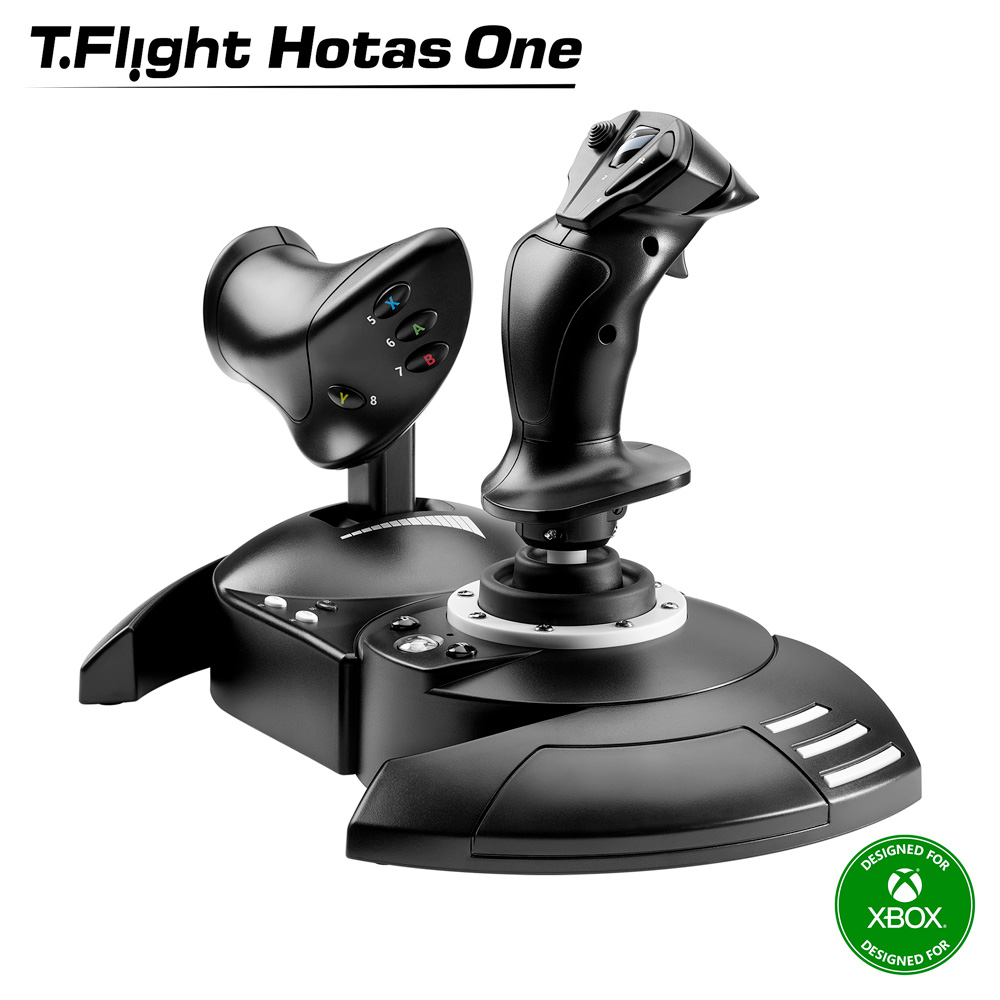
Around Black Friday last year I ended up trying out a Thrustmaster HOTAS One (pic above). It was a decent device for $60 that made games like these...
(such a good game)

...just a much better experience vs any gamepad or mouse I've ever used on them. Second impression was that it had the same problems as cheaper controllers, where it uses plastic internals w/ potentiometers that rub to create stick drift over time, and I had enough fun that I returned to invest in something better.

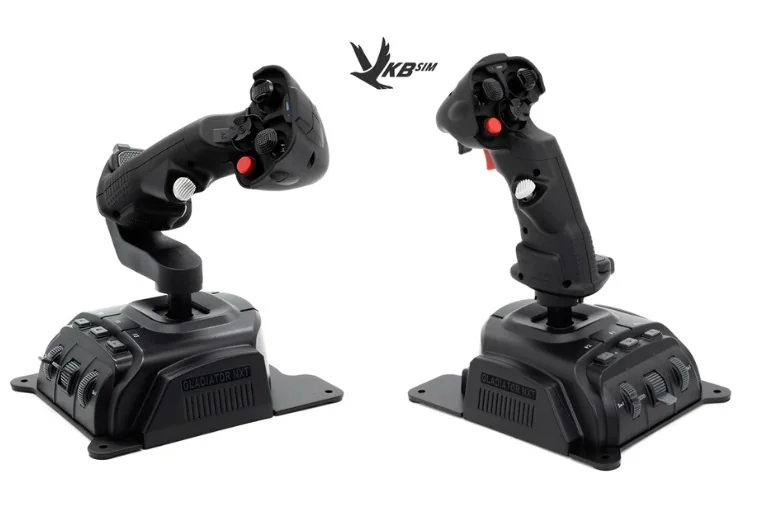
So, I went researching for a while until I could find that best bang for buck option that will last, and ended up with this VKB Gladiator NXT EVO [shop link] (left omni-throttle, right Space Combat) combo:
uDwqjaxLA27A3Myy.jpg


Build Quality

Right away opening these up, I could see they were gonna be better down to the packaging. Metal bottom to make the base sturdy with drill holes (important later), sticks more comfortable to hold, better quality buttons, great feeling triggers. I had to slide the stick into the base though, because these bases can fit 2 other stick shapes themed after aircrafts (F-14 & WW2 bomber one).
Bonus: VKB has excellent customer service, gave me plenty of replacement parts for free, different tension springs, etc.

Stick feel

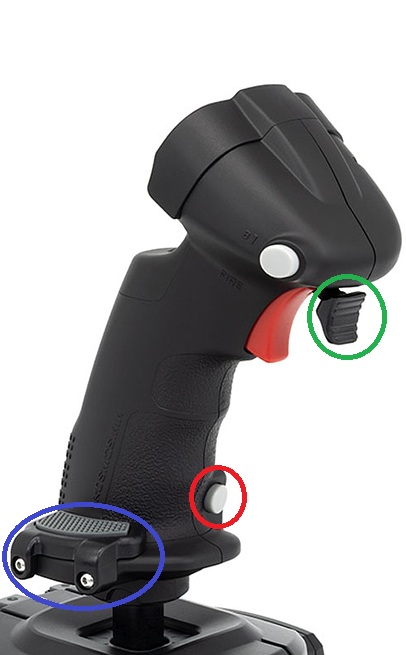
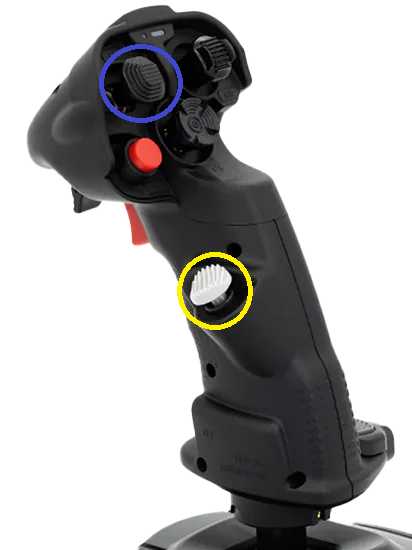
Instead of a plastic cup-and-ball measuring movement via potentiometers like Thrustmaster, these use a fiberglass nylon gimbal with their own MaRS sensors. The sensors are essentially magnet-based like hall effect/TMR, so contactless for no drift. Immediately I can feel the improved precision motion just like a good hall-effect/tmr analog stick, the better quality textured plastic, 2 different sized palm-wrests (circled in blue) to accommodate hand sizes, and a nice measured resistance to move. I could aim better, fly better, control thrust more exactly, and it just felt even more tactile. This alone sold me on them.

xoRb6E3v1jemnl3t.jpg
W3LojPV0UHIcsEzq.png

Inputs

The red triggers on both are dual-stage, so you can feel pressing down where the next input can be read if bound to anything. A small white button (circled in red), which on the left thruster great as a boost button. At the top on the front you can see multiple different shaped hat switches (4-way d-pad + center press), with one mini-analog stick (circled in blue) that is great for menu navigation or looking around your cockpit.

NOTE: I opted towards the premium grip version of these sticks, that come with some fun extras like the rapid flip trigger (circled in green), which can be flipped up or down, and replaces a basic button with another white hat switch (circled in yellow). Left throttle only comes in premium, so it's the same.

The rest of the buttons on the base are just an auto-centering switch, mini throttle wheel, rotary scroll dial, and the 3 buttons. Mainly useful for menus and if you only get one stick the mini-throttle is nice.


Versatility/Customization


HOTAS vs HOSAS

Many times you'll see all stick setups shorthanded to HOTAS, but only some are because it means Hands on Throttle-and-Stick, typically used for controlling planes/jets, and having more granular throttle control.

If you're right handed, typically the left is a throttle going forward/backwards (no y-axis), and you can control exactly where this stops to control thrust rather than the stick auto-centering when you take your hand off. While the right stick does analog motion. Typically that right stick will control roll (x-axis) to bank left/right, pitch raises the nose up/down (usually inverted), and either you twist the stick left/right (or use rudder pedals) for yaw rotating the plane along its vertical axis.

For a space sim (Elite Dangerous), or any arcadey flight game where the vehicle can hover + strafe...that left thruster isn't enough. HOSAS or Hands on Stick-and-Stick solves this by just having the left side be another stick, where forward/backward is still thrust, but left/right now strafes, and twisting the stick up/down for hover since the handle is slanted horizontally.

6 Degrees-of-Freedom shooters like the Descent series also great for this, and the original devs of that series released an indie game in 2018 called I'd recommend greatly
(awesome music)

This stick combo does both HOTAS & HOSAS

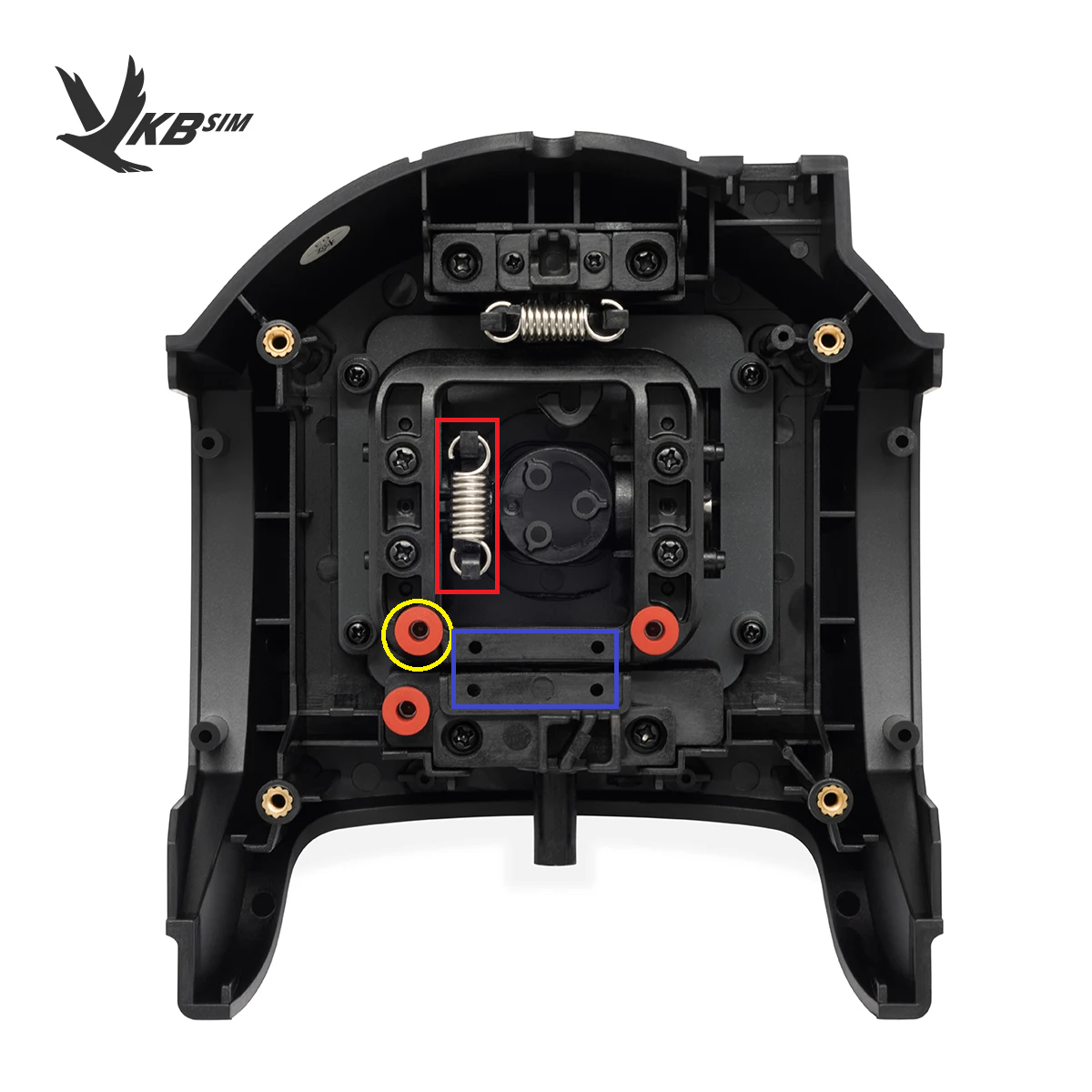
See, the left stick from that picture above is actually the same as the right, just a different handle. You can use it like a normal stick for HOSAS with full thrust/strafe/hover movement, but you can customize it to just be a thruster only. If you open up the bottom here:
NvYiXJErXfpbLwLR.png
To keep the stick locked to only move forward and back, you can easily use an included hex-wrench to screw in a plate where that blue rectangle (above) is to lock out the horizontal x-axis entirely. Then remove the spring (red rectangle in pic) so it doesn't rebound to the center, and with a hex wrench adjust the tension (yellow circle above) based on how much force you want to move it back/forward.

It takes only about 5 mins to do, and worth it to me. You get that tactile immersion of gunning forward a throttle that takes force, and chasing after an enemy in Ace Combat 7 in a dogfight. Then make it a stick again, play Everspace 2 where I get to strafe dodge shots in a fight, or delicately maneuver my hovering vehicle through wreckage. The immersion of having your whole hand move you, holding down a beefier trigger to blast an enemy you're tailing, then they try to get away, but I build a lock, and move my finger to hit another trigger in front for my secondary fire missile...just makes it feel like one of my best peripheral purchases in years.


Learning Curve & Setup


So learning to use the sticks isn't bad, that part is like any controller, just practice. More so that flight sticks are pretty varied without the benefit of a standard Xbox layout. So most games won't come with presets made for you (X4: Foundations an exception), especially given that these two sticks are read as *separate* inputs. You will have to rebind everything for each game, which isn't a big deal, but inconvenient.

Early Stumbles: Ace Combat 7 & Dual Inputs

Given Ace Combat is an historically console-only series, it really only bakes in support for the few (just okay-ish) console-certified flight sticks. The Thrustmaster I had is one of the few that does, so it had a preset for this game automatically on PC too, and it's connected together as one USB device.

My VKBs did not work, since consoles expect one pad input per person...the PC version never supported both inputs at once, it expects a controller or keyboard/mouse input only. Older PC games even have this problem, but I found a pretty easy solution, combine them into one virtual input:

Windows Solution

VJoy + Joystick Gremlin + Steam Input
  • Vjoy [download link] is the virtual controller driver that will be the controller Steam Input sees.
  • Joystick Gremlin [download link] is the GUI program to merge the two joysticks inputs together, do custom curves, etc.
  • Steam Input then reads that virtual controller, and lets you rebind anything per-game.

Linux Solution

Joyful + Steam Input
  • Joyful [download link] is similar in that it can merge multiple joysticks to form a virtual controller, using config yaml files (no gui yet) for the bindings.
  • Steam Input then can use that virtual controller, and do per-game changes.
  • (optional) AntiMicroX [download link] was also recommended, mainly just for games where Steam Input fails, and it can do scripts + complex macros.

After trying this out, the VKB sticks controlled like they were designed for the game, and I was happy to get them working even with games that don't have great support for them. Thankfully out of the 50+ flight games I have in my library that would work well with flight sticks, Ace Combat 7 was the only game released in the last 10 years that needed this, everything else was retro 90s/early 2000s games.

Found out emulators like PCSX2, RPCS3, Dolphin & Xemu can work with these sticks if they're joined as one input, so might try out Crimson Skies - Hight Road to Revenge...or maybe even a mech game like Armored Core 3.


Conclusion

I've been typing up my thoughts for the past days during free time, and this has been a fun rabbit-hole to go down. These things feel premium, easily adjustable if I want to dial them in more, and most places I looked recommended as the best mid-tier entry point.

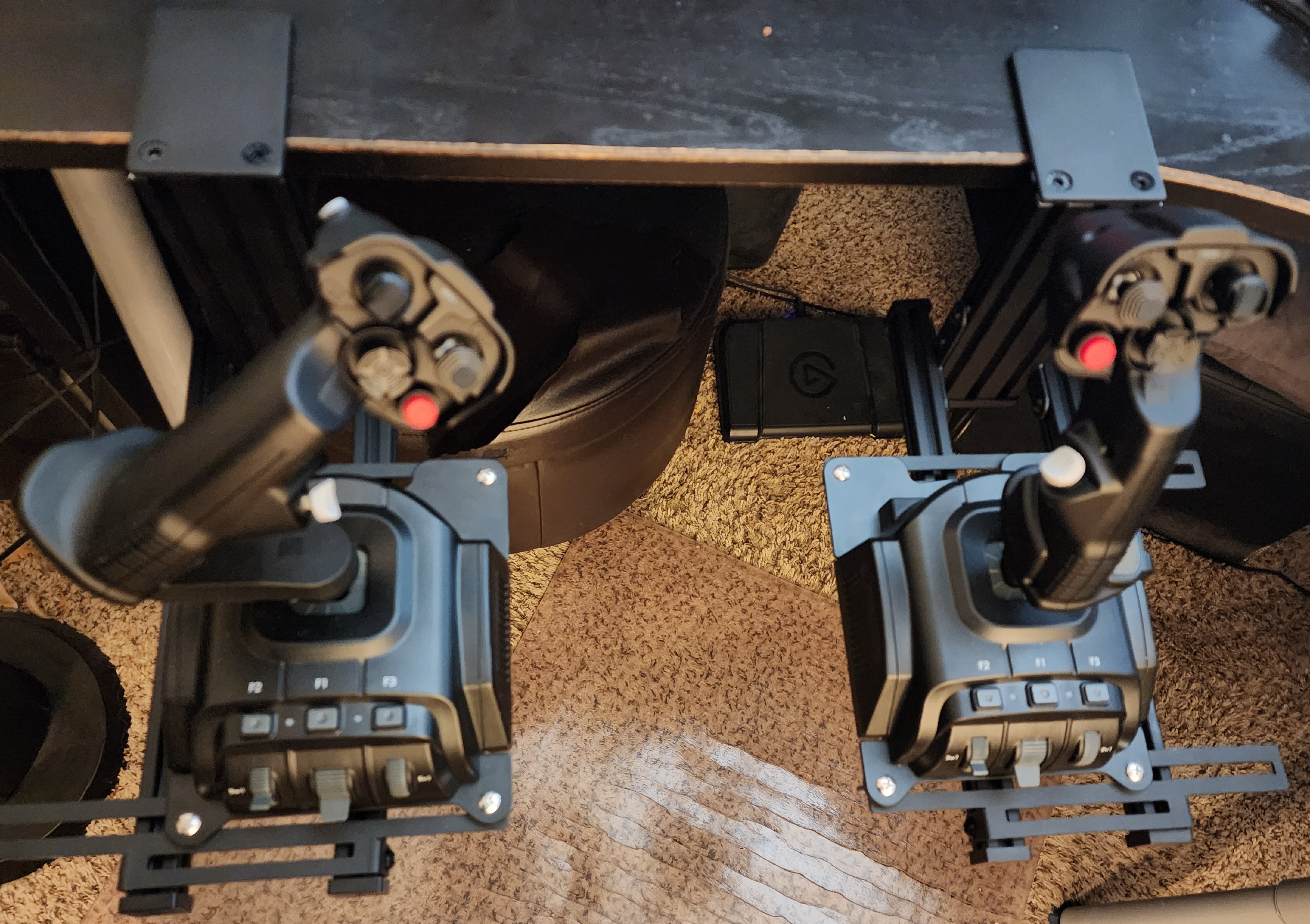
Even decided to add on these Hikig Desk Mounts for $58, so the sticks are stable, and I can have the best chair hand-rest level position for comfort.
uXugOWqYujr9JwtQ.jpg


Easily felt like these 2 VKB sitcks were worth the $280 price, and weren't effected by tariffs due to a US-based plant. That said, they are more expensive for the Euro-bros out there, but if my words have intrigued you there is an another option. The WinWing URSA Minor [shop link]) was recommended as a near feature-identical alternative, at €198.21 on sale still.

So that's it, thanks for reading! This thread is one of my favorites here, so I wanted to shout out another controller type I'm getting into.

 
Last edited:
Figured I'd throw in a curve ball to the thread, and cover an entirely different kind of controller: Flight Sticks

This got a bit long, lol...but it was fun learning experience I wanted to share.


VKB Gladiator NXT Evo - Controller Review


Initial Purchase

CgCkDezEhl2kUZIE.jpg
Around Black Friday last year I ended up trying out a Thrustmaster HOTAS One (pic above). It was a decent device for $60 that made games like these...
(such a good game)

...just a much better experience vs any gamepad or mouse I've ever used on them. Second impression was that it had the same problems as cheaper controllers, where it uses plastic internals w/ potentiometers that rub to create stick drift over time, and I had enough fun that I returned to invest in something better.

So, I went researching for a while until I could find that best bang for buck option that will last, and ended up with this VKB Gladiator NXT EVO [shop link] (left omni-throttle, right Space Combat) combo:
uDwqjaxLA27A3Myy.jpg


Build Quality

Right away opening these up, I could see they were gonna be better down to the packaging. Metal bottom to make the base sturdy with drill holes (important later), sticks more comfortable to hold, better quality buttons, great feeling triggers. I had to slide the stick into the base though, because these bases can fit 2 other stick shapes themed after aircrafts (F-14 & WW2 bomber one).


Stick feel

Instead of a plastic cup-and-ball measuring movement via potentiometers like Thrustmaster, these use a fiberglass nylon gimbal with their own MaRS sensors. The sensors are essentially magnet-based like hall effect/TMR, so contactless for no drift. Immediately I can feel the improved precision motion just like a good hall-effect/tmr analog stick, the better quality textured plastic, 2 different sized palm-wrests (circled in blue) to accommodate hand sizes, and a nice measured resistance to move. I could aim better, fly better, control thrust more exactly, and it just felt even more tactile. This alone sold me on them.

xoRb6E3v1jemnl3t.jpg
W3LojPV0UHIcsEzq.png

Inputs

The red triggers on both are dual-stage, so you can feel pressing down where the next input can be read if bound to anything. A small white button (circled in red), which on the left thruster great as a boost button. At the top on the front you can see multiple different shaped hat switches (4-way d-pad + center press), with one mini-analog stick (circled in blue) that is great for menu navigation or looking around your cockpit.


The rest of the buttons on the base are just an auto-centering switch, mini throttle wheel, rotary scroll dial, and the 3 buttons. Mainly useful for menus and if you only get one stick the mini-throttle is nice.


Versatility/Customization


HOTAS vs HOSAS

Many times you'll see all stick setups shorthanded to HOTAS, but only some are because it means Hands on Throttle-and-Stick, typically used for controlling planes/jets, and having more granular throttle control.

If you're right handed, typically the left is a throttle going forward/backwards (no y-axis), and you can control exactly where this stops to control thrust rather than the stick auto-centering when you take your hand off. While the right stick does analog motion. Typically that right stick will control roll (x-axis) to bank left/right, pitch raises the nose up/down (usually inverted), and either you twist the stick left/right (or use rudder pedals) for yaw rotating the plane along its vertical axis.

For a space sim (Elite Dangerous), or any arcadey flight game where the vehicle can hover + strafe...that left thruster isn't enough. HOSAS or Hands on Stick-and-Stick solves this by just having the left side be another stick, where forward/backward is still thrust, but left/right now strafes, and twisting the stick up/down for hover since the handle is slanted horizontally.

6 Degrees-of-Freedom shooters like the Descent series also great for this, and the original devs of that series released an indie game in 2018 called I'd recommend greatly
(awesome music)

This stick combo does both HOTAS & HOSAS

See, the left stick from that picture above is actually the same as the right, just a different handle. You can use it like a normal stick for HOSAS with full thrust/strafe/hover movement, but you can customize it to just be a thruster only. If you open up the bottom here:
NvYiXJErXfpbLwLR.png
To keep the stick locked to only move forward and back, you can easily use an included hex-wrench to screw in a plate where that blue rectangle (above) is to lock out the horizontal x-axis entirely. Then remove the spring (red rectangle in pic) so it doesn't rebound to the center, and with a hex wrench adjust the tension (yellow circle above) based on how much force you want to move it back/forward.

It takes only about 5 mins to do, and worth it to me. You get that tactile immersion of gunning forward a throttle that takes force, and chasing after an enemy in Ace Combat 7 in a dogfight. Then make it a stick again, play Everspace 2 where I get to strafe dodge shots in a fight, or delicately maneuver my hovering vehicle through wreckage. The immersion of having your whole hand move you, holding down a beefier trigger to blast an enemy you're tailing, then they try to get away, but I build a lock, and move my finger to hit another trigger in front for my secondary fire missile...just makes it feel like one of my best peripheral purchases in years.


Learning Curve & Setup


So learning to use the sticks isn't bad, that part is like any controller, just practice. More so that flight sticks are pretty varied without the benefit of a standard Xbox layout. So most games won't come with presets made for you ([X4: Foundations](https://store.steampowered.com/app/392160/X4_Foundations/) an exception), especially given that these two sticks are read as *separate* inputs. You will have to rebind everything for each game, which isn't a big deal, but inconvenient.

Early Stumbles: Ace Combat 7 & Dual Inputs

Given Ace Combat is an historically console-only series, it really only bakes in support for the few (just okay-ish) console-certified flight sticks. The Thrustmaster I had is one of the few that does, so it had a preset for this game automatically on PC too, and it's connected together as one USB device.

My VKBs did not work, since consoles expect one pad input per person...the PC version never supported both inputs at once, it expects a controller or keyboard/mouse input only. Older PC games even have this problem, but I found a pretty easy solution, combine them into one virtual input:

Windows Solution

VJoy + Joystick Gremlin + Steam Input
  • Vjoy [download link] is the virtual controller driver that will be the controller Steam Input sees.
  • Joystick Gremlin [download link] is the GUI program to merge the two joysticks inputs together, do custom curves, etc.
  • Steam Input then reads that virtual controller, and lets you rebind anything per-game.

Linux Solution

Joyful + Steam Input
  • Joyful [download link] is similar in that it can merge multiple joysticks to form a virtual controller, using config yaml files (no gui yet) for the bindings.
  • Steam Input then can use that virtual controller, and do per-game changes.
  • (optional) AntiMicroX [download link] was also recommended, mainly just for games where Steam Input fails, and it can do scripts + complex macros.

After trying this out, the VKB sticks controlled like they were designed for the game, and I was happy to get them working even with games that don't have great support for them.


Conclusion

I've been typing up my thoughts for the past days during free time, and this has been a fun rabbit-hole to go down. These things feel premium, easily adjustable if I want to dial them in more, and most places I looked recommended as the best mid-tier entry point.

Even decided to add on these Hikig Desk Mounts for $58, so the sticks are stable, and I can have the best chair hand-rest level position for comfort.
uXugOWqYujr9JwtQ.jpg


Easily felt like these 2 VKB sitcks were worth the $280 price, and weren't effected by tariffs due to a US-based plant. That said, they are more expensive for the Euro-bros out there, but if my words have intrigued you there is an another option. The WinWing URSA Minor [shop link]) was recommended as a near feature-identical alternative, at €198.21 on sale still.

So that's it, thanks for reading! This thread is one of my favorites here, so I wanted to shout out another controller type I'm getting into.
Flight games aren't even my thing but that was a really cool read. Thank you for sharing that, very in depth
 
Flight games aren't even my thing but that was a really cool read. Thank you for sharing that, very in depth
Thanks! I just kind of on a whim decided to try a flight stick because of the cheap price on the Thrustmaster, and when I tried it on a few games ended up getting hooked.

Last time I really had a flight stick was playing the demo levels of Descent 1 on my Compaq PC running Windows 98, using a Microsoft Sidewinder joystick that my dad got me.

What really sold me was Star Wars Squadrons, which was a game I thought was just ok before, but then playing it on a flight stick just elevated the whole experience, and they had great support for joysticks.
 
Flight games aren't even my thing but that was a really cool read. Thank you for sharing that, very in depth
Yeah it isn't my cup of tea either but Durin Durin makes my reviews seem bare-bones in comparison.

I'm kinda excited how our Linux OT will be going along in the future. His reviews are fire. /off-topic

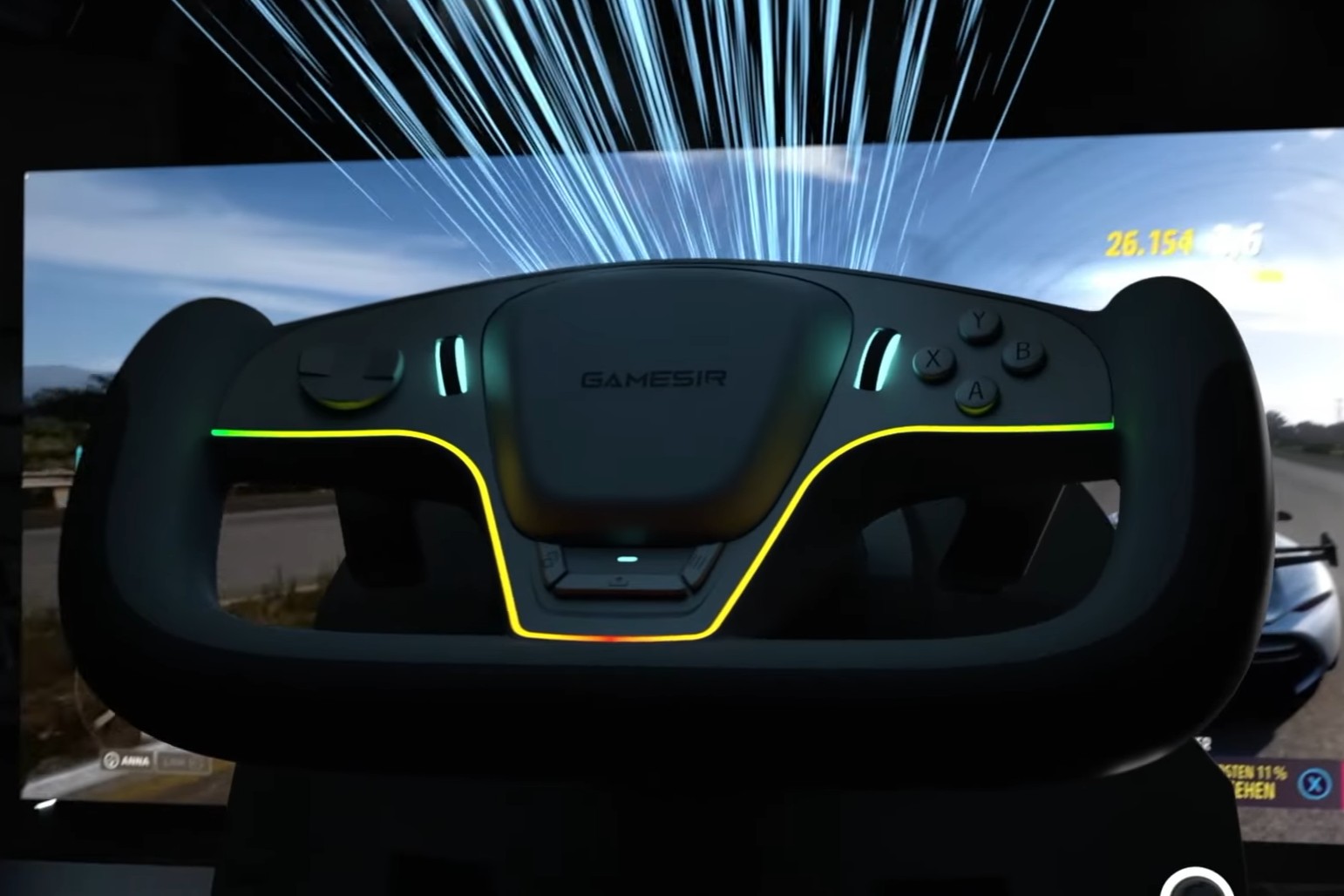
Also I wouldn't mind if someone reviews Gamesir Steering Wheel in driving games next, if they release that - I believe they called it Turbo Drive. I think I saw it on their X profile and YT videos along with that Swift Drive controller - I wouldn't mind both reviews of those honestly, I didn't really get into driving games that much either but if I ever will get into some other genre it will probably will be driving games instead of flight games.

 
Last edited:
Yeah it isn't my cup of tea either but Durin Durin makes my reviews seem bare-bones in comparison.

I'm kinda excited how our Linux OT will be going along in the future. His reviews are fire. /off-topic
Thanks. I'll probably try to trim them down in future, but I wanted to have the sections where I share the programs I used to make them work with older games, and being able to open up the bottom to make adjustments to them. Also made sure before I bought them they had compatibility in Linux. For any games that don't need to combine them into one input, they should also just work out of the box with no work needed just like in Windows.

I'll try to add some notes to the Linux OT doc too later today.
 
Found a Reddit review mentioning the same thing about the G2


another poster with a similar issue


I've heard Gulikit has questionable quality control before but I was hoping it would skip me. If the new one they send me doesn't work out I might just get a refund and impulse buy a DualSense Edge with modded TMR sticks but that stuff is more than 3 times the price of the TT Max. Of course this wouldn't be an issue if Valve would just release the new Steam Controller already.
 
Found a Reddit review mentioning the same thing about the G2


another poster with a similar issue


I've heard Gulikit has questionable quality control before but I was hoping it would skip me. If the new one they send me doesn't work out I might just get a refund and impulse buy a DualSense Edge with modded TMR sticks but that stuff is more than 3 times the price of the TT Max.

That first one is so in depth. I wish there was something like that for every controller. I love the minute detail.

Of course this wouldn't be an issue if Valve would just release the new Steam Controller already.
Always comes back to this for me now. Before I got to your post I was thinking about thr possibility of installing TMR sticks in my DS4, but stopped the thought as SC2 will come eventually.

I know sod's law means if I spend enough money SC2 will release, so if I tempt fate it will probably release tomorrow. Might have to take one for the team.
 
https://www.reddit.com/r/GPDL/s/3xWDcN93vt

Johnny Punch review of Machienke F1. Another symmetrical controller.


This site lists it with $115 price tag.

Looks very much inspired by PlayStation, especially dpad and back buttons look like something out of DualSense Edge.

One of the lowest latency on the market right now, and it's cheaper than Razer 8k or Edge.
 
Last edited:
https://www.reddit.com/r/GPDL/s/3xWDcN93vt

Johnny Punch review of Machienke F1. Another symmetrical controller.


This site lists it with $115 price tag.

Looks very much inspired by PlayStation, especially dpad and back buttons look like something out of DualSense Edge.

One of the lowest latency on the market right now, and it's cheaper than Razer 8k or Edge.
No analog triggers are a huge pass from me. Especially with Forza Horizon 6 so close.
 
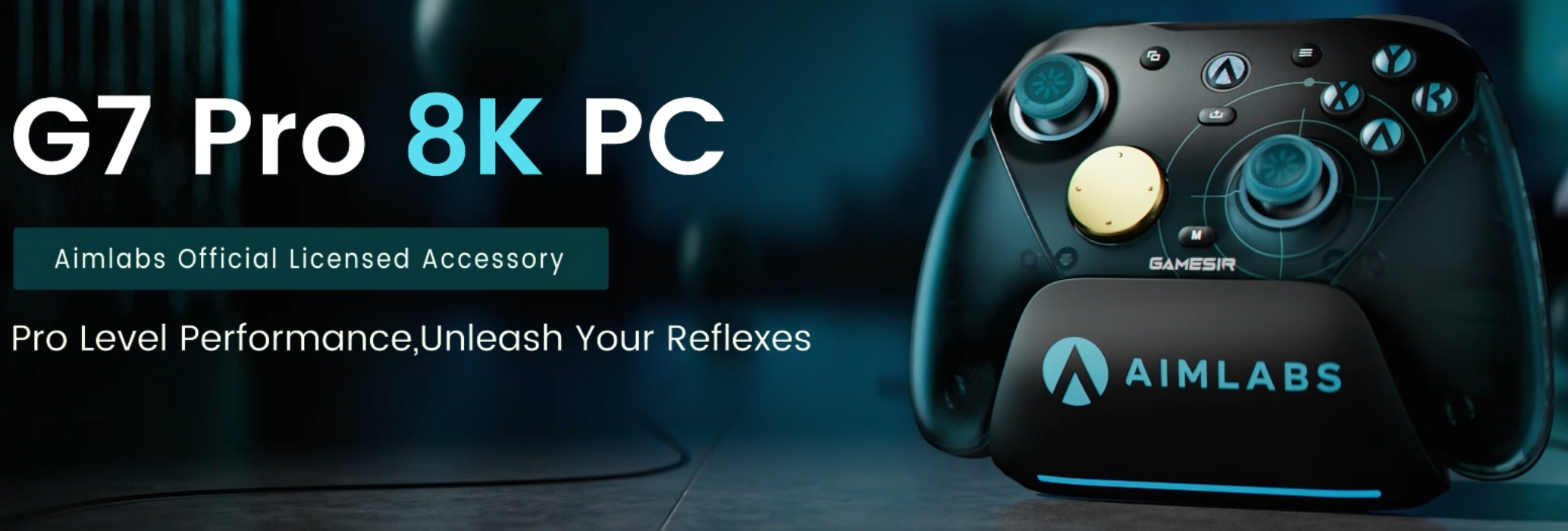
Got a discord ping from GameSir that their G7 Pro 8K is up for pre-order
GYwl6vpe3AZ7kdA0.jpg


Surprised it's going to be $80, instead of their other special editions, so they really are passing down the savings of not having the Xbox compatibility costs I guess.

New features are the 8k polling rate, 2nd gen TMR sticks, and macro support because it's PC only. I'm cool keeping my Wuchang version, but this one comes out in March-April for those interested.


Huh, turn on CC auto subtitles translation or audio translation.

Monoru says there's a new adapter on the market that lets you possibly use these all new shiny controllers with PS4 and PS5.

And currently he's tested Gamesir and it works with PS5.

G7 Pro is among working ones on this Brook Wingman adapter, as well as six other ones - like Super Nova.

Astray Astray

It would be funny if Steam Controller 2 worked on PS5 with this, lmao.
 
Last edited:
Top Bottom