• Hey Guest. Check out your NeoGAF Wrapped 2025 results here!

NVIDIA DLSS 4.5 to feature 2nd Gen Transformer model and Dynamic 6x Frame Generation

Are you talking about the geometry at the top of the first screenshot? DLSS isn't going to do anything to change that.
Maybe I was miss remembering the top of the first screenshot and it was more angular/faceted even on PS5, but the other circular geometry like the lights and the disc I'm sure were faceted like that on PS5, so I would have expected the reconstruction to have been trained on the maximum geometric density for those models and reconstructed them to look less faceted than that IMO.
 
Maybe I was miss remembering the top of the first screenshot and it was more angular/faceted even on PS5, but the other circular geometry like the lights and the disc I'm sure were faceted like that on PS5, so I would have expected the reconstruction to have been trained on the maximum geometric density for those models and reconstructed them to look less faceted than that IMO.

I don't think you're really understanding what DLSS does or how it works. It's not going to effect geometric density/polygons in any way.
 
I don't think you're really understanding what DLSS does or how it works. It's not going to effect geometric density/polygons in any way.
They aren't geometry once they've been fed in to be reconstructed.

They are just pixels, filled in by regression maths that take lots of variables(source pixels and other variables) multiplied against the model's coefficient for each variable and then summed in each layer of the neural network to make a shading decision. A trained model can deep fake lower geometry to higher geometric rendered pixels.

but if you are saying that is the LoD of the native source you are running the game - causing those facetted edges - that I see your point. But I'm pretty sure DLSS - like PSSR - can enhance and replace what is there, and unsightly facetted edges - particularly on the circumference of the light in the first image and the big concrete disc in the 3rd image are areas I would have expect DLSS to have enhanced by making them look more circular - and by extension appear as higher polygon geometry.
 
They aren't geometry once they've been fed in to be reconstructed.

They are just pixels, filled in by regression maths that take lots of variables(source pixels and other variables) multiplied against the model's coefficient for each variable and then summed in each layer of the neural network to make a shading decision. A trained model can deep fake lower geometry to higher geometric rendered pixels.

but if you are saying that is the LoD of the native source you are running the game - causing those facetted edges - that I see your point. But I'm pretty sure DLSS - like PSSR - can enhance and replace what is there, and unsightly facetted edges - particularly on the circumference of the light in the first image and the big concrete disc in the 3rd image are areas I would have expect DLSS to have enhanced by making them look more circular - and by extension appear as higher polygon geometry.

Neither PSSR nor DLSS can or are intended to "deep fake" geometry or simulator higher polygon counts. That's not what they do nor is that what they're intended to do. You will never see DLSS turn a octagonal object into a round one or vice versa.
 
Last edited:
Neither PSSR nor DLSS can or are intended to "deep fake" geometry or simulator higher polygon counts. That's not what they do nor is that what they're intended to do. You will never see DLSS turn a round object into a octagonal object.
<-> Octagonal into round object you hopefully mean, but they do already try to deep fake details. It is exactly what the denoising literally does. It takes low fidelity signal with noise and fakes it to become a higher quality signal - which is semantically no different with the source being facetted geometry trying to approximate the smooth curves of a round disc - with the facets being the signal noise.
 
<-> Octagonal into round object you hopefully mean, but they do already try to deep fake details. It is exactly what the denoising literally does. It takes low fidelity signal with noise and fakes it to become a higher quality signal - which is semantically no different with the source being facetted geometry trying to approximate the smooth curves of a round disc - with the facets being the signal noise.

Okay? But that's not what it does. I don't know what the fuck you're talking about at this point.

We're not talking about what a similar technology could possibly theoretically do. We're talking about what DLSS actually does and doesn't do. And it doesn't alter in-game geometry.
 
Thanks! I've experienced a stutter or two when entering new biomes/areas, but generally speaking it's as smooth as can be.
You convinced me to buy the game! I think it will look even more impressive in HDR, and RT seems to make a noticeable difference too.


But that's not what it does.

We're not talking about what a similar technology could possibly theoretically do. We're talking about what DLSS actually does and doesn't do. And it doesn't alter in-game geometry.
Many people assume that the ML part of DLSS creates fake details from nothing based on its training because that's what ESRGAN models do when trained with pure synthetic data. However, what ESRGAN does is extremely costly and time-consuming. Gamers aren't going to wait a minute to see a single generated frame. Nvidia and AMD only uses ML to decide how to combine / merge data from previous frames, meaning if the objects was round it will still be round after reconstruction.

ML wasnt even needed in FSR2/3 or TSR to achieve a great results on the static image. Here's FSR vs DLSS comparison. On the static image both look similar.

FSR3 Quality


DLSS4.0 Quality


The differences are only more apparent during motion. FSR3 / TSR image shimmers and blurs. Here's what AMD said about its FSR 2 technology: They emphasized that no new features are generated from recognizing shapes even with ML based methods.

lEAg4s7U4wPJOnAQ.jpg

qM50Pqj9TmWLWdUO.jpg
 
Last edited:
Has DLSS 4.5 been a good enough improvement for those who use balanced and quality settings? Or has the focus been on performance profiles only?
 
Has DLSS 4.5 been a good enough improvement for those who use balanced and quality settings? Or has the focus been on performance profiles only?

The improvements are fantastic on balanced and quality. Quality 4.5 looks better than DLAA 4.0.

However, unless you're using a 4000 or 5000 series card, there's a large performance hit.
 
The improvements are fantastic on balanced and quality. Quality 4.5 looks better than DLAA 4.0.

However, unless you're using a 4000 or 5000 series card, there's a large performance hit.
Based on YT videos I saw the mighty 5090 is the only card that can run 4.5 DLSS quality with a minimal performance cost. There's a noticeable performance impact on the 5080, 5070ti, and 40 series GPUs like my 4080, although DLSS Q is still somewhat usable (there's still noticeable performance boost over TAA native). On the 20/30 series though, the performance impact is greater, and DLSS Q is often more demanding than native TAA, rendering it unusable.

I don't plan on using DLSS 4.5 Quality mode for many games. The performance impact is too high at 4K, and I don't feel like I'm missing out much with older 4.0. However, 4.5 in Performance Mode is usable and only runs 1-3% slower than 4.0 on my card's Tensor Cores. That's acceptable, so I plan to use this mode for the most demanding games.



The PT/RT shimmering is garbage in 4.5, i noticed this when i reinstalled cp2077 and stalker 2. This video proves it even more. Theres no "clear" winner, there are ups and downs. Still sticking to K for now at 1440p.
 
Has DLSS 4.5 been a good enough improvement for those who use balanced and quality settings? Or has the focus been on performance profiles only?
It's an improvement but I'd urge you to check P and even UP as from my testing using the new models with lower ratios is generally wasteful as the IQ difference between say P with model M and Q with model M is very minor while the performance difference is very noticeable. There is a reason why Nvidia's official setup is to not use new models above P.


The PT/RT shimmering is garbage in 4.5, i noticed this when i reinstalled cp2077 and stalker 2. This video proves it even more. Theres no "clear" winner, there are ups and downs. Still sticking to K for now at 1440p.

Rdr2 has raytracing and path tracing?

Since when?

Mod?
 
Rdr2 has raytracing and path tracing?

Since when?

Mod?

the video is not rdr2 only. it has multiple games which include rt/pt. stalker 2 isnt there, but my own testing. shadow grass is ugly as fuck but that might jsut be the game being a pos. ow2 seems fine for example and its the same engine.
 
Last edited:
So I managed to snag a 5070 ti at MSRP at Microcenter Monday after selling that 7900 XTX.


Anywho, I bought it even though I have a 4080 because I wanted the 4X MFG cause I'm at 4K and I'm not impressed?

I remember being amazed when 4.0 released last year and that performance looked as good as it did at 4K and 4.5 just looks like a smear fest. I'm talking FXAA 2012.
 
Last edited:
So I managed to snag a 5070 at MSRP at Microcenter Monday after selling that 7900 XTX.


Anywho, I bought it even though I have a 4080 because I wanted the 4X MFG cause I'm at 4K and I'm not impressed?

I remember being amazed when 4.0 released last year and that performance looked as good as it did at 4K and 4.5 just looks like a smear fest. I'm talking FXAA 2012.

Weird side grade/downgrade you did. 7900XTX is still much more powerful than 5070 (not to mention 2x VRAM):

IQJLvvn8N1x0TrtT.png
 
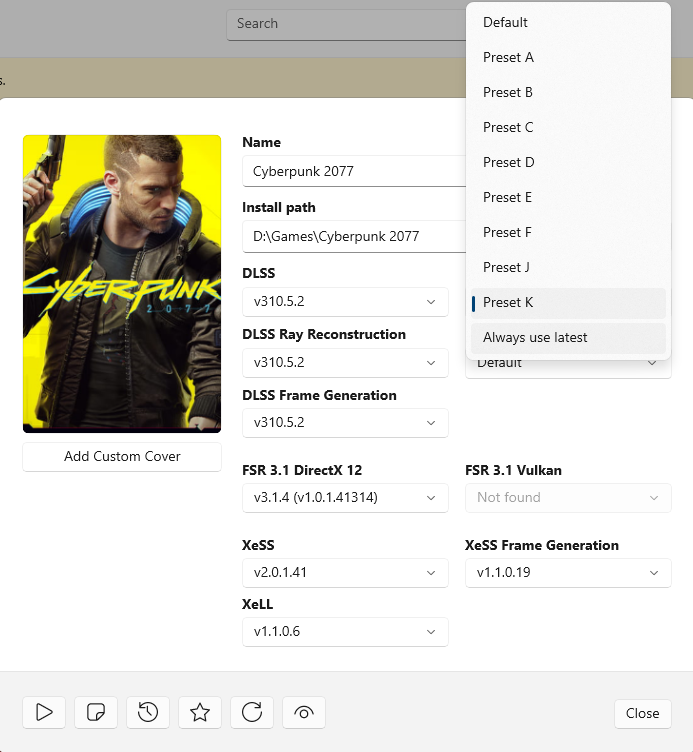
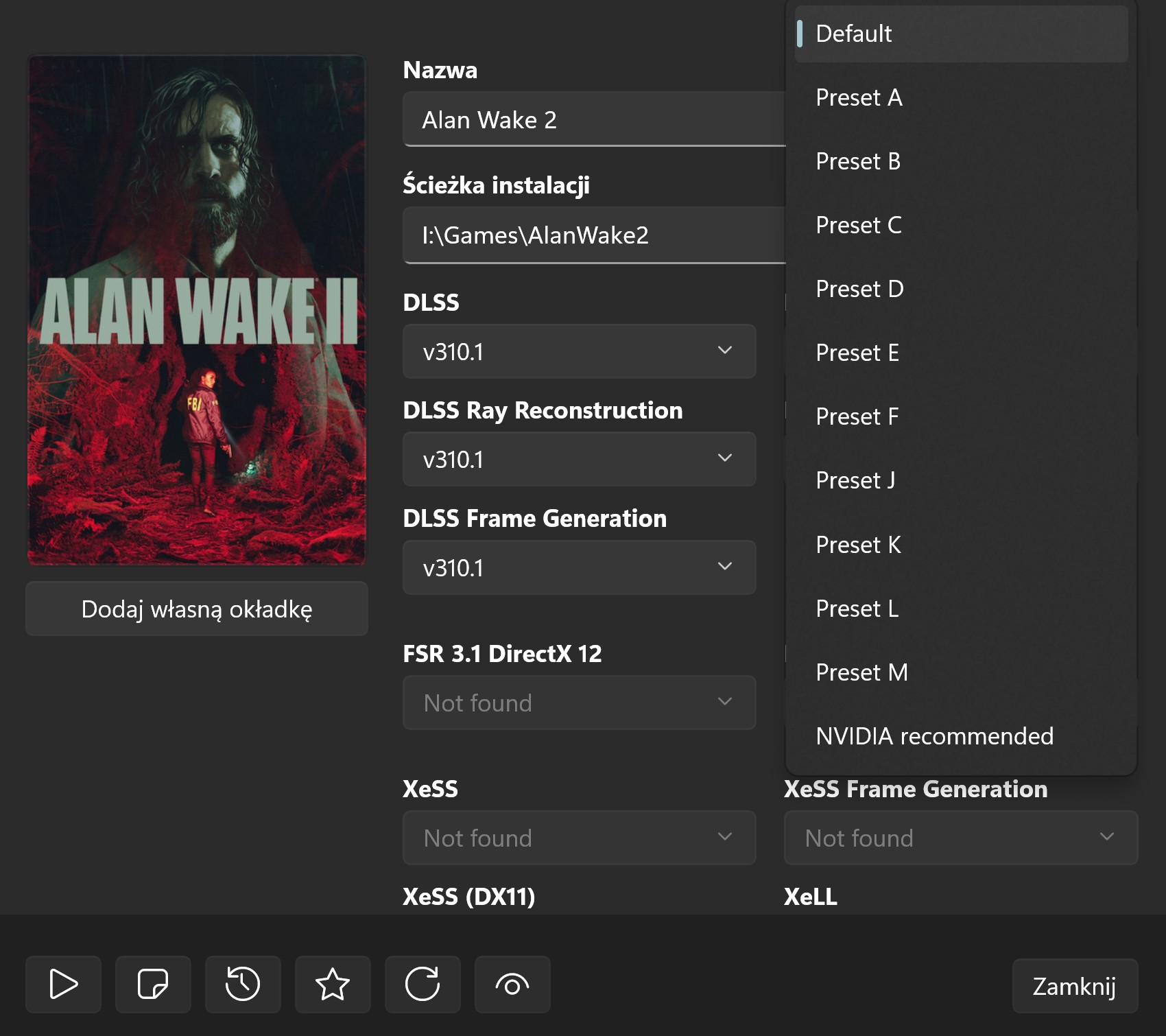
Can someone explain to me why i don't get the option of preset L and M?

gE5PWPiOd9IZvXB4.png


I have the 5060 ti 16GB on Windows 10. Please tell me this shit isn't locked to Windows 11 or something...
 
Weird side grade/downgrade you did. 7900XTX is still much more powerful than 5070 (not to mention 2x VRAM):

IQJLvvn8N1x0TrtT.png
I should correct myself, a 5070 ti!

I enjoyed the XTX under Linux but I can't lie, it's a "Have it and not use it and want it and not need it" situation with ray tracing. I don't care more than half the time and often turn it off for better framerates.

Hell, I'd argue under Linux I'd rather have the 9070 XT but lol damn it, I just hate that Nvidia constantly has me pulled back.
 

Alex nicely sums up my observations. There are image quality regressions in many games, especially RT ones. Some games, like Jedi Survivor with RT, even have PSSR-like noise around the grass, which so many people hated on the PS5Pro. On top of that, there's a noticeable performance cost, so I don't think the latest "M" preset is as good as people hoped. I'm fine with that since I was already happy with DLSS 4.0 (preset "K" has a good balance between sharpness and stability) and 3.7 (preset "E" slightly blurs details in motion but delivers a stable, almost noise-free image).
 
Last edited:
Alex nicely sums up my observations. There are image quality regressions in many games, especially RT ones. Some games, like Jedi Survivor with RT, even have PSSR-like noise around the grass, which so many people hated. On top of that, there's a noticeable performance cost, so I don't think the latest "M" preset is as good as people hoped. I'm fine with that since I was already happy with DLSS 4.0 (preset "K" has a good balance between sharpness and stability) and 3.7 (preset "E" slightly blurs details in motion but delivers a stable, almost noise-free image).
weirdly ac shadows still looks pristine with the new model. it must have an insanely high quality denoiser by itself (and considering how heavy the game runs, I wouldn't be surprised)
i even pushed 1440p dlss ultra performance and still couldn't notice any boiling or shimmering in that game

ideally we just need a new ray reconstruction model and more games using ray reconstruction
 
Last edited:
Can someone explain to me why i don't get the option of preset L and M?

gE5PWPiOd9IZvXB4.png


I have the 5060 ti 16GB on Windows 10. Please tell me this shit isn't locked to Windows 11 or something...

Update DLSS Swapper/nvidia driver. Current version of swapper is

v3G17NkWtUhtj6Jj.jpg


w07empSgVqJCzuGb.jpg
 
weirdly ac shadows still looks pristine with the new model. it must have an insanely high quality denoiser by itself (and considering how heavy the game runs, I wouldn't be surprised)
i even pushed 1440p dlss ultra performance and still couldn't notice any boiling or shimmering in that game
AC shadows does pretty good with PSSR as well right? So I'm not surprised that it's not affected by model M.

Looks like Model M is way more dependent on ray reconstruction to clean up low ray counts or noise. Any idea how Star Wars: Outlaws performs?
 
AC shadows does pretty good with PSSR as well right? So I'm not surprised that it's not affected by model M.

Looks like Model M is way more dependent on ray reconstruction to clean up low ray counts or noise. Any idea how Star Wars: Outlaws performs?
I played that game with ubisoft plus so I can't try it now sadly (and no one has any interest in testing these games because no one cares about these games honestly lol)
I'd say it would probably look decent with preset M because it had competent denoising too
 
DLSS4 performance (M) looks awesome, much better than what the overly analytical Digital Foundry zoomed scenes show. The image quality in-game during movement is impressive, often even better than DLSS4 (K) balanced and quality.

Example:

 
DLSS4 performance (M) looks awesome, much better than what the overly analytical Digital Foundry zoomed scenes show. The image quality in-game during movement is impressive, often even better than DLSS4 (K) balanced and quality.

Example:


Keep in mind this YouTuber shows a game that always showcased DLSS technology in the best possible light. The more games you test and the more details you look at, the more apparent the DLSS 4.5 issues become.
 
Keep in mind this YouTuber shows a game that always showcased DLSS technology in the best possible light. The more games you test and the more details you look at, the more apparent the DLSS 4.5 issues become.
I don't know what else to show, because in both cases it shows the exact same scene almost pixel by pixel. This is a great representative video.

I've tried it in several games, the preset M is amazing in REALTIME.
 
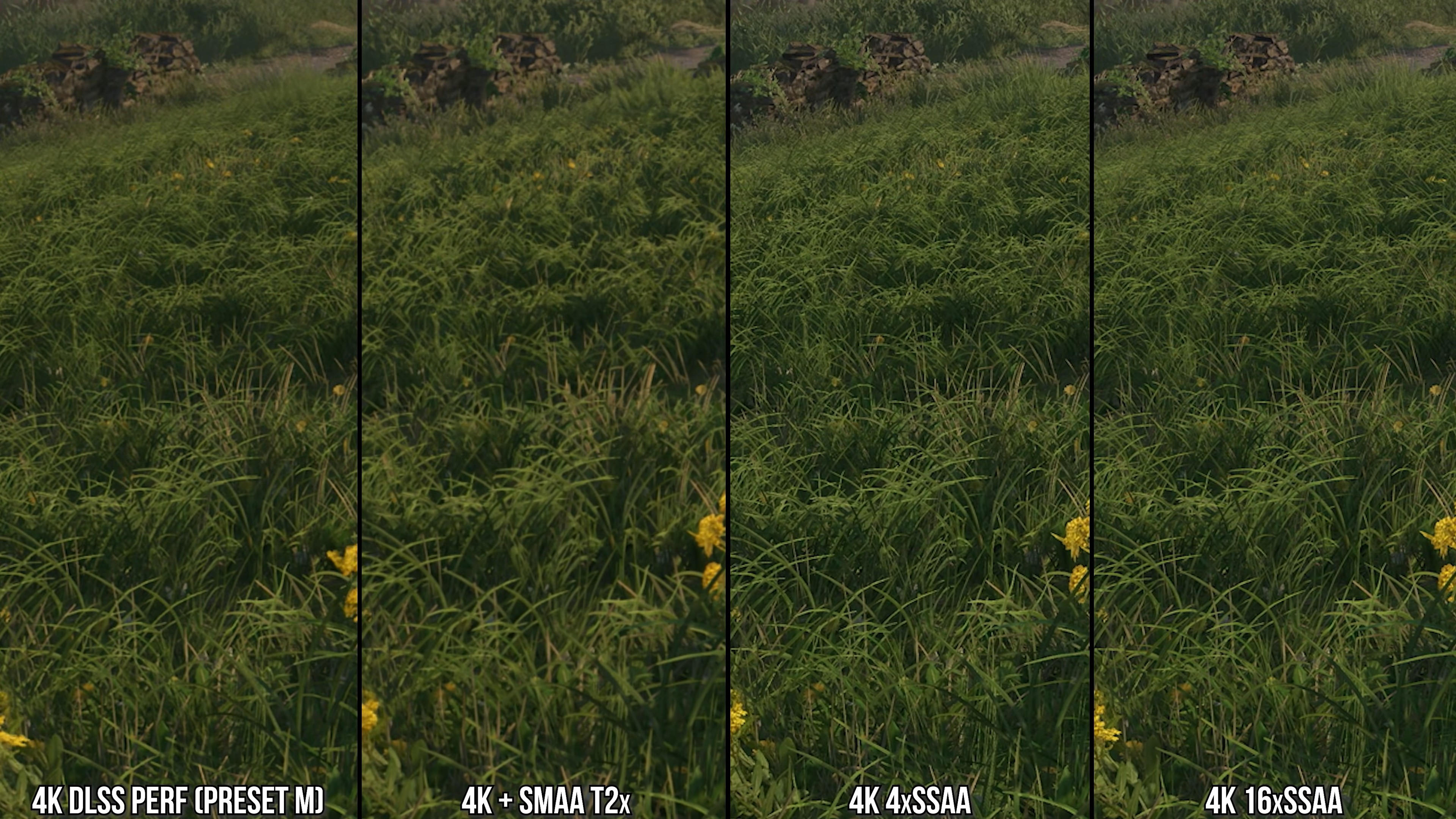
I love the clarity that downsampling provides. Even TAA games look sharp when downsampled, and the image still looks natural to me (no ringing). On a 1440p monitor, I often used DLDSR (combined with DLSS to fully counterbalance performance cost of downsampling) and the image quality was incredible.
 
Last edited:
Based on YT videos I saw the mighty 5090 is the only card that can run 4.5 DLSS quality with a minimal performance cost. There's a noticeable performance impact on the 5080, 5070ti, and 40 series GPUs like my 4080, although DLSS Q is still somewhat usable (there's still noticeable performance boost over TAA native). On the 20/30 series though, the performance impact is greater, and DLSS Q is often more demanding than native TAA, rendering it unusable.

I don't plan on using DLSS 4.5 Quality mode for many games. The performance impact is too high at 4K, and I don't feel like I'm missing out much with older 4.0. However, 4.5 in Performance Mode is usable and only runs 1-3% slower than 4.0 on my card's Tensor Cores. That's acceptable, so I plan to use this mode for the most demanding games.
Recommended* it is then. I'm on a 5080 by the way.

" what recommended profile does
  • Quality/Balanced → Preset K (DLSS 4.0)
  • Performance → Preset M (DLSS 4.5)
  • Ultra Performance → Preset L (DLSS 4.5)"
 
Ok so the M profile is supposed to bu used with the "Performance" option in-game, correct?

Are there any other downsides when using "Quality" with it, other than the performance hit? Is it worth it if your GPU has some breathing room?
 
Ok so the M profile is supposed to bu used with the "Performance" option in-game, correct?

Are there any other downsides when using "Quality" with it, other than the performance hit? Is it worth it if your GPU has some breathing room?
The downsides are the same as in P.
Model M is more skewed towards current frame data and is considerably more aggressive at discarding frame history.
The result is a sharper and more coherent in motion but noisier, less temporally stable resolve.
It is the same in all presets, the reason why Nvidia "recommends" using K with B/Q/DLAA is performance.

In practice it is completely game dependent which model will work better or worse.
A game which has noisy surfaces (i.e. badly resolved RT) will likely fare better with model K even in P.
A game which is properly filtered, denoised and provide good pixel grid jitter to DLSS will likely look better with model M even in B/Q/DLAA.

Another thing which seem to be overlooked is that model L could be a middle ground between K and M. But this I need to test a bit before saying that it is.
 
Death Stranding (the original) gets messed up with preset M. There's screen tearing even with vsync ON. Preset K fixes this.
 
Death Stranding (the original) gets messed up with preset M. There's screen tearing even with vsync ON. Preset K fixes this.

I have not seen that when testing DS1.

But I can say something weird is happening with GOW2018, with M or L presets (regardless of internal res) game has camera stuttering, framerate can be 120fps with perfect frame time but it still isn't smooth in places. No issues like that with K or DLSS3.

Super weird stuff...
 
Another thing which seem to be overlooked is that model L could be a middle ground between K and M. But this I need to test a bit before saying that it is.
I've done some testing of L vs M and K, and the results are interesting.
Generally speaking L is less "sharp" although the difference seem to be game dependent, and the "sharpness" here is more about looking less like a "sharpened" resolve than actually resolving a blurrier image.
L is also doing better at resolving thin elements (both on transparent and opaque textures and in geometry) and has less aggressive history discard which leads to less temporal instability (M tend to resolve a constant flicker when a small bright element is present, like a small pixel sized light - something completely missing in K and lessened considerably in L).
So the choice between L and M (and K) remains game dependent more than scaling ratio dependent IMO.

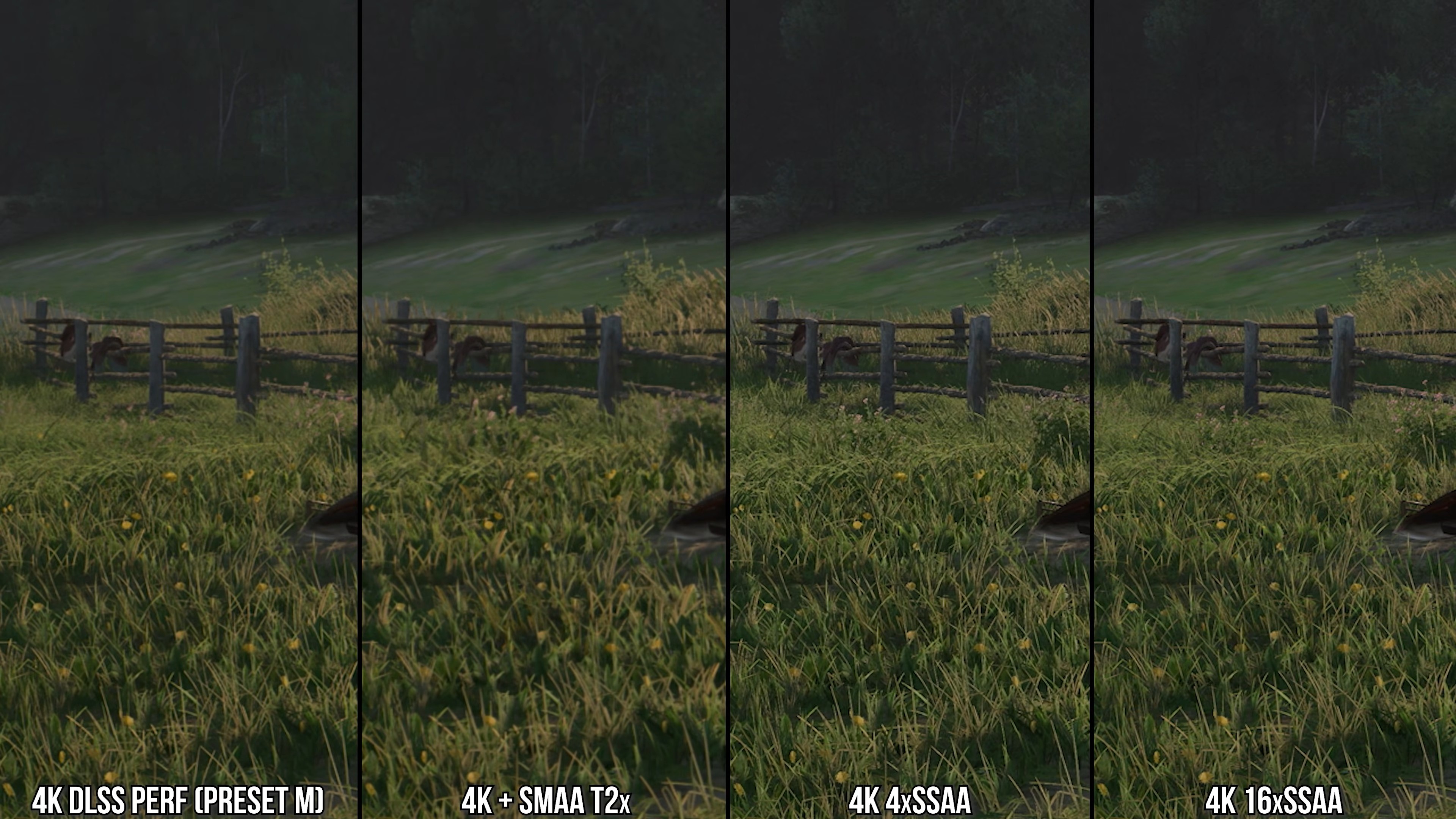
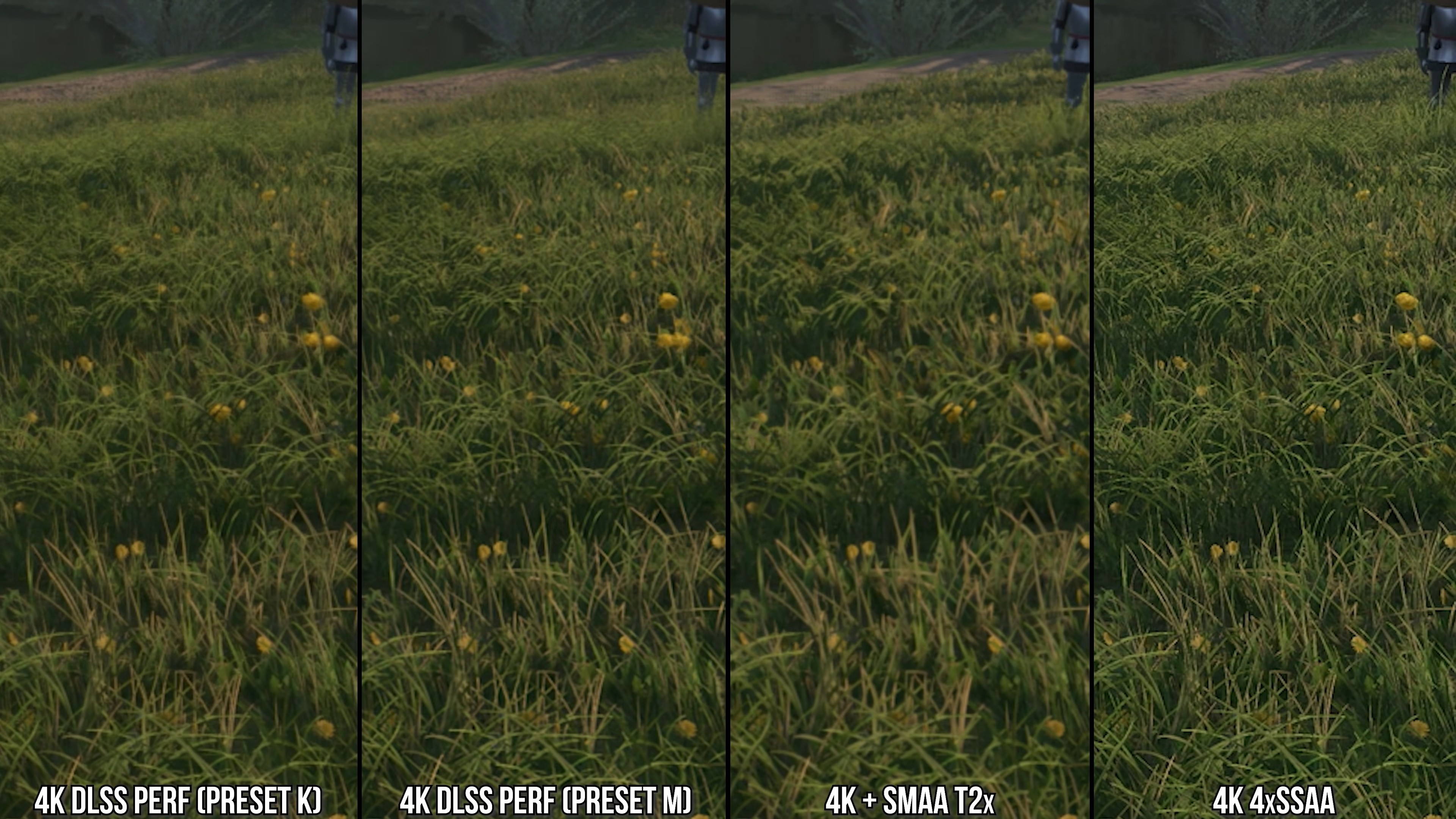
Personally I kinda still prefer K over L/M on my 32" 4K monitor cause it produces details which are pixel sized - even if these details are not exactly correct - while both M and L (the latter to a lesser degree) tend to produce an image which looks more "upscaled" on zoomed inspection, with details "lumped" into groups of pixels - even if they are looking more correct here.
I think I'll be choosing the model on a game to game basis after checking them all in some particular title.
 
Tried 4.5 profile M quality mode in 4 games and none of them is even close to be oversharpened.

Do you people keep the sharp slider in your monitor\tv to the max or something?

If anything the difference between perf and quality is now super low so there is almost no reason to play quality, but not because of the sharpness.
 
Tried 4.5 profile M quality mode in 4 games and none of them is even close to be oversharpened.

Do you people keep the sharp slider in your monitor\tv to the max or something?

If anything the difference between perf and quality is now super low so there is almost no reason to play quality, but not because of the sharpness.
I tried M Quality in Anno 117 and it's definitely sharp, but thats just me.
 
I tried M Quality in Anno 117 and it's definitely sharp, but thats just me.
Do you play on a pc monitor? I have this hunch that some oled tv just have a way softer image than pc monitors or some brands of tv like samsung.

I tried horizon fw, horizon zero dawn remaster, no rest for the wicked and cyberpunk, none of them was oversharpened.
 
Top Bottom