
-
Hey Guest. Check out your NeoGAF Wrapped 2025 results here!
You are using an out of date browser. It may not display this or other websites correctly.
You should upgrade or use an alternative browser.
You should upgrade or use an alternative browser.
Digital Foundry - DLSS Preset L Review - 1440p/4k Ultra Performance Mode etc.
- Thread starter kevboard
- Start date


Radical_3d
Member
so, r.lumen.reflections.temporal=0 has been added to my list of engine.ini tweaks to add
Preset L


kevboard
Member
he only showed preset L in combination with no denoising, but I bet this will work with all presets.
Lumen's denoiser is so absolutely ass, it basically can't be better than no denoising lol. I bet even with DLSS off it would look better


viveks86
Member
the biggest takeaway from this video for me,
the UE5 denoiser is so absolutely awful that having no denoising and only DLSS is superior
so, r.lumen.reflections.temporal=0 has been added to my list of engine.ini tweaks to add to an UE5 game before starting it lol
Looks like that would only fix the reflections though? Not sure why Alex didn't test the shadow flickering in SH2 as well. May be there is a ".temporal" setting for that too?

analog_future
Resident Crybaby
The denoising stuff almost seems like a bug. Hopefully a 4.5.1 release will address it.
Radical_3d
Member
The only preset that I use in my consoles is "on".only showed preset L in combination with no denoising, but I bet this will work with all presets.
kevboard
Member
Looks like that would only fix the reflections though? Not sure why Alex didn't test the shadow flickering in SH2 as well. May be there is a ".temporal" setting for that too?
I think for lighting, and generally more defused RT, it's less viable.
reflections, especially mirror-like ones, don't need much denoising to begin with.
I bet there's also a variable for GI. it's sadly hard to find a comprehensive list of this stuff.
.screenprobegather. could be it... not sure tho. I know I once tweaked that in a game to make GI look more stable, but I actually turned it up and not down.


T4keD0wN
Member
Upgrading GI/lumen and res should make things less noisy, you want to increase the numbers for that.I bet there's also a variable for GI. it's sadly hard to find a comprehensive list of this stuff.
.screenprobegather. could be it... not sure tho. I know I once tweaked that in a game to make GI look more stable, but I actually turned it up and not down.
r.Shadow.Virtual.SMRT.RayCountDirectional,
r.Shadow.Virtual.SMRT.RayCountLocal
these should make impact on the noise in SH2r, i dont have it installed now to check, might check if it uses vsms first tho: r.Shadow.Virtual.Enable=1 but i think it does if i remember correctly, if not ignore this.
Ive also noticed changes in noise when playing around with these subsetting, and epics helptext mentions it too (assume higher values are better):
r.Lumen.ScreenProbeGather.Temporal.MaxFramesAccumulated (flickers if too low)
r.Lumen.ScreenProbeGather.Temporal.MaxRayDirections
r.Lumen.ScreenProbeGather.Temporal.DistanceThreshold
r.Lumen.ScreenProbeGather.TemporalFilterProbes (should be enabled aka 1 for less noise)
r.Lumen.ScreenProbeGather.Temporal.MaxFastUpdateModeAmount (should be below 0, higher = more noise)
These should affect noise too with r.Lumen.ScreenProbeGather.Temporal set to 1 enabling the filter itself (default UE setting), its possible to disable it, but i dont think youll like results, better to increase subsettings.
****
Ive just dumped Avowed cvars and noticed "r.RayTracing.GlobalIllumination.Denoiser" there, but you can only pick between different denoisers it seems and i dont think its possible in a compiled project, so i think the only way to go around GI noise is by increasing its subsettings (which both of these have), lumen quality or just easily adding RR which is what i like to do as it takes like a minute.
Last edited:
viveks86
Member
Does that work with 4.5 if it doesn't support RR yet?r.NGX.DLSS.DenoiserMode=1
T4keD0wN
Member
You need to add the ray recon .dll yourself if a game doesnt have it and no, rr has only transformer 1 upscaling (but itll look overall better than L at least on native resolution, but worse on lower where upscaling/AA matters more, always clearer in my experience tho)Does that work with 4.5 if it doesn't support RR yet?
Last edited:
Does that work with 4.5 if it doesn't support RR yet?
it just uses whatever available in the RR DLL you place in the game folder
kevboard
Member
Upgrading GI/lumen and res should make things less noisy, you want to increase the numbers for that.
r.Shadow.Virtual.SMRT.RayCountDirectional,
r.Shadow.Virtual.SMRT.RayCountLocal
these should make impact on the noise in SH2r, i dont have it installed now to check, might check if it uses vsms first tho: r.Shadow.Virtual.Enable=1
Ive also noticed changes in noise when playing around with these
r.Lumen.ScreenProbeGather.Temporal.MaxFramesAccumulated
r.Lumen.ScreenProbeGather.Temporal.MaxRayDirections
r.Lumen.ScreenProbeGather.Temporal.DistanceThreshold
i think these should affect noise too.
of course increasing Lumen quality itself will help with noise, but as seen in the video, at least for reflections, turning off the denoiser entirely massively increases clarity and reduces noise.
the question is if deactivating the denoiser for GI also still looks good. I feel like it wouldn't, so it's probably better to increase other values instead.
I think for SH2 I did increase the maxframeaccumulated value, and for outer worlds 2 it's a good idea to increase the reflection distance, because it's insanely limited, and increasing it on a decent GPU (rtx3060 and up I'd say) doesn't even really impact performance.
Last edited:
A bit off topic but I highly recommend people to check out UMM mod for all UE4/5 games. Supports a lot of games and unlock features that are not available in the graphic setting. You can turn on features like RR easily. The most essentially fixed HW RT for ninja Gaiden 2 black that was completely broken by default and many more. It's more than just ini tweaks

Magic Carpet
Gold Member
Until they get Ray Reconstruction working, I'm sticking to the older version.
Got to love people now pinning this on a "shit denoiser" in UE while previously blaming the upscaler when it came to other systems. I even tried to tell people that the upscaler doesn't handle poor noise before and they pushed back that it was all PSSRs fault back then, now it's the denoiser again.
That denoiser bit could be huge and needs to be patched in or included in the graphic options of Unreal games going forward.
I'm curious if non-Unreal games have anything similar. I'm playing through Spider-Man remastered and Witcher 3 enhanced right with raytracing using preset L performance at 4k. I haven't noticed any issues, but if they could look even better with a bit of tweaking.....
I'm curious if non-Unreal games have anything similar. I'm playing through Spider-Man remastered and Witcher 3 enhanced right with raytracing using preset L performance at 4k. I haven't noticed any issues, but if they could look even better with a bit of tweaking.....
kevboard
Member
Got to love people now pinning this on a "shit denoiser" in UE while previously blaming the upscaler when it came to other systems. I even tried to tell people that the upscaler doesn't handle poor noise before and they pushed back that it was all PSSRs fault back then, now it's the denoiser again.
for Lumen it was always the denoiser.
the issue is that developers were asked to fully denoise any temporally accumulated effects (SSR, GI, AO, RT) thoroughly before the DLSS step. Nvidia's literal presentation on DLSS2 made it clear that DLSS is not meant to take a partially denoised image and then upsample it.
sadly, many devs don't give a shit about that, and UE5's defaults are pure garbage in many ways. even down to their system specific input defaults.
I literally had a back and forth with one of the devs of Splitgate just recently because I noticed that the PS5 version has a broken deadzone. turns out it is UE5's defaults PS5 device handler that adds an anti-deadzone which fucks up the reaction curve.
Highguard has the exact same issue now

and the engine default of UE4/5 is also to not fully denoise GI, AO or reflections, because it is designed around relying on additional TAA smearing to "complete" the image.
this fucks with DLSS and especially with PSSR. both are designed to have sharp and mostly ghosting free results. this means they don't smear the image, which in return means that the denoising remains visually incomplete and creates issues.
of course there are other engines that do the same shit, or games on other engines doing it due to the Devs not knowing how it will affect upsamplers.
but UE4/5 is the worst offender because of its defaults. and Devs often just keep stuff at the defaults...

Last edited:

BennyBlanco
aka IMurRIVAL69
The only preset that I use in my consoles is "on".

So then this thread isn't for you? Maybe one day PSSR will be good and you can discuss that.

Bojji
Member
Got to love people now pinning this on a "shit denoiser" in UE while previously blaming the upscaler when it came to other systems. I even tried to tell people that the upscaler doesn't handle poor noise before and they pushed back that it was all PSSRs fault back then, now it's the denoiser again.
Before DLSS 4.5 no PC upscaler was able to reproduce shit results with UE5+PSSR. You can blame denoise or PSSR, end results was garbage.
Same is true now with 4.5 that is a massive regress in this aspect vs. DLSS4 (and 3). And disabling reflections denoise doesn't fix flickering with lumen lighting seen with M preset (and PSSR).
L is more stable than M but still not on par with K (and much heavier). Forcing RR will also force first gen transformer model at the same time.
Last edited:
Bojji
Member
Any UE5 games these days should really ship with ray reconstruction. It's a far better solution than the default UE5 denoiser. Especially with Lumen.
Yep. But creating universal reconstruction should demand "working well with UE5 games", and before 4.5 this is what Nvidia was doing (same for Intel and AMD).
It's much more beneficial for consumers to create reconstruction that works well despite UE5 shortcomings than to expect UE5 developers/epic to fix the engine.
Last edited:
Radical_3d
Member
So then this thread isn't for you?

kevboard
Member
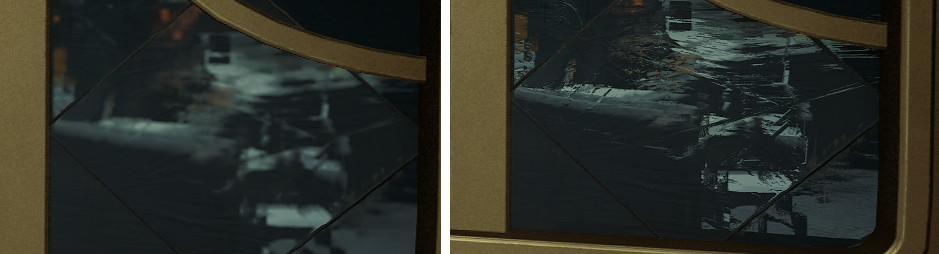
So I tried that denosing off command and reflections are indeed better, so that should be useful for UE5 games. Bottom is lumen denoising on (ignore doggo mask lol).
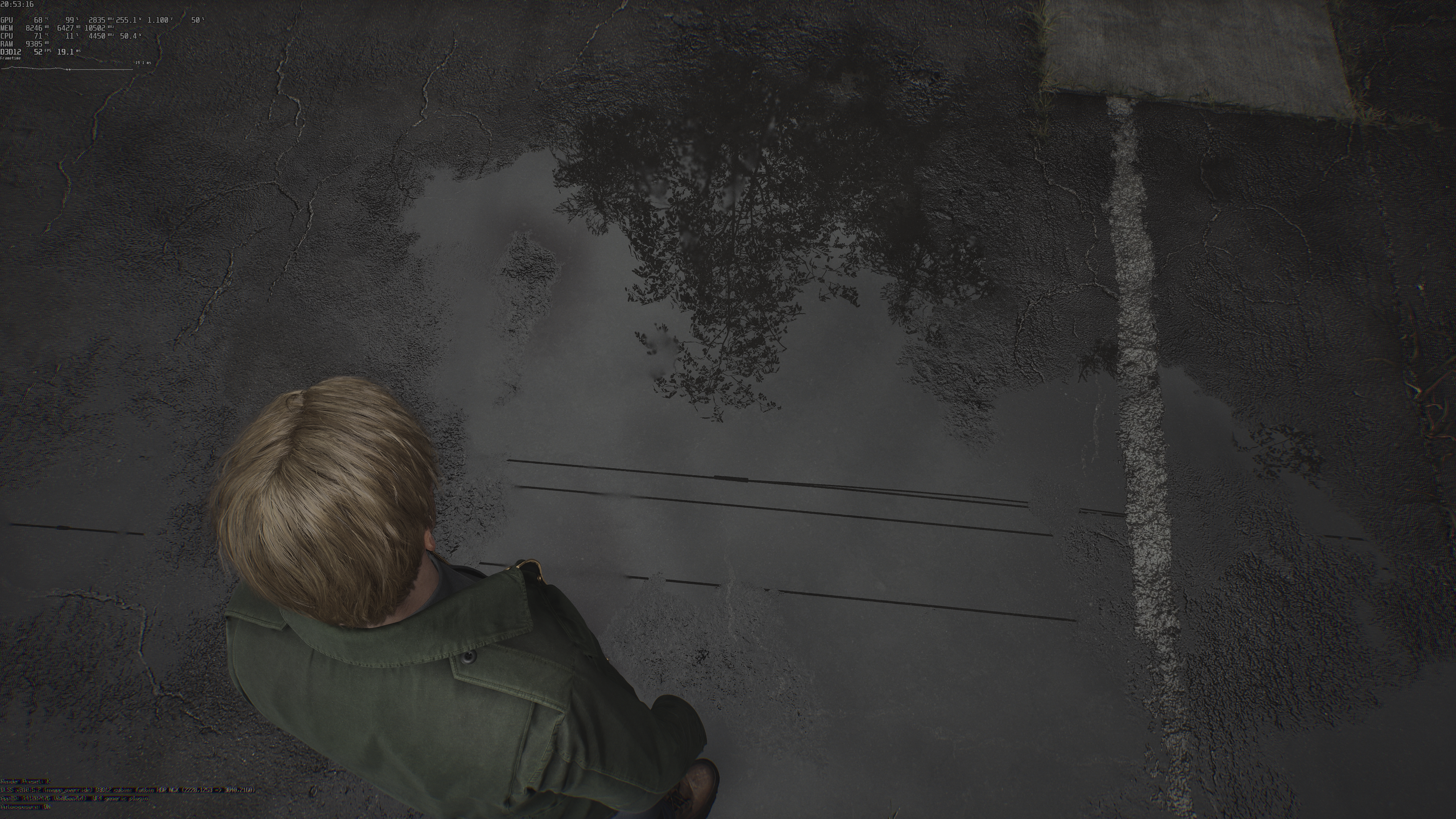
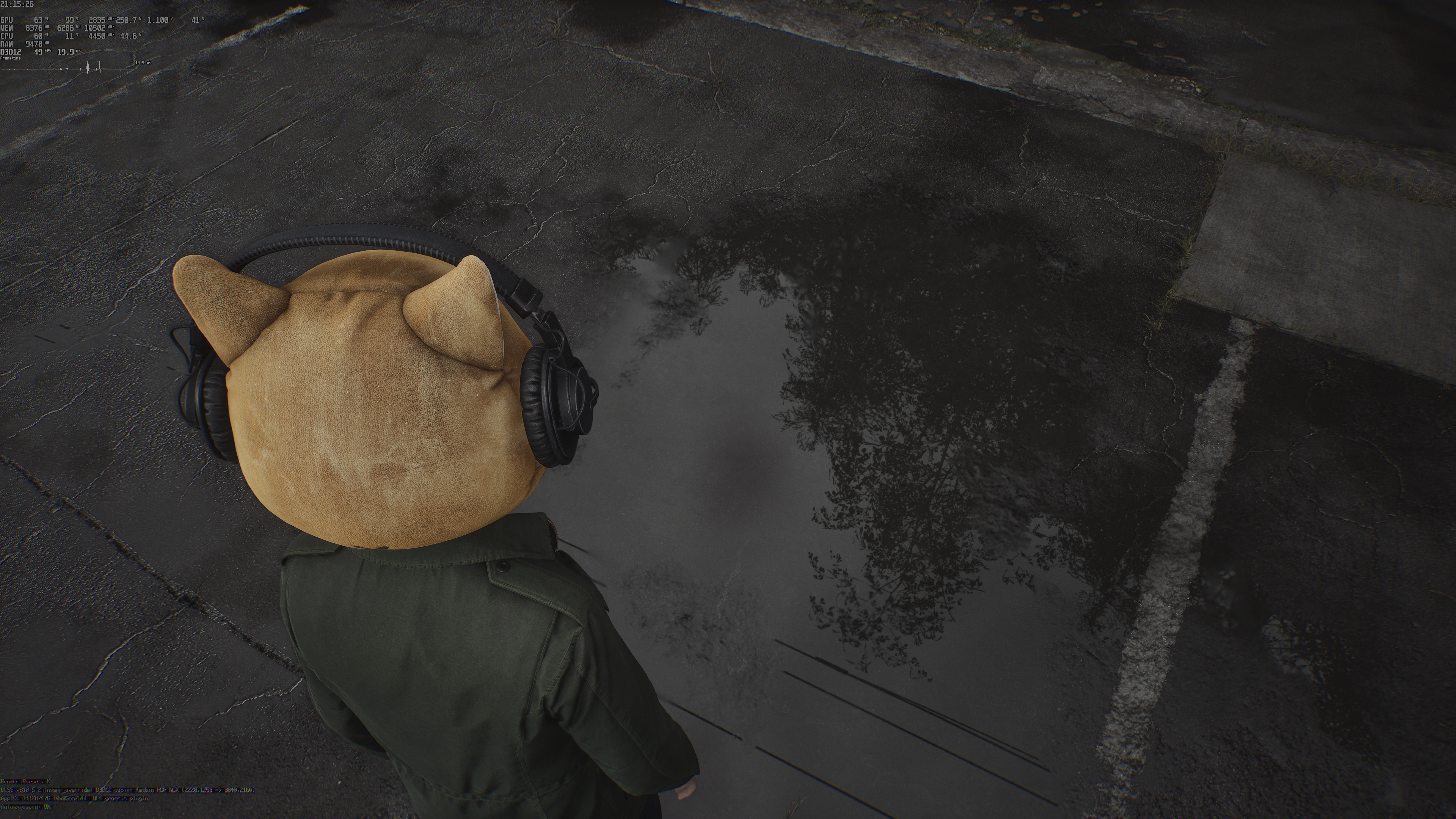
Zoomed in:


But lumen still looks like crap with preset M, much more unstable vs. K...
I just tested it in Outer Worlds 2... and my god... it's 1000x better with denoising off. the difference is actually insane.
in screenshots it's already noticeable, but in motion the increase clarity is even more impressive.
this is with preset K (I think that's the one it ships with) at 1440p, hardware RT enabled:
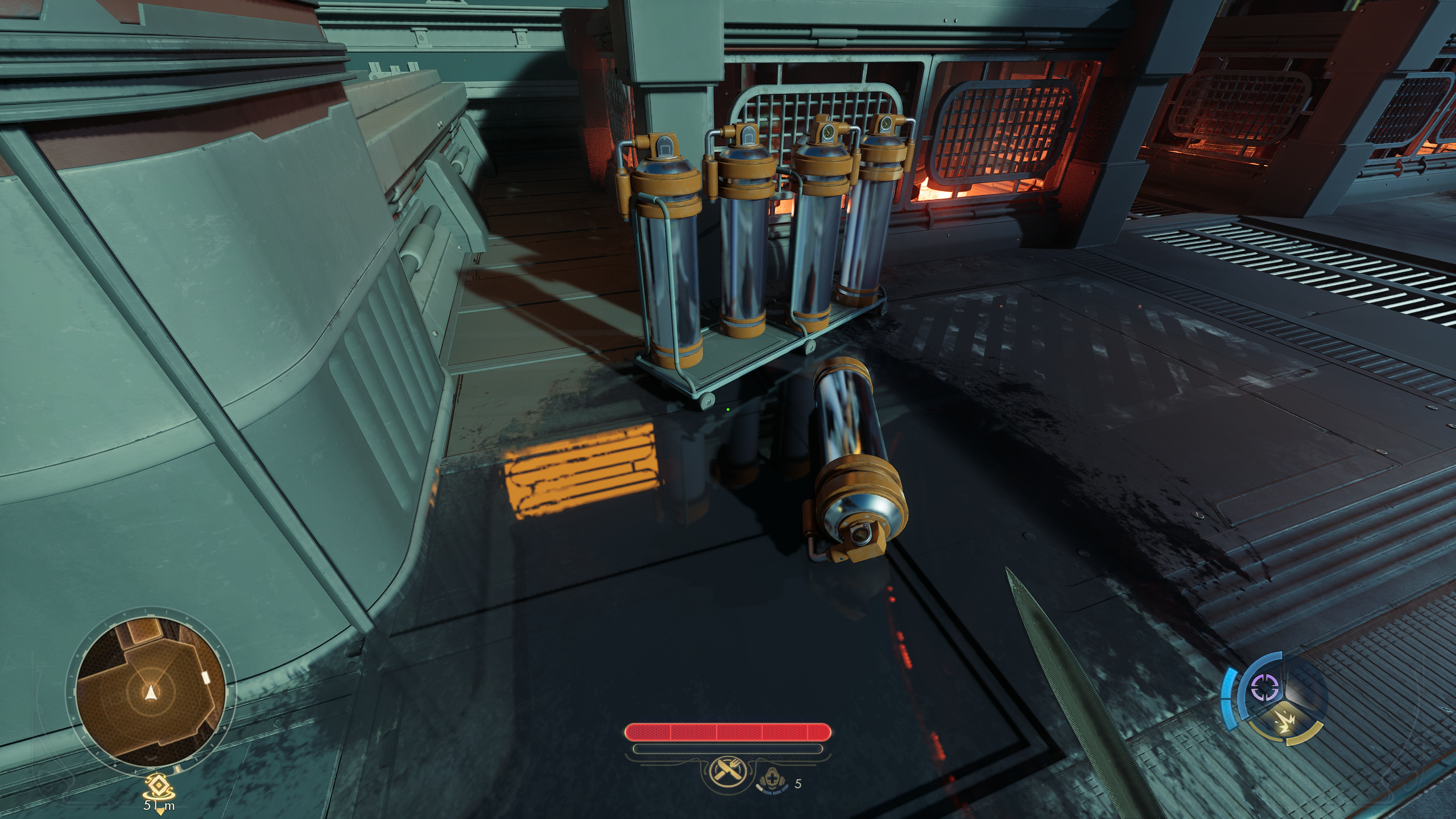
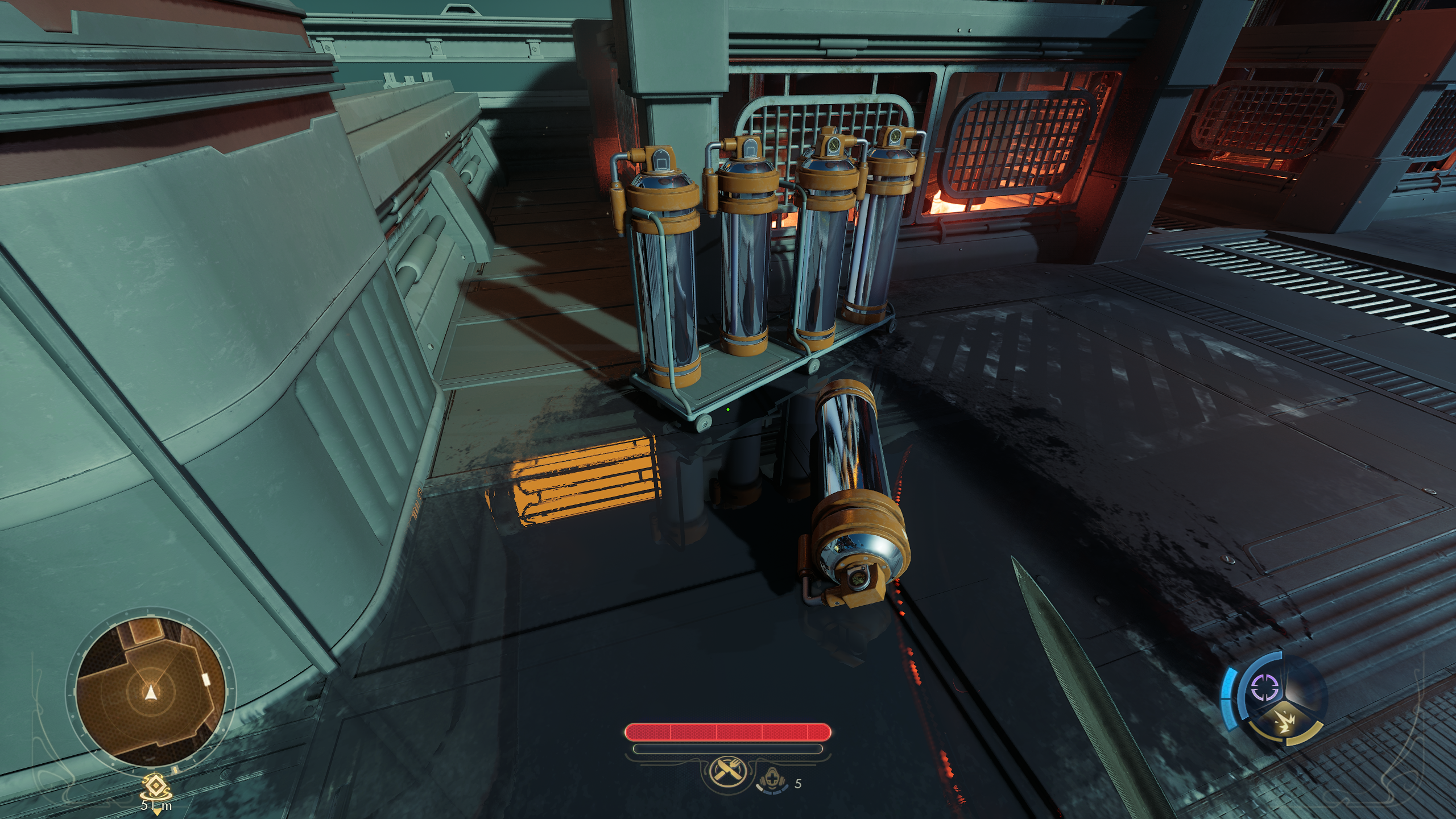
like... jesus, this should literally become the engine default whenever DLSS is enabled.
anyone who wants do add this to outer worlds 2, beware that the game tries to delete engine.ini files when it closes. so create it, add your variables and then set the file to read only.
EDIT: even when using just UE5's TAA instead of DLSS it looks better btw. and mostly stable.
which makes me wonder what the fuck that denoiser even does... like... why is it there in the first place?
EDIT 2:
another set of screenshots... like... what are we doing here Epic? why is that denoiser enabled by default? every TAA method in the game seems to denoise better than that crap!
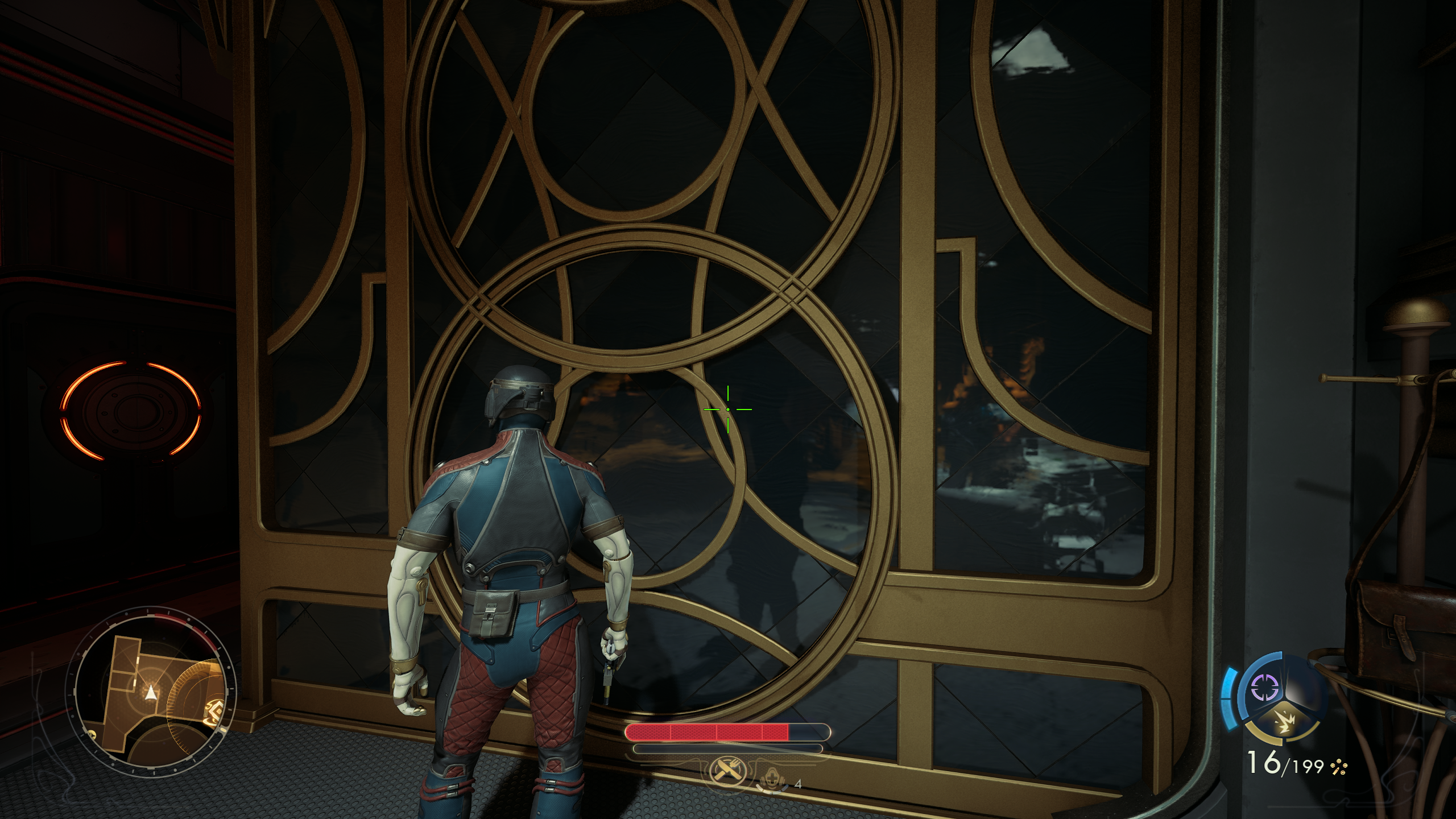
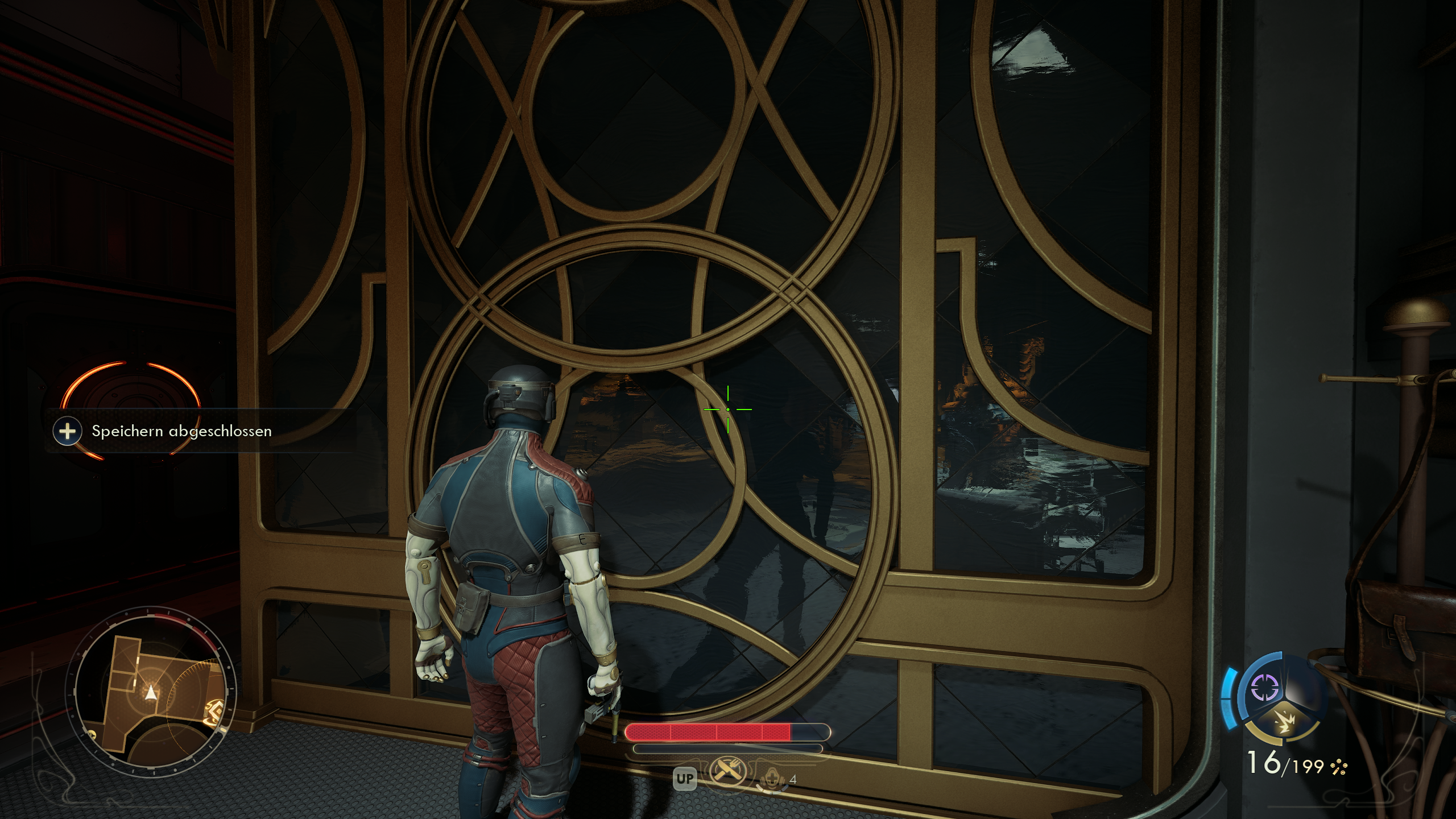
just look how all the surface detail is preserved with the denoiser off! all the little marbling on that wall is there. and with the denoiser on, it just looks like mush.
Last edited:
Bojji
Member
I just tested it in Outer Worlds 2... and my god... it's 1000x better with denoising off. the difference is actually insane.
in screenshots it's already noticeable, but in motion the increase clarity is even more impressive.
this is with preset K (I think that's the one it ships with) at 1440p, hardware RT enabled:
like... jesus, this should literally become the engine default whenever DLSS is enabled.
anyone who wants do add this to outer worlds 2, beware that the game tries to delete engine.ini files when it closes. so create it, add your variables and then set the file to read only.
EDIT: even when using just UE5's TAA instead of DLSS it looks better btw. and mostly stable.
which makes me wonder what the fuck that denoiser even does... like... why is it there in the first place?
EDIT 2:
another set of screenshots... like... what are we doing here Epic? why is that denoiser enabled by default? every TAA method in the game seems to denoise better than that crap!
just look how all the surface detail is preserved with the denoiser off! all the little marbling on that wall is there. and with the denoiser on, it just looks like mush.
Yeah, that denoiser off setting for reflections is legit.
Too bad it doesn't fix terrible lumen lighting+DLSS4.5 interaction. What is funny is that I have Wukong installed right now and it was one of the games promoted by nvidia when they showcased DLSS 4.5. Game has the same problems as SH games with preset M (to a lesser degree), like how the fuck you don't see that (Nvidia)?

kruis
Exposing the sinister cartel of retailers who allow companies to pay for advertising space.
Got to love people now pinning this on a "shit denoiser" in UE while previously blaming the upscaler when it came to other systems. I even tried to tell people that the upscaler doesn't handle poor noise before and they pushed back that it was all PSSRs fault back then, now it's the denoiser again.
If DLSS 4.5 works better with denoiser turned off in UE5 games, could that mean that PSSR might work better too with UE5 games with the denoiser turned off? That could be a very easy fix for games like Silent Hill on PS5 Pro. But here we are completely dependent on the devs for adding that simple patch to the game.

Bojji
Member
If DLSS 4.5 works better with denoiser turned off in UE5 games, could that mean that PSSR might work better too with UE5 games with the denoiser turned off? That could be a very easy fix for games like Silent Hill on PS5 Pro. But here we are completely dependent on the devs for adding that simple patch to the game.
It only works for reflections. So that lumen lighting+PSSR boil would still be present.
PSSR to work correctly with UE5 games would have to accumulate more frames/data.


Zathalus
Member
If PSSR fix in UE5 was as simple as disabling the denoiser you'd think we would see a patch from all the various games that have issues.If DLSS 4.5 works better with denoiser turned off in UE5 games, could that mean that PSSR might work better too with UE5 games with the denoiser turned off? That could be a very easy fix for games like Silent Hill on PS5 Pro. But here we are completely dependent on the devs for adding that simple patch to the game.
Probably, though I'm not sure if there will be some different artifacts elsewhere. There is a silver lining in all this. Back then I was making the point that with DLSS nvidia mitigated some of the problems of noise by creating things like RR specifically for DLSS, I got pushback that DLSS RR is a completely different thing to upscaling despite them being very closely tied together. You will notice that enabling RR force disabled preset L/M now. Hopefully with most upscalers now on the same path in terms of standardised denoising and exhibiting similar results they can rely less on proprietary stuff and they can improve results in their game for similar upscalers. Better for both the game devs and the upscaler devs.If DLSS 4.5 works better with denoiser turned off in UE5 games, could that mean that PSSR might work better too with UE5 games with the denoiser turned off? That could be a very easy fix for games like Silent Hill on PS5 Pro. But here we are completely dependent on the devs for adding that simple patch to the game.
Here is the post specifically about Silent hill. Notice the artifacts with RR gone. Notice more ghosting with RR.
DLSS RR was used to lower noise to prevent DLSS from hallucinating with specular noise/RT. Let me guess "DLSS RR is not DLSS, but specular noise is PSSR"?
r.NGX.DLSS.denoisermode=1
Depends on several things including what framerate, res, and settings you play on. Did it have ray reconstruction enabled so you got these sort of trails behind leaves?
It would hallucinate the same with lower sampling.
Last edited:

3liteDragon
Member

The Cockatrice
I'm retarded?
Wait what the fuck is that denoiser? I mean why is it enabled by default? What are its benefits? Is the performance massively increased with it on because I dont see a point to it. There has to be a catch.
Last edited:

nkarafo
Member
If you use preset K, the game becomes too noisy if you disable the in-game denoiser.Holy shit on how fucking awful UE5 denoiser is... Will try that command in SH2 myself.
Preset M fixes the noise and makes it look much better but it has the issue with the lumen shadows.
Preset L, however, fixes both issues. I am now using L (quality) with SH2 and disabled the in-game denoiser and it now looks like the best version available.
I hope one day there will be a fix for the abhorrent traversal stutters as well.
Last edited:
3liteDragon
Member
I recently got SH2, how did you disable the denoiser? Unreal unlocker like Alex mentioned or ini tweak in the files?If you use preset K, the game becomes too noisy if you disable the in-game denoiser.
Preset M fixes the noise and makes it look much better but it has the issue with the shadows.
Preset L, however, fixes both issues. I am now using L (quality) with SH2 and disabled the in-game denoiser and it now looks like the best version available.
I hope one day there will be a fix for the abhorrent traversal stutters as well.
nkarafo
Member
No need for the console, you can just add this in the engine.ini file:I recently got SH2, how did you disable the denoiser? Unreal unlocker like Alex mentioned or ini tweak in the files?
[SystemSettings]
r.Lumen.Reflections.Temporal=0
This way it stays disabled and you don't have to re-disable it via the console.
Last edited:

Senua
Member
Everyones against PSSR, we must defend it with all our might!Got to love people now pinning this on a "shit denoiser" in UE while previously blaming the upscaler when it came to other systems. I even tried to tell people that the upscaler doesn't handle poor noise before and they pushed back that it was all PSSRs fault back then, now it's the denoiser again.
3liteDragon
Member
Thx do you have any other tweaks you use for that game? Some ppl mentioned turning it off for GI but idk abt that, reflections I'll absolutely turn it off forTo enable the console like Alex does requires a mod.
But you can just add this in the engine.ini file:
[SystemSettings]
r.Lumen.Reflections.Temporal=0
This way it stays disabled and you don't have to re-disable it via the console.
Physiognomonics
Member
They don't care about IQ, that's all. They probably use it because it's there and the UE doc says to us it.Wait what the fuck is that denoiser? I mean why is it enabled by default? What are its benefits? Is the performance massively increased with it on because I dont see a point to it. There has to be a catch.
That reminds me Dead Space developers using VRS on consoles with awful results and no performance gains.
nkarafo
Member
I don't use anything else atm, only this one because the improvement is pretty noticeable and seems to have no negatives.Thx do you have any other tweaks you use for that game? Some ppl mentioned turning it off for GI but idk abt that, reflections I'll absolutely turn it off for