
The Common Sense Hit Squad strikes again. Damn you!
Lol, I deserved that.

Reason I was asking is because I have to do a lot of late night bottle feeds for my daughter and I end up staring at the same comic page for ages while my hands are full.
The Common Sense Hit Squad strikes again. Damn you!
You have feet and a nose, get creative/flexible. Or if your daughter has a foot loose while you're holding her do some creative dangling baby foot dragging on the screen.Lol, I deserved that.
Reason I was asking is because I have to do a lot of late night bottle feeds for my daughter and I end up staring at the same comic page for ages while my hands are full.
Lol, I deserved that.
Reason I was asking is because I have to do a lot of late night bottle feeds for my daughter and I end up staring at the same comic page for ages while my hands are full.
Yeah, sorry. It's not a constant listener like Star Trek: TNG. It requires a button press to activate and wait for the command like TOS.
You have feet and a nose, get creative/flexible. Or if your daughter has a foot loose while you're holding her do some creative dangling baby foot dragging on the screen.
I'm far from the most knowledgable about batteries, but with Li-ion batteries, temperature affects battery life, and batteries get hot when you are charging them. That's one of the reasons why they discourage using your laptop like a desktop (i.e. it's better to unplug it from the charger for a while then plug it back in). I'd use it unplugged and plug it back in when you are finished, personally.Quick noob question; the iPad 2 has about 1000 charge cycles correct? Would it be alright if I have it connected and charged most of the time, even after its at a 100% charge? That way I can get most out of the 1000 charges, since I usually use the iPad when I'm in my bed and the outlet is right next to me
The 3g version of the iTouch is called an iPhone.
I lol'd.Sounds exciting. I will have to AltaVista it.
As a person who frequently hangs his iPad 2 by the Smart Cover from the fridge while Im cooking, my vote was going to be genius until I thought of exactly how quickly it would take a subway thief to just snag the iPad 2 off the bar on their way out the door. What do you think?

I just discovered a scratch/dent on the top right corner of my iPad 2. :/ Feels bad, man.
I have no idea how that happened. The thing is in a case, for steve's sake.
You realize in order to activate Siri you need to hold Home for like 2 seconds then speak, then wait for her to respond, then wait for the action.
How would that be easier than.. I dunno, how do you turn pages in ComicZeal? Either swiping or tapping a button. Either way, neither would be slower than Siri.
It'd be like having your very own butler and making him only change the channel for you.

http://i.imgur.com/7mMfv.jpg[IMG]
[url]http://www.cultofmac.com/138394/idiocy-or-genius-girl-hangs-her-ipad-2-from-its-smart-cover-during-subway-commute-photo/[/url][/QUOTE]
There is no way a Smart Cover would ever be able to hold up an iPad 2 while on a train. That is certainly some other case.
Either way, no one in America would ever do this and feel safe. On the Philly regional rail system I don't even feel safe pulling out my iPad at my station stop, and that's not even the subway.
There is no way a Smart Cover would ever be able to hold up an iPad 2 while on a train. That is certainly some other case.
Either way, no one in America would ever do this and feel safe. On the Philly regional rail system I don't even feel safe pulling out my iPad at my station stop, and that's not even the subway.

http://i.imgur.com/3hNAt.gif[IMG][/QUOTE]
I know that's an Always Sunny gif, but I don't get the reference! I saw a version of this with the green guy labeled as DRM, the big guy labeled as pirates and the reporter labeled as paying customers, though which I thought was clever.
I know that's an Always Sunny gif, but I don't get the reference! I saw a version of this with the green guy labeled as DRM, the big guy labeled as pirates and the reporter labeled as paying customers, though which I thought was clever.
I just bought an iPad 2, but I'll get on board the iPad 3 if it gets improved cameras and retina I think. Not sure yet.
I don't get why Siri would be a big feature on iPad. Isn't it more useful for a phone rather than a tablet?
I don't get why Siri would be a big feature on iPad. Isn't it more useful for a phone rather than a tablet?
Ignoring battery life, I think the main issue is that the current implementation is all network based. If the voice recognition processing could all be done on phone then you could parse stuff by trigger words or whatever (like Star Trek's "computer, blah blah")...of course at this point now you're to the battery issue. The triggers wouldn't help anything since you still have to be listening to everything to hear them in the first place.Yeah, sorry. It's not a constant listener like Star Trek: TNG. It requires a button press to activate and wait for the command like TOS.
If it was a constant listener, the battery would wear down so fast. Mac's have the ability to listen constantly because they're usually plugged in, but an iPhone has a small battery that may not even last a full day with normal use.
Maybe in the far future when battery power is perfected they'll have our phones constantly listening for key words.
I wouldn't be surprised if the rumored iTV was a constant listener and waited for you to say "Change channel" or "Switch input". If Apple's going to go that way. Which I hope they are. Though I won't buy an iTV unless it came in huge size for less than $1000. i.e. probably never.
When you're using it in bed (if actually using it on the bed and not on a night stand or something) just use it unplugged, and when done put it back and plug it in. As long as you use it off power a decent bit I think you'll be ok. The ideal is something like a cycle per month, and that's an additive thing, like using 5% per day for 20 days would be a cycle (charging in between or not).Quick noob question; the iPad 2 has about 1000 charge cycles correct? Would it be alright if I have it connected and charged most of the time, even after its at a 100% charge? That way I can get most out of the 1000 charges, since I usually use the iPad when I'm in my bed and the outlet is right next to me
Not really though, if we went by pixel=size my iPhone would be taller than my MacBook Pro screen. We'll get used to it and never be able to go back, personally can't wait to read on an iPad with retina display.Gonna be a strange world where my tablet has a better screen resolution than my desktop...
The 3g version of the iTouch is called an iPhone.
Comcast today announced that it has begun rolling the AnyPlay service out to its customers, beginning with Xfinity HD Triple Play customers in Denver and Nashville. More markets will be added in the coming months, with the service initially launching for the iPad only but joined in the future by the Motorola Xoom.
Here's how it works...the AnyPlay device works the same as any other set top box in the home, but instead of delivering the incoming channel lineup to a television, AnyPlay delivers the lineup to the Wi-Fi router on the home network. The router then distributes the secure video signal to the iPad or Xoom over your home's wireless network. So as long as your tablet is within range of the home wireless router, you can turn it into another television screen.



http://www.macrumors.com/2012/01/10/showtime-delivers-streaming-video-to-ipad/Showtime has joined fellow premium television network HBO in offering an iPad app to stream video to its subscribers. The free app, called Showtime Anytime, serves up Showtime's original programming -- TV series like Homeland, Dexter and Weeds, among other things like boxing -- and the movies running on the various Showtime networks.
Currently, the app only works for Showtime subscribers through AT&T U-Verse and Verizon FiOS. Comcast subscribers can access Showtime's content through the Xfinity TV app, but Showtime says the Anytime app will work for Comcast subs "soon."
The app is expected to arrive on the iPhone in early 2012. For now, though, Showtime Anytime for iPad is free on the App Store.
I'm starting to also think the iPad 3 won't have the screen res bump, but because I waited on skipping the iPad 2 for this long I'm going to get the iPad 3 no matter what
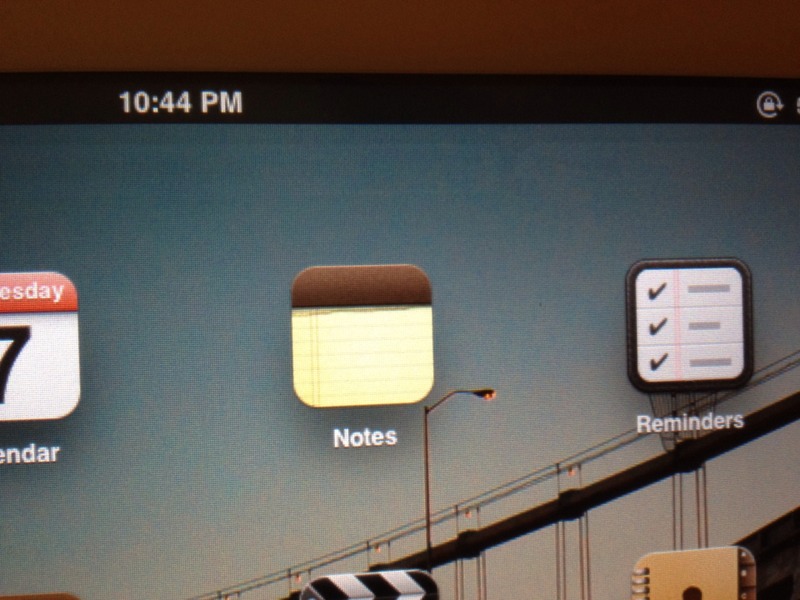
Any of you getting image retention on your iPads? My Safari web bar is retained, very faint, when I go back to the home screen. Easily seen with a black screen or while watching a movie. It goes away after a few minutes but it's annoying.
This is the third product I've purchased in the last 6 months with an IPS screen, and both had the same issue. Both screens were sourced from LG. Is there a way to find out which manufacturer produced my screen?
Have no idea if it's a fab problem or if it's inherent with IPS tech. Any help would be appreciated. To get a better idea of what I'm seeing I've included a pic that I found on the web, shitty one but it gets the point across.

And what makes you think that?
?Macworld said:New iPads early in 2012, including high-end models with double-resolution retina displays. I think Apple will continue selling the existing iPad 2 alongside the new ones, or introduce a new lower-end model that still sports todays 1024- by 768-pixel screen, simply because I think the retina-display iPad will be a bit expensive. I think the new iPad models will use the same screen size as todaysno 7-inch model
My ipad fell down today and cracked the hell out of a corner of the screen
It's fallen down before with no harm, but not this time.
Took it to a nearby Apple Store and they want over $400 to replace it. They said it's 1/2 the price for the original (I got a 64gb with 3G.) That's a bit expensive. I'm wondering if I should go ahead and pay for it or wait for the ipad3 to come out in a month or so? I figure even if I don't get an ipad3, the prices for the ipad2 is probably going to come down. However, I'm not sure if I can live with the screen all cracked and crumbly in the corner for that long.
Also, if I get a brand new ipad3, the store guy said they wouldn't take my old ipad2 since apple doesn't have a recycling program for ipads. anyone know what I should do with it? Would gamestop take damaged ipads for their buyback program?
As a temporary measure I guess you could try a screen protector to somewhat hold it together (uh the sort of plastic sheet type, not one of the wet application ones obviously). Depending on your credit card you might have an accidental coverage thing with it, more likely it's just a regular warranty extension but you might as well check it out.My ipad fell down today and cracked the hell out of a corner of the screen
It's fallen down before with no harm, but not this time.
Took it to a nearby Apple Store and they want over $400 to replace it. They said it's 1/2 the price for the original (I got a 64gb with 3G.) That's a bit expensive. I'm wondering if I should go ahead and pay for it or wait for the ipad3 to come out in a month or so? I figure even if I don't get an ipad3, the prices for the ipad2 is probably going to come down. However, I'm not sure if I can live with the screen all cracked and crumbly in the corner for that long.
Also, if I get a brand new ipad3, the store guy said they wouldn't take my old ipad2 since apple doesn't have a recycling program for ipads. anyone know what I should do with it? Would gamestop take damaged ipads for their buyback program?
Completely realistic? Especially now with others showing off 1920x tablets at CES, 2048x1536 doesn't seem insanely far off.
Dear Time Warner, you suck as usual.
Completely realistic? Especially now with others showing off 1920x tablets at CES, 2048x1536 doesn't seem insanely far off.
Do you think Apple will sell an iPad3 with a 2048x1536 display for $500? How much are these 1920x tablets going for anyway?
Do you think Apple will sell an iPad3 with a 2048x1536 display for $500? How much are these 1920x tablets going for anyway?

Hmm, looks like I might not be able to afford an Ipad 3 at launch. I might just have to get Ipad 2 when the price drops.
Do you think Apple will sell an iPad3 with a 2048x1536 display for $500? How much are these 1920x tablets going for anyway?
Do you think Apple will sell an iPad3 with a 2048x1536 display for $500? How much are these 1920x tablets going for anyway?
I hope they don't use it as an excuse to bump the price.
Apple's usual strategy is keep prices insanely high, bump the tech to create perceived value. Hope they stick with that.
Perhaps as rumoured they keep the standard res version on as a lower priced entry ipad? If it had the ipad 3 internals (A6 please!) but 1024x768, I'd buy that one.
any bets on the price for the 16 GB iPad 2 as entry model next year? (assuming, of course, they follow their current iPhone pricing line)
Most of my brian thinks itll be 400, but I could see them going a bit lower to 350, to get more people off the fence.
I don't think you'll have a problem finding a buyer at $350, especially if it's in mint condition.
Yes. On my first iPad 2 the on screen keyboard would remain forever. It faded somewhat after hours of video, but never completely went away. I exchanged it. My current iPad 2 seems to have less of a problem. The screens were definitely different in terms of colour too, so they probably changed panel manufacturer/model.Any of you getting image retention on your iPads? My Safari web bar is retained, very faint, when I go back to the home screen. Easily seen with a black screen or while watching a movie. It goes away after a few minutes but it's annoying.
possibly, but it depends on what Apple would price a new iPad 2 at. If Apple sells old model iPads for 400 (or 350), then resale value on current iPads drops more than usual.