• Hey Guest. Check out your NeoGAF Wrapped 2025 results here!

Gamer-approved laptop recommendation thread

Status
Not open for further replies.
I have the NP8170, which is designed the same as the 9170.

The machines do indeed have 2 HDD bays. The picture is showing that the 2nd bay is indeed under the optical drive, not either/or in place of it, and the ODD requires the removal of a single screw to slide out of the way.

I'm currently running an SSD in the main bay, an HDD in the 2nd slot, and a BR-Drive.
Thx, figured it out. Was stressed and not able to focus when I saw the instructions.

The files are IN the computer.jpeg

Edit: is there a reason to load the SSD in the main bay? I'm just being lazy and popping it into the secondary bay since that takes less effort right now. I know I do have to switch the loading sequence in BIOS.
 
So, my old laptop finally kicked the bucket, and I want to buy a new one which can run most games decently, not a beast by any means, but something that can run newer games without major issues.
The ones I've been eyeing are:
Asus N56VZ

Asus G55VW

I know next to nothing about PC gaming, but since I need a new laptop anyway, It'd be nice to play some games on it as well. The G55 is at the limit of my price range, so let me know if it's worth bothering gaming on it. If not, I'll just get a cheap laptop instead. Also, if there are better alternatives in that price range, let me know.

Between those two, I'd take the G55, because the 660M has GDDR5, versus the much slower DDR3 of that 650M.

Something priced in between the two would be the Sager 6165 or 6175. If the only upgrades you mare are to the entry level i7 quad and Windows 7, you're looking at $1049 or $1069, respectively. Couple that with the fact that this model ships with a GDDR5 equipped GT 650M, which can be clocked just as high as the GTX 660M (they are both the same exact core, after all).
Thx, figured it out. Was stressed and not able to focus when I saw the instructions.

The files are IN the computer.jpeg

Edit: is there a reason to load the SSD in the main bay? I'm just being lazy and popping it into the secondary bay since that takes less effort right now. I know I do have to switch the loading sequence in BIOS.

It doesn't matter which bay it's in, as they're both SATA III ports.
 
So I ordered the new Vizio laptop which launches today and I'm pretty excited. The specs are great on paper and the 1080p resolution on a 15" screen should look fantastic. When it arrives I want to run some benchmarks on it to see how it holds up, what's the standard software and procedure for that?
 
The new XPS15 is now available in the Dell Australia site, probably appearing everywhere else soon-ish.

Like the design, has a i7 3612QM as best CPU and GT640M with GDDR5 as the best GPU... hopefully it can be heavily overclocked...
 
So I ordered the new Vizio laptop which launches today and I'm pretty excited. The specs are great on paper and the 1080p resolution on a 15" screen should look fantastic. When it arrives I want to run some benchmarks on it to see how it holds up, what's the standard software and procedure for that?

Wow, looks sleek.
The graphics card seems to be an LE version
( NVIDIA® GeForce® GT 640M LE)

Does that mean anything? Or there different versions of that card?

Please post impressions, especially on how hot the laptop gets when gaming.
 
Has anyone tried or bought the Asus Zenbook UX32VD? I know it isn't all powerful, but it does have a GT 620m.

Intel® Core™ i7 3517U Processor
Intel® Core™ i5 3317U Processor
Full HD wide-view IPS anti-glare panel
Genuine Windows® 7 Home Premium
Stylish backlit keyboard
World’s first 13.3” ultrabook to offer discrete NVIDIA® GT 620M graphics with 1GB video RAM
Up to 500GB hard drive plus hybrid 24GB SSD to accelerate performance
Instant on 2-second resume and 10days standby with auto data
Speakers by Bang & Olufsen ICEpower®


i saw a youtube video of it running some games. doesnt look too bad at all. check the thread on notebookreviews forum. lots of owners there.
 
I'm leaning towards this one for $1650.

MSI
Series
G Series
Model
GT70 0ND-202US
Part#
9S7-176212-202

General
Color
Black
Operating System
Windows 7 Home Premium 64-Bit
CPU Type
Intel Core i7-3610QM 2.3GHz
Screen
17.3"
Memory Size
12GB DDR3
Hard Disk
750GB
Optical Drive
DVD Super Multi
Graphics Card
NVIDIA Geforce GTX 675M
Video Memory
2G GDDR5
Dimensions
16.85" x 11.34" x 2.17"
Weight
8.6 lbs.
Other Features
Killer Gaming Network
Intel Wireless Display

CPU
CPU Type
Intel Core i7
CPU Speed
3610QM(2.30GHz)
CPU Support
6MB L3 Cache
Max Turbo Frequency 3.3 GHz

Chipset
Chipset
Intel HM77

Display
Screen Size
17.3"
Wide Screen Support
Yes
Resolution
1920 x 1080
LCD Features
Non Reflection

Operating Systems
Operating System
Windows 7 Home Premium 64-Bit

Graphics
GPU/VPU
NVIDIA GeForce GTX 675M
Video Memory
Dedicated 2GB
Graphic Type
Dedicated Card

Hard Drive
HDD
750GB
HDD RPM
7200rpm

Memory
Memory
12GB
Memory Speed
DDR3 1600
Memory Spec
4GB x 3

Optical Drive
Optical Drive Type
DVD Super Multi

Communications
WLAN
Jackson Peak1x2 (802.11 b/g/n)
Bluetooth
Yes

Ports
USB
3 x USB 3.0
2 x USB 2.0
Video Port
1 x VGA
HDMI
1 x HDMI
Other port
E-SATA only
Audio Ports
Headset AMP + Gold Flash jacks

Audio
Speaker
Dynaudio Tech
Speakers x 2 + Subwooferx1

Input Device
Touchpad
Single touch Touchpad
Keyboard
Steel Series Gaming Backlit 103 keys

Supplemental Drive
Card Reader
SD/SDHC/SDXC/XD/MSPRO/MS/MMC (support SD 3.0)
Webcam
720P HD Webcam

Power
AC Adapter
180-watt AC adapter
Battery
9-cell lithium ion

Physical Specifications
Dimensions
16.85" x 11.34" x 2.17"
Weight
8.6 lbs.

Now, for an extra $250, I can get this model. The differences are that the other one has an extra 750GB hard drive, a Blu-ray burner, and 4 GB of memory for the GeForce 675M card. Is it worth it, or will 2GB be sufficient?

I'm ready to buy this week, need some help here.
 
Wow, looks sleek.
The graphics card seems to be an LE version
( NVIDIA® GeForce® GT 640M LE)

Does that mean anything? Or there different versions of that card?

Please post impressions, especially on how hot the laptop gets when gaming.

Will do. They're backed up on pre-orders right now so it might be a few weeks.
 
So people who have them with a intro level i7, and a 650m, what type of performance can I expect from games like Skyrim and Civ V?
 
I'm leaning towards this one for $1650.

Now, for an extra $250, I can get this model. The differences are that the other one has an extra 750GB hard drive, a Blu-ray burner, and 4 GB of memory for the GeForce 675M card. Is it worth it, or will 2GB be sufficient?

I'm ready to buy this week, need some help here.

Tell me again, at those prices, why aren't you looking at an M17x or Clevo with 7970M?

http://www.newegg.com/Product/Product.aspx?Item=N82E16834215410

I just bought this laptop. I thought it was a good value for its price.

Good CPU, decent ram, decent Hd, and decent GPU.

Are there better deals out there for under $1000 with taxes? I still have time to cancel.

You're okay, but I'll look around real quick.

So people who have them with a intro level i7, and a 650m, what type of performance can I expect from games like Skyrim and Civ V?
1080p, HIGH
 
I read the earlier comments about the AMD drivers, kinda scared me off.

Nvidia's drivers are better, but GTX 670M and 675M are both Fermis. You really want a GTX 680M which is Kepler and literally just a slightly downclocked desktop GTX 670. That thing is an absolute beast if you are serious about doing all your gaming on a laptop.
 
The 680M is also $300 more than the 7970M, with no performance advantage.
I read the earlier comments about the AMD drivers, kinda scared me off.

The upcoming WHQL release is fixing all of those issues, so I don't see it as wise to take the vastly inferior card during one rough patch.
 
The 680M is also $300 more than the 7970M, with no performance advantage.

IME the Nvidia premium is always worth it. If you're gonna keep a laptop for 2-3 years, $300 is not exactly a lot of money compared to fighting ATI's notorious drivers for that period. Of course most of this is hardly relevant when you can't BUY a laptop with 680M inside anywhere.
 
The 680M is also $300 more than the 7970M, with no performance advantage.


The upcoming WHQL release is fixing all of those issues, so I don't see it as wise to take the vastly inferior card during one rough patch.

Okay. I'll think about getting an Alienware M17 with the 7970M upgrade, and only that, and see if I can get that through my parents. It's supposed to be a $200 upgrade, anyways, so about the same price.

I wonder if there are any other discounts I can grab besides the puny student discount and employer discount where I work.
 
IME the Nvidia premium is always worth it. If you're gonna keep a laptop for 2-3 years, $300 is not exactly a lot of money compared to fighting ATI's notorious drivers for that period. Of course most of this is hardly relevant when you can't BUY a laptop with 680M inside anywhere.

What laptops have you owned?
 
That particular model has a 650m with 2gb of DDR3 as a framebuffer (which most of the 650m's on the market do). The 660m comes with GDDR5. Still an amazing deal, btw, but the difference is that it has DDR3 as its framebuffer on the 650m.
 
Still getting resistance on the Alienware. I may just compromise on a Dell Inspiron 15R Special Edition. It has a Radeon 7730M. Will that be enough?

http://www.dell.com/us/p/inspiron-15r-se-7520/pd?~ck=mn&~ck=mn

In that case, go back to the $1600 MSI w/ GTX 675M. Even as a rebranded GTX 580M, it's faster than everything on the market except the 7970M and GTX 680M, and should beat the 7730M by 40-50%.

The 7700Ms are all the desktop 7750, underclocked by various amounts.

edit:

That does look nice. Though the GTX 660M is just as fast as the GTX 570M.
 
So I got bad news from xotic pc. Apparently SAGER no longer ships USPS, so therefore I cannot have my laptop shipped directly to my FPO address out here in Japan. To make matters worse, USPS came out with a policy last month that excludes international shipping of ANY lithium batteries, so no kindles, ipads, phones, or laptop battieries can be shipped to military service members serving overseas.

So I have the option of having the laptop sent via UPS from SAGER to xotic PC's Nebraska facility, then paying for the USPS shipping of the laptop without battery to me out here and shipping the battery to my parent's house and just surviving on "plugged in". Or see if they can ship everything to my Japanese mailing address via some non-USPS method.

Completely lame and is really bad news for any service members that might want to have any piece of technology shipped to them.
 
So I got bad news from xotic pc. Apparently SAGER no longer ships USPS, so therefore I cannot have my laptop shipped directly to my FPO address out here in Japan. To make matters worse, USPS came out with a policy last month that excludes international shipping of ANY lithium batteries, so no kindles, ipads, phones, or laptop battieries can be shipped to military service members serving overseas.

So I have the option of having the laptop sent via UPS from SAGER to xotic PC's Nebraska facility, then paying for the USPS shipping of the laptop without battery to me out here and shipping the battery to my parent's house and just surviving on "plugged in". Or see if they can ship everything to my Japanese mailing address via some non-USPS method.

Completely lame and is really bad news for any service members that might want to have any piece of technology shipped to them.

Damn, that sucks. USPS is the only one handling military mail?

Also, could anyone provide any info/difference between these screens on the Np9150?
15.6” FHD 16:9 LED Backlit Wide screen (1920x1080) Super Clear Glare Type Screen (SKU - S1R319)
15.6” FHD 16:9 LED Backlit Wide screen (1920x1080) Super Clear Matte Type Screen (SKU - S1R316) ( + 30 )
15.6" FHD 16:9 "Matte Type" Super Clear Ultra Bright LED Anti-Glare Screen w/ 95% NTSC Color Gamut (1920x1080) (SKU - S1R303) ( + 95 )
15.6" FHD 16:9 "Glare Type" Super Clear Ultra Bright LED Glossy Screen w/ 95% NTSC Color Gamut (1920x1080) (SKU - S1R301) ( + 95 )
 
I got the Sager NP9170 with the 7970M a few days ago and it's certainly something I definitely want to like, but I'm probably going to return it. I got a stuck blue pixel at the center of the screen (if you divide the screen into a tic-tac-toe table, it'd be Paul freaking Lynde) and have gotten 5 bsods since getting it. I thought it was just GFWL which was running at the time, but after uninstalling that/updating drivers/system restore I got 2 more bsods by just being on Amazon. I ran BlueScreenView and it spits out atikmpag.sys, dxgkrnl.sys and dxgmms1.sys as the problems, but I have no idea what to do with that info.

Does anyone know how I should go about this? I ordered from Xotic. I was also hoping to downgrade the Ram I had (I had 12 gigs) to 8 gigs 1333 or 1600 mhz. I heard that may be the problem as I'm told AMD gpus work better with 2 sticks. Laptop shipped on June 15th and I got it on the 20th, surely I'm covered by some sort of warranty. Also thinking about adding in the no dead pixel policy just to avoid dealing with that again. Would I just have to file it as a full return and pay shipping, then wait for the refund and reorder? Or is there a way to just send it in and get a new laptop with the decreased Ram and no dead pixel policy? Do I bite the bullet and just reroll for the same exact system?
 
Damn, that sucks. USPS is the only one handling military mail?

Also, could anyone provide any info/difference between these screens on the Np9150?

Yeah, companies like UPS, DHL, etc don't ship to FPO/APO addresses. It was all USPS and now all lithium devices are off limits.

I'm waiting on word back on if they ship to Japanese addresses. If not, I'll be forced to use it battery-less after paying for UPS shipping to the xotic PC facility from SAGER.
 
Damn, that sucks. USPS is the only one handling military mail?

I would imagine UPS or FedEx would be happy to ship it to him...for a price.

Also, could anyone provide any info/difference between these screens on the Np9150?

Upgrade to the one with the higher color gamut. I suggest getting the "anti-glare" (matte) screen, not the "glare" (glossy) one unless you enjoy seeing a reflection of yourself in your laptop screen at random and often unwanted moments.
 
I would imagine UPS or FedEx would be happy to ship it to him...for a price.


Upgrade to the one with the higher color gamut. I suggest getting the "anti-glare" (matte) screen, not the "glare" (glossy) one unless you enjoy seeing a reflection of yourself in your laptop screen at random and often unwanted moments.

Appreciated. I'd love to know what "unwanted" moments mean to you though...
 
What laptops have you owned?

Oh, you want to play this card. Okay, I'll play your game. I'm going to tell you my complete video card history which is relevant, and then you can tell me yours. Since I don't buy a laptop every year, I'm not going to pretend that I've owned a million laptop GPUs, but I think my desktop GPU history speaks for itself. I've owned plenty of Nvidia and ATI products, though I freely admit I've owned more Nvidia than ATI over the years.

Desktop GPUs (3D only):
Nvidia RIVA 128
ATI Rage 128
GeForce II GTS
GeForce 3 Ti200
GeForce 4 Ti4200
ATI Radeon 9800 Pro
GeForce 6800 GT
ATI Radeon X1900XTX
GeForce GTX 260
GeForce GTX 470 (2x SLI)

Laptop GPUs:
Intel Extremely Bad Graphics (Dell Inspiron 700m)
ATI Mobility Radeon HD 3470 (Lenovo ThinkPad T400)
Nvidia GeForce GT 640M LE (Sony VAIO S15 2012)

I still have my cute little Dell laptop, she's cute a little 12.1" from days before anyone ever heard of netbooks or Ultrabooks or whatever the hell they are called these days.

Appreciated. I'd love to know what "unwanted" moments mean to you though...

Well now, that's a secret~
Hi-mi-tsu~
 
To people that bought laptops with 660m:

You know that you can buy a cheaper laptop witha 650m and OC it to 660m level? For around $300 cheaper.

http://www.newegg.com/Product/Produ...&cm_mmc=TEMC-RMA-Approvel-_-Content-_-text-_-

Best bang for the buck ATM.

btw, lol at Newegg's links.

Wow. Why is this so cheap? Alright seriously considering this. So I do a lot of gaming and creative work in Nuke/Maya/After Effects, would this be an acceptable rig for that? Keep in mind I can currently do all of that on my unbelievably shit dinosaur desktop. It's an Intel Core Quad 3.0ghz with a 896mb GTX 260 with 4gb of I can't remember RAM. How big of a jump would this be?

Edit: That laptop only has 6gb of RAM but I can upgrade that as needed.
 
YES! I ordered my laptop on May 6th but because of a few complications with the graphics card the shipment kept getting delayed. Today is the day, however, that I will receive it. I'm so psyched but pissed at the same time because, for the first time in MONTHS I have to work a damned mid shift at work (retail). 12:00 to 8:30, and then 6:00 AM the next morning.
 
I got the Sager NP9170 with the 7970M a few days ago and it's certainly something I definitely want to like, but I'm probably going to return it. I got a stuck blue pixel at the center of the screen (if you divide the screen into a tic-tac-toe table, it'd be Paul freaking Lynde) and have gotten 5 bsods since getting it. I thought it was just GFWL which was running at the time, but after uninstalling that/updating drivers/system restore I got 2 more bsods by just being on Amazon. I ran BlueScreenView and it spits out atikmpag.sys, dxgkrnl.sys and dxgmms1.sys as the problems, but I have no idea what to do with that info.

Does anyone know how I should go about this? I ordered from Xotic. I was also hoping to downgrade the Ram I had (I had 12 gigs) to 8 gigs 1333 or 1600 mhz. I heard that may be the problem as I'm told AMD gpus work better with 2 sticks. Laptop shipped on June 15th and I got it on the 20th, surely I'm covered by some sort of warranty. Also thinking about adding in the no dead pixel policy just to avoid dealing with that again. Would I just have to file it as a full return and pay shipping, then wait for the refund and reorder? Or is there a way to just send it in and get a new laptop with the decreased Ram and no dead pixel policy? Do I bite the bullet and just reroll for the same exact system?
Man that sucks. Have you tried the new AMD Catalyst 12.7 (8.981.2.1 June 25) AMD Official BETA?

Oh, you want to play this card. Okay, I'll play your game.
I see how you read it, but my question was one dimensional, and there was no hidden chess match woven in between. I just wanted to know where you started out.

My first "gaming" laptop was a Dell Vostro 1500, with 2.0Ghz C2D and the 8600M GT.

The only ATI/AMD card I've owned is my current 6970M.
Wow. Why is this so cheap? Alright seriously considering this. So I do a lot of gaming and creative work in Nuke/Maya/After Effects, would this be an acceptable rig for that? Keep in mind I can currently do all of that on my unbelievably shit dinosaur desktop. It's an Intel Core Quad 3.0ghz with a 896mb GTX 260 with 4gb of I can't remember RAM. How big of a jump would this be?

Edit: That laptop only has 6gb of RAM but I can upgrade that as needed.
The GT 650M GDDR5 is significantly faster than the stock GTX 260, but that DDR3 version is a much smaller leap, if not even.
 
Does DDR3 really handicap the 650m *that* much?

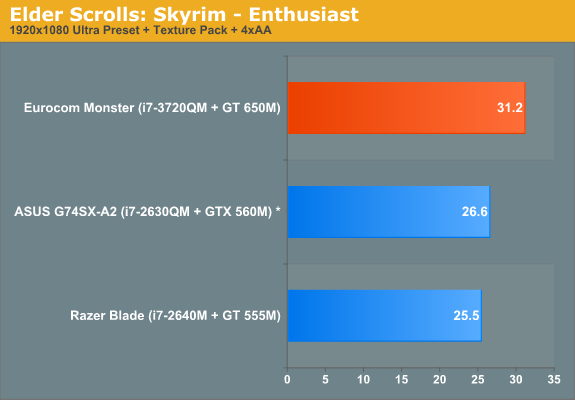
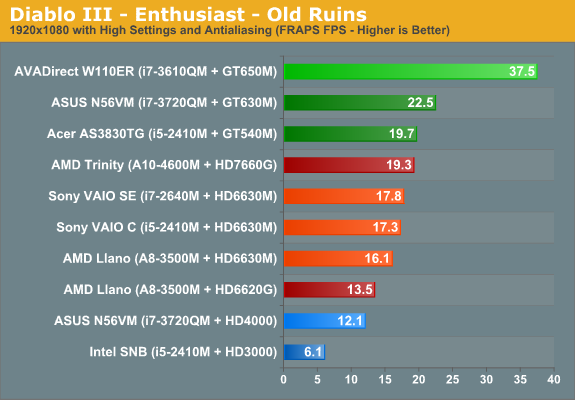
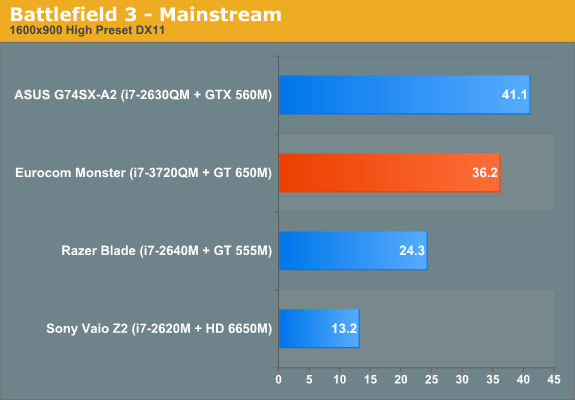
Let me not be painting the DDR3 version as some sort of terrible GPU. Here on Anandtech, they reviewed a machine with an i7 quad and this same GT 650M DDR3.

Highlights:

650M-DDR3-ESS-1080p-Max.png


650M-DDR3_D3_1080p-Max.png


650M-DDR3-B3-900p.png


It's essentially equal to last gen's GTX 560M. So it's a very capable card, and is an absolute steal at $899. The GDDR5 version is only about 20-25% faster, but would also cost another $150 to acquire.

At the Acer's 1600x900, you can run pretty much any game on High settings.
 

Yup. Installed Intel Rapid Storage as well at a friend's suggestion and still got a bsod after every possible/recommended update. Did a full system wipe and reinstall with JUST Firefox and surfed for only a few minutes before another bsod. Is it my 12 gigs of Ram not meshing with the 7970? Will going down to 8 gigs (1600 or 1333mhz) help out? Bad motherboard? I got the IC Diamond Thermal Compound and have been using a cooler and my temps are around 40-50 so I don't think it's overheating.
 
Yup. Installed Intel Rapid Storage as well at a friend's suggestion and still got a bsod after every possible/recommended update. Did a full system wipe and reinstall with JUST Firefox and surfed for only a few minutes before another bsod. Is it my 12 gigs of Ram not meshing with the 7970? Will going down to 8 gigs (1600 or 1333mhz) help out? Bad motherboard? I got the IC Diamond Thermal Compound and have been using a cooler and my temps are around 40-50 so I don't think it's overheating.

You really should try removing one stick at a time, to see if you have bad RAM. If you bsod, put that one back in then test it without the next one.
 
Let me not be painting the DDR3 version as some sort of terrible GPU. Here on Anandtech, they reviewed a machine with an i7 quad and this same GT 650M DDR3.

Highlights:

650M-DDR3-ESS-1080p-Max.png


650M-DDR3_D3_1080p-Max.png


650M-DDR3-B3-900p.png


It's essentially equal to last gen's GTX 560M. So it's a very capable card, and is an absolute steal at $899. The GDDR5 version is only about 20-25% faster, but would also cost another $150 to acquire.

At the Acer's 1600x900, you can run pretty much any game on High settings.
So it wouldn't be an upgrade from my GTX 260?
 
Woot! Just got my laptop in. Now, I have an embarassing question. So, Windows 7 is downloaded to my computer... do I have to do anything with the graphics card now? I've heard that even though it's in the laptop I have to download something from the internet or install something. Is this correct and if so where do I go?
 
Woot! Just got my laptop in. Now, I have an embarassing question. So, Windows 7 is downloaded to my computer... do I have to do anything with the graphics card now? I've heard that even though it's in the laptop I have to download something from the internet or install something. Is this correct and if so where do I go?

What graphics card is it? You may have to update the drivers. That is probably what you mean. Depending on your card, just go to ATI.com or nvidia.com and download the correct driver.
 
I would imagine UPS or FedEx would be happy to ship it to him...for a price.


Upgrade to the one with the higher color gamut. I suggest getting the "anti-glare" (matte) screen, not the "glare" (glossy) one unless you enjoy seeing a reflection of yourself in your laptop screen at random and often unwanted moments.

Neither UPS or FEDEX will ship to FPO/APO addresses. USPS is your only shipping option to military units. That's what makes this battery policy so insanely bad for military members.
 
My parents have moved the goalposts. Now they thInk the Lenovo is too expensive and they don't see the value in dedicated graphics.

I was at an unequal bargaining position already and now my mom flat stated that beggars can't be choosers. She's going to get the cheapest one possible with integrated graphics because cost is the overriding choice for her.

GAF, help me before I give the hell up.
 
Status
Not open for further replies.
Top Bottom