• Hey Guest. Check out your NeoGAF Wrapped 2025 results here!

Gamer-approved laptop recommendation thread

Status
Not open for further replies.
EDIT: Is there some sort of issue with the 7970 and Clevo? I thought it was just crossfire, but it seems to be single gpu set-ups, as well...

There's a problem with it downclocking randomly; it's supposed to be fixed this month with the next catalyst, but you might not want to risk it. The 7970 also really runs hot in mine, but I have a feeling it's due to the size versus your planned 17" and just Sager skimping on the thermal paste; will probably replace the paste when the warranty runs out.
 
Hey, guys--

I, too, was in the market for the Y580. I'm looking for something comparable--perhaps more powerful, with the following specs. Any help is more than appreciated:

15.6" 1080p screen
i7 Ivy Bridge CPU
At least a GTX 660M
SSD or HD at 7200 or hybrid
backlit keyboard (a must)
something that can be used for the practicul stuff like word processing--there will be lots of Adobe Master Suite like InDesign used.

I will be doing a bit of gaming--basically playing superior-to-console ports of some of my favorite console games, plus a few PC exclusives.

Price range, 1000-1200 USD.

I'm still leaning toward the y580 because the "bang-for-buck" ratio is simply unmatched. I want the laptop for heavy, daily use (I'm an editor) to last for 4-5 years. Any suggestions are very much appreciated.

Look at the Sager 6350 and 6370.
There's a problem with it downclocking randomly; it's supposed to be fixed this month with the next catalyst, but you might not want to risk it. The 7970 also really runs hot in mine, but I have a feeling it's due to the size versus your planned 17" and just Sager skimping on the thermal paste; will probably replace the paste when the warranty runs out.
Replacing paste does not void your Sager warranty.\
 
There's a problem with it downclocking randomly; it's supposed to be fixed this month with the next catalyst, but you might not want to risk it. The 7970 also really runs hot in mine, but I have a feeling it's due to the size versus your planned 17" and just Sager skimping on the thermal paste; will probably replace the paste when the warranty runs out.

Good to know, thanks. In terms of the matt screen and cooling options, is there anything worth getting?
 
Replacing paste does not void your Sager warranty.\

That I didn't know. Thanks.

Good to know, thanks. In terms of the matt screen and cooling options, is there anything worth getting?

Thermal paste, if it's like PC Specialist, will only be done on the cpu and cheaper to do on your own anyway. The gamut screen is supposed to be worth it but I couldn't buy it with the 7970 from my reseller for whatever reason.
 

bFLOh.png


Is... is that Cole from Infamous 2? Used to promote a gaming laptop? Yes, yes it is. Weird.
 
So I can pick up the paste elsewhere and it is easy to apply myself?

Haven't done it yet, but it looks fairly simple- screwdriver, rubbing alcohol, cloth and the paste. You could also ask the retailer if they'll do the GPU specifically for you, I suppose.
 
HEADS UP

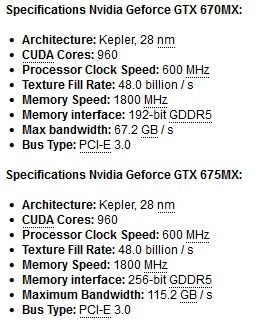
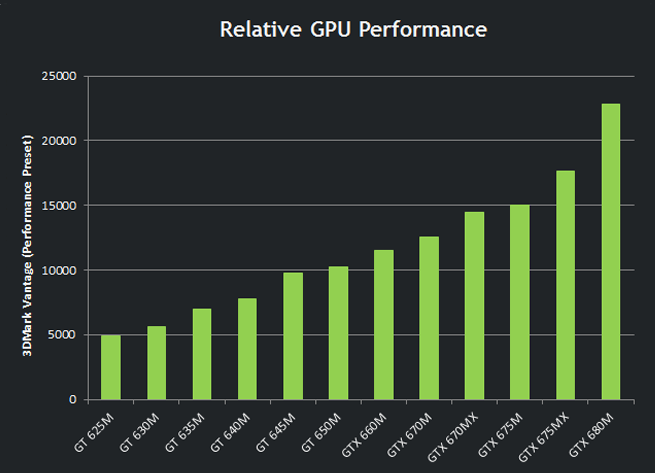
Nvidia is replacing the Fermi GTX 670M and 675M with true 28nm Kepler cards:

GTX_675MX_670MX.jpg

600m-lineup.png


Clevo/Sager, Alienware, and MSI should be carrying them by late Oct./early November.
 
Could anyone explain why a 256-bit memory interface is anathema among the developer community ? That's one of the many MANY things that I don't get about computer tech.
 
Could anyone explain why a 256-bit memory interface is anathema among the developer community ? That's one of the many MANY things that I don't get about computer tech.

Are you asking why 256-bit isn't in more laptops, or on more cards? Sorry if I'm confusing your point.
 
Hey guys, I bought the sager NP9150 a couple of months ago from xoticpc and it's a great machine. I've been looking to grab a spare AC adapter and having trouble locating the appropriate one. I could buy one from sager or xotic for $95+ but was hoping to find one cheaper. The adapter is a 180W brick. As long as I find one at that rating that fits into the machine, then it should work just fine right? I know it's a basic question but I just wanted to make sure before I bought anything.

From the website, the adapter that I need is "ACA-9150, NP9150 180W 110V/240V autoswitch AC Adapter." Also, I live in the US and I'm pretty sure all the outlets in my house are 110v so I don't need any kind of autoswitch to 240v option.

Thanks for your help!
 
HEADS UP

Nvidia is replacing the Fermi GTX 670M and 675M with true 28nm Kepler cards:

Clevo/Sager, Alienware, and MSI should be carrying them by late Oct./early November.

so, the 675MX is a Quadro K4000M... I expected the 670MX to be the K3000M instead of the K4000M with narrower memory bandwidth.
 
HEADS UP

Nvidia is replacing the Fermi GTX 670M and 675M with true 28nm Kepler cards:

GTX_675MX_670MX.jpg

600m-lineup.png


Clevo/Sager, Alienware, and MSI should be carrying them by late Oct./early November.

boss! but out of my money range :(
i ordered the asus n76vz now. i hope it works this time.
 
so, the 675MX is a Quadro K4000M... I expected the 670MX to be the K3000M instead of the K4000M with narrower memory bandwidth.

Yep, that's exactly the situation.

Also.....

I have seen word that a GT 645M was set to be announced also, but there's no details on that one in the wild.
 
Thinking of ditching the ol' dark tower and going whole hog on a NP9370 with dual 680Ms/i7-3720QM/16GB RAM/intel 240GB 520 Series SSD. But I'm seriously battling the urge for a totally adequate 9150/680m and my usually fiscally sensible self.

Might be the last gaming, or hardware for that matter I buy until at least 2015 (when the nex-gen twins start to show real promise) so the SLi carrot and dat GTX is pulling me along.
 
Small update: I think the card actually overheated. At least, it disappeared from all temperature monitoring programs, everything slowed right down and wouldn't appear again till I restarted windows. Be really great if I could get one laptop without heating problems, but there's another reason to avoid the 7970 if you didn't already have enough.
 
Thinking of ditching the ol' dark tower and going whole hog on a NP9370 with dual 680Ms/i7-3720QM/16GB RAM/intel 240GB 520 Series SSD. But I'm seriously battling the urge for a totally adequate 9150/680m and my usually fiscally sensible self.

Might be the last gaming, or hardware for that matter I buy until at least 2015 (when the nex-gen twins start to show real promise) so the SLi carrot and dat GTX is pulling me along.

What is in your current desktop? You may want to hold out until the Q1 2013 Nvidia/AMD mobile GPU updates, because those will be a nice bump in power and closer to the releases of the consoles.

The 675MX is still weaker than the 7970M, right, going by that graph? Still, if the Enduro 'fix' turns out to be hot air...
The 7970M is exactly equal in power to the GTX 680M. So the 675MX will probably be ~25% faster than the 675M, but 25% slower than both of them, by my estimates from the graph.

Also, word is that the 675MX will be exactly equal to the cost of the 7970M. So those looking to jump ship from AMD may have an easy out, under warranty too.
Small update: I think the card actually overheated. At least, it disappeared from all temperature monitoring programs, everything slowed right down and wouldn't appear again till I restarted windows. Be really great if I could get one laptop without heating problems, but there's another reason to avoid the 7970 if you didn't already have enough.

If you're overheating, I'm positive you just need to repaste. I know people who are overclocking their 7970Ms beyond the frequencies of the stock desktop 7870, and the cards aren't touching 90C.

Get some IC Diamond 7 or Arctic MX-4.
 
If you're overheating, I'm positive you just need to repaste. I know people who are overclocking their 7970Ms beyond the frequencies of the stock desktop 7870, and the cards aren't touching 90C.

Get some IC Diamond 7 or Arctic MX-4.

The paste's coming, I'm just annoyed/amused that 3 different laptops of 3 different companies all had the same bloody problem. Ah, well, so it goes.
 
Huge thread but I need help :-) my laptop died so I'm looking for a replacement that'll be more than enough for sim city 5 and won't break the bank hdmi out would be great too.

Here's what the PC specs are on Origin's website,

System Requirements Processor: AMD Athlon 64 X2 Dual-Core 4000+ or better or Intel Core 2 Duo Processor 2.0GHz or better

Operating System: Windows XP/Vista/7

RAM: Windows XP: 1.5GB Windows Vista and Windows 7: 2GB PCs using a built-in graphical chipset are recommended to have 2GB RAM

Graphics Card: ATI X1800 or better* nVidia 7800 or better* Intel 4100 Integrated Graphics or better*

DVD-ROM: 8x or better

*Minimum of 256MB of on-board RAM and Shader 3.0 or better support.
 
I repasted with arctic silver and the max temperatures went down from 91 to... 90.

...Well, I guess I can't say it wasn't an improvement. Just not sure now whether there's something wrong with the card or both I and whoever pasted the GPU in the first place are incompetent.
 
Thinking of ditching the ol' dark tower and going whole hog on a NP9370 with dual 680Ms/i7-3720QM/16GB RAM/intel 240GB 520 Series SSD. But I'm seriously battling the urge for a totally adequate 9150/680m and my usually fiscally sensible self.

Might be the last gaming, or hardware for that matter I buy until at least 2015 (when the nex-gen twins start to show real promise) so the SLi carrot and dat GTX is pulling me along.

The advantages of the dark tower are dramatic over a laptop for gaming. Unless you really need to take your gaming with you everywhere you go, it's not really a good idea to say goodbye to your Gaming Barad-dûr.
 
Huge thread but I need help :-) my laptop died so I'm looking for a replacement that'll be more than enough for sim city 5 and won't break the bank hdmi out would be great too.

Here's what the PC specs are on Origin's website,

System Requirements Processor: AMD Athlon 64 X2 Dual-Core 4000+ or better or Intel Core 2 Duo Processor 2.0GHz or better

Operating System: Windows XP/Vista/7

RAM: Windows XP: 1.5GB Windows Vista and Windows 7: 2GB PCs using a built-in graphical chipset are recommended to have 2GB RAM

Graphics Card: ATI X1800 or better* nVidia 7800 or better* Intel 4100 Integrated Graphics or better*

DVD-ROM: 8x or better

*Minimum of 256MB of on-board RAM and Shader 3.0 or better support.
So basically any modern laptop can run it.

The question is, how much can you spend? Maximum?
Kind of a stupid question, but is it common for the Sager laptops to come with the driver pre-installed?
If you order it with the OS, everything comes installed for you.

I repasted with arctic silver and the max temperatures went down from 91 to... 90.

...Well, I guess I can't say it wasn't an improvement. Just not sure now whether there's something wrong with the card or both I and whoever pasted the GPU in the first place are incompetent.
That's weird, but hopefully it lowers as the AS5 settles in and cures.
 
Bought the ASUS G75VW-DS72
What is your opinion on it?

- Intel Core i7-3610QM (2.30GHz, Quad-Core) Processor
- 17.3" Full HD (1920x1080) Display
- 16GB RAM
- 256GB SSD + 750GB 7200rpm HDD
- NVIDIA GeForce GTX 670M 3GB Graphics
- Blu-ray Writer
- Wireless N, Bluetooth 4.0
- 2.0 Megapixel Webcam
- HDMI
- 8-cell Battery
http://www.canadacomputers.com/product_info.php?cPath=371&item_id=048616

Keep in mind that the point of this was to be able to play PC games away from home while I'm at work for a month.
 
I was looking at this computer:
http://www.xoticpc.com/msi-ge70-0nd033us-p-4577.html?wconfigure=yes

and went looking for one with similar specs but in a 15 inch screen and I found one that appears to be exactly the same to me but it is more expensive than the 17 inch one is there a reason for this that I am missing.

Heres the 17:
http://www.xoticpc.com/msi-ge70-0nd033us-p-4577.html?wconfigure=yes

Also, does anyone here have either of these computers and if so how do you like it?
Did you mean to link the GE60, in one of those?

No one here has either of them, so you should check the GE60/GE70 thread from NBR.

Bought the ASUS G75VW-DS72
What is your opinion on it?

- Intel Core i7-3610QM (2.30GHz, Quad-Core) Processor
- 17.3" Full HD (1920x1080) Display
- 16GB RAM
- 256GB SSD + 750GB 7200rpm HDD
- NVIDIA GeForce GTX 670M 3GB Graphics
- Blu-ray Writer
- Wireless N, Bluetooth 4.0
- 2.0 Megapixel Webcam
- HDMI
- 8-cell Battery
http://www.canadacomputers.com/product_info.php?cPath=371&item_id=048616

Keep in mind that the point of this was to be able to play PC games away from home while I'm at work for a month.

Extremely expensive for the GPU in it.

Do you have a good desktop at home? If so, I'd buy something much more modest, such as this ASUS N56, or at least a much cheaper SKU of the G75. Unless you want all of those extras which are pumping the price, that is.
 
Extremely expensive for the GPU in it.

Do you have a good desktop at home? If so, I'd buy something much more modest, such as this ASUS N56, or at least a much cheaper SKU of the G75. Unless you want all of those extras which are pumping the price, that is.

My main characteristic that I was looking for in the Laptop was the Bluray Player and the Screensize as I watch a lot of movie at work and I want to be able to watch the Blurays movies. Also the SSD is a neat feature I think.

My desktop is 2 year old but the main factor was to play high level games while being in my inuit village for work.
 
My main characteristic that I was looking for in the Laptop was the Bluray Player and the Screensize as I watch a lot of movie at work and I want to be able to watch the Blurays movies. Also the SSD is a neat feature I think.

My desktop is 2 year old but the main factor was to play high level games while being in my inuit village for work.

Well, as I said, it's fine if the additional Blu-ray actually matters to you.

What are the specs of your desktop? I can evaluate the +/- on where its performance stands against this notebook.
 
Well, as I said, it's fine if the additional Blu-ray actually matters to you.

What are the specs of your desktop? I can evaluate the +/- on where its performance stands against this notebook.

It was a 1100 desktop about 2 years ago and I have a GTX 8800 GTS with a i5 and 4go of Ram. Sadly I dont have the full list with me as I'm at work. But I will run the tests when I get back home Monday.
 
It was a 1100 desktop about 2 years ago and I have a GTX 8800 GTS with a i5 and 4go of Ram. Sadly I dont have the full list with me as I'm at work. But I will run the tests when I get back home Monday.

No need for benchmarks, as the GPU was really all I needed. The GTX 670M is nearly double the speed of your current card.
 
Hello guys!

I've saved some money and I'm looking forward to replacing my weak i3 + 5470M.

The main uses will be gaming, obviously, but also 3D modelling and rendering and level design with UDK, CryEngine 3, etc. So I'm pretty sure I'm going to need an i7 and I heavily lean towards Nvidia for compatibility reasons.

The main reason I'm not getting a desktop is because I'm gonna have to move quite often for the next few months and, well, it's not really practical at all. But I don't really care if it's big or heavy, or it's pretty or not or if the battery lasts for long (even if it's obviously preferable).

My target budget is 1000€ (Spain) and after looking around I've seen (using PC Componentes for reference):

Lenovo Y580 - Known by everyone, but it's not on sale in Spain and importing from Germany sounds way too annoying.

MSI GE60 - 1070€, GTX660M, 8GB, 15.6" 1080p... but it only has an i5, which sounds like quite a big difference compared to the laptop below :\ First MSI with an i7 is MSI GE70 and is 260€ more expensive.

And my main choice for now, Dell Inspiron 17R SE - 1019€, i7-3610QM, GT 650M 2GB GDDR5, 8GB, 17.3" 1080p. I would love to have some more GPU power but I want to keep that budget, and the 650M is not that far from the 660M, right?

So, what do you think?
 
Are you asking why 256-bit isn't in more laptops, or on more cards? Sorry if I'm confusing your point.
While discussing the specs of the incoming home consoles, some Gaffers made the assumptions that the memory bus will most certainly not be 256-bit wide because developers are fiercly against it, which in turn tempered our expectations regarding the memory bandwidth.

So, the question is why this specific width is to be avoided? Maybe you have the answer. I know there are other wider buses such as 384-bit. Never heard of anything about them though.
 
So, what do you think?

The Dell looks like a good buy.

While discussing the specs of the incoming home consoles, some Gaffers made the assumptions that the memory bus will most certainly not be 256-bit wide because developers are fiercly against it, which in turn tempered our expectations regarding the memory bandwidth.

So, the question is why this specific width is to be avoided? Maybe you have the answer. I know there are other wider buses such as 384-bit. Never heard of anything about them though.

Sounds like absolute rubbish. Have you ever seen a developer ask for less bandwidth and power? Or, why haven't PC devs been complaining about the leap to 256-bit cards since the Geforce 7900 series?

Unless someone can link me to substantial evidence of this anathema, I'm calling BS on that train. But again, 256-bit is not some new advent in video game development, and I've never once heard this spun as a negative.
 
Well my new 9150 is having some issues. There is a very soft ticking noise exactly every 2 seconds, but it doesn't occur when I am playing a game or installing something. It is most likely the hard drive. Also, I got a blue screen last night. I haven't really done much with the laptop besides play GW2,so I am confused what's happening.
 
Hi Laptop-Gaf, I need your help for a friend!

http://www8.hp.com/de/de/products/l...72950&jumpid=reg_r1002_dede_c-001_title_r0003

This is his laptop: Problem is, it seems the laptop doesn't use the radeon graphics card when playing Dota2. He can only play it on minimal settings and it still stutters, which to me is baffling since it's a source game.

So it seems the game is using the Intel graphics instead of the radeon even though he specified it otherwise in the CCC.

Is there a fix to that or any other possible way to FIX the graphics instead of having this lackluster software solution?
 
Hi Laptop-Gaf, I need your help for a friend!

http://www8.hp.com/de/de/products/l...72950&jumpid=reg_r1002_dede_c-001_title_r0003

This is his laptop: Problem is, it seems the laptop doesn't use the radeon graphics card when playing Dota2. He can only play it on minimal settings and it still stutters, which to me is baffling since it's a source game.

So it seems the game is using the Intel graphics instead of the radeon even though he specified it otherwise in the CCC.

Is there a fix to that or any other possible way to FIX the graphics instead of having this lackluster software solution?

I know in the old DV6/7, HP used to have a way to disable the integrated GPU completely, and run in a fixed mode, perhaps in the BIOS. Is that option present in this machine?

Well my new 9150 is having some issues. There is a very soft ticking noise exactly every 2 seconds, but it doesn't occur when I am playing a game or installing something. It is most likely the hard drive. Also, I got a blue screen last night. I haven't really done much with the laptop besides play GW2,so I am confused what's happening.

yeah, could be the need for a replacement HDD.
 
After some days of playing around with the ASUS N76VZ i have to say it's pretty good. it tops the y580 in terms of looks. unfortunately its a little slower due to the GT 650M inside. Still.... I'm playing Sleeping Dogs (on High at 720p), Skyrim (High), NBA 2K12 (high on 1080p), FIFA 13 (high on 1080p) and F1 2012 (high on 1080p) with no problems at all. it gets a little hot around the cooling area but thats a common thing. i cant remember how the y580 behaved in that regard.

oh yeah, the gamecube emulator dolphin also works great on it. consider me surprised. even though the laptop does not feel as snappy as the y580 (the advantage of the 32GB SSD i guess), its definitely a good buy.


What people Google usually recommends to me are both the

HP Envy 15(2012)

Dell XPS(2012)

Both I think have new models released this year, so I'll just put 2012 at the end of them.

Between those two, I like the style of the XPS 15 more, but only if you take the one with the 640M GDDR5.

Note: DO NOT get the new Dell XPS 15. Its wifi antenna makes the machine basically unuseable. Dell has only now started to acknowledge that it's an issue with the hardware (now that the wifi thread on their forums has reached 500+ pages), but they don't have a fix for it and it's not looking like there's going to be one until the next model. Right now, they are literally shipping out free wireless dongles to everyone who purchased the new XPS 15. It's terrible.

Here's a video with a speedtest comparison.
 
Haven't kept up with the laptop scene but I have a friend that is looking for a 13" laptop that can game at 720p fairly well (medium settings). He also says that if possible he would like the resolution to be 1920x1080. No budget. Any recommendations?

Edit: Saw the Asus Zenbook Prime with a 620M. It's got a 1080p screen and it looks gorgeous. I'm thinking about getting one myself now haha
 
I need to get a nice gaming laptop.
Do you guys/gals recommend "Alienware M18x" ? Need a MinimuM screen of 17inch.
Price does not matter, but what I need is to play the latest games on it and keep it for couple of years. 2-4 years :)
Any of you had a good luck with those.
Never had a gaming laptop, what other brand do you recommend?
 
Status
Not open for further replies.
Top Bottom