• Hey Guest. Check out your NeoGAF Wrapped 2025 results here!

Apple iPad 2 |OT|

Status
Not open for further replies.
I have some bleeding on the right side. There is a spot near the top in portrait that annoys me when the image is dark and another much smaller bleed near the bottom that's barely noticeable.

I'm curious to see whether Apple will start taking exchanges on these. I haven't heard any reports yet. Honestly it doesn't bother me very much but I'll trade it in if they begin allowing it.
 
Jasoco said:
The only thing that bugs me about Friendly is that itdoesnt have notifications and badges. It's my only gripe.

Also, if I use iPhone Explorer, can I transfer my Mighty Eagle to my iPad Angry Birds? Or do I need to buy it again?

Friendly also for some reason doesn't sync that well for me. Anything I write on it never gets updated on facebook's site.
 
kinggroin said:
If you aren't full of shit, then you have just solidified my decision to ditch the xoom ffor the pad....


As soon as they are in stock.
I assure you it all loaded great on my end. It was my only tab open, if that matters.
 
krypt0nian said:
It's definitely not acceptable and you should swap yours, but this will have no real consequences for Apple.
if Apple does it for free with no stress and you've backed up your settings, it shouldn't have any consequence.
 
japtor said:
It was from the screens being glued to the glass...the iPads aren't constructed that way.

I believe they still glue the digitizer (touch sensor) to the glass.... so the yellowing may still be temporary as that glue dries. In fact, I have already seen reports that the yellow spots have mostly disappeared for many users as time progresses.
 
OldJadedGamer said:
So what is the decision from folks? White or Black?
White. Definitely. I love it.

Anyway, does anyone have the same problem with Super Mega Worm. I got it because it's free now (or was) but it doesn't work on the iPad at all. Unusable. The graphics appear 1:1 pixel in the corner and nothing is clickable. And I haven't even played it yet.

Also, why is Trism such a shitty iPad port? This was the first puzzle game hyped up on the iPhone before the SDK was even announced, but the iPad "HD" port is horrible. Like a hybrid of 2x iPhone with retina graphics and horrible looking buttons. It's like the guy didn't even try and just gave up even trying to polish the UI.
 
If you plan on doing any form of video watching, then go for Black

If you only plan on surfing the web, doing text stuff ect then white is acceptable

I still think white is terrible though. I cannot image looking at TV (which I do with he lights dimmed), then grabbing my iPad to check IMDB and having the white bezel glaring at me. Actually watching a video seems terrible.
 
Keyser Soze said:
If you plan on doing any form of video watching, then go for Black

If you only plan on surfing the web, doing text stuff ect then white is acceptable

I still think white is terrible though. I cannot image looking at TV (which I do with he lights dimmed), then grabbing my iPad to check IMDB and having the white bezel glaring at me. Actually watching a video seems terrible.
Dont agree with your evaluation at all.

The white is better for document creation, and reading practically everything. It blends right in with white websites.

The black looks terrible for video in comparison, since the screens black levels cant match the rich black bezel, making it looked washed out in comparison to the contrast the white cates making your blacks look much darker.

To each their own.

Edit: sorry for the spelling errors, typed it in portrait mode with my thumbs. Love my new ipad.
 
OldJadedGamer said:
So what is the decision from folks? White or Black?

I'd say black.

Same reason I'd prefer the Macbook Pro's bezel (black) to the Macbook Air's bezel (silver).

It seems to blend into the images better and is less distracting IMO.
 
Jasoco said:
You don't usually want 4:3 for the iPad. You want 1:1 (square) since it rotates with the device.

There are 4 different 4:3 options and 1024x768 works pretty good depending on the image
 
toohectic said:
I believe they still glue the digitizer (touch sensor) to the glass.... so the yellowing may still be temporary as that glue dries. In fact, I have already seen reports that the yellow spots have mostly disappeared for many users as time progresses.
True but it didn't seem to come up before, whatever the case good to know it's clearing up at least.

For the light leakage I saw a post elsewhere where someone had none at all (dark room, black screen, full brightness) so it's definitely a defect and not something anyone should live with...at least when stock comes in to get replacements.
Jasoco said:
White. Definitely. I love it.

Anyway, does anyone have the same problem with Super Mega Worm. I got it because it's free now (or was) but it doesn't work on the iPad at all. Unusable. The graphics appear 1:1 pixel in the corner and nothing is clickable. And I haven't even played it yet.

Also, why is Trism such a shitty iPad port? This was the first puzzle game hyped up on the iPhone before the SDK was even announced, but the iPad "HD" port is horrible. Like a hybrid of 2x iPhone with retina graphics and horrible looking buttons. It's like the guy didn't even try and just gave up even trying to polish the UI.
Just tested Super Mega Worm and it worked fine on my old iPad, got any hacks installed? Otherwise try reinstalling it or rebooting the iPad I guess. If none of that works it could just be some weird iPad 2 only bug.

For Trism I remember hearing about the HD version sucking hard when it came out, so you're probably just running into it being a really lazy ass port.
 
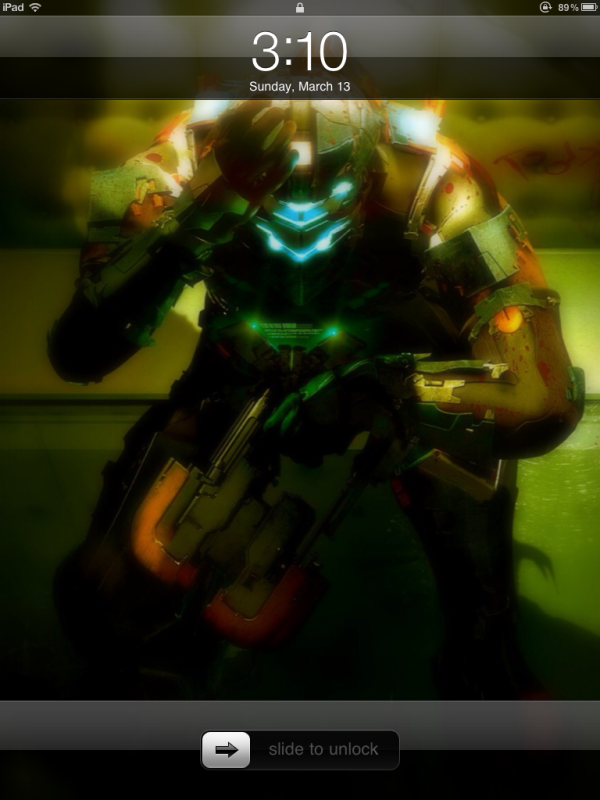
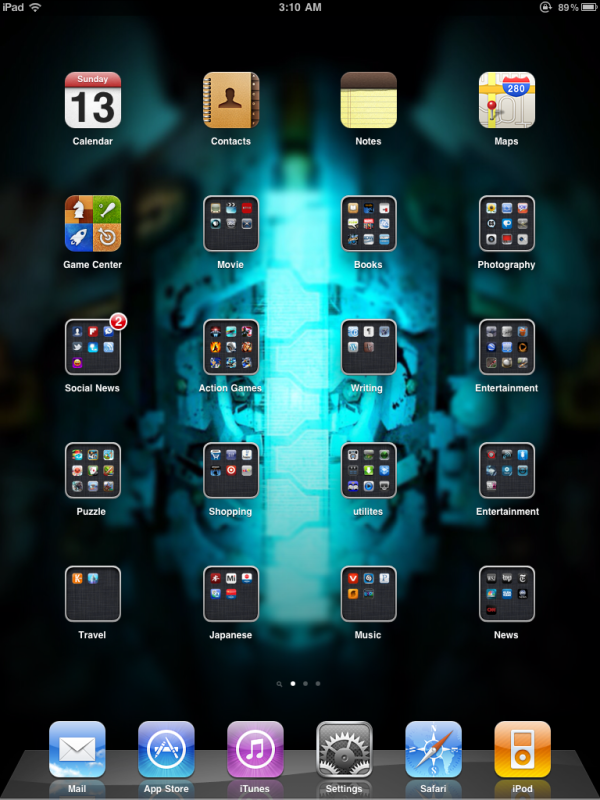
Lets post our new iPad 2s!!

Lockscreen & Homescreen.
5521401405_064e9e1ab7_z.jpg

5521401377_95b5bf7001_z.jpg


I imagine Im not the only iPad upgrader who changed his backgrounds and reorganized to make it feel even fresher.
 
Went back to best buy and bought that Griffin Case. some pics of it, though not my pics

j1WLq.jpg

TWJjT.jpg

1Dfpp.jpg


oh and here is my lock screen and home screen

2926bb3b.png

1f027b1b.png
 
After Day 1

The websites I frequent that have flash have been adequately covered by Skyfire and iSwifter. Anybody who thinks they want Android for Flash should check out those two apps first.

Flipboard is better than I remembered.

SpeedText HD and Evernote combo FTW.
 
Cloudy said:
I think it's worth it if money's not tight. Really feels better to hold and the smart cover is awesome. Speed increase and video are also awesome but the still camera is horrific.

If you are upgrading primarily for taking pics, don't waste your time and money..

Money isn't exactly tight but being as I was less than happy overall with the original (it did grow on me once it was jailbroken) i think ill give this a miss.

The lightness/thinness is not a plus to me as I like to protect my Ipad with 2 cases (one rubber cover sandwiched in a folio case) Ive never had a problem with how thick this makes it, at least not at the expense of dropping it/scratching it.That's why for me, the smart cover is a stupid idea. It doesn't prove protection for the sides or the back and looks flimsy as hell. Also, a gadget that size should be held with 2 hand in my opinion, especially if you use it outdoors and commuting. One hand makes it too easy to drop, no matter how light it is.


So far the only thing that is swaying me is the speed increase, but as I have already stated, I'm happy with what ive got for the time being.

PhoncipleBone said:
It doubled the RAM from the iPad 1. And even the paltry 256 on the iPad 1 was barely noticeable most of the time. Sure, it reared its head now and again, but it was nowhere near a limiting factor of the device.

the Ipad 1's ram was gimped in the first place. Had I known beforehand (i was a Day 1 adpoter) I would never of bought the device. Doubling the ram is just bring it to what it should have been in the first place. 1Gb would be a decent upgrade. My surfing habits must be different than yours because I constantly come up against the piss poor ram. Browsing the first page of Neogaf OT threads are the most appropriate example. Safari crashes by the 3rd or 4th image. Infact, any webpage with too many images on it is a no go.

PSGames said:
I could see them doing a Retina Display on a Premium model but not at the $500 entry price.

Im willing to pay a reasonable premium. I dont quite understand that the 2010 model of iphone, still is a better deal than 2011's ipad. I thought that apple were positioning this as its premium IDevice with specs that blew all the others away, instead they are feeding into the perception that the Ipad is just an oversized ipod touch.

Their had better market improvement next year or android here i come. At this point i suffer from app store apathy, there is no point of having a million apps if you only use like 10 regularly.

 
I was very tempted to get a Smart Case, specifically the red one. I already have a BookBook from TwelveSouth from the original iPad, and the iPad 2 fits it fine, even if it's a little loose. I just want something very slim, like the Smart Case, but with back protection. Hopefully Incase comes through with something soon!
 
Man the new revision of the iPad seems pretty sexy. I haven't even seen one in person yet.

I am really tempted to get one. I have some savings and have always wanted a tablet. I have heard ebooks/digital comics are pretty awesome on the iPad. I am especially interested in how you could read comics/manga. I have seen American comics in cbr format before. Are there good apps for those kind of files?

I could even use the excuse that this might come handy for work. I am doing a project on digital manga and being able to check how they look on a tablet screen would be helpful...

Are there good image viewing apps that would also let me scroll through .png or maybe even photoshop files? A bit of a long shot I guess.

I wonder if the Yodobashi camera type stores would let me buy from them and get points. I could put the 10-20% I get back from a iPad 2 purchase on that digital dictionary I have also been looking to buy.
 
BudokaiMR2 said:
Man the new revision of the iPad seems pretty sexy. I haven't even seen one in person yet.

I am really tempted to get one. I have some savings and have always wanted a tablet. I have heard ebooks/digital comics are pretty awesome on the iPad. I am especially interested in how you could read comics/manga. I have seen American comics in cbr format before. Are there good apps for those kind of files?

I could even use the excuse that this might come handy for work. I am doing a project on digital manga and being able to check how they look on a tablet screen would be helpful...

Are there good image viewing apps that would also let me scroll through .png or maybe even photoshop files? A bit of a long shot I guess.

I wonder if the Yodobashi camera type stores would let me buy from them and get points. I could put the 10-20% I get back from a iPad 2 purchase on that digital dictionary I have also been looking to buy.
You can get a digital dictionary on the iPad. I'm pretty surf you can browse PNG and even PSDwith the right apps, but someone more knowledgeable might know better.
 
numble said:
You can get a digital dictionary on the iPad. I'm pretty surf you can browse PNG and even PSDwith the right apps, but someone more knowledgeable might know better.

dictionary.com for ipad. Amazing app.
 
BigNastyCurve said:
Tried finding this on BB's website and couldn't. I'd really like to see if my best buy has one.


Try searching in the store for the ipad 2 case. It took me some time to even find the ipa 2 cases, best buy did not put them with the ipad 1 cases nor put them near the ipad 2 display.

taylor910 said:
How much did it cost?


The Case was 39 dollars though it feels like it should be 29, I guess Griffin also charges the "Apple" tax.

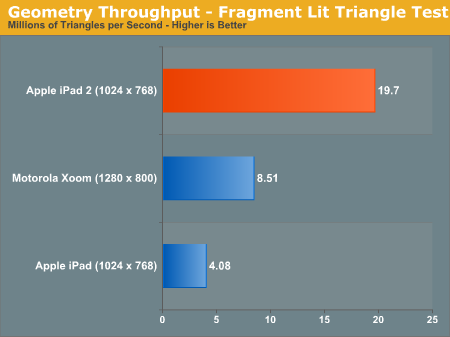
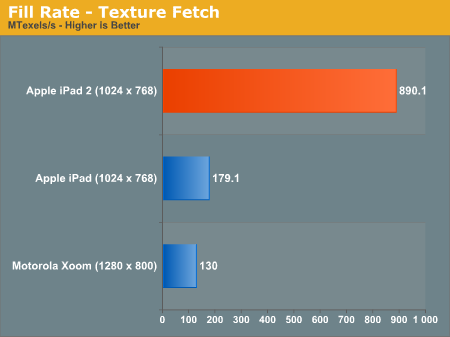
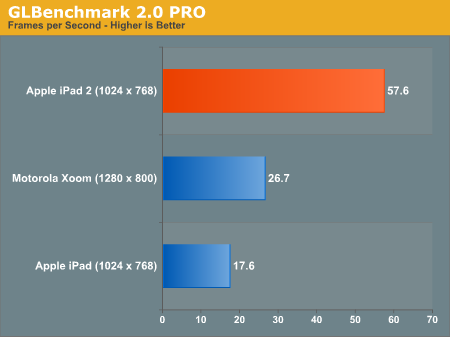
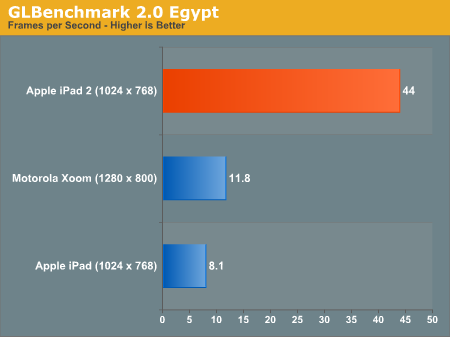
iPad 2 specs discerned, 900MHz dual-core ARM Cortex A9 and PowerVR SGX543MP2 GPU blow away graphical benchmarks


http://www.engadget.com/2011/03/12/...-cortex-a9-and-powervr-sgx543m/#disqus_thread


35902.png


35903.png


35899.png


35897.png


http://www.anandtech.com/show/4216/...rmance-explored-powervr-sgx543mp2-benchmarked
 
Afro Thunder said:
dictionary.com for ipad. Amazing app.

I'm talking japanese-english dictionary. I am looking to get one with a touchpad for kanji as well. Might be something like that for ipad as well but a more compact one makes more sense for work stuff.

If the Yodobashi apple store lets you use your point card then I may get one. I usually have some other electronic device that I want/need to use the points on :D
 
I got an Iphone 4 because it contained an HD camera so I could film snippets of my baby boy's life. At just over 4 months old, I have seen him drawn to touch screens. I let him pick out Pokemon and attacks on my game of Soul Silver, and he will randomly touch the Iphone 4's screen to move stuff. My question is this, does the Ipad make a good teaching tool for a toddler? I know they react well to instant feedback, but are the applications there to support it? Also, would the screen scratch too easily? I would not be against getting a protector sheet for the screen.
 
D4Danger said:
the apologists are the worst type of people..

If it's a fault with the LCD (and it is) then instead of telling people they're wrong or "it's not a big deal" they should be telling people how to get it fixed like people in this thread are doing.
Yea i watched that and was like .... He's all it's not a big deal, use your iPad like how it's supposed to be used! Excuse me for going to websites that are black on the background or watching video..
 
Anslon said:
I got an Iphone 4 because it contained an HD camera so I could film snippets of my baby boy's life. At just over 4 months old, I have seen him drawn to touch screens. I let him pick out Pokemon and attacks on my game of Soul Silver, and he will randomly touch the Iphone 4's screen to move stuff. My question is this, does the Ipad make a good teaching tool for a toddler? I know they react well to instant feedback, but are the applications there to support it? Also, would the screen scratch too easily? I would not be against getting a protector sheet for the screen.
http://www.youtube.com/watch?v=nFVfUl9TfOc
 
Oh, fuck it. I don't need an iPad 2. I'm gonna go get an iPad 1 from Best Buy today and save myself a $100, along with jailbreaking.
 
Stopped by Best Buy, Target, and an Apple Store. All 3 had a handful of 32/64GB Verizon models left, but I wanted a plain old Wi-Fi model.

The form factor is slick and it actually felt like a slightly heavier version of my Kindle DX. Still undecided about white or black and the smart cover. How do you guys like it so far?
 
Status
Not open for further replies.
Top Bottom