• Hey Guest. Check out your NeoGAF Wrapped 2025 results here!

Apple iPad 2 |OT|

Status
Not open for further replies.
Charred Greyface said:
iSwifter. It's free but asks for a $3 in-app purchase for the web browser, which is what you want. It does server-side rendering of all content, including flash, and works about as well as you could hope for given the constraints.


wonder if it works with the pokemon trading card game...
 
Seems kind of odd that Apple designed and demonstrates the smart cover with the fuzzy side down instead of the color side. This just picks up grit and dirt that then gets pressed between your cover and your screen. I do color side down but then the hinge doesn't fall on the right side of the "triangle" when the cover is folded.
 
gutterboy44 said:
Seems kind of odd that Apple designed and demonstrates the smart cover with the fuzzy side down instead of the color side. This just picks up grit and dirt that then gets pressed between your cover and your screen. I do color side down but then the hinge doesn't fall on the right side of the "triangle" when the cover is folded.

color side down can't work at all as a video stand. it just falls over as the weight of the ipad opens up the triangle. it's ok for typing.

i guess you just need to double check that there's no crumbs and loose grit on the surface you're putting the ipad stand on when playing a video. even then, i wouldn't expect anything found in your house to actually scratch the screen since it's not possible for a piece of stale cracker to scratch glass. it's just gonna get the inside of the cover kinda nasty.
 
CRD90 said:
Display Link is free just now on the app store. It allows you to use your iPad as a second monitor. It works pretty well, and it shows up in Windows properties as though it was a real monitor attached.

I think it's been free for a while now, so it's probably going to go back up in price pretty soon, so grab it quickly!

http://itunes.apple.com/us/app/displaylink/id411678720?mt=8

anyone have any strong opinions on apps that'd do the same thing with a mac?
 
WTF, I really thought there would have been good blogging apps by now. Blogsy sounded interesting, but no undo + unformatting destroys text + must be online to use are all deal-killers. I can't believe I am going to have to write in Pages but the only other WP apps I can see all require direct HTML writing (which is again ridiculous, direct coding is very tedious on a touchscreen...)

Maybe I've missed some miracle app, though?
 
This might deserve it's own thread but:


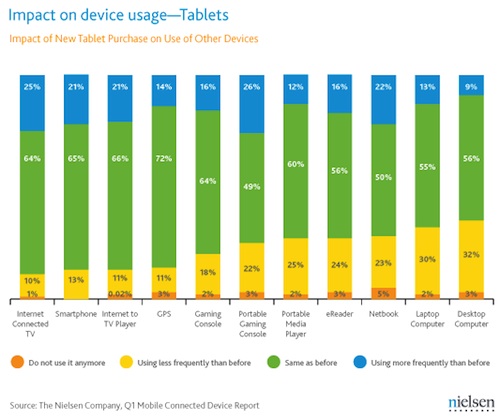
Media research firm Nielsen reports iPad Claims 82% of U.S. Installed Tablet Market, Eating Into Other Devices.

http://www.macrumors.com/iphone/201...lled-tablet-market-eating-into-other-devices/

132337-nielsen_1q2011_tablet_share.jpg


132337-nielsen_1q2011_device_usage.jpg
 
Apple's master plan fully deployed. They realized that they can't beat Windows with Mac OSX in terms of install base. So they made a new market where they rule and MS is playing a catchup game they'll never win.
 
DoctorWho said:
Really surprised to see more people own the Wifi and 3G as opposed to just the Wifi.

Same here.

I considered the 3G one, but one look at the 3G prices ended that. I have a Droid X and pay $30 a month for unlimited web through Verizon, but with the iPad the most you can get is 8GB and that's like $100 a month? WTF.
 
LCfiner said:
color side down can't work at all as a video stand. it just falls over as the weight of the ipad opens up the triangle. it's ok for typing.

i guess you just need to double check that there's no crumbs and loose grit on the surface you're putting the ipad stand on when playing a video. even then, i wouldn't expect anything found in your house to actually scratch the screen since it's not possible for a piece of stale cracker to scratch glass. it's just gonna get the inside of the cover kinda nasty.

Yeah it is a pain that it can't do the video stand with color side out. Oh well, like you said, just have to make sure a bunch of crap doesn't get stuck to it.
 
Deadly Cyclone said:
Same here.

I considered the 3G one, but one look at the 3G prices ended that. I have a Droid X and pay $30 a month for unlimited web through Verizon, but with the iPad the most you can get is 8GB and that's like $100 a month? WTF.

Same with me. If I really needed a data plan on my iPad, I'd give up owning a smartphone. It's just too expensive to pay two data plans, and kind of redundant when carrying both devices. Of course there are times I wish I could get online with my iPad2 without needing access to a Wifi hotspot, especially when commuting.
 
LCfiner said:
color side down can't work at all as a video stand. it just falls over as the weight of the ipad opens up the triangle. it's ok for typing.

i guess you just need to double check that there's no crumbs and loose grit on the surface you're putting the ipad stand on when playing a video. even then, i wouldn't expect anything found in your house to actually scratch the screen since it's not possible for a piece of stale cracker to scratch glass. it's just gonna get the inside of the cover kinda nasty.
It might not scratch the screen but it picks up dirt and leaves streaks on the screen when used as a cover. It's pretty nasty and a poor design from Apple.
 
gutterboy44 said:
Yeah it is a pain that it can't do the video stand with color side out. Oh well, like you said, just have to make sure a bunch of crap doesn't get stuck to it.
?? What, you mean folding the smart cover with the felt side out? Weird, I've never had any problem folding it with the color side out; works just fine as a video stand...
 
Charred Greyface said:
It might not scratch the screen but it picks up dirt and leaves streaks on the screen when used as a cover. It's pretty nasty and a poor design from Apple.


bullshit. every single stand that is made from a foldable cover is going to encounter the same limitation. they have all folded back the same way. unless you want the inside of the cover to include peel away layers of tissue paper kind of like public toilet seat covers.

there are some super bulky folio covers that have slots in the cover that allow you to make a stand but those expose the exterior leather or fabric to your nasty ass table. plus they're bulky and heavy

if you want the smart cover to fold the other way, then you get people complaining about the leather getting dirty and stained - that's a bigger problem than getting some crumbs on the glass screen, which wipe off easily.


edit:

Crazymoogle said:
?? What, you mean folding the smart cover with the felt side out? Weird, I've never had any problem folding it with the color side out; works just fine as a video stand...


it shouldn't. if you touch the ipad or a breeze comes by it will push the ipad backwards as the triangle unfolds. just giving you a heads up so you don't come back in a couple weeks complaining about a cracked screen and how the smart cover design is bullshit :P
 
LCfiner said:
bullshit. every single stand that is made from a foldable cover is going to encounter the same limitation.
It's the groves in the cover that's accumulating dirt and leaving streaks. Not every other cover is using grooves. And even if every cover maker copied Apple, that wouldn't make it any less a poor design decision

LCfiner said:
they have all folded back the same way. unless you want the inside of the cover to include peel away layers of tissue paper kind of like public toilet seat covers.

there are some super bulky folio covers that have slots in the cover that allow you to make a stand but those expose the exterior leather or fabric to your nasty ass table. plus they're bulky and heavy

if you want the smart cover to fold the other way, then you get people complaining about the leather getting dirty and stained - that's a bigger problem than getting some crumbs on the glass screen, which wipe off easily.
I tried using the cover that way when i first got it. *shrug* I seriously doubt that there would be people complaining that a cover gets dirtied and stained, it's a cover after all. Quick informal poll—when using the cover, do you place the iPad on a table
  1. face down (to protect the back)?
  2. on the backside (to protect the leather, or the other, more resilient, materials of which covers may be made off)?
 
Deadly Cyclone said:
What would you all suggest for a messenger bag for my iPad 2 and some other random items (notepads, 3DS, whatever)?

I have a big Timbuk2 messenger bag now, but sometimes I don't want to lug around something that big just for my iPad. I want something that looks good and is not too pricey.

Just bought this and got it today. It's for the iPad 1

It's small, inexpensive, nice looking, and awesome. It also can hold my big ass Evo (with an extended battery so it's even bigger) in an ingeniously designed front pocket, what i mean by that is that it has no zipper, it looks unsafe but the phone goes in at a snug diagonal angle so that it doesn't fall out. This is great because it allows easy entry and exit. I might use this for my iPod for listening while it's in the bag. It also has a second pocket which looks like it can hold cords (Chrager, USB) with a zipper. Then the iPad compartment really protects it as well.

It really is perfect for me, and for 19.99 it's a steal.

Now, I don't know if it could hold a couple of notepads but if you want something small this is the way to go.

It's small so I was worried that being 6'2, it would be way too short and hold up like a purse. Hell no, goes down to my waist, and the strap is removable so you can carry it as well.
 
If you want the folding versatility, you either get fold marks on the screen, or you don't make it magnetized so that it sticks to the screen tightly when closed.
 
numble said:
Yep, that's gonna leave a lot of marks on the screen.


yup. it's going to leave a lot of marks on the screen and it's not going to be as stable as the smart cover as a stand since it's not folded up into itself.

i think it's nice, but it's going to have its own set of compromises.
 
numble said:
Yep, that's gonna leave a lot of marks on the screen.
LCfiner said:
yup. it's going to leave a lot of marks on the screen and it's not going to be as stable as the smart cover as a stand since it's not folded up into itself.

i think it's nice, but it's going to have its own set of compromises.
I don't think it will. Maybe one of the gaffers getting theirs will confirm if it does...
 
numble said:
Here's a ton of reviews:
http://forums.macrumors.com/showthread.php?t=1124349&page=7

I don't know why you don't think it will leave marks--those bends will collect dust/dirt just like any other bend.

so, yeah... talk about a design compromise: the miniot can't be folded flat against the back when using the ipad. you either roll it up int that cylinder or you need to take it off.

this always happens. there are always design compromises that are not initially obvious. those trade offs are worth it for some people but not for others.
 
numble said:
Here's a ton of reviews:
http://forums.macrumors.com/showthread.php?t=1124349&page=7

I don't know why you don't think it will leave marks--those bends will collect dust/dirt just like any other bend.
I didn't see comments in that thread about streaks, could you link to particular post?
This pic is the closest to presenting some evidence of streaks and even then I can't tell for sure:

77wMx.jpg


A groove is different from a bend in my eyes. *shrug* even if you're right about that, we're still back at the argument over which side to expose to the dirt.
 
Charred Greyface said:
I didn't see comments in that thread about streaks, could you link to particular post?
This pic is the closest to presenting some evidence of streaks and even then I can't tell for sure:

http://i.imgur.com/77wMx.jpg[IMG]

A groove is different from a bend in my eyes. *shrug* even if you're right about that, we're still back at the argument over which side to expose to the dirt.[/QUOTE]
Don't base how dirty a cover will make your screen based on first day's use.

Anything with bends/grooves will attract uneven amounts of dirt from the way its held or the way it's propped up on a surface. And if you make it have a tight fit by magnetizing it to the screen, it's going to transfer it over.
 
Gary Whitta said:
I would love Apple to launch its own airline so I never have to fly with non-Apple riff-raff again.
Ya but then tickets would be $10k each, only official Apple luggage would fit in the overheads, and the peanuts would be reused from 2001.

I kid.
 
Gary Whitta said:
I would love Apple to launch its own airline so I never have to fly with non-Apple riff-raff again.

You definitely wouldn't have to worry about flight delays, only about taking flights when you want to.
 
RJT said:
Reviews seems to be really bad... I especially like this one.
I think I read in a few of them, that before some update, the driver for the PC was quite buggy.

Its definitely worth downloading just now while it's free. It's not 1-1, you couldnt watch a video on it, although there is a video mode that I think lowers the resolution for better framerate. Better than remote desktop apps though. Not trIed Air Display, so I can't compare to that.

For the uses I've tried with it so far (looking at a website while I write an essay, controlling spotify) I cant fault it.
 
Tobor said:
Where the hell are you guys setting your iPads down that's so filthy? Lol. It's craziness in this thread.
I don't know what you're talking about? Doesn't everyone place their iPad stands along the urine soaked rim of the long, open trough that passes for a group urinal in a seedy club? Gotta get my Netflix on, y'know?
 
krypt0nian said:

really not surprised. it's moved my focus away from consoles, handhelds, my laptop and my desktop. it does everything really.
 
Crazymoogle said:
WTF, I really thought there would have been good blogging apps by now. Blogsy sounded interesting, but no undo + unformatting destroys text + must be online to use are all deal-killers. I can't believe I am going to have to write in Pages but the only other WP apps I can see all require direct HTML writing (which is again ridiculous, direct coding is very tedious on a touchscreen...)

Maybe I've missed some miracle app, though?
Got a WordPress blog by any chance? QuickWordPress looks like it might be ok, here's a writeup on it.

I've suggested blogging use to the Essay dev (since it does everything in HTML) and it sounded like he's already thought of it, so hopefully some kind of functionality in that direction comes eventually.
 
What's the GAF consensus on iPad comic book reader apps? There's so many floating around that vary greatly in price so I'm wary of dropping money on too many just to play around with them.
 
Status
Not open for further replies.
Top Bottom