• Hey Guest. Check out your NeoGAF Wrapped 2025 results here!

Apple iPad 2 |OT|

Status
Not open for further replies.
Mike Works said:
iOS5 has broken my iCab :(

thankfully Safari is more usable than before with tabs. it's still not as good as iCab (lack of swipes, etc), but it'll do until iCab gets an update.

Wait, what's wrong with iCab? Didn't notice anything today, browsed for a few minutes.
 
iCab works fine for me. Though I'm still on the most recent preview to the GM on my iPad. But it was working since preview 2 fine with no problems.
 
brotkasten said:
The Courier lives!

Okay, parts of it.

As an iPad app.

ny9E1.jpg


http://www.istartedsomething.com/20...ier-project-now-live-in-clibe-an-app-for-ipad

It's free for a limited time.
http://itunes.apple.com/us/app/clibe/id463087376?ls=1&mt=8

I played with it for a while and liked it. Could be a bit faster on my first gen iPad, but whatever. I think I'll get a Jot for this.

Heh. I remember asking in one of the Courier circle jerk threads what was so unique about it that couldn't be done in an iPad app. Irony.
 
CrazyDude said:
How hot does the iPad 2 get?

Actually, I've never even noticed mine get hot. So not very.


Got iOS5 going the other night, love it. Safari is amazingly fast now, and more usable with tabs. Just give me gestures for reloading, and going between tabs and I am set.

Only thing that sucks is that there is no Apple weather app for iPads like iPod and iPhone have, so weather doesn't show up in the new notification bar.
 
Tobor said:
Heh. I remember asking in one of the Courier circle jerk threads what was so unique about it that couldn't be done in an iPad app. Irony.
Come on, it's cool and takes some ideas, but lets not pretend that it's even close to the real dealconcept.
 
brotkasten said:
Come on, it's cool and takes some ideas, but lets not pretend that it's even close to the real dealconcept.

I was being a little hyperbolic, I'll admit. It doesn't have the OS integration that the Courier would have had, or at least I assume it doesn't.

I'll play with it, but I need to order a stylus first. I'm going to get one of the Jot Pro's.
 
Very disappointed with the changes to the Music app for iPad in ios5. I didn't think it was possible for it to be worse then the ios4 version but Apple seems to have found a way. :-(

Other then that though I've been satisfied with the other ios5 changes to my iPad.
 
My launch iPad 2 home key is not working. Guess I'm going to have to visit the apple store. Do they look at jailbroken iPads? or should I unjailbreak it?
 
CougRon said:
Very disappointed with the changes to the Music app for iPad in ios5. I didn't think it was possible for it to be worse then the ios4 version but Apple seems to have found a way. :-(

Other then that though I've been satisfied with the other ios5 changes to my iPad.
How the hell is it even worse?
 
brotkasten said:
How the hell is it even worse?
Several ways, though most of my problems right now are having to do with playlists, particularly smart playlists, and podcasts since this is what I use the most.
  • Right now if I change a playlist the only changes that appear on the iPad are renames and deletes--if I move a playlist in iTunes to a different folder, the iPad keeps it in the original location. if I delete the folder I moved the playlist out of, it no longer appears in iTunes at all.
  • If I rearrange the contents of a smart playlist, the changes are not reflected on the iPad. This is a particular problem for my podcast playlists since the order that iTunes downloads them and adds them to the list is usually not the order I want to play them in.
  • There is no indication of unplayed podcasts.
  • The iPod touch version has a bunch of different sections that you can rearrange so the ones you use most frequently or you are most interested in can appear on the bottom navbar--with the iPad version there are much fewer sections and you cannot rearrange them.
  • A whole bunch of 'genius' playlists fill up the top of the playlist section--the playlists I defined are pushed almost off of the screen. I can delete the genius lists but they just get added back again when I synch. In addition, a few of my playlists are not in alphabetic order, they appear at the end and I'm not sure why
  • playlists appear in a grid and there is no way to change the layout to something else--like a line list to make it easier to quickly find the playlist I'm interested in.
  • videos no longer appear at all in my lists on the iPad (previously they appeared but you would be switched over to the Video app to actually play them.). This wouldn't be so bad if it wasn't for the fact that the Video app has no playlists. So if I have a bunch of videos or video podcasts I want to play I have to remember what they are and dig through the video app one by one to play them.
This is just off the top of my head. There are some features and many things I haven't even tried to use yet.
 
A whole bunch of 'genius' playlists fill up the top of the playlist section--the playlists I defined are pushed almost off of the screen. I can delete the genius lists but they just get added back again when I synch. In addition, a few of my playlists are not in alphabetic order, they appear at the end and I'm not sure why

Uncheck them in iTunes.

Also, I'm not sure I understand why you have podcasts in playlists. Is there a benefit to that?
 
I realize it's my own fault, but I just updated to iOS 5 without realizing my backup wasn't syncing apps as well. Now I have to download them all over again. This is the worst shit ever.
 
Hello iPad gaf, I have a quick question for you.
How much storage do you use on your iPad? I can currently get iPad 2's for the following prices: 16GB - €410, 32GB - 480, 64GB - 560.

Which would you go for? Is it worth getting one of the higher capacities to keep a better resale value for when Retina Pad rolls around? I have a feeling the 16GB market will be flooded at the time of announcement.
 
I went with a 64 GB. I liked being able to put pretty much anything I want on it.

I'm actually fine with the resolution on this thing, surprisingly. I could see where it would be nice for reading but apps are totally fine at the current res.
 
Gav47 said:
Hello iPad gaf, I have a quick question for you.
How much storage do you use on your iPad? I can currently get iPad 2's for the following prices: 16GB - €410, 32GB - 480, 64GB - 560.

Which would you go for? Is it worth getting one of the higher capacities to keep a better resale value for when Retina Pad rolls around? I have a feeling the 16GB market will be flooded at the time of announcement.
I dont use storage for anything but apps. 16gb is plenty for me. I stream any media that i want to play on my ipad.
 
Gav47 said:
Hello iPad gaf, I have a quick question for you.
How much storage do you use on your iPad?

I have a 16gb iPad 2. I wish mine was bigger, but I got it for $300, so I can't complain.
 
Yaboosh said:
I dont use storage for anything but apps. 16gb is plenty for me. I stream any media that i want to play on my ipad.

I also don't keep any media on my iPad, only apps. I bought a 32gb. It's not enough. I wish I went for 64gb. Games are getting BIG.
 
Gav47 said:
Hello iPad gaf, I have a quick question for you.
How much storage do you use on your iPad? I can currently get iPad 2's for the following prices: 16GB - €410, 32GB - 480, 64GB - 560.

Which would you go for? Is it worth getting one of the higher capacities to keep a better resale value for when Retina Pad rolls around? I have a feeling the 16GB market will be flooded at the time of announcement.

I have a 16GB iPad 2 and had a 16GB iPad 1 before that. I got my first iPad within a few weeks of release. There have been exactly two times where I've run into storage issues; both extended vacations where I had no internet connection and wanted to simultaneously load up with music, movies, tv shows, games, and comics.

During actual everyday use, where if I want video I'll be using a streaming service (Netflix, Youtube, Air Video from my home computer, etc) 16GB does not limit me in any way. I have about 100 apps or so. I do unsync large (>500 meg) games when I'm done with them, but this is not an issue because most of the larger games are sort of play-once titles rather than arcadey titles.

In terms of resale value, I think the primary determinant is going to be how compelling the new product is rather than size. I suspect a 16GB will resell for about 70 euro less than a 32GB in your area. Maybe it'll resell for 50 less because more 16s sell or maybe it'll sell for 80 less because second hand buyers don't value the additional storage at face value, but I don't think you're likely to lose out on so much money that it should factor into your purchasing decision.
 
I'll probably not be using the iPad as much of a audio player, video maybe, but streaming audio and video to this thing looks like it will be the way to go so I think I'll pick up the 16GB version. Thanks for your help guys.
 
brotkasten said:
The Courier lives!

Okay, parts of it.

As an iPad app.

http://i.imgur.com/ny9E1.jpg[IMG]


[url]http://www.istartedsomething.com/20111014/sprinkles-of-microsofts-cancelled-courier-project-now-live-in-clibe-an-app-for-ipad[/url]

It's free for a limited time.
[url]http://itunes.apple.com/us/app/clibe/id463087376?ls=1&mt=8[/url]

I played with it for a while and liked it. Could be a bit faster on my first gen iPad, but whatever. I think I'll get a Jot for this.[/QUOTE]
I tried it but it disappoints. It wastes way too much space on making it look like a notebook and extra padding for the tools. Adobe Ideas is much more streamlined and makes much better use of space. Even Wacom's app is better in that it gets the fake notebook out of the way and lets you use all the screen for your ideas.

The only thing this has is the cloud part where it syncs between your devices.
 
Gav47 said:
Hello iPad gaf, I have a quick question for you.
How much storage do you use on your iPad? I can currently get iPad 2's for the following prices: 16GB - €410, 32GB - 480, 64GB - 560.

Which would you go for? Is it worth getting one of the higher capacities to keep a better resale value for when Retina Pad rolls around? I have a feeling the 16GB market will be flooded at the time of announcement.
I have a 16 GB. I don't store any music on it, so it's just apps, comics and movies/TV (which I delete after watching). Right now I have 9 GB free.
 
Gamecocks625 said:
I went with a 64 GB. I liked being able to put pretty much anything I want on it.

I'm actually fine with the resolution on this thing, surprisingly. I could see where it would be nice for reading but apps are totally fine at the current res.
It needs more res for Newsstand magazines and comics. I'm constantly having to zoom in. I'd still zoom in a little anyway, as the screen isn't as big as a comic, but I'm having to zoom in far more than is necessary to get the detail.
 
iPad-GAF: Help a new iPad owner out.

So, I bought one for the family/myself yesterday and spent 2hrs setting it up (went to sleep a little too late) last night. I DLed most of the "essential" apps....the ibook app, the ESPN app, the ebay app, the netflix app, the FB app, etc.


Now I did read the OP (and some of PCMag's iPad coverage), but I still have some questions for / recommendation from you experts:

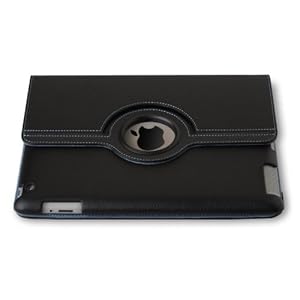
I'm about to order this cover: Targus Versavu 360

41FFGpqqw9L._AA300_.jpg


Good choice? It was highly recommended. Amazon has it at a good price right now, too.


Anyway, I'd like to know what are your favorite iPad apps. Free or paid, it doesn't matter. I'd just like to know what you guys think are the must-have apps for:

Cooking / Baking?

News? I did DL the CNN app yesterday

Drawing / Sketching? I saw there was a free adobe one, but I didn't DL it yet.

Astronomy? Like the one shown on commercials? I did DL the NASA app last night.

Educational apps? My daughter is 3yrs old, so nothing too complicated. Maybe some kiddie games for her?

And any apps you think are just cool and worth having. Again, free or paid, it doesn't matter.


Thanks! And sorry for all the questions.

 
Safari is so damn fast, it's incredible. Switching from Atomic Web for the first time since iPad 1 release.

Only a few things I miss like YouTube videos continuing to play when you switch tabs, but the snappiness is more than makes up for it.
 
LosDaddie said:
Anyway, I'd like to know what are your favorite iPad apps. Free or paid, it doesn't matter. I'd just like to know what you guys think are the must-have apps for:

Cooking / Baking?

Epicurious, and the Betty Crocker one is decent. Epicurious is free and by far the best. The Betty Crocker one I think is either free or $1.

News? I did DL the CNN app yesterday

BBC, Flipboard + subscribe to some news feeds. Mostly I just use Safari.

Drawing / Sketching? I saw there was a free adobe one, but I didn't DL it yet.

Brushes, Sketchbook Pro. Both cost money but are cheap.

And any apps you think are just cool and worth having. Again, free or paid, it doesn't matter.

Flipboard. It takes your Facebook info, your Twitter info, and makes a magazine out of them, along with any news sites you subcribe to, photos from Instagram/Flickr, etc. It just automagically presents it as a magazine. Free, easy to use, excellent design, tons of content pre-configured for it.
 
Stumpokapow said:
Epicurious, and the Betty Crocker one is decent. Epicurious is free and by far the best. The Betty Crocker one I think is either free or $1.

Thanks! I was going to DL the Epicurious app last night, but didn't know if it was good. Going to DL tonight though. :)

Man, there was this baking app the customer rep was showing us, but I forgot the name of it.


Stumpokapow said:
Brushes, Sketchbook Pro. Both cost money but are cheap.

Thanks! Is brushes easy to use?


Stumpokapow said:
Flipboard. It takes your Facebook info, your Twitter info, and makes a magazine out of them, along with any news sites you subcribe to, photos from Instagram/Flickr, etc. It just automagically presents it as a magazine. Free, easy to use, excellent design, tons of content pre-configured for it.

will check out.


What do you think of that cover I posted? Good? Bad? Overrated?
 
LosDaddie said:
What do you think of that cover I posted? Good? Bad? Overrated?

Cover-wise, I've used three:

- The Official Apple case for iPad 1; not made for iPad 2. Was nice, but got dirty easily.
- Zaggmate metal case/keyboard for iPad 1; was heavy but sturdy.
- Apple Smart Cover for iPad 2; works well, light, integrated into the operating system, gets dirty a little easily.

Never used any full folio fancy case like that, sorry.
 
giga said:
500px app is awesome. Really nice curated selection of great photos to browse through or start a slideshow of: http://itunes.apple.com/us/app/500px/id471965292?ls=1&mt=8

The content is great, until you see a photo that you want to save. You basically need to open it in Safari, wait for it to load, click the thumbnail, wait for the full image to load, and then save the image in Safari.

So what could be an excellent source for wallpapers ends up pretty strictly being the equivalent of a Flipboard channel with a slideshow feature.
 
Pazuzu9 said:
It needs more res for Newsstand magazines and comics. I'm constantly having to zoom in. I'd still zoom in a little anyway, as the screen isn't as big as a comic, but I'm having to zoom in far more than is necessary to get the detail.

Yeah, I don't read magazines or comics on it, but I could see that. I really hope Apple is able to manage the battery life and performance with the retina display.

Probably what I'll do is enjoy my iPad 2 for the next year (since I just got the thing) and then upgrade with iPad 4.
 
LosDaddie said:
Now I did read the OP (and some of PCMag's iPad coverage), but I still have some questions for / recommendation from you experts:

I'm about to order this cover: Targus Versavu 360

41FFGpqqw9L._AA300_.jpg


Good choice? It was highly recommended. Amazon has it at a good price right now, too.


Anyway, I'd like to know what are your favorite iPad apps. Free or paid, it doesn't matter. I'd just like to know what you guys think are the must-have apps for:

Cooking / Baking?

News? I did DL the CNN app yesterday

Drawing / Sketching? I saw there was a free adobe one, but I didn't DL it yet.

Astronomy? Like the one shown on commercials? I did DL the NASA app last night.

Educational apps? My daughter is 3yrs old, so nothing too complicated. Maybe some kiddie games for her?

And any apps you think are just cool and worth having. Again, free or paid, it doesn't matter.


Thanks! And sorry for all the questions.
Anybody else? :(


Also, what gaming sites are good on iPad?
 
Pazuzu9 said:
Fruit Memory is a nice simple game for your daughter.

Giant Bomb works well, Gametrailers also has decent HTML5 video.

Thanks. I'll look up Fruit Memory tonight. Fruit Ninja is probably a little too hectic for her right now. Also, is there a Kids app section on the app store? Is Brush good for a kid just to doodle & such?

Thanks for the GB & GT tip. I'll check them out.


Stumpokapow said:
Do you mean which sites are good for iOS gaming news? Toucharcade.com, GAF's iOS gaming thread. In terms of which gaming sites are readable on the iPad? NeoGAF (http://www.secondapps.com/neogaf/ for the unofficial but awesome mobile site version), Joystiq, RPS

Nah, regular (console/handheld) gaming. Someplace where I can watch trailers/reviews/previews and read gaming news.

I'll probably DL a few iOS games, but not much. I have a 3DS. Now, my wife will probably want to buy some puzzle/sudoku games. Also, thanks for your responses.
 
LosDaddie said:
Nah, regular (console/handheld) gaming. Someplace where I can watch trailers/reviews/previews and read gaming news.
Don't quote me on this but I think Gametrailers videos work on iPad so that should cover video stuff.
 
I'm thinking about an Ipad because my girlfriend has taken over my laptop, and I just need something for couch/bed use.

I plan to use it for games and browsing the internet. I'm going to go wifi version.

Am I going to gimp myself with the 16gb version? Can you redownload games?

What is the internet browsing experience like? I have an android phone. Does something like giantbomb work right, or do I have to go to an app for something like that?
 
Class_A_Ninja said:
I'm thinking about an Ipad because my girlfriend has taken over my laptop, and I just need something for couch/bed use.

I plan to use it for games and browsing the internet. I'm going to go wifi version.

Am I going to gimp myself with the 16gb version? Can you redownload games?

What is the internet browsing experience like? I have an android phone. Does something like giantbomb work right, or do I have to go to an app for something like that?
Am I going to gimp myself with the 16gb version? Can you redownload games?


Games do tend to be quite big, but can be redownloaded at any time for free.

What is the internet browsing experience like? I have an android phone. Does something like giantbomb work right, or do I have to go to an app for something like that?

Sites will be fine, and you'll likely find it to be way better than any Android phone.
 
LosDaddie said:
iPad-GAF: Help a new iPad owner out.

So, I bought one for the family/myself yesterday and spent 2hrs setting it up (went to sleep a little too late) last night. I DLed most of the "essential" apps....the ibook app, the ESPN app, the ebay app, the netflix app, the FB app, etc.


Now I did read the OP (and some of PCMag's iPad coverage), but I still have some questions for / recommendation from you experts:

I'm about to order this cover: Targus Versavu 360

41FFGpqqw9L._AA300_.jpg


Good choice? It was highly recommended. Amazon has it at a good price right now, too.


Anyway, I'd like to know what are your favorite iPad apps. Free or paid, it doesn't matter. I'd just like to know what you guys think are the must-have apps for:

Cooking / Baking?

News? I did DL the CNN app yesterday

Drawing / Sketching? I saw there was a free adobe one, but I didn't DL it yet.

Astronomy? Like the one shown on commercials? I did DL the NASA app last night.

Educational apps? My daughter is 3yrs old, so nothing too complicated. Maybe some kiddie games for her?

And any apps you think are just cool and worth having. Again, free or paid, it doesn't matter.


Thanks! And sorry for all the questions.

That cover will fuck you over. It doesn't protect the glass very well like other cases - I had a friend have his glass shatter while in that case and the drop wasn't very far. Simple fact is it trades protection for style. Get an incase book-style cover instead.
 
thewesker said:
Am I going to gimp myself with the 16gb version? Can you redownload games?


Games do tend to be quite big, but can be redownloaded at any time for free.

What is the internet browsing experience like? I have an android phone. Does something like giantbomb work right, or do I have to go to an app for something like that?

Sites will be fine, and you'll likely find it to be way better than any Android phone.


Thanks for the info!
 
Man I'm using my iPad 2 way more than before. The split keyboard that you can move up along with the brilliant multitasking gestures has really made this thing so convenient to use. For the first time I'm using my iPad 2 instead of my Mac and I don't miss it one bit, never thought that would happen.

PS this is the first GAF post I've done on the iPad that didn't make me want to kill myself because of how clumsy the typing experience was.
 
Status
Not open for further replies.
Top Bottom