
• Hey Guest. Check out your NeoGAF Wrapped 2025 results here!

Best PS2 VGA adaptor?

isamu

OMFG HOLY MOTHER OF MARY IN HEAVEN I CANT BELIEVE IT WTF WHERE ARE MY SEDATIVES AAAAHHH
Hi there. What is currently the best VGA adaptor, that will allow me to play my PS Two on my VGA monitor? Also will they all work on the PS Two slim model if they work on the regular PS2?

I read somewhere that some newer PS2 games take advantage of the VGA signal ala Dreamcast games. If so, can someone provide a list of game that alledgedly have this VGA support?
 
isamu said:
I read somewhere that some newer PS2 games take advantage of the VGA signal ala Dreamcast games. If so, can someone provide a list of game that alledgedly have this VGA support?

I'm guessing you mean supports progressive scan? You can get a list of games that do so by searching for 480p supported games here.

Quality-wise, I think the best would be to go with a VD-Z3 , but that will only work on progressive scan supporting games, so probably not what you're looking for (A better choice for gamecube and xbox since they have more games that support progressive scan).

There's a number of line doublers that will work, but don't necessarily look so great.

I've heard some people use a Blaze VGA Adapter, which supposedly can get some games to run in progressive scan, even when they normally don't, but I don't have one myself...
 
Uncle Dukey said:
I'm guessing you mean supports progressive scan? You can get a list of games that do so by searching for 480p supported games here.

Quality-wise, I think the best would be to go with a VD-Z3 , but that will only work on progressive scan supporting games, so probably not what you're looking for (A better choice for gamecube and xbox since they have more games that support progressive scan).

There's a number of line doublers that will work, but don't necessarily look so great.

I've heard some people use a Blaze VGA Adapter, which supposedly can get some games to run in progressive scan, even when they normally don't, but I don't have one myself...


Wow thanks for the reply Uncle! Tell me, how does that one compare *THIS ONE* ?
 
I think you can use the D Terminal connector from Sony.

ps2-d_terminal.jpg


I think this is the same thing that came with the Linux Kit, so you probably need a Sync On Green monitor or some type of adapter like the XRGB-2.

http://www.ncsxshop.com/cgi-bin/shop/SCPH-10330.html

*And I own a Blaze VGA adapter, they do work and support decent amount of games. The problem is the lack of support and craptastic quality of the product.

**If you are looking for the best picture quality, just buy a 27" and up Sony Wega CRT Television and calbirate it.**
 
The cheapest way for good quality is DScaler (www.dscaler.org). You'll need anold cheap capture card (listed at the site) and that's about it. It worked like a charm even on my old p2 400.

If you've got some cash (around $200 usd), you might want to try ViewSonic's NextVision N6 as it supports 480i all the way up to 1080i, 4:3 and 16:9, has a tv tuner that will take HD, and has composite, svideo, and component in's. The 480p isn't pixel perfect like my KeyDigital KD-XB which died recently, but with some ajustments (mainly bumping up the output res to 1024x768 instead of 640x480), it looks pretty darn good in 480i and 480p. It's prolly the best solution for ps2 progressive as you can navigate the 480i menus.
 
Guys thanks for the suggestions, but I forgot to make myself clear on something.....

This is for playing on PS Two games an a CRT pc monitor at work. It's belongs to the building and they gave me the OK to hook up shit to it. Hooking PS Two up to another monitor is not an option. *HERE* is the monitor in question....a fairly modest and inexpensive bare bones monitor manufactured in 2001 by Viewsonic. Max res is 1084 x 768(or whatever that res is)

Anyway in light of this, which one would give me the best picture quality at under say, $300? Oh and it has to have audio in/out as well so I can hear the sound.
 
you'll need a cheap line doubler, not many PS2 games have a progressive scan option, so the VD-Z3 and KD-XB (top choices for most) may not be your cup of tea
 
I'm just a regular guy with bottled up insides said:
The PS2/XBOX/GC VGA display quality is worthless because none of these systems were designed for VGA output.

Only the designers of the Dreamcast back in 97 had the foresight to make a system with VGA in mind.

Are you sure about this? Some one in another forum said there are several PS Two games that are vga/progressive compatible.
 
Thanks The Faceless for that list.

O.K. guys here's the deal....

I am at work right now sitting in front of the monitor I intend on using. The cable running out the back is a 15-pin mini D-sub VGA which is not detatchable from the monitor. But the interesting thing is, above it says RGB Analog! Appearantly this monitor supports an RGB analog signal! Therefore my question is this.... is there a way I can buy an RGB scart cable and connect it to the 15-pin mini D-sub VGA cable running from the monitor via some sort of adaptor? What adaptor will I need and which RGB cable for the PS Two(slim)?

Finally, what will the image quality be like running non-progressive PS2 games to an RGB analog campatible PC monitor?


Thanks in advance.
 
MidgarBlowedUp said:
I think you can use the D Terminal connector from Sony.

ps2-d_terminal.jpg


I think this is the same thing that came with the Linux Kit, so you probably need a Sync On Green monitor or some type of adapter like the XRGB-2.

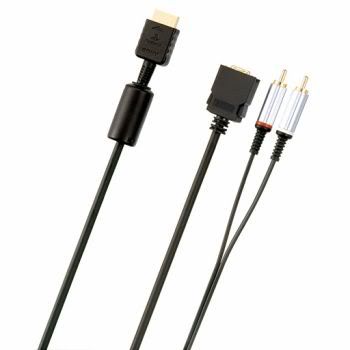
No, that D Terminal Connector from Sony wasn't included with the Linux Kit. The Linux Kit by Sony has an official VGA monitor cable that only works with Sync-on-green monitors.

s19.jpg


You cannot use this Sony monitor cable with any 480i games as it won't be visible on your TV/monitor(Unless you got a tv/monitor that supports 480i whhen using the monitor cable, but won't do nothing for the picture). I've used it with some PS2 480p games like Tekken 4, Tekken 5, SOCOM II, and Soul Calibur II.
 
Defensor said:
No, that D Terminal Connector from Sony wasn't included with the Linux Kit. The Linux Kit by Sony has an official VGA monitor cable that only works with Sync-on-green monitors.

s19.jpg


You cannot use this Sony monitor cable with any 480i games as it won't be visible on your TV/monitor(Unless you got a tv/monitor that supports 480i whhen using the monitor cable, but won't do nothing for the picture). I've used it with some PS2 480p games like Tekken 4, Tekken 5, SOCOM II, and Soul Calibur II.


Defensor...the monitor I intend on using has a15-pin mini D-sub VGA cable running out the back which is not detatchable from the monitor. But the interesting thing is, this monitor supports an RGB analog signal! Therefore my question is this.... is there a way I can buy an RGB scart cable and connect it to the 15-pin mini D-sub VGA cable running from the monitor via some sort of adaptor? What adaptor will I need and which RGB cable for the PS Two(slim)?

Finally, what will the image quality be like running non-progressive PS2 games to an RGB analog campatible PC monitor?
 
I use an XRGB-2 with an RGB cable. It works with all PS2 games, although it will not display a progressive signal so all PS2 games will be line-doubled. The RGB cable connects the PS2 to the XRGB-2 unit, and then you can use a standard VGA cable to hook the XRGB-2 up to your monitor. IIRC, the RGB cable was a custom piece designed to work with the XRGB-2. NCS sold them for awhile (maybe they still do), but if you can't get that cable you can use either a PS2 component cable or the D-terminal cable to hook your PS2 up to the XRGB-2.

As for image quality: as long as you use RGB, component, or D-terminal it's fine (don't bother with S-video or composite). Jaggy as hell, but that's the fault of the PS2.
 
Thanks for the advice. So many things I would need to connect and hook up everyday....Im starting to wonder if it'd be better to just buy the Joytech 8" LCD screen for the PS Two and use that as my screen instead? The monitor here is only about 14". Do you feel the size advantage of the PC monitor over the 8" LCD Flip-up screen warrants lugging around added speakers, rgb adaptors/connectors, etc to work every day? Or do you feel the PS Two screen, even at 7", is a much better solution?

PS2_8inch_tft.jpg


vs

E55_175x175.jpg


????????
 
hooo said:
The cheapest way for good quality is DScaler (www.dscaler.org). You'll need anold cheap capture card (listed at the site) and that's about it. It worked like a charm even on my old p2 400.

DScaler doesn't work too bad. I actually use it myself sometimes to play games. I'm not sure if it depends on the capture card, (I've got a Leadtek Winfast TV2000 Deluxe) but there is some slight lag when I play games. Doesn't make games unplayable (Though certain types like racing ones do get hurt more), but it's certainly an undesirable effect. Perhaps you had a different experience.

isamu said:
Thanks for the advice. So many things I would need to connect and hook up everyday....Im starting to wonder if it'd be better to just buy the Joytech 8" LCD screen for the PS Two and use that as my screen instead? The monitor here is only about 14". Do you feel the size advantage of the PC monitor over the 8" LCD Flip-up screen warrants lugging around added speakers, rgb adaptors/connectors, etc to work every day? Or do you feel the PS Two screen, even at 7", is a much better solution?
????????

I'm a little confused, so do you not already have speakers at work? Personally, I'd just give Hori's upscan convertor a shot. However, if you need to bring speakers and stuff back and forth, maybe the LCD screen would be a more elegant solution.. Cables are no big deal. Heck, you can leave a power and component cable plugged in at work and just transport the PS2 itself.
 
Are there any reviews of the Joytech screen up yet? Is it actually RGB?

Where you can you buy it from if you live in the U.S., and would I need some sort of converter for the power source?
 
PC Gaijin said:
Wait, the CRT you want to hook your PS2 up to is only 14"? Just get the LCD screen.

Yeah. But's like almost twice the size of the Joytech 8" PS two screen. So despite that, you think I should just settle for the LCD 8" screen? See below....

Lyte Edge said:
Are there any reviews of the Joytech screen up yet? Is it actually RGB?

Where you can you buy it from if you live in the U.S., and would I need some sort of converter for the power source?

Lyte....despite not have found any reviews no matter where I looked, I just ordered the Joytech LCD screen yesterday online at some shop in Europe(forgot the name). Don't ask me how much I paid after international shipping, it's too painful to say :( I'll try to provide a link for ya in a little while.

I'm going to use but I still want to know whether it's worth hooking the ps two up the crt 14" monitor to enjoy the larger screen size....
 
Uncle Dukey said:
I'm a little confused, so do you not already have speakers at work?.

Nope. Cant leave stuff here either. And the speakers have to be really small, as to be hidden behind the monitor
 
Isamu, what's the name of the shop you got it from? I'd like to order one myself.
 
DScaler doesn't work too bad. I actually use it myself sometimes to play games. I'm not sure if it depends on the capture card, (I've got a Leadtek Winfast TV2000 Deluxe) but there is some slight lag when I play games. Doesn't make games unplayable (Though certain types like racing ones do get hurt more), but it's certainly an undesirable effect. Perhaps you had a different experience.


thats because you get to almost 100% of cpu utilistation. i had the same problem
i was tryintg to play pro evo soccer trough dscaler and the players were just a fraction of a second to late with every button i pressed

i found out this was the problem. there is a workaround (some settings ) but i forgot wich...
 
I have an RTV Veg-Lite box. It works well, and I like the fact that I can plug in both a computer and a game system. But there are a few major issues:

1) For as much as I paid for it, there ought to be a system selector (the salesman lied and told me it had one)
2) You can drive a pair of speakers for the game system. But when you're running the computer through it, the unit is off - which means no sound. You'll need a second pair of speakers if you want to be able to switch.
3) The image quality is very poor on my 1280 x 1024 LCD, because it picks a sucky resolution and the monitor blockies it up to make it fit.
 
Lyte Edge said:
Isamu, what's the name of the shop you got it from? I'd like to order one myself.


*Whitedog.co.uk*


There ya go. Be prepared to pawn a body part or your first born for shipping to the U.S. :)
 
I figured I'd throw this in here, I want to connect my PS2 to my TV Card. This is a pictures of the input. I would assume I would need an adapter that would allow me to plug an S-Video cable. What would be the name of this connection though.

my.php
 
isamu, can you do us a favor and post impressions of the quality of that LCD when you get it? I'm very curious about it, as I'd love to get one for my PS2, and have skipped the US one because of this one.
 
MoxManiac said:
isamu, can you do us a favor and post impressions of the quality of that LCD when you get it? I'm very curious about it, as I'd love to get one for my PS2, and have skipped the US one because of this one.


Answer *this* question for me and I will gladly poast impressions :)
 
kpop100 said:
I figured I'd throw this in here, I want to connect my PS2 to my TV Card. This is a pictures of the input. I would assume I would need an adapter that would allow me to plug an S-Video cable. What would be the name of this connection though.

my.php

Hi, what kind of card do you have? I think the cable that goes there should come with your card. My TV tuner came with a cable that goes there, and on the other end has plugs for composite and s-video.
 
kikonawa said:
thats because you get to almost 100% of cpu utilistation. i had the same problem
i was tryintg to play pro evo soccer trough dscaler and the players were just a fraction of a second to late with every button i pressed

i found out this was the problem. there is a workaround (some settings ) but i forgot wich...

Hmm.. I'd appreciate it if you would share if you ever find out what they are.. When I have DScaler on "DScaler alone" it does take around 100%, but with the other options (Priority to DScaler / Priority to other software) it is lower. The problem's the same with both though...
 
Uncle Dukey said:
Hi, what kind of card do you have? I think the cable that goes there should come with your card. My TV tuner came with a cable that goes there, and on the other end has plugs for composite and s-video.

I had the cable at one time, but I've had the TV tuner for a while and lost it during a move. It's a WinFast TV2000 XP Deluxe. I can probably get a replacement from Leadtek, but I really don't wanna drop the what will probably be like $25 for a cable, when the card cost me $50. If it comes to that I'd rather buy a new card that's compatible with Windows MCE.

Anyway I gather it's a 6-pin to 4-pin adapter I need...anyone know offhand a place online that sells that stuff for cheap?
 
isamu said:
Answer *this* question for me and I will gladly poast impressions :)

Yes, PS2 does RGB natively via SCART connector.
You could purchase an adapter cable from somewhere like Ebay and you should have no problem connecting the PS2 to your monitor with RGB.

Note that RGB is basically what Arcade cabinets use.

I'd still just spend about $400 on a nice WEGA Trinitron with a Super Fine Pitch display.
After all, that is what all the reviewers and developers use...
 
MidgarBlowedUp said:
Yes, PS2 does RGB natively via SCART connector.
You could purchase an adapter cable from somewhere like Ebay and you should have no problem connecting the PS2 to your monitor with RGB.

Note that RGB is basically what Arcade cabinets use.

I'd still just spend about $400 on a nice WEGA Trinitron with a Super Fine Pitch display.
After all, that is what all the reviewers and developers use...

Thank very much for the reply....

But....someone on the Lick Sang forums told me this...

Isamu...No, that won't work. It is analog RGB, but your monitor only supports progressive scan.

Your best option is a XRGB-2 Plus with a Japanese RGB cable, if you can find one. It will work with both the PS 2 and the PS Two.


MidgarBlowedUp.......how would respod to this? He seems to be saying that the fact that the monitor is progressive scan, it will still not play non-progressive PS2 games even through an RGB Analog signal. Can you please confirm whether this is indeed true or not?
 
Top Bottom