• Hey Guest. Check out your NeoGAF Wrapped 2025 results here!

GAF Wii Homebrew thread: Homebrew, emulators, USB disc installs! Easy tutorial!

Starwolf_UK said:
To break from the monotony of the usual discussion it seems after nearly a year the homebrew shooting range game Smashing! has been updated:
http://wiibrew.org/wiki/Smashing!
I don't know what it looked like a year ago but it doesn't look half bad for a homebrew title.
Sweet! The initial release was really solid but it was basically just a demo. Sounds like the new release is pretty fully featured, I'll have to check it out.
 
I wish GXGeo and WiiMAME received at least one update since the first release :-/

GXGeo's CC support is pretty broken and many games don't work... nevermind WiiMAME, useless atm...

I just wanna play Ghost 'n Ghoblins arcade (most wanted together with Donkey Kong).
Hopefully Capcom releases it as a VC Arcade title.

Wonderboy Arcade would be pretty awesome too, but the Master System version isn't half bad (same for Bubble Bobble).
 
peppermints said:
My 360 recently got the RROD and as it's normally also my main DVD player (upconverting is awesome!), I'm searching for an alternative to play my DVDs. I've had Homebrew Channel on my Wii for a while now, just now decided to mess with trying to get DVDX to work.

I installed it using BootMii and it said it was successful. But when I try to load the DVD in Media Player CE, it tries mounting the DVD then just stops.

Any ideas?
It says on their Wiibrew page that if you install their special cIOS, it doesn't need DVDX. Why don't you try installing that instead? You may need to delete the stub with AnyTitle Deleter Mod first, but that's not too hard.
 
peppermints said:
My 360 recently got the RROD and as it's normally also my main DVD player (upconverting is awesome!), I'm searching for an alternative to play my DVDs. I've had Homebrew Channel on my Wii for a while now, just now decided to mess with trying to get DVDX to work.

I installed it using BootMii and it said it was successful. But when I try to load the DVD in Media Player CE, it tries mounting the DVD then just stops.

Any ideas?

dont bother, the video will look like ass

assuming you watch anamorphic dvds which is 720x480 stretched to 16:9
if you watch it on wii, it would be 640x480

and, from my testing, the video is noticeably blurrier
 
There's a whole lot stacked against ever having it, but Crediar (of Preloader fame), is certainly trying. No idea if his Freedom project will ever pan out though, and actually allow us to load GCN games off HDD, use virtual memory cards, etc.
 
So I installed everything, plugged in a USB hard drive, and ripped my two games to it.

That was a snap! And this is coming from someone for whom the "really dumb" thing really applies.

Thanks. I still don't have a Wii LAN adapter, so I'm going to wait until that arrives in the mail.

I love the USB loader, I just wish it would work with GC games too :(

emu_kidid seems to have discontinued support for his SD_Boot program, but that was meant for the Gamecube anyway. I don't really like that program though, since it practically encourages users to use it in a shady way.
 
I'm trying to use the 4.2 Safe Updater on a friends Wii. It goes fine with the first 5 or 6 IOS's, but then it seems to timeout on downloading the next one and it exits. It exits pretty quick so I can't see all the error text, but I ran it twice and it failed the same time and I think I saw something about "file not found" and "nintendo canada" in the error. I didn't have any problems when I ran this on my Wii, but it was a over a week ago.

Any suggestions?

Update: Got it to work. I waited for a bit, and tried again. Must have been something wrong with the server.
 
I'm preparing for the Safe 4.2 update by following the process for installing Waninkoko's IOS249 and I'm currently on 4.0. I ran Trucha Bug Restorer and all is well till I got to the step where I "install patched IOS36". I got an error and exited back to the HBC loader screen. I continued on, and finished up to the point where I'll need Waninkoko's cIOS38 rev 14, but should I go back to this step or start the process over again, or is this a minor detail in the grand scheme of things and continue on? I really don't want it to bite me in the arse later on when it could have been prevented.
 
Ramune said:
I'm preparing for the Safe 4.2 update by following the process for installing Waninkoko's IOS249 and I'm currently on 4.0. I ran Trucha Bug Restorer and all is well till I got to the step where I "install patched IOS36". I got an error and exited back to the HBC loader screen. I continued on, and finished up to the point where I'll need Waninkoko's cIOS38 rev 14, but should I go back to this step or start the process over again, or is this a minor detail in the grand scheme of things and continue on? I really don't want it to bite me in the arse later on when it could have been prevented.
If you can tell me what that error was, it might help. If cIOS38 installs OK, then it didn't matter.
 
Hey Clipper, I'm aware that many Wii games have firmware updates attached to them.

When you install every new game you buy, is this something you can avoid or will you always have to keep up with, then safely navigate past, each firmware?
 
Speevy said:
Hey Clipper, I'm aware that many Wii games have firmware updates attached to them.

When you install every new game you buy, is this something you can avoid or will you always have to keep up with, then safely navigate past, each firmware?

USBLoader automatically ignores any firmware on the disc. Of course Nintendo hasn't put an update on a disc since Mario Galaxy, I believe?
 
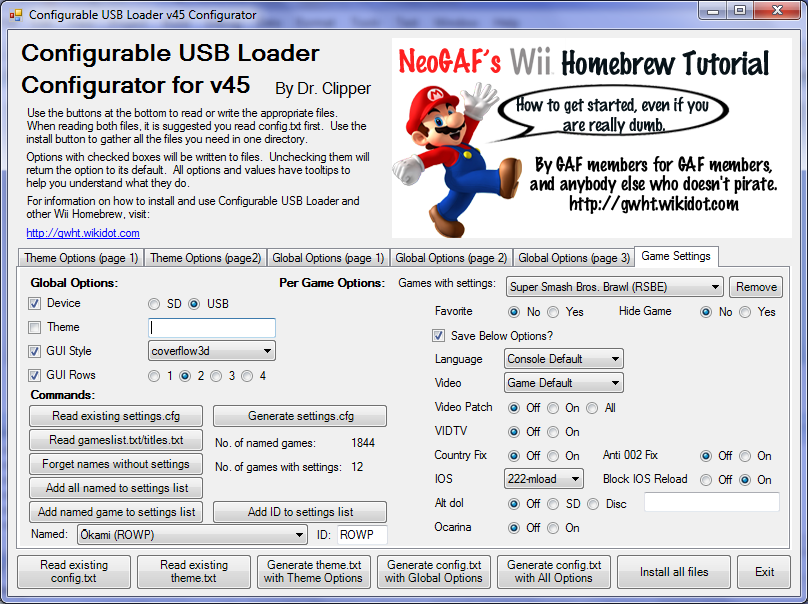
I just added some major functionality to the Configurator for Cfg Loader. Here's the release notes:

Edit: OK, It's good to go with this version now.

me said:
v45.2 of Configurator is out

download here

This one's a biggie.

Changes in 45.1:
  • Added settings.cfg support
  • Read your settings.cfg file and manage it on your PC
  • Use titles.txt or gameslist.txt to add saved options to a game without needing to use Cfg.
  • Automatically reads a titles.txt or gameslist.txt in the same directory as the .exe
  • Can be used to create patch lists of options on troublesome games to give to other people. They can load their own settings file, add your patch one and then save to get their games working!
Changes in 45.2:
  • Fixed naming of gamelist.txt
  • Altered to accept 6 digit IDs for saving options for compatibility with Cfg
  • Can only save options if you know the 6 digit version of the ID, but 4 digit versions are OK for hiding and favorites.
Here's a look at the interface for the new settings.cfg tab:
GameSettings.png


The sample_cdbs have also been updated to handle the new page.

And now for some minor clarifications:

Dragona Akehi said:
USBLoader automatically ignores any firmware on the disc. Of course Nintendo hasn't put an update on a disc since Mario Galaxy, I believe?
They actually put updates on every disc, but they only update you to 3.4 at the highest (Metroid Prime Trilogy did that for me). No game has ever come out with a 4.0 update, and some didn't even update firmware, but contain an update to add some needed IOSes.
 
Question: Until I get my Wii LAN adapter, should I just leave the covers blank?

Is there a simple way to obtain covers for an offline console?
 
Speevy said:
Question: Until I get my Wii LAN adapter, should I just leave the covers blank?

Is there a simple way to obtain covers for an offline console?
Go to wiitdb.com and download the images for the games you need. Put them is the "sd:/usb-loader/covers" directory and it should all be good.
 
Question, my Wii is on 4.1 and I have Homebrew Channel. Can I update the Homebrew Channel and then install 4.2, and it won't get deleted? I have about 5 import Wii games and I don't want to lose the ability to play them. Please PM me your answers!
 
MidnightScott said:
Question, my Wii is on 4.1 and I have Homebrew Channel. Can I update the Homebrew Channel and then install 4.2, and it won't get deleted? I have about 5 import Wii games and I don't want to lose the ability to play them. Please PM me your answers!
Going to answer you here anyways. Yes you can install the new HBC and it wont get deleted, but there's no real reason to update to 4.2. I'd say wait until next firmware update that matters.
 
Clipper said:
If you can tell me what that error was, it might help. If cIOS38 installs OK, then it didn't matter.

It went too fast to really capture, but I went ahead (after backing up just in case), and the rest of the installations went well. Safe Updater crashed once, but the 2nd time was successful and I'm now on 4.2. Guess it was a whole lot of nothing in the grand scheme of things. But thanks for your help anyway.
 
I'm having an issue with my wii. I've installed everything in the faq and used the safe 4.2 updater. After a while when I turn on the wii, the bootmii is shown and then when it tries to boot into the system menu nothing happens, tv just says searching for signal. Same thing if i try to boot into the homebrew. When I restore my nand everything is fine for a bit then it happens again. I don't mess with any of the system files from restoring the nand to it not booting past bootmii. Anyone ever had this happen? Its happened maybe 4 times or so now and getting annoying cause I have to backup my saves onto SD card or constantly make nand backups or I lose any new saves etc. I'm actually doing the restore right now and gonna try and see if I can figure out exactly what happens before it stops loading past bootmii.

edit - restarting/pulling plug/hard reboot don't seem to cause it, its almost as if it happens when I don't use my wii for a while, few days/week
 
hayama987 said:
I'm having an issue with my wii. I've installed everything in the faq and used the safe 4.2 updater. After a while when I turn on the wii, the bootmii is shown and then when it tries to boot into the system menu nothing happens, tv just says searching for signal. Same thing if i try to boot into the homebrew. When I restore my nand everything is fine for a bit then it happens again. I don't mess with any of the system files from restoring the nand to it not booting past bootmii. Anyone ever had this happen? Its happened maybe 4 times or so now and getting annoying cause I have to backup my saves onto SD card or constantly make nand backups or I lose any new saves etc. I'm actually doing the restore right now and gonna try and see if I can figure out exactly what happens before it stops loading past bootmii.

edit - restarting/pulling plug/hard reboot don't seem to cause it, its almost as if it happens when I don't use my wii for a while, few days/week
Next time it happens, try removing your SD card at boot. That way, BootMii won't run. Also, try moving your Wii Remote around in front of the sensor bar at the black screen and see if it rumbles to indicate you are over a button (i.e., to see if the Wii is actually working, but can't display the image. You can try selecting a channel too, and see if you get banner noise to play.

I suspect this might be BootMii forcing the Wii into a slightly different display mode which your TV can't handle.I don't know how that can possibly happen, though...

 
Clipper said:
Next time it happens, try removing your SD card at boot. That way, BootMii won't run. Also, try moving your Wii Remote around in front of the sensor bar at the black screen and see if it rumbles to indicate you are over a button (i.e., to see if the Wii is actually working, but can't display the image. You can try selecting a channel too, and see if you get banner noise to play.

I suspect this might be BootMii forcing the Wii into a slightly different display mode which your TV can't handle.I don't know how that can possibly happen, though...

I've tried removing the sd card before, same thing happens just with out seeing bootmii first, I also don't get sound or anything through my receiver so I assume its not just a bad video mode being displayed. I've yet to figure out how to replicate the problem, it kinda just happens, really annoying.

edit - gonna try formating the system memory, will bump later if it happens again but still taking any ideas on what might be happening.
 
I wanna thank Clipper and all the other posters in this thread.

Thanks to this thread and the helpful wiki, I was able to homebrew my wii without much trouble at all (first SD card apparently wasn't compatible, second card is working great).

My only concern is a "fatal exception" error that crashes the wii when I'm navigating around in the homebrew browser. The crash shows a DOS screen with about 6-8 lines of error code.

It's only happened twice, and I believe both times I was downloading something in the background when it happened. Maybe, don't navigate while downloading?
 
HooCares said:
I wanna thank Clipper and all the other posters in this thread.

Thanks to this thread and the helpful wiki, I was able to homebrew my wii without much trouble at all (first SD card apparently wasn't compatible, second card is working great).

My only concern is a "fatal exception" error that crashes the wii when I'm navigating around in the homebrew browser. The crash shows a DOS screen with about 6-8 lines of error code.

It's only happened twice, and I believe both times I was downloading something in the background when it happened. Maybe, don't navigate while downloading?
I get this sometimes too, but not while I'm navigating the homebrew browser. Only happens to me while I'm using the GBA emulator. If you have any GCN memory cards inserted take them out.

Edit: If it's only happening when you're downloading something and navigating at the same time then don't do both. Downloads shouldn't take that long anyways.
 
Linkhero1 said:
I get this sometimes too, but not while I'm navigating the homebrew browser. Only happens to me while I'm using the GBA emulator. If you have any GCN memory cards inserted take them out.

Edit: If it's only happening when you're downloading something and navigating at the same time then don't do both. Downloads shouldn't take that long anyways.

I'm not using a GCN card. Only card in there is a SD card. But yeah, I will cease navigating while downloading.

thanks!
 
got a wii message from Nintendo just now. Apparently theres a wii shop channel update available. I won't update though, because they'll probably make me get firmware 4.2. >:3
 
DanteFox said:
got a wii message from Nintendo just now. Apparently theres a wii shop channel update available. I won't update though, because they'll probably make me get firmware 4.2. >:3
Use the second method in the Wii Shop Update page. I think it will work, as it always asks for the latest version of the shop.

Actually, it seems like both methods on that page should still work.
 
Second update: Those who downloaded the Wii Internet Browser for 500 points can now receive a free VC NES title (thanks Ronin180!)

Update: Apparently the latest update is for the Ambassador program (earn free VC titles by helping others connect online) in Europe, but again, there are no noticeable changes for North American Wii systems at this point.

A new Wii update is ready for installation – in North America at least. However, the purpose behind the update is unknown at this time. Additionally, the firmware number remains at 4.2 after the download . The DSi Shop is back up as well, although the handheld does not have an upgrade to download unlike the Wii. We’ll update this post with further information as it becomes available.

http://www.nintendoeverything.com/?p=26269
 
caliblue15 said:
Update: Apparently the latest update is for the Ambassador program (earn free VC titles by helping others connect online) in Europe, but again, there are no noticeable changes for North American Wii systems at this point.
Wait, we're getting the ambassador program in Europe? Sweet! I have a few friends that just got Wiis that I can get set up for a few points, looks like I'll need to find a few more, though...

Edit: Seems like it is in Australia too, woohoo! Now, where am I going to find about 17 more people with PAL Wiis that would be willing to say I helped them get online...
 
Clipper said:
Use the second method in the Wii Shop Update page. I think it will work, as it always asks for the latest version of the shop.

Actually, it seems like both methods on that page should still work.
If I already used WiiSCU to update my Shop Channel before, do I have to select the "Install IOS61" option a second time, or do I just have to select "Update Wii Shop Channel" again?
 
nincompoop said:
If I already used WiiSCU to update my Shop Channel before, do I have to select the "Install IOS61" option a second time, or do I just have to select "Update Wii Shop Channel" again?
IOS61 hasn't changed, I believe. Hence you probably don't need to update it. It won't hurt if you do, though.
 
Confirmed that WiiSCU still works to update the channel. I did the IOS61 part because it's in the wiki and I'm a slave to following directions.

Can't decide between Mario 3 and Legend of Zelda for my free NES game.
 
Htown said:
Confirmed that WiiSCU still works to update the channel. I did the IOS61 part because it's in the wiki and I'm a slave to following directions.

Can't decide between Mario 3 and Legend of Zelda for my free NES game.

Super Mario Bros. 3.
 
Htown said:
Confirmed that WiiSCU still works to update the channel. I did the IOS61 part because it's in the wiki and I'm a slave to following directions.

Can't decide between Mario 3 and Legend of Zelda for my free NES game.
It seems like IOS61 might be new, actually. I updated just the shop and it is still asking me to perform a Wii Update to access the store...

It might also need some other IOS... we'll know soon.

OK, it's not IOS61. It has the same version as before. Hmm, it seems that maybe only the new WiiSCU (v0.22) might work and actually download v18. Or perhaps we need to wait for the apps to update. There will be a clean solution soon in any case.

Edit: Clean solution has been found. Marc has updated his installer and I added it to Method 2. I'll probably delete the WiiSCU method soon.
 
Clipper said:
It seems like IOS61 might be new, actually. I updated just the shop and it is still asking me to perform a Wii Update to access the store...

It might also need some other IOS... we'll know soon.

OK, it's not IOS61. It has the same version as before. Hmm, it seems that maybe only the new WiiSCU (v0.22) might work and actually download v18. Or perhaps we need to wait for the apps to update. There will be a clean solution soon in any case.

Edit: Clean solution has been found. Marc has updated his installer and I added it to Method 2. I'll probably delete the WiiSCU method soon.
Wii SCU still works fine for me. No problems accessing the shop.

Then again, I never did any kind of update to 4.2. Maybe that's why it doesn't work for you?

Oh, and I haven't updated WiiSCU since the last time I used it right after 4.2 came out. So, with WiiSCU 0.21, running the process as listed on the Wiki from firmware 4.1, you can do it just fine.
 
Damn, after all this time my HDD is not always recognized by the Wii =(. It sometimes works, sometimes doesn't. Quite disappointing. I still haven't updated the firmware either, so I'll probably just say bye to homebrew and install the newer one and just boot from DVD =/
 
Htown said:
Wii SCU still works fine for me. No problems accessing the shop.

Then again, I never did any kind of update to 4.2. Maybe that's why it doesn't work for you?

Oh, and I haven't updated WiiSCU since the last time I used it right after 4.2 came out. So, with WiiSCU 0.21, running the process as listed on the Wiki from firmware 4.1, you can do it just fine.
That's strange. WiiSCU worked fine for me last time and didn't work this time. I have not updated to 4.2 in the meantime. However, I did run the update on PAL Metroid Prime Trilogy, which took me from 3.2 to 3.4. Whatever the case may be, the other method works for everyone whereas WiiSCU only works for a few people, so I removed the WiiSCU method from the guide to simplify the process.

Relix said:
Damn, after all this time my HDD is not always recognized by the Wii =(. It sometimes works, sometimes doesn't. Quite disappointing. I still haven't updated the firmware either, so I'll probably just say bye to homebrew and install the newer one and just boot from DVD =/
There's no need to update the firmware, and you'd still be able to use homebrew if you did. Try using both the latest IOS249 and Hermes' IOS222/223 to boot your loader as each has better compatibility with certain drives.
 
I'm very confused right now. I'd like to get the Wii Shopping Channel working again, and the steps taken on the Homebrew page don't work, presumably because I don't have 4.2 installed. The app appears on the homebrew channel, but clicking "load" does nothing. What should I be doing?

EDIT: Never mind...it was needing to rename the downloaded file to "boot.dol." The way it's worded in the wiki, I thought that meant renaming the folder on the SD card. :lol

Hope there's no problem installing this on a Japanese Wii. All I want to do is be able to buy Castlevania Rebirth next week!

EDIT 2: SUCCESS! Works on a Japanese unit. :D
 
Bought LostWinds2 and Rygar Arcade yesterday without issue, so I was surprised to lose access to the Wii Shop Channel today.

Whatever, a quick WiiSCU update (just the Shop Channel, not IOS61) and I'm up and running again.

*shrugs*
 
Question: I notice that my Wii reacts when I turn the hard drive on or off (obviously, since I modded it to access the drive).

Is there anything that could happen to the hard drive that would brick my Wii?

Like for example, what if I was playing a game and the thing just powered down?
 
Speevy said:
Question: I notice that my Wii reacts when I turn the hard drive on or off (obviously, since I modded it to access the drive).

Is there anything that could happen to the hard drive that would brick my Wii?

Like for example, what if I was playing a game and the thing just powered down?
The game would crash, but would not brick the Wii. It's a common problem. The only things that can brick the Wii is if it crashes while writing to the NAND.
 
Top Bottom