• Hey Guest. Check out your NeoGAF Wrapped 2025 results here!

GAF Wii Homebrew thread: Homebrew, emulators, USB disc installs! Easy tutorial!

Datschge said:
Well, got the cable thinking it could do 480p (of course I know better now). The image quality is already perfectly clean and clear on my rather low budget HDTV though so I don't really feel any urge to spend additional money on a component cable just now (may well change once I get another HDTV which reacts worse to interlaced signals).
You do know you could get a perfectly workable set of Wii component cables for $5US shipped anywhere in the world?
http://www.dealextreme.com/details.dx/sku.4256
 
So I got an ethernet adapter for my wii in order to play TvC. Apparently whenever I load the game through the configusb online always freezes when trying to connect wired. It works whenever I use my actual disc but not when I go through the configusb. Any reason why this might happen? Wifi works with the game in configusb loader but it's really laggy and almost unplayable for me.
 
Info on the STM exploit employed by the HBC has been released over at HackMii (essentially the HBC/BootMii blog). It's a pretty interesting read.

Linkhero1 said:
So I got an ethernet adapter for my wii in order to play TvC. Apparently whenever I load the game through the configusb online always freezes when trying to connect wired. It works whenever I use my actual disc but not when I go through the configusb. Any reason why this might happen? Wifi works with the game in configusb loader but it's really laggy and almost unplayable for me.
Are you using IOS222? If not, do so.
 
Clipper said:
Info on the STM exploit employed by the HBC has been released over at HackMii (essentially the HBC/BootMii blog). It's a pretty interesting read.


Are you using IOS222? If not, do so.
I tried that but the game wouldn't load on it. I'll try reinstalling it later and see if it works.

Edit: I think I somehow made things worse. After messing with the IOS no matter which I use the game freezes.
 
Linkhero1 said:
Edit: I think I somehow made things worse. After messing with the IOS no matter which I use the game freezes.
Only that game? Try other games and see if they still work. If it is just TvC, delete the game (via the - menu) and reinstall it.

Also, I don't think TvC needs this, but try installing the BCA at the install sreen too (this is a small piece of data read from a portion of the disc that is only accessible on original discs.)
 
Clipper said:
Do you happen to have a PAL Wii? Put it into 480i mode and it should all be good.
Yeah, PAL. How do I set it to 480i on a regular ol CRT SDTV? I only see normal and widescreen in the settings, nothing about 480i?
 
OK, so I have installed the HB channel and my games still work. I have bought a 500gb usb hard disk which at the moment is split into 2 partitions, 1 is FAT32 and the other is NTSC. I have a shit load of Wii games that I would like to rip and put onto the HD which I would like to connect to the Wii and have a game selection menu system like the iPod.

Is this possible? Can anyone point me to a URL of instructions?

Ta.
 
MarkMclovin said:
OK, so I have installed the HB channel and my games still work. I have bought a 500gb usb hard disk which at the moment is split into 2 partitions, 1 is FAT32 and the other is NTSC. I have a shit load of Wii games that I would like to rip and put onto the HD which I would like to connect to the Wii and have a game selection menu system like the iPod.

Is this possible? Can anyone point me to a URL of instructions?

Ta.
Step 1: Read the title of this topic
Step 2: Notice the Wiki posted at the top of this page (in 50 post per page mode) and in post #2 of the thread.
Step 3: Click the picture of Mario to access the Wiki and get all the instructions that you are asking for here.
Step 4: Prepare to face the dire consequences...

Agnates said:
Yeah, PAL. How do I set it to 480i on a regular ol CRT SDTV? I only see normal and widescreen in the settings, nothing about 480i?
The "Screen...TV Type" option.
 
Datschge said:
No, you don't have to. You can make the signal PAL compatible by forcing PAL60 (which is NTSC but using the PAL color model, avoiding that red screen bleeding) in the game settings within Configurable USB Loader (patching the video may be necessary depending on the game). Game specific settings can be reached by pressing 1 and be saved by pressing 2.
Tried forcing PAL60 for No More Heroes on Gecko, if I'm not mistaken the whole screen was green, nothing showing.

For now, I'll just keep the Component, but thanks.
 
A little bit of an off-topic, I think it's better to ask it here instead of making a new thread, sorry if it's not :p

Is it true that if you play online-enabled game online (i.e: Excitebots USA, Tatsunoko JPN, Monster Hunter 3 JPN) on a EUR Wii with Gecko or other ways, you can get banned from the game?
You can read this the other way, too: MH 3 JPN on a US Wii, etc.
Basically an user of another forum was saying he read some people got banned for playing Monster Hunter JP on US/EUR Wiis... and that's where I got the doubt.

Is that ban for that game only? can you avoid it? and (I told you guys I was a little bit of a paranoid:lol ) is it ok if you play a EUR online game launched the classic way from the Disc Channel on a EUR Wii when that Wii has the HBC installed?
 
Wizpig said:
Tried forcing PAL60 for No More Heroes on Gecko, if I'm not mistaken the whole screen was green, nothing showing.
Gecko OS uses the older method of forcing. A forcing failing results either in it locking up on boot (this the green as green is what all zeros sent to the frame buffer look like which is part of the Gecko OS load sequence) or it booting in red.

I think configurable uses the newer method but I don't have a US NMH to test it. I know back in the dark ages a loader was made that always forced PAL60 and NMH played in colour using that (so it is possible); I tried 'Hajimete no Wii' using that loader and it failed to boot (which is why I'm curious to try out newer version of configurable to see if the same result occurs).

Wizpig said:
Is it true that if you play online-enabled game online (i.e: Excitebots USA, Tatsunoko JPN, Monster Hunter 3 JPN) on a EUR Wii with Gecko or other ways, you can get banned from the game?
Only if using Ocarina codes (usually to cheat in some way). FYI, In some games (mainly EA) you end up connecting to US servers which means lagland. I think most games use peer to peer and find other players based off latency and/or connection speed (I'm told Excitebots has some matchmaking issues due a majority of players being in America and thus it not finding them).

Wizpig said:
Basically an user of another forum was saying he read some people got banned for playing Monster Hunter JP on US/EUR Wiis... and that's where I got the doubt.
Well monster Hunter has a subscription and I can imagine that being a bit of an issue (I think the subscription renewal is handled by connecting to the Wii Shop and since US/EU Wiis connect to US/EU shop this will always fail). Plus, don't Capcom run those servers? They might handle things differently.

Wizpig said:
Is that ban for that game only? can you avoid it? and (I told you guys I was a little bit of a paranoid ) is it ok if you play a EUR online game launched the classic way from the Disc Channel on a EUR Wii when that Wii has the HBC installed?
Ban is for all of Nintendo Wi-Fi connection* (I think Wii Shop is excluded). It is a mac address ban. You avoid it by not playing with cheats online. Also the cheaters avoid it by using a cheat code to change the mac address (temporary).
*-I think Monster Hunter 3 isn't, it is a just a ban from the servers (Until the year 2099 IIRC; which given the Wii System clock only goes up until 2036...)

To date there are no known cases of people being being banned for just having the homebrew channel.
 
Thanks, Starwolf (you gotta explain to me that avatar of yours one of these days:D ).

I don't plan to buy NTSC online-enabled games for now, but since I keep that "cheats" thing disabled in the Gecko OS options and of course I didn't install anything to cheat, I think I'm ok.

About EUR games... games like Tatsunoko vs. Capcom or Monster Hunter 3 (when it launches) hopefully the most difficult thing will be updating the Wii with the mandatory update the DVD may contain.
I still need to learn how to do that, I'll read the wiki when i get home.
 
Clipper said:
Only that game? Try other games and see if they still work. If it is just TvC, delete the game (via the - menu) and reinstall it.

Also, I don't think TvC needs this, but try installing the BCA at the install sreen too (this is a small piece of data read from a portion of the disc that is only accessible on original discs.)
I removed it and reinstalled it, updated ios249 and the game works again. I haven't tested out my wired connection yet. I'll do that later on. Thanks for the help Clipper.

I noticed the BCA but didn't try that yet, will do that too.
 
Farore said:
So, Gecko can launch GC games, but... is it able to apply cheats to them too?

Yes.
Wizpig said:
Tried forcing PAL60 for No More Heroes on Gecko, if I'm not mistaken the whole screen was green, nothing showing.

There's almost nothing you can do about your problem, that's the way it is when booting imported NTSC games with Gecko and a Wii (PAL).
Almost.
The only solution (I've done it in the past when I was using a Sony Trinitron SD-TV for the Wii) is to buy an all-in-one cable with both S-Video and RGB (mind you, most of this kind have composite scart instead of RGB scart): Nintendo obviously doesn't sell them (since there would be no official meaning to it), so eBay (et similia) it's the only feasible way. The S-Video signal is sent out by the Wii *ONLY* when outputting an NTSC signal, so you'd have both the S-Video and the RGB inputs connected but, each one would only work when in NTSC mode (S-Video) or RGB mode (RGB scart).
S-Video quality isn't quite up to par with RGB, nor with YUV component (obviously), but it's still a massive step-up compared to a composite signal.
To avoid all of this, as you know already, you can simply use a component cable.

I honestly dunno about Starpatch since I've never used it.
The other posters probably didn't catch the fact the you're playing the games through the original discs and NOT with any USB Loader.
 
marcan of Team Twiizers just posted a really informative blog post up on HackMii. It's easy to read, even for non-techies like myself, and will shed more light on just how rickety the Wii's IOS system really is.
 
So yeah, my gpu is dying on my JPN Wii. My Wii collection is about 50% US, 50% JP games so...what are my options here.

Spend $200 on a new US Wii and hack it for region free?
Ship Nintendo USA a hacked JP Wii and see what happens? :lol

I don't really want to spend a lot of money, but the colored dots at random times on the screen are getting more annoying as I'm playing more Wii games lately. :(
 
Bebpo said:
So yeah, my gpu is dying on my JPN Wii. My Wii collection is about 50% US, 50% JP games so...what are my options here.

Spend $200 on a new US Wii and hack it for region free?
Ship Nintendo USA a hacked JP Wii and see what happens? :lol

I don't really want to spend a lot of money, but the colored dots at random times on the screen are getting more annoying as I'm playing more Wii games lately. :(

How many Wiiware/VC games do you have? If you have enough, I'd suggest sending the unit back to Japan (maybe one of JGAF would be willing) and try to get NCL to fix it, or at least transfer your games to a new Wii.

If you have almost nothing bought from the online shops, just get the US Wii and hax0r it again. :P
 
I have like 3 wiiware games that I really don't care about (FFCC, Pole's adventure, Star Soldier). Guess I'll just get another Wii. Since mine still works outside the annoying dots that appear sometimes, I should probably wait for some place to do a deal like throwing in a free extra controller or something.
 
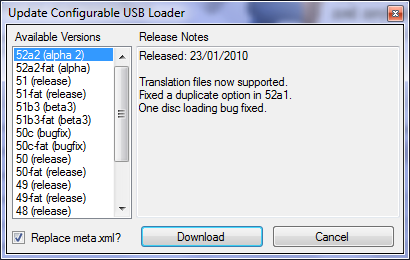
A quick heads up for those that don't have their Wiis online... The Configurator can now show you the most recent versions of Cfg and allow you to download them automatically. Here's a view of the new dialog:
update.png
 
I have the Backup Launcher 0.3g channel on my Wii Menu.

If I no longer have the WAD for it and wanted to remove it from my Wii, can I use Wakinikos WAD Creator to make a WAD from the Wii and then use it to remove the channel using the WAD Manager?

I've been out of the Wii scene so long. And even when I was I don't think I fully grasped the modding aspect like I did with PSP modding and such.

My main concern is that using the WAD Creator to WAD Manager to title removing will FULLY remove a WAD from my wii when I don't have the original WAD

thanks
 
danootz said:
I have the Backup Launcher 0.3g channel on my Wii Menu.

If I no longer have the WAD for it and wanted to remove it from my Wii, can I use Wakinikos WAD Creator to make a WAD from the Wii and then use it to remove the channel using the WAD Manager?

I've been out of the Wii scene so long. And even when I was I don't think I fully grasped the modding aspect like I did with PSP modding and such.

My main concern is that using the WAD Creator to WAD Manager to title removing will FULLY remove a WAD from my wii when I don't have the original WAD

thanks
I believe you'd be better off with AnyTitle Deleter Mod.
 
Dash Kappei said:
Wait, now even the Backup Launcher is an ok discussion here on Gaf?

-__-
Why wouldn't it be? It may be retarded to do that instead of using a HDD but it's not like he's downloading the games and burning them.
 
Dash Kappei said:
Wait, now even the Backup Launcher is an ok discussion here on Gaf?

-__-
I have no problem helping someone remove BL from their Wii. If it was the other way around, we'd have an issue.

At one stage, one of the well known tutorials installed it during its USB Loading tutorial. That's one of the reasons why I created the GWHT in the first place; to avoid crap like that. In any case, I wouldn't be surprised if there are people that have it that never wanted it, and I am assuming this is the case for danootz.
 
Clipper said:
I don't believe so.


No, the translation is only for the loader itself. I think the only method of playing a translated Fatal Frame 4 with Cfg is to rip the game, copy to the PC, apply the patches there (although I don't know how exactly) and then copy the patched game back to the drive. Due to the nature of the patch files, this might not even be possible.
You have to use Wiiscrubber to insert the patch files into the right places. Works on my USB drive.
Someone sent me these instructions, I believe they were found at GBATemp. Obviously you have to rip the ISO from your Wii by using WBFS Manager or something similar to get it off your harddrive.
You need Wiiscrubber (1.4) + partitionbuilder (1.1).

Load ISO in wiiscrubber

Extracting key partition files:
1. Expand Partition:2 (DATA)
2. Right click + extract the following files:
-partition.bin
-boot.bin
-bi2.bin
-apploader.img
-main.dol

Save them all to a folder like "ff4sys" or something.

Data files: Right click Partition:2 (DATA) -> Unencrypted Partition -> Extract
Save to a folder like "ff4data" or whatever you want.

Patch files: Download + Extract the patch files. You need to copy these to the appropriate folders in the data files partition you extracted ("ff4data" in my example). These are the corresponding paths:
BigFontGhostList -> Hide\Item
Chapters -> RSL
Credits -> RSL
Item -> Hide\Item
Menu -> Miya
Miya -> Miya
RSL -> RSL
SmallFontGhostlist -> Hide\Item
Songs -> SND\STREAM

Rebuilding the partition:
1. Open partitionbuilder.exe (make sure you have version 1.1!!)
2. Load up the files it needs (extracted to "ff4sys" in my example).
3. Source file directory is the data partition you extracted to a folder ("ff4data" in my example).
4. Click build, remember the filename you saved it as.
5. Wait. When it finishes, exit partitionbuilder.

Back to Wiiscrubber:
1. Right click Partition:2 (DATA) -> Unencrypted Partition -> Load -> Open the partition img you built in partitionbuilder.
2. Wait. Once it finishes you can exit Wiiscrubber and you'll be all set.

Hope this helps, game works perfectly on my USB Loader now with the patch installed.
 
Nekobo said:
What's the safest way to update from 3.2u to 4.0?
You don't want to update to 4.0. If you want to update, I suggest going straight to 4.2. However, the official update is very slightly dangerous (not because you have homebrew, it's just as dangerous for everybody else), so you can use the Safe 4.2 Updater instead.
 
Hey guys, I've been getting along fine now with with my Japanese 4.0J Wii system running the homebrew channel. All I pretty much use homebrew for is to run American games.

But I have just noticed that playing Tatsunoko Vs. Capcom online "restricts" me to the Asian region. I'd like to use the app that lets you change regions, but would like to know how safe it is to use. Has anyone used it or knows anything about it?
 
Huh? Tatsunoko should have options to choose between worldwide or regional matching I think. At least, I think I chose options along those lines when I first started a save in the European version, and I'm pretty sure they were in some options screen as well... I played some Andrew dude from the US the first day I got it. Beaten :(
 
Lyte Edge said:
Hey guys, I've been getting along fine now with with my Japanese 4.0J Wii system running the homebrew channel. All I pretty much use homebrew for is to run American games.

But I have just noticed that playing Tatsunoko Vs. Capcom online "restricts" me to the Asian region. I'd like to use the app that lets you change regions, but would like to know how safe it is to use. Has anyone used it or knows anything about it?
Region changing is very dangerous, and you will probably brick your machine attempting it. Not worth the risk.

BTW, you are in the US using a US version of the game, right? I didn't think it was the Wii region that determined where your locality is, but I guess that could be it.
 
Agnates said:
Huh? Tatsunoko should have options to choose between worldwide or regional matching I think. At least, I think I chose options along those lines when I first started a save in the European version, and I'm pretty sure they were in some options screen as well... I played some Andrew dude from the US the first day I got it. Beaten :(

Right, it does. So the problem I have is that regional matching only nets me laggy connections from Asian players. Worldwide is a mixed bag. Domestic matches would be the most optimal. Now I know why I wasn't getting any matches on Domestic when I was playing in the afternoon. :lol

Clipper said:
Region changing is very dangerous, and you will probably brick your machine attempting it. Not worth the risk.

That's what I thought, thanks. I'm definitely not going to take the chance for one game.

BTW, you are in the US using a US version of the game, right? I didn't think it was the Wii region that determined where your locality is, but I guess that could be it.

Yeah, I'm in the U.S. and playing the U.S. version of the game using Gecko OS. What I am wondering is if the Gecko OS settings might have affected the game, but it doesn't seem like it would; the first time I played the game, I just left the settings on default and now have everything on forced English. Doesn't seem like it would matter. I could try clearing my online profile and starting over, but that would really suck. :/
 
Is there a way to backup save files that are normally unable to be copied to an SD card? If I could save my TvC profile, then it would be no problem to mess around with it...
 
Lyte Edge said:
Is there a way to backup save files that are normally unable to be copied to an SD card? If I could save my TvC profile, then it would be no problem to mess around with it...
Yes, you can use Savegame_Manager or StartPatch.

Oh, I just realised there may be a solution for you to actually experiment with changing region. There's a new app called Sneek which allows you to emulate a Wii file system on an SD card without affecting your normal one. I haven't looked into it much myself, but it should allow you to experiment with the Wii region changing stuff.
 
I got my hands on the european version of Endless Ocean 2 today, and it requirres a system update to play, so I tried to get around that with using Gecko, but Gecko freezes after asking for installing a new WAD IOS.

Can I follow the safe-update guide on the wiki and play Endless Ocean 2 without problems, or is this an newer update then the NSMB update?
 
Vinterbird said:
I got my hands on the european version of Endless Ocean 2 today, and it requirres a system update to play, so I tried to get around that with using Gecko, but Gecko freezes after asking for installing a new WAD IOS.

Can I follow the safe-update guide on the wiki and play Endless Ocean 2 without problems, or is this an newer update then the NSMB update?
I suspect it probably is similar to the NSMB update, but I don't know for sure. Note that if you ran the NSMB update, then you might as well run the EO2 update as it will not be dangerous for you.

You can get the IOS you need using NUS Downloader and simply store it on the root directory of your SD card then run Gecko OS again, I think. Failing that, Dop-IOS Mod should be able to get the latest version of that IOS for you. The safe update method will probably nab the IOS too.

You could also use the Avoid Disc Updates method to bypass the check, although the game may not function properly if you do that, because it might really need that IOS.
 
Clipper said:
Oh, I just realised there may be a solution for you to actually experiment with changing region. There's a new app called Sneek which allows you to emulate a Wii file system on an SD card without affecting your normal one. I haven't looked into it much myself, but it should allow you to experiment with the Wii region changing stuff.
Might look into it. It would be nice to be able to access other regions' shops. I run a Japanese Wii (with PAL Menu installed, NTSC video, and Japanese Wii shop :lol), and while overall I prefer the Japanese shop, it would be nice to get some of my games in English.
 
Clipper said:
I suspect it probably is similar to the NSMB update, but I don't know for sure. Note that if you ran the NSMB update, then you might as well run the EO2 update as it will not be dangerous for you.

You can get the IOS you need using NUS Downloader and simply store it on the root directory of your SD card then run Gecko OS again, I think. Failing that, Dop-IOS Mod should be able to get the latest version of that IOS for you. The safe update method will probably nab the IOS too.

You could also use the Avoid Disc Updates method to bypass the check, although the game may not function properly if you do that, because it might really need that IOS.

But running the upload could potentially uninstall the Homebrew channel or lock me out of that, correct?

Otherwise I should look into all the IOS mubojumbo and get an understanding of it.
 
D.Lo said:
Might look into it. It would be nice to be able to access other regions' shops. I run a Japanese Wii (with PAL Menu installed, NTSC video, and Japanese Wii shop :lol), and while overall I prefer the Japanese shop, it would be nice to get some of my games in English.
In the old days (pre October 23rd 2008) you could change country to any value (including ones outside of your region) and the Wii Shop would let you in. For whatever reason Nintendo did care probably due to a few people were buying WiiWare from the US Store (mainly World of Goo because at the time the EU publisher wanted it as a €40 retail game) and points from the Japanese store (the only time points get erased is to and from Australia) as ¥1000 is much cheaper than €10.

Post October 23rd the Wii shop looks server-side at its records of the last region you connected from and displays an error message if they don't match.

The only way it could work is if the NAND backup is from another, Japanese Wii in which case you wouldn't need it (and if bootmii backups are anything to go by, converting them to work on another Wii basically makes it unable to connect to the Wii Shop).

What happens if they are the same you might ask? Well, the only way into the Japanese shop (if you've connected to the Wii Shop before) is to delete the Wii Shop account, change country and then connect. This however deletes all the ownership tickets of anything you currently own.

You might think "that is no problem I've got a NAND backup and so can get back into the other one and have my downloads", what happens is when you connect to the Wii shop on the backup the tickets get deleted and I think you get locked out with an error message.

This suggests the Wii Shop uses the console serial number as part of its record keeping.

The above information is based off my own experiences and someone elses experience shortly after bootmii came out (I'll try and hunt the topic down but it was on the Wiibrew forums).
Edit: Found the thread.
 
I think I'm ready to make the jump to homebrew, if only for the Region Free capability and the ability to unprotect the Darkside Chronicles save file.

I have a question that may be obvious, but I couldn't find it in the Wiki: can I use homebrew to get my VC games from one Japanese Wii (with that stupid green pixel problem) to another Japanese Wii that will be the destination console? I have a pretty sizable collection on one Wii and have only one title on the new one. Mainly if anything I just want to move my Mario game collection to the new Wii. Can this help me do that? If not, I'm prepared to just reinvest and get rid of the old Wii at some point, but if I can move it, then that'd be awesome.
 
cvxfreak said:
I think I'm ready to make the jump to homebrew, if only for the Region Free capability and the ability to unprotect the Darkside Chronicles save file.

I have a question that may be obvious, but I couldn't find it in the Wiki: can I use homebrew to get my VC games from one Japanese Wii (with that stupid green pixel problem) to another Japanese Wii that will be the destination console? I have a pretty sizable collection on one Wii and have only one title on the new one. Mainly if anything I just want to move my Mario game collection to the new Wii. Can this help me do that? If not, I'm prepared to just reinvest and get rid of the old Wii at some point, but if I can move it, then that'd be awesome.
While you obviously don't mean it, answering that question would be the same as answering whether it's possible to pirate VC games.

I'll just say that no, you can't transfer them in any way that I'm familiar with. Perhaps you can get Nintendo to transfer your account over to the new Wii by calling them, but as is seems you bought the new Wii on your own, I'd say that's out of the question too.
 
Is the new Tatsunoko some sort of a "special case"?
Before I was looking at the http://gwht.wikidot.com/avoid-disc-updates because I've heard that TvsC Ultimate All-Star requires 4.2 to play it online.
If I'm gettin' the game to run it through the usual CFG Loader, would I be allowed to play online even if my Wii is still on a lower firmware? I mean, I'm not sure because while NSMB Wii probably had the same update and thus for the offline part of TvsC I know there's no problem, maybe the online play does some kind of "firmware check" to let you connect?
Maybe it just requires the "Wii Shop update" (which I've done already:))...
Has anybody tried playing the game online with a Wii ≤ 4.0?

I'd prefer NOT having to update to 4.2.
In fact I want to wait until there's an update I really need/like for what it adds.
 
Dash Kappei said:
Is the new Tatsunoko some sort of a "special case"?
Before I was looking at the http://gwht.wikidot.com/avoid-disc-updates because I've heard that TvsC Ultimate All-Star requires 4.2 to play it online.
If I'm gettin' the game to run it through the usual CFG Loader, would I be allowed to play online even if my Wii is still on a lower firmware? I mean, I'm not sure because while NSMB Wii probably had the same update and thus for the offline part of TvsC I know there's no problem, maybe the online play does some kind of "firmware check" to let you connect?
Maybe it just requires the "Wii Shop update" (which I've done already:))...
Has anybody tried playing the game online with a Wii ≤ 4.0?

I'd prefer NOT having to update to 4.2.
In fact I want to wait until there's an update I really need/like for what it adds.
I'm on 4.0 and have no problem with online
 
Top Bottom