• Hey Guest. Check out your NeoGAF Wrapped 2025 results here!

"I need a new PC!" 2010 Edition

Najaf said:
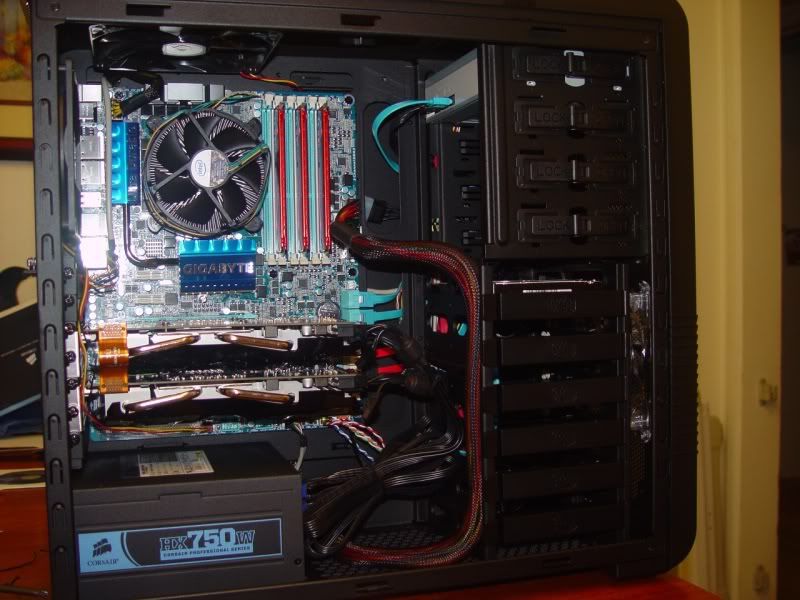
I just finished piecing her together.

new.jpg


Now, will we have post?
Nice work :D
 
How hot do SSDs get? Should there be ample space between them?
If I do get that 2nd SSD I keep thinking about, Id like to mount it in the Scythe Bay Rafter I had that supports 2 SSDs. It would look like this:
156pv07.jpg


Is that ok?
 
Hey guys, I'm not too into PC gaming but I am looking to upgrade to something a bit more modern that will last for a while. My current rig I built back a few years ago on a budget.

Operating System:


Windows 2.6.1.7600


CPU Type:


AMD Athlon(tm) 64 Processor 3200


CPU Speed (GHz):


2.03


System Memory (GB):


3


Video Card Model:


RADEON X800 Series


Video Card Driver:


atiumdag.dll


Desktop Resolution:


1440x900


Hard Disk Size (GB):


465.66


Hard Disk Free Space (GB):


175.06

Right now with those specs my system doesn't even meet the minimum Starcraft II requirements although I can still play it, though it does get sluggish with more stuff on screen. Other than that, the only really big games I look forward to are the next WoW expansion and after that Diablo III. Oh, and Portal 2! If the system could last me 4 years or so I'd be happy.

I'm looking for a system around 1000 (don't need a new monitor). What would you guys suggest? Any new cards or motherboards coming up that I should wait for? I don't really know much about the PC gaming cycle.
 
Salaadin said:
How hot do SSDs get? Should there be ample space between them?
If I do get that 2nd SSD I keep thinking about, Id like to mount it in the Scythe Bay Rafter I had that supports 2 SSDs. It would look like this:
156pv07.jpg


Is that ok?

Per speedfan my SSD is running at 31C.
 
So I'm starting to get more into hunting around for that desktop I'll be getting soon.

I ran across this, but I have no clue if A) The brand is trusted by the PC community B) if the price is great for what you get inside.

http://www.newegg.com/Product/Product.aspx?Item=N82E16883239020

I know I want this desktop to be able to run both FF14 and Starcraft 2 on max settings without any hiccups. FF14 seems to be really asking for a lot, but I figure the processor and the card inside this machine should cover that.

So what's Gaf think or should I keep looking around more ?
 
zlatko said:
So I'm starting to get more into hunting around for that desktop I'll be getting soon.

I ran across this, but I have no clue if A) The brand is trusted by the PC community B) if the price is great for what you get inside.

http://www.newegg.com/Product/Product.aspx?Item=N82E16883239020

I know I want this desktop to be able to run both FF14 and Starcraft 2 on max settings without any hiccups. FF14 seems to be really asking for a lot, but I figure the processor and the card inside this machine should cover that.

So what's Gaf think or should I keep looking around more ?
That's ridiculous for a $2500 prebuilt system to not even come with a monitor. Wtf at two of the same optical drives? I am 100% sure your money could be better spent than that
 
Najaf said:
I just finished piecing her together.

new.jpg


Now, will we have post?

Dude that looks awesome. My rig is currently being built, and I hope my friend does a good job with the cable management.

With you having dual 460's, would you mind downloading the demo for Mafia 2 and setting everything to max and also setting the Physx to High...just curious how awesome it would run with a dual gfx card setup you have and dedicating one of the cards to the physx.

Anyways...looks great man.
 
Mairu said:
That's ridiculous for a $2500 prebuilt system to not even come with a monitor. Wtf at two of the same optical drives? I am 100% sure your money could be better spent than that

Okay cool. I'll keep looking around. I'm going to hit up dell.com and run the gambit of building an alienware PC through them with similar specs as that one I showed to see what it comes out to on their end. I remember doing it before and came up to 2,100 with actually better specs and a great monitor, etc. Just want to reconfirm and post up the specs here to see if that ends up being worth it.

Edit: So I went through the building a PC through Dell/Alienware. I got these specs for $2,299.00

PROCESSOR Intel® Core™ i7 960 Quad Core Processor (3.2GHz, 8MB Cache)
OPERATING SYSTEM Genuine Windows® 7 Home Premium, 64bit, English
VIDEO CARD Dual 1GB GDDR5 NVIDIA® GeForce® GTX 460 - SLI Enabled
MEMORY 6GB Triple Channel 1333Mhz DDR3
HARD DRIVE 500GB - SATA-II, 3Gb/s, 7,200RPM, 16MB Cache HDD
OPTICAL DRIVE Single Drive: 24X CD/DVD burner (DVD+/-RW) w/double layer write capability
MONITOR No Monitor

Figured the other specs don't matter to post up. I could throw in a 22 inch monitor for an extra 199.99 to bump it up to 2,500. Also I wasn't sure if dual or single graphics card is the way to go or if a Nvidia is better than ATI Radeon right now.
 
·feist· said:
Congrats on the new build. I'm surprised you aren't running the 24-pin behind the motherboard. There's plenty of room back there without making the door bow out.

You know, I tried that and was having a heck of a time getting everything flat. In the end, it was the initial curve that put me off. Bending around the case at the bottom started to strip away the sexy wrapping so I did not push it. If I had not been able to place the 24 as it is now, and it had come out looking sloppy, I would have retried. As it stands though, I am really happy with the outcome.
 
So anybody on this page who can help? If you had 1300 to spend and were in need of a new computer, what would you spend it on? Any help is greatly appreciated.
 
Najaf's rig looks clean as hell :D

I'm also in the mood for PC gaming, here's my current shopping list.

qVNgRaVjJ.jpg


Any tips? Do you guys know which Socket 1156 CPU cooler would fit in the Antec Sonata III? I have measurements to go by but depending on the motherboard CPU placement changes, I just want to know if there's ample room (:lol I should just get a full tower).

(EDIT) Also considering buying a GTX 460 1GB. But I heard that it's hotter than the HD 5770, and I want a cool and quiet system.
 
I'm thinking of overclocking my graphics card (only recently learned that this was a thing that a person could do :lol ) so that I can play StarCraft 2 at max settings, 60 FPS, 1080p.

My graphics card is an nvidia gtx 260. How would I go about overclocking this, how much would I need to overclock it, and what are the risks of doing that? I've also overclocked my CPU from 2.67 GHz to 3.5 GHz (i7 920), if that makes a difference. Anyone got any advice?
 
Reading up on RAID a little, theres something I just dont get.

If I have 2 64GB SSDs:
RAID0 would let me use 128GBs with both drives working together. If one dies, I lose everything. Its like having one single hard drive.
RAID1 only lets me 64GBs but in case of failure, I can use the other one and not lose my data.

Im going to want to use all 128GBs so RAID1 seems out of the question. Would putting them in RAID0 give me that big of a performance increase that its worth it to reinstall Windows again even though I just did that? I also do not have a 6GB/s mobo so my SSD speeds are already limited but still fast.

Also, does TRIM still work for an SSD that does not directly contain the OS? Will Windows detect the new hardware as an SSD and just do its thing like its spposed to?

Thanks in advance.
 
Cdammen said:
Najaf's rig looks clean as hell :D

I'm also in the mood for PC gaming, here's my current shopping list.

http://www.pici.se/pictures/qVNgRaVjJ.jpg

Any tips? Do you guys know which Socket 1156 CPU cooler would fit in the Antec Sonata III? I have measurements to go by but depending on the motherboard CPU placement changes, I just want to know if there's ample room (:lol I should just get a full tower).

(EDIT) Also considering buying a GTX 460 1GB. But I heard that it's hotter than the HD 5770, and I want a cool and quiet system.
if you have the money for a 460, you have to go for it.
 
Quick question about Network Adapters :D

Is there much performance difference between a USB Dongle Adapter or a network Adapter Card?

I have to use wireless since i can't run a cable halfway across my house.

Thanks.
 
Semi bump because I need an answer somewhat urgently. :P(Could order PC today if I figure out if this is worth the price)

So I went through the building a PC through Dell/Alienware. I got these specs for $2,299.00

PROCESSOR Intel® Core™ i7 960 Quad Core Processor (3.2GHz, 8MB Cache)
OPERATING SYSTEM Genuine Windows® 7 Home Premium, 64bit, English
VIDEO CARD Dual 1GB GDDR5 NVIDIA® GeForce® GTX 460 - SLI Enabled
MEMORY 6GB Triple Channel 1333Mhz DDR3
HARD DRIVE 500GB - SATA-II, 3Gb/s, 7,200RPM, 16MB Cache HDD
OPTICAL DRIVE Single Drive: 24X CD/DVD burner (DVD+/-RW) w/double layer write capability
MONITOR No Monitor

Figured the other specs don't matter to post up. I could throw in a 22 inch monitor for an extra 199.99 to bump it up to 2,500. Also I wasn't sure if dual or single graphics card is the way to go or if a Nvidia is better than ATI Radeon right now.

So is the dual 460's the best bang for the buck? Should I just go for a single 460? Or a single 480? Dual 5870's from Radeon?

Also, I have a 32inch HDTV and was wondering could I just use that as my monitor? I'm really a PC tech newbie, so if there's any chance someone wants to do a quick PM chat with me to help me out I'd appreciate it. :)
 
zlatko said:
Semi bump because I need an answer somewhat urgently. :P(Could order PC today if I figure out if this is worth the price)

So I went through the building a PC through Dell/Alienware. I got these specs for $2,299.00

PROCESSOR Intel® Core™ i7 960 Quad Core Processor (3.2GHz, 8MB Cache)
OPERATING SYSTEM Genuine Windows® 7 Home Premium, 64bit, English
VIDEO CARD Dual 1GB GDDR5 NVIDIA® GeForce® GTX 460 - SLI Enabled
MEMORY 6GB Triple Channel 1333Mhz DDR3
HARD DRIVE 500GB - SATA-II, 3Gb/s, 7,200RPM, 16MB Cache HDD
OPTICAL DRIVE Single Drive: 24X CD/DVD burner (DVD+/-RW) w/double layer write capability
MONITOR No Monitor

Figured the other specs don't matter to post up. I could throw in a 22 inch monitor for an extra 199.99 to bump it up to 2,500. Also I wasn't sure if dual or single graphics card is the way to go or if a Nvidia is better than ATI Radeon right now.

So is the dual 460's the best bang for the buck? Should I just go for a single 460? Or a single 480? Dual 5870's from Radeon?

Also, I have a 32inch HDTV and was wondering could I just use that as my monitor? I'm really a PC tech newbie, so if there's any chance someone wants to do a quick PM chat with me to help me out I'd appreciate it. :)

You are basically paying Dell $1300 to build that for you. Still a rip off.
 
zlatko said:
Semi bump because I need an answer somewhat urgently. :P(Could order PC today if I figure out if this is worth the price)

So I went through the building a PC through Dell/Alienware. I got these specs for $2,299.00

PROCESSOR Intel® Core™ i7 960 Quad Core Processor (3.2GHz, 8MB Cache)
OPERATING SYSTEM Genuine Windows® 7 Home Premium, 64bit, English
VIDEO CARD Dual 1GB GDDR5 NVIDIA® GeForce® GTX 460 - SLI Enabled
MEMORY 6GB Triple Channel 1333Mhz DDR3
HARD DRIVE 500GB - SATA-II, 3Gb/s, 7,200RPM, 16MB Cache HDD
OPTICAL DRIVE Single Drive: 24X CD/DVD burner (DVD+/-RW) w/double layer write capability
MONITOR No Monitor

Figured the other specs don't matter to post up. I could throw in a 22 inch monitor for an extra 199.99 to bump it up to 2,500. Also I wasn't sure if dual or single graphics card is the way to go or if a Nvidia is better than ATI Radeon right now.

So is the dual 460's the best bang for the buck? Should I just go for a single 460? Or a single 480? Dual 5870's from Radeon?

Also, I have a 32inch HDTV and was wondering could I just use that as my monitor? I'm really a PC tech newbie, so if there's any chance someone wants to do a quick PM chat with me to help me out I'd appreciate it. :)

Is there a reason why you're building this through Dell? Also, is there a reason why you need a $570 processor? It all seems like overkill, and if you wanted to go crazy spending money I would spend it on better graphics cards, not the processor.
 
Salaadin said:
Reading up on RAID a little, theres something I just dont get.

If I have 2 64GB SSDs:
RAID0 would let me use 128GBs with both drives working together. If one dies, I lose everything. Its like having one single hard drive.
RAID1 only lets me 64GBs but in case of failure, I can use the other one and not lose my data.

Im going to want to use all 128GBs so RAID1 seems out of the question. Would putting them in RAID0 give me that big of a performance increase that its worth it to reinstall Windows again even though I just did that? I also do not have a 6GB/s mobo so my SSD speeds are already limited but still fast.

Also, does TRIM still work for an SSD that does not directly contain the OS? Will Windows detect the new hardware as an SSD and just do its thing like its spposed to?

Thanks in advance.

Unless you're really, really after the speed boost, you lose TRIM with RAID (which I suppose isn't that huge a deal, since the RAID boost will outweigh any TRIM boosts, although TRIM keeps the SSDs from degrading over time, so you may want to consider that). TRIM most certainly works whether the SSD contains the OS or not. Windows will most likely detect the SSD fine, but the simplest way to check that is to look under the disk defragmenting scheduler, and if Windows recognizes the SSD drive, it will disable defragmenting on that drive. RAID0 essentially doubles the SSD read/write speeds, but access speeds are not changed.

If one dies... well SSDs aren't going to die really, they have no moving parts, so worst thing that can really happen is you run out of write cycles (which takes decades of writing dozens of GBs daily), and even if you do run out of write cycles, you can still read off the drive, so the data isn't lost.
 
I wouldn't do dual 480s unless you were gaming higher than 1080p or using 3d. I also thought about doing SLI 480s when I started this extra long process of piecing together a potential rig (I wanted to do 3d though at smooth frames..so a valid reason).

How much does it cost to add the 5870 to your system? The 480?

I really hope you reconsider alienware. You're getting ripped especially on that processor.
 
Got everything in and assembled my new pc last night. wouldn't boot. I think it's something with my PSU wiring or maybe front panel controls. This is my first build, and i was surprised at the lack of detail in the instructions for many of the parts. Anyways, i'm going to check all my wiring when i get off work. Someone said earlier that i may need a keyboard plugged in. i'll try that. Any other suggestions? The mobo does have the green light lit when the PSU is flipped on...so it is getting power.

CASE CM|RC-690-KKN1-GP BK RT
MB ASUS|P7P55D-E PRO P55 R
VGA GIGABYTE| GV-N460OC-1GI R
PSU CORSAIR|CMPSU-750TX 750W RT
CPU INTEL|CORE I5 760 2.80G R
MEM 2Gx2| CORS CMX4GX3M2A1600C7 R
HD 1T|SAMSUNG HD103SJ 32M 7K %
DVD BURNER SAMSUNG | SH-S243N/BEBS%
WIN HOME PREM 7 64-BIT ENG 1PK DSP
CPU COOLER CM| RR-B10-212P-G1 RT
 
REV 09 said:
Got everything in and assembled my new pc last night. wouldn't boot. I think it's something with my PSU wiring or maybe front panel controls. This is my first build, and i was surprised at the lack of detail in the instructions for many of the parts. Anyways, i'm going to check all my wiring when i get off work. Someone said earlier that i may need a keyboard plugged in. i'll try that. Any other suggestions? The mobo does have the green light lit when the PSU is flipped on...so it is getting power.

CASE CM|RC-690-KKN1-GP BK RT
MB ASUS|P7P55D-E PRO P55 R
VGA GIGABYTE| GV-N460OC-1GI R
PSU CORSAIR|CMPSU-750TX 750W RT
CPU INTEL|CORE I5 760 2.80G R
MEM 2Gx2| CORS CMX4GX3M2A1600C7 R
HD 1T|SAMSUNG HD103SJ 32M 7K %
DVD BURNER SAMSUNG | SH-S243N/BEBS%
WIN HOME PREM 7 64-BIT ENG 1PK DSP
CPU COOLER CM| RR-B10-212P-G1 RT

What does it do when it doesn't boot? Make sure both mobo power slots are connected, with my build I only plugged in the huge power strip and not the processor one.
 
alanias said:
Is there a reason why you're building this through Dell? Also, is there a reason why you need a $570 processor? It all seems like overkill, and if you wanted to go crazy spending money I would spend it on better graphics cards, not the processor.

Dell allows me to pay about $70.00 a month for it which is how I plan to get a new PC to just pay it off over time. It's just my only option right now.

I don't build PCs and I have heard it's easy, but I do NOT trust myself. Flat out I'm not building it. I don't have a tech savvy friend either so I have to buy a pre built one.

I'm trying to build a PC that is cheap, but I want it to be able to run FF14 next month on max settings without hiccups.

What are your suggestions? Is there another site that could allow me to get a better computer than that for as low or lower than 70 a month that's pre built ? Also, what would you change graphics card wise, so I can make adjustments.
 
zlatko said:
Dell allows me to pay about $70.00 a month for it which is how I plan to get a new PC to just pay it off over time. It's just my only option right now.

I don't build PCs and I have heard it's easy, but I do NOT trust myself. Flat out I'm not building it. I don't have a tech savvy friend either so I have to buy a pre built one.

I'm trying to build a PC that is cheap, but I want it to be able to run FF14 next month on max settings without hiccups.

What are your suggestions? Is there another site that could allow me to get a better computer than that for as low or lower than 70 a month that's pre built ? Also, what would you change graphics card wise, so I can make adjustments.

That $1200 build with the X6 and 5870 w/ the $250 off coupon is/was an awesome deal (even without it is is pretty nice), would probably match the one you spec'd if not slightly better due to the faster GPU, for half the price.
 
Minsc said:
That $1200 build with the X6 and 5870 w/ the $250 off coupon is/was an awesome deal (even without it is is pretty nice), would probably match the one you spec'd if not slightly better due to the faster GPU, for half the price.

Where was this going on at? Newegg? I've tried browsing there just now and I can't even get the same specs of the one I just posted up to happen which sucks.
 
zlatko said:
Where was this going on at? Newegg? I've tried browsing there just now and I can't even get the same specs of the one I just posted up to happen which sucks.

It was at dell, I think the link is quite a few pages back...
 
alanias said:
What does it do when it doesn't boot? Make sure both mobo power slots are connected, with my build I only plugged in the huge power strip and not the processor one.
literally nothing. pressing the power button does nothing. I plugged in both the 24-pin connector and the 8-pin 12v connector. Is there something on the mobo that i can hit to power the system? I'm wondering if i have the front panel controls wired incorrectly. i also wasn't sure how to wire some of the fans...but i'm not sure if that would cause it not to boot.

Edit: i'm going through an article now. there were 12ish standoffs and i only needed 9, but went ahead and put the other 3 under the mobo just to have them there...i'm now reading that doing that may cause it to short and not boot. Is that common?
 
Minsc said:
Unless you're really, really after the speed boost, you lose TRIM with RAID (which I suppose isn't that huge a deal, since the RAID boost will outweigh any TRIM boosts, although TRIM keeps the SSDs from degrading over time, so you may want to consider that). TRIM most certainly works whether the SSD contains the OS or not. Windows will most likely detect the SSD fine, but the simplest way to check that is to look under the disk defragmenting scheduler, and if Windows recognizes the SSD drive, it will disable defragmenting on that drive. RAID0 essentially doubles the SSD read/write speeds, but access speeds are not changed.

If one dies... well SSDs aren't going to die really, they have no moving parts, so worst thing that can really happen is you run out of write cycles (which takes decades of writing dozens of GBs daily), and even if you do run out of write cycles, you can still read off the drive, so the data isn't lost.


Was I correct in thinking that RAID0 is what I want since I need all 128GBs and not RAID1 which would only give me 64GBs?
Do you think RAID will benefit me even with a 3GB/s mobo? Thats my biggest concern right now as I dont want to reformat and reinstall everything to set up RAID0 only to get a small, unnoticeable difference.

How bad is SSD degradation without TRIM? Ive been under the impression all this time that you should not have an SSD if you dont have Windows 7 and TRIM.

Thanks for the answers btw. My brain feels less foggy.
 
zlatko said:
Where was this going on at? Newegg? I've tried browsing there just now and I can't even get the same specs of the one I just posted up to happen which sucks.

http://www.dell.com/content/products/productdetails.aspx/studio-xps-7100?c=us&l=en&s=dhs&cs=19

Look for the right most option that's roughly at ~$1,200. Since you have the budget, don't go lower than the 5870. It's Dell, so try to find family/friends that have employee discounts or look for coupon codes online. I have no experience with long term financing but would generally advise against it as PCs are among the fastest goods to depreciate in terms of value so paying for something a year later when it should be much cheaper by then doesn't sit well with me.

I think Classic_Gs (sp?) bought this and already has his in hand. He posted pics maybe 10-15 pages back.

The month old anandtech article that brought this to everyone's attention is:
http://www.anandtech.com/show/3798/dell-studio-xps-7100

If you don't feel like Dell, assembling your own is still best of course. You can compare this with prebuilts on newegg or gateway to make yourself feel good about the purchaseif ever.
 
REV 09 said:
literally nothing. pressing the power button does nothing. I plugged in both the 24-pin connector and the 8-pin 12v connector. Is there something on the mobo that i can hit to power the system? I'm wondering if i have the front panel controls wired incorrectly. i also wasn't sure how to wire some of the fans...but i'm not sure if that would cause it not to boot.

Edit: i'm going through an article now. there were 12ish standoffs and i only needed 9, but went ahead and put the other 3 under the mobo just to have them there...i'm now reading that doing that may cause it to short and not boot. Is that common?


Yeah get rid of those brass/metal standoffs if you're not using them. Howabout your back panel i/o shield (the thin metal plate that covers your mobo's ports)? Is it flush all the way in? It will usually have some smaller pieces of protruding metal that are meant to touch the edges of the ports and ground them. Do you have cables running behind your mobo? Like a fan's power cable? Make sure you don't have those as well.

Oh and the really small two-pin connectors for your Power and reset switches, make sure they're in the right place. Make sure your 8 and 24 pin power connectors clicked or are otherwise pushed all the way in. Mobos can handle some flex so don't be scared of exerting a little pressure.
 
Phloxy said:
Will this mobo
ASUS P6T Deluxe V2 LGA 1366 Intel X58 ATX Intel Motherboard

Fit inside
Cooler Master HAF 932 Full Tower Case
http://www.newegg.com/Product/Produc...82E16811119160

Just wanted to know before I splurged on my new rig, dual 480's and all.

Sorry to ask again, jus needed an answer before i make this huge purchase.

You can have a miniature greenhouse or even incubator inside a HAF 932 while your PC is running. You might even find it too big when you finally receive it
 
kagete said:
Yeah get rid of those brass/metal standoffs if you're not using them. Howabout your back panel i/o shield (the thin metal plate that covers your mobo's ports)? Is it flush all the way in? It will usually have some smaller pieces of protruding metal that are meant to touch the edges of the ports and ground them. Do you have cables running behind your mobo? Like a fan's power cable? Make sure you don't have those as well.

Oh and the really small two-pin connectors for your Power and reset switches, make sure they're in the right place. Make sure your 8 and 24 pin power connectors clicked or are otherwise pushed all the way in. Mobos can handle some flex so don't be scared of exerting a little pressure.
no cables behind mobo. i/o shield is flush. I'll try my power connections to make sure they're all the way in, but i definitely need to remove the extra standoffs. That may do it. I don't think my mobo came with a speaker, so i may need to get one of those for troubleshooting if this doesn't work.
 
kagete said:
http://www.dell.com/content/products/productdetails.aspx/studio-xps-7100?c=us&l=en&s=dhs&cs=19

Look for the right most option that's roughly at ~$1,200. Since you have the budget, don't go lower than the 5870. It's Dell, so try to find family/friends that have employee discounts or look for coupon codes online. I have no experience with long term financing but would generally advise against it as PCs are among the fastest goods to depreciate in terms of value so paying for something a year later when it should be much cheaper by then doesn't sit well with me.

I think Classic_Gs (sp?) bought this and already has his in hand. He posted pics maybe 10-15 pages back.

The month old anandtech article that brought this to everyone's attention is:
http://www.anandtech.com/show/3798/dell-studio-xps-7100

If you don't feel like Dell, assembling your own is still best of course. You can compare this with prebuilts on newegg or gateway to make yourself feel good about the purchaseif ever.

AMD Phenom™ II X6 1055T + ATI Radeon HD 5870 1GB

^ That's the processor and graphics card in that bundle and it does NOT let you upgrade either of those. You are stuck with that combo. After going through it all I came out to 44.00 a month with a lot of great stuff, but it seems to me that the processor and Gcard are just meh. I'm pretty sure for FF14 I will need a single Nvidia 480X and the processor should be an I7 930 or 960 @ 2.8GHZ right ?
 
zlatko said:
AMD Phenom™ II X6 1055T + ATI Radeon HD 5870 1GB

^ That's the processor and graphics card in that bundle and it does NOT let you upgrade either of those. You are stuck with that combo. After going through it all I came out to 44.00 a month with a lot of great stuff, but it seems to me that the processor and Gcard are just meh. I'm pretty sure for FF14 I will need a single Nvidia 480X and the processor should be an I7 930 or 960 @ 2.8GHZ right ?

That CPU and GPU are far far from meh. They are 2 of the best on the market. If FF14 requires that kind of horsepower it will fail miserably and immediately.
 
kagete said:
You can have a miniature greenhouse or even incubator inside a HAF 932 while your PC is running. You might even find it too big when you finally receive it

Thanks lol, just wanted to double check. Gonna be gettin 12 gigs of ram, new cooler for my processor, an dual 480's to go with my 3d setup, will post pics when its all setup. Thanks again gaf!
 
Salaadin said:
Was I correct in thinking that RAID0 is what I want since I need all 128GBs and not RAID1 which would only give me 64GBs?
Do you think RAID will benefit me even with a 3GB/s mobo? Thats my biggest concern right now as I dont want to reformat and reinstall everything to set up RAID0 only to get a small, unnoticeable difference.

How bad is SSD degradation without TRIM? Ive been under the impression all this time that you should not have an SSD if you dont have Windows 7 and TRIM.

Thanks for the answers btw. My brain feels less foggy.

RAID0 is what you want, correct. It should still benefit you tremendously even on 3GB/s motherboards, I think the 6GB/s boards are somewhat new? You should try and find some SSD raid reviews, older ones should be on 3GB/s boards.

SSD degradation depends on the drives controller w/o TRIM, intel drives use a extremely smart controller and as long as there's enough free space, they don't suffer too poorly as they can rework the issues out. You can see this review for a better explanation.
 
Felix Lighter said:
That CPU and GPU are far far from meh. They are 2 of the best on the market. If FF14 requires that kind of horsepower it will fail miserably and immediately.

From what I've been reading if you DO want to run FF14 on max settings without hiccups then yes you will need a PC with some real nuts to it. That's why I'm trying to make sure what I end up getting will allow me to play it on max. It seems though that the processor is equal to an I5, but I want to play the safe route and go with an I7. As for the graphics card there are a few better ones out there. I went through ibuypower.com and was able to make a PC that landed at 2,000ish with an I7 and a GTX 480.

I'm still trying to keep diggin around though to bring it down from 2,000 to at least 1,700, but it's tough without the proper knowledge of where to look and what is better than what. :(
 
zlatko said:
AMD Phenom™ II X6 1055T + ATI Radeon HD 5870 1GB

^ That's the processor and graphics card in that bundle and it does NOT let you upgrade either of those. You are stuck with that combo. After going through it all I came out to 44.00 a month with a lot of great stuff, but it seems to me that the processor and Gcard are just meh. I'm pretty sure for FF14 I will need a single Nvidia 480X and the processor should be an I7 930 or 960 @ 2.8GHZ right ?

The X6 and 5870 should perform within 25% to the i7 and GTX 480 if I had to guess (so if you were getting ~90 fps with the 480, you'd still get at least around 65 w/ the 5870). The FFXIV benchmark had the 5870 performing much better than that level of a drop, so I'm not sure if I would even expect that much a difference if you go by the benchmark, it may even be within 5% of the GTX 480.

Sometimes the 5870 is faster than the GTX 480. Most of the time it is not, but it is something to consider when you're paying an extra $1000 for the setup. The 5870 is ATI's fastest single card right now, I wouldn't call it meh. And the X6 has 2 more cores than the i7s you listed, so if games take advantage of those cores, it could very well outperform it as well.

If a $2K PC that performs 20-30% faster than a $1.2K PC is your cup of tea, by all means (I usually attribute that kinda jump in performance to a much cheaper spread), the GTX 480 and i7 are faster (keep in mind the GTX 480 uses considerably more power and heat as well). But if I could get a 5870 and X6 for half the price, I wouldn't miss the extra frames one bit (but I'm not an nVidia driver zealot either, that may also play a big part in your decision).
 
So i want a cheap quad-core, and Overclockers UK are doing an X4 640 for £72.84 for today only. Would it be stupid to not buy this now ? I had my eye on a 635 for awhile then this popped up.
 
zlatko said:
AMD Phenom™ II X6 1055T + ATI Radeon HD 5870 1GB

^ That's the processor and graphics card in that bundle and it does NOT let you upgrade either of those. You are stuck with that combo. After going through it all I came out to 44.00 a month with a lot of great stuff, but it seems to me that the processor and Gcard are just meh. I'm pretty sure for FF14 I will need a single Nvidia 480X and the processor should be an I7 930 or 960 @ 2.8GHZ right ?

Ah yeah if you want i7 you're going to have to get an xps 9100, which puts you to around $1480 with the 5870. If you really want a geforce 480, it looks like you'll have to go up to the overpriced alienwares. I was just working on your initial request for the best prebuilt PC around thar $1300 price point.

1055T and 5870 are the penultimate CPU and GPU for ATI/AMD that people will readily recommend you and have great value for their price points. The Intel/Nvidia equivalents (2nd best okay) would probably be an i5-750 and GTX 470 which are rarely found at the same price range in the *prebuilt* PC market. Note that builders like Dell have better margins from ATI/AMD so they're able to offer more competitive configurations using them for the same price. Hunting around for i5 and 470 will get you closer to $1500 for a prebuilt. I imagine that looking for a prebuilt i7-9xx and a 480 will get you closer to $2,000-2,200.

I'm not a fanboy of either brand as I've let my available disposable income dictate what I buy after reading reviews. If you want the absolute best for your money, then take the plunge and assemble it yourself. If not, then be prepared to make some compromises. I honestly don't think you'll find the performance of this machine lacking (especially since you don't seem like a super PC geek in the first place) and can confidently recommend it.

Ask more questions and read more reviews! The worst thing you can do is spend a lot of money and have buyer's remorse.
 
Ogs said:
So i want a cheap quad-core, and Overclockers UK are doing an X4 640 for £72.84 for today only. Would it be stupid to not buy this now ? I had my eye on a 635 for awhile then this popped up.

I just built a rig with an Athlon II X4 635 last week

overclocked to 3.5ish with a Mugen 2; it has plenty of power I guess =] encodes really fast

unfortunately I've only got a 7900GT card lying around, won't buy a new card until the next ATI series are announced so can't do any meaningful gaming benches for you :(

but for pure gaming purposes you might want to consider a Phenom II X4 BE instead -> more cache and seems to overclock better too ... would be around 40 euros extra here in .nl (I went with the 635 instead as I plan to sell it to my dad later this year and get an X6 )

if price really is an issue I can definitely recommend it though :D
 
Top Bottom