
BruceLeeRoy
Banned
Is it possible to build a pretty solid rig for 600? Without a monitor
Introdacqua said:I bought the ASUS UL30Vt-A1, which has a slower CPU but nearly identical GPU and I've played l4d2 and SC2 on medium-low native res without any problems.
-COOLIO- said:So this is my build. It's pretty much the Haz recommended build for the most part. The bolded parts are what I've already bought:
Case: Antec Sonata III with an Antec Earthwatts 500w PSU - $70
GPU: Gigabyte GTX 460 1GB - $200
Hard drive: Samsung F3 Spinpoint 1TB - $88
CPU: Phenom II x4 955 BE - $160
RAM: G.SKILL F3-12800CL9D-4GBRL Ripjaws PC3-12800 4GB 2X2GB DDR3-1600 CL9-9-9-24 Core i5 1.5V Memory Kit -$95
Now here's where I'm undecided
MOBO:
Asus M4A89GTD PRO/USB3 Socket AM3 $156
Or
GA-870A-UD3 $110
Specwise, the motherboards seem pretty similar but the M4A is $46 more. Also, it seems that neither board supports DDR3 1600 memory which is weird since the memory that Haz recommended is 1600 mhz.
I switched to an AMD CPU for the AM3 socket so I don't mind spending a good chunk on the board if the features are worth it since I'm hoping to upgrade my processor at least once in the distant future and keep the same board for a while.
So can anyone let me know what the big feature differences are between the motherboards is and if Im getting the right RAM?
Thanks a ton
edit: oh yeah, and i was also wondering if you need a case with usb 3.0 ports to utilize usb 3.0 on the board?
BruceLeeRoy said:Is it possible to build a pretty solid rig for 600? Without a monitor
AvidNobody said:Sweet. So the NVIDIA that is already installed can handle that kinda stuff? Good to hear.
Expand? I haven't kept up too much and was considering the same laptop. Battery life and screen quality is the real priority for me, but if it's integrated I'd expect some good battery life. What do they have in the works for the end of the year and how much do you think they'll be?brain_stew said:Its a terrible buy if gaming is a priority, I'm afraid. For reference, by the end of the year an Intel integrated GPU will be significantly faster.

thanks, and i was thinking of overclocking the cpu a little bit if there's enough power left over in the 500w from the 460. is overclocking ram hard? i figure i might try that too, once again, if i have enough power.Mad Max said:Judging from your post I'm sort of assuming you're not going to OC, so getting 1600 ram is probably a waste of money, just get a cheap 1333 set from a decent brand.
In case of the mobo, the asus has a better chipset, and is more fit for overclocking and probably crossfire. It also has USB3 and Sata600, which could be usefull in the future. But again, you could just save the money and buy a 870 board with USB3 and Sata600, unless you want to use crossfire.
I have a asus m4a785td evo which has the same chipset as the gigabyte, but also USB3, Sata600 and some OC related stuff.
And you don't need usb3 ports on your case since they are at the back of the motherboard.

I love you Stew. I'm ordering that exact setupbrain_stew said:Absolutely. Something like:
Get GTX 465 (with Mafia 2 and Just Cause 2 for free)
4GB DDR3
870 AM3 motherboard
~500w+ PSU from a decent brand (OCZ are probably good for someone on a budget)
Athlon ii X4 635
1TB Smsung F3
The Sandy Bridge PreviewFirestorm said:Expand? I haven't kept up too much and was considering the same laptop. Battery life and screen quality is the real priority for me, but if it's integrated I'd expect some good battery life. What do they have in the works for the end of the year and how much do you think they'll be?
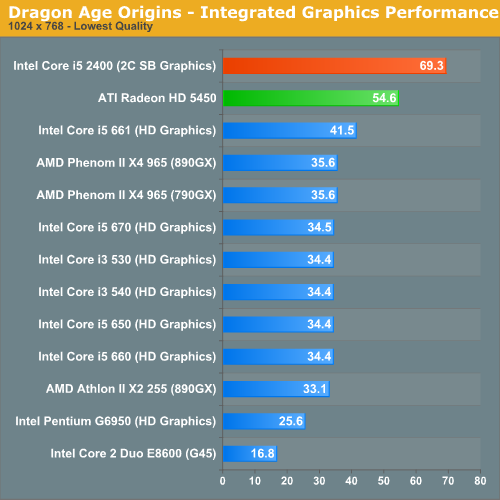
BruceLeeRoy said:I love you Stew. I'm ordering that exact setup
-COOLIO- said:thanks, and i was thinking of overclocking the cpu a little bit if there's enough power left over in the 500w from the 460. is overclocking ram hard? i figure i might try that too, once again, if i have enough power.
if not ill probably grab some OCZ 1333 ram. as for the board im not interested in crossfire, but somewhat interested in overclocking the cpu and possibly the ram if i get 1600. so should i grab the asus? the hdmi output is also of help since i want to hook this up to a tv in the near future.
and thanks again

Mad Max said:It's not hard, but it doesn't really matter much in most real world applications. Most people buy OC ram so they can increase their FSB without having to resort to setting an unusual FSB/RAM ratio, or because they want the highest possible scores in benchmarks. And normally the first would apply to you, but the 955 has an unlocked multiplier so you don't have to increase the fsb to overclock your CPU.
And if you want to overclock you don't need the asus board, unless you really want to go high. The only difference you'll probably notice is that the asus is a little more reliable (for example when it comes to supplying the correct voltages), but it's nothing you can't work your way around with a cheaper board. As long as you buy something decent like that gigabyte, which also has the right bios options.
Also you might want to invest some money into a 3rd party cooler if you want to OC that 955, because AMD CPUs can't take heat very well, and when you start to increase the voltage and go past ~3,5ghz your CPU will probably melt with a stock cooler.
Although I guess having a hdmi output with sound would be nice if you want to hook up your PC to a tv, since a 460 will only send a video signal through a hdmi cable.
btw: http://www.overclockers.com/forums/showthread.php?t=596023 (for more about Phenom II OCing)

-COOLIO- said:alright, thanks a ton!
i think ill go with the cheaper board and 1333 ram then.
and the video signal is good enough, since ill probably never be using the tv speakers.
Hawk269 said:Another Noobish question...
I just tried running the Unigine Benchmark. When the results page comes up, it shows my Video Card is the Nvidia 460. The 460 I have is my physx card and my main card is the 480. When installing my GPU's the ASuS Instruction Manual for the Motherboard stated that I should put the Main GPU in the Slot Closest to the CPU, which would me this is the main slot for main GPU. This is where I placed my 480 and the HDMI cable is connected to this card.
In the Nvidia Control Panel it shows the 480 that it is in Slot 2, the 460 in Slot 1. I am just wondering, can this be impacting my performance at all? No matter what I try, the Unigine Benchmark alwasy comes back as a 460. I have not swapped positions of the cards since the the manual says the main card should be in the slot closest to the CPU...is that right?
Tahnks for any and all help as usual!
mikespit1200 said:My brother is looking to upgrade his 3 year old gaming PC. Is there any life to be had out of his C2D E6420 2.13Ghz? His 8800GTS is toast and he's looking into an i5, H55 mobo, and GTX 460 1GB. Is there any reason to hold off on a socket change or is now as good a time as any?
brain_stew said:That's usually right, yeah. Have you got the 480 setup for rendering and the 460 setup for PhysX in the control panel?
I'd still recommending testing both ways though, might as well be 100% sure.
Hawk269 said:Yeah, it is set up in the control panel correctly. I know in other bench's and in Mafia 2 it detects the 480, so I know it is reading it right..I guess it is just the Unigine that is defaulting to the 460.
I am thinking of testing still, but the 480 is so large that I would need to move the HDD to another area so the 480 fits in the 2nd slot instead.
it's a gb 1gb. opening sale at ncix. i stood in line for 5 hours :[brain_stew said:You've got a $200 460 listed which probably means its the 768MB version? Yeah, don't get a 768MB 460.
I'd get an ASUS GTX 465 for $200 with Mafia 2 and Just Cause 2 personally.
-COOLIO- said:it's a gb 1gb. opening sale at ncix. i stood in line for 5 hours :[
Like this.BruceLeeRoy said:Is it possible to build a pretty solid rig for 600? Without a monitor

BruceLeeRoy said:Is it possible to build a pretty solid rig for 600? Without a monitor
brain_stew said:Look out for Newegg's combos, they can often save you a packet.
Newegg currently has the 1TB Samsung F3 for $60Hazaro said:

Not very.Flying_Phoenix said:I'm planning to get a AMD Phenom II X6 for my upcoming birthday (yes I know I've been talking about this for a while. I'm most likely going to snag a GTX 460 with it too. Now I know this question is silly but will my electric bill go up significantly? I mean I leave my PC on for a while usually because I use it as a media center and I wonder if a more expensive but less wattage Intel CPU would be better for me.
Out of curiosity, what would mine run at, idle?Hazaro said:Not very.
CPU's idle pretty low, GPUs not bad either.
Try and grab a 95W 1055T, should be out soon.
One of the best ways to cut electricity bill is to have a good power supply as that is what converts the AC to DC. Things like 80+ certification (or higher) will help save you money in the long run.
A system like yours will probably run 130-160W idle.
Hazaro said:Not very.
CPU's idle pretty low, GPUs not bad either.
Try and grab a 95W 1055T, should be out soon.
One of the best ways to cut electricity bill is to have a good power supply as that is what converts the AC to DC. Things like 80+ certification (or higher) will help save you money in the long run.
A system like yours will probably run 130-160W idle.
http://en.wikipedia.org/wiki/80_PLUSFlying_Phoenix said:Awesome. When's the 95W version due? Maybe I can grab it if it's cheaper or get the 125W version for a much lower cost. So in short it will only use up to it's potential during extreme times like very high end gaming and high end rendering? Or will it be a rarity even during then?
And yes I'll be getting an 80+ certified power supply. What's that mean anyway?
Yeah. It has a thread dedicated to it.Salaadin said:Posted?
AMD will be retiring the ATI branding
http://www.zdnet.com/blog/hardware/amd-to-retire-ati-branding/9514
AMD Radeon
Mango Positive said:I'm in...
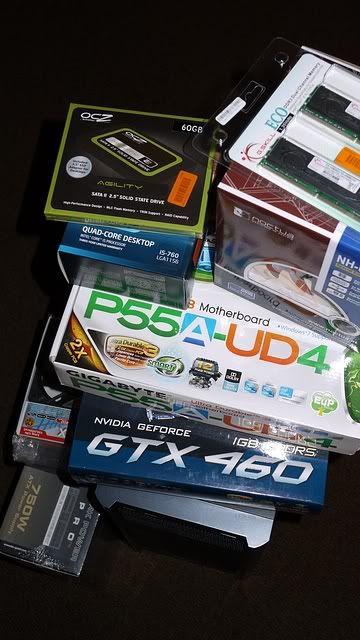
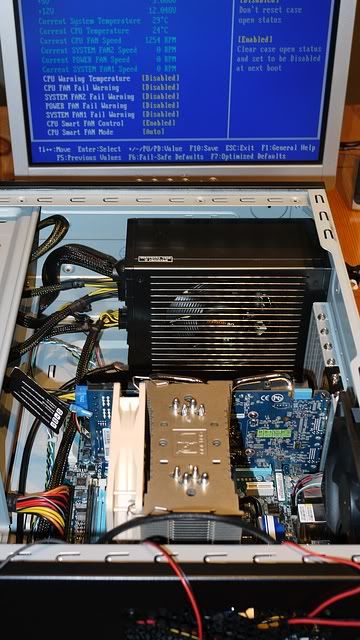
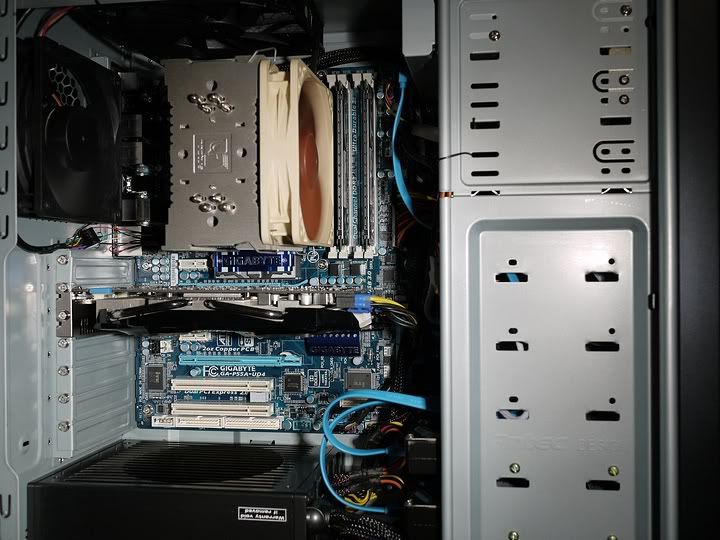
My GT8800 was overheating every time I played Borderlands. I thought I'd replace it with a 460 1GB (Cyclone) and beef up cooling. Then I thought "Hey... why don't I update my Core 2 Duo 2.2 to i5-760?", so I put all of that together and discover that my power supply fan isn't spinning and was probably the reason for the overheating. So I replaced that and upgraded Vista to 7.
After much work over the weekend, I've basically got it running well... except for the whole "shutting down randomly" thing, usually when installing a new program.
Any ideas what might cause that? It basically works perfectly until it thinks too much is going on. Borderlands runs awesome, but it seems to struggle staying on with Crysis.
MB, PSU, GPU, CPU, memory, OS, and case are all new.
Mango Positive said:I'm in...
My GT8800 was overheating every time I played Borderlands. I thought I'd replace it with a 460 1GB (Cyclone) and beef up cooling. Then I thought "Hey... why don't I update my Core 2 Duo 2.2 to i5-760?", so I put all of that together and discover that my power supply fan isn't spinning and was probably the reason for the overheating. So I replaced that and upgraded Vista to 7.
After much work over the weekend, I've basically got it running well... except for the whole "shutting down randomly" thing, usually when installing a new program.
Any ideas what might cause that? It basically works perfectly until it thinks too much is going on. Borderlands runs awesome, but it seems to struggle staying on with Crysis.
MB, PSU, GPU, CPU, memory, OS, and case are all new.
Corky said:What kind of PSU do you have?
MomoPufflet said:That happened to me years ago when my processor would overheat due to improperly applied thermal paste (it was just slopped on; built by dumb friend). No idea if this is what's causing it for you, but that was my problem. Also make sure your video card's fans are spinning. Make sure CPU is seated properly.
ChryZ said:
teepo said:
total was actually 1231.
woo...?
Omiee said:since im new to nvidia what programme do u use to force AA and stuff in games
LukeT said:Bumping this from a page or so back because the deal runs out 1st September. Don't want to miss out if it's worth it..
Looking at this bundle to go in a gaming rig. http://www.overclockers.co.uk/showproduct.php?prodid=BU-038-OB&groupid=43&catid=339&subcat=
Is it worth buying? Seems about the same as the parts priced separately but it's the 95w version pre overclocked or am I missing something?
Budget approx £800. Looking at also using a Gigabyte 460 1gb, Corsair 750w PSU, 500gb spinpoint F3 and the Coolermaster CM-690 II Advanced Dominator case. Wanting to game at 1080p.