
Nice build. Only thing I'd change is getting a board with USB 3.0 and SATA 6gbps, should only be $10-20 more.Outdoor Miner said:Micro Center has me tempted to not wait out for the next wave of stuff coming this Spring.
This
Intel i5-760 @ 2.80 GHz (MC, $170)
*Antec Three Hundred Illusion Black Steel Case Midtower
*Antec Earthwatts EA650 PSU (Newegg PSU+Case combo, $130-15 MIR)
Samsung Spinpoint F3 1TB 7.2k RPM Hard Drive (MC, $60)
MSI P55-GD65 LGA 1156 P55 ATX Motherboard (MC, $150-40 MIR)
G.SKILL Ripjaws Series 4GB (2x2) DDR3 1333 RAM (Newegg, $90)
SPARKLE GeForce GTX 460 768MB GDDR5 (MC, $167)
ASUS DVDRW DRIVE (Newegg, $20)
Total = - $40 MIR - $15 MIR = $732
could pretty much run any and everything maxed (I game @ 1680x1050) for the foreseeable future.
-
Hey Guest. Check out your NeoGAF Wrapped 2025 results here!
You are using an out of date browser. It may not display this or other websites correctly.
You should upgrade or use an alternative browser.
You should upgrade or use an alternative browser.
"I need a new PC!" 2010 Edition
- Thread starter Spy
- Start date
toastyToast
Member
I'm thinking about getting a new case next year along with a new mobo+CPU+RAM (spent enough this year). With regards to USB 3.0, are all the cases coming out now going to have 3.0 headers for the front USB ports? The only one that I've seen is the Coolermaster HAF X which looks far too gamey for my taste. It seems odd that a lot of the mobos out now are supporting USB 3.0 but it'll only be useful for the connections at the back of the case.
In other news I think I've conclusively overclocked my 5850, reached 880/1275 from 725/1000 as my card doesn't support voltage tweaking. Now to convince myself to stop benchmarking games instead of playing them
In other news I think I've conclusively overclocked my 5850, reached 880/1275 from 725/1000 as my card doesn't support voltage tweaking. Now to convince myself to stop benchmarking games instead of playing them
brb benchmarking
Almost all motherboards right now just have 2x USB3.0 ports on the back of the mobo.
As for overclocking it's pretty straight forward.
Up CPU/NB voltage, up the clocks, repeat until you are not stable or get where you want.
Almost every mobo should be the same in those basic regards. Some boards have quirks, but just google CPU + mobo to see if there's any funky business going on.
As for overclocking it's pretty straight forward.
Up CPU/NB voltage, up the clocks, repeat until you are not stable or get where you want.
Almost every mobo should be the same in those basic regards. Some boards have quirks, but just google CPU + mobo to see if there's any funky business going on.

pyros
Member
Hazaro said:As for overclocking it's pretty straight forward.
Up CPU/NB voltage, up the clocks, repeat until you are not stable or get where you want.
Almost every mobo should be the same in those basic regards. Some boards have quirks, but just google CPU + mobo to see if there's any funky business going on.
Thank you
evil solrac v3.0
Member
is it worth it to buy a new motherboard (1156 Socket) that has USB 3.0 and SATA 6.0?
does such a product even exist?
does such a product even exist?
evil solrac v3.0 said:is it worth it to buy a new motherboard (1156 Socket) that has USB 3.0 and SATA 6.0?
does such a product even exist?
I dont know if its worth it but I think the GA-P55A-UD4P supports both:
http://www.newegg.com/Product/Product.aspx?Item=N82E16813128409
PjotrStroganov
Member
Hazaro said:Almost all motherboards right now just have 2x USB3.0 ports on the back of the mobo.
As for overclocking it's pretty straight forward.
Up CPU/NB voltage, up the clocks, repeat until you are not stable or get where you want.
Almost every mobo should be the same in those basic regards. Some boards have quirks, but just google CPU + mobo to see if there's any funky business going on.
Isn't it better to first look for other user's experiences about the max stable clockspeed at stock voltage and start working from there?
And wouldn't changing voltages come after upping the freq to a point where the system becomes unstable?

-COOLIO-
The Everyman
whoo! i have that board! but doesnt the GA-P55A-UD3 have sata 6Gb/s and usb 3.0 for ~$40 less? i think the ud4p is for slightly better audio, sli, more ports, and some overclocking features? i dunno what the other benefits are.Salaadin said:I dont know if its worth it but I think the GA-P55A-UD4P supports both:
http://www.newegg.com/Product/Product.aspx?Item=N82E16813128409
speaking of which, i finished my gaming comp recently. i caved like a bitch and used ncix assembly though

thar he is (yeah my computers a dude):
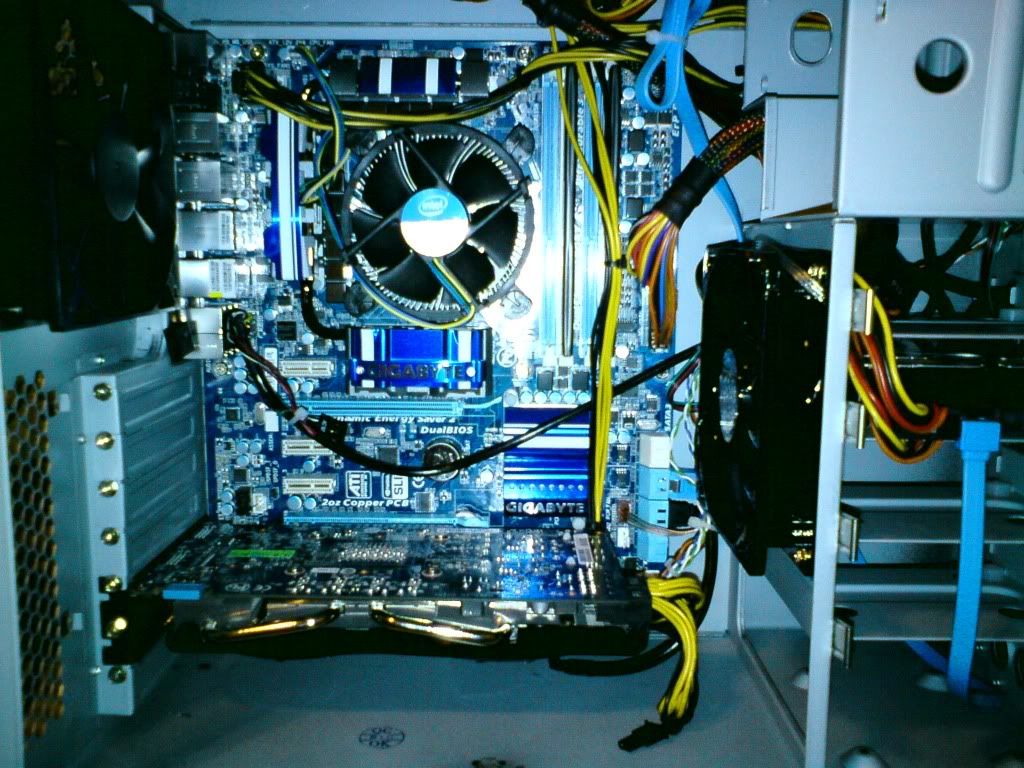
Apparently the 460 had to be moved to the 2nd slot because shit would hit the fan (the wires). If I ever sli id need a 460 with wires on the side (and a new psu of course).
i5 760 $ $200
XMS3 DDR3 1600mhz ram @ $83 (after MIR, which i should do today)
Gigabyte GTX 460 1GB @ $200
GA-P55A-UD4P @ $170
640GB Caviar Black @ $60
Antec Sonata III case with 500w Earthwatts PSU @ $70
Blue LED 120mm fan @ $9
Samsung 22x DVD writer SATA Black @ $17
Assembly and Warranty @ $50
Total before tax: $859 CDN
With Tax: $970.67 CDN
Thanks to the ncix sale i was within my $1000 budget.
PC gaming is glorious. Can't wait until it becomes mainstream. It just needs motion controls
oh and btw a BIG thanks to all the PC Gurus in here!
PjotrStroganov said:Isn't it better to first look for other user's experiences about the max stable clockspeed at stock voltage and start working from there?
And wouldn't changing voltages come after upping the freq to a point where the system becomes unstable?
Yes, you're right. You want to see what the max OC you can achieve WITHOUT upping voltage. When you hit a ceiling in stability/frequency, you up the voltage.
The Big Rig said:I can tell you what I bought. It was around $650 (before rebates), and hopefully it'll last me a good while.
Antec Three Hundred Black Steel ATX Mid Tower Computer Case
ASUS M4A79XTD EVO AM3 AMD 790X ATX AMD Motherboard
SAPPHIRE 100283-3L Radeon HD 5770 1GB 128-bit GDDR5 PCI Express 2.0 x16 HDCP Ready CrossFireX Support Video Card
OCZ ModXStream Pro OCZ700MXSP 700W ATX12V V2.2 / EPS12V SLI Certified CrossFire Ready
AMD Athlon II X4 640 Propus 3.0GHz Socket AM3 95W Quad-Core Desktop Processor
CORSAIR XMS3 4GB (2 x 2GB) 240-Pin DDR3 SDRAM DDR3 1600 (PC3 12800) Desktop Memory Model CMX4GX3M2A1600C9
Seagate Barracuda 7200.12 ST3500418AS 500GB 7200 RPM SATA 3.0Gb/s 3.5" Internal Hard Drive -Bare Drive
Still haven't decided on what card to buy, but its the best price I've seen for a 5770 thats from a major company.
Thanks! Hazaro's list is great too!
I'm thinking of getting this, as i'm pretty sure my mobo is a no go. Either that or the CPU :CSalaadin said:I dont know if its worth it but I think the GA-P55A-UD4P supports both:
http://www.newegg.com/Product/Product.aspx?Item=N82E16813128409
hopefully it's just the mobo and i don't have to buy a new cpu as well.
LiveFromKyoto said:I Googled this place and the reviews are gold.
I want to go in there just to see if they'll be rude to me, then show what their rating on Google maps looks like. You know, after they rebuild I mean.
This is a conversation between a friend of mine, and me.
Dr.Acula: CANADA COMPUTERS BUNED DOWN!
I just bought a case fan there YESTERDAY!
Zeke: I saw it out at the bar last night
Zeke: Were you with me when I went there and the cops were there cuz some guy got pissed about the return policy and smashed their cases?
:lol
-COOLIO- said:i caved like a bitch and used ncix assembly though
Apparently the 460 had to be moved to the 2nd slot because shit would hit the fan (the wires).
Nice build, although their cabling job looks like I did it or something. What wires would get in the way? The lower slot is usually pci-e 8x, and not 16x (although it makes no real-world difference).
I have a feeling the second slot is a slower slot and isn't running the full PCIE x16. At least that's how they're labeled. I'm not sure how you'd test what speed it's running at, perhaps someone else can suggest that. I don't see any reason why that card can't be in the top slot.-COOLIO- said:Apparently the 460 had to be moved to the 2nd slot because shit would hit the fan (the wires). If I ever sli id need a 460 with wires on the side (and a new psu of course).
TouchMyBox
Member
-COOLIO- said:whoo! i have that board! but doesnt the GA-P55A-UD3 have sata 6Gb/s and usb 3.0 for ~$40 less? i think the ud4p is for slightly better audio, sli, more ports, and some overclocking features? i dunno what the other benefits are.
speaking of which, i finished my gaming comp recently. i caved like a bitch and used ncix assembly though
Damn, If you had anything other than a GTX 460, you could turn that into a pretty nice hackintosh.

hylian_pirate
Member
How do I know what is the part that is overheating (64C)?

-COOLIO-
The Everyman
well that's good :]Dr.Acula said:Nice build, although their cabling job looks like I did it or something. What wires would get in the way? The lower slot is usually pci-e 8x, and not 16x (although it makes no real-world difference).
Fredescu said:I have a feeling the second slot is a slower slot and isn't running the full PCIE x16. At least that's how they're labeled. I'm not sure how you'd test what speed it's running at, perhaps someone else can suggest that. I don't see any reason why that card can't be in the top slot.
hmm, maybe ill try moving it sometime myself then.
TouchMyBox said:Damn, If you had anything other than a GTX 460, you could turn that into a pretty nice hackintosh.
a wat?
TouchMyBox
Member
-COOLIO- said:a wat?
Snow Leopard, yo. It's pretty much the Bee's Knees.
GAF, I need PC help real bad.
Built my own computer, about a month or two old, everything was smooth and fine until recently my computer started locking up. It happens at different times, from watching HD movies on it to just idling in windows. I tried doing a system restore from back in august and it still froze up. My problems are very similar to the ones this guy describes: http://www.tomshardware.com/forum/293454-31-computer-locking-indefinitely
I;ve checked temperatures, the max that anything is running at is 40 degrees C.Nothing seems to be overheating. Something fucked up is that my processor is a AMD Athlon II X4 635 processor and is quad core. However, when I boot up and when I check dxdiag, it says I only have 3 cores running. WTF is up with that? Anyone have any ideas to help me? Anything short of a full wipe for now.
Built my own computer, about a month or two old, everything was smooth and fine until recently my computer started locking up. It happens at different times, from watching HD movies on it to just idling in windows. I tried doing a system restore from back in august and it still froze up. My problems are very similar to the ones this guy describes: http://www.tomshardware.com/forum/293454-31-computer-locking-indefinitely
But after an hour or so my computer suddenly froze completely. Thinking it would be only temporary, I waited about five minutes. But since nothing happened and even the mouse pointer had frozen, I rebooted the computer. The problem is that this keeps happening. It can happen from anywhere between two minutes and several hours before it happens, but it WILL happen at some point. I don't think it has kept running for more than four hours before freezing. So far I have not discovered a pattern between my activity on the computer and the freezing. It can happen during a graphically intense game, a processor-intense game or even during idling on the desktop with nothing but windows running.
I;ve checked temperatures, the max that anything is running at is 40 degrees C.Nothing seems to be overheating. Something fucked up is that my processor is a AMD Athlon II X4 635 processor and is quad core. However, when I boot up and when I check dxdiag, it says I only have 3 cores running. WTF is up with that? Anyone have any ideas to help me? Anything short of a full wipe for now.
crisdecuba
Member
Okay, so I finally bought an SSD, but I'm a bit unclear as to what the best way is to switch Windows 7 from my current HDD to the SSD. Do I just install it on the SSD and boot from there? Are there any "activation" issues? Do I need to remove it from the HDD first? And how the heck do you uninstall an OS??
Anyone have a sense of how to do this?
Anyone have a sense of how to do this?
crisdecuba said:Okay, so I finally bought an SSD, but I'm a bit unclear as to what the best way is to switch Windows 7 from my current HDD to the SSD. Do I just install it on the SSD and boot from there? Are there any "activation" issues? Do I need to remove it from the HDD first? And how the heck do you uninstall an OS??
Anyone have a sense of how to do this?
You should be fine. If you enter in a your existing key on your new drive, it should find that all your hardware is the same, and recognise that the computer is the one registered with the particular product key. If it doesn't work, you may have to contact Microsoft (link).
Make sure in your bios to enable AHCI before you install windows. Also perform these tweaks to rid yourself of the cache hits Windows does.
Here are some firefox hacks to put all your cache into ram (makes it FLY!).
Okay GAF, hows the 5770 working out for you guys? Looking to be the optimum upgrade path for my Mac Pro, as the 5870 is looking less likely (and a new PC is out the window now  )
)
Also, Dell ST2410 24 inch, decent monitor? Im looking at the included sound bar, just for something to supplement my surround sound
) Also, Dell ST2410 24 inch, decent monitor? Im looking at the included sound bar, just for something to supplement my surround sound
Yup. Almost for sure it's a 4x or 8x.Fredescu said:I have a feeling the second slot is a slower slot and isn't running the full PCIE x16. At least that's how they're labeled. I'm not sure how you'd test what speed it's running at, perhaps someone else can suggest that. I don't see any reason why that card can't be in the top slot.
I'd put it in the first slot and just have the wire rest on the back of the card, or try to bend it someway around.
Run CPU-Z and check what it reads. Updating your motherboard BIOS would probably be a good idea. As for the freezing that is usually a HDD or RAM problem.CSampson said:GAF, I need PC help real bad.
Built my own computer, about a month or two old, everything was smooth and fine until recently my computer started locking up. It happens at different times, from watching HD movies on it to just idling in windows. I tried doing a system restore from back in august and it still froze up. My problems are very similar to the ones this guy describes: http://www.tomshardware.com/forum/293454-31-computer-locking-indefinitely
I;ve checked temperatures, the max that anything is running at is 40 degrees C.Nothing seems to be overheating. Something fucked up is that my processor is a AMD Athlon II X4 635 processor and is quad core. However, when I boot up and when I check dxdiag, it says I only have 3 cores running. WTF is up with that? Anyone have any ideas to help me? Anything short of a full wipe for now.
Download your HDD specific diagnostic (WD, Samsung, Seagate, etc.) and run that.
Run memtest 86+ from a CD for both sticks, then each stick individually.
Borman said:Okay GAF, hows the 5770 working out for you guys? Looking to be the optimum upgrade path for my Mac Pro, as the 5870 is looking less likely (and a new PC is out the window now
Also, Dell ST2410 24 inch, decent monitor? Im looking at the included sound bar, just for something to supplement my surround sound
Also, to add to my question, how would a 5770 run in an 8X PCI-e slot? Any major problems? Maybe I can crossfire them..

Hawk269
Member
Hey Hazaro or anyone else. Changing to an Intel processor for my rig and I am not sure about the motherboard. Motherboard is for possible 2x or 3x SLI in the future, but as of right it would be for 1 480 and 1 460. I have all the other parts, just need these, but the motherboard has me stumped and need advice.
Thank you to anyone for advice/suggetions. Also, is the memory I chose going to be ok?
Antec Twelve Hundred Black Steel ATX Full Tower Computer Case
ARCTIC COOLING MX-2 Thermal Compound
G.SKILL Ripjaws Series 6GB (3 x 2GB) 240-Pin DDR3 SDRAM DDR3 1600 (PC3 12800) Desktop Memory Model F3-12800CL8T-6GBRM
EVGA 131-GT-E767-TR LGA 1366 Intel X58 SLI3 SATA 6Gb/s USB 3.0 ATX Intel Motherboard
Intel Core i7-950 Bloomfield 3.06GHz LGA 1366 130W Quad
Thank you to anyone for advice/suggetions. Also, is the memory I chose going to be ok?
Antec Twelve Hundred Black Steel ATX Full Tower Computer Case
ARCTIC COOLING MX-2 Thermal Compound
G.SKILL Ripjaws Series 6GB (3 x 2GB) 240-Pin DDR3 SDRAM DDR3 1600 (PC3 12800) Desktop Memory Model F3-12800CL8T-6GBRM
EVGA 131-GT-E767-TR LGA 1366 Intel X58 SLI3 SATA 6Gb/s USB 3.0 ATX Intel Motherboard
Intel Core i7-950 Bloomfield 3.06GHz LGA 1366 130W Quad
It'll run just fine.Borman said:Also, to add to my question, how would a 5770 run in an 8X PCI-e slot? Any major problems? Maybe I can crossfire them..
I would not recommend 3x SLi as the scaling is god awful. Same for xFire.Hawk269 said:Hey Hazaro or anyone else. Changing to an Intel processor for my rig and I am not sure about the motherboard. Motherboard is for possible 2x or 3x SLI in the future, but as of right it would be for 1 480 and 1 460. I have all the other parts, just need these, but the motherboard has me stumped and need advice.
Thank you to anyone for advice/suggetions. Also, is the memory I chose going to be ok?
EVGA 131-GT-E767-TR LGA 1366 Intel X58 SLI3 SATA 6Gb/s USB 3.0 ATX Intel Motherboard
Intel Core i7-950 Bloomfield 3.06GHz LGA 1366 130W Quad
For mobos your options are pretty wide as x58 boards are almost all at least two 16x PCI-E lanes.
Gigabyte GA-X58-UD3R
Asus P6X58D-E
Hawk269
Member
Hazaro said:It'll run just fine.
I would not recommend 3x SLi as the scaling is god awful. Same for xFire.
For mobos your options are pretty wide as x58 boards are almost all at least two 16x PCI-E lanes.
Gigabyte GA-X58-UD3R
Asus P6X58D-E
Thanks man...I don't think I would go 3x, but I am sure 2x in the future. Is the memory I chose going to be good for the mobo I chose or the ASUS you suggested...and one last question hazaro.
My current rig using dual channel. I have 2 2g sticks of Gskill and 2 2g sticks of Patriot Ram. To save money, could I use the 2 existing GSkil and 1 Patriot in the tripple channel mobo and be ok? Just looking to cut some cost. My otehr components from the AMD build are being bought by my friend, so I am not losing much with the AMD motherboard, processor etc..but was wondering if the memory thing would work. Appreciate the feedback man.
Hazaro said:Yup. Almost for sure it's a 4x or 8x.
I'd put it in the first slot and just have the wire rest on the back of the card, or try to bend it someway around.
Run CPU-Z and check what it reads. Updating your motherboard BIOS would probably be a good idea. As for the freezing that is usually a HDD or RAM problem.
Download your HDD specific diagnostic (WD, Samsung, Seagate, etc.) and run that.
Run memtest 86+ from a CD for both sticks, then each stick individually.
Thanks man for the help. I went into my BIOS and saw that the 4th core was turned off. I turned it back on and ran another 1080P movie, and it crashed a short time later. Went back in, changed it to 3 and ran the same video, and so far no problems. I never initially turned off the 4th core however. I am in the process of going through the steps you left for me, but I'm wondering if this sounds like a processor problem?
I'm also adding that it did eventually freeze on 3 cores. Some times (I output to my Plasma via hdmi as a monitor) I have to plug in a vga monitor to get the system to bot up, and I get an error message saying Overclocking failed! I know my mobo comes with overclocking features, but I have never activated them. This freezing and locking up is getting ridiculous, so I'm thinking these are somehow linked?
Nobody answers my stupid monitorquestions :'(, ah well I got more for ya :
So I decided I rather go with a dell uh2311 than the uh2711, with a pricedifference of more than 700$ I could not bring myself to order the uh2711.
My question is ; I've been reading on forums regarding both monitors and it seems a couple of people have trouble installing the drivers that come with the monitor. To which I have to ask : Your lcd-monitor needs drivers? :I.. , I mean do you have to install these for some reason or what are they even for?
Pc-update : still waiting for my psu/mobo do go through the rma-test-process, I havent been notified if they are faulty yet. Blerghhhh
So I decided I rather go with a dell uh2311 than the uh2711, with a pricedifference of more than 700$ I could not bring myself to order the uh2711.
My question is ; I've been reading on forums regarding both monitors and it seems a couple of people have trouble installing the drivers that come with the monitor. To which I have to ask : Your lcd-monitor needs drivers? :I.. , I mean do you have to install these for some reason or what are they even for?
Pc-update : still waiting for my psu/mobo do go through the rma-test-process, I havent been notified if they are faulty yet. Blerghhhh
Ok PC dudes, it's been a while since my PC was upgraded so I'm basically building from scratch again. It's been a few years since I kept up with PC hardware, so any advice on the following build would be appreciated. Things to note: The size of the case and motherboard (mATX) is deliberate and preferable, as is the (hopefully) silent PSU. Prices listed are in AUD.
CPU: Intel Core i5 650 Processor LGA1156 3.2GHz 4MB Cache ($215)
Mobo: Asus P7H55D-M EVO MB, Socket 1156, Intel H55 Chipset ($145)
RAM: Corsair CM3X4G1333C9DHX 4GB (2x XMS3 2GB) PC-10600 (1333MHz) XMP DDR3 ($144)
PSU: CoolerMaster 700W Silent Pro Modular ($181)
Video: Sapphire ATI HD5770 1G GDDR5 ($180)
Case: Silverstone Sugo SG03 mATX Black ($113)
HDD: 2x Samsung 1TB Spinpoint F3 SATA II 7200RPM ($78)
Total is a little over $1k, which is essentially the budget. A moderately powered, priced and sized machine is the goal.
CPU: Intel Core i5 650 Processor LGA1156 3.2GHz 4MB Cache ($215)
Mobo: Asus P7H55D-M EVO MB, Socket 1156, Intel H55 Chipset ($145)
RAM: Corsair CM3X4G1333C9DHX 4GB (2x XMS3 2GB) PC-10600 (1333MHz) XMP DDR3 ($144)
PSU: CoolerMaster 700W Silent Pro Modular ($181)
Video: Sapphire ATI HD5770 1G GDDR5 ($180)
Case: Silverstone Sugo SG03 mATX Black ($113)
HDD: 2x Samsung 1TB Spinpoint F3 SATA II 7200RPM ($78)
Total is a little over $1k, which is essentially the budget. A moderately powered, priced and sized machine is the goal.
You have DDR3 already?Hawk269 said:My current rig using dual channel. I have 2 2g sticks of Gskill and 2 2g sticks of Patriot Ram. To save money, could I use the 2 existing GSkil and 1 Patriot in the tripple channel mobo and be ok? Just looking to cut some cost. My otehr components from the AMD build are being bought by my friend, so I am not losing much with the AMD motherboard, processor etc..but was wondering if the memory thing would work. Appreciate the feedback man.
Mixing ram can sometimes lead to errors and puts more stress on the mobo. You sometimes will need to downclock or lower the timings to have it work.
I wouldn't recommend mixing 2 brands in the same channel.
Sounds like your mobo could be interpreting your CPU wrong (or not even supported), so upgrade that BIOS then runs the steps I listed.CSampson said:Thanks man for the help. I went into my BIOS and saw that the 4th core was turned off. I turned it back on and ran another 1080P movie, and it crashed a short time later. Went back in, changed it to 3 and ran the same video, and so far no problems. I never initially turned off the 4th core however. I am in the process of going through the steps you left for me, but I'm wondering if this sounds like a processor problem?
I'm also adding that it did eventually freeze on 3 cores. Some times (I output to my Plasma via hdmi as a monitor) I have to plug in a vga monitor to get the system to bot up, and I get an error message saying Overclocking failed! I know my mobo comes with overclocking features, but I have never activated them. This freezing and locking up is getting ridiculous, so I'm thinking these are somehow linked?
Get a quad core 750/760 no question. If you are worried about power consumption you can disable cores or undervolt it.Agyar said:Ok PC dudes, it's been a while since my PC was upgraded so I'm basically building from scratch again. It's been a few years since I kept up with PC hardware, so any advice on the following build would be appreciated. Things to note: The size of the case and motherboard (mATX) is deliberate and preferable, as is the (hopefully) silent PSU. Prices listed are in AUD.
CPU: Intel Core i5 650 Processor LGA1156 3.2GHz 4MB Cache ($215)
PSU: CoolerMaster 700W Silent Pro Modular ($181)
Video: Sapphire ATI HD5770 1G GDDR5 ($180)
Should be able to find a 650W Corsair for cheaper, maybe even an HX620W
Step it up to a GTX460, will last a lot longer, both good cards. 5770 obviously less power under load ~30W and the same idle wattage.
Hazaro said:You have DDR3 already?
Mixing ram can sometimes lead to errors and puts more stress on the mobo. You sometimes will need to downclock or lower the timings to have it work.
I wouldn't recommend mixing 2 brands in the same channel.
What about mixing the same brand with different speed and run everything on the lowest? I'm thinking about doing that. Not sure if you remember, but I have 6 GB of ram but can only "use" 4 GB because of the i5.


Vigilant Walrus
Member
Corky said:Nobody answers my stupid monitorquestions :'(, ah well I got more for ya :
So I decided I rather go with a dell uh2311 than the uh2711, with a pricedifference of more than 700$ I could not bring myself to order the uh2711.
My question is ; I've been reading on forums regarding both monitors and it seems a couple of people have trouble installing the drivers that come with the monitor. To which I have to ask : Your lcd-monitor needs drivers? :I.. , I mean do you have to install these for some reason or what are they even for?
Pc-update : still waiting for my psu/mobo do go through the rma-test-process, I havent been notified if they are faulty yet. Blerghhhh
1) You can't expect to have your monitor questions asked. People don't seem to update their monitors that frequently, and as you can see around the internet, information is harder to come by than other components.
2) Monitor Drivers are for different things, like other drivers. I've never had a driver that didn't worked decent with a microsoft monitor driver. However the special drivers can help give the right adjustment to color settings. If your going to use it professionally, you wanna calibrate it, and that usually comes with some calibration software.
3) You should always install the latest drivers for anything, with a few exceptions... (recalls, fail drivers and so on..).
4) (in question to your previous post) what do you want with the monitor? the 700$ is totally worth it IMO if you take into account how much screen estate you get with a 2560x1440 over a 1080! Think about how much more pixel density it is - if your just watching movies, I doubt you will see benefit, as movies are usually in 1080 or 720, but if you need lots of space, or wanna game at 2560 for teh win!!111 then... Yeah.
But these IPS displays are for professionals a lot of time. The ms ain't the best, and it says so in different reviews to. They are not gaming monitors! Beware if you play shooters and stuff!
crisdecuba said:Okay, so I finally bought an SSD, but I'm a bit unclear as to what the best way is to switch Windows 7 from my current HDD to the SSD. Do I just install it on the SSD and boot from there? Are there any "activation" issues? Do I need to remove it from the HDD first? And how the heck do you uninstall an OS??
Anyone have a sense of how to do this?
You could use this program to clone your current OS into the new HD/SSD, it has a 30 day free trial.
http://www.acronis.com/homecomputing/products/trueimage/
Its a very easy process.
SSD Windows 7 Tips & Tweaks.
http://forum.corsair.com/v3/showthread.php?t=82516
drhankmccoyphd
Member
I'm contemplating a downgrade from my current CPU and mobo. I'm running an AMD x6 1090t clocked to 3.9 with a gigabyte 770 mobo, 5770, 4gb of ram. My pc is used exclusively for gaming so I don't get all the use out of the x6 as I should. The one thing the CPU cant do is run emulators like dolphin at full speed which is something I would prefer. I was thinking of grabbing an i3 530 and h55 mobo off of newegg for $170. I got the 1090t for around 220 so I should be able to break even or make a small profit not including the sale of the mobo. My only concerns are would I be screwing myself for future CPU gaming like crisis 2 by going dual core? Should I just wait for bulldozer or another intel refresh? I've thought about an i5 but the clocks are lower and id prefer not to have to overclock too much. Thoughts?
Vigilant Walrus said:
tack snygging
You are right, it is a monitor worth its price if you're doing something else than gaming. Which I wont
Dolphin doesn't run AMD as well as Intel, but other than that with a 3.9Ghz hexa core you are pretty set.mikespit1200 said:I'm contemplating a downgrade from my current CPU and mobo. I'm running an AMD x6 1090t clocked to 3.9 with a gigabyte 770 mobo, 5770, 4gb of ram. My pc is used exclusively for gaming so I don't get all the use out of the x6 as I should. The one thing the CPU cant do is run emulators like dolphin at full speed which is something I would prefer. I was thinking of grabbing an i3 530 and h55 mobo off of newegg for $170. I got the 1090t for around 220 so I should be able to break even or make a small profit not including the sale of the mobo. My only concerns are would I be screwing myself for future CPU gaming like crisis 2 by going dual core? Should I just wait for bulldozer or another intel refresh? I've thought about an i5 but the clocks are lower and id prefer not to have to overclock too much. Thoughts?
Downgrading to a dual core is just silly as getting an i5 would be a much much better choice. 'Not overclocking as much' shouldn't even be in your vocab when you are running a 3.9Ghz 6 core CPU :lol
i5 should be 4Ghz + obviously.
Really it's your choice if you want Dolphin to run slightly better or not (some games tmk still don't run that well even with a 4Ghz i5, but I can't tell you)
SpanishExplorer
Member
Hey GAF I'm building my first PC and I'm pretty much set on getting these parts, but I just wanted to make sure their all compatible with each other and if you guys think it's a good solid build. I started this week knowing nothing about building a PC and now I'm so overwhelmed with information. Anyways the cpu I'm getting is the i7 930 which is $200 at microcenter and the total comes out to about $1200.

BrassMonkey1010
Member
Borman said:Okay GAF, hows the 5770 working out for you guys? Looking to be the optimum upgrade path for my Mac Pro, as the 5870 is looking less likely (and a new PC is out the window now
Also, Dell ST2410 24 inch, decent monitor? Im looking at the included sound bar, just for something to supplement my surround sound
I have a 5770 hooked up to a 23" 1080p monitor and it is holding up quite well for everything I play. Ive played a ton of Starcraft 2, some of The Witcher, and a few source games, and it can run all of these in 1080p on Ultra settings. It also runs super cool and quite which is awesome.
I planned on upgrading when I felt this thing was holding me back, but it doesn't seem like that is going to be any time soon since all I want for the rest of the year is Fallout: New Vegas, and Civ 5, and it will be able to run them on the highest settings no problem.
mikespit1200 said:I'm contemplating a downgrade from my current CPU and mobo. I'm running an AMD x6 1090t clocked to 3.9 with a gigabyte 770 mobo, 5770, 4gb of ram. My pc is used exclusively for gaming so I don't get all the use out of the x6 as I should. The one thing the CPU cant do is run emulators like dolphin at full speed which is something I would prefer. I was thinking of grabbing an i3 530 and h55 mobo off of newegg for $170. I got the 1090t for around 220 so I should be able to break even or make a small profit not including the sale of the mobo. My only concerns are would I be screwing myself for future CPU gaming like crisis 2 by going dual core? Should I just wait for bulldozer or another intel refresh? I've thought about an i5 but the clocks are lower and id prefer not to have to overclock too much. Thoughts?
Hey, don't spend any money or effort on that dude. If your PC is primarily for Dolphin then don't just use the latest builds on the official site. Always search for a specific SSE compiled build that has the highest numbered SSE instructions that your CPU supports (probably SSE3, but check to be sure). I used to think my 955BE@3.6Ghz was terribad for dolphin but I googled around and found a specific SSE compiled build that made performance blazing fast above normal game speed. Of course this was maybe 3-4 months ago so I don't know if things changed since then.
tldr; google "Lectrode's dolphin builds" and save some time and $$$
MomoPufflet
Member
What mid-tower cases have the best cable-management and airflow? I already feel myself outgrowing my Smilodon case...
Good.SpanishExplorer said:Hey GAF I'm building my first PC and I'm pretty much set on getting these parts, but I just wanted to make sure their all compatible with each other and if you guys think it's a good solid build. I started this week knowing nothing about building a PC and now I'm so overwhelmed with information. Anyways the cpu I'm getting is the i7 930 which is $200 at microcenter and the total comes out to about $1200.
I'll preach and say you can save a bit by going i5/1156/1 GPU/smaller PSU but your parts are fine if you plan on adding a second card and want an i7 system.
drhankmccoyphd
Member
kagete said:Hey, don't spend any money or effort on that dude. If your PC is primarily for Dolphin then don't just use the latest builds on the official site. Always search for a specific SSE compiled build that has the highest numbered SSE instructions that your CPU supports (probably SSE3, but check to be sure). I used to think my 955BE@3.6Ghz was terribad for dolphin but I googled around and found a specific SSE compiled build that made performance blazing fast above normal game speed. Of course this was maybe 3-4 months ago so I don't know if things changed since then.
tldr; google "Lectrode's dolphin builds" and save some time and $$$
Thanks for the info, I'll definitely give that a try. It looks like my CPU supports SSE 3, and SSE 4a. Is there a difference between the two?
MomoPufflet said:What mid-tower cases have the best cable-management and airflow? I already feel myself outgrowing my Smilodon case...
What's your price budget.
Intel has sse4.1 which basically makes dolphin run magically.mikespit1200 said:Thanks for the info, I'll definitely give that a try. It looks like my CPU supports SSE 3, and SSE 4a. Is there a difference between the two?
But hunt around, it's a large community and someone has to optimize for AMD CPU's.
mikespit1200 said:Thanks for the info, I'll definitely give that a try. It looks like my CPU supports SSE 3, and SSE 4a. Is there a difference between the two?
I was going to recommend you to read his thread but I saw you moved FAST and already posted there
 . I think his download links go down pretty often but you should be able to d/l and test everything in 5 minutes either way. Just give it a go man
Hazaro said:Sounds like your mobo could be interpreting your CPU wrong (or not even supported), so upgrade that BIOS then runs the steps I listed.
Updated it and the last test I have to run is memtest...everything else has checked out so far, but no solution to this fucking freezing yet.