• Hey Guest. Check out your NeoGAF Wrapped 2025 results here!

"I need a new PC!" 2010 Edition

http://www.neogaf.com/forum/showpost.php?p=22922743&postcount=12999
·feist· said:
If any of the Cooler Master CM690 II owners here are like me and need to get more air into their cases, these photos below may give you some ideas (these are not mine):


http://i36.tinypic.com/2vjab8j.jpg

http://img809.imageshack.us/img809/9708/pic374.jpg

P8150207.jpg


http://i910.photobucket.com/albums/ac306/twicey/P8150206.jpg


Dual 120mm fans. I've been considering doing this for some time now as the front 140mm intake isn't enough to cover all six HDDs in the primary drive cage. Either that, or I may work in a 180/200mm single intake.
So, not only did I go from the stock 140mm single intake to a dual 120mm intake set up, but I also added a 180mm Silverstone AP181 and 2 packs of Aeroslots. Definitely happy with these changes and additions, though the tweaking continues.


http://www.amazon.com/dp/B001NPEBEC/?tag=neogaf0e-20

http://www.amazon.com/dp/B003RRY9SC/?tag=neogaf0e-20


4lq2d4.jpg
 
http://imgur.com/CNKJL.jpg

Build a new PC yesterday, is gonna go at work. I'm using a vx450w to power the thing and having no trouble playing Crysis maxed for an hour (FINALLY ^_^) but some dude told me that PSU isn't enough. Anyone can help me out?

processor is an i5 750 btw, my first quad core. Still using the E8400 on my beast PC
 
Teetris said:
http://imgur.com/CNKJL.jpg

Build a new PC yesterday, is gonna go at work. I'm using a vx450w to power the thing and having no trouble playing Crysis maxed for an hour (FINALLY ^_^) but some dude told me that PSU isn't enough. Anyone can help me out?

processor is an i5 750 btw, my first quad core. Still using the E8400 on my beast PC

If you're playing crysis maxed out for an hour on it, then it is enough. Though crysis can only use dual cores. If you really want to make sure, run occt to stress both your gpu and cpu at the same time. If it survives, your PSU is good enough as your system will never need more power than during a stress test (unless you add a bunch of usb devices and other peripherals). But yeah, neither chip you have is a power hog.

I always say to buy a power supply that can deliver more wattage than you need as these things do degrade over time, but if that's what you already got... if it ain't broke, it don't need fixing.
 
Stupid amateur question I should already know the answer to -

hwka34.jpg


The gray lines on the CPU cooler that came with my i7 950 are the thermal compound, right? I don't need to add more thermal grease to it?
 
Argh, fucking NCIX shipped the CPU and PSU only, no mobo! Goddamnit. So it looks like it'll be monday before they attempt to ship the mobo and DVD while i WORK so i'll have a notice on my door and have to pick the package on tuesday.

Newegg delivered my stuffs in the same week i ordered them, NCIX is dragging its feets apparently, the same order has been shipped in 4 different shipments and in different days. FFS.
 
GAF, if I get a custom built PC online (can't do it myself, bad at these things), what would be the best place?

Not looking at a top of the line gaming machine either, budget around 1500$

Thanks
 
Monroeski said:
Stupid amateur question I should already know the answer to -

hwka34.jpg


The gray lines on the CPU cooler that came with my i7 950 are the thermal compound, right? I don't need to add more thermal grease to it?

Correct, it'll do if you're running at stock.
 
cartoon_soldier said:
GAF, if I get a custom built PC online (can't do it myself, bad at these things), what would be the best place?

Not looking at a top of the line gaming machine either, budget around 1500$

Thanks

Where are you based?

NCIXUS.COM/NCIX.COM are your best options in the states/Canada.

I'd probably get SLI GTX 470s and a core i7 875K with that sort of cash.
 
brain_stew said:
Where are you based?

NCIXUS.COM/NCIX.COM are your best options in the states/Canada.

I'd probably get SLI GTX 470s and a core i7 875K with that sort of cash.

I can than reduce my budget, my gaming needs don't require SLI for sure.

Thanks, I will check out NCIXUS

Their site seems to be down right now

Edit: Wondering about CyberpowerPC too.
 
I replaced my Antec 900 with a Fractal Design R3. This case is an absolute beauty. It is the quietest case I've ever heard. Simply lovely too. Simply, effective, wonderful case so far. Airflow is great (picked up a couple of Fractals fans too) and I couldn't be happier. So long disco lights and fugly plastic side panels and hello sexy simplicity.

I'll update with some pics. My GTX 460 is set to arrive on the 15th. I'm so hyped.
 
brain_stew said:
Few things.

If this is a HTPC setup why do you need a seperate audio card? You don't need top quality analog audio, all you need is for the 5.1/7.1 audio to be transferred to your receiver bit perfect and the HDMI audio on a GTX 460 or any AMD GPU will do that over HDMI just fine. Save your $300.

You need that internet connection sorted out. Most retail releases will still have massive patches or Steam updates these days and a PC that can't take advantage of DD sales is a very sad thing indeed.

Can that case fit a full size dual slot GPU?

Got any more pictures of it?

Ho wow Stew, I didn't catch your reply, damn I must be blind!
First, thanks a lot for taking the time :)

I need the separate audio card because the receiver + power amps I'm going to use don't have HDMI audio, I need to go in with analog 7.1
But I don't have question about the audio card, I knoe already which one I'm going to buy since I had the chance to test it a lort, even with my equipment... that's like the only thing I can sort out by myself with my knowledge for once :P
About the patches, I'm not gonna have any luck, is it something below 1 GB I can d/l to 3G+ like I do with console demos, otherwise I'll download the patch in another room/my office and then transfer it to the htpc.It'g going to be an hassle for sure, but like I said it's not like I can do anything about it and anyway as I've said I'm only going to use the machine to play racing games and Model1 and 2 emulated racing games (Daytona, Sega Rally...)... otherwise I'd go crazy if I had to rely and that process! I don't care about online play there as well, not about Steam achievements but in the worst case I'm going to download Steam and only after that I'll set-it up in the HT room.

I don't have idea about the case :-/
All I know is that it's a Thermaltek series DH 101 (or 102), which my buddy has (both, and two of them in fact)
And here's a review for the DH 101 model:
http://benchmarkreviews.com/index.php?option=com_content&task=view&id=100&Itemid=61

Can you help me out?
At least suggesting a motherboard, GPU, CPU and RAM? Hopefully the PSU will go ok with that case...
 
Dash Kappei said:
Ho wow Stew, I didn't catch your reply, damn!
First, thanks a lot for taking the time :)

I need the separete audio card because the receiver + power amps I'm going to use don't have HDMI audio, I need to go in with analog 7.1
But I don't have question about the audio card, that's the only thing I can sort out by myself with my knowledge... for once :P
About the patches, I'm not gonna have any luck, is it something below 1 GB I can d/l to 3G+ like I do with console demos, otherwise I'll download the patch in another room/my office and then transfer it to the htpc.

I don't have idea about the case :-/
All I know is that it's a Thermaltek series DH 101 (or 102).
Can you help me out?
At least suggesting a motherboard, GPU, CPU and RAM? Hopefully the PSU will go ok with that case...


Patches usually don't work like that these days, its nearly all automatic and much better for it.

If you have an internet connection in another room then what's the issue? Why can't you buy a Wifi adapter with a high gain aerial? I really can't stress enough what a big issue this is

Well link me to some images/specs of the case and I should be able to help. You'll have to do the legwork.

Check Hazoro's $600 build for a good place to start. Since you want to maintain 60fps in high end racing games @ 1080p then you're going to want to push the boat out a bit on the GPU. Get a GTX 460 at a minimum.
 
brain_stew said:
Patches usually don't work like that these days, its nearly all automatic and much better for it.

If you have an internet connection in another room then what's the issue?

There's a strict bandwith cap anyway, that's the big problem :/

Why can't you buy a Wifi adapter with a high gain aerial?

I have one already.

I really can't stress enough what a big issue this is

Believe me I get that, but the choice is to go with that or just forget about PC gaming altogether :'-(
I hoped that with 3 or 4 games per year it wouldn't be much of an hassle... of even if it is, all I care is that it's doable... I mean, what about pirated shit that can't get online or something like that?
There must be some crack for my legit retail copies as well I hope?

Well link me to some images/specs of the case and I should be able to help. You'll have to do the legwork.

Of course, I'll take it from the review I've posted it ok?
ere's a review for the DH 101 model:
http://benchmarkreviews.com/index.ph...=100&Itemid=61
--
35jvvj4.jpg

m8k7co.jpg

hwmjy8.jpg

#
Piano mirror coating with aluminum front panel design
#
Built-in Media LAB LCD with hot keys module (Windows Vista Ready)

*
LCD capable of display any language
*
10 functional hot key buttons
*
Volume Control Knob and remote control

#
Compatible with Windows VISTA, MCE remote and keyboard
#
High efficiency ventilation:12cm silent fan in front & dual 6cm fan in rear
#
Supports ATX form factor & mATX form factor
#
Supports ATX PS2 power supply
--

23ii4cg.jpg


VENTS:
"The high performance thermal management ventilation is evident at ever angle of the VF7001BNS. With so much open mesh ventilation, you might even consider a passively cooled system to maintain complete silence during operation. "
"Although the front panel VFD screen does not generate much heat, the vented bezel offers a subdued location for cool air to be drawn into the DH101 HTPC ATX case. With a single 120mm fan resting behind the front panel, this ventilation should provide more than enough airflow, and the location should assist in restricting noise leaks."

2jg0bwh.jpg

25kt28j.jpg


DH 1010 INTERIOR:
34taart.jpg

2h58uc0.jpg

xatqav.jpg


ASSEMBLING COMPATIBILITIES:
Because the Thermaltake DH101 HTPC ATX case VF7001BNS is practically a mid-tower chassis on it's side, there's really no reason not to treat it the same way when shopping for compatible hardware. To begin with, the DH101 can accept both a standard-sized ATX motherboard and power supply unit. While the longer power supply units such as the Toughpower W0133RU 1200W Modular PSU, Hiper HPU-4M730-SS Type M, or ePower Technology EP-1200P10 xScale 1200W PSU can fit, these power supplies are 7.8" or more and can come into contact with the optical drives in certain cable configurations.
2zflqhz.jpg


Check Hazoro's $600 build for a good place to start. Since you want to maintain 60fps in high end racing games @ 1080p then you're going to want to push the boat out a bit on the GPU. Get a GTX 460 at a minimum.

This, absolutely, 1000x this! :D
Ok, I'll look into that.
I've got a $700 max (not taking into account the case and audio card) for the Hard disk, PSU, GPU, CPU, MOBO and RAM. As I've said, if it makes a difference I can fork out $50 more on the GPU or CPU, just you guys tell me if that's the case...
 
Buggy Loop said:
Argh, fucking NCIX shipped the CPU and PSU only, no mobo! Goddamnit. So it looks like it'll be monday before they attempt to ship the mobo and DVD while i WORK so i'll have a notice on my door and have to pick the package on tuesday.

Newegg delivered my stuffs in the same week i ordered them, NCIX is dragging its feets apparently, the same order has been shipped in 4 different shipments and in different days. FFS.

It seems like they're getting too big for their own good. But hey, they expanded into my neighbourhood so I can't really complain too much.
 
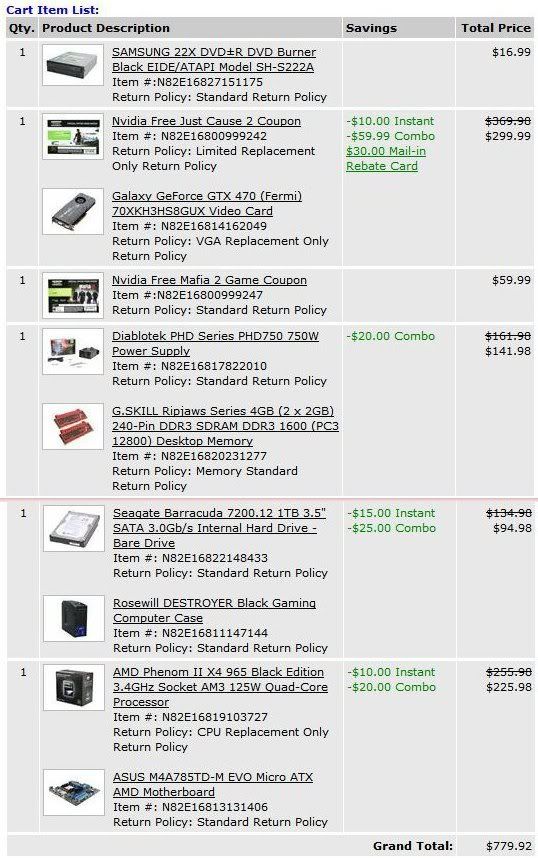
Hello, everyone. Looking for opinions on the build I put together, and advice/opinions on alternative builds for the best buck-to-bang ratio. I'll be ordering on the 15th.

Budget: $700-800 (ideally somewhere between $700-750, but I can stretch it to $800 if I have to)

Main Use: Gaming, video streaming, and light audio editing

Monitor Resolution: 1600x900 (managed to snag one on sale + coupon for $105 today), probably not going to upgrade from that for a long while

List SPECIFIC games that you MUST be able to play: I own Crysis and Metro 2033, I figure if I can get those running at a satisfactory level then everything else will fly like greased lightning :lol

I put the following newegg build together to see what I could come up with for under $800, but if I can get relatively comparable performance for less money I'll certainly go with that.

buil3.jpg
 
I finally got my PC up and running but ran into a snag and hoping for some help.

I have an OCZ agility 2 ssd that will not show up when I'm trying to install Windows 7. My hard drive and external both show up but not the ssd. In the bios, I have the satas on AHCI cause of better performance.

I was wondering if anyone could provide any solutions or suggestions. I been trying everything I can all day to get windows 7 on my ssd.

The post screen also show an error with my SSD saying Smart Command failed. I looked into that and it seems to be an issue but most people seemed to still have been able to install/login to windows 7 so it could be unrelated.

The motherboard I'm using is a Gigabyte GA-P55A-UD3 with intel i5-750.
Any help would be greatly appreciated.
 
Deus Ex Machina said:
NO, NO NO NO!!

If you install in one mode (IDE / AHCI) then switch to another, when Windows boots it'll freak out and you'll get a bluescreen.

Deus Ex Machina said:
Nope, Win7 will need to be reinstall with AHCI enable in the bios.

How to enable AHCI in Windows 7 after Instalation:
http://forum.corsair.com/v3/showthread.php?t=86403

And if you have a Sandforce SSD use ATTO to test its speeds.

Mjunter said:
I have an OCZ agility 2 ssd that will not show up when I'm trying to install Windows 7. My hard drive and external both show up but not the ssd. In the bios, I have the satas on AHCI cause of better performance.

I was wondering if anyone could provide any solutions or suggestions. I been trying everything I can all day to get windows 7 on my ssd.

The post screen also show an error with my SSD saying Smart Command failed. I looked into that and it seems to be an issue but most people seemed to still have been able to install/login to windows 7 so it could be unrelated.

The motherboard I'm using is a Gigabyte GA-P55A-UD3 with intel i5-750.
Any help would be greatly appreciated.

Disable S.M.A.R.T. in bios, its unsupported for Sandforce SSD's.

Does it show when you set it to IDE?
 
TouchMyBox said:
If you're playing crysis maxed out for an hour on it, then it is enough. Though crysis can only use dual cores. If you really want to make sure, run occt to stress both your gpu and cpu at the same time. If it survives, your PSU is good enough as your system will never need more power than during a stress test (unless you add a bunch of usb devices and other peripherals). But yeah, neither chip you have is a power hog.

I always say to buy a power supply that can deliver more wattage than you need as these things do degrade over time, but if that's what you already got... if it ain't broke, it don't need fixing.
Yeah, thanks a lot. I'm gonna do a stress test tomorrow just to be sure
 
TechReport.com has their "Econobox" setup from Newegg that I'm thinking about getting. What does GAF think of this set up?

Processor - AMD Athlon II X4 640 --- $104.99
Motherboard - Asus M4A87TD EVO --- $109.99
Memory - Crucial 2GB (2 x 1GB) DDR3-1333 --- $44.99
Graphics - Sapphire Radeon HD 5670 --- $79.99
Storage - Samsung Spinpoint F3 1TB --- $74.99
Drive - Samsung SH-S223L --- $24.99
Audio - Integrated --- $0
Enclosure - Antec Three Hundred --- $59.95
Power supply - Antec EarthWatts Green 380W --- $39.99
Total --- $539.88

PREFERABLY, I'd like to spend between 400 and 500, but I'm not sure what the best changes would be. I'm fine with dropping storage from 1TB to 500GB, but I don't know what some other reasonable downgrades might be. While I plan on playing star craft 2 I don't necessarily want this to be some kind of powerhouse gaming PC. Especially since I haven't owned a PC in a while... I have a lot of Steam to catch upon. Just something quick and reliable at the preferred price range.

So, does GAF have any final words of advice to drop the price before I click buy? Would mean a lot to me :D I'm pretty PC ignorant these days, so I'd appreciate it.
 
Dash Kappei said:
Ok, I'll look into that.
I've got a $700 max (not taking into account the case and audio card) for the Hard disk, PSU, GPU, CPU, MOBO and RAM. As I've said, if it makes a difference I can fork out $50 more on the GPU or CPU, just you guys tell me if that's the case...
Similar to below once he trims that up :)
Eel O'Brian said:
Hello, everyone. Looking for opinions on the build I put together, and advice/opinions on alternative builds for the best buck-to-bang ratio. I'll be ordering on the 15th.

Budget: $700-800 (ideally somewhere between $700-750, but I can stretch it to $800 if I have to)

I put the following newegg build together to see what I could come up with for under $800, but if I can get relatively comparable performance for less money I'll certainly go with that.

buil3.jpg
Swap out that PSU. See if you can't fit together a Corsair 650W + Samsung F3 1TB combo or something.

Not sure how much you want to trim on GPU (if you are buying JC2) but a 460GTX 1GB at 1600 will probably do just fine.

I'd try to trim the CPU to a 955 and see if you can get a better combo with SATA 6/ USB 3. (If you can't thats fine)
You can even go with a 635 if you want to.

Good on using combos!
Otrebor Nightmarecoat said:
Noob here. Hey guys, can you recommend me a good universal power supply for my dell inspiron 580 desktop. Its an i5

Any help would be greatly appreciated.
I can't find where it is on Dell's site (I have before) where it shows the internals, but if it uses a standard ATX PSU then something like a corsair 400W will be fine, 450W if you want to stick a bit better GPU in there. For reference it ships with a 300W.
Sklorenz said:
TechReport.com has their "Econobox" setup from Newegg that I'm thinking about getting. What does GAF think of this set up?

Processor - AMD Athlon II X4 640 --- $104.99
Motherboard - Asus M4A87TD EVO --- $109.99
Memory - Crucial 2GB (2 x 1GB) DDR3-1333 --- $44.99
Graphics - Sapphire Radeon HD 5670 --- $79.99
Storage - Samsung Spinpoint F3 1TB --- $74.99
Drive - Samsung SH-S223L --- $24.99
Audio - Integrated --- $0
Enclosure - Antec Three Hundred --- $59.95
Power supply - Antec EarthWatts Green 380W --- $39.99
Total --- $539.88

PREFERABLY, I'd like to spend between 400 and 500, but I'm not sure what the best changes would be. I'm fine with dropping storage from 1TB to 500GB, but I don't know what some other reasonable downgrades might be. While I plan on playing star craft 2 I don't necessarily want this to be some kind of powerhouse gaming PC. Especially since I haven't owned a PC in a while... I have a lot of Steam to catch upon. Just something quick and reliable at the preferred price range.

So, does GAF have any final words of advice to drop the price before I click buy? Would mean a lot to me :D I'm pretty PC ignorant these days, so I'd appreciate it.
x4 635 ($99)
MSI 870 mobo ($70)
F3 500GB (buy from ewiz) ($50)
CoolerMaster 310 / 320 / 330 case ($40)
-
+$50 = 4GB total RAM
+$25 = Upgrade to 4870 (ASUS for $105 AR on newegg) / 5750
 
Hello Gentlemen. Allow me to ask you a question about my two machines.

I would like to know, in your opinion, how my Sager NP9850 gaming notebook stacks up against my home desktop PC, particularly for gaming, and which do you feel gives better performance?


Here are the NP9850's basic specs:


Processor: 45nm Intel® Core™ 2 Duo Processor T9900 / 6MB L2 Cache, 3.06GHz, 1066MHz FSB

Video & Graphics Card: *Dual* Nvidia GeForce GTX 280M Graphics with 1GB DDR3 Video Memory in SLI Mode

Operating System: Genuine MS Windows® 7 Ultimate 32/64-Bit Edition

Memory: 8GB DDR3 SDRAM at 1333MHz - 2 X 4GB

Primary Hard Disk Drive: 160GB Intel SATA2 Solid State Disk Drive

2nd Hard Disk Drive: 500GB 7200rpm SATA 300

>>>>>>>>>>>>>>>>>>>>>>>>>

Desktop Basic specs:

#Operating System: Genuine MS Windows® 7 Ultimate 32/64-Bit Edition

#CPU: INTEL, Core™ 2 Duo E8500 Dual-Core, 3.16GHz, 1333MHz FSB, 6MB L2 Cache, 45nm, 65W, EM64T EIST VT XD, Retail

#Motherboard: ASUS, P5Q Pro, LGA775, Intel® P45, 1600MHz FSB, DDR2-1200 16GB /4, PCIe x16 CF /2, SATA 3.0 Gbit/s RAID 5 /8, HDA, GbLAN, FW /2, ATX, Retail

#GPU: SAPPHIRE, Vapor-X Radeon™ HD 5870 870MHz, 1GB GDDR5 5000MHz, PCIe x16 CrossFire, DVI /2, DP, HDMI

#Memory: OCZ, 4GB (2 x 2GB) Reaper HPC Edition PC2-8500 DDR2 1066MHz CL 5-5-5-18 2.1-2.3V SDRAM DIMM, Non-ECC

#Hard Disk Drives: 2X WESTERN DIGITAL, 640GB WD Caviar® SE16 (WD6400AAKS), SATA 3 Gb/s, 7200-RPM, 16MB cache
>>>>>>>>>>>>>>>>>>>>>>>>>


So, from a gaming perspective, which of these two machines should theoretically yield more performance?
 
Sklorenz said:
TechReport.com has their "Econobox" setup from Newegg that I'm thinking about getting. What does GAF think of this set up?

Processor - AMD Athlon II X4 640 --- $104.99
Motherboard - Asus M4A87TD EVO --- $109.99
Memory - Crucial 2GB (2 x 1GB) DDR3-1333 --- $44.99
Graphics - Sapphire Radeon HD 5670 --- $79.99
Storage - Samsung Spinpoint F3 1TB --- $74.99
Drive - Samsung SH-S223L --- $24.99
Audio - Integrated --- $0
Enclosure - Antec Three Hundred --- $59.95
Power supply - Antec EarthWatts Green 380W --- $39.99
Total --- $539.88

PREFERABLY, I'd like to spend between 400 and 500, but I'm not sure what the best changes would be. I'm fine with dropping storage from 1TB to 500GB, but I don't know what some other reasonable downgrades might be. While I plan on playing star craft 2 I don't necessarily want this to be some kind of powerhouse gaming PC. Especially since I haven't owned a PC in a while... I have a lot of Steam to catch upon. Just something quick and reliable at the preferred price range.

So, does GAF have any final words of advice to drop the price before I click buy? Would mean a lot to me :D I'm pretty PC ignorant these days, so I'd appreciate it.

Get rid of the Samsung drive and get a Lite-On, preferably one that is on http://codeguys.rpc1.org/firmwares.htm list of Firmware mods.

Also, you may have trouble getting sound to work correctly through HDMI under certian setups with that 5670 unless they finally fixed the issues.

Listen to hazaro
 
Many thanks Hazaro and MidgarBlowedUp -- on it now, should have it built by next weekend. I'm stoked :D Got a SC2 trial ready to go before I pick it up retail, too.
 
Thanks for the advice, Hazaro.

I've narrowed it down to a choice between these two different builds, one Intel I-5 760 and one AMD Phenom x4. Both have their strengths and weaknesses. With Rebates the Intel build comes to around $734. The AMD build comes to $688 with rebates. That's a $46 difference, but the Intel build leaves a little room to grow with another 460 in SLI when prices come down next year. I'm sort of leaning towards that build, but I'll see what you guys think.

INTEL BUILD:

intelbuildfinal.jpg


AMD BUILD:

amdbuildfinal.jpg
 
You don't want a Caviar Green as your desktop drive so that bundle is worthless.

If gaming is your priority than putting more money into the GPU will net you better performance. A 3ghz Phenom ii isn't going to bottleneck a single GPU setup.
 
Eel O'Brian said:
What's wrong with the WD drive? I've personally never had any problems with Western Digital HDDs.

Caviar Green = media drives.


They run slower so that they consume less power and are quieter, that's fine for a media drive (desirable infact) but not what you want for a boot drive.
 
So my ~4 year old Vewsonic 22" monitor is on it's last leg I think. Wavy lines, tine red lines off edges of red objects.

Research indicates this has something to do with the power supply inside the monitor itself? Tried unplugging monitor for a while, fixed problem for a few days.

Anyways. Seems I'm in the market for a new monitor. Any recommendations for good (And well priced) 22" or maybe even 24" monitors?
 
DrForester said:
So my ~4 year old Vewsonic 22" monitor is on it's last leg I think. Wavy lines, tine red lines off edges of red objects.

Research indicates this has something to do with the power supply inside the monitor itself? Tried unplugging monitor for a while, fixed problem for a few days.

Anyways. Seems I'm in the market for a new monitor. Any recommendations for good (And well priced) 22" or maybe even 24" monitors?
Does it display fine from other sources that are not your computer?
 
Okay, I keep coming in here and asking the same thing over and over... I need to put together an HTPC that does 1080p and audio over HDMI for about $400-500 exclusively off of Newegg. I wanted to do a Core i3 build and that was a little more than I wanted to spend, people recommended AMD but when I put together a build on Newegg with AMD it ended up being just around the same price as the i3 build. Any actually setups you guys would recommend? I can't put this in a standard midtower case either, it'd have to be a mini-ATX mobo and a smaller case. Halp??
 
Help, I keep getting a continuous short beep while trying to boot my system for the first time. According to the manual this indicates a "power error". Mobo is GA-X58A-UD7 and PSU is ATX1200 Gold.

I disconnected and reconnected almost everything, still the same beep.

What other options do I have?
 
Does anyone have these monitors or know about these and are they any good?

Samsung SyncMaster XL2370

Samsung SyncMaster BX2450

Would like to purchase soon so if any other recommendations I need to know! Just want a 24" with HDMI connection so can link up PS3, I took a look at 3D monitors and too early for that market so I would prefer a LED or IPS monitor. Budget is around £250 ($380)
 
So I'm really going back and forth on choosing parts for my upgrade.

Build 1
ASRock Extreme3 870
AMD Phenom II X6 1055T
4GB RAM
OCZ ModXStream Pro 700W (Corsair 650 is more expensive, this is the best bang/buck ratio I can get in NL AFAIK)
CM 690 II Advance (Chose this because of the Sata dock which is useful for me)

This comes in at around 520e

Build 2
ASRock Deluxe3 890FX
AMD Phenom II X4 955BE
rest is same

This comes in at 525e

I could also go the cheaper route for the CPU and wait for Bulldozer to arrive at the start of next year.

Build 3
ASRock Deluxe3 890FX
AMD Phenom II X2 555BE

This comes in at 480e
I could take a risk and try to unlock the cores and perhaps make do with not much of a difference in performance with Build 2, but I have no idea what my chances are here.


I'm looking for some advice/insight into the Mobo/CPU combinations here, I like the features of the 890fx motherboard, with its nice amount of SATA connectors, USB ports and pretty OK TDP.

But then again, I'm a daft multi-tasker, doing schoolwork, browsing, IRC, Dreamweaver, gaming(SC2) and perhaps some streaming encoding, so I think I might benefit from the X6 instead of the X4.

But I'm not really in a rush to stream, so waiting for the Bulldozer, meanwhile doing without streaming could be an option too. Although the benefit would have to be more than marginal.
 
msv said:
So I'm really going back and forth on choosing parts for my upgrade.

Build 1
ASRock Extreme3 870
AMD Phenom II X6 1055T
4GB RAM
OCZ ModXStream Pro 700W (Corsair 650 is more expensive, this is the best bang/buck ratio I can get in NL AFAIK)
CM 690 II Advance (Chose this because of the Sata dock which is useful for me)

This comes in at around 520e

Build 2
ASRock Deluxe3 890FX
AMD Phenom II X4 955BE
rest is same

This comes in at 525e

I could also go the cheaper route for the CPU and wait for Bulldozer to arrive at the start of next year.

Build 3
ASRock Deluxe3 890FX
AMD Phenom II X2 555BE

This comes in at 480e
I could take a risk and try to unlock the cores and perhaps make do with not much of a difference in performance with Build 2, but I have no idea what my chances are here.


I'm looking for some advice/insight into the Mobo/CPU combinations here, I like the features of the 890fx motherboard, with its nice amount of SATA connectors, USB ports and pretty OK TDP.

But then again, I'm a daft multi-tasker, doing schoolwork, browsing, IRC, Dreamweaver, gaming(SC2) and perhaps some streaming encoding, so I think I might benefit from the X6 instead of the X4.

But I'm not really in a rush to stream, so waiting for the Bulldozer, meanwhile doing without streaming could be an option too. Although the benefit would have to be more than marginal.

Heh, your first option has the same combo cpu/mobo I got for my brother's pc. For your multitasking needs, an X6 looks to be your best bet. And doesn't the 870 already have enough usb and sata ports? USB 3 and Sata 3 are nice but only if you have the hardware making use of it. And the 870 also has both, only less of them.


Btw, the 955BE is easily oc'd (have mine at 3,6ghz without upping the voltage). So if an X6 seems too much for your needs you could always go that route.
 
brain_stew said:
. A 3ghz Phenom ii isn't going to bottleneck a single GPU setup.

Out of curiousity, ok a 3ghz phenom 2 wont bottleneck a single 460. But what happens when you toss in another 460'? Lower max-fps? Lower min-fps?
 
PjotrStroganov said:
Heh, your first option has the same combo cpu/mobo I got for my brother's pc. For your multitasking needs, an X6 looks to be your best bet. And doesn't the 870 already have enough usb and sata ports? USB 3 and Sata 3 are nice but only if you have the hardware making use of it. And the 870 also has both, only less of them.
The Sata connections are handy because I will be using almost all at the start. Perhaps 3/4 HD's, DVD drive and probably an SSD drive in the near future. It would be good to know it's a bit future proof in that regard. Always hate having to throw out HD's. USB connections - mouse, keyboard, mic, external HD(uses 2), phone and USB sticks. I'd be at the limit without any USB sticks connected, although I could just use the extra mobo connectors. That might not be a big issue yeah. Also I've found that the 870 has about 20W more idle consumption. 870 has no PCIe x4 slots (can be used for PCIe SSDs).

Nothing is a real deal breaker, except Sata I guess. Low TDP is very much preferred too. Which 870 mobo has the same specs and more Sata connections?
 
GAF, is it better to connect a pc to a hdtv via HDMI instead of VGA?
VGA is a joke compared to the hdmi quality ( i always have alot of problem when connection vga but never had any with hdmi ).
dvi is in the same level thought, but it can't output sound.
 
Q8D3vil said:
VGA is a joke compared to the hdmi quality ( i always have alot of problem when connection vga but never had any with hdmi ).
dvi is in the same level thought, but it can't output sound.
I haven't noticed any difference in quality between using DVI and DSUB connectors on 1080p, so it's not a 'joke' at all. DVI is digital so that's preferred though. Also, eventually the analog signal won't be supported anymore, so you might as well switch now.
 
grap3fruitman said:
Okay, I keep coming in here and asking the same thing over and over... I need to put together an HTPC that does 1080p and audio over HDMI for about $400-500 exclusively off of Newegg. I wanted to do a Core i3/i5 build and that was a little more than I wanted to spend, people recommended AMD but when I put together a build on Newegg with AMD it ended up being just around the same price as the i3/i5 build. Any actually setups you guys would recommend? I can't put this in a standard midtower case either, it'd have to be a mini-ATX mobo and a smaller case. Halp??
So here's what I've got so far: http://secure.newegg.com/WishList/PublicWishDetail.aspx?WishListNumber=11501014. I'm not sure about that wireless card, I'm missing a case and PSU and I can live without an ODD. Any suggestions?
 
Top Bottom