• Hey Guest. Check out your NeoGAF Wrapped 2025 results here!

iPhone 4S |OT|

Status
Not open for further replies.
Why am I using data in my sleep?

Just checked my account on the Telus website, and every night I'm using a chunk of data. Just a few MB, but I've already burned through 13.7MB in the three days since I activated the phone while connected to WiFi. The phone is doing something in the early hours of every day, and I have no idea what it could be; or why it's using 3G to do it. I have a shitty little data plan right now and at this rate I'll burn through my 100MB before the end of the month. Thankfully there's the option to turn off cellular data, but I shouldn't have to use it. I should be switching to a 5GB plan in a few days (wasn't available when I pre-ordered the phone; super irritating) but I want to know what's up. Any ideas?

Searching for info on the issue brings up a bunch of posts from last year about AT&T users with the same issue, but no conclusive explanation.


Stumpokapow said:
Turn it on 100% of the time, since you still have access to the regular non-HDR shot, so you can just review your photos and say "the HDR shot looks better to me here" or "the non-HDR shot looks better to me here".

You can't turn it on if you want to use the flash. When I set flash to 'Auto', HDR turns off. If I then enable HDR, the flash switches to 'Off'. I'd like to have it auto-enable HDR whenever it auto-disables flash, but it doesn't seem possible. Right now I leave the flash off and HDR on.
 
You can't turn it on if you want to use the flash. When I set flash to 'Auto', HDR turns off. If I then enable HDR, the flash switches to 'Off'. I'd like to have it auto-enable HDR whenever it auto-disables flash, but it doesn't seem possible. Right now I leave the flash off and HDR on.
Which makes sense as the HDR mode quickly takes samples at different exposures and composites them together, I believe. That wouldn't really work properly with a flash.
 
So without really realizing what I was doing, I have basically allowed push notifications and location services for everything. Is there a way to basically erase all those permissions and start over without erasing all my apps?
 
Gary Whitta said:
HDR is great and has saved many photos for me. I always leave it on. Just a few small problems:

1. Both versions get saved to your Photo Stream so you'll see a lot of what look like duplicates in your stream and you can't delete photos a la carte.

You can turn off 'Keep Normal Photo' so it doesn't save a regular version of the photo, just the HDR.

You can find the option in Photo settings, down the bottom. Does that affect Photo Stream in any way? Surely it wouldn't save a duplicate if the photo album isn't saving one?
 
joeblackisback said:
So without really realizing what I was doing, I have basically allowed push notifications and location services for everything. Is there a way to basically erase all those permissions and start over without erasing all my apps?

Can't you just go to the 'Locations' menu in Settings and disable location services for each individual app with a swipe of a button? Same with Notifications.
 
planar1280 said:
Posted?

http://mashable.com/2011/10/19/siri-lets-you-make-calls-on-passcode-locked-iphone-4s/
Security flaw: Siri can make phone calls on a passcode locked phone
Uhhh...

So let's follow this through. I touch Settings... Then General... Where's the passcode setting? Oh, there it is, labeled 'Passcode Lock'. Let's click that.

Oooh, here's a screen where I enter my passcode. Ok. 'Turn On Passcode'... simple enough. 'Require Passcode Immediately'? Certainly.

What what the heck... There's a new setting there, right below 'Simple Passcode'. It says 'Siri' and it's marked 'On'! And below that it says "Allow access to Siri when locked with a passcode.' Gee, that sounds exactly like the behavior described in that article. I wonder if I turn that off...

Well, blow down houses! Siri doesn't work on a passcode-protected iPhone while it is locked when I turn the "use Siri on a passcode-protected iPhone while it is locked" feature off!

That was some exhaustive research. I understand completely why people writing tech articles on the internet might have missed one of the passcode lock features so cleverly hidden on the Passcode Lock screen.

EDIT:
qRWYu.png
 
dark10x said:
Which makes sense as the HDR mode quickly takes samples at different exposures and composites them together, I believe. That wouldn't really work properly with a flash.

Makes total sense - I just don't know why it isn't all handled automatically. It makes the auto flash option redundant for HDR users, because I always have to go into options and switch HDR on when I want to take a photo without flash, and therefore always have to hit Auto/On when I want to use flash. Not a big deal, but a bit irritating.
 
Treefingers said:
How could you possibly classify that as a security flaw?

Some moron CEO in Australia blew a gasket in the Australian media and demanded Apple release a fix to ensure 'private company information' cannot be accessed by hackers and the great unwashed. He even detailed the security flaw, making it out to be some sort of highly exploitable, company-wide catastrophe and as though the iPhone 4S was an unsecured hacker's dream.

Common sense is a rare thing, these days.
 
Aske said:
Why am I using data in my sleep?

Just checked my account on the Telus website, and every night I'm using a chunk of data. Just a few MB, but I've already burned through 13.7MB in the three days since I activated the phone while connected to WiFi. The phone is doing something in the early hours of every day, and I have no idea what it could be; or why it's using 3G to do it. I have a shitty little data plan right now and at this rate I'll burn through my 100MB before the end of the month. Thankfully there's the option to turn off cellular data, but I shouldn't have to use it. I should be switching to a 5GB plan in a few days (wasn't available when I pre-ordered the phone; super irritating) but I want to know what's up. Any ideas?

Searching for info on the issue brings up a bunch of posts from last year about AT&T users with the same issue, but no conclusive explanation.


So I found some info here that suggests this is just a data tally for the day all getting dumped at once. That would be fine...except I know I have never used any 3G data. The phone hasn't left my apartment because I've been working from home and don't take a phone to the gym. So it's been on WiFi since its first activation, yet I'm still seeing 13.7MB on the Telus website and in the data usage stat on my 4S.

WTF?
 
Evlar said:
Uhhh...

So let's follow this through. I touch Settings... Then General... Where's the passcode setting? Oh, there it is, labeled 'Passcode Lock'. Let's click that.

Oooh, here's a screen where I enter my passcode. Ok. 'Turn On Passcode'... simple enough. 'Require Passcode Immediately'? Certainly.

What what the heck... There's a new setting there, right below 'Simple Passcode'. It says 'Siri' and it's marked 'On'! And below that it says "Allow access to Siri when locked with a passcode.' Gee, that sounds exactly like the behavior described in that article. I wonder if I turn that off...

Well, blow down houses! Siri doesn't work on a passcode-protected iPhone while it is locked when I turn the "use Siri on a passcode-protected iPhone while it is locked" feature off!

That was some exhaustive research. I understand completely why people writing tech articles on the internet might have missed one of the passcode lock features so cleverly hidden on the Passcode Lock screen.

EDIT:
qRWYu.png

Treefingers said:
How could you possibly classify that as a security flaw?

the ISSUE here is that Siri allowed to do this is the DEFAULT option set by Apple. Most users like us would find it out. most other users would have to go into settings to turn it off and they wouldnt even know about this (que facebook policy of turning things on as default only for users to find out later and heckle)
 
Aske said:
So I found some info here that suggests this is just a data tally for the day all getting dumped at once. That would be fine...except I know I have never used any 3G data. The phone hasn't left my apartment because I've been working from home and don't take a phone to the gym. So it's been on WiFi since its first activation, yet I'm still seeing 13.7MB on the Telus website and in the data usage stat on my 4S.

WTF?
As I understand it, any data use while the phone is asleep will default to 3G to save energy. To ensure that no 3G data is used, go to Settings > General > Network and turn off 'Cellular Data'.
 
planar1280 said:
the ISSUE here is that Siri allowed to do this is the DEFAULT option set by Apple. Most users like us would find it out. most other users would have to go into settings to turn it off and they wouldnt even know about this (que facebook policy of turning things on as default only for users to find out later and heckle)
The phone also comes with Passlock off by default. Security flaw! Security flaw!
 
planar1280 said:
the ISSUE here is that Siri allowed to do this is the DEFAULT option set by Apple. Most users like us would find it out. most other users would have to go into settings to turn it off and they wouldnt even know about this (que facebook policy of turning things on as default only for users to find out later and heckle)

But isn't the option staring you in the face when you set your passcode? You have to see that settings screen just to enable a passcode in the first place, don't you?

I suppose it would be better to default to Off, but I think this was just a judgment call by Apple to allow the convenience of making a phone call without having to enter your passcode each time. Can you view an entire contact list while locked via Siri, or do you just have to guess names?

I'm guessing most people are more sensitive about their photos and texts than individual contacts.
 
Evlar said:
Which is... what? You are complaining that the phone is not locked by default. Well no shit.

I am not complaining the phone is not locked by default. the setting should be security wise to have the Siri off on passcode. A user can always just look into the passcode and only look at setting passcode on or off and not realizing at the time there is a SIRI option set as on even if passcode is applied. Security wise it is a better option to have the phone alert you if you want to keep siri on or off when passcode is applied.
 
I think people are making a much bigger deal out of this then there needs to be, the average smart phone is pretty lax on security for the sake of convenience.
 
Evlar said:
As I understand it, any data use while the phone is asleep will default to 3G to save energy. To ensure that no 3G data is used, go to Settings > General > Network and turn off 'Cellular Data'.

I'd read that was the case with older iPhones, but that the 4, and presumably 4S, kept using WiFi while asleep. I have turned off data, and I'll leave it off until I get a decent plan, but I'm amazed the phone is using that much data just for push notifications. 13.7MB in three days for the handful of tasks that use data while the phone is asleep seems like a lot.
 
LyleLanley said:
I think people are making a much bigger deal out of this then there needs to be, the average smart phone is pretty lax on security for the sake of convenience.

Not if they want to make in-roads into the corporate market. There is a reason why Black Berry has stayed so entrenched in that area for so long and why Apple and Google are trying hard to get in. Security matters in that arena.

That said, this is kind of a bullshit thing that is so easily fixed that it's a non-issue.
 
LyleLanley said:
I think people are making a much bigger deal out of this then there needs to be, the average smart phone is pretty lax on security for the sake of convenience.
And they'll probably change it in the first point update anyway. Not a big deal.
 
Kung Fu Jedi said:
Not if they want to make in-roads into the corporate market. There is a reason why Black Berry has stayed so entrenched in that area for so long and why Apple and Google are trying hard to get in. Security matters in that arena.

That said, this is kind of a bullshit thing that is so easily fixed that it's a non-issue.

Well of course what I said doesn't apply to corporate phones, chances are any corporations IT department will apply all sorts of security to their phones and I doubt they'd be stupid enough to not check the settings and see wether or not they can turn off Siri on a locked phone.

But in regards to the average consumers smartphone, I believe what I said is true. It's the same reason why phones aren't set to have passcode locks automatically among other things.

Edit:

On an unrelated note, it seems strange that someone would write an article based on this and not even check the settings. I understand that they think it should default a certain way, but if they saw it as a flaw wouldn't they at least give the settings a glance? Maybe I'm just a super nerd because the first thing I do when I get a new phone is go over every setting to make sure everything is just the way I like it.
 
Joe Shlabotnik said:
But isn't the option staring you in the face when you set your passcode? You have to see that settings screen just to enable a passcode in the first place, don't you?

I suppose it would be better to default to Off, but I think this was just a judgment call by Apple to allow the convenience of making a phone call without having to enter your passcode each time. Can you view an entire contact list while locked via Siri, or do you just have to guess names?

I'm guessing most people are more sensitive about their photos and texts than individual contacts.
You have to know people's names, but I suppose you can call other people's 'wife' 'father/dad' , 'mother/mom' etc of they even have those set


[EDIT]

My bad, you can actually tell it to dial a specific number. Meh, still not an issue since the damn option is staring you in the face when you add a passcode
 
quadriplegicjon said:
You have to know people's names, but I suppose you can call other people's 'wife' 'father/dad' , 'mother/mom' etc of they even have those set

You can also just start using generic names. If you say "Call Sarah" I believe Siri will ask you which Sarah you want to talk to.
 
AHAHAHA NEXUS SUX i have no idea what those numbers mean really

Not surprising as the Nexus ended up having fairly modest hardware specs, I think. The new RAZR is supposed to be a more beastly phone, no?


LyleLanley said:
I wouldn't call much about the specs modest, it has a dual core 1.2ghz processor and a gig of ram.

Ah, for some reason I thought it ended up being single core. Regardless, I think we're well into diminishing returns with everyday applications right now.
 
Joe Shlabotnik said:
AHAHAHA NEXUS SUX i have no idea what those numbers mean really

Not surprising as the Nexus ended up having fairly modest hardware specs, I think. The new RAZR is supposed to be a more beastly phone, no?

I wouldn't call much about the specs modest, it has a dual core 1.2ghz processor and a gig of ram.
 
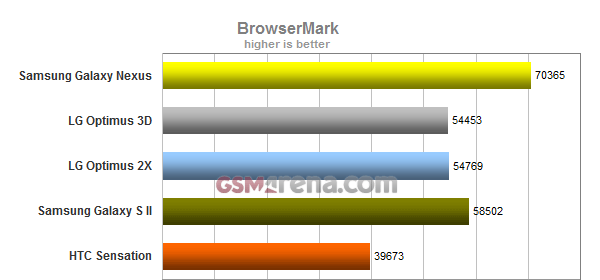
The Samsung Galaxy Nexus scored a hair over 70 thousand. This puts the Android purebred closer to the new iPhone 4S (which scores around 89 thousand) than any other droid. Again, keep in mind that the benchmark was run on buggy non-final version of ICS.

I thought every version of Android was a buggy non-final version, *Rim Shot*
 
Technosteve said:
I thought every version of Android was a buggy non-final version, *Rim Shot*
You should write for The Big Bang theory.
I laughed.
 
Wait they actually say that? I only saw a youtube clip where they played a laughtrack everytime they mentioned windows.
 
Can I make Siri change the way she spells certain names of people? Like if I send a text with the name 'Sara' in it, it types out 'Sarah'. I just want her to drop the 'H'.


edit: also, what does the coloring scheme within the text message app mean? Like what constitutes a white, blue or green message?
 
Vik_Vaughn said:
Can I make Siri change the way she spells certain names of people? Like if I send a text with the name 'Sara' in it, it types out 'Sarah'. I just want her to drop the 'H'.

Along these same lines, I want to be able to tell siri how to pronounce someones name. Some people I know have names that are spelled one way but sound the other. It makes telling siri to text or call them quite annoying.
 
I need some help with my iphone. It won't let me drag and drop songs/podcasts into it anymore. I think it's a sync issue (ie, I don't want to have to sync it to be able to mess with songs). If I try to drag a song from a folder on my computer, it won't copy over and will show a red circle with a cross through it (y'know, like the ghostbusters logo). I can drag songs from itunes to it, but then I can't fluidly mess with songs on the iphone without dealing with the syncing issues. I've never had this problem with my ipod nano.

How can I make it so that I can drag songs straight from folders on my computer to the iphone?
 
Vik_Vaughn said:
edit: also, what does the coloring scheme within the text message app mean? Like what constitutes a white, blue or green message?

Green is regular text message blue is an iMessage.

Have no idea what White is. Undelivered?
 
Kung Fu Jedi said:
Green is regular text message blue is an iMessage.

Have no idea what White is. Undelivered?
Regular text messages sent to you. Green and Blue apply to messages sent out by you.
 
Technosteve said:
I thought every version of Android was a buggy non-final version, *Rim Shot*

Reading some of the posts in the Ice Cream Sandwich/Nexus Galaxy announcement thread greatly reminded me of the damage control that always goes on near the end of a particularly troubled MMORPG's beta. "Don't worry guys, it's still beta!"
 
frico said:
How do I turn off location in reminders?

Can't you just make reminders that aren't location based? If that's not good enough, go into Settings - Location Services - and turn off the switch next to Reminders.
 
LyleLanley said:
Can't you just make reminders that aren't location based? If that's not good enough, go into Settings - Location Services - and turn off the switch next to Reminders.
Ahhh, I dont seem to have reminders in the list. I think it is off already
 
Vik_Vaughn said:
Can I make Siri change the way she spells certain names of people? Like if I send a text with the name 'Sara' in it, it types out 'Sarah'. I just want her to drop the 'H'.


edit: also, what does the coloring scheme within the text message app mean? Like what constitutes a white, blue or green message?
White means somebody sent the message to you. Green means it's an SMS text message you sent, blue means it's an iMessage.
 
Status
Not open for further replies.
Top Bottom