• Hey Guest. Check out your NeoGAF Wrapped 2025 results here!

iPhone 4S |OT|

Status
Not open for further replies.
Bgamer90 said:
Also, I'm kind of regretting getting the 32GB version... have about 7 GB left after putting movies, games, and music on it these past few weeks. Should have got the 64GB.

I'm actually glad my friend decided tease me mercilessly until I decided to go for the 64GB rather than settling for the 32. Considering that I've blind-grabbed some more apps and will have a ton of music to dump on my phone soon... Yep, 32 would've just killed me and filled me with regret.
 
Auron_Kale said:
I'm actually glad my friend decided tease me mercilessly until I decided to go for the 64GB rather than settling for the 32. Considering that I've blind-grabbed some more apps and will have a ton of music to dump on my phone soon... Yep, 32 would've just killed me and filled me with regret.

Yeah I'm coming from a full 16 GB iPhone 3GS so I thought that 32 GB would be fine but now I'm realizing how much space games and movies take up.

I can delete some videos to free up space but I still think that I will be having to make some tight squeezes in the future when it comes to putting stuff on my phone.

Even if I don't in the future (which would be surprising to me), 64GB would have put my mind at ease since I know that I wouldn't be able to fill it up anytime soon.
 
Liu Kang Baking A Pie said:
If someone is completely ignorant of extra features, do they care?

Why would someone not knowing about a feature means they don't care about it? There are plenty of features that people don't know exist that someone would like had they known about it. Heck, sometimes it's something they might find as a quirk or annoyance about the device but just aren't aware there is a way to rectify it. So I don't see how not knowing a feature exists means that they don't care about it.
 
Bgamer90 said:
Yeah I'm coming from a full 16 GB iPhone 3GS so I thought that 32 GB would be fine but now I'm realizing how much space games and movies take up.

I can delete some videos to free up space but I still think that I will be having to make some tight squeezes in the future when it comes to putting stuff on my phone.

Even if I don't in the future (which would be surprising to me), 64GB would have put my mind at ease since I know that I wouldn't be able to fill it up anytime soon.

That was me about 2 years ago.

I bought a 16GB 3GS a few weeks after it came out - though I could've gotten one two weeks earlier had I gone for a 32GB. Told myself that I didn't need 32 as there's no way I could've filled it. Flash-forward to me getting my phone stolen and having to get a new phone, I went with a 32 and was content until I filled it to the point where I only had 927mb leftover. Even by then, I had begun to cherry-pick my stuff.

This time though, thanks to my friend calling me a pussy for nearly not going for the 64 (as well as sleeping on the thought) I decided to pre-order the 64 when it was first available. Despite having 28.5GB left on my 64, I'm quite content and it should hold me over until for a good while. *fingers crossed*
 
Phone contract up in a few months and my beloved evo 4g was stolen so I've been considering an iphone 4 s to replace this shitty replacement phone since I already have the android stuff on the Asus transformer that I love and there are a few ios games I never got to play like infinity blade that I'm interested in.

A few deal breakers I need to know about.

To activate the phone do I need to connect it to my pc and install itunes etc? Do I need to use itunes to move files over or can I just use dropbox?

Is there any gps app that is nearly as good as the google turn by turn nav? The turn by turn nav on my evo 4g that I sold my stand alone gps since it wasn't nearly as good.
 
Hmm just read that the default weather app really drains the battery with location services. I guess I'll turn it off and get a weather app that uses zipcode to improve battery life?

http://gizmodo.com/5854933/how-to-save-your-iphone-4s-crappy-battery

Now let's dig deeper—at the very bottom of the list is a brand new button labeled System Services. Hit it. Here is the real battery succubus. Kill these things:

Turn off Diagnostics & Usage (Information about how and where you're using your phone, sent automatically to Apple).

Turn off Location-Based iAds (Ads are shitty enough, you don't need them to know where you are)

Setting Time Zone (Unless you're flying to a different country every other day, you probably don't need your phone to constantly see if you'ved moved nations and setting the time zone accordingly)

Traffic (Sure, the fewer people who use this, the less reliable crowdsourced traffic maps are. A necessary sacrifice.)
 
In case anyone cares I bought a Otterbox Defender case, the universal iPhone 4 model, for my 4S, works great. No problems with camera / flash at all. Love this case because I don't have to worry about stuff like scratching up the camera and it works good for my gigantic hands.
 
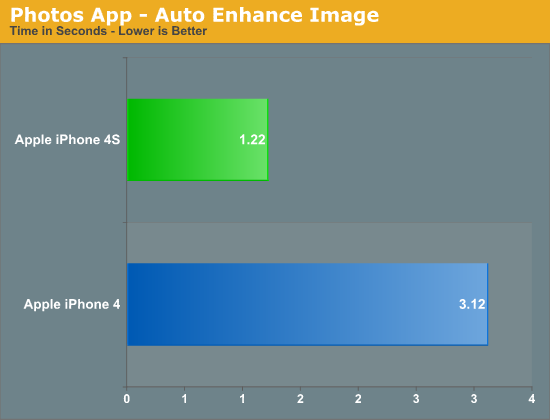
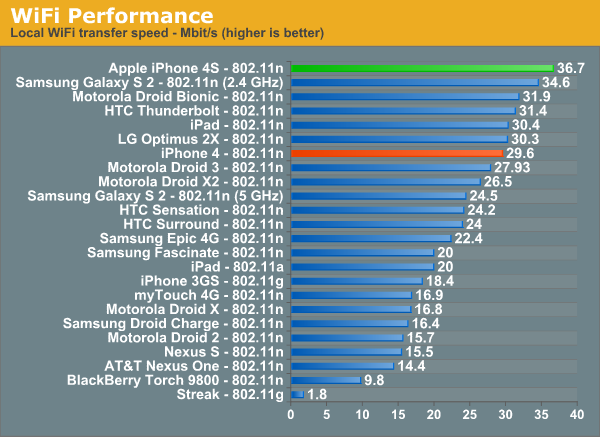
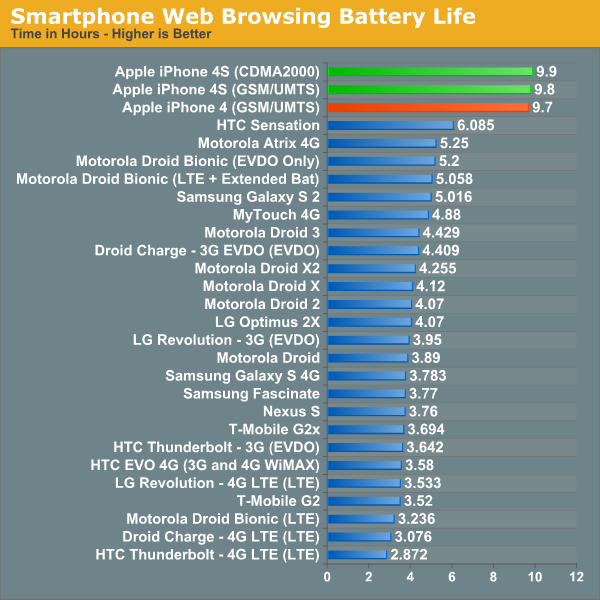
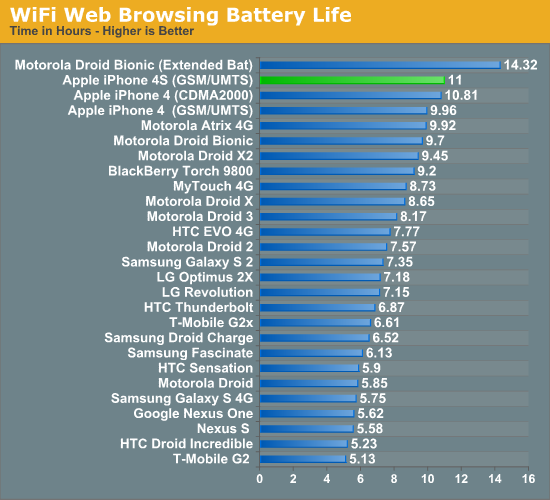
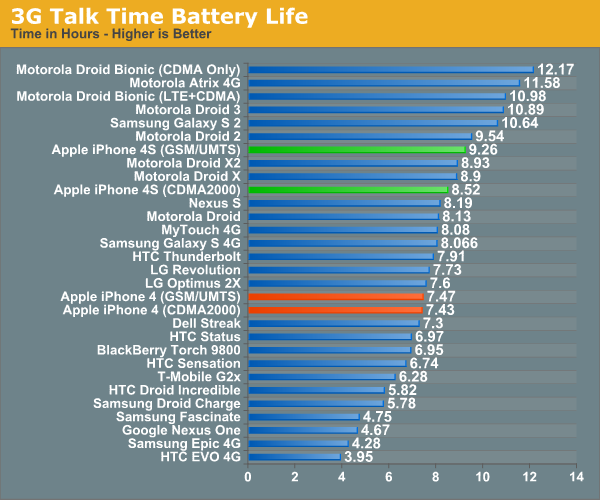
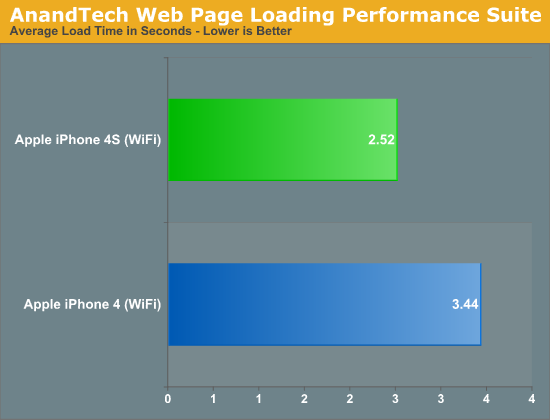
http://www.anandtech.com/show/4971/apple-iphone-4s-review-att-verizon

BWQrZ.png


41955.png


41956.png


41747.png


S8RfW.png


41743.png


41744.png


41745.png
 
jwluther said:
It could be a placebo effect, but I saw that article earlier today, turned off that setting, and I currently have around 60% battery when I would normally be completely dead.
I've noticed that's the thing most used for location. Will try turning off. We'll see
 
Read the review, Anand's team did a good job. New camera got over hyped =/ Apple needs to go the Nokia route and just put the camer dead center of the phone
 
Technosteve said:
Read the review, Anand's team did a good job. New camera got over hyped =/ Apple needs to go the Nokia route and just put the camer dead center of the phone

Funny, I said this and got attacked... =/
 
Raitosaito said:
After that use airplay mirroring on your Apple TV to freak people out.
Did this at work the other day and people's reactions were hilarious, I won't be surprised if some of them end up with iPhones.

Pretty awesome stuff.
 
chuckddd said:
Ok guys. Got mine today.


What now?


First of all go into settings and turn everything off. Do this as fast as possible.

Once you've done that, it's time to break in the battery and warm up the screen to prevent damaged pixels. Set the brightness to full, then loop a 240p video. Anything above 240p will cause milked pixels and screen weeping if played for the duration of the warming process this early in the screen's life. Zoom the video so there are no black bars, then place the phone face down (that's important, due to the ambient light sensor) somewhere warm and dry. Leave it there until the battery runs down, but don't touch it until at least 17 hours after that.

Your screen will now exhibit more resilient colours, and your battery should last 18% longer than normal.
 
Marty Chinn said:
Why would someone not knowing about a feature means they don't care about it? There are plenty of features that people don't know exist that someone would like had they known about it. Heck, sometimes it's something they might find as a quirk or annoyance about the device but just aren't aware there is a way to rectify it. So I don't see how not knowing a feature exists means that they don't care about it.
What does this have to do with user confusion, empowerment, and feeling overwhelmed? You're reading my post without context.
 
RubxQub said:
I made the switch the moment they offered tethering plans. You can indeed play WoW on it, but it's not the smoothest experience.
You'll have something like 300-1000ms pings to server so all of your actions will slightly delayed (you couldn't raid with that kind of internet connection), but you can certainly do dailies and craft and all your other random stuff. I did a ton over that connection with my character.
Thanks, I think I will go for it, then. Gotta fly next week and I like the idea of having my connection while I sit at the gate.
 
Aske said:
First of all go into settings and turn everything off. Do this as fast as possible.

Once you've done that, it's time to break in the battery and warm up the screen to prevent damaged pixels. Set the brightness to full, then loop a 240p video. Anything above 240p will cause milked pixels and screen weeping if played for the duration of the warming process this early in the screen's life. Zoom the video so there are no black bars, then place the phone face down (that's important, due to the ambient light sensor) somewhere warm and dry. Leave it there until the battery runs down, but don't touch it until at least 17 hours after that.

Your screen will now exhibit more resilient colours, and your battery should last 18% longer than normal.

0.o
 
So I have had my 4S since launch with no problems.

However, yesterday afternoon, out of nowhere, I started experience really slow 3G speeds on AT&T even though I am showing 5 full bars. Everything works great on Wi-Fi, but trying to load a webpage on 3G takes forever. Anyone else experiencing this problem?

I have tried re-booting, removing the SIM card, reseting network settings and nothing seems to be helping.
 
Aske said:
First of all go into settings and turn everything off. Do this as fast as possible.

Once you've done that, it's time to break in the battery and warm up the screen to prevent damaged pixels. Set the brightness to full, then loop a 240p video. Anything above 240p will cause milked pixels and screen weeping if played for the duration of the warming process this early in the screen's life. Zoom the video so there are no black bars, then place the phone face down (that's important, due to the ambient light sensor) somewhere warm and dry. Leave it there until the battery runs down, but don't touch it until at least 17 hours after that.

Your screen will now exhibit more resilient colours, and your battery should last 18% longer than normal.
What in gods name?
 
Aske said:
First of all go into settings and turn everything off. Do this as fast as possible.

Once you've done that, it's time to break in the battery and warm up the screen to prevent damaged pixels. Set the brightness to full, then loop a 240p video. Anything above 240p will cause milked pixels and screen weeping if played for the duration of the warming process this early in the screen's life. Zoom the video so there are no black bars, then place the phone face down (that's important, due to the ambient light sensor) somewhere warm and dry. Leave it there until the battery runs down, but don't touch it until at least 17 hours after that.

Your screen will now exhibit more resilient colours, and your battery should last 18% longer than normal.

I'm sorry, but who the fuck does that? I've had 4 iPhones and my pixels have survived just fine without this voodoo.
 
Aske said:
First of all go into settings and turn everything off. Do this as fast as possible.

Once you've done that, it's time to break in the battery and warm up the screen to prevent damaged pixels. Set the brightness to full, then loop a 240p video. Anything above 240p will cause milked pixels and screen weeping if played for the duration of the warming process this early in the screen's life. Zoom the video so there are no black bars, then place the phone face down (that's important, due to the ambient light sensor) somewhere warm and dry. Leave it there until the battery runs down, but don't touch it until at least 17 hours after that.

Your screen will now exhibit more resilient colours, and your battery should last 18% longer than normal.
:lol

Or you can.. you know.. download apps that look cool, put on all your contacts and start enjoying the phone.
 
Aske said:
First of all go into settings and turn everything off. Do this as fast as possible.

Once you've done that, it's time to break in the battery and warm up the screen to prevent damaged pixels. Set the brightness to full, then loop a 240p video. Anything above 240p will cause milked pixels and screen weeping if played for the duration of the warming process this early in the screen's life. Zoom the video so there are no black bars, then place the phone face down (that's important, due to the ambient light sensor) somewhere warm and dry. Leave it there until the battery runs down, but don't touch it until at least 17 hours after that.

Your screen will now exhibit more resilient colours, and your battery should last 18% longer than normal.

I can't stop laughing...

is this true?
 
Aske said:
First of all go into settings and turn everything off. Do this as fast as possible.

Once you've done that, it's time to break in the battery and warm up the screen to prevent damaged pixels. Set the brightness to full, then loop a 240p video. Anything above 240p will cause milked pixels and screen weeping if played for the duration of the warming process this early in the screen's life. Zoom the video so there are no black bars, then place the phone face down (that's important, due to the ambient light sensor) somewhere warm and dry. Leave it there until the battery runs down, but don't touch it until at least 17 hours after that.

Your screen will now exhibit more resilient colours, and your battery should last 18% longer than normal.
This man is absolutely correct. Sorry if there are any typos in my post - I'm actually hanging upside-down right now as I type this, because I was just born and need to calibrate my future height so I don't end up as a short person or someone who enjoys anchovies. I am also wearing headphones looping KoRn on max volume for the next 16 hours so I don't end up going gray. This will maximize my awesome factor up to 23% higher than average. Suckers.
 
The Lamonster said:
This man is absolutely correct. Sorry if there are any typos in my post - I'm actually hanging upside-down right now as I type this, because I was just born and need to calibrate my future height so I don't end up as a short person or someone who enjoys anchovies. I am also wearing headphones looping KoRn on max volume for the next 16 hours so I don't end up going gray. This will maximize my awesome factor up to 23% higher than average.
Are you crazy?

You're only meant to hang upside down when eating!!


So as not to derail this thread too much, can you say 'Give me a timer for 30 minutes' or do you have to say 'Set a timer for 30 minutes'
 
Enco said:
Are you crazy?

You're only meant to hang upside down when eating!!


So as not to derail this thread too much, can you say 'Give me a timer for 30 minutes' or do you have to say 'Set a timer for 30 minutes'

I'm pretty sure it just parses for key words so as long as timer and 30 minutes are in there, you can say whatever the hell else you want.
 
Azwethinkweiz said:
I'm pretty sure it just parses for key words so as long as timer and 30 minutes are in there, you can say whatever the hell else you want.
Ah sweet.

Kermit The Dog said:
You guys need re-calibrate your sarcasm detectors.
I think it's kinda obvious it's sarcasm. But still..
 
Massive battery drain for me last night during sleep on stand by. I did a test 2 days in a row. First day went from 20% down to 12% and last night something really fucked up...I went to bed at 4am with 20% battery and woke up at 630 to take a piss and my battery was at 6%. Wtf. 14% lost in 2 1/2 hours?

Apple done fucked up. Hope they address this soon.
 
Kermit The Dog said:
You guys need re-calibrate your sarcasm detectors.

I hear you can take them to the Apple store, and have them replaced free of charge even if you didn't buy Applecare. But you have to change your Apple ID and lose all your iTunes purchases, so make sure it's worth it.
 
Is it at all possible that this battery issue can be fixed with an update? My contract expires in December, so I'll be due for an upgrade, but these battery issues are making me worry. But I should mention that I never even come close to running out with my 3GS; I usually end the day with a pretty significant portion of my battery left (at least %50). Still, battery life makes me anxious.
 
Jimmy Stav said:
Is it at all possible that this battery issue can be fixed with an update? My contract expires in December, so I'll be due for an upgrade, but these battery issues are making me worry. But I should mention that I never even come close to running out with my 3GS; I usually end the day with a pretty significant portion of my battery left (at least %50). Still, battery life makes me anxious.

yes, it’s possible. especially if it’s some bug with the behind the scenes location services that’s causing it.
 
I don't know which of the changes I made made the difference, but battery life today is much improved so far. I KNOW it wasn't the time-zone thing since I already had that off. May have been the "usage and diagnostics"
 
I hope there are plans for Siri to operate outside of Apple's network. I shouldn't have to be connected in order to play my music, set up my calendar, and other local iPhone functions.
 
Marco1 said:
Got my IP4S yesterday and siri is awful.
Is the UK version borked?

Nah, it just cant understand you. You guys talk like David Bowie and it confuses siri. Maybe when it comes out of beta. Even regional dialects here in the US give it problems.
 
8sanders said:
Nah, it just cant understand you. You guys talk like David Bowie and it confuses siri. Maybe when it comes out of beta. Even regional dialects here in the US give it problems.
Thought so, then stop bloody advertising it as a feature outside of the US apple!
 
Marco1 said:
Thought so, then stop bloody advertising it as a feature outside of the US apple!
I find I have to talk clearly - not too forced, but certainly not how I'd naturally talk. Minimising background noise makes a lot of difference as well, I found it impossible to compose a text using BT in the car but it was fine if I hooked up the headset.

You'll also note a distinct lack of advertising for Siri in the UK, at least I certainly haven't seen anything.
 
LCfiner said:
Garageband is ipad only for now. they may make an iPhone version someday like they did with iMovie.
So this came out today. I'm really curious if the iPad Camera connector kit thing works with iPhone 4S for this. I know people were hooking up their USB mics through it for the iPad GarageBand, and if that still works with the iPhone 4S it will be incredibly useful to me. Anyone have both the GarageBand app and a Camera Connector Kit to verify?
 
Marco1 said:
Thought so, then stop bloody advertising it as a feature outside of the US apple!

Siri has a 95% success rate for me, and I'm in New Zealand (using the English - Australian option) which isn't even an official country yet.

So Siri should be fine for you if you're using UK English and you sound British..
 
Status
Not open for further replies.
Top Bottom