Just upgraded from a 4070ti to a 5080 and now I have sound issues, help!

There is a 10 month old post on Reddit that describes a similar issue, even upgrading from a 4070 to a 5080, and they fixed it by changing their PCIE from "Auto" to "4.0" in the bios. Another person claimed that updating their bios fixed it. Can't hurt to at least change the setting in the bios, even if you don't want to update it.


yeah I saw that ! my problem is I cant find the PCIE in my Bios, the last update is from 2022 , thats the last it seems , its a asus prebuilt
 
yeah I saw that ! my problem is I cant find the PCIE in my Bios, the last update is from 2022 , thats the last it seems , its a asus prebuilt
Well if you have the latest bios that's the end of it from that angle, unless someone has made a custom bios for your particular mb.

What's the mb model number?
 
yeah I saw that ! my problem is I cant find the PCIE in my Bios, the last update is from 2022 , thats the last it seems , its a asus prebuilt

The second post is using a pcie riser/adapter which is why it was a problem for him, the first post doesn't specify one way or the other. Is yours slotted directly into the mobo slot, or is there some kind of adapter or cable extension? The pcie bios settings are deeply nested in seemingly unrelated submenus. If you can't find instructions for your generic prebuilt board, find a similar Asus retail mobo from your model year and google/manual where it's located on them. If yours doesn't have it you'll probably need to call Asus and try to get escalated to a higher tier of support who can get you a newer bios (which they almost definitely have available for repair technicians), or perhaps they have hidden hotkeys that expose advanced settings in the bios.

If your mobo has a second pcie slot you can test to see if it still does it in it, though as an older prebuilt, any second slot is probably only 3.0 @ x4 or x8 and not a permanent solution
 
Last edited:
Have you tried, a PS5?
team america vomit GIF
 
The second post is using a pcie riser/adapter which is why it was a problem for him, the first post doesn't specify one way or the other. Is yours slotted directly into the mobo slot, or is there some kind of adapter or cable extension? The pcie bios settings are deeply nested in seemingly unrelated submenus. If you can't find instructions for your generic prebuilt board, find a similar Asus retail mobo from your model year and google/manual where it's located on them. If yours doesn't have it you'll probably need to call Asus and try to get escalated to a higher tier of support who can get you a newer bios (which they almost definitely have available for repair technicians), or perhaps they have hidden hotkeys that expose advanced settings in the bios.

If your mobo has a second pcie slot you can test to see if it still does it in it, though as an older prebuilt, any second port is probably only 3.0 @ x4 or x8 and not a permanent solution
fuck this Ill either return the 5080 keep the 4070ti and buy a better Mb , until the 60 series comes out....
 
as a 40 series owner myself, I have seen nothing that makes me want to jump to the 50 series. Hopefully the 60 series is more worth it.
 
fuck this Ill either return the 5080 keep the 4070ti and buy a better Mb , until the 60 series comes out....

If it's a Ryzen 5000 CPU it's probably a B550 board. The bios setting, if it has it, should be under the advanced tab > onboard device configuration > pciex mode
 
this thread is a complete mess

start with the basics

try gpu to tv speakers
and try onboard audio to tv speakers
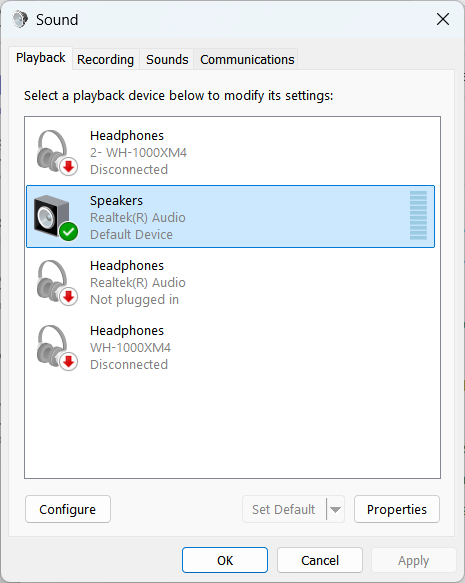
(you can change the playback device in the Sound window from windows control panel)
yOBp9DZNocYpTgVU.png


see if they both have the same crackling/youtube issue

dont use your soundbar yet
 
Last edited:
I think I solved it , its the usb dongle that I use for my mouse and keyboardand blutooth controllers causing the problem, its usually in the top of the tower I moved it in the back, since im having problems with both keyboard and mouse the audio issues went away
 
So yeah this is usually a sign of some driver introducing a long wait times into system interrupts.
First thing to check is to see which of your devices aren't using MSI interrupt mode (Device Manager -> View -> Resources by connection -> IRQ -> and check which PCI devices at the bottom of the list are using positive numbers).
If there are any then you can try force switching them into MSI mode (there are tools for that) and see if that helps.
If it doesn't then use the DM to disable such devices one by one and check for results.

I think I solved it , its the usb dongle that I use for my mouse and keyboardand blutooth controllers causing the problem, its usually in the top of the tower I moved it in the back, since im having problems with both keyboard and mouse the audio issues went away
Ah Bluetooth the best tech in the world! You could try switch to a different dongle.
 
Last edited:
So yeah this is usually a sign of some driver introducing a long wait times into system interrupts.
First thing to check is to see which of your devices aren't using MSI interrupt mode (Device Manager -> View -> Resources by connection -> IRQ -> and check which PCI devices at the bottom of the list are using positive numbers).
If there are any then you can try force switching them into MSI mode (there are tools for that) and see if that helps.
If it doesn't then use the DM to disable such devices one by one and check for results.


Ah Bluetooth the best tech in the world! You could try switch to a different dongle.
when I did the gpu switch , I had a usb conection wire , when I disconnected it I swear the fucking thing disappeared , i still dint find it ! Ill just buy a cheap one on amazon , what a fucking load of shit lol
 
I think I solved it , its the usb dongle that I use for my mouse and keyboardand blutooth controllers causing the problem, its usually in the top of the tower I moved it in the back, since im having problems with both keyboard and mouse the audio issues went away
Fucking Bluetooth. I have to keep my mouse and keyboard dongles in the front of the PC to keep them from cutting out occasionally and I went through three different dongles on my last motherboard to get my DualSense to actually stay connected. I dunno why Bluetooth is still so finicky.

Anyway, glad you got it figured out, and it was something simple to boot!
 
Aside from the problem being fixed, hows the performance difference? You think it was worth it? I also have a 4070ti but Im still unsure whether to bite the bullet just for 20% performance boost excluding MFG3x/4x which prolly arent woth it due to severe artefacts.
 
Aside from the problem being fixed, hows the performance difference? You think it was worth it? I also have a 4070ti but Im still unsure whether to bite the bullet just for 20% performance boost excluding MFG3x/4x which prolly arent woth it due to severe artefacts.
I thought it was fixed , it seemed fixed yesterday but its back lol
actually its a good boost in performance , the fact that I can turn everything up to ultra and have ray tracing on and still gain 20 to 30 fps in some cases , before with the 4070ti I had to tone it down with the graphics
 
Had to go through process of elimination.

Looks like it was an ASMedia SATA to PCI-E adapter acting the silly sausage.
yeah, Im still not sure whats going on, yesterday I thought it was maybe a usb problem , because my mouse and keyboard was acting up and the gpu was fine , tried a whole bunch of games with any problems, today the bitch is screeching again
 
this is what I get when running Latency Mon_________________________________________________________________________________________________________
CONCLUSION
_________________________________________________________________________________________________________
Your system appears to be having trouble handling real-time audio and other tasks. You are likely to experience buffer underruns appearing as drop outs, clicks or pops. One or more DPC routines that belong to a driver running in your system appear to be executing for too long. At least one detected problem appears to be network related. In case you are using a WLAN adapter, try disabling it to get better results. One problem may be related to power management, disable CPU throttling settings in Control Panel and BIOS setup. Check for BIOS updates.
LatencyMon has been analyzing your system for 0:01:25 (h:mm:ss) on all processors.


_________________________________________________________________________________________________________
SYSTEM INFORMATION
_________________________________________________________________________________________________________
Computer name: DESKTOP-RT56QJ4
OS version: Windows 11, 10.0, version 2009, build: 26200 (x64)
Hardware: ROG Strix G10DK_G10DK, ASUSTeK COMPUTER INC.
BIOS: 310
CPU: AuthenticAMD AMD Ryzen 7 5800X3D 8-Core Processor
Logical processors: 16
Processor groups: 1
Processor group size: 16
RAM: 32683 MB total


_________________________________________________________________________________________________________
CPU SPEED
_________________________________________________________________________________________________________
Reported CPU speed (WMI): 3401 MHz
Reported CPU speed (registry): 3394 MHz

Note: reported execution times may be calculated based on a fixed reported CPU speed. Disable variable speed settings like Intel Speed Step and AMD Cool N Quiet in the BIOS setup for more accurate results.


_________________________________________________________________________________________________________
MEASURED INTERRUPT TO USER PROCESS LATENCIES
_________________________________________________________________________________________________________
The interrupt to process latency reflects the measured interval that a usermode process needed to respond to a hardware request from the moment the interrupt service routine started execution. This includes the scheduling and execution of a DPC routine, the signaling of an event and the waking up of a usermode thread from an idle wait state in response to that event.

Highest measured interrupt to process latency (µs): 2079.60
Average measured interrupt to process latency (µs): 11.078099

Highest measured interrupt to DPC latency (µs): 2073.70
Average measured interrupt to DPC latency (µs): 1.583729


_________________________________________________________________________________________________________
REPORTED ISRs
_________________________________________________________________________________________________________
Interrupt service routines are routines installed by the OS and device drivers that execute in response to a hardware interrupt signal.

Highest ISR routine execution time (µs): 28.269888
Driver with highest ISR routine execution time: HDAudBus.sys - High Definition Audio Bus Driver, Microsoft Corporation

Highest reported total ISR routine time (%): 0.000073
Driver with highest ISR total time: HDAudBus.sys - High Definition Audio Bus Driver, Microsoft Corporation

Total time spent in ISRs (%) 0.000099

ISR count (execution time <250 µs): 507
ISR count (execution time 250-500 µs): 0
ISR count (execution time 500-1000 µs): 0
ISR count (execution time 1000-2000 µs): 0
ISR count (execution time 2000-4000 µs): 0
ISR count (execution time >=4000 µs): 0


_________________________________________________________________________________________________________
REPORTED DPCs
_________________________________________________________________________________________________________
DPC routines are part of the interrupt servicing dispatch mechanism and disable the possibility for a process to utilize the CPU while it is interrupted until the DPC has finished execution.

Highest DPC routine execution time (µs): 2167.585150
Driver with highest DPC routine execution time: nvlddmkm.sys - NVIDIA Windows Kernel Mode Driver, Version 581.94 , NVIDIA Corporation

Highest reported total DPC routine time (%): 0.003889
Driver with highest DPC total execution time: ntoskrnl.exe - NT Kernel & System, Microsoft Corporation

Total time spent in DPCs (%) 0.024871

DPC count (execution time <250 µs): 42295
DPC count (execution time 250-500 µs): 0
DPC count (execution time 500-10000 µs): 7
DPC count (execution time 1000-2000 µs): 6
DPC count (execution time 2000-4000 µs): 3
DPC count (execution time >=4000 µs): 0


_________________________________________________________________________________________________________
REPORTED HARD PAGEFAULTS
_________________________________________________________________________________________________________
Hard pagefaults are events that get triggered by making use of virtual memory that is not resident in RAM but backed by a memory mapped file on disk. The process of resolving the hard pagefault requires reading in the memory from disk while the process is interrupted and blocked from execution.

NOTE: some processes were hit by hard pagefaults. If these were programs producing audio, they are likely to interrupt the audio stream resulting in dropouts, clicks and pops. Check the Processes tab to see which programs were hit.

Process with highest pagefault count: svchost.exe

Total number of hard pagefaults 312
Hard pagefault count of hardest hit process: 160
Number of processes hit: 10


_________________________________________________________________________________________________________
PER CPU DATA
_________________________________________________________________________________________________________
CPU 0 Interrupt cycle time (s): 1.206256
CPU 0 ISR highest execution time (µs): 28.269888
CPU 0 ISR total execution time (s): 0.001348
CPU 0 ISR count: 507
CPU 0 DPC highest execution time (µs): 2167.585150
CPU 0 DPC total execution time (s): 0.101933
CPU 0 DPC count: 10055
_________________________________________________________________________________________________________
CPU 1 Interrupt cycle time (s): 0.325106
CPU 1 ISR highest execution time (µs): 0.0
CPU 1 ISR total execution time (s): 0.0
CPU 1 ISR count: 0
CPU 1 DPC highest execution time (µs): 28.450206
CPU 1 DPC total execution time (s): 0.001634
CPU 1 DPC count: 353
_________________________________________________________________________________________________________
CPU 2 Interrupt cycle time (s): 0.524361
CPU 2 ISR highest execution time (µs): 0.0
CPU 2 ISR total execution time (s): 0.0
CPU 2 ISR count: 0
CPU 2 DPC highest execution time (µs): 1736.684738
CPU 2 DPC total execution time (s): 0.027815
CPU 2 DPC count: 4160
_________________________________________________________________________________________________________
CPU 3 Interrupt cycle time (s): 1.954186
CPU 3 ISR highest execution time (µs): 0.0
CPU 3 ISR total execution time (s): 0.0
CPU 3 ISR count: 0
CPU 3 DPC highest execution time (µs): 1964.566883
CPU 3 DPC total execution time (s): 0.072696
CPU 3 DPC count: 7371
_________________________________________________________________________________________________________
CPU 4 Interrupt cycle time (s): 0.443653
CPU 4 ISR highest execution time (µs): 0.0
CPU 4 ISR total execution time (s): 0.0
CPU 4 ISR count: 0
CPU 4 DPC highest execution time (µs): 271.218621
CPU 4 DPC total execution time (s): 0.009344
CPU 4 DPC count: 1301
_________________________________________________________________________________________________________
CPU 5 Interrupt cycle time (s): 0.468664
CPU 5 ISR highest execution time (µs): 0.0
CPU 5 ISR total execution time (s): 0.0
CPU 5 ISR count: 0
CPU 5 DPC highest execution time (µs): 57.741897
CPU 5 DPC total execution time (s): 0.004907
CPU 5 DPC count: 1224
_________________________________________________________________________________________________________
CPU 6 Interrupt cycle time (s): 0.373698
CPU 6 ISR highest execution time (µs): 0.0
CPU 6 ISR total execution time (s): 0.0
CPU 6 ISR count: 0
CPU 6 DPC highest execution time (µs): 93.444903
CPU 6 DPC total execution time (s): 0.011221
CPU 6 DPC count: 901
_________________________________________________________________________________________________________
CPU 7 Interrupt cycle time (s): 0.365753
CPU 7 ISR highest execution time (µs): 0.0
CPU 7 ISR total execution time (s): 0.0
CPU 7 ISR count: 0
CPU 7 DPC highest execution time (µs): 118.428992
CPU 7 DPC total execution time (s): 0.002508
CPU 7 DPC count: 578
_________________________________________________________________________________________________________
CPU 8 Interrupt cycle time (s): 0.290297
CPU 8 ISR highest execution time (µs): 0.0
CPU 8 ISR total execution time (s): 0.0
CPU 8 ISR count: 0
CPU 8 DPC highest execution time (µs): 120.382440
CPU 8 DPC total execution time (s): 0.001016
CPU 8 DPC count: 176
_________________________________________________________________________________________________________
CPU 9 Interrupt cycle time (s): 0.299073
CPU 9 ISR highest execution time (µs): 0.0
CPU 9 ISR total execution time (s): 0.0
CPU 9 ISR count: 0
CPU 9 DPC highest execution time (µs): 28.850913
CPU 9 DPC total execution time (s): 0.000577
CPU 9 DPC count: 135
_________________________________________________________________________________________________________
CPU 10 Interrupt cycle time (s): 0.569184
CPU 10 ISR highest execution time (µs): 0.0
CPU 10 ISR total execution time (s): 0.0
CPU 10 ISR count: 0
CPU 10 DPC highest execution time (µs): 107.249263
CPU 10 DPC total execution time (s): 0.010666
CPU 10 DPC count: 1934
_________________________________________________________________________________________________________
CPU 11 Interrupt cycle time (s): 0.625960
CPU 11 ISR highest execution time (µs): 0.0
CPU 11 ISR total execution time (s): 0.0
CPU 11 ISR count: 0
CPU 11 DPC highest execution time (µs): 147.500295
CPU 11 DPC total execution time (s): 0.013009
CPU 11 DPC count: 2667
_________________________________________________________________________________________________________
CPU 12 Interrupt cycle time (s): 0.318147
CPU 12 ISR highest execution time (µs): 0.0
CPU 12 ISR total execution time (s): 0.0
CPU 12 ISR count: 0
CPU 12 DPC highest execution time (µs): 99.084856
CPU 12 DPC total execution time (s): 0.005085
CPU 12 DPC count: 995
_________________________________________________________________________________________________________
CPU 13 Interrupt cycle time (s): 0.312164
CPU 13 ISR highest execution time (µs): 0.0
CPU 13 ISR total execution time (s): 0.0
CPU 13 ISR count: 0
CPU 13 DPC highest execution time (µs): 119.390689
CPU 13 DPC total execution time (s): 0.003974
CPU 13 DPC count: 673
_________________________________________________________________________________________________________
CPU 14 Interrupt cycle time (s): 0.695013
CPU 14 ISR highest execution time (µs): 0.0
CPU 14 ISR total execution time (s): 0.0
CPU 14 ISR count: 0
CPU 14 DPC highest execution time (µs): 126.954037
CPU 14 DPC total execution time (s): 0.043402
CPU 14 DPC count: 5940
_________________________________________________________________________________________________________
CPU 15 Interrupt cycle time (s): 0.629773
CPU 15 ISR highest execution time (µs): 0.0
CPU 15 ISR total execution time (s): 0.0
CPU 15 ISR count: 0
CPU 15 DPC highest execution time (µs): 146.708898
CPU 15 DPC total execution time (s): 0.029394
CPU 15 DPC count: 3848
_________________________________________________________________________________________________________
 
Last edited:
this is what I get when running Latency Mon

Is it way off into the red on the program? My latency was off the charts :messenger_grinning_sweat:

The fact that it's found SOMETHING is a good sign. I was completely non-plussed before I downloaded it.

All I can suggest is take out any expansion cards or devices and work from there, perhaps a clean boot so it's just your display driver and audio. For me it looks like a dodgy SATA connection was crackling my sound lol (?!!).

The Joys of computers/windows.
 
Last edited:
Aside from the problem being fixed, hows the performance difference? You think it was worth it? I also have a 4070ti but Im still unsure whether to bite the bullet just for 20% performance boost excluding MFG3x/4x which prolly arent woth it due to severe artefacts.
I upgraded from a 4070 Ti to a 5080. Depends on what you want performance wise from your games.

If you are fine with 60 FPS, the 4070 Ti is still plenty enough. At 1080p the 4070 Ti is still a beast, you can get 120+ FPS easily in most games (non path traced). At 1440p you might get into some troubles due to the amount of VRAM (12GB), and probably you won't be able to hit high framerates in some games at high/max settings. I still use the 4070 Ti on my 1080p setup (paired with a 5800X3D) and it still performs really well.

If you plan to play at >1440p and at higher framerates (120/240) then it's a relevant upgrade imho, in that case it's absolutely worth it. You need to have a high refresh rate monitor though (at least 240Hz).
 
Is it way off into the red on the program? My latency was off the charts :messenger_grinning_sweat:

The fact that it's found SOMETHING is a good sign. I was completely non-plussed before I downloaded it.

All I can suggest is take out any expansion cards or devices and work from there, perhaps a clean boot so it's just your display driver and audio. For me it looks like a dodgy SATA connection was crackling my sound lol (?!!).

The Joys of computers/windows.
yep it in the dark orange! good times but when I put my 4070ti back in its perfect with no problems......
 
If 4070ti works fine then it has to be related to 5080. Maybe update bios of motherboard and try switching to PCIE 4.0? Maybe this GPU is faulty or maybe there is some conflict between your hardware/software and 5xxx series, updating bios might help.
 
I've read somewhere to put it to Pcie 4 but when I do go in my Bios there's no option for it..I tried updating my bios but it says I jave the latest updates that dates from 2022, so not sure! Starting to think its a faulty gpu because the 4070 works fine with no sound issues
 
Last bios being from 2022 seems a bit old. My old shitty B350 board has a BIOS from 2025 to keep up with compatibility. What model is your MOBO?

My 2019 X570 board got update two weeks ago...

But I think PCIE can't be the issue here, platform goes up to PCIE 4.0 anyway and PCIE 5.0 is more likely to cause problems on Blackwell. Funny thing is that I had problems like that few years ago (on 3070 I think), I got sound cracks and stutters in games - problem was related to Realtek sound card on mobo, it is fucked or just complete garbage. Turning it off in bios ("HD Audio") solved the problem, now all the sound is coming from GPU audio tech and drivers. Maybe try something like this?

VeganElduderino VeganElduderino or just RMA the card...
 
Last edited:
My 2019 X570 board got update two weeks ago...

But I think PCIE can't be the issue here, platform goes up to PCIE 4.0 anyway and PCIE 5.0 is more likely to cause problems on Blackwell. Funny thing is that I had problems like that few years ago (on 3070 I think), I got sound cracks and stutters in games - problem was related to Realtek sound card on mobo, it is fucked or just complete garbage. Turning it off in bios ("HD Audio") solved the problem, now all the sound is coming from GPU audio tech and drivers. Maybe try something like this?

VeganElduderino VeganElduderino or just RMA the card...
I tried uninstalling the realtek and it din't change a thing..
I turned off the Nvidia high def audio and I have no sound so its not that
ill bring back the card I think
 
Last edited:
I tried uninstalling the realtek and it din't change a thing..
I turned off the Nvidia high def audio and I have no sound so its not that
ill bring back the card I think

I think I had to turn off "HD Audio" in Bios to fix the issue (removing drivers didn't help because Windows still had default driver that worked with the sound card).

It looks like that in my Bios:

TxQkRE3.jpeg


But it should cause issues with 4070ti as well (in theory) so it's probably the GPU...
 
Last edited:
"Hardware: ROG Strix G10DK_G10DK, ASUSTeK"

Leonardo Dicaprio Look GIF by Once Upon A Time In Hollywood


It's that one of those pre-built machines with a custom proprietary motherboard?

Go after Asus and try to find out the correct model your motherboard, the correct pcie gen it can accept and ask for a bios update.

If they can't give you a solution, then you are out of luck. Just return thev(probably perfectly fine) 5080 and call it a day.
 
Last edited:
I think I had to turn off "HD Audio" in Bios to fix the issue (removing drivers didn't help because Windows still had default driver that worked with the sound card).

It looks like that in my Bios:

TxQkRE3.jpeg


But it should cause issues with 4070ti as well (in theory) so it's probably the GPU...
yeah IM thinking it has to be the gpu because the 4070ti has 0 issues
 
yep it in the dark orange! good times but when I put my 4070ti back in its perfect with no problems......
That's why I thought it was possibly bus related.

Have you tried a) using a linux live CD to run the system just out of RAM to see if it works for youtube flawlessly that way, as that would instantly take all manner of potential causes like SSD overheating, not trimmed recently or not ran a elevated Commandline: chkdsk /x /f c: to offline repair, mismatched memory timings/stability in dual channel mode - probably exhausted by the 5080 and not the 4070ti, not to mention eliminate Windows and driver issues and B) turned off EXPO timings and C) tried running with just one stick of RAM to drop to single channel mode?
 
That's why I thought it was possibly bus related.

Have you tried a) using a linux live CD to run the system just out of RAM to see if it works for youtube flawlessly that way, as that would instantly take all manner of potential causes like SSD overheating, not trimmed recently or not ran a elevated Commandline: chkdsk /x /f c: to offline repair, mismatched memory timings/stability in dual channel mode - probably exhausted by the 5080 and not the 4070ti, not to mention eliminate Windows and driver issues and B) turned off EXPO timings and C) tried running with just one stick of RAM to drop to single channel mode?
For now the card is back at the shoppe, they will test it and see..my 4070ti is back in for now
 
Top Bottom