
-
Hey Guest. Check out your NeoGAF Wrapped 2025 results here!
You are using an out of date browser. It may not display this or other websites correctly.
You should upgrade or use an alternative browser.
You should upgrade or use an alternative browser.
Windows Phone 7 |OT|
- Thread starter brotkasten
- Start date
- Status
- Not open for further replies.
What was the mic bug?Commodore said:Hell yeah, that was my biggest gripe. Great to hear. Updating now!
VanMardigan
has calmed down a bit.
dLMN8R said:What was the mic bug?
You plug in headphones, and when you plug them back out the mic doesn't work. So voice search and shazam both don't pick up audio, but calls do.
Also, I just unbranded my phone and STILL no update. Whether I'm branded or unbranded, I don't get prompted for the Samsung update. I wouldn't care if it was the AT&T crap, but anti shake by default and the mic bug would both be pretty useful for me.
Any ideas?
Bump for the new page since this got lost in all the update discussion...dLMN8R said:Now that the platform's been out for a while, anyone have suggestions for a simple groceries app? I use on that's simply called Shopping List, but it hasn't ever been updated in the months it's been out, and still has some annoying scrolling bugs.
What I like about Shopping List is that it has pivots for "all", "shelf", and "cart". Basically, it's an easy way to keep track of everything you need, what you've already picked up and put in your cart, and what's still waiting sitting on the shelf.
any recommendations?
antiquegamer
Member
Posting this from Starbucks, whispr seems to be working essentially it let you connect to att WiFi without having to go to the accept agreement page. My phone detect WiFi and connect it right up. I deleted and try connect it again and it connect me without going through that prompt. Nice to have I guess if you go to place with att hotspot.
VanMardigan
has calmed down a bit.
Hey Brettison, I got the update to show up. After you rebrand your phone, restart it. After that, when you plug in to Zune, the Samsung update should show up.
And Raistlin, to answer you question about how you know where the update is from: The update page actually SAYS the update is from Samsung specifically:
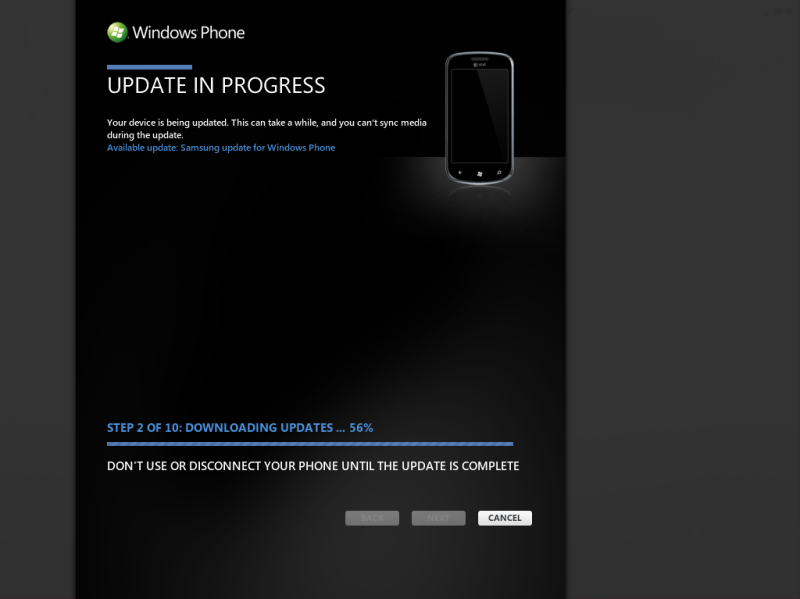
And Raistlin, to answer you question about how you know where the update is from: The update page actually SAYS the update is from Samsung specifically:
Vanillalite
Ask me about the GAF Notebook
Weird.....
1) Rolled back
2) Got prompted through Zune for an update
3) Updated
4) Finished the update
5) Have NoDo installed from Zune
6) Do NOT have the Samsung update
PS: This shows me the samsung update and the nodo update weren't rolled together for me.
1) Rolled back
2) Got prompted through Zune for an update
3) Updated
4) Finished the update
5) Have NoDo installed from Zune
6) Do NOT have the Samsung update
Code:
OS version: 7.0.7390.0
Firmware revision number: 2103.10.10.1
Hardware revision number: 3.1.0.7
Radio software version: 2103.10.10.1
Radio hardware version: 0.0.0.3
Bootloader version: 4.10.0.1
Chip SOC version: 0.36.2.0
PS: This shows me the samsung update and the nodo update weren't rolled together for me.
antiquegamer
Member
When you roll back did you remember to rebrand the phone?
Ogrekiller
Member
Is anyone in Canada on Rogers getting this Samsung update?
antiquegamer
Member
If it still stuck I would follow that update page guide they put up few days back. You might need to run that update tool.OuterWorldVoice said:Mine is stuck on the third stage, at this point:

Stuck like this for 20+ minutes. Don't want to cancel in case it's actually doing something. Any ideas?
I have an insanely fast internet connection, btw.
Vanillalite
Ask me about the GAF Notebook
Ugh no... But why would I get an update at all through Zune if I hadn't rebrandedantiquegamer said:When you roll back did you remember to rebrand the phone?

CaptainABAB
Member
After waiting patiently all this time, my Focus finally got the NoDo update...
The most interesting aspect: I actually gained disk space (opposite of what I experience with the Windows Desktop Updates)
Earlier today:
----------------------
Total Storage: 7.39GB
Available: 5.85 GB
OS: 7.0.7004.0
Firmware revision: 2103.10.10.1
Hardware revision: 3.1.0.7
Radio software: 2103.10.10.1
Radio hardware: 0.0.0.3
Bootloader: 4.10.0.1
Chip SOC: 0.36.2.0
After Feb 2011 update:
----------------------
Total Storage: 7.39GB
Available: 5.94 GB
OS: 7.0.7008.0
Firmware revision: 2103.10.10.1
Hardware revision: 3.1.0.7
Radio software: 2103.10.10.1
Radio hardware: 0.0.0.3
Bootloader: 4.11.0.9
Chip SOC: 0.36.2.0
After March 2011 update:
----------------------
Total Storage: 7.39GB
Available: 5.98 GB
OS: 7.0.7390.0
Firmware revision: 2103.11.3.3
Hardware revision: 3.1.0.7
Radio software: 2103.11.3.3
Radio hardware: 0.0.0.3
Bootloader: 5.3.1.6
Chip SOC: 0.36.2.0
The most interesting aspect: I actually gained disk space (opposite of what I experience with the Windows Desktop Updates)
Earlier today:
----------------------
Total Storage: 7.39GB
Available: 5.85 GB
OS: 7.0.7004.0
Firmware revision: 2103.10.10.1
Hardware revision: 3.1.0.7
Radio software: 2103.10.10.1
Radio hardware: 0.0.0.3
Bootloader: 4.10.0.1
Chip SOC: 0.36.2.0
After Feb 2011 update:
----------------------
Total Storage: 7.39GB
Available: 5.94 GB
OS: 7.0.7008.0
Firmware revision: 2103.10.10.1
Hardware revision: 3.1.0.7
Radio software: 2103.10.10.1
Radio hardware: 0.0.0.3
Bootloader: 4.11.0.9
Chip SOC: 0.36.2.0
After March 2011 update:
----------------------
Total Storage: 7.39GB
Available: 5.98 GB
OS: 7.0.7390.0
Firmware revision: 2103.11.3.3
Hardware revision: 3.1.0.7
Radio software: 2103.11.3.3
Radio hardware: 0.0.0.3
Bootloader: 5.3.1.6
Chip SOC: 0.36.2.0
VanMardigan
has calmed down a bit.
Brettison said:Ugh no... But why would I get an update at all through Zune if I hadn't rebranded
So you have NoDo, an unlocked device, and are unbranded? If so, the fix is easy. Use the Samsung Registry tool, rebrand to ATT-US, restart the phone, plug it in to Zune, and you should get prompted for the Samsung update.
Vibram6finger
Banned
CaptainABAB said:After waiting patiently all this time, my Focus finally got the NoDo update...
The most interesting aspect: I actually gained disk space (opposite of what I experience with the Windows Desktop Updates)
Earlier today:
----------------------
Total Storage: 7.39GB
Available: 5.85 GB
OS: 7.0.7004.0
Firmware revision: 2103.10.10.1
Hardware revision: 3.1.0.7
Radio software: 2103.10.10.1
Radio hardware: 0.0.0.3
Bootloader: 4.10.0.1
Chip SOC: 0.36.2.0
After Feb 2011 update:
----------------------
Total Storage: 7.39GB
Available: 5.94 GB
OS: 7.0.7008.0
Firmware revision: 2103.10.10.1
Hardware revision: 3.1.0.7
Radio software: 2103.10.10.1
Radio hardware: 0.0.0.3
Bootloader: 4.11.0.9
Chip SOC: 0.36.2.0
After March 2011 update:
----------------------
Total Storage: 7.39GB
Available: 5.98 GB
OS: 7.0.7390.0
Firmware revision: 2103.11.3.3
Hardware revision: 3.1.0.7
Radio software: 2103.11.3.3
Radio hardware: 0.0.0.3
Bootloader: 5.3.1.6
Chip SOC: 0.36.2.0
Microsoft is so cool, they can give you free memory via download
Vanillalite
Ask me about the GAF Notebook
Is there a way to tell what my phone is branded without using the Samsung registry tool?
PS: Still can't use the tool.
PS: Still can't use the tool.
antiquegamer
Member
Brettison said:Ugh no... But why would I get an update at all through Zune if I hadn't rebranded
Well because you have unbranded phone, and all unbranded phone get update. (That's how you able to get update before now, because the phone is unbranded).
Developer unlock phone is essentially allow you to sideload app (xav) file by bypassing Zune so you can run homebrew. ie unapprove stuff.
When you run Chevron 7 (not the update but the unlock tool that is essentially what you did, you make the phone into developer unlock phone). You can also paid Microsoft or sign up as student developer and get code to unlock your phone.
This is not the same as carrier Unlock or Sim unlock which is letting you use other carrier sim card on your phone (for example traveling to other country so you don't have to pay outside roaming charge)
Unbranded is rewritten the registry so the phone is no loger tie to specific carrier. Zune check on this string to see if your phone is branded with particular carrier. By unlocking the phone, you could sideload app that allow you to edit the registry. So by editing this registry you are essentially unbrand your phone and free it from carrier so when Microsoft send out update the unbranded phone, ie not tie to carrier would get it first.
The thing about developer unlock is that it relock after you reboot the phone or connect it to Zune so you also need to sideload app that will edit the registry so the phone stay permanently unlock. If you did not do this before you update to No Do then you can not currently unlock the phone again and any sideload app (such as the one that let you edit registry of carrier) will no longer work.
I hope this help clear up.
antiquegamer
Member
Brettison said:Is there a way to tell what my phone is branded without using the Samsung registry tool?
PS: Still can't use the tool.
After you restore, you need to make sure you unlock the phone again if it become lock. Then you can run Samsung Registry tool to rebrand it.
antiquegamer
Member
dLMN8R said:Bump for the new page since this got lost in all the update discussion...
any recommendations?
Sorry I don't use any of the grocery app since my wife doesn't have Windows Phone, when she need me to get stuff she just email me the list .... yeah kinda low tech but it work.
I know you could also set up MS Office One-Note and use it as grocery list so everyone in the house can share and edit list. My wife just think it's a hassle and she rather just email me the list ....
Fellow Focus owners, if you encounter this error code (800705B4) while updating, check out the following support article.
This worked for me
This worked for me
VanMardigan
has calmed down a bit.
My update just completed. I have the Samsung firmware with the anti-shake by default, and NoDo as well as an unlocked phone. How do you check to see if I got the AT&T stuff? I'm pretty sure I don't have that, but that's a-ok with me.
Vanillalite
Ask me about the GAF Notebook
I figured as much. I was just dragging my feet cause the update takes so long cause of backing things up. I'm at my GFs now, and will do this all over again when I get home.
antiquegamer
Member
VanMardigan said:My update just completed. I have the Samsung firmware with the anti-shake by default, and NoDo as well as an unlocked phone. How do you check to see if I got the AT&T stuff? I'm pretty sure I don't have that, but that's a-ok with me.
Go to Setting>swipe to applications>People>+Add an account You should see At&T Address Book under Outlook. (it's icon of phone book with huge AT&T next to it, you can't miss it).
I am assuming the carrier stuff (ie At&T code) is bundle in with Samsung firmware update, which would make sense since technically, all Focus phone should be At&t phone since they are the only one that sell it.
antiquegamer
Member
Brettison said:I figured as much. I was just dragging my feet cause the update takes so long cause of backing things up. I'm at my GFs now, and will do this all over again when I get home.
I would suggest unsync your content and update will go much faster. It doesn't take long anyway to sync musics, video, pictures etc back to your phone.
Just remember after you restore your phone, to make sure it is unlock again so you can run the Samsung Tool app and brand your phone back. (code is ATT-US).
Once your phone is branded again, it should prompt you to get official update.
antiquegamer said:If it still stuck I would follow that update page guide they put up few days back. You might need to run that update tool.
It required patience. The %age counter simply never goes up from 0.
All updated. All working great.
ALL HAIL CUT AND PASTE.
VanMardigan
has calmed down a bit.
I can confirm the Samsung update has the ATT functionality.
VanMardigan said:I can confirm the Samsung update has the ATT functionality.
I can confirm this confirmation.

Anton Sugar
Member
Now the short wait for Mango...?
brotkasten
Member
Nope, the security update on May 3 comes first.Mr. Snrub said:Now the short wait for Mango...?
Looks like Focus users may have to adjust their phones again for faster data.
http://pocketnow.com/windows-phone/att-nodo-update-disabling-samsung-focus-hsupa-fix-it
http://pocketnow.com/windows-phone/att-nodo-update-disabling-samsung-focus-hsupa-fix-it
antiquegamer
Member
venne said:Looks like Focus users may have to adjust their phones again for faster data.
http://pocketnow.com/windows-phone/att-nodo-update-disabling-samsung-focus-hsupa-fix-it
I thought that bit of news that go around is a little misleading. The HSUPA is always off on the Focus before pre-No Do. It was never on to begin with but the article and all the blogger (which copy off each other story pretty much) make it sound like No Do disable it for the first time. It was never on to begin with and you always have to turn it on using dianostic tool before No Do.
Vanillalite
Ask me about the GAF Notebook
Okay I just reflashed back, and got the samsung registry tool to load up again.
Do I put the ATT-US after the GetString : and delete the 000-88 so it looks like
??
Do I put the ATT-US after the GetString : and delete the 000-88 so it looks like
Code:
GetString : ATT-US??
Darth Tigris
Member
Well I still don't have the NoDo update. Kinda hard to update with no phone. That's right, I'm still a Verizon holdout, waiting for Big Red to acknowledge that I (and others) exist.
I guess we're the last group with a legitimate gripe, eh? S'ok, for now. I have around 2 weeks before this officially turns into an annoyance for me.
Enjoy your phones, folks ...
I guess we're the last group with a legitimate gripe, eh? S'ok, for now. I have around 2 weeks before this officially turns into an annoyance for me.
Enjoy your phones, folks ...
Brettison said:Okay I just reflashed back, and got the samsung registry tool to load up again.
Do I put the ATT-US after the GetString : and delete the 000-88 so it looks like
Code:GetString : ATT-US
??
Yes set it to ATT-US
Vanillalite
Ask me about the GAF Notebook
jagowar said:Yes set it to ATT-US
Meh I did that, and I still only got the vanilla NoDo...
I'll fuck with this again later uggggghhh
venne said:Looks like Focus users may have to adjust their phones again for faster data.
http://pocketnow.com/windows-phone/att-nodo-update-disabling-samsung-focus-hsupa-fix-it
yea I just GUESSED they would do that and first thing I did after installing update was to re-enable.

Iced_Eagle
Member
Brettison said:Meh I did that, and I still only got the vanilla NoDo...
I'll fuck with this again later uggggghhh
Remember that updates are rolled out, so it's possible you just don't have it yet. Otherwise you may have to roll back and update again.


antiquegamer
Member
Brettison said:Okay I just reflashed back, and got the samsung registry tool to load up again.
Do I put the ATT-US after the GetString : and delete the 000-88 so it looks like
Code:GetString : ATT-US
??
No, first hit read and see what it said, delete all that and type in ATT-US. Hit write.
Hit read again it should say Get String : ATT-US.
Give me this version of IE9 right now. Update it now. Now. Now. Now.
http://m.youtube.com/watch?gl=US&client=mv-google&hl=en&v=vohmbZjRXqk
(Note I copied and pasted this on the phone ;-) )
http://m.youtube.com/watch?gl=US&client=mv-google&hl=en&v=vohmbZjRXqk
(Note I copied and pasted this on the phone ;-) )
Earl Cazone
Member
will we eventually get flash btw?
Vanillalite
Ask me about the GAF Notebook
antiquegamer said:No, first hit read and see what it said, delete all that and type in ATT-US. Hit write.
Hit read again it should say Get String : ATT-US.
That's exactly what I did, and yeah I didn't get the update. I noticed if you did it the way I posted you were adding a Get String to the mix.

Still no update...
brotkasten
Member
Maybe. I think WP7 was mentioned in a footnote when Adobe announced Flash 10.2 at MWC.Earl Cazone said:will we eventually get flash btw?
I have to imagine it will not happen until mango at the earliest..... I cant see them adding it until it can be hardware accelerated (for performance and battery life)Earl Cazone said:will we eventually get flash btw?
VanMardigan
has calmed down a bit.
Are you getting the official att no do? The Samsung update seems to be for folks that have no do from an unofficial source, such as the Hungarian server trick or chevron.Brettison said:That's exactly what I did, and yeah I didn't get the update. I noticed if you did it the way I posted you were adding a Get String to the mix.
Still no update...
My flow was Hungarian trick no do, then rebrand att, then the Samsung update. To do that flow you have to make sure your phone stays unlocked through the Hungarian no do update. I now have the best possible outcome, which is an unlocked device with the ATT features and the Samsung features.
antiquegamer
Member
Brettison said:That's exactly what I did, and yeah I didn't get the update. I noticed if you did it the way I posted you were adding a Get String to the mix.
Still no update...
If you get official No Do then you should also get Samsung update (they are bundle together). Samsung update only show up separate for people that either unbranded or use Chevron Update tool.
Some people did report that they haven't got the update on their stock phone and I assume this is because it's another rolling update and may be some region of the country is not getting the update yet. (Not sure where you are at)
- Status
- Not open for further replies.