• Hey Guest. Check out your NeoGAF Wrapped 2025 results here!

Windows Phone 7 |OT|

Status
Not open for further replies.
brotkasten said:
Where did you buy your phone? Do you have it already?

My father renewed his contract (he is on the D2 network) and got the Optimus 7, but he wants to keep using his feature phone.

My mother is on e-plus and has some old, cheap touchscreen phone. So ideally I'd want to remove the simlock so that she can use it on e-plus.

And yes, we do have the phone already.

From what I can tell removing the simlock should be legal and I've read that some carriers sell the unlock codes.
 
Mr. Snrub said:
WeatherBug stopped working for me about a month ago. Weather Channel is flawless and I think I like it more actually.

Weather Channel would crash daily on my phone before. It go to the point where I'd try and load the app and it would just start to load and kick back out to the home screen 90% of the time. Only fix was a hard reset, and that only worked for like 1 or 2 times loading the app and then it would crash again.
 
So.. my LG Quantum was humming along just fine.. would restart itself every few days for some reason but in the last 48 hours it has locked up many times. All when it was not being used. I would reach for it and the main screen was locked forcing me to do a manual restart.

I turned off wi fi and removed a few tiles on the front page just for testing reasons but has this been an issue with anyone else? For the first month it was fine.. but these locks ups are annoying as sometimes based on the frozen time it is a few hours before I notice.
 
Can anyone be kind enough to explain to me how linked Contacts decide which picture to use (facebook/google/windowslive/etc)?

Some show facebook's profile photo, others windows live's pic. I don't get it.
 
ochobit said:
Can anyone be kind enough to explain to me how linked Contacts decide which picture to use (facebook/google/windowslive/etc)?

Some show facebook's profile photo, others windows live's pic. I don't get it.

It might just use the most recent one
 
U2NUMB said:
So.. my LG Quantum was humming along just fine.. would restart itself every few days for some reason but in the last 48 hours it has locked up many times. All when it was not being used. I would reach for it and the main screen was locked forcing me to do a manual restart.

I turned off wi fi and removed a few tiles on the front page just for testing reasons but has this been an issue with anyone else? For the first month it was fine.. but these locks ups are annoying as sometimes based on the frozen time it is a few hours before I notice.

Definitely sounds like a hardware specific problem. Get it fixed ASAP.
 
Brettison said:
Definitely sounds like a hardware specific problem. Get it fixed ASAP.
Well so far since removing some tiles it has been great. Other issue is that this is a corporate phone so its a pain to exchange. But I'll keep an eye on it. Thanks for the feedback.
 
U2NUMB said:
So.. my LG Quantum was humming along just fine.. would restart itself every few days for some reason but in the last 48 hours it has locked up many times. All when it was not being used. I would reach for it and the main screen was locked forcing me to do a manual restart.

I turned off wi fi and removed a few tiles on the front page just for testing reasons but has this been an issue with anyone else? For the first month it was fine.. but these locks ups are annoying as sometimes based on the frozen time it is a few hours before I notice.

This happen to me all day today. It has been couple of weeks since the phone reboot itself on my Focus (I have SD card in it). I thought the problem was gone but today I have the exact same problem that you have the phone would just freeze up sitting there not being used.

I think there is more than just adding SD card since you have the LG and having the same problem. I will try remove some tiles, because I did add several tiles to the home screen the day before.
 
antiquegamer said:
This happen to me all day today. It has been couple of weeks since the phone reboot itself on my Focus (I have SD card in it). I thought the problem was gone but today I have the exact same problem that you have the phone would just freeze up sitting there not being used.

I think there is more than just adding SD card since you have the LG and having the same problem. I will try remove some tiles, because I did add several tiles to the home screen the day before.


Yep I am starting to believe it is a combo of tiles or having too many. I must say I never had a ton but a day or two after adding 4-5 tiles it started. Since I removed those 4 or so the phone has not locked up. Let me know if your freezes stop after removing tiles.

If this is true.. ugh not cool. I would like to have many more tiles on my front page.
 
this trophy is rubbish at managing different situations, eg overnight, meet is etc.

- no profiles so can't quickly switch to silent mode. Best seems to be flipping to vibrate and putting it in your pocket to muffle the vibration.

- no way to set email retrieval times. I'd like to set my exhange for work to not sync during evenings and weekends.

- you can't charge the phone when it's off!? Damn thing just turns straight back on again. So if I want to charge overnight (common i'd guess), then i'm stuck with all the issues mentioned above, being interrupted by email/SMS during the night

- phone doesn't turn on to activate an alarm (iPhone is the same but blackberry and nokias handle this really well)

What do you do at night? Do you manually go in and set it to flight mode, and then risk forgetting to turn it back again in the morning? Seems really


How do live tiles even work if there is no multitasking? I'd love the twitter app to update the tile but is that possible? I'd also like the people tile to live update, with a number on it. Currently it just tells you what was happening the last time you opened it (til it updates)
 
maeh2k said:
From what I can tell removing the simlock should be legal and I've read that some carriers sell the unlock codes.

Are you sure the phone is even locked?
I bought a D1 branded Omnia 7, and it runs fine with ePlus (minus the pre-installed T-Online software, which is tied to having a D1 sim inside).
 
Hammer24 said:
Are you sure the phone is even locked?
I bought a D1 branded Omnia 7, and it runs fine with ePlus (minus the pre-installed T-Online software, which is tied to having a D1 sim inside).


False alarm. You were right... there is no simlock.

The sim card was inserted the wrong way (the layout is a bit misleading. looks like the "shaved off" corner is on the other side...

I didn't think of checking whether it's in the right place...


Now everything works :)
 
Is there a way to check my data usage on my Omnia 7. I can't help being paranoid with how much I use. I bought alphajax and it asked if I want push and live tile notifications. I said no. Will it take a dent out of my usage I want to experiment.

Fucking t-mobile. 500mb a month sound like too little to me lol, so I hardly use it at all....
 
besiktas1 said:
Is there a way to check my data usage on my Omnia 7. I can't help being paranoid with how much I use. I bought alphajax and it asked if I want push and live tile notifications. I said no. Will it take a dent out of my usage I want to experiment.

Fucking t-mobile. 500mb a month sound like too little to me lol, so I hardly use it at all....


I have no idea whether you can monitor that, but I wouldn't worry too much about push notifications and live tiles. I believe those use only very little data.
 
besiktas1 said:
Is there a way to check my data usage on my Omnia 7. I can't help being paranoid with how much I use. I bought alphajax and it asked if I want push and live tile notifications. I said no. Will it take a dent out of my usage I want to experiment.

Fucking t-mobile. 500mb a month sound like too little to me lol, so I hardly use it at all....

Not sure how you check it on T-Mobile, but I can tell you I've used (monthly) .5GB, .5GB and .4GB in data since switching from an iPhone to my W7 phone. Before that I was using in the range of 1.5GB. That's with like 5 live tiles on my front page. Depending on your other usage habits it looks like you might be riding a fine line with a 500MB plan.
 
mrklaw said:
What do you do at night? Do you manually go in and set it to flight mode, and then risk forgetting to turn it back again in the morning? Seems really
I charge it in my bedroom and put it on silent mode. When you press the volume rocker, the volume control indicator will appear at the top of the screen; pressing the right side of that (it should say ring) will change it to silent mode.
 
ElNino said:
I charge it in my bedroom and put it on silent mode. When you press the volume rocker, the volume control indicator will appear at the top of the screen; pressing the right side of that (it should say ring) will change it to silent mode.
If you don't have it set to vibrate. I have mine set to vibrate+ring normally, so if you do that, the volume shortcut only turns the ringer off, it still vibrates.
 
VanMardigan said:
The Engadget app was up and now it looks like it got pulled. Wonder what happened.

Was it the official one? There was a fanmade one I saw a couple days ago, and I can imagine Engadget having MS pull it since they're working on their own official one.
 
mrklaw said:
If you don't have it set to vibrate. I have mine set to vibrate+ring normally, so if you do that, the volume shortcut only turns the ringer off, it still vibrates.
That is true, but I don't think I would notice the vibration when I'm sleeping... I never did when I had my BB at least.
 
Saw one of my best friends for the 1st time in months. We missed each other over the Holidays because of conflicting schedules and shit. Anyways we went out for BBQ last night, and I was showing him my Chrome CR-48 and then my Focus.

Main thing he said was WOW@The Screen. Screen on Medium @ night just pops visually with the UI. He was mucho impressed!
 
Zerokku said:
Was it the official one? There was a fanmade one I saw a couple days ago, and I can imagine Engadget having MS pull it since they're working on their own official one.
Yup, the official one, published by AOL.

On that note: I just found out that Paul Miller, one of the sen. editors, left Engadget. This really saddens me, because I thought he was the more likable guy of the trio (Topolsky, Patel, Miller). I guess Thomas Ricker will replace him.
 
ochobit said:
Can anyone be kind enough to explain to me how linked Contacts decide which picture to use (facebook/google/windowslive/etc)?

Some show facebook's profile photo, others windows live's pic. I don't get it.

Go into people hub, click on the particular person with pet as their facbook avatar picture then when you in their profile, click on edit button (pencil icon) and then click on the picture then there should be option to let you choose which picture you want to use (ie facebook, windows live) or you can select one from your phone pictures.

Picture default to Facebook one if they have Facebook, if not then Live, if neither then it's just blank tile.
 
besiktas1 said:
Is there a way to check my data usage on my Omnia 7. I can't help being paranoid with how much I use. I bought alphajax and it asked if I want push and live tile notifications. I said no. Will it take a dent out of my usage I want to experiment.

Fucking t-mobile. 500mb a month sound like too little to me lol, so I hardly use it at all....

I am skating by with 200mb on At&t, but I don't want to spend $10 extra a month because last few months my usage never exceed 100mb. I always have wi-fi usually so it's not a problem.
 
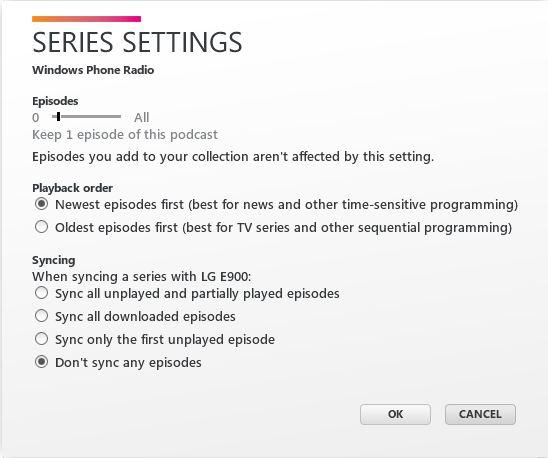
Ok probably a newb 'I didn't read the instructions' sort of question. Podcasts.

I've loaded up some podcast subscriptions that I'm a bit behind in, and the order seems backwards. If I have a backlog of eps, once I play one of the older ones instead of moving to the next newest it instead goes to the prior ep.

Help me gaf, what am I doing wrong? I would expect if I play ep 59 it would then go to ep 60, not 58.
 
Raistlin said:
Ok probably a newb 'I didn't read the instructions' sort of question. Podcasts.

I've loaded up some podcast subscriptions that I'm a bit behind in, and the order seems backwards. If I have a backlog of eps, once I play one of the older ones instead of moving to the next newest it instead goes to the prior ep.

Help me gaf, what am I doing wrong? I would expect if I play ep 59 it would then go to ep 60, not 58.

  1. Open the Zune software client
  2. go to podcasts
  3. right click on a feed
  4. click on "series settings"
  5. change playback order from "newest episodes first" to "oldest episodes first"

br4knf9sojlrsyldw.jpg
 
antiquegamer said:
Go into people hub, click on the particular person with pet as their facbook avatar picture then when you in their profile, click on edit button (pencil icon) and then click on the picture then there should be option to let you choose which picture you want to use (ie facebook, windows live) or you can select one from your phone pictures.

Picture default to Facebook one if they have Facebook, if not then Live, if neither then it's just blank tile.
Thanks a bunch, man!

New question: I've noticed that when I delete an email on my google account (using the built in mail app), it archives the email instead of deleting it. Can I change that?

Also: For LG Optimus 7 users: how's battery life? I can barely handle 6 hours with moderate use. :(
 
ochobit said:
Thanks a bunch, man!

New question: I've noticed that when I delete an email on my google account (using the built in mail app), it archives the email instead of deleting it. Can I change that?

Also: For LG Optimus 7 users: how's battery life? I can barely handle 6 hours with moderate use. :(

I am not sure how optimus 7 is but 6 hours seems kinda short even moderate usesage. My Focus will last me at least 10-12 hours and that will it constantly looking for signal all night due to my work place block cell phone signal in many areas.

Do you stream and watch a lot of stuff? That draine battery real quick on my Focus, normal usage such as email, and even surf the net last me at least a day. If I am not working I can go about day and a half before needing to charge.
 
brotkasten said:
  1. Open the Zune software client
  2. go to podcasts
  3. right click on a feed
  4. click on "series settings"
  5. change playback order from "newest episodes first" to "oldest episodes first"

br4knf9sojlrsyldw.jpg
Awesome thanks!
 
Yeah, not pleased with the weatherbug and weather channel tiles, I went with the HTC hub tile for my weather. It updates flawlessly.
 
antiquegamer said:
I am not sure how optimus 7 is but 6 hours seems kinda short even moderate usesage. My Focus will last me at least 10-12 hours and that will it constantly looking for signal all night due to my work place block cell phone signal in many areas.

Do you stream and watch a lot of stuff? That draine battery real quick on my Focus, normal usage such as email, and even surf the net last me at least a day. If I am not working I can go about day and a half before needing to charge.
No streaming of any kind. 90% of my use is twitter/facebook app. I've been downloading and testing new software, here and there. No WiFi. Find my phone is on (low key).
 
Any of you here have AT&T with grandfather in unlimited data plan? I was told I can keep the plan if I have iPhone so I call to see if I can get unlimited data plan back since I was granfather in and I was told ONLY if I used iPhone that unlimited data plan will work. Do you guys know if this is true or another At&T bullcrap to get you off the unlimited data plan?
 
antiquegamer said:
Any of you here have AT&T with grandfather in unlimited data plan? I was told I can keep the plan if I have iPhone so I call to see if I can get unlimited data plan back since I was granfather in and I was told ONLY if I used iPhone that unlimited data plan will work. Do you guys know if this is true or another At&T bullcrap to get you off the unlimited data plan?

So you gave up your unlimited plan at some point? Yeah, I don't know, maybe if you give them a hard time, but my wife and I just kept our unlimited data plans when we moved away from iPhone. But we never actually changed our plans away from unlimited. They said if you changed it, you wouldn't get it back.
 
so how is the lg optimus 7. i think it is the cheapest wp7 phone to buy without contract. i think its ugly but if its a good phone i might buy it
 
antiquegamer said:
Any of you here have AT&T with grandfather in unlimited data plan? I was told I can keep the plan if I have iPhone so I call to see if I can get unlimited data plan back since I was granfather in and I was told ONLY if I used iPhone that unlimited data plan will work. Do you guys know if this is true or another At&T bullcrap to get you off the unlimited data plan?
http://www.neogaf.com/forum/showpost.php?p=24460311&postcount=1714
http://www.neogaf.com/forum/showpost.php?p=24476598&postcount=1779


As you can see I was under the same mistaken impression that you could only grandfather iPhone unlimited plans, not the older 'PDA' ones. I guess it comes down to the actual store/person you find whether they'll help you or not. Given the current circumstances of iPhone hitting Verizon however, I think they're much more likely to help out now then in the past.

That said ... you may be screwed. From what I recall in talking with with the chick that serviced me (giggity), they do not actually have the capability to access older plans from their computers. Given the circumstances of my situation - them actually did help me - there's really no reason for me to assume she lied. The gist of it is that supposedly they can only do one of two things from their in-store computers: 1) continue whatever plan you have (assuming it is one that is allowed to be grandfathered) or 2) select from one of the current plans. In your case, you may be screwed. I don't think they have access to the unlimited plans since you don't currently employ one.


I'd still recommend going to a few stores and see what they can get you. It may be possible that they can contact someone at HQ with override powers (this was implied to me). Since you did have it at one time, maybe someone can be convinced to override ... assuming it is possible at all. Just make sure to explain your situation. You previously had an unlimited plan (which they can look up) ... and you were (mistakenly) told you could not continue it back when you switched plans?

Good luck
 
antiquegamer said:
Any of you here have AT&T with grandfather in unlimited data plan? I was told I can keep the plan if I have iPhone so I call to see if I can get unlimited data plan back since I was granfather in and I was told ONLY if I used iPhone that unlimited data plan will work. Do you guys know if this is true or another At&T bullcrap to get you off the unlimited data plan?
My brother has been able to keep his unlimited plan from his iPhone to his wp7 to his Android. The unlimited option is still in the system and he's lucky enough to have some nice people working at his local at&t store. It really seems to be a case of just being lucky with who's helping you.

Edit: Reading more, if you gave it up, pretty sure theres no chance in hell they'll let you have it back regardless of how nice your local AT&T store might be.
 
Earl Cazone said:
so how is the lg optimus 7. i think it is the cheapest wp7 phone to buy without contract. i think its ugly but if its a good phone i might buy it
It's a decent phone. Average, I'd say. I'm not happy with battery life, but this is my first smarthphone and my only other point of reference is the iPad (with it's amazing battery life).

Solid build, decent everything else. Runs as smooth as most of the other phones.

I like the design a lot, though.
 
just wanted to say that endomondo app is the best workout app on the marketplace and i encourage everyone to use it. plus, the more traffic the app gets, the more the app gets updated with features. this app the best of its kind on wp7 but it is sorely lacking behind the iphone, blackberry, and android versions.
 
thirty said:
just wanted to say that endomondo app is the best workout app on the marketplace and i encourage everyone to use it.
Fully agree. The web site is great, and I feel like their recent update has improved the tracking. I run a 3.2mi loop, and previously, it was jittery enough that I was getting 4mi consistently. Last time I ran it, post-update, it came in around 3.6mi. Still not perfect, but better.
 
How does WP7 work without data plan?

- does the "find phone" feature upload data or can you use it without data plan?

- the option to automatically upload photos to skydrive: would the phone want to upload them immediately via data plan or would the phone just wait and upload them over wi-fi?


What are the best ways to search for free apps and free games? (ideally on a website and not on the phone)

With over 8000 apps there are probably a lot of free games out there, but they are hard to find.
 
Zerokku said:
My brother has been able to keep his unlimited plan from his iPhone to his wp7 to his Android. The unlimited option is still in the system and he's lucky enough to have some nice people working at his local at&t store. It really seems to be a case of just being lucky with who's helping you.

Edit: Reading more, if you gave it up, pretty sure theres no chance in hell they'll let you have it back regardless of how nice your local AT&T store might be.

I didn't give it up by choice it seems like the guy at Costco just simply lie to me and switch me to the tier plan. I was told by rep at att store that they could only grandfather me in at the time of renew contract, I call att today and he said he will submit request to have my old plan put back on but he said I have go back to use my iPhone. Anyway he said someone will call when the request get approved so we will see.
 
Status
Not open for further replies.
Top Bottom