• Hey Guest. Check out your NeoGAF Wrapped 2025 results here!

2016+ Gaming Laptop Thread: Embracing Pascal's Wafer (Please Read OP)

I hope this helps a bit:

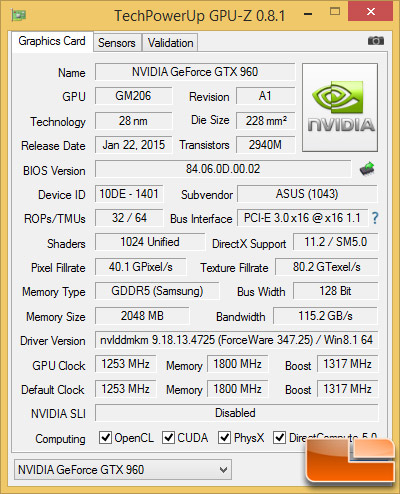
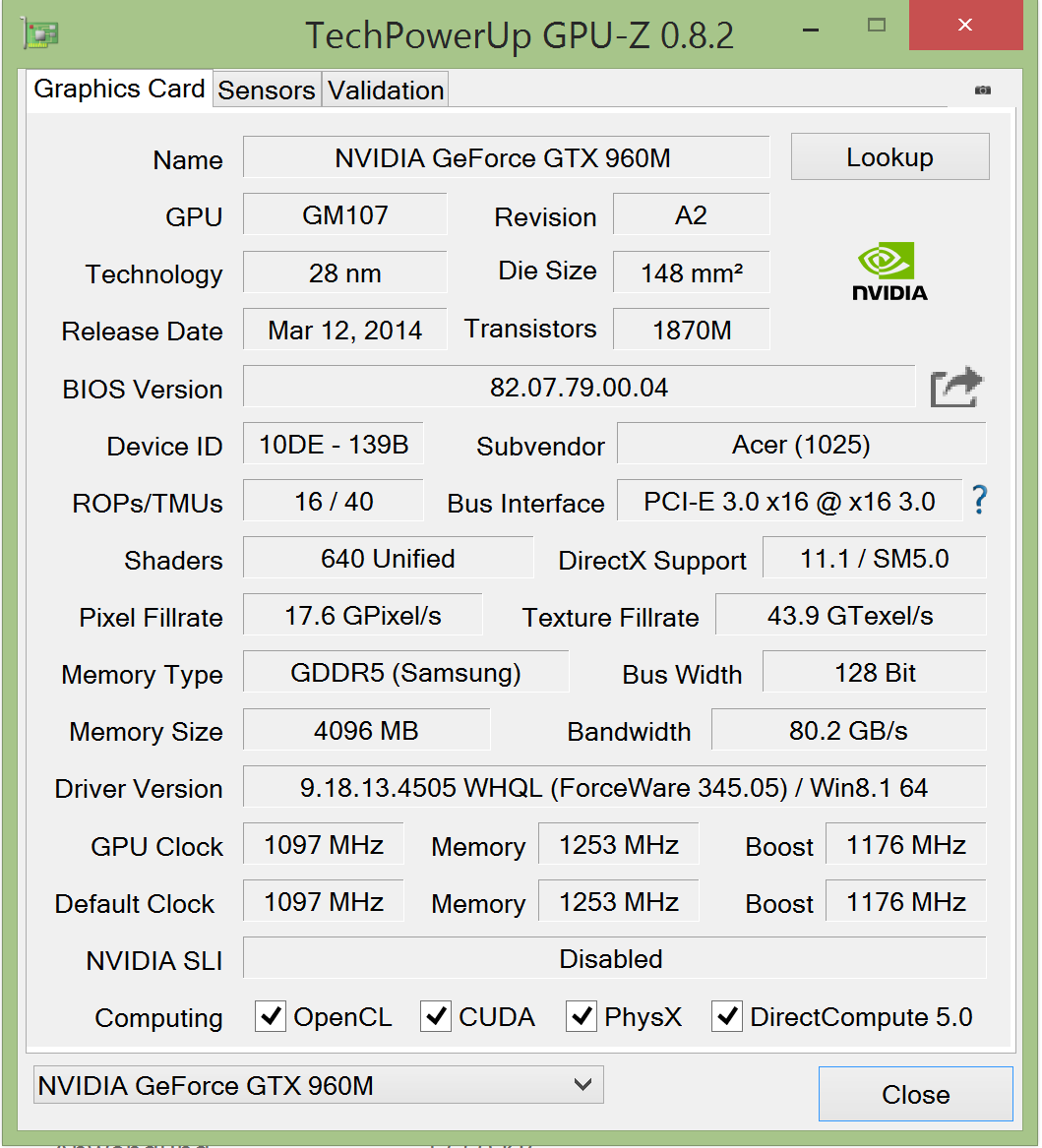
GTX 960M vs GTX 750 Ti:

gpuz2.PNG
zotac-gtx750ti.gif


GTX 965M vs GTX 960:

Alienware-15-GPU-Z-GTX-965M-GPU.jpg
gtx960-gpuz.jpg


GTX 970M:


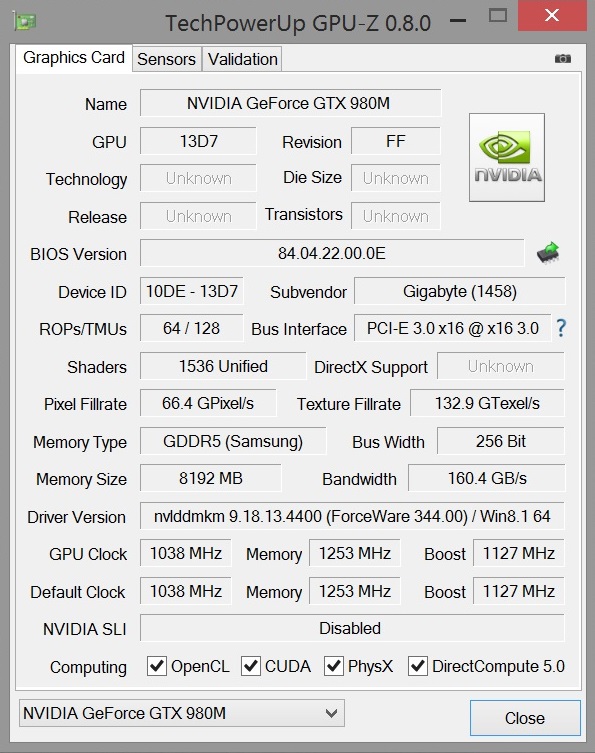
GTX 980M:

 
So are you saying not worth it?

No, wasn't saying that at all. Being a GTX 750 Ti, the 960M is a solid card for a secondary gaming system.

But you could spend another $150, to get a GE72 w/ GTX 970M.

As you can see from the GPU-Z in my last post, the 960M vs 970M performance gap is huge. 40-60%, depending on the game.
 
So, if there is a MXM of the next mobile gpu of nvidia. Around how much money would it be?

Nvidia is really hyping up Pascal...

I think a desktop solution might be viable for me in around two more years.

My absolute max budget for a mxm is 900 usd.

Which is a lot of money for me, around 32 weeks of saving 33% of all my money. Yei, college.
 
Very informative thank you. I won't take your advice to wait though because first I already waited enough and 2nly when this new series release it will be expensive and do we have any confirmation it will be on laptop's too? Because I want a laptop not a desktop.

There is always something to upgrade, but this one could be remarkable, not only because it is a bigger jump but also a cooler running card.
 
I am thinking of buying dell XPS 15

I hope that "Infinity" display becomes a major trend. Beautiful.
I am thinking of buying dell XPS 15

I hope that "Infinity" display becomes a major trend. Beautiful.

So, if there is a MXM of the next mobile gpu of nvidia. Around how much money would it be?

Nvidia is really hyping up Pascal...

I think a desktop solution might be viable for me in around two more years.

My absolute max budget for a mxm is 900 usd.

Which is a lot of money for me, around 32 weeks of saving 33% of all my money. Yei, college.

The top end Nvidia mobile GPU is usually $700+. The GTX 980M is currently $720, and they always follow the same pricing trend, give or take $100.

Just for fun, the prices of every MXM GPU Nvidia has ever made.
 
I suspect what I want doesn't exist, but is there anything similar to the XPS 15 in overall quality, but with a slighty better graphics card?

Country: US
Budget: No upper limit
Max Size: 15.6"
Want: 6th gen i7, ssd only, lots of ram, baller screen, not hideous, 970m, acceptable battery life

Otherwise I guess I'm just getting an xps 15
 
I suspect what I want doesn't exist, but is there anything similar to the XPS 15 in overall quality, but with a slighty better graphics card?

Country: US
Budget: No upper limit
Max Size: 15.6"
Want: 6th gen i7, ssd only, lots of ram, baller screen, not hideous, 970m, acceptable battery life

Otherwise I guess I'm just getting an xps 15

Sager NP8657 might be a solid bet. You can customize it to your liking (M2 SSD, 4K screen if desired, more RAM, etc.) as well.
 
Finally received my 29th Anniversary Dragon from MSI. At the moment I'm running through the essential spin-up (Steam and games installation, Visual Studio and CYGWIN setup, etc.), but the thing that jumps out at me right away is that the screen is just beautiful.

I mean, I picked it up on the basis of the tech specs without really thinking too much about the display since I can always just run it out to a TV, but I probably won't do so nearly as much as I thought I would, particularly since it also has g-synch.

The speakers have a surprising amount of "oomph", too, though obviously they're not going to satisfy any true audiophile. I haven't stressed it yet, but in normal operation it runs quieter than the cooling pad I have it on.
 
Finally after 6 months, I have bougth a laptop today. I took myself a MSI GE62 with a 970M, can't wait to get it ready to work and play. I just need an SSD that I'll be getting tomorrow.
Thank you all for the advice. o_o9
 
Oops sorry, this thread is not for laptop tech support

You can still ask, and we'll do our best to help.

I suspect what I want doesn't exist, but is there anything similar to the XPS 15 in overall quality, but with a slighty better graphics card?

Country: US
Budget: No upper limit
Max Size: 15.6"
Want: 6th gen i7, ssd only, lots of ram, baller screen, not hideous, 970m, acceptable battery life

Otherwise I guess I'm just getting an xps 15

Sager NP8657 might be a solid bet. You can customize it to your liking (M2 SSD, 4K screen if desired, more RAM, etc.) as well.

I agree. Go nuts on one of those, it'll change your life.

Finally received my 29th Anniversary Dragon from MSI. At the moment I'm running through the essential spin-up (Steam and games installation, Visual Studio and CYGWIN setup, etc.), but the thing that jumps out at me right away is that the screen is just beautiful.

I mean, I picked it up on the basis of the tech specs without really thinking too much about the display since I can always just run it out to a TV, but I probably won't do so nearly as much as I thought I would, particularly since it also has g-synch.

The speakers have a surprising amount of "oomph", too, though obviously they're not going to satisfy any true audiophile. I haven't stressed it yet, but in normal operation it runs quieter than the cooling pad I have it on.

Welcome to the GT72 club. You have any questions, I'm your guy.

And yes, the screen is beautiful. The LG IPS being used by Asus and MSI is one of the best in production.

Finally after 6 months, I have bougth a laptop today. I took myself a MSI GE62 with a 970M, can't wait to get it ready to work and play. I just need an SSD that I'll be getting tomorrow.
Thank you all for the advice. o_o9

The MSI family grows daily. It's a movement.
 
You can still ask, and we'll do our best to help.
Alright

I have a problem with what I assume is Shadowplay keeping gpu alive when computer isn't doing much. Fans are off when nothing uses the gpu, but sometimes Shadowplay gets stuck active or something (I see it at gpu activity tray icon) and fans turn on for a bit every 5 minutes.
Has anyone experienced and solved this?
Shadowplay is definitely keeping clocks from going down to idle levels.
I guess there's nothing I can do besides praying that Nvidia would fix it or turning Shadowplay off and back on?
 
Not really looking to buy an expensive gaming laptop per se, just looking for some advice.

I'm looking for something cheap, but efficient. Something for around 5000 SEK (about 590 USD).

If SweGAF has any recommendations, I'm all ears!


Thanks for the reply!

I'd be willing to go another $200 or so for reliability and long lasting quality.

Would you still recommend the same laptop or something different?


Negative reviews seem damning, but also seems like some of the problems being had are related to the old drivers and other things that could be fixed with a fresh install of windows and updating the drivers.

I could put that extra 200 into extra storage and ram, but I live with this feeling that laptops are just waiting to die, like ps3s or xboxes, and would be willing to go further for something that's known to be of good quality and long lasting.
 
Alright


Shadowplay is definitely keeping clocks from going down to idle levels.
I guess there's nothing I can do besides praying that Nvidia would fix it or turning Shadowplay off and back on?

Yikes, I've not heard of that issue.

Try reinstalling the new 361.43 driver with the clean install option?

Not really looking to buy an expensive gaming laptop per se, just looking for some advice.

I'm looking for something cheap, but efficient. Something for around 5000 SEK (about 590 USD).

If SweGAF has any recommendations, I'm all ears!

Link me to some of your websites, and I'll see what I can find.

Thanks for the reply!

I'd be willing to go another $200 or so for reliability and long lasting quality.

Would you still recommend the same laptop or something different?


Negative reviews seem damning, but also seems like some of the problems being had are related to the old drivers and other things that could be fixed with a fresh install of windows and updating the drivers.

I could put that extra 200 into extra storage and ram, but I live with this feeling that laptops are just waiting to die, like ps3s or xboxes, and would be willing to go further for something that's known to be of good quality and long lasting.

At $999, I'd suggest the MSI GE62, though you'd need to pay a little extra to have an SSD added.
 
So my screen is supposed to have gsync but I still see some tear. Like when playing Far Cry 4 or Battlefield 4. I don't know what's going on.

Also weird audio in Bioshock infinite, like when you are losing signal when using the radio.
 
Hello LaptopGaf! I am currently looking for a new, more powerful laptop, but I don't have the knowledge to feel like I'm making the right choice. Help me!

Country: United States
Budget: $1000-1200
Max Size: Prefereable around 15", could be a bit larger if need be
Planned Usage: My main priority is gaming, being able to play League of Legends at max settings, but also current gen/future games such as Street Fighter V and Star Wars Battlefront that will be more demanding. I also will use this computer for school so decent functionality in that area is ideal as well.

I made this post a couple months back, and made the order for the MSI GE62 Apache-002. Unfortunately they have just stopped manufacturing this line and I am now looking for a laptop. The above qualifications still apply, as I would like a computer this is of a similar quality to the one suggested. IF ANYONE COULD HELP ME THAT"D BE GREAT!
 
I've recently moved to England, for over a year or such, and so I can't take my gaming desktop; as such, I was considering getting a replacement laptop since my 6 year old HP takes 20 mins to fully boot and overheats like mad.
I have a general idea of what I might get, but I wanted to know more about the intel HD 5500 graphics card, it seems surprisingly solid?
 
So I ended up purchasing a Dell Inspiron 7000 series 15" notebook. It was mainly for school, but as a budget gaming laptop I'm finding it really capable with a 960m with 4 GB GDDR5, 8 GB 1600MHZ RAM, and an Intel Skylake 2.3 ghz processor that can turbo boost to 3.5 ghz. Full HD matte screen on my model

The ram, hard drive, and WiFi card are all user upgradeable. I slapped a 250 GB m.2 SSD to pair with the factory 1 TB mechanical drive. Right now I'm catching up on my Assassin's Creed backlog. MSRP is $799.

http://www.dell.com/en-us/shop/productdetails/inspiron-15-7559-laptop?ref=PD_Family

I'll answer any questions that I can if anyone is thinking of picking one up.
 
I was going to buy a xps 15, but in another thread people mention the msi gs60 and that gtx 970m is so tempting. How is the msi gs60 compare with the xps15 in portability? That is my main focus with my new laptop I want to buy. I want to take it to university constantly.
 
So my screen is supposed to have gsync but I still see some tear. Like when playing Far Cry 4 or Battlefield 4. I don't know what's going on.

Also weird audio in Bioshock infinite, like when you are losing signal when using the radio.

Does Gsync show up in Nvidia's control panel?

I made this post a couple months back, and made the order for the MSI GE62 Apache-002. Unfortunately they have just stopped manufacturing this line and I am now looking for a laptop. The above qualifications still apply, as I would like a computer this is of a similar quality to the one suggested. IF ANYONE COULD HELP ME THAT"D BE GREAT!

The 002 is still outchea, but you better snatch it up QUICKLY.

I've recently moved to England, for over a year or such, and so I can't take my gaming desktop; as such, I was considering getting a replacement laptop since my 6 year old HP takes 20 mins to fully boot and overheats like mad.
I have a general idea of what I might get, but I wanted to know more about the intel HD 5500 graphics card, it seems surprisingly solid?

Solid for gaming? Nah, not really, beyond indies.

I was going to buy a xps 15, but in another thread people mention the msi gs60 and that gtx 970m is so tempting. How is the msi gs60 compare with the xps15 in portability? That is my main focus with my new laptop I want to buy. I want to take it to university constantly.

Both less than an inch thick, XPS weighs 3.9lbs, versus 4.2lbs for the MSI.

The 970M is nearly 2x the speed of the 960M, though.
 
Acer build quality?

I'm looking for 4+ years on schoolwork. Mostly going to be programming with Java, Javascript, and whatever other languages web-dev/app-dev companies want.

No need to play game on it.
 
At $999, I'd suggest the MSI GE62, though you'd need to pay a little extra to have an SSD added.

Is that the same thing as this?

This talk of 960-970 and 40-60% difference has me wondering the price difference for 970.

Thanks again for your help!


edit: You know, I'm getting out of control. I don't have the budget, and I need to be honest with myself, that portability, is important. So weight, battery life, and as long as it blows through art rage on 15" inch canvases, I'm happy.
The 800 dollar recommendation is more than enough. Thank you! (Is there a similar model with a detachable battery though? I wouldn't want a hassle later if there was a problem... Also, are Square Trade warranties legit, and should I get one?)
 
I was going to buy a xps 15, but in another thread people mention the msi gs60 and that gtx 970m is so tempting. How is the msi gs60 compare with the xps15 in portability? That is my main focus with my new laptop I want to buy. I want to take it to university constantly.

Edit: I want to add that my comparison is of the Dell Inspiron 7000 15" and the MSI Ghost Pro. Not the Dell XPS 15 to clear that up.

Well in gaming performance that GTX 970 is a nice thing to have. But I think you are like me and plan to have your laptop with you for school so heft is important.

I want to say I love MSI laptops, and owned a Ghost Pro. If memory serves I believe the MSI felt lighter to me by a few grams.

The Dell is not heavy nor thick as it is barely over an inch deep chassis. But I can certainly feel it in my hand. It is not a wafer like the Macbook Air. I have small hands and thin fingers just so you know. Mileage may vary person to person

The power brick is long but not overly thick either. But it is important to note if portability is under consideration and you like to travel to class without the power cord. I can fit my Dell, the power cord, and a laptop mat in my messenger bag without it feeling like a massive amount of weight. I could go laptop and power cord if it's just my backpack.

Now, where my Dell beats my MSI is two areas. Price and battery life. My Ghost Pro with 970m from XOTIC PC was north of $2000. I did get it customized so base price was still $1,700 IIRC. I'm very happy with what I got in my Dell in the sub $1000 class. Lenovo competes in this space but I don't trust them anymore as they were accused of placing spyware on their PCs. I didn't break the bank for this PC and that adds value to me.


For battery life I barely got four to five hours in non-gaming usage on the MSI. I would not dare travel without my power brick. The Dell seems to give me six hours or so for school work. I can take it to class and come back without worry of a dead battery.

I think both companies recommend gaming off the brick or 45 minutes to an hour of playtime is what you could expect. The 970m being more power hungry of the two cards.

So TLDR, as a school and multimedia computer that games on the side the Dell offers me a lot of value for a fraction on what I paid for the MSI. I ended up returning the MSI because I just didn't want to spend all that money with a gaming desktop at home.
 
So attempting Fallout 4 (and with Rift/Vive just over the horizon) made me realize it was time to update my 5 year old G73JH-A1. I've been extremely happy with this system and have used it as a day to day PC/gaming system for the entirety of that period.

Looking at the ASUS ROG G751JY-DB72
http://www.amazon.com/gp/product/B00YR6BNVS/?tag=neogaf0e-20

Just wondering if anyone else has any experience with such or if there's anything known in the pipeline I should be holding on for that's expected in next year's offerings.

Edit:

Is there any difference between the above and the following besides the RAM, SSD size, and optical drives?
http://www.amazon.com/gp/product/B015QZPRW4/?tag=neogaf0e-20
 
I have a 2011/12 msi gt683dxr laptop with 2 500gb hdd in raid0 that finally busted, won't boot to windows after some failed updates I think, can't even go to safe mode. Can still access the bios though.

Thinking of formatting the hdd and reinstall win 7 in a non Raid0 setting, as I lost data in both drives in raid0. Is there any major cons in non raid0, and how should I go about doing that? Never done this before >_<
 
So it looks like mobile nvidia gpus suffer from a bug where playing games in window or borderless window mode could randomly give you horrible looking tearing artifacts, diagonal tearing being the worst? I always thought it was just a Final Fantasy 13 Lightning Returns visual bug but I just started Life is Strange using borderless windowed mode and I get the same diagonal tearing issue. Is this just a maxwell problem with windowed mode? Another game I've seen window mode problems is Witcher 3 but there, I get a significant performance hit versus fullscreen.

I always used a borderless window when possible with my desktop to take advantage of free vsync but its just the opposite with my laptop and it gives some of the nastiest looking tearing I've ever seen. Is this a maxwell only issue? Any known fix for it?
 
Well, after installing OS and programs to my new MSI laptop I still have some issues which I don't know how to solve. I encountered that after I suspending the laptop, when back up it demanded to restart OS. (I think I managed to solve that on BIOS).
But now, when I start Windows the screen goes black for a second and continue running. (dunno if that is a graphic card bug). And I'm fighting with GeForce Experience to get an update too...

Is all that a usual thing?
 
So it looks like mobile nvidia gpus suffer from a bug where playing games in window or borderless window mode could randomly give you horrible looking tearing artifacts, diagonal tearing being the worst? I always thought it was just a Final Fantasy 13 Lightning Returns visual bug but I just started Life is Strange using borderless windowed mode and I get the same diagonal tearing issue. Is this just a maxwell problem with windowed mode? Another game I've seen window mode problems is Witcher 3 but there, I get a significant performance hit versus fullscreen.

I always used a borderless window when possible with my desktop to take advantage of free vsync but its just the opposite with my laptop and it gives some of the nastiest looking tearing I've ever seen. Is this a maxwell only issue? Any known fix for it?
Never heard of that issue. Have you updated both your Nvidia and Intel graphics drivers?
 
Never heard of that issue. Have you updated both your Nvidia and Intel graphics drivers?
Nvidia drivers are updated. Not sure about intel. Here is a pretty recent thread in the nvidia forums with what looks to be the same problem

https://forums.geforce.com/default/...issues-on-gtx-860m-870m-960m-965m-970m-980m-/

There was also another thread last feb with the exact same problem

https://forums.geforce.com/default/...rectx-windowed-mode-on-gtx-970m-amp-gtx-870m/

It doesn't seem to affect all games though. I tested Aliens Isolation on windowed mode both with and without vsnyc and did not notice any diagonal tearing. I wonder though if its a random occurrence. I could sometimes get Lightning Returns to run without tearing when changing resolutions but most of the time, it starts tearing again diagonally
 
I'll probably be going with one of the laptops recommended to me in this thread, but I've got something they may be a silly question..

Rather than going with a laptop, is it possible to attach a laptop style rechargeable battery to a small form factor PC, and carry that with you along with a portable monitor? (Assume that the graphics card is rather mild, as I assume graphics cards are some of the biggest energy hog parts in a computer)

I'm just feeling out the possibility. I mean, I could get a laptop and be done with it (and probably will), but I like the idea of something I could take over to a studio or a friend's house, or even pop out at a cafe that would be more customizable and repairable than a laptop. At least it's something I would like to do in the future to make PC usage more portable, social, and letting me do digital art whenever and wherever.

Any thoughts?
 
I'm on Windows 8.1. I want to upgrade to W10 but I want to do a fresh install because I will swap my HDD to an SSD. How do I do this? OS came with the laptop.
 
Acer build quality?
.

Decent.

Too expensive?

Hello guys, I'm giving away my current laptop to my sister who broke hers, so I'm in need of a new one.


Country where it will be purchased : France
Maximum budget : preferably 800€ in all honesty.
Max size: don't care much
Planned usage : Gaming, photoshop, video editing and work related web dev.

Some of my country retailers: https://www.amazon.fr/?tag=, www.pixmania.fr, www.fnac.com, www.e-leclerc.com, www.rueducommerce.fr/

Thanks in advance.

EDIT: My current laptop that I'm OK with but cannot run the witcher 3 or fallout 4 well, is an HP 15-b060sf http://www.fnac.com/HP-Pavilion-Sleekbook-15-b060sf-15-6-LED/a4704912/w-4

Stretch for this.

GTX 960M = GTX 750 Ti

Is that the same thing as this?

This talk of 960-970 and 40-60% difference has me wondering the price difference for 970.

Thanks again for your help!

edit: You know, I'm getting out of control. I don't have the budget, and I need to be honest with myself, that portability, is important. So weight, battery life, and as long as it blows through art rage on 15" inch canvases, I'm happy.
The 800 dollar recommendation is more than enough. Thank you! (Is there a similar model with a detachable battery though? I wouldn't want a hassle later if there was a problem... Also, are Square Trade warranties legit, and should I get one?)
Would you regret the 970M|? Probably not. Plus the Dell actually weighs more, though it does easily win the battery life war.

I actually don't know about the bolded.

Squar Trade I've never dealt with, so can't speak to that. Definitely read some reviews.

So attempting Fallout 4 (and with Rift/Vive just over the horizon) made me realize it was time to update my 5 year old G73JH-A1. I've been extremely happy with this system and have used it as a day to day PC/gaming system for the entirety of that period.

Looking at the ASUS ROG G751JY-DB72
http://www.amazon.com/gp/product/B00YR6BNVS/?tag=neogaf0e-20

Just wondering if anyone else has any experience with such or if there's anything known in the pipeline I should be holding on for that's expected in next year's offerings.

Edit:

Is there any difference between the above and the following besides the RAM, SSD size, and optical drives?
http://www.amazon.com/gp/product/B015QZPRW4/?tag=neogaf0e-20

The ROG line is not what it used to be. MSI and Clevo are where I'd be looking.

I think I might have finally found my next laptop.

https://www.pcspecialist.co.uk/notebooks/octaneII-17-Pro/

How long does it usually take for the price to come down on these things? Sure, it's still cheaper than all the other proper 980 laptops out there, but I hope to purchase it just north of €2,000 with the specs I've chosen.

Pricing, pricing never changes.

Seriously.

This shows up:


Activate G-Sync.
( ) Enable G-SYNC for full screen mode.
(*) Enable G-SYNC for windowed and full screen mode.

My internet slouthing is telling me that you need to keep v-sync enabled.

I have a 2011/12 msi gt683dxr laptop with 2 500gb hdd in raid0 that finally busted, won't boot to windows after some failed updates I think, can't even go to safe mode. Can still access the bios though.

Thinking of formatting the hdd and reinstall win 7 in a non Raid0 setting, as I lost data in both drives in raid0. Is there any major cons in non raid0, and how should I go about doing that? Never done this before >_<

Only con is losing the raid speeds.

All you should need to do is un-raid them in the BIOS, format, then reinstall OS.
So it looks like mobile nvidia gpus suffer from a bug where playing games in window or borderless window mode could randomly give you horrible looking tearing artifacts, diagonal tearing being the worst?


Nvidia drivers are updated. Not sure about intel. Here is a pretty recent thread in the nvidia forums with what looks to be the same problem

https://forums.geforce.com/default/...issues-on-gtx-860m-870m-960m-965m-970m-980m-/

https://forums.geforce.com/default/...rectx-windowed-mode-on-gtx-970m-amp-gtx-870m/

It doesn't seem to affect all games though. I tested Aliens Isolation on windowed mode both with and without vsnyc and did not notice any diagonal tearing. I wonder though if its a random occurrence. I could sometimes get Lightning Returns to run without tearing when changing resolutions but most of the time, it starts tearing again diagonally

I've never seen tearing with v-sync on, not in my 10+ years of laptop gaming.

The fact that I keep seeing the names of the latest Final Fantasy games popping up, and that the list of games affected is so random, makes me think it's a software issue.

On the other hand, I'm also wondering if it's an Optimus issue, since in such equipped machines, the iGPU is the one which is connected to the screen.

I'd definitely try updating to the latest Intel drivers, just to be sure.
I'll probably be going with one of the laptops recommended to me in this thread, but I've got something they may be a silly question..

Rather than going with a laptop, is it possible to attach a laptop style rechargeable battery to a small form factor PC, and carry that with you along with a portable monitor? (Assume that the graphics card is rather mild, as I assume graphics cards are some of the biggest energy hog parts in a computer)

I'm just feeling out the possibility. I mean, I could get a laptop and be done with it (and probably will), but I like the idea of something I could take over to a studio or a friend's house, or even pop out at a cafe that would be more customizable and repairable than a laptop. At least it's something I would like to do in the future to make PC usage more portable, social, and letting me do digital art whenever and wherever.

Any thoughts?

That's beyond me. Definitely ask in the desktop thread. Just expect the very idea of a laptop to be shitted on massively.

I'm on Windows 8.1. I want to upgrade to W10 but I want to do a fresh install because I will swap my HDD to an SSD. How do I do this? OS came with the laptop.
Download Windows 10 ISO -> burn to DVD (or flash drive) -> install on SSD
 
Okay, thanks K.Jack.

A couple more things real quick, because I'm on the verge of getting something.


About the 800 Dell you suggested. I saw a video review that started out like 'if you want something for photography, this isn't it', before talking about how good it is with battlefield 4 on ultra.. I'm a little confused. How is 8gigs of ram (plus space for up to 16) not good enough for photography. I'll be doing digital painting and I just want to be certain it's a good choice for me... But if this isn't, then what exactly is? I saw that, and I'm thinking, isn't this laptop still leagues ahead of anything else design wise than anything 2 or 3 years before it that have been around for designers? What's the deal. You'd say it's sufficient right?

About the MSI and the battery difference to the dell. Is that battery life the estimation while gaming? I'm sure digital painting wouldn't drain as much battery as heavy gaming.. I think anyway. Why is the batteyr estimation so much lower than the dell, I wonder. Also, maybe unlikely is the MSI battery upgradeable? Or could I even get a second battery that I could keep charged and swap out if I needed?

Well, thanks again for all your help. I certainly need it.
 
Okay, thanks K.Jack.

A couple more things real quick, because I'm on the verge of getting something.


About the 800 Dell you suggested. I saw a video review that started out like 'if you want something for photography, this isn't it', before talking about how good it is with battlefield 4 on ultra.. I'm a little confused. How is 8gigs of ram (plus space for up to 16) not good enough for photography. I'll be doing digital painting and I just want to be certain it's a good choice for me... But if this isn't, then what exactly is? I saw that, and I'm thinking, isn't this laptop still leagues ahead of anything else design wise than anything 2 or 3 years before it that have been around for designers? What's the deal. You'd say it's sufficient right?

About the MSI and the battery difference to the dell. Is that battery life the estimation while gaming? I'm sure digital painting wouldn't drain as much battery as heavy gaming.. I think anyway. Why is the batteyr estimation so much lower than the dell, I wonder. Also, maybe unlikely is the MSI battery upgradeable? Or could I even get a second battery that I could keep charged and swap out if I needed?

Well, thanks again for all your help. I certainly need it.
I bet it's referring to the screen quality. The color gamut and accuracy is ok at best.
Also I think the Dell has a huge battery compared to other laptops, but I haven't checked in a while
 
So guys, I just bought a Yoga 900 as my laptop to play some casual games on the go (i have a big gaming desktop).

But I just saw this on slickdeals and it seems like an insanely good deal, and basically the same price as I paid for the Yoga.

http://www.dell.com/us/p/alienware-...5b59a66a8e48408ad0001&ven3=870901947265576058

I know alienware is usually over priced, but that's a crazy deal no?
Alienware laptops seem to be priced fairly well in comparison to the competition. Don't know if its a good deal but unlike what I see about the yoga (low-power cpu, no dedicated gpu), that alienware laptop is a pure gaming machine
 
I bet it's referring to the screen quality. The color gamut and accuracy is ok at best.
Also I think the Dell has a huge battery compared to other laptops, but I haven't checked in a while

Well, I'm thinking about getting it.

Would you be able to tell me how it compares to a BenQ monitor GW2750 (which I'm currently using)?

edit: Also, any recommendations for a blue tooth mouse? Never used bluetooth mouse, but I imagine it would be nice to have a free USB port on the laptop.
Having trouble finding an overwhelmingly positively reviewed one though.


edit: Found a few more people talking about the screen quality lacking in this laptop... But I need the battery life.
I feel like I'm going in circles and am back at square one. I want something with a screen decent enough to do art on with accurate color reproduction, with specs on par with this Dell Inspiron i7559-763BLK.. If the screen wasn't sub par, it would be perfect for me.. And it's a damn shame that the MSI doesn't have a bigger battery on it. 2 hours just doesn't cut it. I need something that promises closer to 4 or more..

Sigh.. I'm hopeless.
 
Top Bottom