• Hey Guest. Check out your NeoGAF Wrapped 2025 results here!

Linux Bros, what's the best Linux OS for gaming (GOG and Steam)?

The biggest hurdle for me was the file/folder structure and figuring out how Wine/Proton works, but once I realise it's just a fake Windows folder structure it made more sense and I was back to installing mods etc, essentially picking up where I left off.

Happy If You Say So GIF
 
Any Nvidia users out there, Is there any way to force DLAA on games that don't natively support it does anyone know?

I've found a few commands online but none of them seem to work
 
Any Nvidia users out there, Is there any way to force DLAA on games that don't natively support it does anyone know?

I've found a few commands online but none of them seem to work
You can force it through OptiScaler. It works on Linux no problem. I even use the Windows.bat through Wine, lmao.
 
Last edited:
I tried both:

Code:
flatpak override --user --env=MANGOHUD=1 com.hypixel.HytaleLauncher

And

Code:
sudo flatpak override --filesystem=xdg-config/MangoHud:ro com.hypixel.HytaleLauncher

and it doesn't work.

I dropped my MangoHud config file to ~.var

Looked around in Flatseal to no avail.
Anyone has any ideas how to use MangoHud with native Linux Hytale??
 
I can't get Bazzite to install on my laptop. It's odd as I've had it on before.

I've just installed Ubuntu but might give Cachy OS another try.
 
Fingers crossed for native Linux launcher and Cloud Saves feature not in beta, lmao.

As much as I love Heroic Games Launcher, native stuff will be always better.


Valve Linux Stack open source, they can hire contractors from umu folks wrapped valve linux stack. No need reinvent wheel.
 
Fingers crossed for native Linux launcher and Cloud Saves feature not in beta, lmao.

As much as I love Heroic Games Launcher, native stuff will be always better.
Agreed. GOG and Linux kind of go together on paper, but right now Lutris/Heroic/etc are carrying the GOG side of things. Getting Cloud save support would be a big boost. Feature parity goes a long way when it comes to OS hoppers.
 
Finally have everything set up the way I want it, Bazzite gaming mode working with VRR, HDR and all the bells an whistles on my 4070.

And its magnificent. You really do not realise how stuttery and jank Windows is until you've fully jumped ship.

The only thing I'm missing out on is video rtx hdr for movies etc, but meh I don't really care about that in the grand scheme of things.

Really happy with Bazzite.
 
Finally have everything set up the way I want it, Bazzite gaming mode working with VRR, HDR and all the bells an whistles on my 4070.

And its magnificent. You really do not realise how stuttery and jank Windows is until you've fully jumped ship.

The only thing I'm missing out on is video rtx hdr for movies etc, but meh I don't really care about that in the grand scheme of things.

Really happy with Bazzite.

Really wish more people knew about how good frame time is under gamescope in the gaming mode.
 
Finally have everything set up the way I want it, Bazzite gaming mode working with VRR, HDR and all the bells an whistles on my 4070.

And its magnificent. You really do not realise how stuttery and jank Windows is until you've fully jumped ship.

The only thing I'm missing out on is video rtx hdr for movies etc, but meh I don't really care about that in the grand scheme of things.

Really happy with Bazzite.
I booted back into Win11 today to play Minecraft with my nephew, and even booting up made my fans rev up. Booting into CachyOS is a silent operation. One of those things I never noticed until I noticed.

Really wish more people knew about how good frame time is under gamescope in the gaming mode.
I can't say I use gamescope enough. Do people run everything through it?
 
I'm happy to report Kernel: Linux 6.18.5-2-cachyos is finally free from issue me and Poppinfresh had on CachyOS. Which was Automatic Sleep option, my PC wouldn't wake up on earlier Kernels, they have finally figured it out.

vdb vdb
 
Last edited:
I can't say I use gamescope enough. Do people run everything through it?

I had used it on individual games with desktop steam client, but I only just started using bazzite game mode. Steamos/game mode launches bpm itself in gamescope and all games launched run under it, too. It actually helps bpm and it's overlays be more reliable and smooth, too. Closer to the console ideal. I only play in the living room so I pop it in game mode every time.
 
I had used it on individual games with desktop steam client, but I only just started using bazzite game mode. Steamos/game mode launches bpm itself in gamescope and all games launched run under it, too. It actually helps bpm and it's overlays be more reliable and smooth, too. Closer to the console ideal. I only play in the living room so I pop it in game mode every time.
That's genius. I'll have to see if that's easily achievable in Cachy without setting up a new user.

edit: I was one click away in the Arch wiki when I posted... https://wiki.archlinux.org/title/Steam#Big_Picture_Mode_from_a_display_manager
 
Last edited:
That's genius. I'll have to see if that's easily achievable in Cachy without setting up a new user.

Should be. I was actually installing the steamos session, later called gamescope, on my ubuntu installs over ten years ago. It's not that different than logging out of your kde desktop and logging back in on gnome.
 
Should be. I was actually installing the steamos session, later called gamescope, on my ubuntu installs over ten years ago. It's not that different than logging out of your kde desktop and logging back in on gnome.
Coincidentally another thing I've been contemplating lately. I went straight into KDE Plasma and didn't think anything of it until people started talking about Gnome. I hate that the G is often pronounced, but the design of the DE does look good.
 
I'm glad Steam is running fine on Linux.
But GOG is the dealbreaker for me. I get most of my games through there.
Is it worth it? Does GOG Galaxy (or GOG games in general) work on Linux?
I tried Ubuntu a few years back and hated every second of it.
 
I'm glad Steam is running fine on Linux.
But GOG is the dealbreaker for me. I get most of my games through there.
Is it worth it? Does GOG Galaxy (or GOG games in general) work on Linux?
I tried Ubuntu a few years back and hated every second of it.
Linux doesn't have native GOG Galaxy, yet. New CEO is speaking about supporting Linux more, so this could change.

GOG games work just fine through Heroic Games Launcher - so is Epic games, it syncs play times, has somewhat working Cloud Saves although that's in beta and can always go wrong.

Lutris can install GOG games from exe backup files or through GOG just fine but it doesn't sync play times, nor it has Cloud Saves at all. Lutris also plays EA, Ubisoft Connect, Epic games besides GOG.

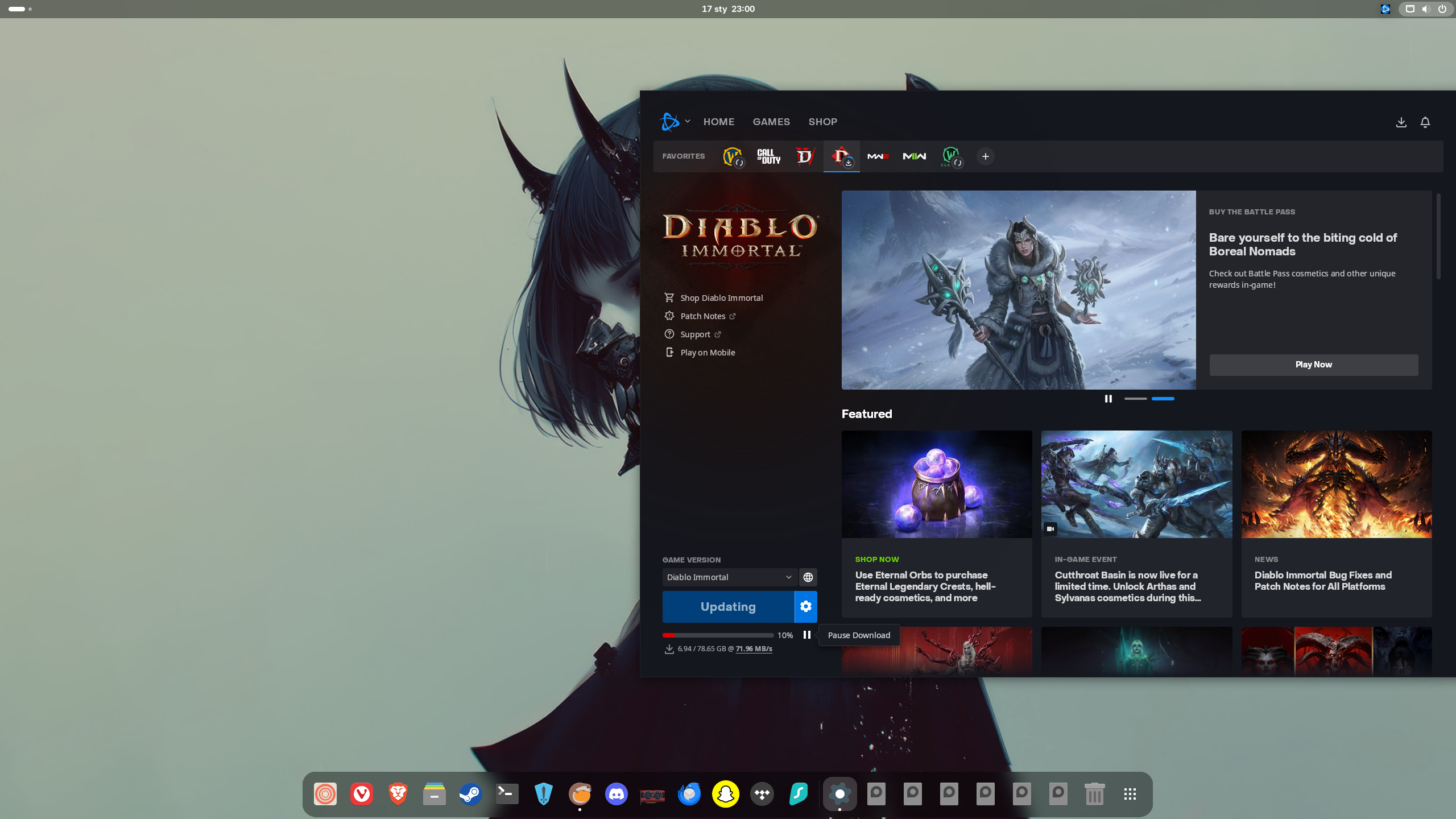
I also successfully launched Battlenet through it. Downloaded trial of WoW and played it there. You have to click top left "+" icon, search installs on Lutris page type in Battlenet and let the magic happen. Edit: Correction I typed World of Warcraft, and then it did launch Battlenet. So I think you have to type in the games name for this to work.

You install games from exe through "+" icon too.

I have most of my library on GOG too, you can also add GOG games from Heroic Games Launcher or Lutris to Steam app on Linux and use Steam Input this way.

Have fun!
 
Last edited:
Coincidentally another thing I've been contemplating lately. I went straight into KDE Plasma and didn't think anything of it until people started talking about Gnome. I hate that the G is often pronounced, but the design of the DE does look good.

I love gnome. I like kde, too. But I tend to use that for gaming machines. When I'm doing anything else, I gravitate towards gnome. I've got this tablet here and won't even think of using kde or cinnamon on it.


I'm glad Steam is running fine on Linux.
But GOG is the dealbreaker for me. I get most of my games through there.
Is it worth it? Does GOG Galaxy (or GOG games in general) work on Linux?
I tried Ubuntu a few years back and hated every second of it.

The typical way to do it is to use a launcher like lutris or heroic. Never tried heroic, but I like lutris and it comes pre-installed on many distros.
 
I also successfully launched Battlenet through it. Downloaded trial of WoW and played it there. You have to click top left "+" icon, search installs on Lutris page type in Battlenet and let the magic happen. Edit: Correction I typed World of Warcraft, and then it did launch Battlenet. So I think you have to type in the games name for this to work.
ooPrsqSzbkO6fZ0l.png

Yeah, I just tried to install Diablo Immortal and Battlenet works. So maybe typing Battlenet there will work too, I guess.

Edit: It works just fine if you run Battlnet with Anticheat libraries.
 
Last edited:
Fingers crossed for native Linux launcher and Cloud Saves feature not in beta, lmao.

As much as I love Heroic Games Launcher, native stuff will be always better.
The support would be nice, but I gotta say that I uninstalled the GoG Galaxy app for Heroic even on Windows.

I just think the interface is cleaner, takes less clicks to do stuff, GoG Galaxy store integrations break, Heroic replaces Epic & Amazon's apps entirely, and the auto-add to Steam feature is just great.

Cloud saves still being a beta feature is my only issue, but even then I haven't had it fail me yet (I'm sure it has for somebody though).
 
I love gnome. I like kde, too. But I tend to use that for gaming machines. When I'm doing anything else, I gravitate towards gnome. I've got this tablet here and won't even think of using kde or cinnamon on it.
I've always thought Gnome felt designed for tablets, because they do the full-screen app menu like Win8 did. Not to mention all the gesture stuff.
 
I've always thought Gnome felt designed for tablets, because they do the full-screen app menu like Win8 did. Not to mention all the gesture stuff.

I like it in particular for touch screen and single display. A tablet happens to both so it's the ideal candidate imo.
 
I like it in particular for touch screen and single display. A tablet happens to both so it's the ideal candidate imo.
Yeah it works really well for that, and so much of Gnome also seems built for a single display period. They want you to use the built-in workspaces, the top bar defaults to only your primary display, multi-monitor features seem less of a priority and offer less customization than stuff like KDE, etc. Thankfully extensions exist.

Even multi-monitor wallpaper programs I've used for Gnome, seem to not really work per display natively. Like they use a hacky method where if you have 3 displays of different resolutions and/or scaling like me. It will take those values, and splice the wallpapers together as one big wallpaper, and span that across based on the position you have setup in your display properties like it's still just one big monitor. KDE on the other hand treats each display like its own entity to place taskbars and widgets.
 
Last edited:
I think as long as you can install Steam, Wine, and maybe something like Lutris, it won't matter too much which distribution you pick. I've been able to play everything I've wanted on Arch so far.
 
I'm glad Steam is running fine on Linux.
But GOG is the dealbreaker for me. I get most of my games through there.
Is it worth it? Does GOG Galaxy (or GOG games in general) work on Linux?
I tried Ubuntu a few years back and hated every second of it.
BeardSpike covered a lot of ground, so I'll just add that personally I prefer the more granular detail the per game options in Lutris allow. I had a couple issues in Heroic, and tbh I don't recall exactly what they were so it's possible I could have fixed them, but I have less issues in Lutris. It just doesn't look as pretty (although both have options to add games to Steam so you don't need their interfaces after install).

Also, Lutris sometimes has user uploaded install scripts for games that includes mods and other useful things. They're presented as options before install (usually it's just a choice between Win or Linux version, for example). But I haven't seen too many of them yet, and the Deus Ex one had some wrong folder installs so I had to do a bit of fixing by moving files round.
 
BeardSpike covered a lot of ground, so I'll just add that personally I prefer the more granular detail the per game options in Lutris allow. I had a couple issues in Heroic, and tbh I don't recall exactly what they were so it's possible I could have fixed them, but I have less issues in Lutris. It just doesn't look as pretty (although both have options to add games to Steam so you don't need their interfaces after install).

Also, Lutris sometimes has user uploaded install scripts for games that includes mods and other useful things. They're presented as options before install (usually it's just a choice between Win or Linux version, for example). But I haven't seen too many of them yet, and the Deus Ex one had some wrong folder installs so I had to do a bit of fixing by moving files round.
The deal breaker for some is that Heroic Games Launcher is an Electron app, and Lutris is not.

Personally I find both apps usable and I use them both. And I do agree that Lutris can be easier to use or more transparent with settings but you can achieve the same results in both apps.

What I like about Heroic though is that it actually syncs play time, I have yet have to see Cloud Saves fail me and I actually get Achievements although it doesn't show them during gameplay but I can check them later on through web browser and activity on my account.
 
Last edited:
On a completely different note, does anyone in here run some kind of RAID configuration of HDDs as a backup storage? I recently got into backuping my GOG collection.

So far I got like two 2.5" external HDDs but I thought about buying an enclosure for both 2.5" and 3.5" drives with external power supply.

Something like Yottamaster or ORICO would suffice for backuping data? Not that I'm thinking of running a server, lmao.
 
On a completely different note, does anyone in here run some kind of RAID configuration of HDDs as a backup storage? I recently got into backuping my GOG collection.

So far I got like two 2.5" external HDDs but I thought about buying an enclosure for both 2.5" and 3.5" drives with external power supply.

Something like Yottamaster or ORICO would suffice for backuping data? Not that I'm thinking of running a server, lmao.
I use a QNAP 4-bay DAS that I back up each PC on my network to regularly. I use Borg for Linux backups and AOMEI for Windows backups. Both can point to the DAS network location and be scheduled to do incremental backups automatically. I used to have it configured in RAID 5 but I ended up switching it to JBOD so that I could make use of every drive. I figured that the odds of both my DAS and the systems it backs up dying at the same time were pretty low.
 
On a completely different note, does anyone in here run some kind of RAID configuration of HDDs as a backup storage? I recently got into backuping my GOG collection.

So far I got like two 2.5" external HDDs but I thought about buying an enclosure for both 2.5" and 3.5" drives with external power supply.

Something like Yottamaster or ORICO would suffice for backuping data? Not that I'm thinking of running a server, lmao.

I'd echo Edgetune on the QNAP 4-bay DAS (TR-004 I've seen before), or any other bigger enclosure that supports more drives. Take as someone who bought a Synology 4-bay NAS, those drive bays don't take that long to fill up if you wanna back up media (games + movies/tv + family videos/photos take up the most for me), and I just wish I went with more slots up front because it kinda wastes money in the long run.

Cool thing with most of the DAS enclosures though, is you can if you want later attach them to a NAS for additional storage, and since the NAS would be connected to the internet that storage can then be remoted into for your personal cloud. I basically use my old Synology NAS as a DAS enclosure over USB since my Unraid NAS has a better CPU + more RAM.
 
Does Fedora work somehow worse in the KDE edition than Gnome? I tried the Gnome desktop, but couldn't get used to it, hence switched to OpenSUSE KDE in dual boot, didn't play any games though. Still most often use Windows, as it's convenient for apps I use.
 
Thinking about buying another nvme and setting up a dual boot on my gaming rig to see if Linux is viable for me.

This thread was created 9 months ago. What's the consensus today on the OS to go with? Bazzite? CachyOS? Arch? Something else? I'm running a Ryzen 9800X3D/Geforce 5090 combo.
 
Last edited:
Thinking about buying another nvme and setting up a dual boot on my gaming rig to see if Linux is viable for me.

This thread was created 9 months ago. What's the consensus today on the OS to go with? Bazzite? CachyOS? Arch? Something else? I'm running a Ryzen 9800X3D/Geforce 5090 combo.
CachyOS (bleeding edge Arch gaming distro), PikaOS (debian based gaming distro - less bleeding edge still stable), Bazzite (Fedora atomic immutable OS gaming based distro - extra stable), Fedora/Nobara (less bleeding edge than Cachy but still bleeding edge my second best distros after Cachy).

Most Nvidia users generally use either Bazzite or PikaOS in this thread.

Grab an empty pendrive install Ventoy on it, drop all the ISO files on it, you can boot up all the distros from it. See what you like.
 
Last edited:
CachyOS (bleeding edge Arch gaming distro), PikaOS (debian based gaming distro - less bleeding edge still stable), Bazzite (Fedora atomic immutable OS gaming based distro - extra stable), Fedora/Nobara (less bleeding edge than Cachy but still bleeding edge my second best distros after Cachy).

Most Nvidia users generally use either Bazzite or PikaOS in this thread.

Grab an empty pendrive install Ventoy on it, drop all the ISO files on it, you can boot up all the distros from it. See what you like.

Thanks! That's really helpful.

I think I'm leaning towards Bazzite or CachyOS, as I want whatever distro I go with to have a thriving community & active development. I don't want to put my eggs into a basket and then find development on that distro to be slow or nonexistent down the line. Seems like Bazzite and Cachy are the two most popular options for gaming focused distros.
 
Thanks! That's really helpful.

I think I'm leaning towards Bazzite or CachyOS, as I want whatever distro I go with to have a thriving community & active development. I don't want to put my eggs into a basket and then find development on that distro to be slow or nonexistent down the line. Seems like Bazzite and Cachy are the two most popular options for gaming focused distros.
FYI Nobara and PikaOS use CachyOS kernel modifications I think so these are also viable options.

I can help you with CachyOS since I use it daily. But I'm on AMD so unfortunately I can't help you with Nvidia drivers.

But the rule of thumb is, if there is a regression install previous drivers.

Edit: also setting up Secure Boot on Cachy is a breeze, since I also dual boot to Windows from time to time to play Kernel level Anticheat games and they will soon if not already require Secure Boot to be on.

Edit2: be sure to install Linux on a separate SSD drive, not on the same drive as Windows it will save you the headaches.

I use rEFInd boot manager.

Here are some useful guides:


analog_future analog_future
 
Last edited:
FYI Nobara and PikaOS use CachyOS kernel modifications I think so these are also viable options.

I can help you with CachyOS since I use it daily. But I'm on AMD so unfortunately I can't help you with Nvidia drivers.

But the rule of thumb is, if there is a regression install previous drivers.

Edit: also setting up Secure Boot on Cachy is a breeze, since I also dual boot to Windows from time to time to play Kernel level Anticheat games and they will soon if not already require Secure Boot to be on.

Edit2: be sure to install Linux on a separate SSD drive, not on the same drive as Windows it will save you the headaches.

I use rEFInd boot manager.

Here are some useful guides:


analog_future analog_future

Thanks a bunch! I've got an nvme on the way specifically to install Linux onto. Should be fun to play around with.
 
Thanks! That's really helpful.

I think I'm leaning towards Bazzite or CachyOS, as I want whatever distro I go with to have a thriving community & active development. I don't want to put my eggs into a basket and then find development on that distro to be slow or nonexistent down the line. Seems like Bazzite and Cachy are the two most popular options for gaming focused distros.
Both have the largest communities for gaming, it really comes down to how much control of your system you want.

Bazzite is immutable, so all core system files are read-only, so you have limited access to them, but you can't break anything. You'll largely be using flatpak apps, appimages, and then anything else you're either going to layer the RPM (fedora-based) application into your system, or using Distrobox to handle deb or Arch-based packages (kinda like emulation). Some packages that have core system access might not work via any of those methods, and for some of the popular ones they created some ujust commands that run scripts to automate those installs like DaVinci Resolve (video editing app). Bazzite automates quite a bit since it just downloads new images of your OS, and then even at boot you can select the previous images if the new image breaks something.

CachyOS is the opposite, it gives you pretty much full control over your system, it's pretty bleeding edge cause it's Arch. Sometimes that can create instability, but for gaming CachyOS is much more stable than vanilla Arch, and they give you a GUI-based way to install Nvidia drivers. Only difference isPikaOS and Bazzite have ISOs that come with nvidia drivers pre-installed, while you have to manually select that stuff during the welcome setup I think with CachyOS, but should be pretty easy. Most of these gaming distros have maintainers that know each other, and cross-pollinate features. CachyOS kernal optimizations have been copied, PikaOS's GUI device manager was copied across these, and they all give you a handy list of useful gaming apps to install out of the gate.

I liked Bazzite, would recommend for a portable or living room setup since it's so automatic, but I like having more control of my system so I jumped to PikaOS. What I've seen and heard is CachyOS is pretty similar, so if Pika didn't exist I'd be on that with fellow Linux Bro BeardSpike BeardSpike . You could always use Bazzite as a learning experience, since it's easiest to use, and see if the limitations actually limit you though. Go with KDE or GNOME though, other choices are either more complex (Hyprland), a bit too early (Cosmic), or old (XFCE).

 
Well after over 2 years of cumulative use, I got my first ever bug on bazzite! If both desktop and game mode sessions are set to hdr, switching to game mode will be all weirdly washed out until you flick steam's hdr toggle on and off again. I found this affecting others online and like them, I never saw this before. Annoying, but a single error in that long is pretty damn good. Hopefully they fix that up. I currently have hdr turned off on the desktop, which fixes the problem and lets hdr work fine in game mode. No big loss since we just watch youtube and old tv shows on the desktop. Hopefully they fix it soon, though.
 
Both have the largest communities for gaming, it really comes down to how much control of your system you want.

Bazzite is immutable, so all core system files are read-only, so you have limited access to them, but you can't break anything. You'll largely be using flatpak apps, appimages, and then anything else you're either going to layer the RPM (fedora-based) application into your system, or using Distrobox to handle deb or Arch-based packages (kinda like emulation). Some packages that have core system access might not work via any of those methods, and for some of the popular ones they created some ujust commands that run scripts to automate those installs like DaVinci Resolve (video editing app). Bazzite automates quite a bit since it just downloads new images of your OS, and then even at boot you can select the previous images if the new image breaks something.

CachyOS is the opposite, it gives you pretty much full control over your system, it's pretty bleeding edge cause it's Arch. Sometimes that can create instability, but for gaming CachyOS is much more stable than vanilla Arch, and they give you a GUI-based way to install Nvidia drivers. Only difference isPikaOS and Bazzite have ISOs that come with nvidia drivers pre-installed, while you have to manually select that stuff during the welcome setup I think with CachyOS, but should be pretty easy. Most of these gaming distros have maintainers that know each other, and cross-pollinate features. CachyOS kernal optimizations have been copied, PikaOS's GUI device manager was copied across these, and they all give you a handy list of useful gaming apps to install out of the gate.

I liked Bazzite, would recommend for a portable or living room setup since it's so automatic, but I like having more control of my system so I jumped to PikaOS. What I've seen and heard is CachyOS is pretty similar, so if Pika didn't exist I'd be on that with fellow Linux Bro BeardSpike BeardSpike . You could always use Bazzite as a learning experience, since it's easiest to use, and see if the limitations actually limit you though. Go with KDE or GNOME though, other choices are either more complex (Hyprland), a bit too early (Cosmic), or old (XFCE).

Thanks. I'll do a little more digging but I think CachyOS it is for me then. I have an IT background and like to tinker so I'm not afraid of something that's a little less user friendly if I'm getting more cutting edge features and more flexibility.
 
Does Fedora work somehow worse in the KDE edition than Gnome? I tried the Gnome desktop, but couldn't get used to it, hence switched to OpenSUSE KDE in dual boot, didn't play any games though. Still most often use Windows, as it's convenient for apps I use.
At this point, not really. KDE and Gnome I think have the best support under Fedora, and most other distros. I used KDE when I tried Fedora, and never had any real problems.

I thought I read your post somewhere on GAF that you use something like DAS or NAS Durin Durin so I thought it would be best to just ask this stuff in here.
It's a fun rabbit hole you can go down. DAS are nice because they're cheap, and will work as fast as your USB ports will since it's just an enclosure.

I just like a NAS because you can extend all that beefy storage, remote into that storage to use/sync, and install apps on them. Being able to use Kavita so I can have my phone stream all my digital Manga wherever I have cell service, or use Jellyfin to stream all my converted physical DVD/Blu-rays is great. You can also use a network share, and actually have Steam recognize the NAS as another drive library, so you can just move your games to/from it to your other drives on the actual PC instead of just as a backup.
 
Thanks. I'll do a little more digging but I think CachyOS it is for me then. I have an IT background and like to tinker so I'm not afraid of something that's a little less user friendly if I'm getting more cutting edge features and more flexibility.
If you have an IT background, then yeah you'd probably like CachyOS more. You should ask BeardSpike BeardSpike on whatever system backup options you have on CachyOS, in case anything happens when you're messing around for the first time.
 
Thanks. I'll do a little more digging but I think CachyOS it is for me then. I have an IT background and like to tinker so I'm not afraid of something that's a little less user friendly if I'm getting more cutting edge features and more flexibility.
If you have an IT background, then yeah you'd probably like CachyOS more. You should ask BeardSpike BeardSpike on whatever system backup options you have on CachyOS, in case anything happens when you're messing around for the first time.
I used TimeShift before but it did break something anyways and I had to chroot the system through ISO but I managed to save it one time and one time I didn't. I recommend if you have 3 SSDs to have one SSD for Windows, second for Linux and third for games for Linux (format it in ext4) if you like to tinker like me analog_future analog_future , this way you can have your Steam and Heroic Games Launcher import your games from a third SSD if you have to reinstall Linux on a second drive. You don't actually have to do Steam backups, Steam will import your already installed games if you add the third drive in it's options, and Heroic has an import game option.

Now I use already installed app on CachyOS called "Btrfs Assistant" and I configured Snapper through it and it does Snapshots, works much better. I once went pretty far back and I didn't have to chroot to repair the /boot mount like in TimeShift, I just had to reinstall some dependencies for some apps and that's it- mainly Steam Tinker Launch.

It's pretty useful launcher, I might say.

analog_future analog_future


This is extra useful it allows you to install custom Proton and Wine versions. And it even has "Games" tab and you can easily change Proton versions for games already installed on Steam.

And this app if you turn in new modern UI it can look like Nvidia ShadowPlay or AMD Adrenalin ReLive. It even uses GPU acceleration on AV1 for me and supports recording Instant Replay to RAM.
 
I used TimeShift before but it did break something anyways and I had to chroot the system through ISO but I managed to save it one time and one time I didn't. I recommend if you have 3 SSDs to have one SSD for Windows, second for Linux and third for games for Linux (format it in ext4) if you like to tinker like me analog_future analog_future , this way you can have your Steam and Heroic Games Launcher import your games from a third SSD if you have to reinstall Linux on a second drive. You don't actually have to do Steam backups, Steam will import your already installed games if you add the third drive in it's options, and Heroic has an import game option.

Now I use already installed app on CachyOS called "Btrfs Assistant" and I configured Snapper through it and it does Snapshots, works much better. I once went pretty far back and I didn't have to chroot to repair the /boot mount like in TimeShift, I just had to reinstall some dependencies for some apps and that's it- mainly Steam Tinker Launch.

It's pretty useful launcher, I might say.

analog_future analog_future


This is extra useful it allows you to install custom Proton and Wine versions. And it even has "Games" tab and you can easily change Proton versions for games already installed on Steam.

And this app if you turn in new modern UI it can look like Nvidia ShadowPlay or AMD Adrenalin ReLive. It even uses GPU acceleration on AV1 for me and supports recording Instant Replay to RAM.
I like that ProtonPlus has a download map. There's one dude in Niger flying the flag, what a hero
 
BeardSpike BeardSpike Soodanim Soodanim Durin Durin

Dove pretty deep into setting up my PC today and I'm successfully running CachyOS w/ rEFInd for my boot manager, btrfs for my file system, and Plasma for my desktop environment.

Honestly everything's been surprisingly painless so far. Everything feels so zippy as well. I've got all the basics installed with no issues. Picked up my 4K display & 165hz refresh rate right out of the box. Sound/network/bluetooth/everything working with no issues as well. My Razer Wolverine V3 controller surprisingly just worked, no setup required.

Using Proton CachyOS for my default Proton compatibility tool. Played a bit of System Shock (2023) to test and I was able to inject DLSS 4.5 Preset M with no issues. I'm a tinkerer; I can already tell I'm going to love tooling around with this setup.


Haven't messed around too much with setting up HDR yet, but that's next. And then I want to figure out a good route for a controller friendly frontend ala Steam Big Picture or Playnite where I can bring in all of my games from different launchers as well as my emulated library of games into one UI. Looks like there's several options out there but none are really fully baked at the moment. I'll have to do some digging.

Will have to do some benchmarks as well. I know Linux is behind right now with Nvidia performance compared to windows, but I'd like to see how much I'm lagging behind at the moment. My approach for now is to play super demanding games on Windows if needed, and the rest I'll play on Linux.
 
Last edited:
Haven't messed around too much with setting up HDR yet, but that's next. And then I want to figure out a good route for a controller friendly frontend ala Steam Big Picture or Playnite where I can bring in all of my games from different launchers as well as my emulated library of games into one UI. Looks like there's several options out there but none are really full baked at the moment. I'll have to do some digging.

Well the good news with HDR is that KDE is the furthest ahead in support vs other desktop environments to my knowledge. It's color management and HDR protocols are merged, so there is a standard way to negotiate HDR, tone mapping and color spaces. You have a calibration tool, color clamping mostly works for SDR content while HDR is on, and per display color management is better imo than Windows. Some streaming HDR video on browsers can be buggy, Nvidia has the shakier driver support for now, and games can still mis-send HDR metadata + you sometimes need launch commands added for games.

Honestly though, I think by the end of the year HDR will mostly be a done deal, and it will be small case by case issues. It wouldn't surprise me if it's better than Windows 11 by then.

I'd still say for now Steam Big Picture mode is your best bet for having all your games together in one place. Nvidia for now still has beta support for Valve's gamescope, which is Valve's UI front-end for Steam Deck, that can launch at startup with your PC + have system options like a Deck where you can navigate with your pad (AMD/Intel pretty perfect for this already).

Still, Big Picture Mode is good enough, and Heroic Games Launcher has an option where when you download/install any of your GoG/Epic Games/Amazon stuff, it will auto-add it to Steam as a non-steam game for you. Lutris can work with everything else, and I think can export as well to Steam. If you want to use emulation, Emudeck supports EmulationStation or Steam ROM Manager (where it auto-adds emulated games to categories based on their system to launch from Steam).
 
Last edited:
Top Bottom