• Hey Guest. Check out your NeoGAF Wrapped 2025 results here!

Linux Bros, what's the best Linux OS for gaming (GOG and Steam)?

BeardSpike BeardSpike @Soodanim Durin Durin

Dove pretty deep into setting up my PC today and I'm successfully running CachyOS w/ rEFInd for my boot manager, btrfs for my file system, and Plasma for my desktop environment.

Honestly everything's been surprisingly painless so far. Everything feels so zippy as well. I've got all the basics installed with no issues. Picked up my 4K display & 165hz refresh rate right out of the box. Sound/network/bluetooth/everything working with no issues as well. My Razer Wolverine V3 controller surprisingly just worked, no setup required.

Using Proton CachyOS for my default Proton compatibility tool. Played a bit of System Shock (2023) to test and I was able to inject DLSS 4.5 Preset M with no issues. I'm a tinkerer; I can already tell I'm going to love tooling around with this setup.


Haven't messed around too much with setting up HDR yet, but that's next. And then I want to figure out a good route for a controller friendly frontend ala Steam Big Picture or Playnite where I can bring in all of my games from different launchers as well as my emulated library of games into one UI. Looks like there's several options out there but none are really full baked at the moment. I'll have to do some digging.

Will have to do some benchmarks as well. I know Linux is behind right now with Nvidia performance compared to windows, but I'd like to see how much I'm lagging behind at the moment. My approach for now is to play super demanding games on Windows if needed, and the rest I'll play on Linux.

Right on. Welcome to it.

Check out gamescope some time: https://github.com/ValveSoftware/gamescope You can enable it per-game through launch options in steam. It's a microcompositor that will launch a game in a dedicated graphical session. It can have advantages in frame time and limiting.
 
So I ran a few comparisons. First, Arkham Knight, max settings, native 4k. 175min/424max/297avg on Windows 11. 289min/486max/367avg on CachyOS. A pleasant surprise???


Next, Returnal, max settings, RT ON, at 4K DLAA 4.5 benchmarked out to an 84 FPS average (64 min) with Windows 11. 61 FPS average (48 min) on CachyOS. Pretty huge drop there.


So yeah, work to be done with Nvidia on the Linux side, but I had expected these results. From what I've read, there's DX12 and RT performance gaps with Linux on the Nvidia side right now. Some promising performance increases over the last year though so hopefully that continues through 2026. In the meantime, I'll probably go forward with my plan of playing older/less demanding games on Linux, and the stuff that really pushes my hardware I will play on Windows until Linux/Nvidia catches up.


Definitely going to play around a lot with emulation on Linux as well, as I've read promising things there.
 
BeardSpike BeardSpike @Soodanim Durin Durin

Dove pretty deep into setting up my PC today and I'm successfully running CachyOS w/ rEFInd for my boot manager, btrfs for my file system, and Plasma for my desktop environment.

Honestly everything's been surprisingly painless so far. Everything feels so zippy as well. I've got all the basics installed with no issues. Picked up my 4K display & 165hz refresh rate right out of the box. Sound/network/bluetooth/everything working with no issues as well. My Razer Wolverine V3 controller surprisingly just worked, no setup required.

Using Proton CachyOS for my default Proton compatibility tool. Played a bit of System Shock (2023) to test and I was able to inject DLSS 4.5 Preset M with no issues. I'm a tinkerer; I can already tell I'm going to love tooling around with this setup.


Haven't messed around too much with setting up HDR yet, but that's next. And then I want to figure out a good route for a controller friendly frontend ala Steam Big Picture or Playnite where I can bring in all of my games from different launchers as well as my emulated library of games into one UI. Looks like there's several options out there but none are really full baked at the moment. I'll have to do some digging.

Will have to do some benchmarks as well. I know Linux is behind right now with Nvidia performance compared to windows, but I'd like to see how much I'm lagging behind at the moment. My approach for now is to play super demanding games on Windows if needed, and the rest I'll play on Linux.
Welcome to the other side brother 🤜.


Is useful for checking if MP games work and generally you can learn new launch parameters through there. Generally anything with EasyAntiCheat will work and Battlnet if you use Proton anticheat libraries for those AntiCheats. Anything more intensive like Battlefield 6 or COD uses won't run.

Another useful site for as being on CachyOS is AUR https://aur.archlinux.org/

If you use HDR monitor, like am I, and don't want for you to burn your eyes out install Stylus extension for your browser it can search for free CSS styles for sites and apply them, I use dark theme for AUR and other sites that won't have dark mode.

Be sure to install through terminal
Code:
sudo pacman -S yay gamemode gamescope goverlay mangohud heroic-games-launcher-bin lutris
shift+ctrl+v in terminal does the pasting, shift+ctrl+c copying.

yay is basically pacman for AUR, if pacman doesn't have it, AUR will - you can check the exact package name on AUR site.

You use it exactly the same as pacman but without sudo at the beginning so
Code:
yay -S <package-name>
Then just hit enter enter at the beginning questions, and "y" at the end to delete the unnecessary dependencies and "y" to install the app.

Goverlay configures MangoHud, Heroic and Lutris run GOG and Epic games. Lutris can run EA, Ubisoft, Battlenet games besides GOG etc.

Gamescope was already discussed in this thread, or the other Linux one lmao.

Here's a look at MangoHud:
It's a useful monitoring tool. And you can set FPS caps through it too.

You set launch parameters in Steam
Code:
mangohud %command%
to use it in games.

I use LACT for undervolting my GPU and setting up my fans. You can also overclock it through there.

I tried CoreCtrl in the past but it isn't picking up my motherboard sensors like FanControl on Windows so, I just setup my CPU and Case fans in bios and I just use LACT to control GPU fans, you may have better luck than me with support for your motherboard.

Useful launch parameters for older games and ReShade:

Have fun tinkering!

Edit:

I recently bought The Technomancer dirt cheap and I've read that on Windows you have to generally do a bit of brainstorm on how to run it on modern system with CPU which has higher number of cores.

I just did
Code:
WINE_CPU_TOPOLOGY=4:0,1,2,3 %command%
In launch parameters of the game in Steam and it uses 4 cores, lmao.

Edit2:
Code:
yay -Ss <app name>
I recently discovered this command, it searches all packages in AUR without opening up the browser and lists their versions.

Edit3:
My launch parameters for Helldivers 2.
 
Last edited:
I tried Bazzite for an HTPC setup. I really don't get the hype. I had to log in to steam every time it booted. Some games were terrible frame rate, even though I play them fine in my Linux desktop normally. Mangohud wouldn't even run for some games. Everything updated to latest. if you want to install something, there are like seven layers of different ways to install things... I get the atomic OS, but um, seems way too complicated to deal with all that.
 
After testing several distros in Virtualbox earlier, finally did a proper install of KDE-Arch on an AMD CPU/ nvidia GPU machine on its own drive. So multiboot, but no interference in either system's bootmanager.

WLAN is a bit funny. Seems to connect via "iwd" during install, but afterwards network manager seems to scan only via "wpa supplicant" as default. So i was online but the info box in the right bottom corner was not able to show that, or connect to any other connection, or disconnect. Saw available sources but could do nothing with them. Had to write some simple config file that forces the network manager to use iwd.
Reminded me a lot of setting up my now ancient laptop for the first time some years ago with Ubuntu where the wlan driver was not correctly chosen by the system and I had to force it into some blacklist which resulted in it switching to another, working driver.
It's insane how much is included in the Linux kernel while some very basics are almost Windows 98 kinda bad, where installing a driver from the original floppys or cd would end up in a refusal loop throwing you into an internet free Internet Explorer for help...

Browsers work with copy pasted Win profiles. Just has a few buttons here and there differently placed. Even imported the bug that I can't see the pic in pic button anymore on some sites.
Mail works fine, even though Thunderbird is a bit dumb with not automatically subscribing to all necessary elements. Which is probably no Linux specific problem/inconvenience.
GIMP, Inkscape work just the same as their Windows versions.
Overall I already used almost only open source software anyway, so why should stuff not work.
My Wacom tablet works out of the box without doing anything. While Windows came with some 500MB install.
Spotfiy works.
Kdenlive seems okay, but I might switch to AVIdemux since I am used to it on Windows and I think Kdenlive might be more powerful and feature reach which I do not need.
Dolphin as the filemanager is a bit weird with its search function, seems to need Kfind to properly find stuff sometimes.
File preview is a bit odd since preview seems to be on, as a general option, while video preview pics (or other options) have to be enabled separately. Before that the folder already shows previews of its content, but the files themselves are blank video icons. Everything is there, somewhere, but some defaults are just odd.

Wallpaper switcher works nice, allows selecting several folders while Win only has one activ directory. HDR seems to work, Multimonitor as well, although lacking the same options Windows provides with monitor specific task bar behavior.
I like that window borders are snapping to each other and the monitor limits.
Not all apps seem to remember their window size and position, even after you manually set it to remember.

Tried a few icon packs. The most downloaded ones seem to love some rather colorful icons, deviating from the original logos' colors completely. I don't like the very top one much, "candy", just too thin contours, "sours" and "beautyline" are based on that but thicker. In the end chose a very tame black and white one. Also for the window colors. Greytones with orange as highlight. Mouse also orange. Neogaf inspired I guess. lol Alternatively I would either choose Papirus or the system default Breeze. Created a new icon for Thunderbird myself since I hated the one the icon pack provides, and modified the Dolphin folder icon dolphin with the dolphin of the dolphin emulator. Why some icon sets use the Firefox brand logo instead of the actual Firefox browser logo is weird to me, but swapped that too.
I am kinda confused about the nonsense about KDE and gnome being two different systems and their title bars looking different. Found Willow for KDE and something called Redstone for gnome/GTK to make both look like regular ass Windows, at least in theory it should be one design now, but since steam, firefox and vivaldi use their own designs, steam comes at least close, but both browsers just have something entirely else on their top. Why they don't just use system standard is beyond me. Same in Windows though. There are some programs that just know better... ugh.

Installing stuff that is outside their pacman and flathub archives is a bit odd. Download from github, trigger some makepkg or whatever and then realise that the programmers forgot to add all required dependencies. So when "scon" cries about being stuck on line 5 of a code, you have to research that scon seems to be some python element and install python manually. It's no dealbreaker since the programm that required this hassle isn't essential at all, offers debian/ubuntu and fedora packages, just not arch stuff which should not be chosen anyway if you are not enjoying solving nonsense. The app would run anyway manually just in its unzipped folder without even installing... installing only adds it properly in the autostart service list, which would not work by just adding it to autostart for some reason... it would run fine locally, starting it manually, but adding the exe to autostart would save several folders directly in my home directory outside of its own folder.

Gaming
Tested not that much. Trackmania runs. A very simple 2D puzzle game worked well too. Another 3D puzzler had a weird bug though. It runs default Linux native, but 15 of the 40 levels could not be solved at all since the command for one of the three verhicles would not register, just makes a sound but does nothing. Switched to some Proton runtime which updates the game files to the Windows version or directory paths or whatever. Took a while to find my savegame and transfer it. No idea why proton has this insanely branching folder paths replicating a ton of folders for every game individually, but I guess every game gets a clean fake Windows in that way?

Boot and shutdown so far seem quicker than Win, but fresh systems are usually snappy. Linux is on an "old" 2,5 SATA SDD while Win is on a more modern nvme drive. I don't know their respective speeds, but I assume nvme should be faster, so Linux might be nice in that area.

I would not expect games to run better, especially since I am on nvidia, but just like normal apps most should run fine enough, and if not, Win is waiting on the other drive. I don't expect Linux to be better, I just try to avoid MS and Google as much as possible. OS, startpage and duckduck as search engines. Did not use an MS Office product since years.

 
So yeah, work to be done with Nvidia on the Linux side, but I had expected these results. From what I've read, there's DX12 and RT performance gaps with Linux on the Nvidia side right now. Some promising performance increases over the last year though so hopefully that continues through 2026. In the meantime, I'll probably go forward with my plan of playing older/less demanding games on Linux, and the stuff that really pushes my hardware I will play on Windows until Linux/Nvidia catches up.
Yeah, I hope they will patch it. Although I'm on AMD.

I hope by the time I decide to upgrade my GPU RAM prices will be back to normal, so VRAM prices also go down and I could look more towards Nvidia also.

Don't get me wrong, general performance on Mesa open AMD drivers is almost on par with Windows - sometimes I even get more FPS on Linux. But Raytracing wise I dunno if they will ever catch up. I hope they will. But I'm open minded, and brand of GPU doesn't matter to me.

I'm honestly rooting both for Team Green and Red on Linux to improve performance further. But it looks like Nvidia could figure out stuff faster than Mesa devs.
 
Last edited:
After testing several distros in Virtualbox earlier, finally did a proper install of KDE-Arch on an AMD CPU/ nvidia GPU machine on its own drive. So multiboot, but no interference in either system's bootmanager.

WLAN is a bit funny. Seems to connect via "iwd" during install, but afterwards network manager seems to scan only via "wpa supplicant" as default. So i was online but the info box in the right bottom corner was not able to show that, or connect to any other connection, or disconnect. Saw available sources but could do nothing with them. Had to write some simple config file that forces the network manager to use iwd.
Reminded me a lot of setting up my now ancient laptop for the first time some years ago with Ubuntu where the wlan driver was not correctly chosen by the system and I had to force it into some blacklist which resulted in it switching to another, working driver.
It's insane how much is included in the Linux kernel while some very basics are almost Windows 98 kinda bad, where installing a driver from the original floppys or cd would end up in a refusal loop throwing you into an internet free Internet Explorer for help...

Browsers work with copy pasted Win profiles. Just has a few buttons here and there differently placed. Even imported the bug that I can't see the pic in pic button anymore on some sites.
Mail works fine, even though Thunderbird is a bit dumb with not automatically subscribing to all necessary elements. Which is probably no Linux specific problem/inconvenience.
GIMP, Inkscape work just the same as their Windows versions.
Overall I already used almost only open source software anyway, so why should stuff not work.
My Wacom tablet works out of the box without doing anything. While Windows came with some 500MB install.
Spotfiy works.
Kdenlive seems okay, but I might switch to AVIdemux since I am used to it on Windows and I think Kdenlive might be more powerful and feature reach which I do not need.
Dolphin as the filemanager is a bit weird with its search function, seems to need Kfind to properly find stuff sometimes.
File preview is a bit odd since preview seems to be on, as a general option, while video preview pics (or other options) have to be enabled separately. Before that the folder already shows previews of its content, but the files themselves are blank video icons. Everything is there, somewhere, but some defaults are just odd.

Wallpaper switcher works nice, allows selecting several folders while Win only has one activ directory. HDR seems to work, Multimonitor as well, although lacking the same options Windows provides with monitor specific task bar behavior.
I like that window borders are snapping to each other and the monitor limits.
Not all apps seem to remember their window size and position, even after you manually set it to remember.

Tried a few icon packs. The most downloaded ones seem to love some rather colorful icons, deviating from the original logos' colors completely. I don't like the very top one much, "candy", just too thin contours, "sours" and "beautyline" are based on that but thicker. In the end chose a very tame black and white one. Also for the window colors. Greytones with orange as highlight. Mouse also orange. Neogaf inspired I guess. lol Alternatively I would either choose Papirus or the system default Breeze. Created a new icon for Thunderbird myself since I hated the one the icon pack provides, and modified the Dolphin folder icon dolphin with the dolphin of the dolphin emulator. Why some icon sets use the Firefox brand logo instead of the actual Firefox browser logo is weird to me, but swapped that too.
I am kinda confused about the nonsense about KDE and gnome being two different systems and their title bars looking different. Found Willow for KDE and something called Redstone for gnome/GTK to make both look like regular ass Windows, at least in theory it should be one design now, but since steam, firefox and vivaldi use their own designs, steam comes at least close, but both browsers just have something entirely else on their top. Why they don't just use system standard is beyond me. Same in Windows though. There are some programs that just know better... ugh.

Installing stuff that is outside their pacman and flathub archives is a bit odd. Download from github, trigger some makepkg or whatever and then realise that the programmers forgot to add all required dependencies. So when "scon" cries about being stuck on line 5 of a code, you have to research that scon seems to be some python element and install python manually. It's no dealbreaker since the programm that required this hassle isn't essential at all, offers debian/ubuntu and fedora packages, just not arch stuff which should not be chosen anyway if you are not enjoying solving nonsense. The app would run anyway manually just in its unzipped folder without even installing... installing only adds it properly in the autostart service list, which would not work by just adding it to autostart for some reason... it would run fine locally, starting it manually, but adding the exe to autostart would save several folders directly in my home directory outside of its own folder.

Gaming
Tested not that much. Trackmania runs. A very simple 2D puzzle game worked well too. Another 3D puzzler had a weird bug though. It runs default Linux native, but 15 of the 40 levels could not be solved at all since the command for one of the three verhicles would not register, just makes a sound but does nothing. Switched to some Proton runtime which updates the game files to the Windows version or directory paths or whatever. Took a while to find my savegame and transfer it. No idea why proton has this insanely branching folder paths replicating a ton of folders for every game individually, but I guess every game gets a clean fake Windows in that way?

Boot and shutdown so far seem quicker than Win, but fresh systems are usually snappy. Linux is on an "old" 2,5 SATA SDD while Win is on a more modern nvme drive. I don't know their respective speeds, but I assume nvme should be faster, so Linux might be nice in that area.

I would not expect games to run better, especially since I am on nvidia, but just like normal apps most should run fine enough, and if not, Win is waiting on the other drive. I don't expect Linux to be better, I just try to avoid MS and Google as much as possible. OS, startpage and duckduck as search engines. Did not use an MS Office product since years.
Correct if I am wrong but Virtual box vs native installation has significant performance and compatibility differences because drivers, right??
 
Apparently, the latest Nvidia driver has improved performance in some DX12 games.


benchmark-shows-gaming-on-nvidia-is-improving-v0-oioja6yls6eg1.png
 
Finally have everything set up the way I want it, Bazzite gaming mode working with VRR, HDR and all the bells an whistles on my 4070.

And its magnificent. You really do not realise how stuttery and jank Windows is until you've fully jumped ship.

The only thing I'm missing out on is video rtx hdr for movies etc, but meh I don't really care about that in the grand scheme of things.

Really happy with Bazzite.

Try using MPV, it supports HDR.

 
We're gonna have to get that gaming linux ot ready for steam machine. Who's good at that? I suck shit at OT's.

edit: hope I can contribute SOMETHING but I'm largely useless.
 
Last edited:
I did see that, interesting. Will give it a shot!
+1 for MPV player.

I use it on Android, Windows and Linux. Can't recommend that player enough. And if one digs minimalism, it is just that and it also has a lot of options you can set, you just have to check the manual and try to remember the hotkeys for stuff you want to use.

I already have the ones I use the most memorized, like subtitles size and position or software/hardware decoding.

And other stuff I just can set quickly with mouse, like volume, switching subtitles and audio tracks, fast-forwarding or rewinding.
 
Last edited:
+1 for MPV player.

I use it on Android, Windows and Linux. Can't recommend that player enough. And if one digs minimalism, it is just that and it also has a lot of options you can set, you just have to check the manual and try to remember the hotkeys for stuff you want to use.

I already have the ones I use the most memorized, like subtitles size and position or software/hardware decoding.

And other stuff I just can set quickly with mouse, like volume, switching subtitles and audio tracks, fast-forwarding or rewinding.
I've dabbled a wee bit with it using a capture card on windows before, but that was a long time ago. If I can get it's auto HDR working then there's literally no reason for me to ever go back to windows.
 
Do we need to force this driver version?? Mine says it's updated but it's 580.119.02 version. Or is it beta??

Nvidia has four types of drivers for Linux: Production Branch, New Feature Branch, Beta, and Legacy.

Latest Production Branch Version: 580.126.09
Latest New Feature Branch Version: 590.48.01
Latest Beta Version: 590.44.01
Latest Legacy GPU version (470.xx series): 470.256.02

The Production Branch is like an LTS (Long Term Support), it has fewer updates, but it's more stable. The New Feature Branch, as the name suggests, is where the most drastic changes occur, with the possibility of bugs.
Nobara is probably using the Production Branch. I don't know how to change that, I've never used that distro (well, I've only tested it).
 
Don't get me wrong, general performance on Mesa open AMD drivers is almost on par with Windows - sometimes I even get more FPS on Linux. But Raytracing wise I dunno if they will ever catch up. I hope they will. But I'm open minded, and brand of GPU doesn't matter to me.
My understanding is that it's kind of a chain-link problem. Where there are limitations in Vulkan as an API to do everything from DX12 with ray-tracing, areas that aren't complete in Wayland for the compositor, and the GPU drivers/mesa. Personally think when that gets solved is when Valve will be confident enough to start releasing SteamOS for generic hardware. Vulkan I think will improve the fastest, with some lag on the GPU drivers to work with everything it translates to with Proton.

We're gonna have to get that gaming linux ot ready for steam machine. Who's good at that? I suck shit at OT's.

edit: hope I can contribute SOMETHING but I'm largely useless.
That's why I brought it up a week or so ago, because I remember that being mentioned for the start of this year.

I haven't really made threads much here, so I don't know all the fancy formatting to make stuff look nice. I think Valve towards the end of the month or maybe next month will announce concrete release dates with pre-orders, and maybe we can just do the go-to Linux mega-thread when they make the announcement?
 
That's why I brought it up a week or so ago, because I remember that being mentioned for the start of this year.

I haven't really made threads much here, so I don't know all the fancy formatting to make stuff look nice. I think Valve towards the end of the month or maybe next month will announce concrete release dates with pre-orders, and maybe we can just do the go-to Linux mega-thread when they make the announcement?

Idk. I did the gaming on linux thread on era shortly before I ditched and it was kinda lame. Tried my best. I included a very brief "history" of the os (1 paragraph). Another 3 sentences or so on the concept of open source. Then a summary of valve-sponsored progress since then. A list of alternative apps for those that aren't available on linux, and popular ones people might not realize are on linux. Then some basic onboarding stuff.

I think the categories were good, but the result was a little ugly. Has anyone here done and ot WELL? lol
 
My understanding is that it's kind of a chain-link problem. Where there are limitations in Vulkan as an API to do everything from DX12 with ray-tracing, areas that aren't complete in Wayland for the compositor, and the GPU drivers/mesa. Personally think when that gets solved is when Valve will be confident enough to start releasing SteamOS for generic hardware. Vulkan I think will improve the fastest, with some lag on the GPU drivers to work with everything it translates to with Proton.


That's why I brought it up a week or so ago, because I remember that being mentioned for the start of this year.

I haven't really made threads much here, so I don't know all the fancy formatting to make stuff look nice. I think Valve towards the end of the month or maybe next month will announce concrete release dates with pre-orders, and maybe we can just do the go-to Linux mega-thread when they make the announcement?
I think I was the one who brought it up, lmao.

The way we did controller OT with Astray Astray and BennyBlanco BennyBlanco was through Google Drive live document sharing, we tracked live which parts were added in, could make comments about parts we added or what we fought needed changing and we could see how BBcode formatted by Google Drive on a live document looked. Then Astray converted it to a regular text document and overlooked if the BBcode is alright. I think it looks decent format wise. we didn't have anyone familiar with graphics, so we just went ahead since we wanted it to finally go live.

Maybe me, Durin Durin Crayon Crayon could do something similar? We should make an PM group first here on GAF - thats how I did it earlier lmao. I don't think we should have more than four person group working on it honestly. Maybe we could add another person or so and it would suffice besides us? That depends who's willing to pitch in besides us three.
 
Last edited:
We're gonna have to get that gaming linux ot ready for steam machine. Who's good at that? I suck shit at OT's.

edit: hope I can contribute SOMETHING but I'm largely useless.
The OT will eventually recommend installing Windows 11 and calling it a day.
My bet is page 7.
 
Maybe me, Durin Durin Crayon Crayon could do something similar? We should make an PM group first here on GAF - thats how I did it earlier lmao. I don't think we should have more than four person group working on it honestly. Maybe we could add another person or so and it would suffice besides us? That depends who's willing to pitch in besides us three.
I'm up for to help spec it out, never done a PM group on here at all before.

The OT will eventually recommend installing Windows 11 and calling it a day.
My bet is page 7.
Only way it will happen is if Microsoft can improve Windows 11. I'm at a place now where they fucked up the file explorer so large transfers always freeze it, and force me to restart the explorer process. Win10 was a more stable experience, for both gaming and general use.
 
Last edited:
Apparently, the latest Nvidia driver has improved performance in some DX12 games.


benchmark-shows-gaming-on-nvidia-is-improving-v0-oioja6yls6eg1.png


I wanted to cross-reference the results in this video with my own experience, so I ran the in-game benchmark for Avatar on both CachyOS and Windows 11. RTX 5090, 4k, everything maxed out, ray tracing/ray reconstruction on, DLSS Quality.


On Cachy OS, I got 86FPS AVG / 72FPS MIN / 100FPS MAX

On Windows 11, I got 86FPS AVG / 73FPS MIN / 107FPS MAX


So these results are really within margin of error at this point. Super impressed with how well some of these modern DX12/RT games are running on Cachy tbh. If many games have made up this much ground already, I'm feeling really optimistic about how things might look a year from now.
 
Last edited:
I think I was the one who brought it up, lmao.

The way we did controller OT with Astray Astray and BennyBlanco BennyBlanco was through Google Drive live document sharing, we tracked live which parts were added in, could make comments about parts we added or what we fought needed changing and we could see how BBcode formatted by Google Drive on a live document looked. Then Astray converted it to a regular text document and overlooked if the BBcode is alright. I think it looks decent format wise. we didn't have anyone familiar with graphics, so we just went ahead since we wanted it to finally go live.

Maybe me, Durin Durin Crayon Crayon could do something similar? We should make an PM group first here on GAF - thats how I did it earlier lmao. I don't think we should have more than four person group working on it honestly. Maybe we could add another person or so and it would suffice besides us? That depends who's willing to pitch in besides us three.

Yah I'll try to help! I'm a manager and have no skills learned or inherent.
 
I wanted to cross-reference the results in this video with my own experience, so I ran the in-game benchmark for Avatar on both CachyOS and Windows 11. RTX 5090, 4k, everything maxed out, ray tracing/ray reconstruction on, DLSS Quality.


On Cachy OS, I got 86FPS AVG / 72FPS MIN / 100FPS MAX

On Windows 11, I got 86FPS AVG / 73FPS MIN / 107FPS MAX


So these results are really within margin of error at this point. Super impressed with how well some of these modern DX12/RT games are running on Cachy tbh. If many games have made up this much ground already, I'm feeling really optimistic about how things might look a year from now.

Its got to vary a lot game to game that's a very good case for linux. Got any more?
 
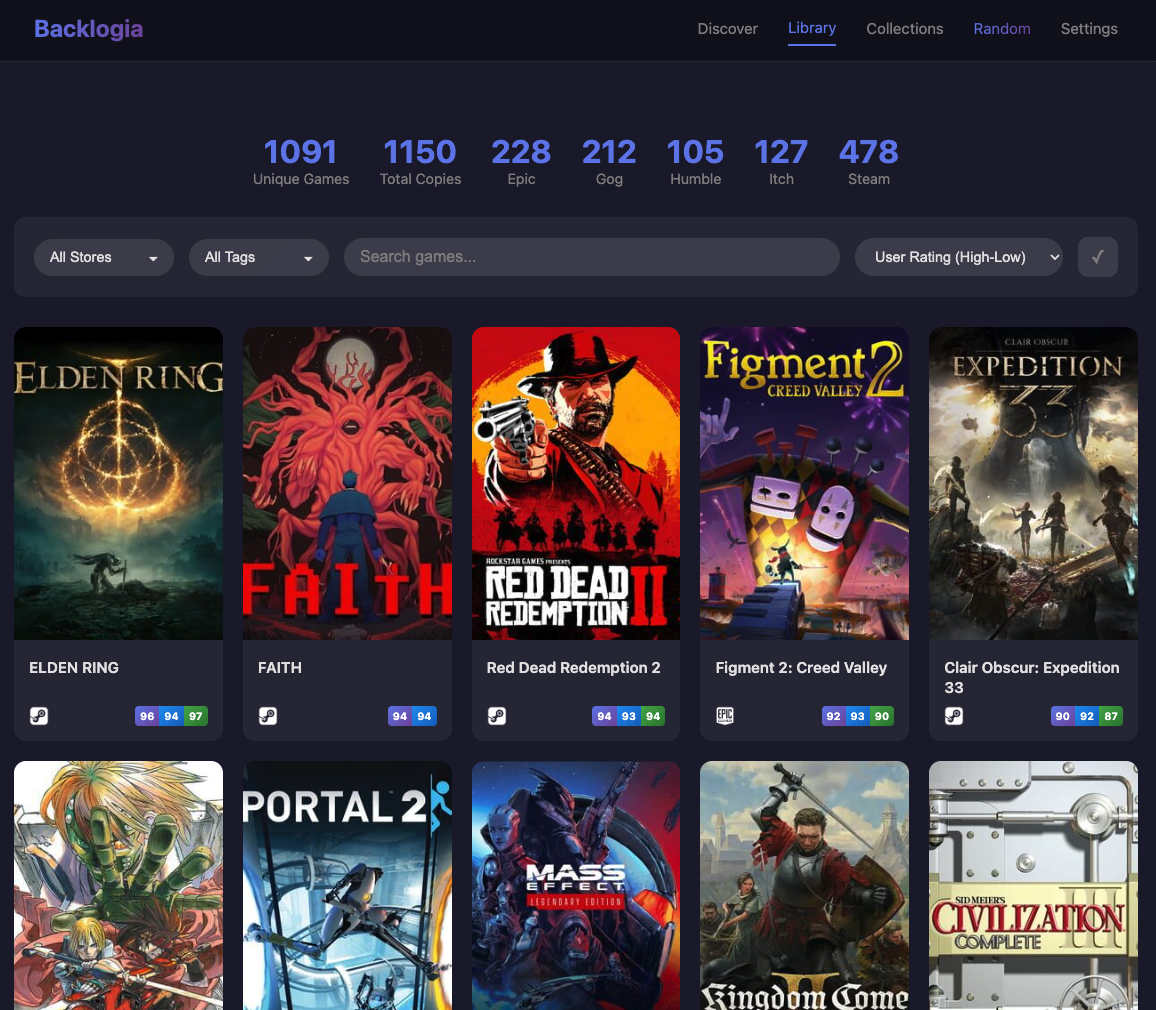
Saw this new app today: Backlogia
PbMmjng9WSuUZ6jb.png


Not really a game launcher, but more of a game sorting/discovery tool. Right now it just supports Epic, GoG, Humble, Itch.io & Steam, but others are planned for the future.
  • Pulls metadata for all your games, and prevents duplicate entries if you own the same game on multiple stores.
  • Custom filtering like popularity, aggregated ratings, hidden gem option (high rating, not popular), randomizer.
  • I see you can create custom collections for stuff you want to play, local multiplayer favorites, etc.
  • Discovery categories also update and change, so you can over time see different things in your backlog to knock out.
  • Either you can self-host with as docker app to remote into, or just locally run on your machine. Works like a web app through your browser.
Looked kinda neat, hope it could get integration with HowLongToBeat so you can see what games take less time to beat.
 
Oh, and ended up coming across some old news, but new to me on the post talking about Backlogia.

Apparently there is a Maxima Launcher open-source launcher project for EA games, and one of the Heroic Games Launcher devs mentioned working with them to integrate it once it's stable. That could be cool. The post was from 2024, so it might be a while though.
 
So I ran a few comparisons. First, Arkham Knight, max settings, native 4k. 175min/424max/297avg on Windows 11. 289min/486max/367avg on CachyOS. A pleasant surprise???


Next, Returnal, max settings, RT ON, at 4K DLAA 4.5 benchmarked out to an 84 FPS average (64 min) with Windows 11. 61 FPS average (48 min) on CachyOS. Pretty huge drop there.


So yeah, work to be done with Nvidia on the Linux side, but I had expected these results. From what I've read, there's DX12 and RT performance gaps with Linux on the Nvidia side right now. Some promising performance increases over the last year though so hopefully that continues through 2026. In the meantime, I'll probably go forward with my plan of playing older/less demanding games on Linux, and the stuff that really pushes my hardware I will play on Windows until Linux/Nvidia catches up.


Definitely going to play around a lot with emulation on Linux as well, as I've read promising things there.

I wanted to cross-reference the results in this video with my own experience, so I ran the in-game benchmark for Avatar on both CachyOS and Windows 11. RTX 5090, 4k, everything maxed out, ray tracing/ray reconstruction on, DLSS Quality.


On Cachy OS, I got 86FPS AVG / 72FPS MIN / 100FPS MAX

On Windows 11, I got 86FPS AVG / 73FPS MIN / 107FPS MAX


So these results are really within margin of error at this point. Super impressed with how well some of these modern DX12/RT games are running on Cachy tbh. If many games have made up this much ground already, I'm feeling really optimistic about how things might look a year from now.

Its got to vary a lot game to game that's a very good case for linux. Got any more?

Well as I learn Cachy more, I found that enabling NTSYNC and turning on the game-performance wrapper is recommended for all games. After turning both of these on, I re-ran my Returnal benchmark and got a 77 FPS average maxed out/DLAA/RT ON (vs 61 FPS before). That's only a 7 FPS drop compared to my 84 FPS Windows 11 bench, so in a much more reasonable range.


Will continue to do testing/share here. I'm having a lot of fun with this.
 
Last edited:
Apparently, the latest Nvidia driver has improved performance in some DX12 games.


benchmark-shows-gaming-on-nvidia-is-improving-v0-oioja6yls6eg1.png

That's actually good news. Because the open source MESA team has been kicking Nvidia's ass in the Linux Driver scene since Valve got involved. I've been using Linux for a long time, and back in 2007-2008, the only worthwhile graphics cards used to be the ones made by Nvidia as back in those days, the AMD (or ATi?) Linux drivers use to be complete shit. Generally Speaking Nvidia use to have the only stable video drivers on Linux. But they would always under perform compared to their Windows counterparts.

AMD drivers were garbage all the way up to AMD Radeon team open sourcing their driver stack and making them publicly available. This is where the MESA team came in. But I think it also had something to do with Valve putting a little pressure on AMD to do this. As Valve was pushing for better video card performance on Linux.

With recent benchmarks showing up on how much better AMD cards perform under Linux (in some cases they have better performance on Linux than Windows 11) I can see why Nvidia are starting to step their game up. As they also ported their GeForce Experience manager to Linux as well. Good news.
 
Correct if I am wrong but Virtual box vs native installation has significant performance and compatibility differences because drivers, right??
I would guess so. Even saving system options did not work always in some virtual machines. Linux Lite installed very poorly, while being probably a fine distro. Did not try proper gaming inside one, but some simple 2D one ran already noticeable worse.

Installed Lutris now. For PS Plus streaming. Now I have a couple of trash installed, since every thread directs you to new packages that might help. Wine-32bit, Vulkan-32... no idea why stuff is still stuck on 32-bit. Last log report said something about fonttype 2 is missing. Which may or may not come within some gcc compiler package. damn...
So, did not work on day one, since Lutris forgot to download GE-proton on top of wine-GE something something... at least that seemed to finally enable it to launch properly. Installer was through already before, but now finally the launcher actually launched the app. And while the performance is somewhat choppier than I think it is on Windows, it runs.
Lutris is also a hub for EGS, Gog, Ubiconnect, humble bundle, EA. At least gog works perfectly fine. Have not tried a game, but it shows my library. EGS does not get over the account authorization I think. Oauth2 or something. Kinda similar crap I sometimes have on my win-PC in work with my Outlook account. Did not try Ubi, since that should be already installed somewhere on behalf of Steam. Have to try EA and humble next. I wonder if Rockstar social, Nacon account and other crap would be running, but I am not eager to test just for testing. So steam and some PS Plus streaming is the stuff I wanted most.
 
Try using MPV, it supports HDR.

Been looking for a straight forward guide, thank you! If i use these in my config, wont it affect SDR videos though?

tone-mapping=hdr
target-peak=1000
hdr-compute-peak=yes

Is mpv smart enough to apply HDR specific config to a file it detects as 'HDR' or does it just apply the config to every file... :messenger_mr_smith_who_are_you_going_to_call:
 
Last edited:
Been looking for a straight forward guide, thank you! If i use these in my config, wont it affect SDR videos though?

tone-mapping=hdr
target-peak=1000
hdr-compute-peak=yes

Is mpv smart enough to apply HDR specific config to a file it detects as 'HDR' or does it just apply the config to every file... :messenger_mr_smith_who_are_you_going_to_call:

It doesn't switch to SDR, it identifies it by the video metadata. If you look closely, that same tutorial also explains how to enable Auto-HDR for SDR videos.
 
It doesn't switch to SDR, it identifies it by the video metadata. If you look closely, that same tutorial also explains how to enable Auto-HDR for SDR videos.
Apparently that section is not so good - essentially, its something like (on KDE with calibration) : hdr-compute-peak=yes target-colorspace-hint=yes gamut-mapping-mode=perceptual
 
Last edited:
I'm glad to see that the newer nvidia drivers potentially improve performance. My main concerns with Windows remain the bloat and the nature of what all the complaints have already said. I've installed Bazzite on the Xbox Ally. Once again, suspend works with no issues compared to Windows. If I'm about even on performance and the battery life and OS improvements Steam OS provides then I see less reason for Windows.

As soon as things become stable and usable with nvidia on Linux then I may very well do a Linux install on my main PC.
 
Well as I learn Cachy more, I found that enabling NTSYNC and turning on the game-performance wrapper is recommended for all games. After turning both of these on, I re-ran my Returnal benchmark and got a 77 FPS average maxed out/DLAA/RT ON (vs 61 FPS before). That's only a 7 FPS drop compared to my 84 FPS Windows 11 bench, so in a much more reasonable range.


Will continue to do testing/share here. I'm having a lot of fun with this.

Bit of an odd one, but next I've benchmarked Immortals: Fenyx Rising. I'm pretty much just trying find games I have with in-game benchmark tools to make the results as comparable as possible.

9800X3D / RTX 5090. Immortals: Fenyx Rising, 4K/max settings benchmark. NTSYNC/game-performance turned on. Proton-CachyOS compatibility layer.


Windows 11 completed with a 127FPS average
CachyOS
completed with a 130FPS average


Continued positive impressions with CachyOS.
 
Last edited:
Saw this new app today: Backlogia
PbMmjng9WSuUZ6jb.png


Not really a game launcher, but more of a game sorting/discovery tool. Right now it just supports Epic, GoG, Humble, Itch.io & Steam, but others are planned for the future.
  • Pulls metadata for all your games, and prevents duplicate entries if you own the same game on multiple stores.
  • Custom filtering like popularity, aggregated ratings, hidden gem option (high rating, not popular), randomizer.
  • I see you can create custom collections for stuff you want to play, local multiplayer favorites, etc.
  • Discovery categories also update and change, so you can over time see different things in your backlog to knock out.
  • Either you can self-host with as docker app to remote into, or just locally run on your machine. Works like a web app through your browser.
Looked kinda neat, hope it could get integration with HowLongToBeat so you can see what games take less time to beat.
Very cool. I've been using Cartridges as a library visualizer but this looks a lot more robust. Will check it out
 
Last edited:
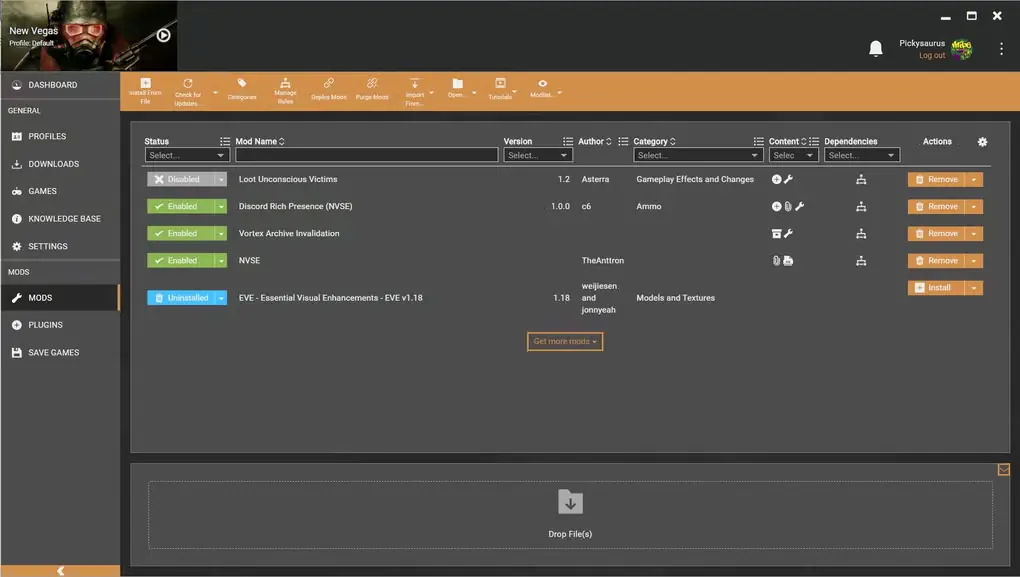
Saw this on SteamDeckHQ, apparently the newer mod manager that was also gonna support Linux from Nexus Mods is getting cancelled to focus on Vortex.

However, Nexus did mention this:

We're also committing to supporting Vortex on SteamOS. We'll be targeting vanilla Steam hardware like the Steam Deck and Steam Machine. We won't be officially supporting any other configurations, but as Vortex is an open source project community developers will be free to extend support for their preferred Linux distros as they please.

NexusMods Team

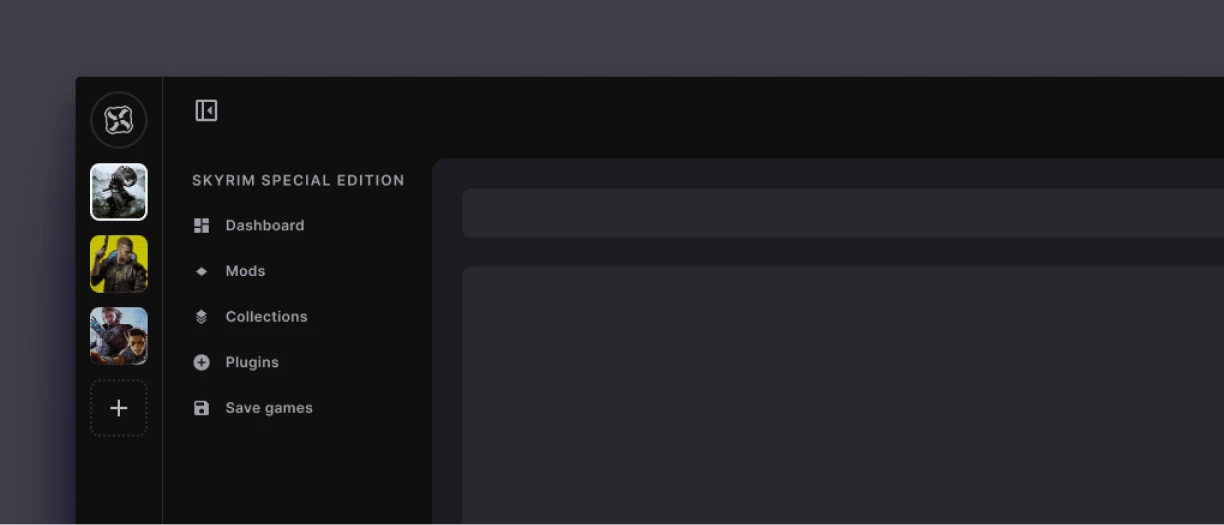
They even shared a proof of concept of the newer interface, and I'll post the current one on the left:
ow1kBJOQ3MWVYD6a.jpg
pv3WQIgerCS6ptrV.jpg


My bet is on probably CachyOS or Bazzite building support for this first after SteamOS. If Arch sees movement on this, definitely CachyOS, but Bazzite has Fedora Silverblue money behind them. Either way, an actual mod manager with money behind it will trickle down to all these Linux gaming distros likely in the not so distant future.
 
So I'm pretty much all set to go with everything working how I want it to with CachyOS. I had a decent amount niche apps doing various specific things on the Windows side, but I'm surprised how easy it was to bring over either the apps themselves or different versions of the apps that accomplish the same thing into CachyOS. I'm really missing nothing from Windows at this point.


With that said, I have one remaining issue and honestly it's a significant one:

I have a 4k/165hz display. VRR works totally fine on the Windows side @ 4k/165hz. With Cachy, if I turn Adaptive Sync to Automatic or Always @165hz, my screen goes black. 4k/165hz at a fixed refresh works fine. If I lower my refresh rate down to 120hz, however, I can turn on Adaptive Sync with no issues. RTX 5090 / Wayland / KDE Plasma.

Not sure if this is a known bug or if there's something I'm missing, but it does suck that I pretty much either can't play with VRR on (which makes 165hz kind of useless because there's no way I'm playing games at a locked 165hz), or if I turn VRR on I can't play at 165hz (which also sucks).


Did a lot of Googling/searching on this one, and I've found a decent number of posts asking similar things, but it seems no one has had an answer thus far. Thought I'd check here to see if anyhon has any thoughts or suggestions.
 
I've got CachyOS installed and had an issue with Yakuza 0 directors cut. It wouldn't work while installed on my 2nd SSD. Once I moved it to my primary it works fine.
 
Im REEEALLLYYY close to trying cachyos, I've got an external 2tb SSD that I can use for testing.

Ive currently got everything installed with windows on my 1tb internal - will I need to to reinstall everything to test playing on cachy?
Does anyone know or tried if rocket league works? I thought it didn't but protondb seems to say it works fine?

One other one, I read you can install a steam deck style OS version of cachy, anyone tried that at all?
 
I've got CachyOS installed and had an issue with Yakuza 0 directors cut. It wouldn't work while installed on my 2nd SSD. Once I moved it to my primary it works fine.
Other drive has to be in btrfs or ext4 not ntfs, otherwise games won't launch.

OS reads NTFS drives just fine with ntfs-3g installed but games won't launch. But you can store them on this drive no problem.

I formated the same drive in ext4 games launch no problem... On a second SSD.

So this "bug" is already known to me.

I wrote about it in this thread or the other Linux thread. I will probably put a note about it in new OT we're just starting making with Durin Durin and Crayon Crayon but so far its in really early stages, it could be months before we figure out what is useless essay rumble on and what actually will be published.
 
Last edited:
Im REEEALLLYYY close to trying cachyos, I've got an external 2tb SSD that I can use for testing.

Ive currently got everything installed with windows on my 1tb internal - will I need to to reinstall everything to test playing on cachy?
Does anyone know or tried if rocket league works? I thought it didn't but protondb seems to say it works fine?
You shouldn't have to reinstall everything. The filesystems for Windows and Linux are different, so you can't run them on your 1tb internal unless you made a separate linux partition, but I would VERY much recommend putting Linux on another physical drive if you're gonna dual-boot with windows. You can run CachyOS off an external SSD, but you will have some overhead due to usb, and those external SSDs can get hot unless you got one of those bigger enclosures that helps with heat.

I know that if you want to transfer your Steam games, you can either go to where steam is installed -> steamapps folder, and just copy all of the folders in there, including your appmanifest file, or use the backup option in Steam, and you can select whichever games you want to an external device. Then just transfer them from your external device to whatever storage you install CachyOS on, either copy/pasting the steamapps folder contents where they need to go, or restoring from the backups. Lastly, maybe verify the files for the games, since they have some extra stuff they'll download for proton.

CachyOS has a pretty good wiki to help with basic questions: wiki link

One other one, I read you can install a steam deck style OS version of cachy, anyone tried that at all?
Not sure if you're talking about the handheld version of CachyOS, or just the UI front-end that mimics the Steam Deck interface you can entirely navigate with your controller. If it's the latter, their wiki - essential packages in the "Tools & Stores" section has a command that installs a number of game applications, including Gamescope that is the microcompositor that enhances big picture mode to work like the Steam Deck interface. Be wary if you have an Nvidia card, it's still kinda buggy due to Nvidia's drives being closed, so the CachyOS devs don't know everything inside the driver to make it function properly, but intel or AMD GPUs should be work fine. Over time likely Nvidia will work proper with it though.
 
analog_future analog_future btw when you install older games and MangoHud isn't working.

Install:
Code:
sudo pacman -S lib32-mangohud

I actually just discovered, you have to have installed mangohud, goverlay and 32 bit mangohud for older 32 bit games for it to work...

And suddenly it started working in Warhammer 40k Space Marine 1 and The Technomancer, and I can cap my FPS as always, lmao.

I feel like a dumbass 🤦‍♂️.

I also just discovered that if yay -S tries to install the same app version that is on pacman mirror list.

You have to actually type

Code:
yay -S AUR/<package-name>

Since new Heroic version isn't yet in pacman mirrorlist I had to use AUR.
 
Last edited:
Top Bottom