I am checking the market for replacements for the Steam Deck OLED as I prefer to have a device that anti-cheat isn't a concern, I don't think I want to dual boot the Deck and just prefer to go with something that is a Windows based handheld for that price point of around $600. Is there anything out there that is worth getting that isn't a Steam Deck? What are some recommendations out there?
You can get the z1 extreme asus ROG first gen for pretty cheap these days. Would be fine for fortnite I would imagine. Screen is a downgrade from OLED steam deck though.
If you want to play Fortnite i'd recommend a Legion Go Gen 2 with the z2 Extreme, it's not cheap though, but the 32gb of LPDDR5X @8000MT/s is going to future proof you for the longest, the Z1 Extreme Rog Ally does ok for Fortnite but you do get hit with stutters, and big fps drops even when it seems to be holding 100/120hz pretty well for the most part (though i haven't played Fortnite on it for about a year now)
That xbox ally x is $1k isn't it? It seems like a waste of money especially if I like playing games on my ps5 pro for the most part. Xbox Ally might be worth it but I wonder if the screen size sucks or it's not that bad.
That xbox ally x is $1k isn't it? It seems like a waste of money especially if I like playing games on my ps5 pro for the most part. Xbox Ally might be worth it but I wonder if the screen size sucks or it's not that bad.
I think the Xbox one is a good deal as well. Z1E would have gotten you a little more performance, but in a handheld I want ergonomics. It's got controller handles instead of just being a slab. It's not like the Z1 Extreme would have unlocked any games you just couldn't play on the Xbox one. It'll crush Fortnite, COD and Esports stuff.
Between the Xbox version and the non-Xbox version of the Rog Ally (not X), the trade off is battery for performance. Xbox has a better battery. non-Xbox has better performance.
I think the Xbox one is a good deal as well. Z1E would have gotten you a little more performance, but in a handheld I want ergonomics. It's got controller handles instead of just being a slab. It's not like the Z1 Extreme would have unlocked any games you just couldn't play on the Xbox one. It'll crush Fortnite, COD and Esports stuff.
Battery is main advantage in my mind. You can buy a grip for the non-Xbox version that improves the ergonomics. I generally do that anyway just to provide protection.
Performance difference can be around 10 fps at times so yeah, depends on what types of games you are playing.
Battery is main advantage in my mind. You can buy a grip for the non-Xbox version that improves the ergonomics. I generally do that anyway just to provide protection.
Performance difference can be around 10 fps at times so yeah, depends on what types of games you are playing.
I'd have to see the benchmarks. an extra 10 fps in an already well running game or is it "unlocking" games that are just beyond a regular Z2? My biggest gripe with my Steam Deck is the ergonomics. I should shop around for some bolt-on handles I guess.
I'd have to see the benchmarks. an extra 10 fps in an already well running game or is it "unlocking" games that are just beyond a regular Z2? My biggest gripe with my Steam Deck is the ergonomics. I should shop around for some bolt-on handles I guess.
For most games, I don't think the difference is between making a game playable or not. It's just something to be aware of if you are going to play more demanding games.
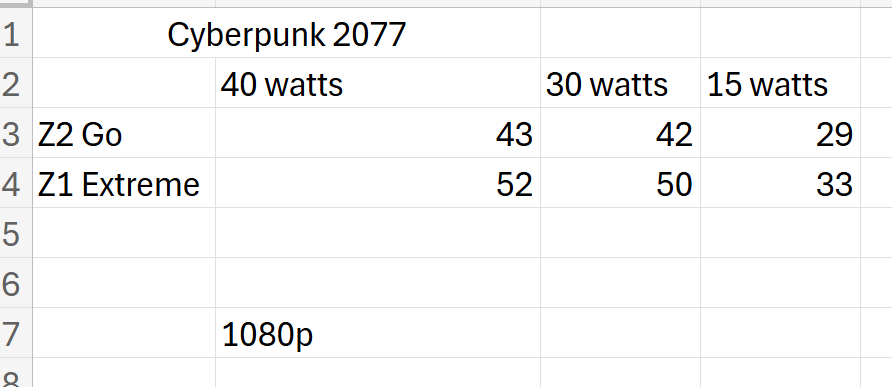
I did some benchmarking between the Z1 Extreme and the Z2 Go at various wattages. The Z2 Go is has four more GPU cores than the Z2 A so Rog Xbox Ally would not perform as well.
Legion Go S Z2 Go version is on sale at Best Buy for $499. I got an open box for $475, like new. The Z2 Go came with Windows but I installed Steam OS
Here are the benchmarks using the built in benchmarks for Black Myth Wukong, Cyberpunk 2077 and Shadow of the Tomb Raider. Run them all with the same settings, varying only the TDP (Simple Decky TDP)
Considering I paid $775 for the Z1 Extreme, I'm pretty sure I'm returning it and keeping the Z2 Go. Just can't justify $300 more for 4-9fps
For most games, I don't think the difference is between making a game playable or not. It's just something to be aware of if you are going to play more demanding games.
I did some benchmarking between the Z1 Extreme and the Z2 Go at various wattages. The Z2 Go is has four more GPU cores than the Z2 A so Rog Xbox Ally would not perform as well.
Legion Go S Z2 Go version is on sale at Best Buy for $499. I got an open box for $475, like new. The Z2 Go came with Windows but I installed Steam OS
Here are the benchmarks using the built in benchmarks for Black Myth Wukong, Cyberpunk 2077 and Shadow of the Tomb Raider. Run them all with the same settings, varying only the TDP (Simple Decky TDP)
Considering I paid $775 for the Z1 Extreme, I'm pretty sure I'm returning it and keeping the Z2 Go. Just can't justify $300 more for 4-9fps
Realistically Z1E may make some games a bit more playable at around 20W. 40FPS is a much better proposition vs low 30s. Or it may allow you to lock 30 frames vs uneven performance.
Realistically Z1E may make some games a bit more playable at around 20W. 40FPS is a much better proposition vs low 30s. Or it may allow you to lock 30 frames vs uneven performance.
Yeah, at that price point, you are going to have to trade off something. Sucks we don't have more options as the sub $600 market gets more harder to find a good option. Rog Xbox Ally is all that's available and it is literally shrinkflation in handheld form. Really shitty.
Open box or ebay is your best best. Speaking of....
FudgeIt
Check and see if you have any Lenovo Go S Z2 Go in your area. That may be a good alternative. Better performance than Rog Xbox Ally. 55wh vs 60wh so battery difference is neglible. Still not as powerful as Rog Ally, but still.....a decent option.
What do you mean defined WiFi system? the modem is in the garage and Optimum came to my house to put an extender which I hardwired my ps5 pro into. I also have a google mesh system (prior to the extender) that I had hard-wired to but apparently Optimum told me that this one was WIfi 6 or the one below the highest and would cap out at 500mb instead of the 1gb that I have with Optimum so he told me to use the extender. It was terrible.
I don't know what else to really do, as I have gotten no help from Optimum
Yeah, at that price point, you are going to have to trade off something. Sucks we don't have more options as the sub $600 market gets more harder to find a good option. Rog Xbox Ally is all that's available and it is literally shrinkflation in handheld form. Really shitty.
Open box or ebay is your best best. Speaking of....
FudgeIt
Check and see if you have any Lenovo Go S Z2 Go in your area. That may be a good alternative. Better performance than Rog Xbox Ally. 55wh vs 60wh so battery difference is neglible. Still not as powerful as Rog Ally, but still.....a decent option.
this lenovo looks good but it's a Steam OS, I don't think I can play fortnite or games required anticheat unless I dualboot (which I don't know if I want to do) or xcloud, which screw streaming right now?
this lenovo looks good but it's a Steam OS, I don't think I can play fortnite or games required anticheat unless I dualboot (which I don't know if I want to do) or xcloud, which screw streaming right now?
You can just erase the Steam OS partition and install Windows if you want. There is a Windows version of the same handheld so you can just download the drivers from Lenovo.
I had looked into this before. This is a summary of what I found.
The regular ROG Xbox Ally is shit. Not worth considering.
The ROG Ally X non-Xbox is great, but oddly hard to find for a reasonable price. I often saw it close enough to the Xbox version to make the upgrade worth it, IMO. If you can find it for <$600, though, that's a different story.
The ROG Ally Z1E is a solid pick when on discount, but you really need to budget for a battery upgrade unless you plan on being tethered. There are kits available that simplify the install.
The Legion Go S is quite good and might be a good choice when on sale.
Many of the Windows handhelds are basically dog shit, even if the specs on paper are better than the Steam Deck. They often have bad software, mediocre battery life, or some other combination of issues that make them a non-starter.
The Windows handheld experience is not great and nowhere close to being as easy as SteamOS. Microsoft fundamentally has no idea what it's doing in this space and it shows.
I had looked into this before. This is a summary of what I found.
The regular ROG Xbox Ally is shit. Not worth considering.
The ROG Ally X non-Xbox is great, but oddly hard to find for a reasonable price. I often saw it close enough to the Xbox version to make the upgrade worth it, IMO. If you can find it for <$600, though, that's a different story.
The ROG Ally Z1E is a solid pick when on discount, but you really need to budget for a battery upgrade unless you plan on being tethered. There are kits available that simplify the install.
The Legion Go S is quite good and might be a good choice when on sale.
Many of the Windows handhelds are basically dog shit, even if the specs on paper are better than the Steam Deck. They often have bad software, mediocre battery life, or some other combination of issues that make them a non-starter.
The Windows handheld experience is not great and nowhere close to being as easy as SteamOS. Microsoft fundamentally has no idea what it's doing in this space and it shows.
I had looked into this before. This is a summary of what I found.
The regular ROG Xbox Ally is shit. Not worth considering.
The ROG Ally X non-Xbox is great, but oddly hard to find for a reasonable price. I often saw it close enough to the Xbox version to make the upgrade worth it, IMO. If you can find it for <$600, though, that's a different story.
The ROG Ally Z1E is a solid pick when on discount, but you really need to budget for a battery upgrade unless you plan on being tethered. There are kits available that simplify the install.
The Legion Go S is quite good and might be a good choice when on sale.
Many of the Windows handhelds are basically dog shit, even if the specs on paper are better than the Steam Deck. They often have bad software, mediocre battery life, or some other combination of issues that make them a non-starter.
The Windows handheld experience is not great and nowhere close to being as easy as SteamOS. Microsoft fundamentally has no idea what it's doing in this space and it shows.
I think the Xbox one is a good deal as well. Z1E would have gotten you a little more performance, but in a handheld I want ergonomics. It's got controller handles instead of just being a slab. It's not like the Z1 Extreme would have unlocked any games you just couldn't play on the Xbox one. It'll crush Fortnite, COD and Esports stuff.
I can't tell if I'm an idiot or not. I feel like I made ecosystems so complicated. I love my ps5 pro, wish there was a damn handheld that downloaded shit. Damn you Sony!!!
I bought 2 months used MSI claw A7+ ( same processor as 8 AI lunar lake. With 1 tb upgraded in it for 430$ US. Not really sure why I bought it but I can play my PC games on it when I am far from the PC and it's really powerful ( same as extreme Z2 ) . Great device really
1080p 120 hz screen with VRR. Nvidia GFN can take full advantage of it at 1080/120 GFN Ultimate tier.
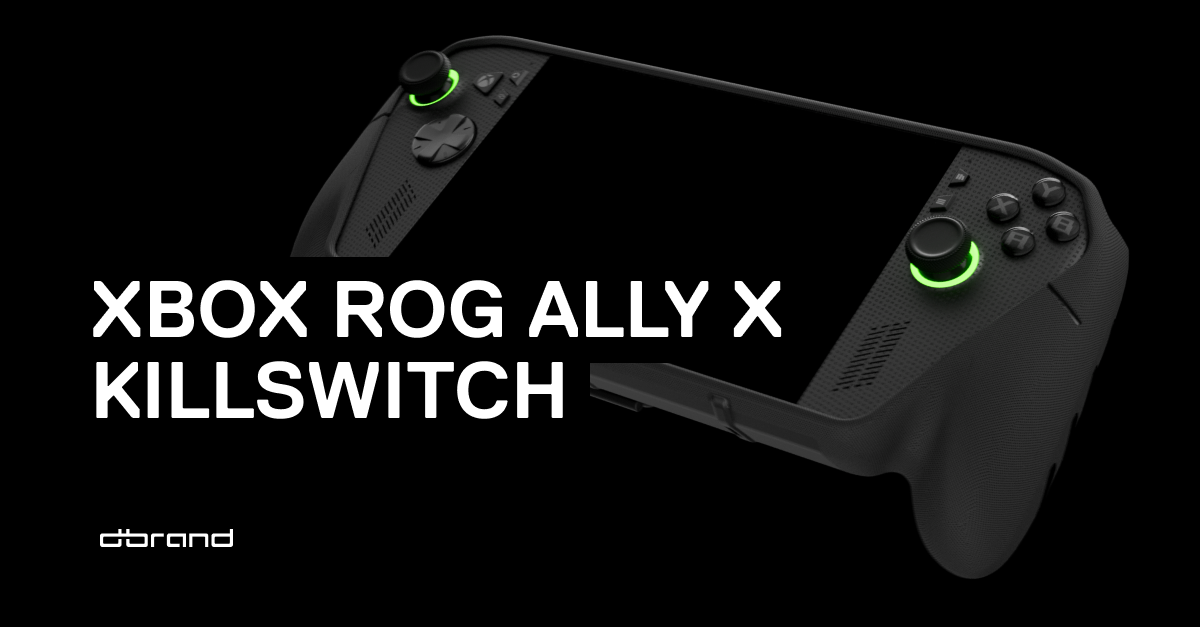
Streaming increases battery life by three fold. And most importantly, the device is more comfortable to hold, and D-Brand worked with Asus and MS to make a case that is perfect fit, the KillSwitch. The case adds even better grip.
The Windows handheld experience is not great and nowhere close to being as easy as SteamOS. Microsoft fundamentally has no idea what it's doing in this space and it shows.
Yeah.
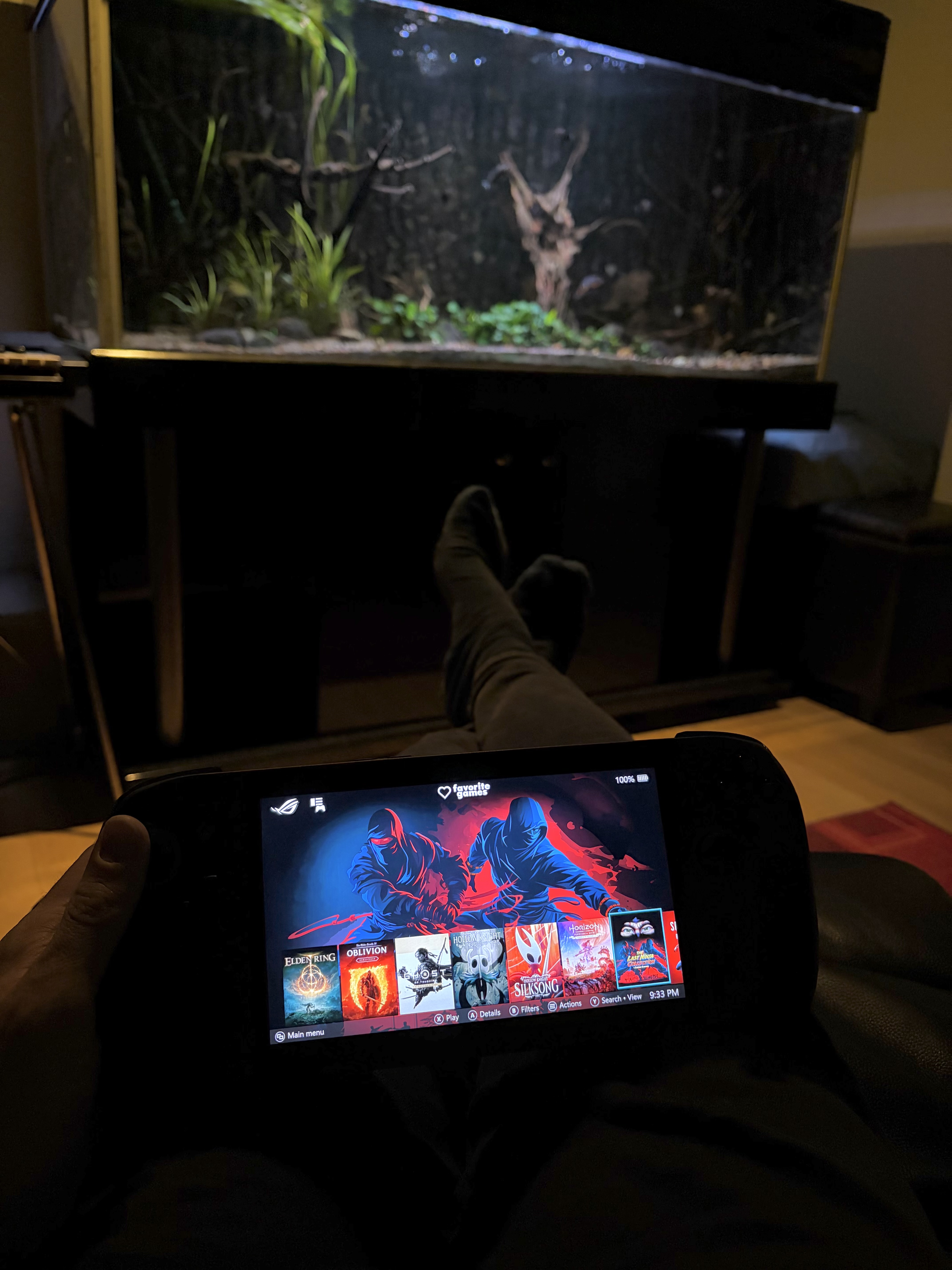
I installed Playnite on ROG Xbox Ally X after 1 hour of using Xbox App. Worked great! I don't care about Fortnite but having Gamepass is important for me. Bad pic but the menu can be customized to be a ton better than Xbox App, booting right into this, no Windows unless you want to fiddle with settings.
Unfortunately my device had an A button that occasionally got stuck when pressing it (not uncommon on non-Xbox devices going by some googling) so I sent it back and asked for a refund.
Yeah.
I installed Playnite on ROG Xbox Ally X after 1 hour of using Xbox App. Worked great! I don't care about Fortnite but having Gamepass is important for me. Bad pic but the menu can be customized to be a ton better than Xbox App, booting right into this, no Windows unless you want to fiddle with settings.
Unfortunately my device had an A button that occasionally got stuck when pressing it (not uncommon on non-Xbox devices going by some googling) so I sent it back and asked for a refund.
What do you mean defined WiFi system? the modem is in the garage and Optimum came to my house to put an extender which I hardwired my ps5 pro into. I also have a google mesh system (prior to the extender) that I had hard-wired to but apparently Optimum told me that this one was WIfi 6 or the one below the highest and would cap out at 500mb instead of the 1gb that I have with Optimum so he told me to use the extender. It was terrible.
I don't know what else to really do, as I have gotten no help from Optimum
Basically best bet is to run Ethernet cable from garage to a switch (Ethernet one not Nintendo ). This can be 1Gb or 2.5 Gb, depends on your internet connection. These are usually pretty cheap (you can just get unmanaged).
Plug in your PS5 into that (hard wired) and also your Google Mesh APs. Make sure to run Mesh in AP mode as otherwise you will have double NAT.
Alternatively if you have a few Ethernet ports on your Google setup, forget the Ethernet switch. Put the internet router in the garage in Bridge mode and use your Google Mesh system as the main firewall. Run PS5 directly to the main node. Not familiar with the Google setup so can't quite say what's best bet. But you can take your situation, drop it into ChatGPT/Gemini and get some ideas as well.
I can't tell if I'm an idiot or not. I feel like I made ecosystems so complicated. I love my ps5 pro, wish there was a damn handheld that downloaded shit. Damn you Sony!!!
Basically best bet is to run Ethernet cable from garage to a switch (Ethernet one not Nintendo ). This can be 1Gb or 2.5 Gb, depends on your internet connection. These are usually pretty cheap (you can just get unmanaged).
Plug in your PS5 into that (hard wired) and also your Google Mesh APs. Make sure to run Mesh in AP mode as otherwise you will have double NAT.
Alternatively if you have a few Ethernet ports on your Google setup, forget the Ethernet switch. Put the internet router in the garage in Bridge mode and use your Google Mesh system as the main firewall. Run PS5 directly to the main node. Not familiar with the Google setup so can't quite say what's best bet. But you can take your situation, drop it into ChatGPT/Gemini and get some ideas as well.
3rd party drop ship warning: A few months again Best Buy started partnering with 3rd party drop shippers which post their product offerings in line with those sold directly by Best Buy. IF you have an issue with one of those purchased items return timing on your paid funds is impacted by this and can take up to 30 days to process.
Just a word of warning on this one. I found a great open box deal in this around the holidays.
Loved the device and it quickly replaced my work travel setup…until the B button stopped working after about 40 hours of Diablo 4.
Took it back, got another one…same shit. Got a third one and the Y button went out.
While I loved the hardware and performance I cannot recommend this one.
Currently travel with the Rog ally z1 extreme (16gb version with an upgraded ssd). This one is as steal at $450 open box imo.
I have the other Lenovo legion (detachable controllers) and the Xbox rog ally's (24gb ram version), and the MSI claw X, and almost every Android handled (anyneo's, retro pockets, etc) and a few steam decks.
I cannot find the sweet sport that the Legion Go S fit into. The other high end devices have atrocious battery and battery throttling, and the ROG (despite its hardware) performs terrible for me with windows or steam os installed on it.
Fortnite may not be what I really need. I might just stick to the steam deck OLED for now. I just wish it had a 1080p screen. I feel lik some fans look way too fucking tiny for $600 after taxes. I sort of don't care about OLED at this point.
I'm looking at Best Buy for a replacement at this point but I don't know. Maybe the Legion Go S is what I'd go with at this point because it's a bit more powerful and I can dock it…
3rd party drop ship warning: A few months again Best Buy started partnering with 3rd party drop shippers which post their product offerings in line with those sold directly by Best Buy. IF you have an issue with one of those purchased items return timing on your paid funds is impacted by this and can take up to 30 days to process.
Just a word of warning on this one. I found a great open box deal in this around the holidays.
Loved the device and it quickly replaced my work travel setup…until the B button stopped working after about 40 hours of Diablo 4.
Took it back, got another one…same shit. Got a third one and the Y button went out.
While I loved the hardware and performance I cannot recommend this one.
Currently travel with the Rog ally z1 extreme (16gb version with an upgraded ssd). This one is as steal at $450 open box imo.
I have the other Lenovo legion (detachable controllers) and the Xbox rog ally's (24gb ram version), and the MSI claw X, and almost every Android handled (anyneo's, retro pockets, etc) and a few steam decks.
I cannot find the sweet sport that the Legion Go S fit into. The other high end devices have atrocious battery and battery throttling, and the ROG (despite its hardware) performs terrible for me with windows or steam os installed on it.
I have had good luck with the Legion Go S z1e so far. I do not use it constantly and dock it sometimes when I do, so maybe I just have not worn out the buttons yet.
I have had good luck with the Legion Go S z1e so far. I do not use it constantly and dock it sometimes when I do, so maybe I just have not worn out the buttons yet.
Fortnite may not be what I really need. I might just stick to the steam deck OLED for now. I just wish it had a 1080p screen. I feel lik some fans look way too fucking tiny for $600 after taxes. I sort of don't care about OLED at this point.
I'm looking at Best Buy for a replacement at this point but I don't know. Maybe the Legion Go S is what I'd go with at this point because it's a bit more powerful and I can dock it…
The Go S is a bit more expensive than your original $600 price point but if you can find a good deal on one, I love mine. The extra screen size it fantastic but it feels slightly bulkier to me than the Steam Deck. I have gotten decent performance out of it docked.
Another thing you can look into, I believe you can install Windows on the Steam Deck. I never did it, but I have seen videos of people that have. Just a thought.
The one I am using now is the windows variant with a 4TB ssd installed. It is dual boot however and I spend most of my time in Steam os…dip into windows for other storefronts or kernel locked drm games.
I do not recommend upgrading the SSD at this time…will cost you as much as the unit (or 4x more) in some cases. I've used these hand held for a few years and have a bunch of replacement nvm drives hence the large upgrade on my end.
Ah yes you're referring to this one? Interesting. That may be a nice device. I know it was on sale one time for $650 I thought. I'll keep an eye out. Maybe I won't need it for Fortnite and can just stick to playing that on my console for now










 ). This can be 1Gb or 2.5 Gb, depends on your internet connection. These are usually pretty cheap (you can just get unmanaged).


