• Hey Guest. Check out your NeoGAF Wrapped 2025 results here!

Apple iPad 2 |OT|

Status
Not open for further replies.
Crisis averted. Last night I left my iPad 2 on the plane in the magazine holder after flying back from Arizona to LA. Luckily, I called up, left a message, and United Express had my iPad in Seattle and has sent it back on overnight delivery. I still believe in humanity.
 
donkey show said:
Crisis averted. Last night I left my iPad 2 on the plane in the magazine holder after flying back from Arizona to LA. Luckily, I called up, left a message, and United Express had my iPad in Seattle and has sent it back on overnight delivery. I still believe in humanity.

That's fantastic!! Make sure you write a letter and/or make a phonecall to their customer service management and let them know how happy you are. That way they'll be inclined to do this every time.
 
Opera updated. So fast. So good...

Edit: gifs not working in funny pics thread... And spoilers not showing though... Don't really care about the gaming/off topic tab frames..
 
Outtrigger888 said:
Guy at my work dropped his iphone4 and the screen cracked. Took it to apple and they gave him a new one no questions asked. Is apple always like this?
Same thing happened with my iPhone a few months ago.

It certainly helps if you are still under warranty (either the standard or the extra AppleCare) and they probably won't do it more than once, but that's definitely a replacement that Apple has been making for a lot of people.
 
outunderthestars said:
Contemplating buying an ipad original gen from Apple for $350

I really just want one for pdfs, magazines, and board games.


Can I get by with an original generation ipad or should I save up for a new gen model?
I actually wanted a tablet with a high DPI display, but when it turned out that the iPad 2 still has the same low res display, I got the first gen iPad for 290 and I'm pretty happy with it for now. Don't have many tabs and apps open and you should get a good experience. That said, I really just bought it, because I wanted a tablet right now and I'll get the 3rd gen iPad on day one, if possible.
 
outunderthestars said:
Contemplating buying an ipad original gen from Apple for $350

I really just want one for pdfs, magazines, and board games.


Can I get by with an original generation ipad or should I save up for a new gen model?

you can definitely get by with an original model. the speed benefits of the second one aren't super noticeable for those tasks.

the weight and thickness improvements have a bigger impact for those tasks than pure speed. but they may not be worth 150 bucks to everyone.
 
outunderthestars said:
Contemplating buying an ipad original gen from Apple for $350

I really just want one for pdfs, magazines, and board games.


Can I get by with an original generation ipad or should I save up for a new gen model?
Get the iPad2, or wait for 3.
 
Zzoram said:
So do most gaffers buy an extended warranty or not?
No, don't do it. Sell your iPad after a year, losing 100-150 in value, that you can partially make up by not spending that $70-$100 on an extended warranty. You can then use that to get a next gen tablet that comes with another free year of warranty.
 
I really miss my iPad for the reading experience. May have to purchase one in the near future again. The Kindle, whilst it had the e-ink screen, was horrible to use.
 
outunderthestars said:
Contemplating buying an ipad original gen from Apple for $350

I really just want one for pdfs, magazines, and board games.


Can I get by with an original generation ipad or should I save up for a new gen model?
OG. You'll gain nothing from the new model between now and the iPad3 unless fancy super-magazine publishing (you didn't mean comics, right? Because the OG has no problems with those) really, REALLY takes off.
 
I compared reading on the kindle app versus ibooks and for me, ibooks is the clear winner.

The look of ibooks is so much nicer. It just "feels" like I am "reading" a book, not words on a screen.
 
Just got my Incipio Smart Feather case, I love it. It adds very little thickness to the iPad and is compatible with the smartcover. One gripe I have with the Incipio over the Switcheasy Coverbuddy is that you have to take the Incipio cover off to take off the Smart Cover. Also, if you want the Smart Cover on, you have to put it on first before the Incipio case. Though I've found that its flexible enough for you to bend the case off and add the Smart Cover on.

The benefit of this is that, unlike the Switch easy, there is no "gap" with the iPad back exposed for the Smart Cover. The Incipio and the Smart Cover looks like its one unit without the gap.

I dont see people posting pictures in this thread so I HOPE its ok that I embed some here. If not, just let me know and Ill take them off.


http://www.flickr.com/photos/63420053@N06/5766302128/ http://www.flickr.com/people/63420053@N06/


http://www.flickr.com/photos/63420053@N06/5765753657/http://www.flickr.com/people/63420053@N06/


http://www.flickr.com/photos/63420053@N06/5765753053/http://www.flickr.com/people/63420053@N06/


http://www.flickr.com/photos/63420053@N06/5766300126/http://www.flickr.com/people/63420053@N06/


http://www.flickr.com/photos/63420053@N06/5766299476/http://www.flickr.com/people/63420053@N06/


http://www.flickr.com/photos/63420053@N06/5765750891/http://www.flickr.com/people/63420053@N06/
 
Badgerst3 said:
I compared reading on the kindle app versus ibooks and for me, ibooks is the clear winner.

The look of ibooks is so much nicer. It just "feels" like I am "reading" a book, not words on a screen.
Agreed. Too bad I have to buy from Kindle store to sync across to my Kindle.
 
Badgerst3 said:
I compared reading on the kindle app versus ibooks and for me, ibooks is the clear winner.

The look of ibooks is so much nicer. It just "feels" like I am "reading" a book, not words on a screen.

Is there anyway to auto-sort the books on the bookshelf (not list view)? Either by author, title, or most recent? It seems to throw all my books in there at random, and sorting them by hand would take forever.
 
Hey guys, I'm wondering if my iPad 2 has a faulty screen or I'm just one of the few who notices these things and it's happening to all of them... because I can't find many examples of people complaining about this:

I am getting some form of image retention or screen burn. I thought lcds were pretty much immune to this, but I am being shown otherwise. It is most noticeable against grey, but the outline of the keyboard is clearly retained on the screen. I first noticed it when playing Canabalt, on the grey start screen. The keyboard is clearly visible. It tends to fade after a while of not bringing up the keys, but it never fully goes away. Even after a cold boot I can make out the keyboard outline as soon as there is any large area of grey on the screen. I tend to use the imo messaging app a lot, so the on-screen keyboard is often sat there for extended periods, but this really shouldn't be a problem, right?

Anyone else seeing signs of screen burn? If this is not normal then I'll be tempted to exchange my unit.
 
Pazuzu9 said:
Hey guys, I'm wondering if my iPad 2 has a faulty screen or I'm just one of the few who notices these things and it's happening to all of them... because I can't find many examples of people complaining about this:

I am getting some form of image retention or screen burn. I thought lcds were pretty much immune to this, but I am being shown otherwise. It is most noticeable against grey, but the outline of the keyboard is clearly retained on the screen. I first noticed it when playing Canabalt, on the grey start screen. The keyboard is clearly visible. It tends to fade after a while of not bringing up the keys, but it never fully goes away. Even after a cold boot I can make out the keyboard outline as soon as there is any large area of grey on the screen. I tend to use the imo messaging app a lot, so the on-screen keyboard is often sat there for extended periods, but this really shouldn't be a problem, right?

Anyone else seeing signs of screen burn? If this is not normal then I'll be tempted to exchange my unit.
There shouldn't be screen burn. That's very odd.
 
numble said:
There shouldn't be screen burn. That's very odd.
Indeed. But I think it's one of those things that people might not notice in everyday use, so I'd like to do a check...

All iPad 2 owners (particularly those who type a lot, e.g. when using an instant messaging app like imo), please take a look at this image, make it fullscreen, and turn up your brightness so it's easier to spot.

Is anyone seeing any kind of outline of the on-screen keyboard? Thanks.
 
Pazuzu9 said:
Anyone else seeing signs of screen burn? If this is not normal then I'll be tempted to exchange my unit.
I'd exchange it.

I don't see any keyboard outline in your picture.
 
Zzoram said:
the iPad 2 is so hard to find, I'm so scared that the first one I get will be defective in some way.
In Apple stores?

I guess I got lucky with my school bookstore's computer shop. Picked up a 64 GB Wifi without any lines or reservation. A few weeks later I randomly walked in on my way elsewhere and picked up another iPad, a 16 GB Wifi.
 
Ken said:
In Apple stores?

I guess I got lucky with my school bookstore's computer shop. Picked up a 64 GB Wifi without any lines or reservation. A few weeks later I randomly walked in on my way elsewhere and picked up another iPad, a 16 GB Wifi.

I don't have an Apple Store nearby, but nobody else is getting more than a few at a time and they sell them immediately.

I want a 16GB wifi since I see no reason to pay $100 or $200 more for storage that shouldn't matter on a device that is ideal to stream content with.
 
Freestyler said:
That's fantastic!! Make sure you write a letter and/or make a phonecall to their customer service management and let them know how happy you are. That way they'll be inclined to do this every time.
Just got it back today and called up the csm and gave them a glowing review. So good to have my whitey back. :3
 
HenryGale said:
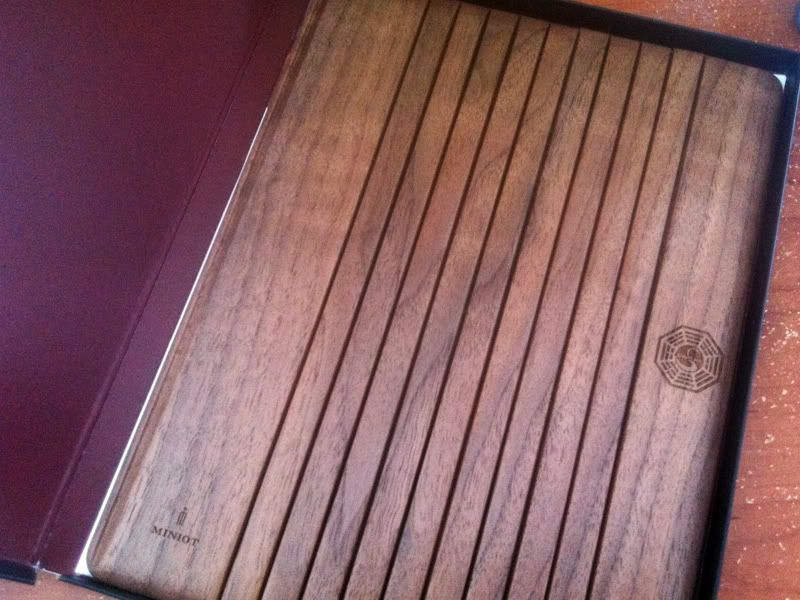
Look what came today!! I love it.

IMG_1661.jpg

http://i932.photobucket.com/albums/ad162/CHumes1/IMG_1666.jpg

So here's the breakdown. I DO NOT agree with the reviews. So this is mine.

Pros
-Super light weight
-Great look
-higher angles
-Better hand for holding
-Looks slick
-Nice and durable

Cons
-Doesn't snap around so you have to turn it (not a big deal)
-wouldn't wanna hold the ipad from the cover only (you're dumb to do it even with a smart cover)


My biggest two gripes with the reviews online are this. Look below as to how it is curled up. I'd like to address the biggest complaints of the cover.

http://i932.photobucket.com/albums/...obucket.com/albums/ad162/CHumes1/IMG_1670.jpg

In two reviews I saw they opened it and immediately tried the folding like with a smart cover. Except this IS NOT a smart cover. You need to apply a bit more pressure.

My first three attempts to fold it were met with resistance form the wood as it had yet to be bent back. After that It clicks in perfectly overtime. I just have to click it down, unlike the smart cover since there is actually weight to this one, and needs to be broken int.

With that said I can easily after a few attempts, now having it loosened up (was very stiff at first) it clicks and holds together perfectly. I did have the same problem as both unboxing reviews for about 1 min. After that the wood was nice and loose and locks into position. Which makes sense really. So that debunks the first part of the negative reviews.

Next is using it folded back. Which actually works well. If you do it right.

http://i932.photobucket.com/albums/ad162/CHumes1/IMG_1673.jpg

Apparently people didn't think of this. Since it doesn't clip on the sides, the other problem found with the cover was you have to take it off if you don't want to use it as a stand. Well if you just flip the cover around you can see above it will hold onto the ipad. All the people int he review tried to do the same movements as with the apple smart cover, which shouldn't work since this has a different magnetic positioning.

Now if they had only flipped it around, with the microfiber on the inside, they would have seen the cover hangs onto the back and can be held magazine style, just like the smart cover.

So all in all I love it. It holds very well, looks amazing and I love the solid feel.

Don't they look great for one another!
http://i932.photobucket.com/albums/ad162/CHumes1/IMG_1681.jpg
http://i932.photobucket.com/albums/ad162/CHumes1/photo-9.jpg

So... does it leave dirt streaks on the iPad screen?
 
Zzoram said:
So do most gaffers buy an extended warranty or not?
As mentioned, just sell and buy a new iPad. It's like a super extended warranty!
Zzoram said:
So is PDF reading on iPad 2 really good? Anyone like it better than PC or printing them on paper?
Generally yeah. Reading on a computer feels like living in stone ages for me now, while compared to paper it's more of simple convenience thing (transfer and just read on iPad vs printing and carrying however many pages).
Pazuzu9 said:
Indeed. But I think it's one of those things that people might not notice in everyday use, so I'd like to do a check...

All iPad 2 owners (particularly those who type a lot, e.g. when using an instant messaging app like imo), please take a look at this image, make it fullscreen, and turn up your brightness so it's easier to spot.

Is anyone seeing any kind of outline of the on-screen keyboard? Thanks.
Tried taking a screenshot? I'm wondering if the software bugged out for you and is showing a keyboard mask everywhere or something, if so that might show up in a screenshot. Otherwise just try restarting or restoring I guess (you'd have to do that anyways if you swap it).
 
donkey show said:
Are you talking about through its white borders?

That or through the edges of the screen. Apparently light leaking through the edges of the screen has been a problem for many iPad 2 owners of both colors. You can only see it in a dark room though, but that affects movie watching in bed at night.
 
JayDub said:
Just got my Incipio Smart Feather case, I love it. It adds very little thickness to the iPad and is compatible with the smartcover. One gripe I have with the Incipio over the Switcheasy Coverbuddy is that you have to take the Incipio cover off to take off the Smart Cover. Also, if you want the Smart Cover on, you have to put it on first before the Incipio case. Though I've found that its flexible enough for you to bend the case off and add the Smart Cover on.

The benefit of this is that, unlike the Switch easy, there is no "gap" with the iPad back exposed for the Smart Cover. The Incipio and the Smart Cover looks like its one unit without the gap.

I dont see people posting pictures in this thread so I HOPE its ok that I embed some here. If not, just let me know and Ill take them off.


http://www.flickr.com/photos/63420053@N06/5766302128/ http://www.flickr.com/people/63420053@N06/


http://www.flickr.com/photos/63420053@N06/5765753657/http://www.flickr.com/people/63420053@N06/


http://www.flickr.com/photos/63420053@N06/5765753053/http://www.flickr.com/people/63420053@N06/


http://www.flickr.com/photos/63420053@N06/5766300126/http://www.flickr.com/people/63420053@N06/


http://www.flickr.com/photos/63420053@N06/5766299476/http://www.flickr.com/people/63420053@N06/


http://www.flickr.com/photos/63420053@N06/5765750891/http://www.flickr.com/people/63420053@N06/
i like this combo. would love a case like that, although buying both the apple smart cover AND this seems kind of expensive and pointless if you don't already have a smart cover to begin with. are there any cases out there that are just like this but one piece, covering both the front and back?
 
japtor said:
Tried taking a screenshot? I'm wondering if the software bugged out for you and is showing a keyboard mask everywhere or something, if so that might show up in a screenshot. Otherwise just try restarting or restoring I guess (you'd have to do that anyways if you swap it).
I didn't think there was a way of screencapping the iPad display... I guess... there's an app for that? :P

I'm confident that it is not a software bug. In addition to the keyboard, I can also see evidence of the imo contacts list on the right hand side, as well as some lines along the top where you get the address bar in safari or whatever. These are all very slight - they're impossible to see when viewing moving images, or static, colourful images. But when you know they're gonna show up every time you see plain shades of grey, it becomes hard to ignore.
 
Pazuzu9 said:
I didn't think there was a way of screencapping the iPad display... I guess... there's an app for that? :P

I'm confident that it is not a software bug. In addition to the keyboard, I can also see evidence of the imo contacts list on the right hand side, as well as some lines along the top where you get the address bar in safari or whatever. These are all very slight - they're impossible to see when viewing moving images, or static, colourful images. But when you know they're gonna show up every time you see plain shades of grey, it becomes hard to ignore.
Hold the home button and press the power button. The screen will show an effect to make it clear you took a screenshot. It saves the screens into your the standard Photo app.

Retention is definitely possible with LCDs but really should never be as bad as you've mentioned. It sounds like there is some sort of voltage retention or regulation damage; you need to get it swapped ASAP.
 
Ah! Thanks for the tip. Yep, the screencap shows nothing wrong... will have to replace this damn thing. Just hope that the Apple store have one to exchange for me... they're still pretty hard to come by I hear? (UK here)
 
Status
Not open for further replies.
Top Bottom