• Hey Guest. Check out your NeoGAF Wrapped 2025 results here!

Apple iPad 2 |OT|

Status
Not open for further replies.
My iPad's back already looks like my MacBook Pro's. So I don't care about covering it anymore. I still want a screen protector smart cover as soon as I can get one.

jts said:
Okay. Still, a lot can be done to improve that on the software side (except for image heavy webpages). Here's hoping that iOS 5 brings a new and improved Safari.

On other subject, the multitouch gestures really get in the way of some apps :( One of them being GarageBand (or any other screen mashing music app). Disabled the gestures and already miss them sorely.

Hard to think of what Apple can do to eventually fix this. Clearly they haven't abandoned the idea so here's also hoping that multitouch gestures will be a shining feature of iOS 5.
If you have the current Xcode tools, you can enable gestures RIGHT NOW!

Sadly, I only had Xcode 3.2.6 and screwed my iPad up to the point I had to reset it. But if you have 4.0, it will work fine. You just have to turn on "Use for development".

It gives you four-finger swipe gestures for Next App, Previous App, Home and Task Manager. It was awesome for the 10 minutes I could use it. But I'll wait for iOS 5 to put them in officially without needing a hack. (Since I don't want to pay $5 for tools I won't even use.)

Best part is they're fast. Switching apps is faster than using the manager and waiting for the animation, so it's not really a slow reload. It loads the apps very fast back into memory.
 
I see that Dodo case is available for iPad 2 now but it seems like it doesn't have the instant-on magnet cover. Can't see myself buying a case that doesn't have that feature, it's the coolest thing about smart covers.
 
suffah said:
Probably pretty hard unless your friend is willing to get there super early and camp out.

That's what I was afraid of. Well I'll just ask my friend to pop in in one of the stores and see if they happen to have one, otherwise I'll just wait.

Thanks for the info mate.
 
Gary Whitta said:
I see that Dodo case is available for iPad 2 now but it seems like it doesn't have the instant-on magnet cover. Can't see myself buying a case that doesn't have that feature, it's the coolest thing about smart covers.
No reason to get a Dodocase when it's the thickest and least feature-filled Moleskine-style case. These have the magnet cover and other stuff:
Portenzo
Octavo
 
CoachKevin said:
Gary- What do you recommend to protect the back? My iPad 2 comes Monday and I ordered an invisible shield. Is that the best option? I already have smart cover for it.

BTW- Loved the iPad 2 discussion on Tested this week! Norm will come around.
I'm using a Zagg on the back and smart cover on the front- working great so far. Don't buy a front Zagg though.
 
Jasoco said:
If you have the current Xcode tools, you can enable gestures RIGHT NOW!

Sadly, I only had Xcode 3.2.6 and screwed my iPad up to the point I had to reset it. But if you have 4.0, it will work fine. You just have to turn on "Use for development".

It gives you four-finger swipe gestures for Next App, Previous App, Home and Task Manager. It was awesome for the 10 minutes I could use it. But I'll wait for iOS 5 to put them in officially without needing a hack. (Since I don't want to pay $5 for tools I won't even use.)

Best part is they're fast. Switching apps is faster than using the manager and waiting for the animation, so it's not really a slow reload. It loads the apps very fast back into memory.
Nah brah, I probably didn't explain myself right. I do have the gestures toggle on my settings. Also, I enabled it with Xcode 3.2.3. I clicked on "use for development", it returned some error (on the Mac), and I was like, whatever, thought it didn't work.

Next thing I knew the toggle was right there. And yes, the gestures are a bless.
 
I totally didn't know that iOS 4.3 lets you make the external switch into a rotation lock again. Having it set to mute made no sense to me; besides, you can hold down the volume down switch to mute quickly anyway.
 
a couple announced smart cover style cases with back protection for those who care.

no mention of magnets, though. it'd be damn stupid to release these without the magnets but anyone considering getting one of these should ask to find out.

http://www.macally.com/EN/Product/ArticleShow.asp?ArticleID=387

gjL7N.jpg


http://www.speckproducts.com/tablet-ipad-cases/ipad-2-cases/pixelskin-hd-wrap-ipad-case-black.html

74Aggl.jpg
 
I think it's funny that so many cases manufacturer's immediately duplicate certain designs.

It's not like the smart cover couldn't have been done (sans magnetic parts to the iPad itself) on the iPad1. It's not so much the magnets that I like, but rather the elegant way it triangles into different uses. It makes the old iPad apple case look a bit clumsy the way it slots into a big wedge.

If apple did that design for the first iPad case, i'd probably have liked it more.

I wasn't really all that enamoured on the smart cover previously. Sure it's neat, but I didn't think awesome. But on reflecting, it's like a cover for the front that converts into a stand, and then folds back out to be easily storable with the iPad. It really is kind of genius.
 
I'm looking more closely at those flap designs I posted.

they're not gonna be stable as stands with three panels. you end up with a sharp edge from one panel resting as the support for the stand structure. it'd be easy to shift that edge around and the thing collapses.

you'll note that apple used 4 panels and then made sure that the 4th panel would stick with magnets to the piece it was mating against. that gives it stability.

I bet that unless these panels add some sort of method of locking in the panels when folded - or add a 4th panel - they're gonna work like crap as stands.
 
So what do you guys hope to see in iOS 5?

This was taken from the wishlist on the macrumors forum , but I agree with just about all of them...

A filesystem is my biggest want for the next iOS. Not like on a Mac where you see system files and other stuff, but just a users home folder. A place that all apps can access and load and save files from/to. That way if I have a document it doesn't have to exist inside of each app in order to access it. (1 copy in DropBox, 1 in Pages, 1 in DocsToGo, etc.) Also it means that Apples apps would be able to share files with DropBox or any other file syncing service. Then get rid of the file sharing in iTunes and instead just have the disk show up as an external drive. - Originally posted by Jclardy. And please let us drag and drop videos and photos from any PC directly into the iPad's video/photos folder without having to go through iTunes and syncing everything. It sucks that we can't just simply drag and drop a photo from a friend's computer into the Phone. When plugged in, allow Windows/OSX to recognize and use the iPad as a 32GB/64GB/128GB Mass/USB Storage Device with access to the file system.

Improved notifications, notifications that don't disappear immediately (like push notifications that you see on the unlock screen), let the notifications show up somewhere and have a dismiss all button or something like that. Example: http://vimeo.com/18568684

Updated Lock Screen That Displays Number of Texts, Emails & Custom Widgets of our choice

Dynamic Weather, Temp, Stocks and Clock Icons (or Widgets)

"I want the ipad to integrate more with the iphone. I've said it all along. There should be a software setting on the iphone that pushes all texts, notifications to the ipad. So I dont have to go back and forth just to reply to text messages. Now blackberry is doing it with the playbook but I figured apple would have done this from the get go with the ipad." - CrAkd

OTA/Wireless iTunes and Syncing - file-soup solution allowing apps to push and pull files from a cloud-synced file-collection

Output iPad to HDTVs/Apple TV scaled or downconverted to display at 1080p either OTA/Wirelessly or via a mini-HDMI port or a Dock Connector to VGA adapter

Higher contrast ratio and much lower minimum brightness - The iPad is way too bright to use in the dark, it gives me headaches. iBooks goes much lower (by making all the colours grey basically) but this should also be possible system-wide, in Safari etc

Wireless Hotspots without Jailbreaking

Arrow keys on the keyboard so we can correct mistakes without having to delete everything.

Improved/More Voice Commands - Siri Assistant/Voice controls across the board: Turn off Bluetooth, Turn off Wifi, Launch Safari, Open a Website, Create Notes and Type/Dictate Emails with our voice (integrated voice to text input across the board).

Full use of Bluetooth. It sucks that we can't BT a photo or anything else to other devices.

Let us Add (via Bluetooth, iTunes apps, Dropbox and other Apps), Delete and Rename Music, Videos from our iPads directly.

Let us download files from Safari(or other apps) and store them on the phone in a centralized location, then be able to access them without Safari on my Mac/PC for easy file sharing/swapping.

Apple, let us organize the 100+ photos and videos on our iPads into separate folders/albums. Add a file system for organizing and reordering videos, music, photos (into albums), and documents (PDF, DOC, PAGES), and other files for email attachments directly on the phone itself without having to sync it, and giving the files names and describtions. Adding a file system would allow us to attach any filetype to emails we are sending out. They could also improve the controls over podcasts so that we could delete podcasts or rearrange the order of podcasts and make iTunes collect them by topic, or mark podcasts for deletion upon syncing and make notes on podcasts. These features should be combined with and enabled in a Network File Browser.

More Email Functionality - Simple things like flagging emails for follow up or by category are still missing, auto-categorizing emails based on where they are sent from, and other business class email functionality would be nice. The option to let us download all of the text in our emails off the email client onto the phone permanently would also be a welcome change. Currently, searching through your emails in the iPad is broken and really does not work. If you're looking for a specific email you sent out or received more than a week ago, you have no choice but to use your computer to find it. I still can’t view only unread emails. I still can’t configure a unique email signature for each different email account.

The option to schedule your emails so that they can be sent/delivered at a specific time in the future would be very useful and very welcome. I would love to be able to write up an email at 1 am and schedule it to be sent out at 9AM the next morning. Likewise, I would love to schedule an email to myself to be sent a week from now reminding myself that I need to contact someone at that specific date.

The ability to download themes from the app store. Users who are tired of the stale look of iOS and who want to customize the device with a theme that has been tested for functionality will be happy as will theme makers, and Apple makes some money from the sales.

Additional functionality for iMovie, Aperature and iLife on the iPad - So that you can transport and continue to work on your iLife projects on your iPad while still retaining most if not all of the same functionality that you do on a Mac.

Improved Calender Functionality - Syncing with Google calendars, Yahoo calendars, Facebook, or whatever you want to sync it with. Ability to see each calendar together and separated, to be able to turn on a countdown on certain events and to have a way to text appointments or some other method of sharing things you intend to do with other people. Also, features such as a week view, showing appt names in the month view, ability to copy appts to other dates, a good todo list (Shows blocks of time on a list of days of your schedule), being able to see, in month view, colored dots representing my different calendars so that users don't have to click on a day to see that I have *something* for work or church or any other specific calendar scheduled that day, a landscape week agenda view, tasks, ability to remind you of tasks, and location abilities that if it senses you are near a task/appt it can remind you.

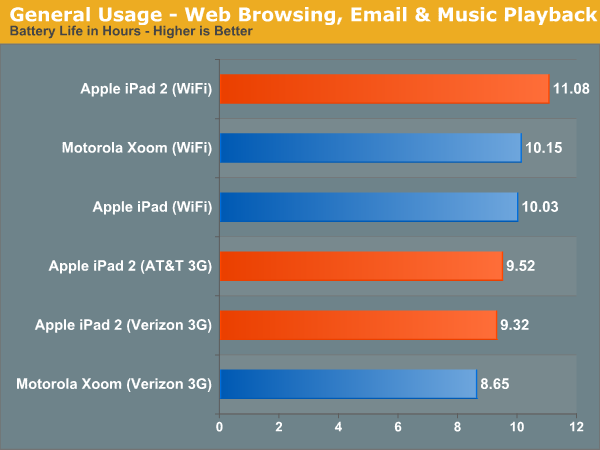
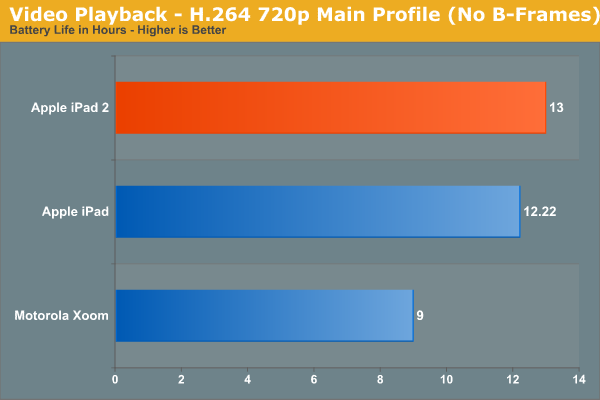
Automatically downclock the iPad during menial tasks and preserve battery life

Ability to use it like a Magic Trackpad or 10/Gui Keyboard device with other apple devices

Allow us to connect our iPad to a PC/TV to function as an external hard drive to store and move content

Letting us rename apps, remove app names entirely, and more customizations to how the UI, home screen, lock screen, dock, slider, icons, dynamic wallpapers etc all look

Multiple Profiles based on gps location (at work vs. home), time, what BT device connected etc.

A Competitor to BlackBerry Enterprise Server Software Suite and the ability to run two iPhone apps next to each other simultanously on the iPad thanks to it's higher resolution display.

A Button to kill all multitasking apps at once to instantly free up RAM. It’s ridiculous that there is no way to close an app without saving its state. The iPad is easily the worst when it comes to clutter in the app manager, and the solution would be all too simple. How about a long-tap on the home button to close an app, fellas?

Let us delete/hide the built in stocks and youtube (and other) apps, so that we can replace youtube app with m.youtube.com web app (looks and works a lot better).

Integrate a way to interact with a printer to print out emails, photos, pdfs and other documents, and integrate a built in business card scanner, bar code scanner . You simply take a photograph of the business card (or bar code) and press add to contact list and it will fill in the contact info. Also, integrate Session Initiation Protocol (SIP) support.

GPS built in, comparable to Andriod phones at least

Smarter OS (ex: if you type an email and can't send it because you're not connected to the internet, instead of the message "Cannot send mail," etc. it should say "Will send message in background once internet connection is reestablished,' better file management and connectivity with the cloud, better autocorrect, faster code execution via the new xCode 4 and other similar functions. And most importantly, stop deleting new contacts I added to my phone and the changes I made to my notes on my phone just because I sync them with Gmail. Likewise, Safari should let us set it to open new tabs in the background. The OS should be smart enough to keep the most recent version of the contacts and notes, not automatically delete all new contacts and replace the notes on the phone with the ones in gmail even though the file on the notes was modified and changed more recently. These issue absolutely need to be fixed before wireless iTunes syncing is implemented or it's going to lead to a lot of frustrated iPad users.

Better Autocorrect + Customizable Dictionary - The iPad has the worst auto-correct system ever devised by man. It doesn’t learn from habits, which means I have to reject the same changes repeatedly, forever. I also can’t add words. And speaking of the address book, I better not have any contacts prefaced with “Mr.” If I do, I need to be prepared to constantly reject an unwanted change every time I type the word “me”.

Better Youtube - Youtube functions very poorly on the iPadThe quality is horrendous and slow, especially over 3G.

Support in the native iPad video player for all the codecs that VLC supports

Additional buttons on the multitasking launch bar and revamped UI to switch between apps that provide a quicker way to shut off bluetooth, wifi, brightness and enable/disable airplane mode. If I want to save some precious battery life and disable wifi when I’m not using it, it takes five taps. Compare that to Android, where disabling wifi takes a single tap on a widget.

Enable natively the other legitimate functionality that people currently jailbreak /unlock their iOS devices and iPads for...
Facetime over 3G/4G and letting us make video calls to non-iOS devices
Custom SMS, MMS, email and other custom alert sounds
Protect or hide apps (for privacy without having to lock my entire phone)
Unlimited Safari Tabs (current limit is eight)

Also, what would you say the odds of seeing a 2000+ X 1500+ resolution screen?

It just sounds like it would be too pricy and a battery hog. I just want the resolution to catch up with or slightly beat the Xoom. So for me, a 1280x960 resolution screen would be fine. This is exactly a 1.25x scale increase over the current resolution. This allows playback of 720p (1280x720) movies downloaded from iTunes without downscaling.

And this is exactly twice the iPhone 4's resolution (640x960) so you could allow people to have two iphone apps open side by side, simultanously, and multitask, with no loss of resolution. People can read email while browsing online etc.

If you use interpolation, current apps will look fantastic when upscaled by 1.25x.

There is a very good article on this topic...

http://blog.yafla.com/Apples_Embarrassing_Predicament/

1920x1440 also works well. Would allow for 1080p playback without downscaling. :)
 
mrkgoo said:
I think it's funny that so many cases manufacturer's immediately duplicate certain designs.

It's not like the smart cover couldn't have been done (sans magnetic parts to the iPad itself) on the iPad1. It's not so much the magnets that I like, but rather the elegant way it triangles into different uses. It makes the old iPad apple case look a bit clumsy the way it slots into a big wedge.

If apple did that design for the first iPad case, i'd probably have liked it more.

I wasn't really all that enamoured on the smart cover previously. Sure it's neat, but I didn't think awesome. But on reflecting, it's like a cover for the front that converts into a stand, and then folds back out to be easily storable with the iPad. It really is kind of genius.
Um, you do know about the incase prior art, right? Anyway, I'm not a fan of the triangle folding because it doesn't pin properly to the back. I'm hoping to see a smart cover that can be rolled up instead of folded.
 
LCfiner said:
I'm looking more closely at those flap designs I posted.

they're not gonna be stable as stands with three panels. you end up with a sharp edge from one panel resting as the support for the stand structure. it'd be easy to shift that edge around and the thing collapses.

you'll note that apple used 4 panels and then made sure that the 4th panel would stick with magnets to the piece it was mating against. that gives it stability.

I bet that unless these panels add some sort of method of locking in the panels when folded - or add a 4th panel - they're gonna work like crap as stands.

I thought the same thing at first, but then I figure the share end just wedges into the hinge/corner. If so, it's not likely just going to slip out of there. At least in keyboard mode. Might be a bit precarious as a movie stand.

That top design looks weird though, as the triangle formed doesn't sit directly beneat the iPad.
 
Apple's never going to use an in-between resolution bump. it'll be doubled, just like the iphone 4's screen. this has been talked about before. and please note that Apple has already created 2X art assets for their iPad iBooks app. they're prepping for a 266 ppi screen.


and there will never be a mode that has two iphone or ipad apps running side by side. it goes against the entire philosophy of the device.

I can understand why you, personally, might want it as a "power suer" type thing, but it is not a reasonable request for Apple considering how they are positioning the product.


edit: @ mrkgoo. that movie stand image is what got me thinking, actually. looks like a sketched mockup without a real design behind it that figures out how to keep the flaps stable.
 
Charred Greyface said:
Um, you do know about the incase prior art, right? Anyway, I'm not a fan of the triangle folding because it doesn't pin properly to the back. I'm hoping to see a smart cover that can be rolled up instead of folded.

I guess I didn't! That's pretty cool. Not a fan of big plastic back covers, but the idea is neat.

Still, I don't use a case (except for transport and storage). I liked the idea that it's a foldable stand that clips onto the iPad (as storage) mostly. I have this weid plastic stand that came with my case, but it's mostly pooh, an donly works in one way.
 
I put a $100 down at Best Buy and reserved my iPad2 last Monday/Tuesday and they called me today and said that they got my model in stock and to come pick it up. Sitting right here on my desk.

I got the Verizon 16 gig 3G Black model. They got 4 of them in today and I was on the list. Seems to be the model least people are picking up so that worked in my favor.

Going to put Air Video on it and take a crap watching some Parks and Recreation.
 
Twilight Princess said:
Guys, I'm sure this has been asked plenty of times but how do I see spoiler tagged stuff on an iPad?

People insert a bookmarklet or something that has java code.

Or use the neogaf web app.
 
LCfiner said:
and there will never be a mode that has two iphone or ipad apps running side by side. it goes against the entire philosophy of the device.

I can understand why you, personally, might want it as a "power suer" type thing, but it is not a reasonable request for Apple considering how they are positioning the product.


edit: @ mrkgoo. that movie stand image is what got me thinking, actually. looks like a sketched mockup without a real design behind it that figures out how to keep the flaps stable.
It's a reasonable request because the only way it could happen on iOS is if Apple allows it. 'Power users' are still customers after all and if Apple is taking our money then we get to request features too. Many power users would honestly admit that they don't want Apple to waste their time developing a theme manager or icon switcher for iOS. However, we are used to a relatively open platform like Mac OSX where third party efforts, like Themepark and Candybar, can fill that niche and nobody requests it from Apple (except that Apple not make the process so difficult). Nobody is bugging Google to add features like multiple phone app windows to Android because the opportunity is there for others to do so (an opportunity that is indeed being taken advantage of). If Apple insists on all control then they must open their ears to all requests.
 
Kuran said:
I think they are getting little to no shipments..

My 3-4 week iPad case shipped a week early, I wonder if the same will apply to my iPad..

Why would you put a giant sticker on your iPad? Just enjoy the design of it! Who cares if it gets a few scratches..

The person you're going to sell it to when you upgrade to iPad3.
 
I would like for iOS5 to have some multitouch gestures added to the browsing experience and for them to fix the notification system. But they need redo task switching.
 
Copernicus said:
How many apps can you go through with the swipes? Is it all of them in the recent list?
It works exactly like OS X Lion.

LCfiner said:
a couple announced smart cover style cases with back protection for those who care.

no mention of magnets, though. it'd be damn stupid to release these without the magnets but anyone considering getting one of these should ask to find out.

http://www.macally.com/EN/Product/ArticleShow.asp?ArticleID=387

http://i.imgur.com/gjL7N.jpg[IMG]

[url]http://www.speckproducts.com/tablet-ipad-cases/ipad-2-cases/pixelskin-hd-wrap-ipad-case-black.html[/url]

[IMG]http://i.imgur.com/74Aggl.jpg[IMG][/QUOTE]
Does it have magnets? No magnets, no deal.
 
LCfiner said:
I'm looking more closely at those flap designs I posted.

they're not gonna be stable as stands with three panels. you end up with a sharp edge from one panel resting as the support for the stand structure. it'd be easy to shift that edge around and the thing collapses.

you'll note that apple used 4 panels and then made sure that the 4th panel would stick with magnets to the piece it was mating against. that gives it stability.

I bet that unless these panels add some sort of method of locking in the panels when folded - or add a 4th panel - they're gonna work like crap as stands.
You're better off going with an actual smart cover and then something separate for the back if you need it. The smart cover is such a good stand. Rock solid.
 
Twilight Princess said:
It'd be so awesome if this thing has flash on it.
For porn...
You're not visiting the right sites. And if you're talking about stuff you downloaded, well, there are apps for that.
 
Success! I was able to find an iPad 2 for my fiancee. A Target had one left, white 16 GB, which was exactly what she wanted.

Now to find myself a 32 GB one.
 
Gary Whitta said:
No red leather smart covers at the Apple store today, it was the only color sold out :(

That means they had pink. Pink and black are the only color combination worth considering besides orange and white.
 
Status
Not open for further replies.
Top Bottom