• Hey Guest. Check out your NeoGAF Wrapped 2025 results here!

Gamer-approved laptop recommendation thread

Status
Not open for further replies.
RoadHazard said:
Ok, for gaming I can see why that would be true. But what about for other purposes? I do of course want to do some gaming on the laptop, but I'll also be running Photoshop, recording music, etc. It seems to me like when doing pretty much anything other than gaming (i.e. running multiple other applications at once), the GE620DX would come out on top?

I realize this is a thread for gaming laptops, and I do want the laptop to be usable for that, but it being a good all-rounder for a couple of years to come is slightly more important to me.
So then the situation is that you'll need to choose the one which is going to benefit the most overall. The i7 will hold a pretty huge advantage in CS3/Lightroom, and most other technical apps.

The 460M's advantage aside, that 555m is not a "measly" GPU. It's going to be a bit below the 8800 GT, which is still above decent in mobile terms.
 
K.Jack said:
So then the situation is that you'll need to choose the one which is going to benefit the most overall. The i7 will hold a pretty huge advantage in CS3/Lightroom, and most other technical apps.

The 460M's advantage aside, that 555m is not a "measly" GPU. It's going to be a bit below the 8800 GT, which is still above decent in mobile terms.

Hmm, yeah... Looking at some benchmarks for the 555M, it looks like it's capable of running most current games at medium to high settings with acceptable framerates (by which I mean 30+). Obviously the 460M would perform better in every scenario, but I'll have to decide if that's worth the other drawbacks of the G53 (take a look at my updated previous post for a bit more on this).
 
Road Hazard, have you looked at the Sager 8130? It seems like the perfect match for what you want.
8130.jpg

I bought mine from Malibal and it works great.
http://www.malibal.com/boutique/pc/configurePrd.asp?idProduct=285 (They call it a Lotus P151HM1 but it is exactly the same as the Sager 8130)

Base Specs for $1,174
15.6" 1920 x 1080 FHD LED Backlit Matte Display
Intel® Core™ i5-2410M, 3MB L3 Cache, 2.3-2.9GHz
(8GB) 8192MB, PC3-10660/1333MHz DDR3 - 2 SO-DIMM
NVIDIA® GeForce® GTX 560M 1.5GB GDDR5
500GB 7200rpm 2.5" SATA 300
8X Multi DVD+/-R/RW RAM Dual-Layer Drive
Windows 7 Home Premium
 
QuantumBro said:
Road Hazard, have you looked at the Sager 8130? It seems like the perfect match for what you want.
8130.jpg

I bought mine from Malibal and it works great.
http://www.malibal.com/boutique/pc/configurePrd.asp?idProduct=285 (They call it a Lotus P151HM1 but it is exactly the same as the Sager 8130)

Base Specs for $1,174
15.6" 1920 x 1080 FHD LED Backlit Matte Display
Intel® Core™ i5-2410M, 3MB L3 Cache, 2.3-2.9GHz
(8GB) 8192MB, PC3-10660/1333MHz DDR3 - 2 SO-DIMM
NVIDIA® GeForce® GTX 560M 1.5GB GDDR5
500GB 7200rpm 2.5" SATA 300
8X Multi DVD+/-R/RW RAM Dual-Layer Drive
Windows 7 Home Premium

That looks sweet, but I really don't feel like importing a laptop. I want to buy it here in Sweden, it's just much simpler if anything goes wrong. Plus, I want a Swedish keyboard. Unfortunately I don't think anyone here in Sweden really offers custom laptops like that.
 
RoadHazard said:
That looks sweet, but I really don't feel like importing a laptop. I want to buy it here in Sweden, it's just much simpler if anything goes wrong. Plus, I want a Swedish keyboard. Unfortunately I don't think anyone here in Sweden really offers custom laptops like that.
A google search led me here http://www.ggsdata.se/
 
Unless you are going to output to another screen I'd stay away from the Asus. Had a G51JX-A1 and dam the screen was bad. You couldn't look at it straight on without the screen going negative at the top or the bottom. Maybe they got newer screen now but I wouldn't go near it unless I could see it 1st.
 
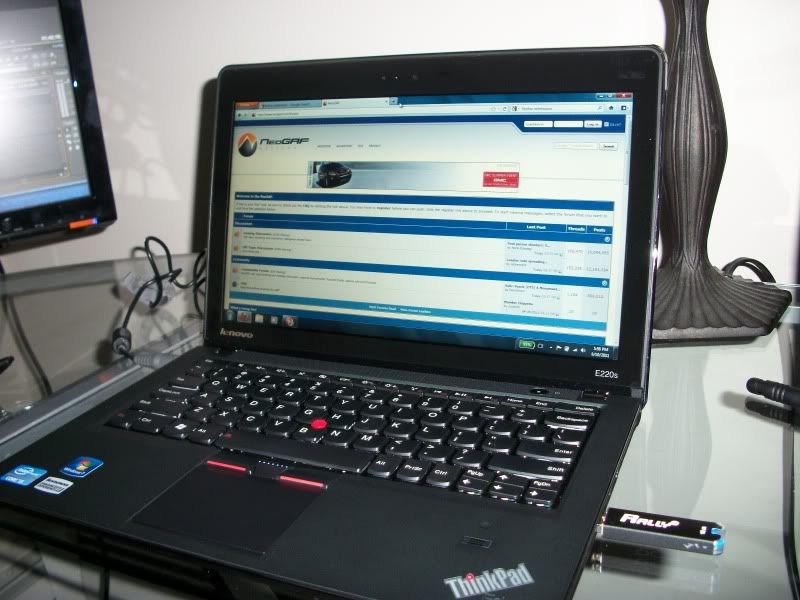
I thought I would throw in another recommendation. I got my Lenovo Thinkpad Edge e220s today and love it. It is basically built like a thinkpad but with a slimmer design, built in battery, and more consumer friendly things like controls replacing the F keys.

Got L4D2 running natively on High settings very smoothly.

100_0471.jpg
 
Should i jump on this XPS? I looked up the card and it feels powerful enough for me, and the allure of a free xbox is making me jump right now. I have no idea when my old jet engine version will be die, and i am coming up on the opportunity to sell it, with some of my accessories, to a friend for $175.
 
ShaneDude said:
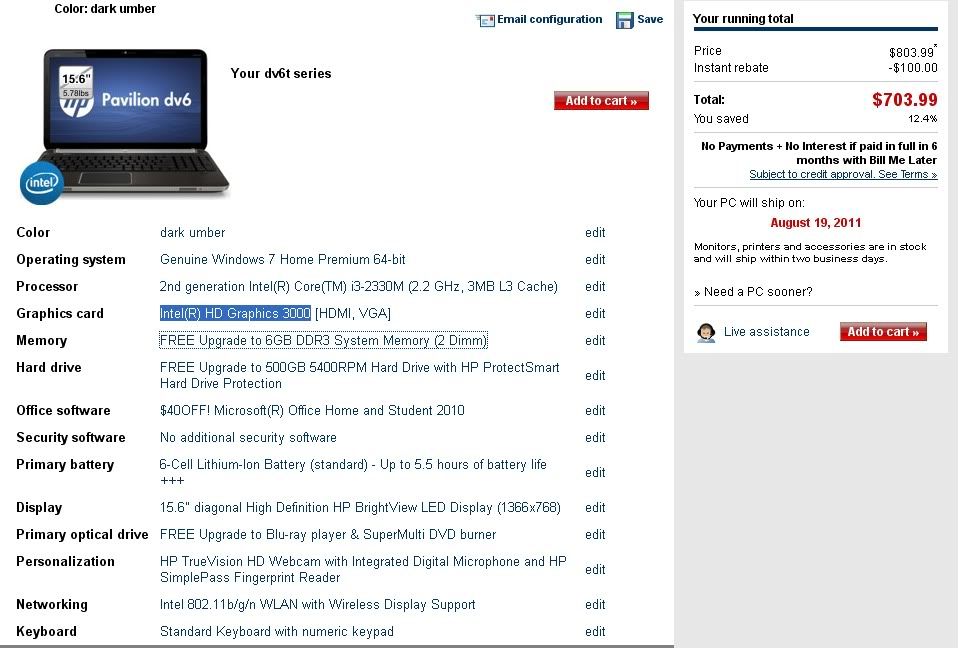
Hey gaf,I needed to get a new laptop for school and i'm going to be a chemical engineering major. My dad's paying for it, and this was his budget. Is this good for gaming? Or is it not a good computer at all? I don't know much about computer parts.

dv6t.jpg

You can do better. Upgrade the i3 to a i5-2410m, the intel HD 3000 to a Radeon HD 6490m, the 6-Cell to a 9-Cell Lithium-Ion Battery.

And use this coupon 15% off: NBG48945

I'll come out with taxes (California) at $704 total.
 
QuantumBro said:
Road Hazard, have you looked at the Sager 8130? It seems like the perfect match for what you want.
http://www.sagernotebook.com/images/products/8130.jpg[IMG]
I bought mine from Malibal and it works great.
[url]http://www.malibal.com/boutique/pc/configurePrd.asp?idProduct=285[/url] (They call it a Lotus P151HM1 but it is exactly the same as the Sager 8130)

Base Specs for $1,174
15.6" 1920 x 1080 FHD LED Backlit Matte Display
Intel® Core™ i5-2410M, 3MB L3 Cache, 2.3-2.9GHz
(8GB) 8192MB, PC3-10660/1333MHz DDR3 - 2 SO-DIMM
NVIDIA® GeForce® GTX 560M 1.5GB GDDR5
500GB 7200rpm 2.5" SATA 300
8X Multi DVD+/-R/RW RAM Dual-Layer Drive
Windows 7 Home Premium[/QUOTE]

Do you find it heavy to carry it daily? What I'm looking for is a good gaming laptop and at the same time I want to be able to carry it with me to the university without feeling the burden of its weight. I know that I can find lighter laptops, but I think their performance won't be as much as I need (especially for gaming).
 
K.Jack said:
I would take the G53.

At 1080p, the GTX 460M leads that version of the 555M by around 50%. Even paired with a dual core, it's the more potent combo.

A year from now, I'd rather have the stronger GPU.

Add to that you can always upgrade the CPU, but usually laptops won't let you change out the GPU. At least that's how it is with my XPS 17. The 555M is fused onto the mobo.
 
ZoddGutts said:
You can do better. Upgrade the i3 to a i5-2410m, the intel HD 3000 to a Radeon HD 6490m, the 6-Cell to a 9-Cell Lithium-Ion Battery.

And use this coupon 15% off: NBG48945

I'll come out with taxes (California) at $704 total.

Thanks for the suggestion, but i went ahead with this : http://www.newegg.com/Product/Produ...&cm_mmc=TEMC-RMA-Approvel-_-Content-_-text-_-.

Mind you, this is mainly for school work. However I do want to know if this can run all modern games at medium settings and good FPS. Can it?
 
m11x at $1078

Intel® Core™ i5 2537M 1.4GHz(2.3GHz w/Turbo Boost, 3MB Cache)
Genuine Windows® 7 Home Premium, 64bit, English
11.6" High Def (720p/1366x768) with WLED backlight
4GB3 Dual Channel DDR3 SDRAM at 1333MHz
320GB4 SATA hard drive (7200RPM)
NVIDIA® GeForce® GT540M graphics with 1.0GB Video Memory and Optimus
Intel® Centrino® Wireless-N 1000 a/g/n 1x2
Microsoft® Office Home and Student 2010

is it a good deal or can i get a better one for that money, keep in mind that i look for 11-14 inch laptops.
 
jling84 said:
Add to that you can always upgrade the CPU, but usually laptops won't let you change out the GPU. At least that's how it is with my XPS 17. The 555M is fused onto the mobo.

It's extremely rare that you can upgrade the CPU (as well as the GPU) in a laptop. Usually, the only parts that can be replaced and upgraded are the RAM sticks and the HDD (plus the battery, obviously).
 
If I get the full-time office job I'm pining for, I may splurge on an Origin EON 17. My question is, does anyone know an airline checkpoint-friendly carry case that can hold one of those beasts? The dimensions are:

(W)16.22" x (H)1.79"x (D)10.87"

Any help here would be appreciated.
 
twinturbo2 said:
If I get the full-time office job I'm pining for, I may splurge on an Origin EON 17. My question is, does anyone know an airline checkpoint-friendly carry case that can hold one of those beasts? The dimensions are:

(W)16.22" x (H)1.79"x (D)10.87"

Any help here would be appreciated.
Origin is the worst decision you could make. They are selling the same Clevos as everyone else, but they overprice by nearly $500.

Compare a config here, to what you'd pay buying from Origin.

Origin: 2630QM, 8GB RAM, 500GB HDD, 6990M = $2124
Same config from Sager reseller = $1714.00 ($1662.58 w/ Paypal Echeck)

The NP8170 comes with a carrying case, which fits it perfectly.
 
RoadHazard said:
It's extremely rare that you can upgrade the CPU (as well as the GPU) in a laptop. Usually, the only parts that can be replaced and upgraded are the RAM sticks and the HDD (plus the battery, obviously).

Oh I guess I've just been lucky. Both my laptops (old Gateway and my XPS 17) allow changing the CPU. Both don't allow switching the GPU though.

When you say don't allow do you mean just switching easily or at all? For instance, my XPS 17, there is literally no possible way to switch out the 555M because it's not a slot card, it's literally a part of the mobo.

While there's no cover for easy access to change out the CPU, if you take the laptop apart you can easily change the CPU. I didn't even know there were CPUs that were not removable from a mobo.
 
These days, soldered CPUs are usually only found in notebooks smaller than 15", or the thin-and-light category. The vast majority of 15+ inch laptops have slots for replaceable CPUs, even when the graphics card is soldered. Reason being that manufacturers don't want to mass produce a unique motherboard for every CPU option they offer. So, they produce a single motherboard, with the GPU attached, but the CPU slot open to upgrading.
 
I'm looking to get a new laptop in the next couple days and I don't know much about computer parts so I need some help. My price limit is $1000 and I got to get it at either Best Buy, Fry's or Costco. I don't play games that much anymore but I want something that can play Fallout New Vegas at max or close to max settings and play Battlefield 3 decently at least. Other than that I just use my computer for internet and iTunes and don't want it to constantly slow down like my current 5 year old laptop does. Having it be a little future proof in case there are other games I want to play would be nice too but would be a bonus.
 
So I'm having trouble figuring out a good lighter ( less than 5lb) laptop at the moment, for good gaming. Sony SA seems great but I'm iffy about the higher price/build quality.
 
RoadHazard said:
Hmm, yeah... Looking at some benchmarks for the 555M, it looks like it's capable of running most current games at medium to high settings with acceptable framerates (by which I mean 30+). Obviously the 460M would perform better in every scenario, but I'll have to decide if that's worth the other drawbacks of the G53 (take a look at my updated previous post for a bit more on this).

the asus rog notebook look way better in person with functional heat exhaust capabilities. the quality of build is much higher than msi gaming notebooks, not sure if this msi latest gaming notebook is an improvement. i would try to personally touch the g53 instead of looking at pictures. would take asus over msi.
 
RoadHazard said:
Hmm, yeah... Looking at some benchmarks for the 555M, it looks like it's capable of running most current games at medium to high settings with acceptable framerates (by which I mean 30+). Obviously the 460M would perform better in every scenario, but I'll have to decide if that's worth the other drawbacks of the G53 (take a look at my updated previous post for a bit more on this).

If you are really picky about gaming performance, I would definitely stay away from the 555M. I have it on my XPS 17 and I'm already looking around for parts to build a desktop because I'm not all that satisfied with the gaming performance. It'll definitely run most games decently, but when you are trying to run at 1080p or above resolutions, it starts to chug.
 
Just posting to check interest --

but is anyone interested in a

M11x R1 (with Gobi Wwan/c2duo/4gb ram/500gb hdd)

or

ASUS G73JH-BST7 (i7/5870m) - 2 year warranty

??
 
SolidPain said:
Do you find it heavy to carry it daily? What I'm looking for is a good gaming laptop and at the same time I want to be able to carry it with me to the university without feeling the burden of its weight. I know that I can find lighter laptops, but I think their performance won't be as much as I need (especially for gaming).
I got the laptop for carrying around college too and I must say it is much lighter than I thought it would be. Now I haven't carried it everyday, as I don't start school till September, but whenever I carry it in my backpack it is very easy to carry and I can barely feel the wait.
 
mlaz14 said:
I'm looking to get a new laptop in the next couple days and I don't know much about computer parts so I need some help. My price limit is $1000 and I got to get it at either Best Buy, Fry's or Costco. I don't play games that much anymore but I want something that can play Fallout New Vegas at max or close to max settings and play Battlefield 3 decently at least. Other than that I just use my computer for internet and iTunes and don't want it to constantly slow down like my current 5 year old laptop does. Having it be a little future proof in case there are other games I want to play would be nice too but would be a bonus.
If you can add $100 to your budget, get this.
 
K.Jack said:
fyi, this is a much better deal, for the same notebook

It comes with a much better screen; 95% color gamut vs. the 60% screen of the iBuy machine.

Damn, I already ordered the ibuypower one. Is the color gamut that noticeable?

Edit. Looking through the options it seems the OS isn't included. Once you add that in and upgrade the components to the the level of the ibuypower laptop there isn't a price difference. So the only question is the color gamut.
 
QuantumBro said:
I got the laptop for carrying around college too and I must say it is much lighter than I thought it would be. Now I haven't carried it everyday, as I don't start school till September, but whenever I carry it in my backpack it is very easy to carry and I can barely feel the wait.

Thanks ! I think I will get the Sager NP8130.
 
So did the 6970m turn out to be a decent chip? Might be getting some cash soon, would be looking at a 6970m + i7 ect sager most likely.

Would consider a mbp but the gpu in those suck so much :/
 
Uriah said:
Damn, I already ordered the ibuypower one. Is the color gamut that noticeable?

Edit. Looking through the options it seems the OS isn't included. Once you add that in and upgrade the components to the the level of the ibuypower laptop there isn't a price difference. So the only question is the color gamut.
There's a huge difference in quality and viewing angles. If you were to see them side by side, you'd immediately know that the stock screen is pretty crap. The enhanced screen is an aftermarket cost of $200, and Sager is giving it away for free.

I really must strongly recommend that you cancel and buy it from Sager instead. You's thank me later.
rhfb said:
So did the 6970m turn out to be a decent chip? Might be getting some cash soon, would be looking at a 6970m + i7 ect sager most likely.

Would consider a mbp but the gpu in those suck so much :/
The 6970M is/was a very good chip. It's also not being sold anymore.

Luckily for you, the 6970M was replaced by the 6990M, at the same price the former was sold for, and it brings a performance increase of 20%.
 
Doh, I was meaning the 6990m. Just depends if I get the money soon, i7 + 6990m in a 15" 1080p laptop should be a decent bump over my q9550 + 4870 desktop :(

Though waiting for ivy bridge and the next generation of gpus might make more sense at this point in the game.
 
Hi,
I have a HP dv6t quad and I absolutely love it. Fantastic 1080p screen the 6770m can max out almost every game. And depending on your CPU choice you can get it for around 1100. Plus with the 9 cell battery and the switchable graphics I get around 5+ hours of battery life and its relatively portable.

My two cents...
 
K.Jack said:
There's a huge difference in quality and viewing angles. If you were to see them side by side, you'd immediately know that the stock screen is pretty crap. The enhanced screen is an aftermarket cost of $200, and Sager is giving it away for free.

I really must strongly recommend that you cancel and buy it from Sager instead. You's thank me later.

The 6970M is/was a very good chip. It's also not being sold anymore.

Luckily for you, the 6970M was replaced by the 6990M, at the same price the former was sold for, and it brings a performance increase of 20%.

Thanks for the reply. I cancelled the order and plan to buy from sager.
 
So I'm going back to school, and I've narrowed my laptop search down to these two.

Toshiba Portege R835
and
Asus U41JF

Now my dilemma is this:
The Toshiba has a bigger hard drive (500 vs 640), is smaller(13.3 in vs 14.7) and lighter(4.7lbs vs 3.2), has a bigger battery (like an hour and a half more), and is fifty bucks cheaper.
The Asus has a discrete graphics card. (nVidia GeForce GT 425M)

Now, I want to be able to play games on my laptop, but I could really care less about how good they look. I'm willing to turn down/off every single effect if it means I can play a game smoothly. I have a 360, that's going to be my primary gaming machine, but I want a system that will let me be able to play pc-exclusive games with my friends who are also going away.

So my question is: if I were to turn down the graphics to their lowest settings, would I be able to play games on the Toshiba's Intel HD3000 chip? I don't want to choose the Asus simply for the fact that it can play games, but if I can't play games on the Toshiba, that's a dealbreaker.

Thanks for your help.
 
delleps said:
So I'm going back to school, and I've narrowed my laptop search down to these two.

Toshiba Portege R835
and
Asus U41JF

Now my dilemma is this:
The Toshiba has a bigger hard drive (500 vs 640), is smaller(13.3 in vs 14.7) and lighter(4.7lbs vs 3.2), has a bigger battery (like an hour and a half more), and is fifty bucks cheaper.
The Asus has a discrete graphics card. (nVidia GeForce GT 425M)

Now, I want to be able to play games on my laptop, but I could really care less about how good they look. I'm willing to turn down/off every single effect if it means I can play a game smoothly. I have a 360, that's going to be my primary gaming machine, but I want a system that will let me be able to play pc-exclusive games with my friends who are also going away.

So my question is: if I were to turn down the graphics to their lowest settings, would I be able to play games on the Toshiba's Intel HD3000 chip? I don't want to choose the Asus simply for the fact that it can play games, but if I can't play games on the Toshiba, that's a dealbreaker.

Thanks for your help.
Take the dedicated GPU, every time.
 
Status
Not open for further replies.
Top Bottom