
-
Hey Guest. Check out your NeoGAF Wrapped 2025 results here!
You are using an out of date browser. It may not display this or other websites correctly.
You should upgrade or use an alternative browser.
You should upgrade or use an alternative browser.
"I need a new PC!" 2010 Edition
- Thread starter Spy
- Start date
Anyone have any opinions on the Logitech G500 mouse?
It's on sale at amazon if anyone is interested. ($44.99 Gold Box deal, 1 hour only)
It's on sale at amazon if anyone is interested. ($44.99 Gold Box deal, 1 hour only)
ok here's a question
I got the fans connected to the power supply, but the power supply plug itself needs to be plugged into the motherboard
now, i got the one set in fine - it's a standard four pin plug. but, I need a second four pin plug for the other set. however, it's being used by the CPU cooler. i only have 3 pin plugs remaining for the fans. Do I just plug the four pin into the three pin plug? Seems like a big issue since this is gonna keep my system cool
I got the fans connected to the power supply, but the power supply plug itself needs to be plugged into the motherboard
now, i got the one set in fine - it's a standard four pin plug. but, I need a second four pin plug for the other set. however, it's being used by the CPU cooler. i only have 3 pin plugs remaining for the fans. Do I just plug the four pin into the three pin plug? Seems like a big issue since this is gonna keep my system cool
Molex 4 pin or fan 4 pin?
If the small fan connectors are 4 pin you can plug them into the 3 pin slots on the motherboard. The 4th pin just just RPM/Voltage changing iirc (Although that might be the 3rd pin. Either way it is not important) Plug the right 3 pins into the mobo. (Usually, just make sure the Red/Black is plugged in)
These right? http://www.elma.it/IMAGES/fantt/4in4a.jpg
If the small fan connectors are 4 pin you can plug them into the 3 pin slots on the motherboard. The 4th pin just just RPM/Voltage changing iirc (Although that might be the 3rd pin. Either way it is not important) Plug the right 3 pins into the mobo. (Usually, just make sure the Red/Black is plugged in)
These right? http://www.elma.it/IMAGES/fantt/4in4a.jpg
cuevas. PhD.
Member
My out of warrenty laptop just died and I want to invest in a decent computer.
Budget: 1000-1150 with monitor (would really want it to stay under 1050 but if ithe extra hundred would make a huge difference then step it up)
Main uses: gaming, web browsing, coding on virtualbox
Monitor resolution - anything above 1280x1024 would be fine.
Games: modern warfare 2 and starcraft 2
Budget: 1000-1150 with monitor (would really want it to stay under 1050 but if ithe extra hundred would make a huge difference then step it up)
Main uses: gaming, web browsing, coding on virtualbox
Monitor resolution - anything above 1280x1024 would be fine.
Games: modern warfare 2 and starcraft 2
Hazaro said:Molex 4 pin or fan 4 pin?
If the small fan connectors are 4 pin you can plug them into the 3 pin slots on the motherboard. The 4th pin just just RPM/Voltage changing iirc (Although that might be the 3rd pin. Either way it is not important) Plug the right 3 pins into the mobo.
Well, it's like this... the power supply daisy chains the fans with its four molex connectors, and then at the end of that chain is a small connector (4 pins) that goes into the motherboard.
Since the CPU Cooler and the first set of fans is taking up two of the other four pin connectors, I only have 3 pin ones remaining

Minsc
Gold Member
cuevas said:My out of warrenty laptop just died and I want to invest in a decent computer.
Budget: 1000-1150 with monitor (would really want it to stay under 1050 but if ithe extra hundred would make a huge difference then step it up)
Main uses: gaming, web browsing, coding on virtualbox
Monitor resolution - anything above 1280x1024 would be fine.
Games: modern warfare 2 and starcraft 2
Not a bad starting point
You can swap the 5770 for a 5850, but you don't need too really, a 5770 will get over 60fps w/ 4xAA maxed out. You could definitely swap the WD Black for a Samsung Spinpoint F3 though.
The buy complete at newegg link actually comes to around 750, you can get that Samsung Syncmaster I linked to a few pages back for around $300. That's not a bad starting place again.
Double check every connection and make sure PSU is switched on.
Make sure Mouse and KB / monitor all hooked up etc.
Hopefully it'll boot right up, show you the BIOS screen, then try to load an OS (but it won't find any).
If it beeps at you really loudly before that something is probably wrong.
Make sure Mouse and KB / monitor all hooked up etc.
Hopefully it'll boot right up, show you the BIOS screen, then try to load an OS (but it won't find any).
If it beeps at you really loudly before that something is probably wrong.
Again I can't argue with what TechReport puts together. That is an excellent starting point. I might go with a CM690 and a corsair PSU though.Minsc said:Not a bad starting point
You can swap the 5770 for a 5850, but you don't need too really, a 5770 will get over 60fps w/ 4xAA maxed out. You could definitely swap the WD Black for a Samsung Spinpoint F3 though.
The buy complete at newegg link actually comes to around 750, you can get that Samsung Syncmaster I linked to a few pages back for around $300. That's not a bad starting place again.
Amir0x said:ok i think i have everything in place
now I know I don't have windows 7 and such yet, but is there a way just to test if the thing works? Like, if X, Y or Z doesn't happen, then something isn't installed right?
Gosh this will be fun
Push the power button. IF it doesn't explode, and make radiation noises. Good work.
um well i push the power button and nothing happens. I see a blue light on the back for some indicator or other, which says the power supply itself is working... but i hear no sounds of anything. No fans, nothing that indicates the clicking and whirring of a computer.
I shouldn't have done this. I shoulda let a professional handle this. how the fuck am I gonna trouble shoot this behemoth?
What if I fried something!? OH GOD...
I shouldn't have done this. I shoulda let a professional handle this. how the fuck am I gonna trouble shoot this behemoth?
What if I fried something!? OH GOD...

Druz
Member
Amir0x said:um well i push the power button and nothing happens. I see a blue light on the back for some indicator or other, which says the power supply itself is working... but i hear no sounds of anything. No fans, nothing that indicates the clicking and whirring of a computer.
I shouldn't have done this. I shoulda let a professional handle this. how the fuck am I gonna trouble shoot this behemoth?
What if I fried something!? OH GOD...
the 20 or 25 pin connector has to be plugged in. also the 8 pin up by the cpu
edit: it also doesn't turn on when RAM isn't installed all the way
Odious Tea
Member
Did you make sure to plug the power 4/8 pin power to the motherboard? Forgot that my first time and boy did that chew up a few hours wrought with paranoia. :lol
Make sure you have both power connections to the motherboard, and also make sure your switch is plugged in correctly.Amir0x said:um well i push the power button and nothing happens. I see a blue light on the back for some indicator or other, which says the power supply itself is working... but i hear no sounds of anything. No fans, nothing that indicates the clicking and whirring of a computer.
I shouldn't have done this. I shoulda let a professional handle this. how the fuck am I gonna trouble shoot this behemoth?
What if I fried something!? OH GOD...
Amir0x said:um well i push the power button and nothing happens. I see a blue light on the back for some indicator or other, which says the power supply itself is working... but i hear no sounds of anything. No fans, nothing that indicates the clicking and whirring of a computer.
I shouldn't have done this. I shoulda let a professional handle this. how the fuck am I gonna trouble shoot this behemoth?
What if I fried something!? OH GOD...
You didn't fry shit. This has happened on both of my builds. Make sure the heatsink for the processor is seated properly, make sure your ram is in the right slots because some boards won't even start if it's not right. Make sure you got your 8pin plugged in, and just make sure everything else is intact.

GHG
Member
Amir0x said:um well i push the power button and nothing happens. I see a blue light on the back for some indicator or other, which says the power supply itself is working... but i hear no sounds of anything. No fans, nothing that indicates the clicking and whirring of a computer.
I shouldn't have done this. I shoulda let a professional handle this. how the fuck am I gonna trouble shoot this behemoth?
What if I fried something!? OH GOD...
:lol Take a deep breath and make sure everythings plugged in right. Just take your time.
big black woman
Member
Amir0x said:all the RAM is clicked into place. Both connectors are in; the one by the CPU and the only 24 pin connector there is.
All I see is a blue light on the back on the PC on, indicating the power supply is working, but nothing. I don't hear any indication the PC is alive.
did you plug in the power switch? you know those really small pins that come from the case - reset switch, hdd led, pwr switch etc....
http://www.build-your-own-computer.net/image-files/computer-wiring-01.jpg
Minsc
Gold Member
Amir0x said:all the RAM is clicked into place. Both connectors are in; the one by the CPU and the only 24 pin connector there is.
All I see is a blue light on the back on the PC on, indicating the power supply is working, but nothing. I don't hear any indication the PC is alive.
I swore to death I clicked all my RAM in to place, and the damn stuff still wasn't in, RAM is a pain in the ass. You can try turning it on with just a single 2GB chip of RAM in as well most likely, on my motherboard I can use the single slot closest to the CPU, but it may not even matter.
Good luck, and I know what that feeling's like, worst thing in the world!

Just go slow, and eventually it will work. I've said before GAF isn't really the best place to troubleshoot when building/putting together a PC (not that it's bad by any means, it's just a lot of time things go unanswered), but you've got quite a few willing helpers, and luckily another connection.
The worst part is just feeling like you'll never figure it out, I've been there, and always have eventually, hope you do to.
cuevas. PhD.
Member
Thank you so much for the information. I might play the new diablo do you think the 5770 could handle that?Minsc said:Not a bad starting point
You can swap the 5770 for a 5850, but you don't need too really, a 5770 will get over 60fps w/ 4xAA maxed out. You could definitely swap the WD Black for a Samsung Spinpoint F3 though.
The buy complete at newegg link actually comes to around 750, you can get that Samsung Syncmaster I linked to a few pages back for around $300. That's not a bad starting place again.
I just wish I had a a person versed in this shit to be here to help me out. This was a bad idea to just jump into the fray. Now, everything inside the case and cluttered as fuck and troubleshooting is gonna be hell. I'll try clicking the RAM some more but i doubt that's the problem. I mean, all the RAM clicked and the white things locked it down
big black woman
Member
Amir0x said:yupper. Made sure the pins were in the appropriate positive/negative spots as well.
did you connect "BOTH" the 24 pin "AND" the 8 pin power as well as the cpu fan to the board?
Minsc
Gold Member
cuevas said:Thank you so much for the information. I might play the new diablo do you think the 5770 could handle that?
It doesn't look any more graphically intensive than what a 5770 could handle, but I can't make any promises if it doesn't come out until 2014 or so... but by then, you may be willing to upgrade your card if need be anyway! I'd lean towards yes, given it's blizzard though, and the stuff they've shown.
Do you have a monitor plugged in? Some boards won't boot without it, strange as it may seem.Amir0x said:What if I fried something!? OH GOD...
yes. The one 8 pin is by the CPU... that's connected. The one 24 pin is off to the middle right of the motherboard, that's connected. The CPU fan is plugged into its respective slot.big black woman said:did you connect "BOTH" the 24 pin "AND" the 8 pin power as well as the cpu fan to the board?
Idunno

IMACOMPUTA
Member
Amir0x said: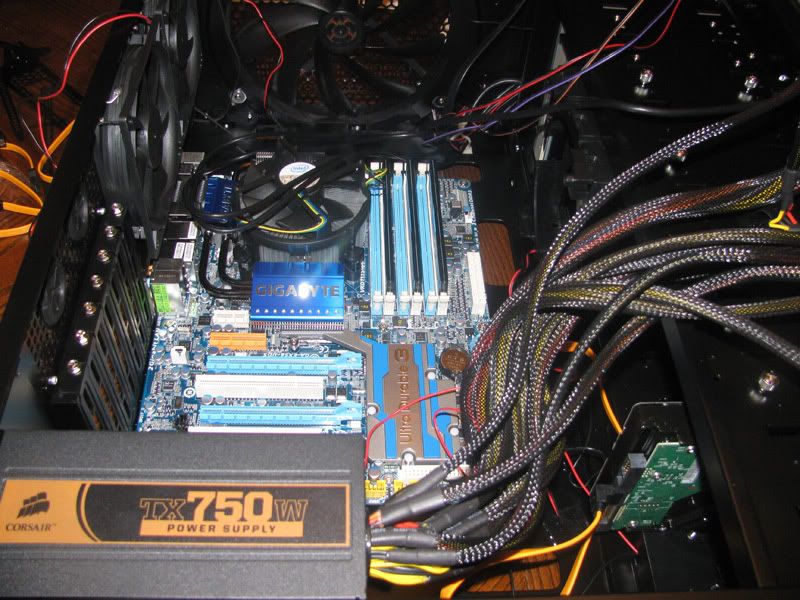
ahhhhh
Stock cooling for the lose.
Get a coolermaster heatpipe... It's amazing. You spent so much money already, and it's only 20-30 dollars.
But nice, man! Bet you're pretty excited right now =D!
Do you have your video card and the power connected to it plugged in?Amir0x said:yes. The one 8 pin is by the CPU... that's connected. The one 24 pin is off to the middle right of the motherboard, that's connected. The CPU fan is plugged into its respective slot.
Idunno
IMACOMPUTA
Member
Amir0x said:I just wish I had a a person versed in this shit to be here to help me out. This was a bad idea to just jump into the fray. Now, everything inside the case and cluttered as fuck and troubleshooting is gonna be hell. I'll try clicking the RAM some more but i doubt that's the problem. I mean, all the RAM clicked and the white things locked it down
I built an i5 750 rig and had the same problem.
Turned out the ram had to be in the second group of slots, not the first one like most computers...
So if you're only using one set, make sure theyre in the right slots.
IMACOMPUTA said:I built an i5 750 rig and had the same problem.
Turned out the ram had to be in the second group of slots, not the first one like most computers...
So if you're only using one set, make sure theyre in the right slots.
you mean the blue slots? Three channel?
If you see the picture posted, you can see my RAM is already in those slots

I don't know I guess I'll fiddle around tomorrow. This is frustrating.
Cheeto: Yeah
Odious Tea
Member
Best I could recommend is pictures. PCGAF is here.Amir0x said:yes. The one 8 pin is by the CPU... that's connected. The one 24 pin is off to the middle right of the motherboard, that's connected. The CPU fan is plugged into its respective slot.
Idunno
speculawyer
Member
I NEED A NEW PC!
Where should I shop for online parts where I don't pay California sales tax? I have case, power supply, mouse, and hdd already . . . is it worth it for me to build?
Or should I just buy a pre-built system and add a nice graphics card? If so, where do I buy?
Anything Special I should due for HTPC usage?
Is there any reason to buy anything but the standard Home Windows 7?
Where should I shop for online parts where I don't pay California sales tax? I have case, power supply, mouse, and hdd already . . . is it worth it for me to build?
Or should I just buy a pre-built system and add a nice graphics card? If so, where do I buy?
Anything Special I should due for HTPC usage?
Is there any reason to buy anything but the standard Home Windows 7?
doa's in my experience are usually down to something on the motherboard shorting with the case. if no ram configurations are working, try taking out the mobo/barebones parts and laying it down on the anti-static bag it came in on a table or something. try firing it up there and see if you get a response.
ok somehow i guess when I closed the case the Reset button got unplugged, and when I put that in the whole motherboard lit up. That little power indicator light located on the motherboard itself also came on.
Unfortunately I still don't hear fans or anything, but maybe that's normal... considering nothing is installed yet.
But at least I see the motherboard is alive! :lol
Unfortunately I still don't hear fans or anything, but maybe that's normal... considering nothing is installed yet.
But at least I see the motherboard is alive! :lol
Amir0x said:ok somehow i guess when I closed the case the Reset button got unplugged, and when I put that in the whole motherboard lit up. That little power indicator light located on the motherboard itself also came on.
WTF. I never plug in the reset button. Random as hell.
The silent fan thing is normal. Don't expect your system to sound like that for long.
according to the manual, the LED indicator lights I saw lit up were the "NB Phase LED" and the "DDR PHASE LED"
It says the first does: "the number of lighted LEDs indicates the North Bridge loading. The higher the North Bridge loading, the more the number of lighted LEDs."
The second is for: "The number of lighted LEDs indicates the memory loading. The higher the memory loaded, the more number of lighted LEDs."
Does that mean shit is looking good if they were lit up?
Should any of the fans start up until I install something or no?
It says the first does: "the number of lighted LEDs indicates the North Bridge loading. The higher the North Bridge loading, the more the number of lighted LEDs."
The second is for: "The number of lighted LEDs indicates the memory loading. The higher the memory loaded, the more number of lighted LEDs."
Does that mean shit is looking good if they were lit up?
Should any of the fans start up until I install something or no?
Looking at that pic I don't know what your cpu fan is plugged into, unless the connector the Mobo is above it hidden by the mess of wires. Usually it's at the side. Your fans should spin as soon as the computer starts.Amir0x said:ok somehow i guess when I closed the case the Reset button got unplugged, and when I put that in the whole motherboard lit up. That little power indicator light located on the motherboard itself also came on.
Unfortunately I still don't hear fans or anything, but maybe that's normal... considering nothing is installed yet.
But at least I see the motherboard is alive! :lol
oh it's not even put together in that pic I guess. Oops.
Well make sure you plugged all the fans into the right spots on the motherboard.
They should start spinning as soon as the computer is on.Amir0x said:Should any of the fans start up until I install something or no?
Dipper145 said:They should start spinning as soon as the computer is on.
ok. So I guess I still have to fool around with the fans since none of them turned on at all...
cuevas. PhD.
Member
Minsc said:It doesn't look any more graphically intensive than what a 5770 could handle, but I can't make any promises if it doesn't come out until 2014 or so... but by then, you may be willing to upgrade your card if need be anyway! I'd lean towards yes, given it's blizzard though, and the stuff they've shown.
I found this card, http://www.newegg.com/Product/Produ...ogle-_-Video+Cards-_-Sapphire+Tech-_-14102878 , that looks decently priced. Do you think it is a good value? Also what is the difference when it comes to manufactuers? How much does quality vary?
Minsc
Gold Member
cuevas said:I found this card, http://www.newegg.com/Product/Produ...ogle-_-Video+Cards-_-Sapphire+Tech-_-14102878 , that looks decently priced. Do you think it is a good value? Also what is the difference when it comes to manufactuers? How much does quality vary?
I would recommend reading this review before getting a 5830. The 5770 is ~$150 (much cheaper) and almost as good performance, well a big almost, but take a look at the numbers. Keep in mind a lot of those are with 4xMSAA, so you can easily get better framerates if you drop the AA.
If you aren't going to be happy with a 5770, I saw a 5850 on newegg for $310, with MW2 included. I don't know how much that costs, but even at $30, that puts it only $50 more than the 5830, and look at that review, you'll see the 5850 is really where you start hit 60+ fps in the maxed out benches. You're also getting close to GTX 270 prices now, keep in mind, in case you prefer the nVidia route.
The 5830 just isn't the best value right now, unless you find one with a free game or something. It fills a performance gap, but I just don't know!
I'm not going to be blamed for making any bad decisions, but if it were me, I'd just get the 5770 or 5850 or GTX 270, depending on budget.TouchMyBox said:But wearing a wristband is like making sure to buckle up when you drive to your next-door neighbour's house...
Shambles said:I've never put much worry into static and never had a problem. Unless you're going to do something retarded like putting on a housecoat and slipper and sliding your feet around on shag carpet and then touching the components directly you'll be fine.
Heh.vocab said:Nice Octopus.
I don't think I've ever come across anyone who uses static straps or gloves unless they work in an environment where it's mandated.
Congrats. It really isn't as daunting as it may initially seem and you're all the better for the experience gained. I have to say though, it's surprising to see stock cooling on such a high-end chip. Even the E4500 in one of my old builds had a nice and stout aftermarket HSF. Hell, I don't even think I could ever go back to using pushpins either.Amir0x said:
ahhhhh
Alright dudes, I could use some serious help right now.
I'm upgrading from a E6750 CPU to a Q9550. I have an Abit IP35-Pro mobo and according to a cursory glance at the manual I don't need to upgrade the BIOS to use the new CPU HOWEVER after installing the new quad core and trying to start up my PC the lights and fans spin up for 5 seconds or so and then shut off... and then start up again for another 5 seconds until it shuts off and tries again over and over until I pull the plug or hold down the power button. So am I gonna have to upgrade the BIOS anyway? While typing this post out I thought about resetting the CMOS so I will try that and edit back. If anyone has ANY idea what my course of action should be please reply, thanks
Edit: Clearing the CMOS didn't do shit. I think I have to upgrade my BIOS but still if anyone has any ideas please chime in. What a pain in the ass...
I'm upgrading from a E6750 CPU to a Q9550. I have an Abit IP35-Pro mobo and according to a cursory glance at the manual I don't need to upgrade the BIOS to use the new CPU HOWEVER after installing the new quad core and trying to start up my PC the lights and fans spin up for 5 seconds or so and then shut off... and then start up again for another 5 seconds until it shuts off and tries again over and over until I pull the plug or hold down the power button. So am I gonna have to upgrade the BIOS anyway? While typing this post out I thought about resetting the CMOS so I will try that and edit back. If anyone has ANY idea what my course of action should be please reply, thanks
Edit: Clearing the CMOS didn't do shit. I think I have to upgrade my BIOS but still if anyone has any ideas please chime in. What a pain in the ass...