• Hey Guest. Check out your NeoGAF Wrapped 2025 results here!

"I need a new PC!" 2010 Edition

What happened to Newegg's combo deals? I know they recycle every month but now there's nothing, as in they're all gone. Will they be back later this month?
 
nacire said:
I was curious if there are any pc games / xbox360 games that work online together? All of my friends have xbox360's and while I do to, I'd rather buy games for my pc if I can. I've been hunting online for sometime, but I'm not finding many answers. It seems in 2007 Microsoft announced cross compatible gaming with GFWL, but I have yet to see anything concrete on people actually playing together. I'm primarily concerned about Borderlands, but I'd love to see a database that lists all of the games if there are any at all.

Thanks!

*-edit- I didn't really know where to ask this question and didn't want to create a thread for it.

Shadowrun
Lost Planet Colonies

Not sure if there are any others.
 
Amir0x said:
oh boy my stuff arrived but I have to go to work and wait all day before I can start putting stuff together

i hope I don't fuck this up :lol

U may consider picking up a heatpipes cooler (xigmatek, thermalright, scythe are some brands) and a pack of thermal paste (artic cooling mx2/3) on the way home to prepare for you impending overclock(after a month of usage and research). Remove old crappy Intel cooler, clean up with tissue and wipe remnants with rubbing alcohol, add a rice sized line of paste on the center of your cpu, mount mega cooler, go to the bios, change the blclk from 133 to 166, set all voltage readings from auto to the lowest possible, save and restart, bam instant overclock. :D

And really go for SPVA or IPS monitors, avoid TN ones, sure the refresh rate may look good but unless you are ultra sensitive you wont notice the lag. The poor viewing angles, 6bit colours and gamma shift will kill your picture!
 
chixdiggit said:
Need some advice direction. Found an amazing deal on an i7, mother board, and hard drive.

Is my current 600wt Thermaltake PSU still good for the i7 and 6gb of Ram?

I have two identical 1tb 7200rpm Western Digital drives. Is Raid 0 worth it? Or should I just set it up Raid 1 to mirror the drive?

Rated wattage means very little. It's the amperage on the 12V rails that you really want to look at. Thermaltake makes some decent boxes, their 600W will be more than enough for any single GPU setup you want. To give you an idea right now on a Corsair 520W I'm running a Q6000@3.4, an overclocked 4870 along with several hard drives and PCI-E expansion cards and I still have a lot of headroom.

ChoklitReign said:
What happened to Newegg's combo deals? I know they recycle every month but now there's nothing, as in they're all gone. Will they be back later this month?

Could possibly be prepping for an Easter sale. I still see combo's around although I don't keep my eyes out for it.

Amir0x said:
oh boy my stuff arrived but I have to go to work and wait all day before I can start putting stuff together

i hope I don't fuck this up :lol

This will be the longest day you've had in quite some time :D
 
I have a question hopefully someone can answer.

My brothers computers video card, which he hand built, seems to run way too hot. I dont know if the card is on its way out but it just seems really too loud and hot at idle and full load speed. What do you guys think/suggest?

System specs:

-e8400 3.0ghz stock, no OC.
-BFG 9800 GT OC
-4gigs of ram
-500gb HD
-Power Supply is a 500w Antec Trio
-Some intel mboard.

The 9800 idles at like 40-50% fan speed and 77c, straight from a boot, when on full load/playing wow or torchlight it goes up to 88c or so. Could popping it out, reapplying the thermal paste/better cooler fix it or is it a goner?

Thank you all in advance !

-Baal
 
DrBaalzamon said:
I have a question hopefully someone can answer.

My brothers computers video card, which he hand built, seems to run way too hot. I dont know if the card is on its way out but it just seems really too loud and hot at idle and full load speed. What do you guys think/suggest?

System specs:

-e8400 3.0ghz stock, no OC.
-BFG 9800 GT OC
-4gigs of ram
-500gb HD
-Power Supply is a 500w Antec Trio
-Some intel mboard.

The 9800 idles at like 40-50% fan speed and 77c, straight from a boot, when on full load/playing wow or torchlight it goes up to 88c or so. Could popping it out, reapplying the thermal paste/better cooler fix it or is it a goner?

Thank you all in advance !

-Baal

88 is normal for a G92b based card (although it probably should only go that high if you're stressing it out 100%). Look at the fermi chips which border on 100 degrees.

It couldn't hurt to install a custom heatsink, I liked using the Zalman VF1000 on my 8800gt. But unless the heat/noise is bothering you, don't worry about it.
 
talk show host said:
NEWEGG has 5970s in stock get it fast if you want one of these powerhouses. For the record I have never seen them in stock before.

http://www.newegg.com/Product/Product.aspx?Item=N82E16814102887&cm_re=5970-_-14-102-887-_-Product

As ever I'd recommend people stay well clear until these start shipping with 4GB of RAM. A 1GB framebuffer is frankly pathetic for a card with that amount of GPU horsepower. Its incredibly imbalanced, and the current models can't clock for shit either as they can't get enough power. its just a really shitty product imo.
 
Hey guys.

I'll be getting a new system soon and have almost finalised my choices, and am just looking for any opinions/ advice.

i7 920 - Im thinking OCing to around 3.0
XFX 5870 black edition
Gigabyte x58 mobo
6gb of ram - do i need to go for any particular brands ?
2 x 500 gb HD
PSU (branded) - how much power should I be looking for considering the above components + slight CPU oc. Im thinking 800w, is that too much ?

Would I need any particular cooling solutions ? any heatsinks ? Im mostly likely looking at a coolmaster case.

Thanks a lot. Any suggestions would be greatly appreciated.
 
brain_stew said:
As ever I'd recommend people stay well clear until these start shipping with 4GB of RAM. A 1GB framebuffer is frankly pathetic for a card with that amount of GPU horsepower. Its incredibly imbalanced, and the current models can't clock for shit either as they can't get enough power. its just a really shitty product imo.

Well I agree the 1GB framebuffer is a hindrance, it can still push titles at 1600p with 4xAA without a problem. Not to mention the 4GB model is going to be insanely expensive-- $899 after retailer markup (which their will be due to supply constraints the regular 5970 is still facing).

I am not sure what you are referring to about clocking, as 5970s are designed to be overclocked significantly (ATI designed it this way). They stay withing the PCI-E 300 TDP spec as shipped, but AMD even quotes that they will all hit 850 mhz on the core. Of course you need a beefy PS that can deliver extra wattage on the rails that connect to PCI-E. Odds are if are an enthusiast considering a card like this you already have a PS capable of doing this.
 
brain_stew said:
As ever I'd recommend people stay well clear until these start shipping with 4GB of RAM. A 1GB framebuffer is frankly pathetic for a card with that amount of GPU horsepower. Its incredibly imbalanced, and the current models can't clock for shit either as they can't get enough power. its just a really shitty product imo.

From my experience, driver issues are still by far the 5970's biggest problem. While i would still warn people away from it, the reason wouldnt be the hardware side.
 
So for somebody who's moderately knowledgeable about computers but has never built one before: Where the fuck do I start? I know most of the shit I need but I don't know what's good or really where to start at all.
 
Jokey665 said:
So for somebody who's moderately knowledgeable about computers but has never built one before: Where the fuck do I start? I know most of the shit I need but I don't know what's good or really where to start at all.

The op ;)
 
brain_stew said:
Yeah I read that but didn't see any big TUTORIAL HERE READ THIS part lol, and I'm still not sure what I'm doing. If you want me to fill out the template at the top here:

Budget: 600-800 USD
Main Use(s): Gaming
Monitor Resolution: 1920x1080 is good
List SPECIFIC games that you MUST be able to play: Starcraft II, Diablo III
 
Jokey665 said:
Yeah I read that but didn't see any big TUTORIAL HERE READ THIS part lol, and I'm still not sure what I'm doing. If you want me to fill out the template at the top here:

Budget: 600-800 USD
Main Use(s): Gaming
Monitor Resolution: 1920x1080 is good
List SPECIFIC games that you MUST be able to play: Starcraft II, Diablo III

The components will be a little older but it is still very helpful to anyone new to this.
http://www.techpowerup.com/articles/other/144

Anyone can easily build a PC as long as long as they comfortable with legos. The trickier part is isolating a faulty component if need be, but there are tons of resources available so even that can be resolved by more knowledgeable users.
 
dread9 said:
I just ordered an open box motherboard from newegg, smart choice, dumb choice?

Depends. You don't really get warranty benefits but I think you can get a refund if it breaks in 30 days. I don't trust open box/refurbished items anymore after I bought a dead $800 laptop only to have it refunded weeks later.

Now here's what I'm wondering. Should I really opt for two new GPUs? Personally I think my two BFG Geforce 7900 GS cards can handle some of todays standards.

Here's my setup I just bought, using the same video cards in mind:
2eznr5l.png
 
Jokey665 said:
Yeah I read that but didn't see any big TUTORIAL HERE READ THIS part lol, and I'm still not sure what I'm doing. If you want me to fill out the template at the top here:

Budget: 600-800 USD
Main Use(s): Gaming
Monitor Resolution: 1920x1080 is good
List SPECIFIC games that you MUST be able to play: Starcraft II, Diablo III

I would recommend checking out www.anandtech.com. Sometimes they have building guides which are very helpful and their reviews are awesome. Also guru3d is great. Finally, newegg reviews are your friend. It's a daunting thing at first, but once you do it, you'll be so happy. I loved building my PC but now I need a better video card. I went with a cheap Radeon 4770 about a year ago or so, but I really want a 5850 now.

I've been itching to play Age of Conan again when the expansion comes out and I know I want more horsepower for Crysis and Shattered Horizon. Anyone have any experience with running those games on a 5850 at 1680x1050?
 
longdi said:
U may consider picking up a heatpipes cooler (xigmatek, thermalright, scythe are some brands) and a pack of thermal paste (artic cooling mx2/3) on the way home to prepare for you impending overclock(after a month of usage and research). Remove old crappy Intel cooler, clean up with tissue and wipe remnants with rubbing alcohol, add a rice sized line of paste on the center of your cpu, mount mega cooler, go to the bios, change the blclk from 133 to 166, set all voltage readings from auto to the lowest possible, save and restart, bam instant overclock. :D

And really go for SPVA or IPS monitors, avoid TN ones, sure the refresh rate may look good but unless you are ultra sensitive you wont notice the lag. The poor viewing angles, 6bit colours and gamma shift will kill your picture!
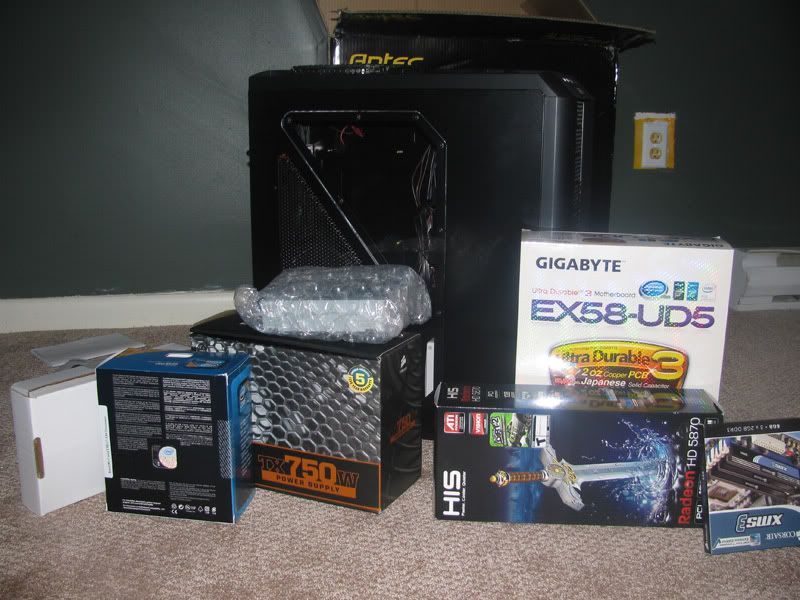
There is absolutely no way once I'm done I'm going back to do anything to this system, save part replacement! Definitely not gonna put rubbing alcohol near my shit!

StuffIsHere.jpg


MOTHERFUCKERS didn't have Windows 7 or my super fast harddrive in this latest package.

I wanna test this shit out so bad. I almost wanna just load my shitty harddrive with this stuff and just use Windows XP until it comes :(
 
longdi said:
And really go for SPVA or IPS monitors, avoid TN ones, sure the refresh rate may look good but unless you are ultra sensitive you wont notice the lag. The poor viewing angles, 6bit colours and gamma shift will kill your picture!
Prices are crazy though :(
 
Amir0x said:
There is absolutely no way once I'm done I'm going back to do anything to this system, save part replacement! Definitely not gonna put rubbing alcohol near my shit!

StuffIsHere.jpg


MOTHERFUCKERS didn't have Windows 7 or my super fast harddrive in this latest package.

I wanna test this shit out so bad. I almost wanna just load my shitty harddrive with this stuff and just use Windows XP until it comes :(

You should put all that stuff in the "free to a good home" thread and give it all to me. I'll trade you my Phenom 2 550 and Radeon 4770. How about it? :D

Man... you are gonna have some serious fun. Make sure to download Shattered Horizon just to see awesome shit. And play the Age of Conan trial at least. It's a badass looking mmo.
 
Amir0x said:
There is absolutely no way once I'm done I'm going back to do anything to this system, save part replacement! Definitely not gonna put rubbing alcohol near my shit!

[http://i184.photobucket.com/albums/x55/Amir0x/StuffIsHere.jpg[/IMG]

MOTHERFUCKERS didn't have Windows 7 or my super fast harddrive in this latest package.

I wanna test this shit out so bad. I almost wanna just load my shitty harddrive with this stuff and just use Windows XP until it comes :(

You most likely don't need a hard drive or windows 7 to do the vast majority of work ahead of you. You may want to wait for someone else to confirm, but if you're only missing those two things, even without getting your old HDD in there, you can get all the hard work out of the way.

If you connect everything except for the new HDD, you should still see your BIOS start, thus verify your RAM is picked up, hell you can even download the MEMTest+ or whatever to a USB stick and run that and test your RAM while you wait.

So basically you can assemble it now and then when your HDD comes pop that in, and install W7 and have it running in less than an hour!
 
Amir0x said:
fuck i also forgot to buy a static wristband :lol
Unless you're on carpet or something, you'll be fine, and even then, you'll be fine. Chances are you'll be constantly touching the case which is all metal anyway.

I built my computer on carpet without a static wristband.
 
i need someone to confirm that is true because i'm reading online and they're like "if you don't have a wristband, plug the case in, but don't turn it on, and even then you gotta know if your house has good ground plugs!"

Makes me nervous!
 
Amir0x said:
i need someone to confirm that is true because i'm reading online and they're like "if you don't have a wristband, plug the case in, but don't turn it on, and even then you gotta know if your house has good ground plugs!"

Makes me nervous!
Just touch the case, you'll be fine.

You could wear this to be sure though
tinfoilhat.jpg

Take pics please
 
Amir0x said:
There is absolutely no way once I'm done I'm going back to do anything to this system, save part replacement! Definitely not gonna put rubbing alcohol near my shit!

StuffIsHere.jpg


MOTHERFUCKERS didn't have Windows 7 or my super fast harddrive in this latest package.

I wanna test this shit out so bad. I almost wanna just load my shitty harddrive with this stuff and just use Windows XP until it comes :(
That is virtually the same PC I just built. i7-930? If so, then it definitely is (same motherboard and everything). Good luck.

It's really not difficult to put these things together, but you may end up getting sliced if you don't take care. The stock Intel fan is a piece of cake to install, but custom fans tend to be a bit more difficult. I used to have a large copper Zalman fan that sliced the shit out of me. Gotta be careful with those things. No matter how many times I build a PC I almost always end up with at least one cut (generally not even realizing that it just happened until after the fact).
 
I'm building almost that exact build too, probably will order next week. I was originally going to go i5 route and spend extra on a water cooling system. I've never ran water-cooling before and it seemed like a cool project, but I decided to shelve the idea for now and spend extra money for the i7 setup with triple channel memory.

Anyone have opinions on 5850 vs 5870?
 
Amir0x said:
i need someone to confirm that is true because i'm reading online and they're like "if you don't have a wristband, plug the case in, but don't turn it on, and even then you gotta know if your house has good ground plugs!"

Makes me nervous!

I've been building machines since I was 9 years old on and off carpets and almost 13 years later I have not fried anything.

It can never hurt, and of course the official response should be "You should always wear a wristband". But wearing a wristband is like making sure to buckle up when you drive to your next-door neighbour's house just in-case you get in an accident along the way. Sure you should always buckle up, but it's safe to assume that you'll be fine.
 
Cheeto said:
I'm building almost that exact build too, probably will order next week. I was originally going to go i5 route and spend extra on a water cooling system. I've never ran water-cooling before and it seemed like a cool project, but I decided to shelve the idea for now and spend extra money for the i7 setup with triple channel memory.

Anyone have opinions on 5850 vs 5870?

5870 is more expensive, slightly cooler hotter, slightly quieter, and a slightly higher power draw. And it's about 20% faster of course. You can seemingly find it for a good price if you grab it for around $390 w/ a free game.
 
Ok awesome, thank you! Will look into putting a custom HS on it or just riding it out :D Thanks again !


TouchMyBox said:
88 is normal for a G92b based card (although it probably should only go that high if you're stressing it out 100%). Look at the fermi chips which border on 100 degrees.

It couldn't hurt to install a custom heatsink, I liked using the Zalman VF1000 on my 8800gt. But unless the heat/noise is bothering you, don't worry about it.
 
Amir0x said:
i need someone to confirm that is true because i'm reading online and they're like "if you don't have a wristband, plug the case in, but don't turn it on, and even then you gotta know if your house has good ground plugs!"

Makes me nervous!

A radiator is a good alternative.
 
Just touching the metal on your case is enough to discharge static. I've always done that since I've been building and have always been fine. *touches wood*

Some people are just OTT when it comes to these types of things. I've even heard not to use a magnetic screwdriver because it increases the chance of static and can kill HDD's. What absolute bullcrap. Unless you directly touch the underside of the HDD with the screwdriver (and why oh why would you do that anyway...?) there's no way a magnetic screwdriver will do any damage. I'd like to see someone build without one. God knows how they get dropped screws out and get screws in the more awkward places.

Main thing is relax and just take care. Touch everything by the rim, don't force anything. Last thing you want is to be nervous and have shaky hands. Hell, you probably wouldn't know the difference between if you fried it with static or whether it was DOA, so neither will the company that you bought from.
 
Amir0x said:
ok, um, I put the 3 2GB DDR3 memory in the slots that are 3 channel, not dual channel...right?

Yeh put them all in the same bank. (You should have 2 colour coded banks, blue and white on Gigabyte mobos IIRC). Put them all in either the blues or the whites. So basically put them in alternating slots. There should be a module gap between each one you install.
 
I've never put much worry into static and never had a problem. Unless you're going to do something retarded like putting on a housecoat and slipper and sliding your feet around on shag carpet and then touching the components directly you'll be fine. You can't really put stuff into the case without touching the case first/at the same time. Static bracelets are for suckers.

GHG said:
Main thing is relax and just take care. Touch everything by the rim, don't force anything. Last thing you want is to be nervous and have shaky hands. Hell, you probably wouldn't know the difference between if you fried it with static or whether it was DOA, so neither will the company that you bought from.

Except don't worry if you have to force in the push pins for the CPU cooler. Those things can get brutal sometimes.
 
The only thing I was super worried about handling was the processor itself. Every place was all "it's super delicate if one pin is bent FORGET ABOUT YOUR PC" and shit.

Then, I felt all paranoid trying to lock the latch back in place over it. Felt like too much pressure, but I definitely lined up the proper pins on the processor :lol

Goddamn it this screwdriver is too small for some of these screws, I gotta hunt for a new one. Damn it... I don't even have a toolbox! Time to knock on some doors.
 
Hey guys I have a quick question regarding the 58xx series and sound via the HDMI out.

I have my 5850 and want to output 5.1 via LPCM. My receiver can handle that but it can't output a 1080p signal, only a 1080i signal to my 42 inch panny.

Can I only output sound from the HDMI port and use my DVI port with my DVI to HDMI cable for video? I tried it a few months ago for a bit and couldnt get it to work.

I'm moving my rig into a case finally and would let to get this working, thanks in advance.
 
holy fuck I am totally lost on this connecting cables part. SATA this HD Audio this but in the motherboard book it doesn't tell me a place to connect any "HD Audio", and I'm not even sure what a SATA is!

This part is frustrating. There's a billion cables I'm totally going to put shit in the wrong spots and be fucked :/
 
Sup guys, Anyone know of a good TV Tuner card that is good for playing console games ie Wii, PS2? Price isn't an issue if it means I can experience games input lag free.

I only have one monitor and I use it for my PS3 and computer. The Wii and PS2 can't connect to my monitor, so I can't use them currently. I have a cable box, but I don't really watch TV anymore so when I purchased my monitor(recommended through Gaf which I love) i didn't even care lol, but, since I am paying for basic cable with my internet and want to play last gen(lolwii) games I'd figured I'd look into a TV Tuner card instead of the VDigi Wii VGA cable that could only be used with the Wii. Since I can't make new threads yet, I think this is probably the best place to ask my question. lol i registered and waited for 1 year to ask this very question :lol

@Amir0x for me the most annoying part is the usually the bottom-right corner of motherboards. Patience my frienddd.
 
Amir0x said:
This part is frustrating. There's a billion cables I'm totally going to put shit in the wrong spots and be fucked :/

Don't fret too much; most critical cables will only fit one way and only with their own connector. The SATA interface is used to connect your hard drives and optical drives to the motherboard.
 
So my best friend has an old AM2 mobo left to him by his girlfriend and he has a very low budget, it can only handle low wattage X2 cpus but the good thing is that his monitor is 1280 x 1024. It has a PCI Express x16 slot but it runs at x8 and I dont know if that makes a difference. Right now the cards we are evaluating are the Radeon 4670 or the 9600GT (and leaning to the 9600GT due to them being damn near the same price). What I don't know is which company has better driver support for old hardware, I know Nvidia usually has better support for older GAMES, but don't know about hardware.

Games that have to be able to run: Source (mainly L4D & L4D2, Bad Company 2, and console ports).

Right now the possible build is:
AMD Athlon 64 5000 X2 2.6 Ghz
GeForce 9600GT
2GB DDR2 800 Ram
1280 x 1024 monitor

Note: The mobo is an Nvidia chipset, if that makes a difference.
 
Jin34 said:
So my best friend has an old AM2 mobo left to him by his girlfriend and he has a very low budget, it can only handle low wattage X2 cpus but the good thing is that his monitor is 1280 x 1024. It has a PCI Express x16 slot but it runs at x8 and I dont know if that makes a difference. Right now the cards we are evaluating are the Radeon 4670 or the 9600GT (and leaning to the 9600GT due to them being damn near the same price). What I don't know is which company has better driver support for old hardware, I know Nvidia usually has better support for older GAMES, but don't know about hardware.

Games that have to be able to run: Source (mainly L4D & L4D2, Bad Company 2, and console ports).

Right now the possible build is:
AMD Athlon 64 5000 X2 2.6 Ghz
GeForce 9600GT
2GB DDR2 800 Ram
1280 x 1024 monitor

Note: The mobo is an Nvidia chipset, if that makes a difference.

Don't know your budget but if you want the best card you can get that doesn't take any power (i.e. no extra pci-e power cable needed) have a look at one of the newer revision 9800GT's that don't require a power cable:

http://www.newegg.com/Product/Product.aspx?Item=N82E16814500142&cm_re=9800gt-_-14-500-142-_-Product

Heres a review to give you an idea of what kind of perfomence you would be getting:

http://www.hardwarezone.com/articles/view.php?id=2999&cid=3&pg=1
 
Top Bottom