• Hey Guest. Check out your NeoGAF Wrapped 2025 results here!

21:9 Gaming Thread | That cinematic feel

I love it, at 25" is good for me cause i sit semi close to my monitor. Im sure bigger is better but for the price its a good choice. Down the road if i save up and what not i might get a bigger but for now I'm loving playing with this monitor. i stop using my tv to game.

Thanks for the input, I'm seriously considering getting it.
 
Is 21:9 the future of TVs as well? Or is this just a PC thing?
Cinemascope TVs have been around for a while. I don't see them becoming mainstream (especially if OLED gets adopted fast but aging remains an issue - parts of the panel that aren't lit when watching regular widescreen content would age unevenly with the rest of the panel unless the content is stretched) unless TV programming moves that way though, which I definitely don't see happening.
21:9 will probably remain a niche thing unless companies can be sold on the productivity aspect and people can start picking up 21:9 for the same price or a slight premium compared to good quality 16:9 displays.
 
My 21:9 is a Samsung VA panel, so I get color banding in Steam and Valve game UIs, similar to TN panels. I've never used an IPS before, so was wondering if people that are using 21:9 LG AH-IPS panels getting the same color banding in Steam/Dota2 menus?
 
I didn't know about this until now. I know my laptop can't run a monitor like this, but... ugh. I want this so bad.


Talking of laptops it's a shame that 21:9 laptops never caught on, back in 2012 the Toshiba Satellite U845W came out:

9U6TU5V.jpg


It really should have been a 18" laptop tbh.
 
Does anyone think that nvidia might eventually support VESA adaptive sync? I'm having a hard time swallowing the additional cost of gsync comoared to freesync, and also there aren't yet any gsync 21:9 monitors, but there is a 34" LG freesync one. Although I have an nvidia GPU the freesync doesn't add much to the cost so I could treat it like a normal monitor for now, wih the possible bonus that nvidia supports the technology in a year or two?
 
My 21:9 is a Samsung VA panel, so I get color banding in Steam and Valve game UIs, similar to TN panels. I've never used an IPS before, so was wondering if people that are using 21:9 LG AH-IPS panels getting the same color banding in Steam/Dota2 menus?

Vertical banding? You could try calibrating but I think that's just a tradeoff with VA panels.
 
Are there chances of getting a >=40" screen in 2016? 34" is a bit too small for 21:9. If I can't get a bigger one next year, I might need to switch to a regular UHD 40". Not so cool.
 
Does anyone think that nvidia might eventually support VESA adaptive sync? I'm having a hard time swallowing the additional cost of gsync comoared to freesync, and also there aren't yet any gsync 21:9 monitors, but there is a 34" LG freesync one. Although I have an nvidia GPU the freesync doesn't add much to the cost so I could treat it like a normal monitor for now, wih the possible bonus that nvidia supports the technology in a year or two?
Probably never... nVidia has 70% marketshare and they are going to do what they want.
 
Is 21:9 the future of TVs as well? Or is this just a PC thing?

Philips tried for years but no dice. Vizio apparently had one lined up but havent heard much else about it. I would say most manufacturers aren't interested in it due to the amount of regular 16:9 content shown, things like tv shows etc. it would take a massive overhaul for everyone to jump on 21:9. Wont happen.

The only way of getting 21:9 is going with a projector and seperate lens to accomodate it.
 
No, color/gradient banding. Here's a sample pic. An easy way to see if it if you open up a steam chat window and maximize it, using the default skin.

I think that's just valve not using proper colour gradients, but I'm not sure. I have a Samsung VA panel as well and I only see that kind of banding in the default skin for Steam.
 
does anyone use a 21:9 monitor with a second monitor alongside? I have dual monitors at the moment and 21:9 sounds great but it would actually be a drop in real estate compared to 2 x 16:9 monitors.

My second monitor is an old Dell 2007wfp which is 99ppi. Seems like that would match quite nicely with a 29" 2560x1080 (96ppi) or slightly less well but not bad with a larger 32" 3440x1440 (110ppi) or 27" 2560x1440 (109ppi)
 
Love my 21:9 LG. But AC: Rogue wants to run in 5760x1080 when I set it at native 3440x1440. Ubi? More like Poopy, amiright?

Most of the time Ubi gets it right.
However with Rogue they got it wrong.
Here's a fix: http://www.wsgf.org/forums/viewtopic.php?f=64&t=28011

Talking of laptops it's a shame that 21:9 laptops never caught on, back in 2012 the Toshiba Satellite U845W came out:

9U6TU5V.jpg


It really should have been a 18" laptop tbh.

Oh man, I want one!
I hope they make a comeback one day.
I love my 21:9 monitor.

does anyone use a 21:9 monitor with a second monitor alongside? I have dual monitors at the moment and 21:9 sounds great but it would actually be a drop in real estate compared to 2 x 16:9 monitors.

My second monitor is an old Dell 2007wfp which is 99ppi. Seems like that would match quite nicely with a 29" 2560x1080 (96ppi) or slightly less well but not bad with a larger 32" 3440x1440 (110ppi) or 27" 2560x1440 (109ppi)

I have one 29" LGUM65 (2560x1080), one 23" Samung XL2370(1920x1080). and one 25" Dell U2515H (2560x1440)

I use all 3 extensively, however it all really depends on what you need them for.
 
is there a way to get youtube/videos to play 'full screen' but not fullscreen? eg right now I have wimbledon playing fullscreen on my second monitor. I do that quite a lot with youtube etc. If I buy a 21:9 monitor I'd like to play videos as big as possible and still be able to do stuff alongside it.

possibly looking at the AOC U3477PQU (3840x1440) to replace my two 1080p monitors

The alternative would be to keep my 27" Benq monitor as a second monitor (and for PS3 and my work computer), and get a gsync like the Acer XB270HU as my primary monitor. problem then would be difference in ppi between the two but I think I could live with that if I mostly use it for videos or as a preview window for lightroom
 
I got the LG-34UM95 when my ROG Swift crapped out and it was a beautiful screen but I ended up exchanging it for an Acer XB270HU. It was too big of a change to go from 144hz gsync to 60hz.
 
between the LG 34UM95 and the AOC 3477. The LG is about £65 more expensive than the AOC, but the UI with the joystick looks much simpler, including quick access to PBP which I might need fairly often in conjunction with a second PC. AOC has PBP but it seems to be more hidden under a usual monitor 'horrible navigation using horizontal row of buttons'. Also the transparent stand of the LG looks like it'd help look less dominating on the desk, the AOC has a massive slab by comparison.


Also, are there any tricks needed to get scope movies to fill the screen? I use plex for my bluray rips which aren't anamorphic so they have bars that would need to be zoomed, and I don't know if plex handles 21:9 screens well? I haven't seen any zoom controls at least. But I also watch things via netflix and amazon instant video (either free or rented), and blurays directly occasionally so I'd be interested in general solutions too.
 
Got a good price on the U3415W and I'm liking it a lot. I'm now using that as the main monitor with my 2713HM in portrait mode to my left displaying several different windows while I'm on my PC.

It's a pretty sweet getup. I play FFXIV:Heavensward which supports 21:9 natively. The only caveat is that cutscenes are in 16:9, which is understandable. While playing I have the 2713HM displaying voice chat, a DPS Parser, and playing a video when I'm doing something not intensive (like running dungeons for EXP or tokens).
 
Got a good price on the U3415W and I'm liking it a lot. I'm now using that as the main monitor with my 2713HM in portrait mode to my left displaying several different windows while I'm on my PC.

It's a pretty sweet getup. I play FFXIV:Heavensward which supports 21:9 natively. The only caveat is that cutscenes are in 16:9, which is understandable. While playing I have the 2713HM displaying voice chat, a DPS Parser, and playing a video when I'm doing something not intensive (like running dungeons for EXP or tokens).

that's a pretty amazing setup. Isn't the 27" portrait a bit big? I was toying with the idea of keeping my 27" 1080p monitor partly as a second monitor for things like you mention, and partly because at native 1080p it would be good for playstation etc. But I don't think I'd fit that on my desk without an extending wall mount to hold it over the edge. Might try with my Dell 2007wfp though, thats only 20" so wouldn't take up so much space.
 
that's a pretty amazing setup. Isn't the 27" portrait a bit big? I was toying with the idea of keeping my 27" 1080p monitor partly as a second monitor for things like you mention, and partly because at native 1080p it would be good for playstation etc. But I don't think I'd fit that on my desk without an extending wall mount to hold it over the edge. Might try with my Dell 2007wfp though, thats only 20" so wouldn't take up so much space.

Yeah it's pretty fucking big, but since it is in portrait its tall instead of wide. It's the perfect companion for my U3415W right now.
 
So does anyone have any cal ration settings for a 34UM67? I know all screens are different but in the ballpark is close enough for me on PC.
 
anyone heard anything about the LG 34UC87-P? overclockers uk just got a bunch in for £600, which is roughly the price of the LG 34UM95, and only about £50 more than the AOC U3477PQU

curved 3440x1440 IPS, 2xHDMI and 1xDP

Wj8tHMe.jpg


not the prettiest stand in the world but it is height adjustable and has a VESA mount, unlike the 34UC97


edit: Bought the AOC U3477PQU in the end from Overclockers.co.uk for £499. Should arrive on monday. Now need to clear space for it to fit, and try and sell my old 1080p VA monitor.
 
Well this fricking sucks. Have had the U3415W for a week and all of a sudden today it starts displaying a red/magenta line right through the middle vertically half way through the screen. It appears even without an input, so it is something wrong with the monitor itself.

I guess I'll have to talk to Amazon and get it replaced. This is after they gave me a discount for keeping the monitor with light bleeding, so I guess I'll lose that discount. I'm going to have to wait until tomorrow to contact Amazon since their late night support is usually awful.

It appears that a white background causes the line to appear magenta while a black background causes a red line.

Literally nothing was done with it since I last used it and it was fine. I can't believe something broke internally this fast.
 
Well this fricking sucks. Have had the U3415W for a week and all of a sudden today it starts displaying a red/magenta line right through the middle vertically half way through the screen. It appears even without an input, so it is something wrong with the monitor itself.

I guess I'll have to talk to Amazon and get it replaced. This is after they gave me a discount for keeping the monitor with light bleeding, so I guess I'll lose that discount. I'm going to have to wait until tomorrow to contact Amazon since their late night support is usually awful.

It appears that a white background causes the line to appear magenta while a black background causes a red line.

Literally nothing was done with it since I last used it and it was fine. I can't believe something broke internally this fast.

You mean like the line created when the LG Screen Split app is turned on?
 
Anyone have any experience with the LG 34um65? newegg has a pretty good deal going on, or would it be worth it to get something with more pixels?
 
Anyone have any experience with the LG 34um65? newegg has a pretty good deal going on, or would it be worth it to get something with more pixels?

I've been using a 27" 1080p monitor for about 6 months and it was fine - a 34" 2560x1080 monitor would be the same ppi, just wider. Also way easier to drive for games. Having said that, I did just buy a 3440x1440 monitor, but that's to get more real estate for apps as I'm moving from dual monitors to just one.
 
Well this fricking sucks. Have had the U3415W for a week and all of a sudden today it starts displaying a red/magenta line right through the middle vertically half way through the screen. It appears even without an input, so it is something wrong with the monitor itself.

I guess I'll have to talk to Amazon and get it replaced. This is after they gave me a discount for keeping the monitor with light bleeding, so I guess I'll lose that discount. I'm going to have to wait until tomorrow to contact Amazon since their late night support is usually awful.

It appears that a white background causes the line to appear magenta while a black background causes a red line.

Literally nothing was done with it since I last used it and it was fine. I can't believe something broke internally this fast.

Sorry to hear that. Hope you can sort this thing out soon or replace it quickly... The U3415W is a really nice monitor!
 
Anyone have any experience with the LG 34um65? newegg has a pretty good deal going on, or would it be worth it to get something with more pixels?

I got the 34UM67 just days ago. Same monitor except it has freesync, which I'm not using as I have an nvidia card so I'm basically running a UM65 equivalent. Anything you wanted to know specifically?
 
I got the 34UM67 just days ago. Same monitor except it has freesync, which I'm not using as I have an nvidia card so I'm basically running a UM65 equivalent. Anything you wanted to know specifically?

Nvidia here too, so freesync is useless for us? have you run into any weird problems in any games? I play a lot of CS:GO and it seems like it has some HUD problems on 21:9.
 
Nvidia here too, so freesync is useless for us? have you run into any weird problems in any games? I play a lot of CS:GO and it seems like it has some HUD problems on 21:9.


Yeh it's a pity about G-Sync, but the monitors that do have it will largely be 1440p monitors and you essentially double the price for them right now and you'll need a real mofo of a GPU to run anything near 60fps for the latest games at that res especially when you add on the extra pixels for width.

I can't really comment on CSGO unfortunately as I haven't played it.


I'll give you a quick break down going by my current experience;

Pros;

- 21:9 really looks fucking amazing. Seriously. Like holy crap amazing in games.

- Most newer games natively support 2560x1080 without having to mess around with anything. As simply as setting resolution in any other game.

- Excellent, deep colour saturation across the entire screen even to the edges.

- Full suite of primary and secondary colour adjustments if you want accurate colours (I haven't needed to go into individual colour adjustments for grey scale etc , but it's there if you need to)

- Jog Button on the bottom is nice and tactile, easy to use

- In built speakers when using HDMI handy for when you have people in the room and dont want to use headphones

- Easily have 2 windows open on the one screen side by side.

- err.....did I mention it looks amazeballs for games?

- Video card or monitor, no idea which, is detecting animorphic videos and playing them full screen no issues. I thought you might need to use the zoom function on the monitor to get them to fill the screen but nope, working perfectly, even Youtube fills the screen for ultrawide videos fullscreen no problems.

- Very smart looking monitor any way you look at it.
-----------------------------------------------------------------------------------

Cons;

- Still an LED LCD with the same inherent problems (some backlight bleed / uniformity), not the deepest blacks (better than most LCD's I've seen, but I use a calibrated Plasma for home theatre so it's never going to match that)

- Out of box picture was insanely bright, I could feel my retinas burning. Like, ridiculous bright. I am using Brightness at 18 out of 100 to give you an idea.

- There will definitely be some games that just don't play nice with the monitor. There are work arounds for some of these games, but some games might be harder to get working than others and some may not be workable at all without some sort of compromise. You can still play in 16:9 with black borders on the side for those that don't or won't work. Which would be disappointing, but thats a last resort and as mentioned above, most games I have tried so far support 21:9 natively with no need for modifying or things like flawlesswidescreen app etc.

- When using just one program on screen, like my web browser right now, I tend to have it sit in the middle of the screen so it's easier to see as you will find that if you need to read something frequently you probably just want it in the middle of the screen as there is a lot of horizontal real estate to cover either moving you eyes or even moving your head a little.
------------------------------------------------------------------------------

Not necessarily bad, but would be nice;

- Screen curve. Say what you want for curved TV's etc, you definitely get the impression a slight curve so the edges of the screen were a little more orientated toward you would be a bonus. Obviously you need to go nearly double the cost to get that, plus the higher res + the bigger video card. So it's not really a monitor flaw, but it's something that going into the future would be nice.

- While most games seem to support 2560x1080 native, some games don't have options too or don't adjust HUD position for that wide aspect ratio. It would be nice if, having that extra real estate on the side, all games that support 21:9 used that space on the edges to push those further toward the outside.

- 34" despite being what appears to be the largest size you can get, definitely don't go smaller. 34" is basically a little taller than my 24" was, and when I say little taller I mean not at all noticable unless side by side, it's the extra width you get that takes up your view. 29" would actually seem small compared to even a 24" 16:9


Will post some pics in a second of how some games look in 21:9 to give you an idea.

 
Holy shit, am I converted or what. I don't have a special monitor or anything of the sort, but I tried running a game at 1920x810 on my TV per this thread's suggestion and holy shit. That FOV is more than worth any black bars. Until I get a TV capable of running proper 21:9 that' the way I'm going with for sure. But man, after trying this out I don't think I can go back. If it's at all possible I'll try to play all games I can like this. Welp, time to get a new graphics card a new TV. I'm aboard the 21:9 train.

1920x1080
x08cvGi.jpg


1920x810
SvvC0Cj.jpg


1920x1080
faDhIko.jpg


1920x810
ZwQOAQ3.jpg

Also unless I'm crazy or changed a setting by accident running games at 1920x810 seems to actually result in way better framerate for me. Is that supposed to happen or is it more likely that I just changed a setting by accident? Because I'd gladly sacrifice FPS for this improvement in FOV, if I'm gaining FPS on top of that I'll be the happiest man on earth haha.

(Also, way I'm running 1920x810 is just setting a custom resolution for the desktop then going borderless window for the actual games. No idea if there's an easier way to run them like this.)
 
The reduced resolution will probably affect FPS more than the increased FoV does. Course, when you buy a 2560x1080 or 3440x1440 monitor that will all change ;)
 
Nvidia here too, so freesync is useless for us? have you run into any weird problems in any games? I play a lot of CS:GO and it seems like it has some HUD problems on 21:9.

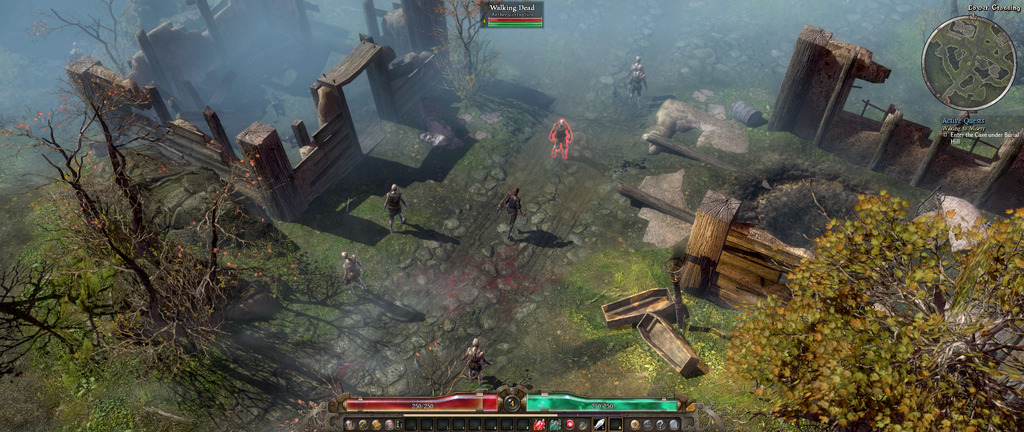
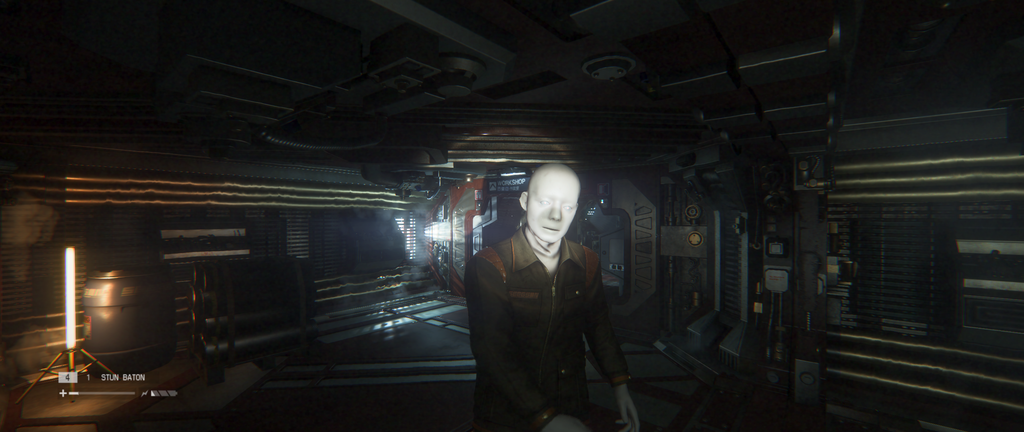
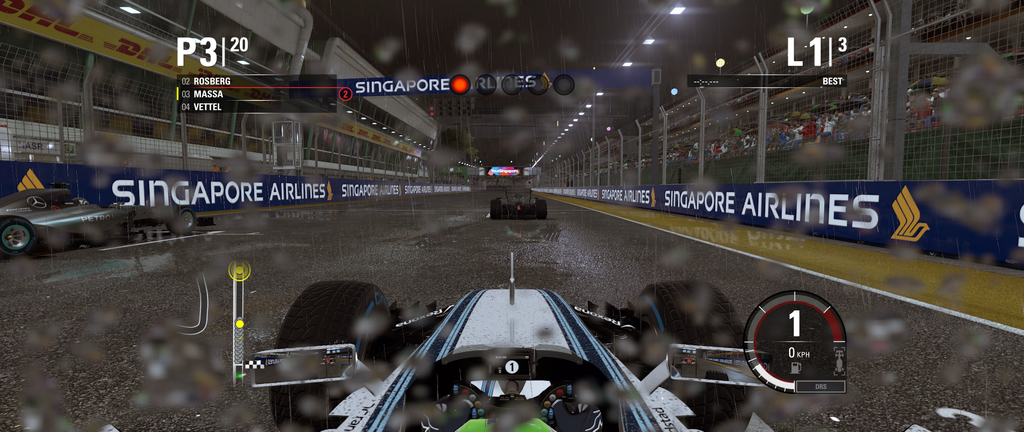
Some games to give you an idea of how the aspect ratio works for a few different games.

Shitty compressed fraps screens incoming

grim%20dawn%202015-07-19%2005-30-30-39_zpspo8kgkmm.png

AI%202015-07-19%2005-28-04-79_zpspi434vfu.png

F1_2015%202015-07-19%2005-13-42-58_zpsja4qmc6p.png


That's what you can expect on the UM65
 
Some games to give you an idea of how the aspect ratio works for a few different games.

Shitty compressed fraps screens incoming

grim%20dawn%202015-07-19%2005-30-30-39_zpspo8kgkmm.png

AI%202015-07-19%2005-28-04-79_zpspi434vfu.png

F1_2015%202015-07-19%2005-13-42-58_zpsja4qmc6p.png


That's what you can expect on the UM65

Thanks for the screens, I'm pretty impressed but I'm going to hold off until I can dig up some current info on CSGO. I really want a huge new monitor for Battlefront so I might wait and see what black friday has on offer.
 

Now this is a letterbox I don't mind at all! (It's letterboxed on my tv, not on the screenshot)

I know this probably ruins the whole artistic intention to make the original FOV claustrophobic and all, but man this makes the game a lot more fun to me and I already liked the game a lot before. Being able to play it for longer than a couple minutes without a headache is wonderful.

Plus 1920x810 actually got me steady 60fps, which I wasn't getting before. This is like Christmas haha.

The reduced resolution will probably affect FPS more than the increased FoV does. Course, when you buy a 2560x1080 or 3440x1440 monitor that will all change ;)

Thanks! That's wonderful to know, I'll be sure to buy a stronger memory card when I get a new monitor too then!
 
Thanks for the screens, I'm pretty impressed but I'm going to hold off until I can dig up some current info on CSGO. I really want a huge new monitor for Battlefront so I might wait and see what black friday has on offer.

CSGO works perfectly on 21:9 3440x1440 res, but the scoreboard gets cut off at the bottom in casual matches with lots of players on both teams, not sure about comp/scrims 5v5.
 
I think I found out how to solve my Dota 2 problems when I buy a ultrawide screen monitor.
Windowed mode.

There is no other way :(
 
Some games to give you an idea of how the aspect ratio works for a few different games.

Shitty compressed fraps screens incoming

grim%20dawn%202015-07-19%2005-30-30-39_zpspo8kgkmm.png

AI%202015-07-19%2005-28-04-79_zpspi434vfu.png

F1_2015%202015-07-19%2005-13-42-58_zpsja4qmc6p.png


That's what you can expect on the UM65

which game is the first screen from ?
 
Top Bottom