• Hey Guest. Check out your NeoGAF Wrapped 2025 results here!

Graphical Fidelity I Expect This Gen

you need to install reshade then put the reshade file in the game's folder. then setup the game in the reshade app. The reshade will run automatically when you boot up the game and then pressing the home key lets you select whatever reshade you want to enable/disable.

its fairly simple, but you need reshade installed in your system first.

📥 Installation

  • Download the file "Reshade preset" from here.
  • Move the file to your game folder where the .exe is located: C:\steam\steamapps\common\Crimson Desert\bin64 (your path may be different)
  • Download ReShade (scroll to the very bottom of the page to get the latest version)
  • Run the ReShade installer.
  • Click "Browse" and select the game .exe from: C:\steam\steamapps\common\Crimson Desert\bin64
  • Click "Next".
  • Select DirectX 10/11/12.
  • In the next window, click "Browse" and select the preset file (the one you moved earlier into the game folder)
  • Click "Next".
  • Done! Launch the game 👍

Serpiente babosita, do you try the mod? Does impact performance? Thanks for the rundown
 
Why is 'DLSS Ray Reconstruction' deflating the terrain in Crimson Desert?

DDXjZaVGEw5Rhlcf.gif

New patch on Steam is out

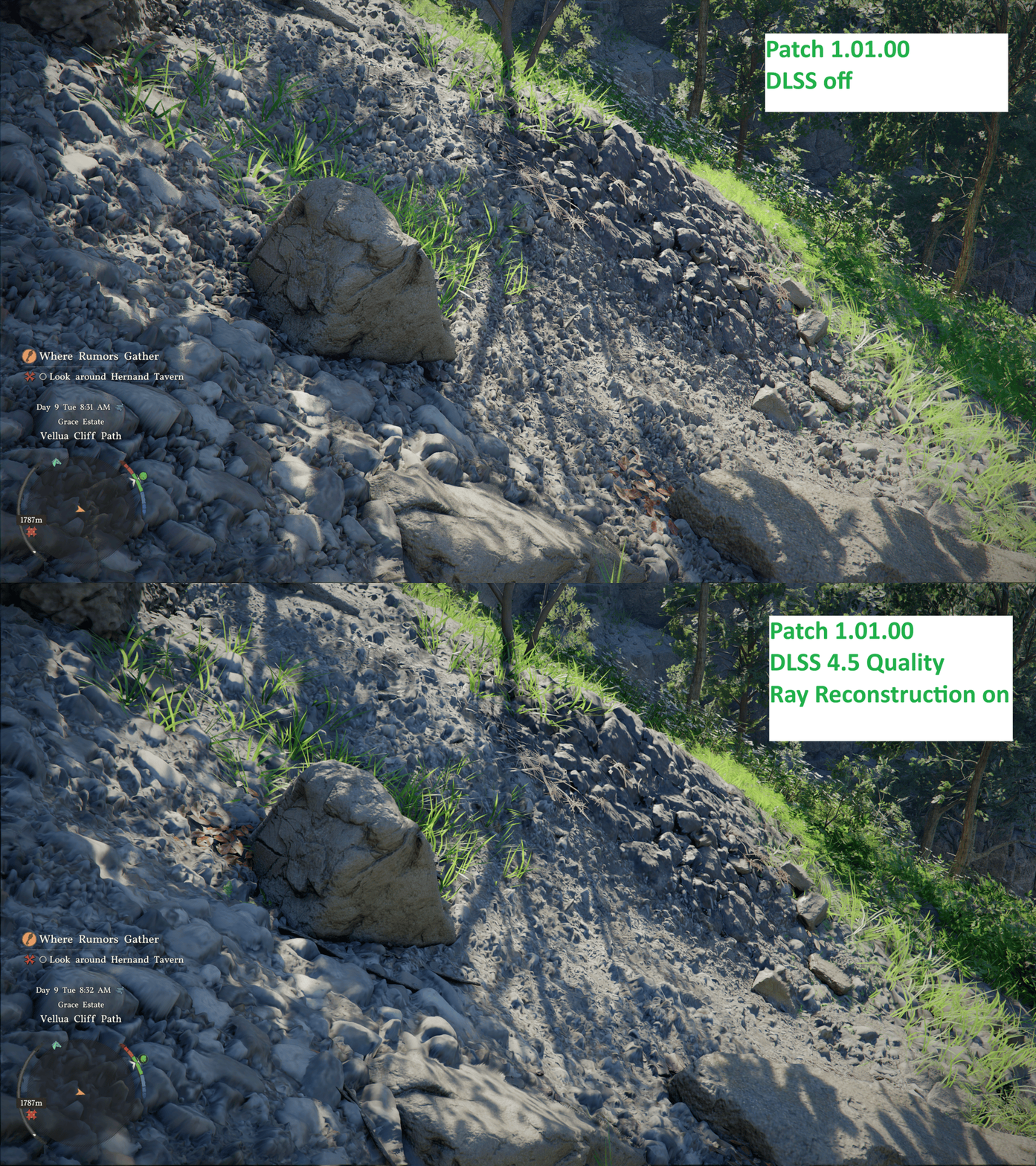
  • Fixed an issue where displacement mapping was not applied correctly when DLSS-RR was enabled. In addition, the DLSS-RR preset has been changed from D to E, improving overall visual quality and fixing an issue where texture animations, such as waterfalls, could stop playing.
 
Why is 'DLSS Ray Reconstruction' deflating the terrain in Crimson Desert?

DDXjZaVGEw5Rhlcf.gif
they just fixed it in a patch released a few minutes ago. Also changed DLSS preset to E like others had recommended doing manually.

  • Fixed an issue where displacement mapping was not applied correctly when DLSS-RR was enabled.
  • Improved rendering stability and visual quality in low-resolution environments or when upscaling is enabled.
  • Improved the rendering of translucent materials such as hair, fur, and clothing when FSR-RR / DLSS-RR is enabled.
I didnt notice any issues with hair and fur, but i really hope they have fixed the flickering with certain textures like hay stacks.

I wonder what they mean by improving rendering stability for low-res envs or when upscaling was enabled. Really hope they changed the way DLSS works in this game.

 
they just fixed it in a patch released a few minutes ago. Also changed DLSS preset to E like others had recommended doing manually.

  • Fixed an issue where displacement mapping was not applied correctly when DLSS-RR was enabled.
  • Improved rendering stability and visual quality in low-resolution environments or when upscaling is enabled.
  • Improved the rendering of translucent materials such as hair, fur, and clothing when FSR-RR / DLSS-RR is enabled.
I didnt notice any issues with hair and fur, but i really hope they have fixed the flickering with certain textures like hay stacks.

I wonder what they mean by improving rendering stability for low-res envs or when upscaling was enabled. Really hope they changed the way DLSS works in this game.

Man it's a long list of fixes that patch too and added content

They're working overtime over there
 
Glad I didn't buy it now and decided to wait. It's gonna be a treat - I hope - playing this half a year or even a full year from now.
I beginning to think that I shouldn't have either.
I'm still hesitant to really start playing Crimson Desert, gonna try to hold back until the major kinks have been ironed out.


they just fixed it in a patch released a few minutes ago. Also changed DLSS preset to E like others had recommended doing manually.

  • Fixed an issue where displacement mapping was not applied correctly when DLSS-RR was enabled.
  • Improved rendering stability and visual quality in low-resolution environments or when upscaling is enabled.
  • Improved the rendering of translucent materials such as hair, fur, and clothing when FSR-RR / DLSS-RR is enabled.
I didnt notice any issues with hair and fur, but i really hope they have fixed the flickering with certain textures like hay stacks.

I wonder what they mean by improving rendering stability for low-res envs or when upscaling was enabled. Really hope they changed the way DLSS works in this game.
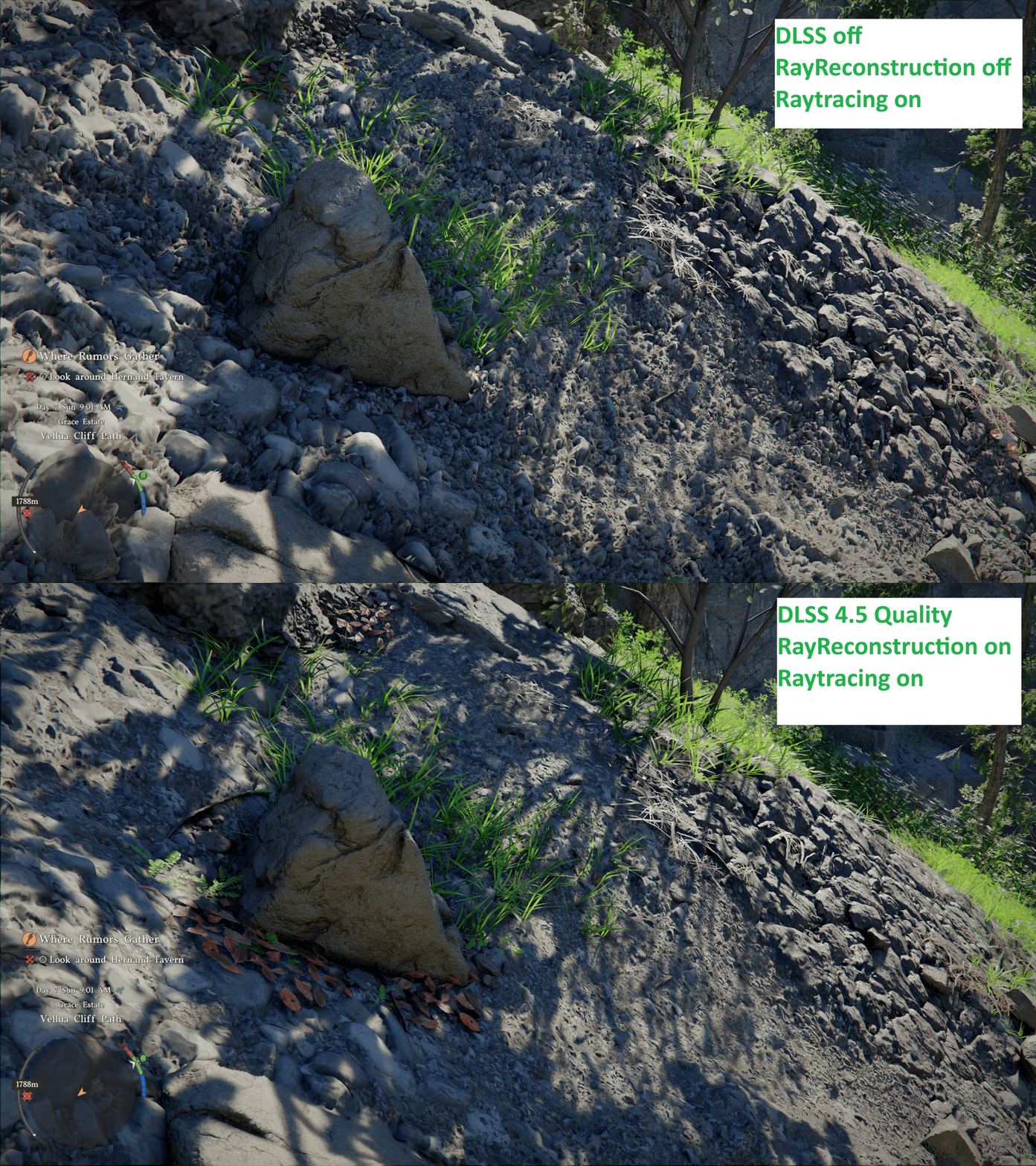
It's gotten way better, but it's not perfect yet (or I'm doing sth wrong):

pre patch:
Why is 'DLSS Ray Reconstruction' deflating the terrain in Crimson Desert?

DDXjZaVGEw5Rhlcf.gif

LOW6tnhvQ7SyrmAe.gif


edit: I just checked again. 'DLSS RR off' + 'DLSS RR on' look the same now, but there seems to be a general issue regarding DLSS.
The finest layer of displacement mapping only applies when DLSS is turned off.
 
Last edited:
While there are lots of technical issues with Crimson Desert like poor quality grass and other foliage, clipping, shadows, implementation of these effects, etc, it can still look quite good.

s6krmUY.jpg
 
9-9-6 culture
Well this game was in dev for 7 years and this 9-9-6 culture resulted in issues that should've been fixed at launch.

I get that every game has issues especially ambitious open world games but the problems with this game's visuals are very unique and likely a result of overworked developers who would've caught these issues if they weren't working 72 hours a week.
 
Top Bottom