• Hey Guest. Check out your NeoGAF Wrapped 2025 results here!

Apple iPad 2 |OT|

Status
Not open for further replies.
It's the magazine, since I usually buy that magazine it's nifty to have it in digital format instead.

How does Dropbox compare to the iDisk with MobileMe app? I've used both in the past, Dropbox does seem far easier to use though. Infinity Blade was okay, I had it on my iPhone but after awhile it just felt really repetitive. Looks amazing graphically on the iPad though!
 
ramyeon said:
How does Dropbox compare to the iDisk with MobileMe app? I've used both in the past, Dropbox does seem far easier to use though.


Never used iDisk with MobileMe so I can't say. It's a free app though. Just takes a few minutes to sign up and a really simple install. You get 2GB of storage for free.

I've only had my iPad for a day but the little time I've spent on Dropbox I think it will stay on my iPad for a long while.
 
I think FileBrowser is essential, but depends on your needs. If you have an Airport Extreme or another router that allows you to attach a wireless USB drive, you have an instant wireless file server for your iPad. It's like a local DropBox but with much more storage space; I never have to touch iTunes or have my computer on to transfer media.
 
NYR said:
All right. Going to try to exchange my red smart cover at the Apple Store. The damage of every day use has made it looked like I have rubbed it against sand paper. I take care of my stuff so well, no rough use at all. The leather is just too soft and susceptible to damage, especially at the price.
This is true of the leather covers, but I like how much softer it feels now and the current nicks and lines give it character in the way leather products do.
That's just me though.

I just really hate the 3 line thing. Constant wiping.
 
If I just got the iPad 2 and I want to buy some movies through iTunes, should I be getting the HD versions of the movies for playback on the iPad? I don't plan on playing them back anywhere other than iPad.
 
Epix said:
If I just got the iPad 2 and I want to buy some movies through iTunes, should I be getting the HD versions of the movies for playback on the iPad? I don't plan on playing them back anywhere other than iPad.
HD content does look nicer on it (at least going by some DVD and BD stuff I ripped myself) but it's up to you whether it's worth the price premium. SD content looks fine, HD just looks better. I haven't seen the quality of the iTunes encodes so that's a bit of an x-factor to take into consideration. I think there are HD and SD video podcasts so maybe test that stuff out to get a feel for how they look to you.

I guess you could take it movie by movie, you might want an HD version of a visual spectacle (like Tron Legacy for example) but may not care as much for a comedy or whatever where the visuals aren't a big deal.
 
Is there any app that lets me download videos from the internet for later offline viewing? I don't have wifi at work, so I'd like to download Giantbomb quicklooks while I'm at home for watching at work.
 
SmokyDave said:
Oh, bugger. I'm a PC :(
As am I. Just grabbed a friend's Macbook for a while. You could probably even do it in an Apple shop. If not, they'll probably show up for everyone in iOS 5. I'd say they're definitely worth the effort to enable, they really make the experience a whole lot smoother.
 
ramyeon said:
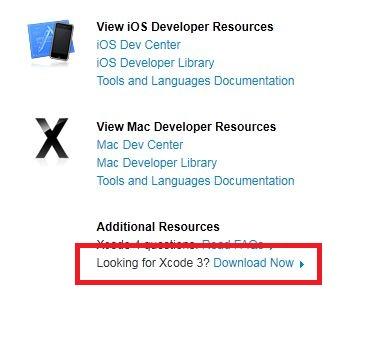
I just wish Xcode wasn't such a huge file... I also can't find Xcode 3 anywhere so I might have to front the cash for 4.
Nah, you can get XCode 3 from Apple.

Go to: http://developer.apple.com/xcode/
Create a free dev account, if you don't have one
Click on:
bsst26xefc9p1g373.jpg
 
NYR said:
All right. Going to try to exchange my red smart cover at the Apple Store. The damage of every day use has made it looked like I have rubbed it against sand paper. I take care of my stuff so well, no rough use at all. The leather is just too soft and susceptible to damage, especially at the price.

Sounds like you need a cover for your cover. You do understand the purpose of a cover right?
 
One app I'd highly recommend is The Economist. With each issue you get around 8 or so articles for free. Pretty awesome.
 
RSTEIN said:
One app I'd highly recommend is The Economist. With each issue you get around 8 or so articles for free. Pretty awesome.

You can get a subscription (print and ipad) for a dollar a week. Well worth it, though I kinda like the Businessweek layout a little more, I think.
 
Apparently something is wrong with my iPad's Volume Up button. I have to press it in much more in order to get the volume to go up, and I can also pull it in and out whereas the Volume Down seems fine and doesn't seem wobbly or loose at all. Hope I can get it exchanged today.

If I do exchange it, resetting/restoring the iPad as new will get rid of all stored passwords, correct?
 
Anybody buy the HDMI adapter and have it not work?

Doesn't work at all on one of my TV's, and the other it works but it doesn't even take up the whole screen AND it's not the correct resolution, so videos look like ass. Very pissed.
 
Holy shit, Qwiki is awesome. It's free slideshow based articles on various topics and places near you. I just spent good 30 mins watching random crap and learning cool facts.
 
bob page said:
Holy shit, Qwiki is awesome. It's free slideshow based articles on various topics and places near you. I just spent good 30 mins watching random crap and learning cool facts.
Oh wow, the interface is awesome. Thanks.
 
So this has probably been discussed to death, but what is everyone using for Facebook on the iPad? I went ahead and downloaded Friended which seems like a pretty decent app as it does everything facebook does really. Is there any one definitive app for it?
 
X-Frame said:
Anybody buy the HDMI adapter and have it not work?

Doesn't work at all on one of my TV's, and the other it works but it doesn't even take up the whole screen AND it's not the correct resolution, so videos look like ass. Very pissed.

Could it be a faulty adapter?

btw Is there not a non-apple brand hdmi-adapter?
 
Ashes1396 said:
Could it be a faulty adapter?

btw Is there not a non-apple brand hdmi-adapter?
There were some random ones on Chinese websites last year, although I have no clue if they work the same way (considering they were made before the official one existed, who knows).

As for X-Frame's problem, is your TV 720/768p by any chance? I'm wondering if mirroring is screwed up on those (since the iPad has 1024 vertical pixels when portrait, maybe it doesn't scale down right), otherwise going by the last post in this thread it sounds like there may have been a batch of faulty adapters.
 
Ok, so what's the best iPad App to be able to play divx and xvid movies without having to convert to MP4?

I'm not converting a shitton of movies just so it can run through the iPad's native movie player.
 
MercuryLS said:
Ok, so what's the best iPad App to be able to play divx and xvid movies without having to convert to MP4?

I'm not converting a shitton of movies just so it can run through the iPad's native movie player.
AV Player HD. Plays all formats, including subtitles, plus wireless file transfer.
 
X-Frame said:
Anybody buy the HDMI adapter and have it not work?

Doesn't work at all on one of my TV's, and the other it works but it doesn't even take up the whole screen AND it's not the correct resolution, so videos look like ass. Very pissed.
Something is wrong then.mine works fine, it wont take up all the screen unless you set your tv to do it, since it's 1924x768. Otherwise the app, video or photo needs to be higher res to fill the screen.
 
Another decent browser just came out, Sleipnir. Technically it came out for iPhone a few months ago but just got an iPad update now it looks like.

Seems kinda nice once you get used to it, at least as a pretty basic browser. You open tabs in the background by holding down on links, it's a quicker process if you do this a lot, but the lack of menu is obnoxious if you just want to copy a link (although you do get a menu when you tap on the address bar). On the iPad at least, you can also swipe left and right (when zoomed out) to switch tabs, and has a gesture to close tabs, all that seems to work nicely.

Again it's pretty basic, but overall feels pretty polished. It could be pretty nice if you want a nicer Safari alternative for tabbed browsing but not that much more (like all the extra stuff iCab has).

Edit: video of it in action does it more justice: http://www.youtube.com/watch?v=gmNbZSo3Cy4
 
Questions:
1. My iPad will be arriving next week. I also got AppleCare and it says it has already shipped (like 2 weeks ago), do they just somehow apply it to that iPad? Do I have to do anything to activate it when my iPad shows up?

2. I want a case that covers front and back, but allows me to see the back still, any recommendations (or do I really even need to cover the back?)

Thanks
 
Deadly Cyclone said:
2. I want a case that covers front and back, but allows me to see the back still, any recommendations (or do I really even need to cover the back?)

Thanks
You don't NEED to cover the back, but it's always nice to have protection. I haven't seen any cases that have exactly what you want, but I went with a smart cover + clear shell for the back. Works well and doesn't add too much weight.
 
Deadly Cyclone said:
Cool. What about the Applecare thing? Do they just automatically apply it to your ipad? Do you actually get documentation or anything?

I think you need to go online and activate it. Probably will need your iPad's serial number or something.

http://www.apple.com/support/products/ipad.html
There's a 'Register your AppleCare Now' box at the bottom of the page.

Epix said:
Are there better browser alternatives to Safari for the ipad 2?

I am really enjoying Atomic browser. Only thing I dislike so far is the ugly icon.
 
Ok, so they don't actually ship you anything related to AppleCare but once I get my iPad I go register it for the service to begin? Makes sense.
 
Status
Not open for further replies.
Top Bottom