• Hey Guest. Check out your NeoGAF Wrapped 2025 results here!

"I need a new PC!" 2010 Edition

Dynamic3 said:
Quick question, will this mobo allow me to SLI two 400 series Nvidia cards since the PCIx ports are far enough away from eachother (and the cards are apparently twice as thick as traditional cards)? Also, since both ports will run at x16, will I be maximizing performance?

As this is socket 1366, is the i7-930 significantly faster than the i5-750?
Yes that mobo will lets you SLi/xFire cards at full bandwidth.

Performance wise the 750 and 930 don't differentiate much. The main draw to the i7 line is hyper threading which is only useful for very few.
There are tons of 1156 boards that have 16/16 (although 8x/8x) or (16x/8x) would be fine.
dragonlife29 said:
Hey, PC GAF, I was looking at newegg's combos and wondered if any of them were good? This one stood out to me for no reason. Could that play L4D2? That's (and all Valve games) pretty much the only game it has to play flawlessly.

If you guys think you could steer me to better parts/prices, let me know! I'll gladly state my budget/wants, etc, but I was just curious to see if any of the combos were actually good deals. I know nothing about PCs so the help would be appreciated.
It's not bad, but you can get a quad for the same price today. Some components are not optimal.
I fit in a video card + 2 more cores for the same price.
That will play any Valve game at 60fps at high @ 1080p

http://secure.newegg.com/WishList/PublicWishDetail.aspx?WishListNumber=11174214


Dina said:
Anyone have experience running two 5850s in Crossfire? Will the Asrock P55 Deluxe3 motherboard work?
It switches to 8x/8x mode on PCI-E 2.0 so that is fine.
Coldsnap said:
I want to better my score on FFXIV benchmark. Here's my setup what should I upgrade? :

Intel Core 2 Duo E4500 Allendale 2.2GHz
CPU to a quad core for sure. You can get used Q6600's very cheaply, or you can consider upgrading to an AMD x4 635 using an AM3 motherboard that uses DDR2: http://www.newegg.com/Product/Product.aspx?Item=N82E16813157180
Kenak said:
What's an RMA? And does this more or less mean I need to buy a new HDD?

I'll google how to do this =P
You are returning a broken HDD. It should not cost you anything. Try to return it to the retailer first, then manufacturer second.
nickrempe said:
I dropped in to say that I purchased my system last night and stayed under my $800 budget (with mail-in rebates). Should be pretty awesome.
http://i47.tinypic.com/ne6amo.jpg
Very nice. Again I suggest the CM Hyper MX3.
MoreCraiger said:
Well guys, this is my first build, let me know what you think! I'll mainly be playing StarCraft 2, Diablo 3 when it come outs, and some of the bigger PC games out there (BC2, MW2, Bioshock 2, Fallout 3, Dragon Age: Origins, etc.) I'm trying to keep it cheaper, and since I'm not super picky on the visual quality of the games I'll be playing (equivalent or better than console counterparts), coupled with my 42" 1024x768 plasma, I didn't figure I'd need a quad-core or a higher-end GPU.
http://secure.newegg.com/WishList/PublicWishDetail.aspx?WishListNumber=11174214
d677l.png
http://secure.newegg.ca/WishList/PublicWishDetail.aspx?WishListNumber=11174214
Mystery said:
Are you planning on overclocking anything at all, or adding any other power-hungry components? 450W is the bare minimum standard to running a 5770.
Come on dude, you know that's not true at all.
BioHazard said:
Ok so I am thinking of building a custom gaming PC for the first time, but I really don't know where to start. I think I know what I need but need some help finding parts to make a high-end gaming PC on a budget of about $1000. Am I in for a difficult and tedious process or what, GAF?
http://secure.newegg.com/WishList/PublicWishDetail.aspx?WishListNumber=11141094
d677l.png
http://secure.newegg.ca/WishList/PublicWishDetail.aspx?WishListNumber=11141094

Pick a motherboard with USB 3.0 (The $150 model), and drop the Intel SSD.
That is your starting point. I'd probably drop in a 5850. If you can wait 2 weeks GPU prices should come down a bit with the introduction of the GTX 460, which might be a better value buy.
Of course depending what you play, the AMD above might be perfectly fine as well with a better GPU.


1)Basic Desktop Questions

Budget: Price Range + Country
Main Use: Gaming, Video editing, or just general usage
Monitor Resolution: What resolution will you be playing your games at? Are you going to upgrade later?
List SPECIFIC games that you MUST be able to play: Self Explanatory
 
Hazaro: Wow! Thank you for taking the time to make a list of components for me :) (It was for me, right? :P) I really appreciate it--and the price is perfect.
The image's items don't correspond with the ones on the list, though, so I'm making my own wish list to save. But just to double-check, I do want the items on the image, right?
 
dragonlife29 said:
Hazaro: Wow! Thank you for taking the time to make a list of components for me :) (It was for me, right? :P) I really appreciate it--and the price is perfect.

The image's items don't correspond with the ones on the list, though, so I'm making my own wish list to save. But just to double-check, I do want the items on the image, right?
Yes it was for you :p

The list items have alternatives in case people want to step up the HDD / mobo (for xfire) / etc.
Additionally the Antec case is there as a backup so I know when the Corsair/CM692 deal and rebates go down I have something on there already.

You can just check the box and add the ones in the image to your cart.
 
Hazaro said:
Yes that mobo will lets you SLi/xFire cards at full bandwidth.

Performance wise the 750 and 930 don't differentiate much. The main draw to the i7 line is hyper threading which is only useful for very few.
There are tons of 1156 boards that have 16/16 (although 8x/8x) or (16x/8x) would be fine.

Even if full bandwidth nets me only a frame or two, I'm happy. I'm going to get that mobo for $132 and a 930 for $200, then wait to see what happens when the 460 launches. I'm going to need an sli bridge though, correct? If so where can I find a cheap one. Would you be able to help me pick out some good compatible ram?

Once again, thanks for your help.
 
So I'm planning on upgrading my PC.

Intel quad core (2.4 ghz)
2 gigs of Ram
Nvidia GTS 250

I want to be able to run some Wii games in dolphin... what would you recommended?
 
So is it possible to have 2gb DDR3 1333mhz and 2gb DDR3 1600mhz? At the moment, I only have the 1333 stick, but I intend to have 6gb 1600 only, but can't afford to do it at once.
 
Dynamic3 said:
Even if full bandwidth nets me only a frame or two, I'm happy. I'm going to get that mobo for $132 and a 930 for $200, then wait to see what happens when the 460 launches. I'm going to need an sli bridge though, correct? If so where can I find a cheap one. Would you be able to help me pick out some good compatible ram?

Once again, thanks for your help.
That's a fine deal so I'm ok with that. Full bandwidth will only net you a few % better, but since the mobo is cheap enough I wouldn't worry. (See if it comes with an SLi bridge).
As for buying a bridge I can't say, but eBay would be a good place to start. I wonder if you would need one since PCI-E 2.0 @ 16x has enough bandwidth for them to talk or not. (I'm just wondering)

http://www.newegg.com/Product/Product.aspx?Item=N82E16820231304

1600 for overclocking, You want to stay at or below 1.65V for memory since it is tied to... something important :lol
AppleMIX said:
So I'm planning on upgrading my PC.
Intel quad core (2.4 ghz)

I want to be able to run some Wii games in dolphin... what would you recommended?
Overclock to 3.0 or 3.2 Ghz! (Even 3.6 if you are lucky)
A rifle style cooler will help, but it's possible to manage a decent OC on stock cooler without upping the voltage. Dolphin likes 3.0+Ghz
http://www.newegg.com/Product/Product.aspx?Item=N82E16835200026
luiztfc said:
So it possible to have 2gb DDR3 1333mhz and 2gb DDR3 1600mhz? At the moment, I only have the 1333 stick, but I intend to have 6gb 1600 only, but can't afford to it at once.
Installed yes.
Running no.

You'd have to downclock your memory to 1333 but that is a non issue since you can tighten the timings to get the same performance boost (not much). 1600 is only really needed if you are pushing your CPU past 4Ghz and want to keep the ratio at stock.
Mixing RAM usually isn't the best thing to do, but usually works without problem.
 
filipe said:
Alright, for anyone considering a gaming laptop, stop.

Take it from a guy who's spent the last like 10 pages bombarding them with questions like "Is this setup good?" and "What about this and that and the other thing?" gaming laptops are truly not worth it in the least. I have many a friends who thought they'd need the bare minimum gaming laptop because they just wanted to play that one game... but then they wanted to play a game that came out a year later and left screaming "Fffffffffuuuuuuuu!"

I have gone through SO many test builds, from Intel to AMD, and from nVidia to Radeon, and you are honestly only hurting yourself if you spend that much on a gaming laptop. You are paying a price for something that would have to be tethered during gaming sessions.

I considered such laptops until I started looking into just building my own desktop. I set my desktop budget at a decent $1500, which allows me to build something that can run Crysis at close to max settings (you know, that benchmark game). If need be now, I can go out and buy a netbook for >$500 and have portability + gaming for $2000.

That suggestion has already been made above me, and it's the best suggestion that can be made. Do yourself a favour and build a desktop and then buy a netbook.

While I agree with the statement exceptions can be found. I just spend 680$ CDN on an i3 330 with a 5730. For 750$ I could have bumped it up to the i5 540 but I really wanted to be thrifty and I already have a gaming desktop anyways. I'd rather have the battery life. It also includes switchable graphics. I had to use a coupon code to get it but Lenovo puts them up fairly often, although not usually that much of a discount. I have the Y560.

Mystery said:
Oh, really?

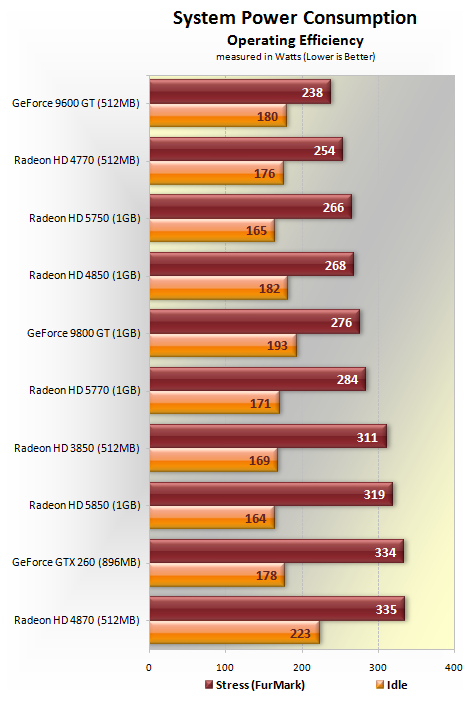
A 450W PSU will run that system, but in the even that he upgrades his GPU, or decides to overclock his CPU, or adds any other power-hungry components, he could run into issues. I personally like to allow a certain amount of overhead when building my PCs, and I was trying to share that with him.

Don't even bother looking at the "recommended specs". They are garbage and built to accomodate garbage PSUs. You could even get away with running a 5850 on a quality 400W PSU if it saved you from having to buy a new one.

Power.png

- Intel Core i7 965 Extreme Edition (Overclocked @ 3.70GHz)
 
Hazaro said:
That's a fine deal so I'm ok with that. Full bandwidth will only net you a few % better, but since the mobo is cheap enough I wouldn't worry. (See if it comes with an SLi bridge).
As for buying a bridge I can't say, but eBay would be a good place to start. I wonder if you would need one since PCI-E 2.0 @ 16x has enough bandwidth for them to talk or not. (I'm just wondering)

http://www.newegg.com/Product/Product.aspx?Item=N82E16820231304

1600 for overclocking, You want to stay at or below 1.65V for memory since it is tied to... something important :lol

Are you sure that ram is the right type? The mobo says it doesn't support 1600 or triple channel. Also, will 6gb provide me a significant benefit over 4gb?
 
I think this is the right thread to ask this? My notebook is an Asus UL30V series with a Geforce G210M 512MB card. I think I'm still running the Nvidia driver the notebook shipped with. According to Nvidia's site, I'm running driver version 186.88. I don't game much on this notebook, but I just got Trine and I'm getting shitty performance so far, and would like to update the graphics driver if that will help. What driver version should I get, and how do I get it?
 
Dynamic3 said:
Even if full bandwidth nets me only a frame or two, I'm happy. I'm going to get that mobo for $132 and a 930 for $200, then wait to see what happens when the 460 launches. I'm going to need an sli bridge though, correct? If so where can I find a cheap one. Would you be able to help me pick out some good compatible ram?

Once again, thanks for your help.

Yeah, I did some research. There was a test done somewhere online with 5870's I think where they limited them to x4 instead of x16 by putting some tape over the slots and the difference was really really minimal.

I'll be Xfire with two 5770's which should use less bandwidth than 5870's so I should be fine. Although if I had to do it again I'd probably go with two 5750's and save enough money to pay for my MB.

And I'm not sure but, in theory I think it would be wise to OC your cards to exactly the same speeds if you Xfire or SLI.

To Thread:

Yeah, as far as PSU's go I'm running a 5770 + 8GB ram + OC'd quad core with no issues on a Earthwatts 380.
 
Dynamic3 said:
Are you sure that ram is the right type? The mobo says it doesn't support 1600 or triple channel. Also, will 6gb provide me a significant benefit over 4gb?
It is the correct RAM. For whatever reason MicroCenter has some wrong specs on the mobo (Socket 1333?). It runs triple channel (checked newegg + the GB website to double check) and you can tell from looking at the board.
Motherboards generally list all the RAM speeds that are currently available (also I think 1600 does not meet specifications and must be overclocked, this happened with DDR2 as well) So that is why it's not listed. It should run it fine, however. As with most RAM you need to set it manually in the BIOS.

6GB over 4GB has some benefits if you use it. Windows should be able to preload more stuff for you, and you can have a lot of programs open at once (Just stupid amounts really). Triple channel makes some difference in gaming. That's about it.
If you don't want to shell out an extra $50 it's not a big deal. Just make sure it's 1.5V-1.65V

I checked your mobo manual and it indeed supports Dual Channel / Triple. I'm not sure but I don't think supporting Dual / Triple is a standard feature.
Parallax Scroll said:
I think this is the right thread to ask this? My notebook is an Asus UL30V series with a Geforce G210M 512MB card. I think I'm still running the Nvidia driver the notebook shipped with. According to Nvidia's site, I'm running driver version 186.88. I don't game much on this notebook, but I just got Trine and I'm getting shitty performance so far, and would like to update the graphics driver if that will help. What driver version should I get, and how do I get it?
There should be an nvidia mobile drivers section
www.nvidia.com/object/notebook_drivers.html
 
AppleMIX said:
So I'm planning on upgrading my PC.

Intel quad core (2.4 ghz)
2 gigs of Ram
Nvidia GTS 250

I want to be able to run some Wii games in dolphin... what would you recommended?
2GB on a PC is a crime. At least get 2 more.
 
Bit of an off topic question. Anyone here played Galactic Civilization II? I was looking into acquiring a copy and notice I can get the stand alone one fairly cheap, but have to shell out quite a bit for it with the 2nd expansions. Worth it to pick up the two expansions?

2nd question, how much is it like Sins of a Solar Empire? Like worth it or not
 
Hazaro said:
Yes that mobo will lets you SLi/xFire cards at full bandwidth.

Performance wise the 750 and 930 don't differentiate much. The main draw to the i7 line is hyper threading which is only useful for very few.
There are tons of 1156 boards that have 16/16 (although 8x/8x) or (16x/8x) would be fine.

Can you recommend a few? Preferably with USB3 and SATA6. I'm looking for a good, proper Crossfire motherboard that can also overclock.
 
Dina said:
Can you recommend a few? Preferably with USB3 and SATA6. I'm looking for a good, proper Crossfire motherboard that can also overclock.
Budget wise this is a cheap mobo (it does 16x/4x + USB 3.0 + SATA 3.0). You are looking at about a 4% loss of FPS if you go 4x, at least numerically.
http://www.newegg.com/Product/Product.aspx?Item=N82E16813128412

8x/8x upgrade here for a bit more: http://www.newegg.com/Product/Product.aspx?Item=N82E16813131621

Just another reason besides (power, heat, and microstutter) to go with a single card.
Adding on another PCI-E lane and increasing bandwidth costs $.

Apparently it is possible that the P55 chipset has a limitation on PCI-E bandwith and it must be shared / or the USB3 / SATA to be reverted back to 2.0
A newegg review states that the Asus does not have this problem but I am not convinced.
I remember hearing 1366 was the way to go for xFire, makes some more sense now.

So basically on a P55 (1156) you are picking between xFire or USB3/SATA3.
If you want xFire on your Intel system + USB3 and SATA 3 it looks like you will need to step up to socket 1366 and an i7.

Sorry about that, I wasn't aware the chipset had such limits as of now. This is why single cards are so much better. Less power draw and heat, no micro stutter, plus they work equally well on all games, and you can run games windowed well.

*Do dual GPU's only work when games are FullScreen? Has this been updated?
 
Thanks. I'm looking at the Asrock P55 Deluxe3 personally. 40 euros cheaper than the ASUS and roughly the same specs.
 
Also be aware the ASUS can emit a high pitched noise when in use.
I'll dig a bit to see if the ASUS has the same issue as the other P55 boards.

*OK
The P7P55D-E Pro doesn't seem to disable USB 3.0 or SATA3.0 because the PRO versions of the board have a chip (PLX) that combines bandwidth from the PCI-E 1x slots to make up the difference.

So if you want xFire go with that.
 
I know this is OT for the thread but I really hate making new threads.

Use at Your own risk!!!
I did some tweaks today for my 512k DSL internet with fantastic results in Windows 7 x64 and it seems to make playing online games much snappier.
Do this stuff at your own risk and to learn more about it along with optional registry tweaks which i do NOT recommend go here: http://www.speedguide.net/read_articles.php?id=2574
I don't know if this stuff works for any other type of connection except DSL so take that for what it is worth. Everything here can be easily returned to default if it doesn't work by replacing the last word in the command with default.

At a command prompt type:

"netsh int tcp set heuristics disabled" press enter

"netsh int tcp set global congestionprovider=ctcp" press enter


If you have a dual core and up:
"netsh int tcp set global rss=enabled" press enter

Now go to this page in IE and run it...

If you get Traffic Congestion Test Supported then enter this at a command prompt:

"netsh int tcp set global ecncapability=enabled" press enter

If you get TCP High Performance Test Unsupported then try this at a command prompt:

"netsh int tcp set global autotuninglevel=disabled" press enter

if that doesn't work then set it back to default

"netsh int tcp set global autotuninglevel=default" press enter

Alternatively, you can try setting it to "restricted" which is where mine is set.


Next you can try to enable Direct Cache Access. I'd recommend to test your connection or web browsing snappiness before and after you do this. If your NIC doesn't support it you need to set it to disabled but, if it does then enable it.

"netsh int tcp set global dca=enabled" press enter
or
"netsh int tcp set global dca=disabled" press enter

I used to get a lot of timeout errors on some websites and my download speeds would fluctuate too much. Windows 7 enables TCP Chimney Offload. I disabled mine and it helped tremendously.

"netsh int tcp set global chimney=enabled" press enter


And one last thing to try is to do enter "gpedit.msc" down in the W7 search box and press enter to run it. Now go Administrative_Templates -> Network ->QoS Packet Scheduler -> Limit Reservable Bandwidth and set it to Enable then set the Bandwidth limit to 0%


This stuff really helped out my internet connection. My downloads aren't really any faster but, when I surf the net, watch youtube videos, play online games, everything feels so much snappier and quicker.


Also, OP should add Open Hardware Monitor to the first post.
 
Should I bump up to the USB 3.0/SATA 6.0gbs board (it's an extra $105), or will I not realize the difference as pretty much every drive I've looked at (including the X-25M) only support SATA 3.0gbs?
 
Is there any way to disable AA by default on ATI cards? I've used nVidia cards up until this point, so I'm curious what sofware is in vogue for doing such.
 
Dynamic3 said:
Should I bump up to the USB 3.0/SATA 6.0gbs board (it's an extra $105), or will I not realize the difference as pretty much every drive I've looked at (including the X-25M) only support SATA 3.0gbs?
I wouldn't. You have an extra PCI-E x4 and x1 so if you REALLY needed to you could probably add on an internal card for less later when stuff actually starts using it. Maybe Intel's optical tech will win in 2 years, who knows.

That mobo is so cheap it is crazy. I want a micro center near me.
saelz8 said:
Is there any way to disable AA by default on ATI cards? I've used nVidia cards up until this point, so I'm curious what sofware is in vogue for doing such.
Curious why you would want to?

Also do you mean software AA or what? Normally games default to 0xAA / medium settings unless they auto detect.

This should work: Disable the Catalyst A.I
If not go into ATI Control Center / Catalyst and using the setting titled something like 'Use Application Setting' should set it to 0xAA unless the program defaults to 2xAA.
You can also look for a setting / slider that goes from 'Performance' --------- 'Quality' and drag it to Performance.
See: http://www.tweakguides.com/ATICAT_7.html

Let me know what you find.
 
Someone in other forum posted this. Im guessing this is BS?
perfrel.gif


I am really looking at a 30% perfomance increase in going from a 280 to a 470?
 
Crunched said:
GAF, can I xfire two Vapor-X 5870s if one is 1GB and the other 2GB?

*-------------*

Yes, you can Crossfire 2 different ATI cards. Crossfire and SLI don't care if you have 2/3 different cards with different memory configurations, so you are good to go ;)
 
Ryoma-Echizen said:
Well choosed components for the price. One change can be the OCZ Modstream 500w.

Thanks, I´ll consider the OCZ Modstream. I heard next week releases the new midclass Geforce. Is it worth the wait? Is it better than a Radeon 5850?
 
xyla said:
Thanks, I´ll consider the OCZ Modstream. I heard next week releases the new midclass Geforce. Is it worth the wait? Is it better than a Radeon 5850?

Definetely worth the wait as it'll shift GPU prices down if it has decent performance. Will definetely be weaker than a 5850.
 
Mr_Brit said:
Definetely worth the wait as it'll shift GPU prices down if it has decent performance. Will definetely be weaker than a 5850.

Thanks, I think I´ll wait, then. If the performance is right, how fast are the prices expected to go down? Weeks, month? My plan was to upgrade before August, but I guess a week or two won´t matter...
 
Shadowhaxor said:
*-------------*

Yes, you can Crossfire 2 different ATI cards. Crossfire and SLI don't care if you have 2/3 different cards with different memory configurations, so you are good to go ;)
Glorious, thank you.
 
I have an i5 with a GTX 260 with 4GB of RAM. What is the thinking on the GTX480/GTX470 compared to what I have as far as it being worth it to upgrade?
 
Here is my new baby, I only OC'd to 3.09GHz atm will go upto 3.5GHz stock eventually just letting it break in.

zwj0j5.jpg


Dunno if my ram is optimally configed.

Model
Brand G.SKILL
Series ECO Series
Model F3-12800CL7D-4GBECO
Type 240-Pin DDR3 SDRAM
Tech Spec
Capacity 4GB (2 x 2GB)
Speed DDR3 1600 (PC3 12800)
Cas Latency 7
Timing 7-8-7-24-2N
Voltage 1.35V

Quiet n cool drops the speed to 800ish MHz per core when not doing much, like browsing etc and voltage to 1.xx ish normally the cpu is at 22c-23c not doing much which I assume it's about 32c idle (since it reports under 10c it seems) which I am happy about.. It's pretty hot over here in nyc :lol


Look at my high temp (40c) with prime running everything at 100% shit is running beautifully.
 
Alright well, I could go around newegg and picking out the parts, but I know there are some Resident GAF experts, that really know whats best. Looking to pick the parts for my brother-in-law.


Budget: $600-700, USA
Main Use: General Usage, but a nice video card would be good.
Monitor Resolution: 720p/1080p he has an HDTV which he would be hooking it up to.
List SPECIFIC games that you MUST be able to play: Doesn't mattter at the moment, since he wouldn't really be gaming much(if any) on it. But if I had to slap a benchmark game of sorts on it, I'll say Mirror's Edge. Also a DVD-Burner would also be good.

If possible Newegg please. Thanks, GAF.
 
Slayer-33 said:
Here is my new baby, I only OC'd to 3.09GHz atm will go upto 3.5GHz stock eventually just letting it break in.

So you're pretty happy with that CPU? I'm pricing out a similar system right now, I'm just going to leave my HD4850 in it for a while though.
 
Lonely1 said:
Someone in other forum posted this. Im guessing this is BS?
http://tpucdn.com/reviews/HIS/Radeon_HD_5550/images/perfrel.gif
I am really looking at a 30% perfomance increase in going from a 280 to a 470?
Sort of. Checking benchmarks of the cards per game and resolution is more important, especially with what settings they run on. If you run higher resolutions with more AA it can pull much farther ahead... but the FPS will probably be low.
Amneisac said:
Any impressions on this deal?

http://www.newegg.com/Product/Combo...ickDeals-_-NA-_-NA-_-NA&ItemList=Combo.441302

Going to build something in the next few months for FFXIV and TOR, I have an HD4850 that might be going into this system as a place holder after I find a decent mobo/proc deal. Anyways, if this deal is hot enough I'll just buy the case/psu/hdd now.
That is a nice combo deal.
ACE 1991 said:
So how possible is it to upgrade to a new graphic's card in a laptop?
Your laptop needs to support it. If your laptop has an expensive GPU it most likely is replaceable...but, buying a new laptop GPU separately is obscenely expensive.
Plywood said:
Alright well, I could go around newegg and picking out the parts, but I know there are some Resident GAF experts, that really know whats best. Looking to pick the parts for my brother-in-law.


Budget: $600-700, USA
Main Use: General Usage, but a nice video card would be good.
Monitor Resolution: 720p/1080p he has an HDTV which he would be hooking it up to.
List SPECIFIC games that you MUST be able to play: Doesn't mattter at the moment, since he wouldn't really be gaming much(if any) on it. But if I had to slap a benchmark game of sorts on it, I'll say Mirror's Edge. Also a DVD-Burner would also be good.

If possible Newegg please. Thanks, GAF.
http://www.newegg.com/Product/Combo...ickDeals-_-NA-_-NA-_-NA&ItemList=Combo.441302
+ http://www.newegg.com/Product/Product.aspx?Item=N82E16814150482 (You will have to set up your display options to get rid of overscan or w/e)
+ http://www.newegg.com/Product/Product.aspx?Item=N82E16813128419
+ http://www.newegg.com/Product/Product.aspx?Item=N82E16819103702
+ http://www.newegg.com/Product/Product.aspx?Item=N82E16827151188
+ http://www.newegg.com/Product/Product.aspx?Item=N82E16820231190
__________
$549 after rebate + Tax + Shipping
__________
Bonus items: Cooler: http://www.newegg.com/Product/Product.aspx?Item=N82E16835103064
GPU upgrade/sidestep: GTS 250 / 5770 (Or wait 2 weeks and hope GTX460 lowers prices, mixes things up)

Is the TV 720 or 1080? 1080 needs a lot more horsepower. If you can't wait 2 weeks nab a 5850 or GTX470
 
Amneisac said:
So you're pretty happy with that CPU? I'm pricing out a similar system right now, I'm just going to leave my HD4850 in it for a while though.


Hell yeah bro :lol my xfx 5750 (will be replaced within a year probably when prices come down on the top dogs) and the proc/ram EAT BFBC2 alive @ 1080p I f'in love this system.

make sure you get an extra 2 case fans (120mm's) and block out the side vent on the Antec 300 for optimal airflow. That would be 2 included 120mm case fans + 2 extra for intake on the front. Check the specs of my system a few pages back, I listed them a few days ago.


514RNvS9z0L._SL500_AA300_.jpg


http://www.amazon.com/gp/product/B0026ZPFCK/?tag=neogaf0e-20 these are fucking awesome.

They look sexy as hell on the front of the 300.


These are my settings for bc


It's steady over 35fps-60 depending on whats going on at those settings. I haven't tweaked any other deep core settings yet, just those with the launcher atm.

10gfha1.jpg
 
So I spent some time looking at cases and I found my way to this one:

http://www.newegg.com/Product/Product.aspx?Item=N82E16811112239

If I were to get a SSD, how would that work with their trays.

And to anyone that has used both or knows more on this than me. Raptor HD or SSD? Still don't know what to do on this.

O_O


Amneisac said:
Any impressions on this deal?

http://www.newegg.com/Product/Combo...ickDeals-_-NA-_-NA-_-NA&ItemList=Combo.441302

Going to build something in the next few months for FFXIV and TOR, I have an HD4850 that might be going into this system as a place holder after I find a decent mobo/proc deal. Anyways, if this deal is hot enough I'll just buy the case/psu/hdd now.

Now I kind of want this :lol

Hey, has anyone else noticed that all of the Newegg links have the '-_-' face all over them?
 
demosthenes said:
So I spent some time looking at cases and I found my way to this one:

http://www.newegg.com/Product/Product.aspx?Item=N82E16811112239

If I were to get a SSD, how would that work with their trays.

And to anyone that has used both or knows more on this than me. Raptor HD or SSD? Still don't know what to do on this.


All I know is that the Antec 300 has 2 special compartments for 2 ssd's I think :D

I would IMO get a big (or two) 500GB-6XX-1TB (F3's have 2 500GB platters 1TB ver) 7200RPM hdds and wait a year or so to upgrade to SSD for OS booting and certain app installations/game.

Go for WD Caviar black's or Sammy F3's (I bought two 1TB F3's they are working flawlessly so far and they are as fast as raptors I hear from certain benching)

I'll bbl going to buy some shit to the store.

http://www.bit-tech.net/hardware/storage/2009/10/06/samsung-spinpoint-f3-1tb-review/10
 
Slayer-33 said:
All I know is that the Antec 300 has 2 special compartments for 2 ssd's I think :D

I would IMO get a big (or two) 500GB-6XX-1TB (F3's have 2 500GB platters 1TB ver) 7200RPM hdds and wait a year or so to upgrade to SSD for OS booting and certain app installations/game.

Go for WD Caviar black's or Sammy F3's (I bought two 1TB F3's they are working flawlessly so far and they are as fast as raptors I hear from certain benching)

I'll bbl going to buy some shit to the store.

http://www.bit-tech.net/hardware/storage/2009/10/06/samsung-spinpoint-f3-1tb-review/10

I know you're gone but could anyone else comment on this question:

They tested a 1TB HD. I won't use 1TB, I doubt ever. So if I saved $20-$30 for a 620GB version, I'd assume it would have similar speeds?
 
demosthenes said:
I know you're gone but could anyone else comment on this question:

They tested a 1TB HD. I won't use 1TB, I doubt ever. So if I saved $20-$30 for a 620GB version, I'd assume it would have similar speeds?


yep that's fine.
 
What are some of the GAF OC results for the 5770? I'm currently sitting at 950/1400 from 875/1225.

Not bothering OCing my Core i5 750. I'll let Turbo Boost do its thing since I've been looking over some overclocking benchmarks and it's really not worth OCing anymore (For gaming anyway).
 
demosthenes said:
I know you're gone but could anyone else comment on this question:

They tested a 1TB HD. I won't use 1TB, I doubt ever. So if I saved $20-$30 for a 620GB version, I'd assume it would have similar speeds?
The Samsung F3 drives (500GB, 1TG) are 500GB platters.
The other drive I'd recommend is a 640FB WD, but those are 320GB platters.
Both are quite zippy.
Plywood said:
Its 1080p, so I gave him the link to the GTX470. Thanks Hazaro, much appreciated.
Are you sure you don't want to wait 2 weeks? The GTX460 should slot in at the ~$220 mark and be nice for 1080p. Like I said it might drop down prices across the board as well.
No_Style said:
What are some of the GAF OC results for the 5770? I'm currently sitting at 950/1400 from 875/1225.

Not bothering OCing my Core i5 750. I'll let Turbo Boost do its thing since I've been looking over some overclocking benchmarks and it's really not worth OCing anymore (For gaming anyway).
http://hwbot.org/hardware/videocard...GPU_1602&hardwareType=GPU&tabid=gpubenchmarks

You could probably squeeze a bit more out of it (Select 1x core and stock cooling)
 
demosthenes said:
Ugh, this happened last time I build a computer, I get so indecisive about parts. :(
That just means there are so many good choices.
Toss your parts up I'll pick for you :p
 
Hazaro said:
That just means there are so many good choices.
Toss your parts up I'll pick for you :p

I don't know if you remember from last week but we were talking about the XIV benchmark.

So right now I have:

MOBO:
http://www.newegg.com/Product/Product.aspxItem=N82E16813131386&Tpk=asus p6t se

CPU:
http://www.newegg.com/Product/Product.aspx?Item=N82E16819115225&cm_re=i7_930-_-19-115-225-_-Product

RAM:
http://www.newegg.com/Product/Product.aspx?Item=N82E16820145258

Video Card:
http://www.newegg.com/Product/Product.aspx?Item=N82E16814150447

PSU:
http://www.newegg.com/Product/Product.aspx?Item=N82E16817139005

Monitor:
http://www.newegg.com/Product/Product.aspx?Item=N82E16824236059

What I'm unsure of:
1) HD
a) Go 40GB SSD / WD or Samsung secondary for everything else. ~$165
b) Raptor / Samsung/WD for everything else ~$195
c) Just get 2 of the 7200 Samsung/WD ~$110

Raptor I'm looking at:
http://www.newegg.com/Product/Product.aspx?Item=N82E16822136296
Samsung I'm looking at:
http://www.newegg.com/Product/Product.aspx?Item=N82E16822152181
SSD I'm looking at:
http://www.newegg.com/Product/Product.aspx?Item=N82E16820167025

I'm used to the current Raptor I have now, but it's old and needs to be replaced.

2) Case
a) http://www.newegg.com/Product/Product.aspx?Item=N82E16811129021
b) http://www.newegg.com/Product/Product.aspx?Item=N82E16811112247
c) http://www.newegg.com/Product/Produ...129066&cm_re=antec_300-_-11-129-066-_-Product
d) http://www.newegg.com/Product/Product.aspx?Item=N82E16811112239

Won't be doing LAN so I don't care if it's heavy or not. I just want the best air flow really.

I'm also wondering if I should go for a better video card or not, but there doesn't seem to be much in the $200ish price range. Goes from $180 to $300 from what I saw.
 
Nakazato said:
Im trying to deiced between

1GB HD4850/HD5450/HD5750
Out of those? 5750 is the fastest. Don't bother with 5450 as isn't gaming grade. I would try to squish the budget a bit more for a 5770 though.
 
Top Bottom