
I used to use a $5 picture easel from Target.Stat Flow said:Yeah I know, that's why I said I forgot to mention it (and edited). Thanks.
I think I may have found something on Amazon, though it looks flimsy. People also say that cheap ass business card holders from office depot work, might have to check that out.
-
Hey Guest. Check out your NeoGAF Wrapped 2025 results here!
You are using an out of date browser. It may not display this or other websites correctly.
You should upgrade or use an alternative browser.
You should upgrade or use an alternative browser.
Apple iPad 2 |OT|
- Thread starter giga
- Start date
- Status
- Not open for further replies.
http://www.amazon.com/dp/B003XQMUVA/?tag=neogaf0e-20Stat Flow said:Yeah I know, that's why I said I forgot to mention it (and edited). Thanks.
I think I may have found something on Amazon, though it looks flimsy. People also say that cheap ass business card holders from office depot work, might have to check that out.
Are you looking for something like that?
Saw that you mentioned DIY, I know this one
http://www.geeky-gadgets.com/the-pencil-ipad-stand-07-07-2010/
Thanks for the tips guys. Looks like I'll be doing this: http://drewvigal.tumblr.com/post/512171217/the-0-69-ipad-stand
I'll buy a couple. Looks like I missed the boat. I'll look around for something similar though.
kkaabboomm
Member
ok. so i got an ipad 2 for graduation. 32GB, verizon (i have an att iphone 4, so my dad thought id like a different carrier for the ipad to balance things out).
best apps i should get? best ones i can pay for? i dont really want to imovie shit up, and wont be using it to type spreadsheets and word docs. maybe a couple games and random other things?
best apps i should get? best ones i can pay for? i dont really want to imovie shit up, and wont be using it to type spreadsheets and word docs. maybe a couple games and random other things?
Macho Madness
Member
What do you use now?Tobor said:I used to use a $5 picture easel from Target.
Since I upgraded to the iPad 2, I use the smart cover. Finding a secondary stand isn't an issue anymore.thewesker said:What do you use now?
Solideliquid
Member
Can you guys give some recommendations on what is the best iPad 2 travel bag?
BDCasbox said:I'm planning on getting an iPad soon and mainly using it (aside from web browsing) to watch movies. Should 16 GB be fine or should I go for 32?
In what capacity do you plan to watch them? Because there are plenty of streaming options available, but if you're going to store them locally I'd recommend the 32GB.
Well I'm going to college next year and was planning on using it to watch the digital copy of my movies so I don't have to take all the disks with me. I might stream a bit but it would mostly be local.Orellio said:In what capacity do you plan to watch them? Because there are plenty of streaming options available, but if you're going to store them locally I'd recommend the 32GB.
BDCasbox said:I'm planning on getting an iPad soon and mainly using it (aside from web browsing) to watch movies. Should 16 GB be fine or should I go for 32?
I would go with the 32G
Keyser Soze
Member
BDCasbox said:Well I'm going to college next year and was planning on using it to watch the digital copy of my movies so I don't have to take all the disks with me. I might stream a bit but it would mostly be local.
You are going to have a computer with you at collage, so if you pick up a 1TB harddrive, and maybe a USB dongle, you could stream all you collection to the iPad very easily
All you have to do is use MakeMKV to rip, which is the quickest option available - 90minute films take about 15 minutes, and most of these come out at about 3GB. You could fit 300+ DVDs on a 1TB harddrive at that rate. Then set up Airvideo or SteamToMe
What do you mean by put each section into its own PDF?Anastacio said:So this is my plan for all of my papers (from the bank, commune etc.)
01) Scan in all my papers on the computer.
02) Put each section into its own .PDF file - but how to do this?
03) Transfer them to the iPad into iBooks.
Merging PDFs? There are some desktop applications that do that.
For viewing on the iPad, I personally would go with GoodReader and its Dropbox integration.
BDCasbox said:Does MakeMKV go past the encryption on most DVDs? I have digital copies for many of my movies so it would be mainly the older movies or tv shows that i would take the disk for.
How much does a reliable 1TB hard drive cost now?
Newegg.com:
1TB Western Digital External $110
1TB Western Digital Internal $60
2TB Seagate Internal $74
I'm just not too fond of having it stored on another device and then use Dropbox, as if I am going outside, I won't be able to stream it to the iPad - I don't have a micro-sim card for my tablet unlike the iPhone 4.numble said:What do you mean by put each section into its own PDF?
Merging PDFs? There are some desktop applications that do that.
For viewing on the iPad, I personally would go with GoodReader and its Dropbox integration.
I mean, I have already sorted my papers in categories like "bank", "commune", "bills" etc. and would like to have them as each their own .pdf file, instead of one big .pdf file with all of those categories in one.
Deadly Cyclone
Pride of Iowa State
I guess Atomix mag is still broken. Just bought issue 2 and it errors when trying to download...
Goodreader will save it locally. But it makes it easier since you don't need to connect and sync everytime you want to add a PDF. The way I organize it is I put it in separate folders and they show up in separate folders in Goodreader.Anastacio said:I'm just not too fond of having it stored on another device and then use Dropbox, as if I am going outside, I won't be able to stream it to the iPad - I don't have a micro-sim card for my tablet unlike the iPhone 4.
I mean, I have already sorted my papers in categories like "bank", "commune", "bills" etc. and would like to have them as each their own .pdf file, instead of one big .pdf file with all of those categories in one.
Can't you just make bank.pdf and commune.pdf and bills.pdf? I might not be understanding your question.
That's what I mean, a bank.pdf, commune.pdf, bills.pdf etc.numble said:Goodreader will save it locally. But it makes it easier since you don't need to connect and sync everytime you want to add a PDF. The way I organize it is I put it in separate folders and they show up in separate folders in Goodreader.
Can't you just make bank.pdf and commune.pdf and bills.pdf? I might not be understanding your question.
But how do I create one? When I have the papers on my computer, I'll use a program to merge the bank papers into bank.pdf?
Seriously. The battery life might be one of my favorite things about my iPad 1.mrkgoo said:Was on a long haul flight. The iPad makes it sooooo much better.
Watched 3x 50 minute tv shows. Battery life, 87% remaining.. Of course, new batteries always operate better, right?
Well, it's my year old iPad 1 that I use a lot every day. Love the battery life on this thing.
OldJadedGamer
Banned
Deadly Cyclone said:I guess Atomix mag is still broken. Just bought issue 2 and it errors when trying to download...
It seems to be released totally untested.
The battery life of these things in airplane mode is really good--they never test or rate these things in reviews, but they should. With all the antennas turned off, it can last intercontinental flights going full blast with games and movies.mrkgoo said:Was on a long haul flight. The iPad makes it sooooo much better.
Watched 3x 50 minute tv shows. Battery life, 87% remaining.
Well, it's my year old iPad 1 that I use a lot every day. Love the battery life on this thing.
I use this for my iPad 2 and formerly my iPad 1 when not in use, or as a stand when it's a "second monitor".Stat Flow said:Alright guys, I'm looking for a super portable stand for my iPad 1, something that can fit into a small bag very easily without taking up much room.
As far as functionality, I don't need it to be super sturdy, because I won't be intensively using it for touch when its in this stand, I'll be using it for taking notes in class with my bluetooth keyboard. I already have a sturdy Griffin A-Frame but it really is bukly and is for home use mostly.
I would get the Apple Dock but no Landscape :|...and it's a bit expensive.
Any buys or DIY methods?
http://twelvesouth.com/products/compass/
It's a nice solid metal, heavy piece. Really like it.
Comes with a little felt sleeve to slip it into when folded up as well.


My friend just bought an iPad 2, their first iDevice. They mainly want it to view university readings, lectures, etc online. Lecture notes went without a hitch, they're straight forward PDFs. We had trouble viewing reading notes. They're PDF files contained in a web-based viewer. When these are loaded only the first page is viewable. Is there any PDF reader that can strip viewers, or somehow latch onto Safari, etc?
Thanks dallow, I did check out the TwelveSouth, but $39.99 was a bit too much when I already spent a solid amount on a Griffin A-Frame (which does its job well at home).
I finally settled on something cheap and which seems to be small: A Book Stand From Amazon...it seems to be very portable, there are reviews (and pictures) that says it works well with the iPad, and to top it all off it's a incredible $5 bucks, will go well with my bluetooth keyboard for class. Prime shipping too!
I finally settled on something cheap and which seems to be small: A Book Stand From Amazon...it seems to be very portable, there are reviews (and pictures) that says it works well with the iPad, and to top it all off it's a incredible $5 bucks, will go well with my bluetooth keyboard for class. Prime shipping too!
Try a different browser like Terra or iCab otherwise rip the PDFs from the web viewer on a regular computer.Syb said:My friend just bought an iPad 2, their first iDevice. They mainly want it to view university readings, lectures, etc online. Lecture notes went without a hitch, they're straight forward PDFs. We had trouble viewing reading notes. They're PDF files contained in a web-based viewer. When these are loaded only the first page is viewable. Is there any PDF reader that can strip viewers, or somehow latch onto Safari, etc?
Here's the best cheap portable iPad stand, I have it and it works great:
http://www.amazon.com/gp/product/B000CKVOOY/?tag=neogaf0e-20
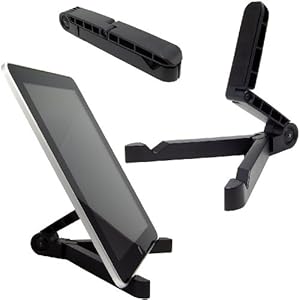
http://www.amazon.com/gp/product/B000CKVOOY/?tag=neogaf0e-20
I've tried Terra, iCab, GoodReader. The most I can do is download the html file that the PDF is embedded in. Ugh.giga said:Try a different browser like Terra or iCab otherwise rip the PDFs from the web viewer on a regular computer.
Have you tried two-finger scroll? Worth a shot in the dark.Syb said:I've tried Terra, iCab, GoodReader. The most I can do is download the html file that the PDF is embedded in. Ugh.
It works on mine, but I've heard others say the same as you, so I don't know. Maybe try restarting the iPad and/or reinstalling.Shotgun Kiss said:I downloaded Chu Chu Rocket recently, only to find that it doesn't work on the iPad 2. When you try to start it, the screen just flashes white for a split second, and then crashes.
Looking at reviews, this is apparently the case for everybody.
What are the chances this will be fixed, and can I get a refund?
It's still 30% barring some unannounced change. The main problem most publishers have is that the subscriber information is an opt-in thing rather than opt-out.BigNastyCurve said:It's because publishers are getting reasonable terms, not the 30% pole up the arse. If Apple sticks to its guns for every content distributor they will bleed publishers and middle-men.
Yeah this was the difference, the Camera+ guys took it out while the Comic Reader Mobi guy deliberately left it in and tried to hide it from Apple (in a hilariously elaborate but extremely flawed plot).Tobor said:Don't sugarcoat it. It wasn't just USB functionality, it was an exploit that took advantage of a flaw in the old API's, and he tried to hide it instead of removing it at Apple's request. Apple added the official file syncing support through iTunes right after that, anyway.
I haven't tried MakeMKV for DVDs (I use it for BD ripping) so I'm not sure on that. I use Handbrake for DVDs but that only does decrypting on Macs (with VLC) afaik.BDCasbox said:Does MakeMKV go past the encryption on most DVDs? I have digital copies for many of my movies so it would be mainly the older movies or tv shows that i would take the disk for.
How much does a reliable 1TB hard drive cost now?
Note that the "digital copy" stuff on newer movies is protected and won't work with the various streaming apps, but you can stream over a LAN with iTunes Home Sharing. Of course if you're in the dorms you might have to deal with the network there and may run into problems.
Does their school use Blackboard for their online stuff by any chance? I haven't found a way to download the PDFs that display in line, although I can't say I've tried much since I just download everything on my computer and put it on Dropbox.Syb said:My friend just bought an iPad 2, their first iDevice. They mainly want it to view university readings, lectures, etc online. Lecture notes went without a hitch, they're straight forward PDFs. We had trouble viewing reading notes. They're PDF files contained in a web-based viewer. When these are loaded only the first page is viewable. Is there any PDF reader that can strip viewers, or somehow latch onto Safari, etc?
One other possibility if they use Blackboard is to try the app (although the reviews aren't exactly promising).
Doesn't work. Its almost as if it takes a one page screenshot of the PDF.numble said:Have you tried two-finger scroll? Worth a shot in the dark.
They use Blackboard and unfortunately haven't enabled Blackboard Mobile access. Documents (PDF, DOC, PPT) housed on the Blackboard are viewable - I'm more having trouble with reading articles housed on journal databases that embed the PDF files. If I can't find sort something out I'll just have to do a mass download and load them into GoodReader. I hope it doesn't come to that though, it's not the most desirable option.japtor said:Does their school use Blackboard for their online stuff by any chance? I haven't found a way to download the PDFs that display in line, although I can't say I've tried much since I just download everything on my computer and put it on Dropbox.
One other possibility if they use Blackboard is to try the app (although the reviews aren't exactly promising).
BuggyDClown
Member
japtor said:It works on mine, but I've heard others say the same as you, so I don't know. Maybe try restarting the iPad and/or reinstalling.
It's still 30% barring some unannounced change. The main problem most publishers have is that the subscriber information is an opt-in thing rather than opt-out.
Yeah this was the difference, the Camera+ guys took it out while the Comic Reader Mobi guy deliberately left it in and tried to hide it from Apple (in a hilariously elaborate but extremely flawed plot).
I haven't tried MakeMKV for DVDs (I use it for BD ripping) so I'm not sure on that. I use Handbrake for DVDs but that only does decrypting on Macs (with VLC) afaik.
Note that the "digital copy" stuff on newer movies is protected and won't work with the various streaming apps, but you can stream over a LAN with iTunes Home Sharing. Of course if you're in the dorms you might have to deal with the network there and may run into problems.
Does their school use Blackboard for their online stuff by any chance? I haven't found a way to download the PDFs that display in line, although I can't say I've tried much since I just download everything on my computer and put it on Dropbox.
One other possibility if they use Blackboard is to try the app (although the reviews aren't exactly promising).
Odd. I don't use the Blackboard app, it stinks you don't get the save options.
Whenever I get PDFs from class via blackboard or maybe it's a .ppt or .doc w.e safari gives me the option to save it to keynote, docs to go, ibooks ect.
Vinterbird
Member
After the news of the subscription stuff coming for Condo Nast publications, I was reminded that I bought a Wired magazine some time ago, and I went to read it.
But as I opened the Wired app the magazine I had previously bought was not saying "download", I was just given the option to buy it again. Does anyone know if there is a way to restore my purchase or if there was a timed usage of bought magazines I wasn't aware of. Anyone else experienced the same thing?
But as I opened the Wired app the magazine I had previously bought was not saying "download", I was just given the option to buy it again. Does anyone know if there is a way to restore my purchase or if there was a timed usage of bought magazines I wasn't aware of. Anyone else experienced the same thing?

Qatar said:http://enkigear.com/
http://reviews.cnet.com/i/tim/2011/03/28/EnkiCaseiPad2SmartCover_540x359.jpg[IMG]
EDIT: does this only covers the back, or does it come with the smart cover?[/QUOTE]
Probably does not come with smart cover--otherwise it'll be selling at a loss.
numble said:Probably does not come with smart cover--otherwise it'll be selling at a loss.
at first I thought it's sold with a smart cover of their own manufacturing as it says "Genius Case" on their website, but yeah I guess it only covers the back
That's not true. The Camera+ guys updated their app after Apple told them to remove the volume controls but left the functionality in there. Then word got out that the volume controls could be unlocked in the app by entering an address in mobile safari on the phone and that's when Apple banned the Camera+ guys from the store.japtor said:Yeah this was the difference, the Camera+ guys took it out while the Comic Reader Mobi guy deliberately left it in and tried to hide it from Apple (in a hilariously elaborate but extremely flawed plot).
I'm not sugar coating anythingit was just USB functionality. It's the same method that Stanza was using for their usb feature at the time. I guess you might be technically correct to call it an 'exploit' but iirc Diskaid still uses that method for usb syncing. the apis are still there, the 'exploit' is still available. it's more like a feature that Apple keeps for their own private use...Tobor said:Don't sugarcoat it. It wasn't just USB functionality, it was an exploit that took advantage of a flaw in the old API's, and he tried to hide it instead of removing it at Apple's request. Apple added the official file syncing support through iTunes right after that, anyway.
Anyway that's besides point. I don't think the Camera+ guys or the CRM developer were justified in breaking breaking the rules (the CRM guy claims he was keeping the feature in there until Apple released the new firmware but who cares now).
Using private API's and the DCIM folder inappropriately is an exploit, full stop. No quotations needed. Everybody else pulled it immediately when Apple requested they do so, he didn't. You're right about Camera +, they should have received a year as well. Much like GAF moderation, there seems to be a difference in punishment level based on who's wielding the ban hammer.
Teddman said:Here's the best cheap portable iPad stand, I have it and it works great:
http://www.amazon.com/gp/product/B000CKVOOY/?tag=neogaf0e-20
That looks cool. I've seen the one Dallow posted, and that looked neat, but a smaller lighter version could be great! As long as smaller/lighter doesn't make it a worse stand.
numble said:The battery life of these things in airplane mode is really good--they never test or rate these things in reviews, but they should. With all the antennas turned off, it can last intercontinental flights going full blast with games and movies.
You know, that could've been it.
I'm in Taiwan at the moment, and not having a roaming account or Taiwanese Sim-card, my iPhone is constantly searching, and it runs out in a day. I thought I tried using the GPS, but it will fail, seeing as it last thought I was in NZ, and that kept running as a rogue process or something, but maybe it was just the antennas constantly searching for a signal....
FoxhoundNL
Member
Best iPad (2) stand, imo:

The padfoot. Portable and light as fuck! Price is a bit steep though (starting at $20/15).
The padfoot. Portable and light as fuck! Price is a bit steep though (starting at $20/15).
Superblatt
Member
So what's the latest word on availability at best buy and other brick and morter retailers? I think I've finally convinced the wife our piece of shit 5 year old macbook has bit the dust. I've got ZERO patience, and would love to stroll into a store and grab one. Any luck you think?
Quotations are needed when calling it an 'exploit'. Those private API's and the DCIM folder are meant for USB syncingexcept only for use by Apple's own developers. Exploit kinda means something else... maybe because i keep tabs on the jailbreak scene and the term 'exploit' wouldnt be applied to this..Tobor said:Using private API's and the DCIM folder inappropriately is an exploit, full stop. No quotations needed.
I didn't say otherwise.Tobor said:Everybody else pulled it immediately when Apple requested they do so, he didn't.
At least the GAF mods have clear and easily accessible faqs and rules. Sometimes the Apple review team seem to be reading from different rule books.Tobor said:You're right about Camera +, they should have received a year as well. Much like GAF moderation, there seems to be a difference in punishment level based on who's wielding the ban hammer.
I think a one year ban is too harsh. It's not like they were stealing address books or selling their users information (all activities which other developers havent been banned for, by the way). The developers pf CRM and Camera+ were, horror of horrors, providing features that their users requested and liked. Of course, this all boils down to the fact that the developer program is the only way for an independent developer to distribute their apps (without going the jailbreak route). I wouldn't care how long Apple banned a developer from their store if the developers was free to set up shop elsewhere.
Having been apart of the "ipad-is-entirely-useless" camp for a little while, my thoughts on the usefulness of an ipad has changed considerably. I used to think "why buy an ipad when I could just get a cheaper netbook or laptop and be done with it" but now I'm seriously wondering if getting an ipad in lieu of either would be a good choice?
The form factor seems like a major plus and I'd just be goofing off with it for the most part (with some school time thrown in here and there.) Has the functionality of the ipad (and tablet pc's in general) gotten to the point where a laptop could be seen as overkill now?
The form factor seems like a major plus and I'd just be goofing off with it for the most part (with some school time thrown in here and there.) Has the functionality of the ipad (and tablet pc's in general) gotten to the point where a laptop could be seen as overkill now?
Veal said:Having been apart of the "ipad-is-entirely-useless" camp for a little while, my thoughts on the usefulness of an ipad has changed considerably. I used to think "why buy an ipad when I could just get a cheaper netbook or laptop and be done with it" but now I'm seriously wondering if getting an ipad in lieu of either would be a good choice?
The form factor seems like a major plus and I'd just be goofing off with it for the most part (with some school time thrown in here and there.) Has the functionality of the ipad (and tablet pc's in general) gotten to the point where a laptop could be seen as overkill now?
that really depends on you.
Software you use, priority of power vs portability, requirement for a mouse, and the fact you still need a computer to sync to.
An ipad is both "entirely useless" and "game-changing" depending on YOU.
Lagspike_exe
Member
I agree with mrkgoo, but I haven't met a person who has one and who thinks its a disappointing gadget.
Gary Whitta
Member
How's NBA Jam on iPad? I'm downloading it now to help me survive a long flight later today.
Christian Spicer was saying it's pretty good on Weekend Confirmed. I imagine it depends on how you feel about virtual analog sticks.Gary Whitta said:How's NBA Jam on iPad? I'm downloading it now to help me survive a long flight later today.
- Status
- Not open for further replies.