• Hey Guest. Check out your NeoGAF Wrapped 2025 results here!

[MLiD] PS6 & PSSR2 Dev Update

YvwQkaP2lYY2yQpn.jpeg
3UEDeFcdhasJiwf6.jpeg

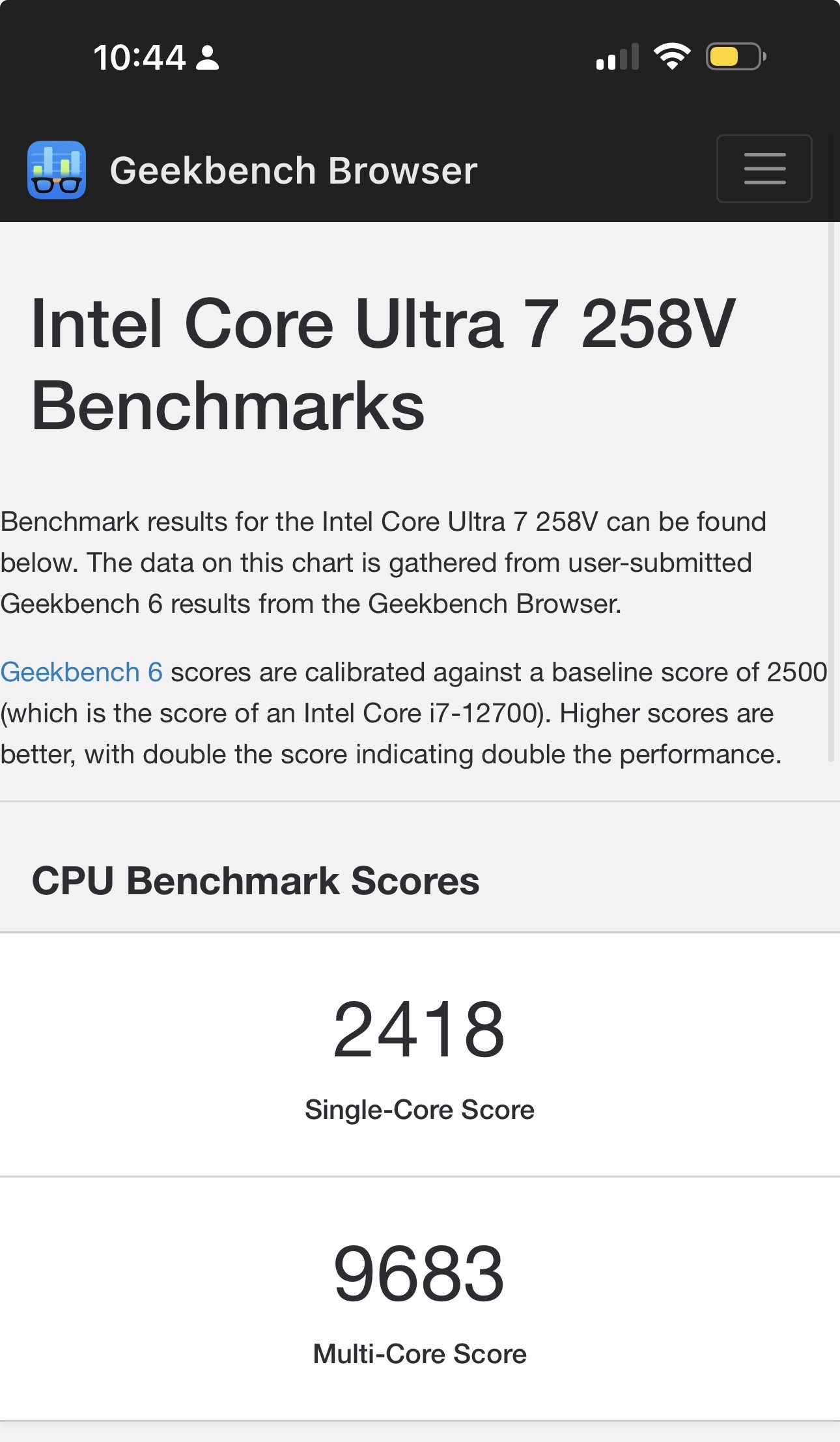
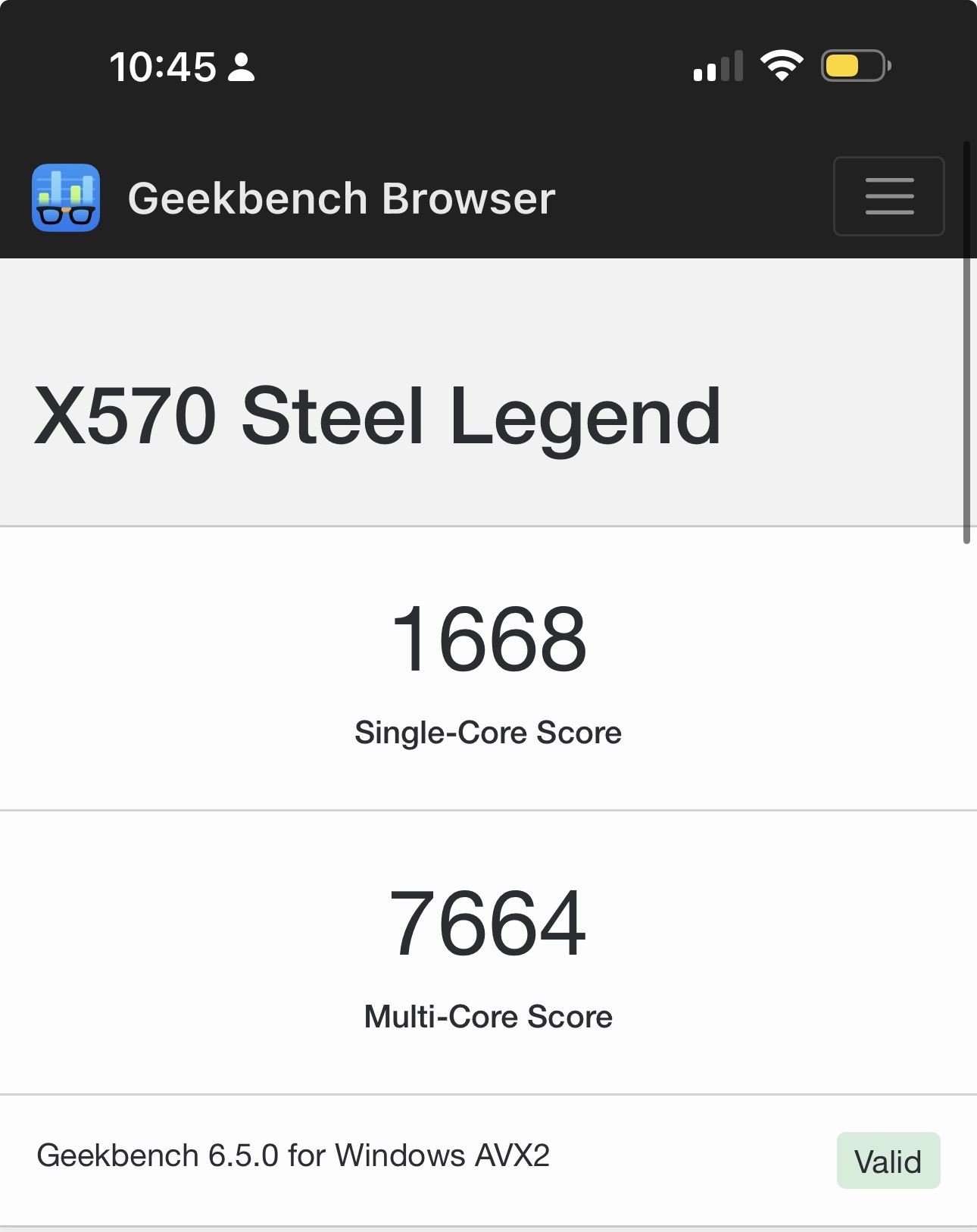
This is comparing the CPU in that PC handheld with a Zen 2 CPU with a similar frequency as the PS5 SoC (a bit higher but close enough).

Still, I would want to see benchmarks using resolutions that make sense for each device before taking your faster than 90% Steam PC comment to heart without many pinches of salt.

Steam HW survey 2025: https://store.steampowered.com/hwsurvey/Steam-Hardware-Software-Survey-Welcome-to-Steam (it would be fairer to PS5's design to check the 90% specs "group" in 2020/2021 though to judge the customisations in PS5's HW as far as their effectiveness goes).

Geekbench is a terrible CPU benchmark, especially for comparing to gaming performance.
That thing pretty much only stresses the CPU's backend. But most programs and games stress the front-end and caches.
Although AMD has made improvements to the backend, with newer Zen CPUs, most of the improvements have been in the Front-end.
 
When the Portable has crossplay between my console and this device ill consider buying one.
When i need to buy games twice and has no cross save they can shove it into the grave next to the PSP and Vita.
 
Last edited:
When the Portable has crossplay between my console and this device ill consider buying one.
When i need to buy games twice and has no cross save they can shove it into the grave next to the PSP and Vita.

I presume by "my console" you mean a PS4/5/6 console. In which case why wouldn't it support crossplay and cross saves? There's zero reason to believe you would need to buy games twice, unless you're deciding to buy physical for the console, I suppose
 
When the Portable has crossplay between my console and this device ill consider buying one.
When i need to buy games twice and has no cross save they can shove it into the grave next to the PSP and Vita.
I can't see it being any different than between PS4 and PS5. Different systems but all saves etc work across platforms.
 
Which pc? What are it's specs? There are lots of pcs where that load time is not possible.

4070ti Super, 5800X3D, PCIE4 NVME: mid-high end in 2025.

Even on fucking HDD load time is not terrible (but game will be unplayable anyway):


People forget about Ghost of Tsushima on PS4, no SSD, no I/O, no dedicated decompression or Api... few seconds load times:

 
When the Portable has crossplay between my console and this device ill consider buying one.
When i need to buy games twice and has no cross save they can shove it into the grave next to the PSP and Vita.

That's why that portable idea would put Sony between a rock and a hard place. If it is a PS6 but it is less powerful than a PS5 (which it should, because you don't negotiate much with costs but certainly not with thermodynamics), then Sony would have no excuse to not just release ALL games on PS5 as well, and in that case, why would I buy a home a PS6 which is just going to be a PS5 Ultra Pro?

And if it doesn't receive all of the PS6 games, then it is not a PS6 and why would I buy such a gimped console?

And if the hook is to play PS4-PS5 games, then it is in essence a retro console and that's a different market.
 
That's why that portable idea would put Sony between a rock and a hard place. If it is a PS6 but it is less powerful than a PS5 (which it should, because you don't negotiate much with costs but certainly not with thermodynamics), then Sony would have no excuse to not just release ALL games on PS5 as well, and in that case, why would I buy a home a PS6 which is just going to be a PS5 Ultra Pro?

And if it doesn't receive all of the PS6 games, then it is not a PS6 and why would I buy such a gimped console?

And if the hook is to play PS4-PS5 games, then it is in essence a retro console and that's a different market.

Everything will be cross-gen for the next generation for years to come.
Between the shortage of DRAM, SSDs, development costs...

Studios will have no choice.
 
Some comments in this thread are funny. The answer isn't just sticking the biggest CPU possible into everything!
Especially not a console-type device where form-factor and power consumption/heat emission are crucial concerns, to say nothing of price point.

Above all else when designing a product, every decision needs to justified in terms of cost to benefit. You could make the best performing and most technologically advanced hardware in existence, but if its price-point reduces its addressable market below what's acceptable... what's the point ?

Just making tech-heads happy isn't a viable business plan!
 
Some comments in this thread are funny. The answer isn't just sticking the biggest CPU possible into everything!
Especially not a console-type device where form-factor and power consumption/heat emission are crucial concerns, to say nothing of price point.

Above all else when designing a product, every decision needs to justified in terms of cost to benefit. You could make the best performing and most technologically advanced hardware in existence, but if its price-point reduces its addressable market below what's acceptable... what's the point ?

Just making tech-heads happy isn't a viable business plan!
Correct. A X3D CPU is wasted on a console where the silicon budget can be better spent elsewhere.
 
Everything will be cross-gen for the next generation for years to come.
Between the shortage of DRAM, SSDs, development costs...

Studios will have no choice.

If really everything is cross-generation (I am not against the idea), why even have generations? Unless by generations, they mean shifting to a business model inspired by mobile phones with soft transitions. But I am really, really not sure that the medium is ready for that, whether in terms of hardware, software, or acceptance by the consumers. I am not in charge of Sony and they surely know things I don't, but I do believe that both Nintendo and Sony should remain in their respective lanes because they have a good thing going on and virtually no competition.
 
If really everything is cross-generation (I am not against the idea), why even have generations? Unless by generations, they mean shifting to a business model inspired by mobile phones with soft transitions. But I am really, really not sure that the medium is ready for that, whether in terms of hardware, software, or acceptance by the consumers. I am not in charge of Sony and they surely know things I don't, but I do believe that both Nintendo and Sony should remain in their respective lanes because they have a good thing going on and virtually no competition.

It's a transition to an ecosystem business model rather than the traditional generations based model.
That is happening regardless of what Sony and Nintendo wish.
No one is currently in a position to tell publishers to simply drop support of current consoles to start making games only for the new box that starts from a zero installed base.
Development costs make that impossible.
Sony itself hasn't done it with PS5 initially and it took a few years to see all their first party games being developed on PS5 only.
It will be worse next gen, the whole gen risks to be fully cross gen until the late years.
So platform holders will have to reason in terms of ecosystem, that is people being active and buying games and services regardless of the particular hw platform.

There is a clear downside to that strategy, adoption of the new box will be slower than in the past because there won't be any urge to upgrade outside of fans and people wanting the latest tech and that will be further cemented by hardware prices rising, we're risking another price hike next year on 5-6 years old devices due to the DRAM situation after an already not particularly strong 2025 holiday season with price deals.

It is what it is, there will be definitely challenges.
 
Last edited:
I presume by "my console" you mean a PS4/5/6 console. In which case why wouldn't it support crossplay and cross saves? There's zero reason to believe you would need to buy games twice, unless you're deciding to buy physical for the console, I suppose
Couse greed
 
With a CPU 3 times faster than PS5 CPU and costing as much as the PS5. On PS5 the decompression is costing nothing to the CPU, litterally, on PC it costs every CPU cycles.

So why not every game loads like that, both on consoles and PC? It's all about game design and developers skills, Ghost of Tsushima has few seconds loading times on fucking 1.6GHz Jaguar and HDD while older Battlefield games have long load times even on fast NVMEs.
 
So why not every game loads like that, both on consoles and PC? It's all about game design and developers skills, Ghost of Tsushima has few seconds loading times on fucking 1.6GHz Jaguar and HDD while older Battlefield games have long load times even on fast NVMEs.
Tsushima size is tripled so you could get the HDD load faster. Also Tsushima travel on PS5 is instantaneous
 
the low power mode is there to give the handheld a way to be backwards compatible, because it doesn't have enough raw power to actually run PS5 games normally.

like how the Xbox Series S isn't powerful enough to run Xbox One X versions of games, so it runs base Xbox One versions.

it will have more modern hardware that outclasses the PS5 in some ways. like better RT hardware, ML Acceleration, mesh shaders etc.
so actually optimised games on it that are true native apps and not back compatible apps, will get more out of the hardware than those low power modes.

but it will indeed keep the lower end target low enough for the PS5 to be pretty easy to port to for a very long time.
which is why I predict that the next cross gen period is gonna be essentially endless. the PS5 will be the Xbox Series S of the PS6 in a way.
With the distinction of not having the memory capacity issues that the Series S had. I think that will be key in making the portable work alongside the PS6
 
With the distinction of not having the memory capacity issues that the Series S had. I think that will be key in making the portable work alongside the PS6
But it will have CPU bottleneck issues in its place, courtesy of 4 underclocked cores, which will make things very interesting of how it will scale with games that do not have high framerates on the main consoles.
 
Last edited:
Everything will be cross-gen for the next generation for years to come.
Between the shortage of DRAM, SSDs, development costs...

Studios will have no choice.
And there aren't any "extreme" bottlenecks like Jaguar CPUs from last gen. Despite them, we still had a very long cross-gen. Next gen does not appear to have huge leaps, like Zen 2 and NVMe this gen, unless they figure out how to run LLMs internaly. Even then, the differences in hardware throughput will be the smallest ever. Particularly when we have PS5 Pro as well.
 
But it will have CPU bottleneck issues in its place, courtesy of 4 underclocked cores, which will make things very interesting of how it will scale with games that do not have high framerates on the main consoles.
true thats going to be quite a challenge. I think thats why Sony is pushing devs to start working on "low power mode" using 8 threads right now. Creating a consistent workflow for 8 thread CPUs. We'll see how it impacts developement but you're right it could be a bottleneck
 
But it will have CPU bottleneck issues in its place, courtesy of 4 underclocked cores, which will make things very interesting of how it will scale with games that do not have high framerates on the main consoles.
I love how now when a unoptimized game release people call CPU/GPU bottleneck.
 
But it will have CPU bottleneck issues in its place, courtesy of 4 underclocked cores, which will make things very interesting of how it will scale with games that do not have high framerates on the main consoles.
It is all relative to what the native resolution is on the portable. PS Vita demonstrated that QHD at that size gave superior IQ to 720p on TV from the PS3.

Low resolution alleviates CPU bottlenecks, just keep in mind that some high frame-rate games of the past operated on PC CPUs as low as 120Mhz, and a fraction of that on consoles, so those "underclocked cores" will in fact be overclocked relative to their workload, when PSSR and the GPU are going to be doing the heavy lifting to target 1080p output.
 
It is all relative to what the native resolution is on the portable. PS Vita demonstrated that QHD at that size gave superior IQ to 720p on TV from the PS3.

Low resolution alleviates CPU bottlenecks, just keep in mind that some high frame-rate games of the past operated on PC CPUs as low as 120Mhz, and a fraction of that on consoles, so those "underclocked cores" will in fact be overclocked relative to their workload, when PSSR and the GPU are going to be doing the heavy lifting to target 1080p output.

Low resolution won't help with CPU bottlenecks at all. Drop from 60 to 30fps will.
 
Low resolution won't help with CPU bottlenecks at all. Drop from 60 to 30fps will.
Not true. Try running Quake3 on a raspberry Pi400. As you drop the resolution you gain frame-rate, or you can overclock and gain some smaller frame-rate uplift via the GPU. IIRC I had it running the demo video at 45fps at 512x384 a year ago, up from 17fps at 1080p with a clock of 1.8Ghz - as the power adapter was only 9Watt rather than +10watt for the full clock or overclock power draw - and pretty sure if I went 320x240 by custom ini edits it would hit 60fps.
 
Last edited:
Not true. Try running Quake3 on a raspberry Pi400. As you drop the resolution you gain frame-rate, or you can overclock and gain some smaller frame-rate uplift via the GPU. IIRC I had it running the demo video at 45fps at 512x384 a year ago, up from 17fps at 1080p with a clock of 1.8Ghz - as the power adapter was only 9Watt rather than +10watt for the full clock or overclock power draw - and pretty sure if I went 320x240 by custom ini edits it would hit 60fps.

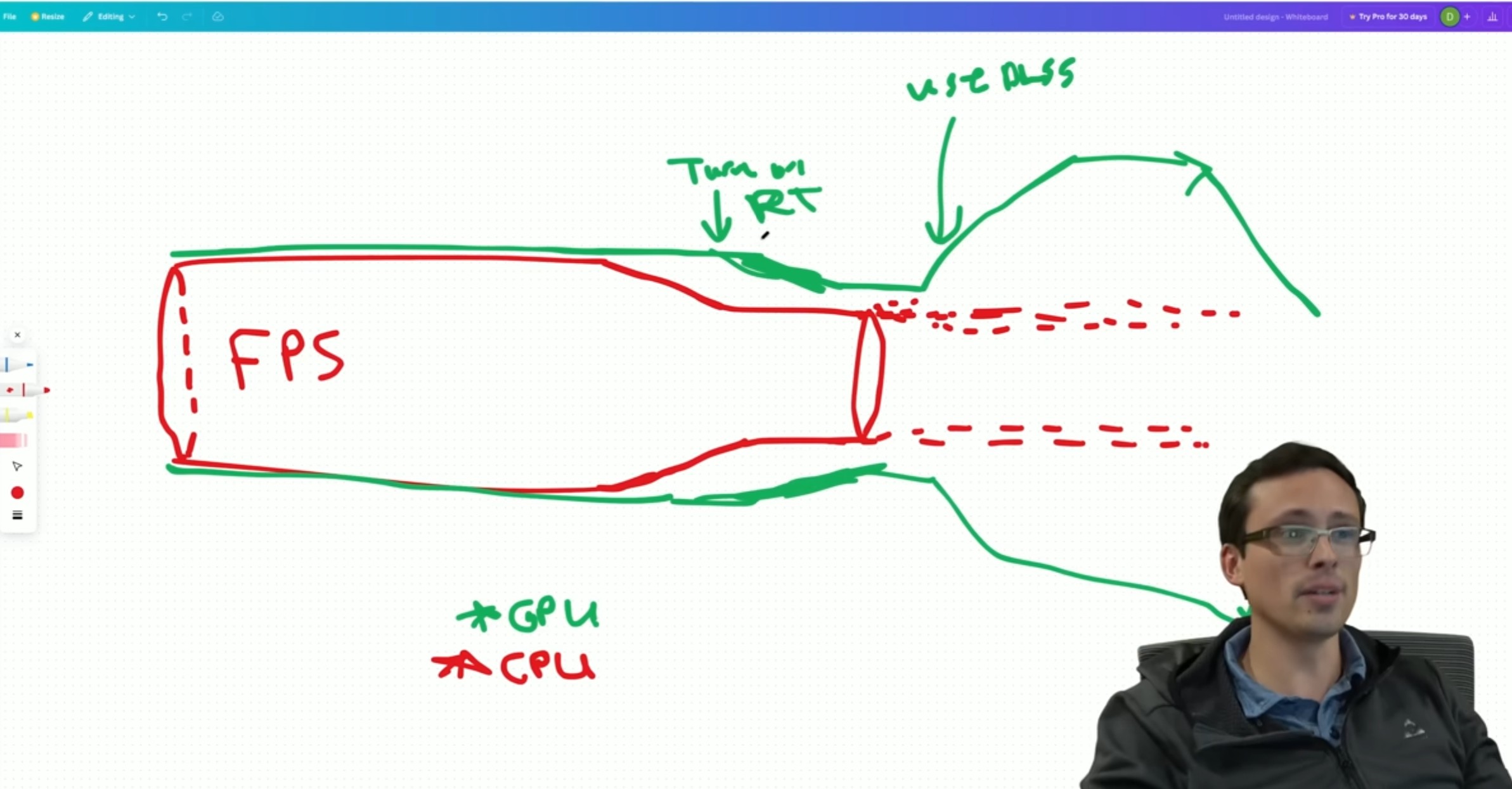
Resolution in that game had to scale with something else. In vast majority of modern games resolution only affect GPU, you can be bottlenecked by CPU to 55fps for example both in 720p and 4k.


xHa6siw2RjgaTT0Q.jpg
 
Resolution in that game had to scale with something else. In vast majority of modern games resolution only affect GPU, you can be bottlenecked by CPU to 55fps for example both in 720p and 4k.


xHa6siw2RjgaTT0Q.jpg

You need to do better than drop people a 34min video of your proxy opinion - which I haven't watched - but let me simplify.

Firstly the person I was responding to SABRE220 was already saying the Ps6 portable will be CPU limited with PS6 games, so you can't have it both ways, not CPU and not GPU limited with regards to that opening comment.

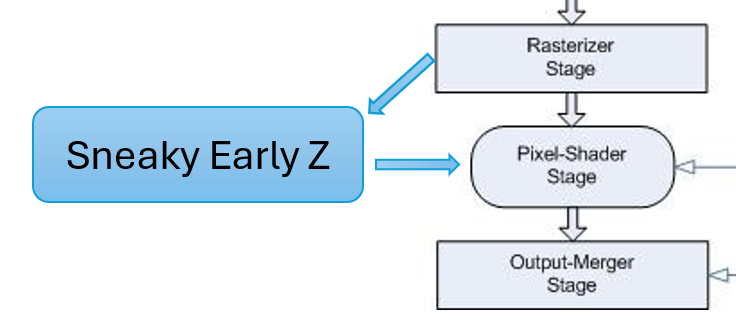
Secondly, the limiting factor with framerate which "typically" ends up tying all games to resolution being CPU - single core - limited is the zbuffer and stencil buffer testing on the GPU.

At a low enough resolution the CPU starts getting a completion response from the GPU at such a quick rate- with zbuffer /stencilling testing being the remaining main GPU wait/delay for the CPU - that the CPUs normal inefficiency to utilise its resources while waiting on the GPU frame-flip, and its normal lack of reactiveness - unlike say a 7800X3D - after waiting no longer becomes an issue, and allows the main CPU core to generate far more CPU->GPU workloads per second until a higher v-sync, GPU rendering, northbridge bandwidth, RAM or main CPU core performance becomes the limiting factor.

Now you might then say, well with all the shaders and geometry and everything else the GPU does it can still bottleneck framerate at low resolutions like 320x240 below 60fps, which in theory they could and any offscreen rendering at resolution independent of the framebuffer or RT certainly would, but outside those situation the graphics vector, geometry and fragment hardware pipelines have been intrinsically built with hierarchical early outs for any redundant work they can escape doing at all or more than once, and as the low resolution framebuffer generates so few fragments from the projected geometry even just to pass the zbuffer or stencil test that most of the work for the GPU is dropping exponentially compared to say a1080p native resolution.

So at low resolution the CPU wait time is being lowered effectively giving the same main CPU core a multi-fold increase in utilisation/efficiency - assuming the game logic is fully unlocked and not using a CPU update cap or stalled by multi-core workload waiting conditions.
 
Last edited:
If the ps6 portable has the same power as GPD win 5/One player apex on with very strong battery ,and 1080p screen, it will be awesome. This will play most ps5 games 1080p 60fps. Example, I have the GPD win 5. It plays ff7 Rebirth 1080p 60fps with mixed settings consistent
 
If the ps6 portable has the same power as GPD win 5/One player apex on with very strong battery ,and 1080p screen, it will be awesome. This will play most ps5 games 1080p 60fps. Example, I have the GPD win 5. It plays ff7 Rebirth 1080p 60fps with mixed settings consistent
Interesting observation, but I think current leaks point to it having a weaker CPU than you have in your GPD device!!
 
Some effects that require CPU calculations can scale with resolution, so thats not always true.
Back in the day it used to be the case but with modern game engines it won't help much. Especially not with UE5. These days the GPU and CPU are decoupled and pipelined, stuff like Z-testing used to be done by the CPU, but is now GPU exclusive for example. Or how the CPU work now uses deep render queues, frame buffering, and asynchronous compute to not sit idle, it's always kept busy doing useful work. As long as the modern game engine uses multithreading efficiently and leverages async (for example) then, if you are CPU limited, lowering the resolution to even sub 720p levels won't really give you any meaningful performance back. The PS6 handheld will only be 4c/8t dedicated to games, so maybe it could help a bit, but I wouldn't exactly expect miracles.

Plenty of evidence to support this on YouTube. Or you can test it yourself. Disable some cores, lower the CPU clock and load up a UE5 title and see if lowering the resolution past a certain point (to make sure you are fully CPU limited) does anything meaningful.
 
Back in the day it used to be the case but with modern game engines it won't help much. Especially not with UE5. These days the GPU and CPU are decoupled and pipelined, stuff like Z-testing used to be done by the CPU, but is now GPU exclusive for example. Or how the CPU work now uses deep render queues, frame buffering, and asynchronous compute to not sit idle, it's always kept busy doing useful work. As long as the modern game engine uses multithreading efficiently and leverages async (for example) then, if you are CPU limited, lowering the resolution to even sub 720p levels won't really give you any meaningful performance back. The PS6 handheld will only be 4c/8t dedicated to games, so maybe it could help a bit, but I wouldn't exactly expect miracles.

Plenty of evidence to support this on YouTube. Or you can test it yourself. Disable some cores, lower the CPU clock and load up a UE5 title and see if lowering the resolution past a certain point (to make sure you are fully CPU limited) does anything meaningful.
That comment exposes the lack of real first hand know how of graphics programming.

Hidden surface removal was done on the CPU via simple testing or precomputed for static objects via BVH structures, but since N64 console have had a zbuffer/stencil buffer capability in the GPU, so zbuffering and stencil test has never been done on the main CPU core in 3D games or the CPU's other cores for that matter.

So no, the zbuffer is still the wait state limiting factor for a CPU at lower resolution that ties the CPU and GPU simulation together. For all the pre-calculation of frames, the simulation still runs under the control of the game logic which runs by the primary CPU core. Just because games on PC aren't CPU limited at low resolution, doesn't mean they would be on a console in which the multi core jobs would always be designed to let the primary core run at maximum efficiency.
 
Last edited:
That comment exposes the lack of real first hand know how of graphics programming.

Hidden surface removal was done on the CPU via simple testing or precomputed for static objects via BVH structures, but since N64 console have had a zbuffer/stencil buffer capability in the GPU, so zbuffering and stencil test has never been done on the main CPU core in 3D games or the CPU's other cores for that matter.

So no, the zbuffer is still the wait state limiting factor for a CPU at lower resolution that ties the CPU and GPU simulation together. For all the pre-calculation of frames, the simulation still runs under the control of the game logic which runs by the primary CPU core. Just because games on PC aren't CPU limited at low resolution, doesn't mean they would be on a console in which the multi core jobs would always be designed to let the primary core run at maximum efficiency.
I mean, you probably won't believe me and I really don't want a full back and forth, so I just ran your comment through ChatGPT:

What they get right (credit where due)
  1. Z-buffering moved to hardware very early
    • Yes: since the mid-/late-90s (N64, PS1 add-ons, PC accelerators), depth testing and stencil tests are GPU fixed-function.
    • CPUs have not been doing per-pixel depth tests for real-time 3D games for decades.
  2. Hidden surface removal used to exist on the CPU
    • Early engines did CPU-side visibility (BSPs, portals, PVS, painter's algorithm).
    • Static BVHs / BSP trees are still used — but for culling, not depth resolution.
So far, all fine.

Where the argument goes off the rails

❌ Mistake #1: Conflating z-buffering with CPU wait states

"So no, the zbuffer is still the wait state limiting factor for a CPU at lower resolution"

This is incorrect.

A CPU does not stall because the GPU is doing depth testing.

Modern (and even older) pipelines are:
  • Asynchronous
  • Deeply buffered
  • Decoupled by command queues, fences, and frame latency
The CPU:
  • Submits command buffers
  • Advances simulation
  • Prepares the next frame(s)
The GPU:
  • Executes those commands later
  • Performs depth tests internally
There is no CPU wait state tied to the z-buffer unless:
  • You explicitly insert a GPU → CPU sync (readback, fence wait)
  • Or the driver queue is completely full
Depth testing alone does not block the CPU.

❌ Mistake #2: Misunderstanding why low resolution exposes CPU limits

"At lower resolution the zbuffer ties the CPU and GPU simulation together"

No — resolution has almost nothing to do with CPU↔GPU coupling.

Lower resolution reduces:
  • Pixel shading cost
  • ROP bandwidth
  • Z fill cost
What it does not reduce:
  • Draw call count
  • State changes
  • Simulation complexity
  • Animation, AI, physics
  • Visibility determination
  • Command submission overhead
So when you drop resolution and FPS doesn't go up, that means:

The CPU is the bottleneck — not because of z-buffering, but because the GPU finished early.

The GPU is waiting on the CPU, not the other way around.

❌ Mistake #3: Incorrect console vs PC distinction

"Just because games on PC aren't CPU limited at low resolution, doesn't mean they would be on a console"

This is backwards.

Consoles are more likely to be CPU-limited at low resolution because:
  • Fixed hardware → engines are tuned to push GPU harder
  • CPU cores are weaker per-core than high-end PCs
  • Draw call scaling is more sensitive
In fact:
  • Most console engines deliberately target GPU saturation
  • CPU headroom is precious and tightly budgeted
  • Simulation does not magically escape CPU limits
If consoles were immune to CPU bottlenecks:
  • 30 FPS caps wouldn't exist
  • CPU-heavy scenes wouldn't tank performance
But they do.

❌ Mistake #4: Overstating "primary core runs everything"

"Game logic runs by the primary CPU core"

This hasn't been broadly true for over a decade.

Modern engines:
  • Run simulation, animation, culling, physics, audio, streaming across many threads
  • Still have a main thread, yes — but it is often command orchestration, not "all logic"
And critically:
  • The main thread is not blocked by z-buffer operations
  • It is limited by its own workload and synchronization, not GPU depth tests
The correct model (short & precise)
  • Z-buffering is GPU-internal and asynchronous
  • Lowering resolution removes GPU pressure
  • If FPS doesn't increase → CPU or submission bottleneck
  • CPU bottlenecks come from:
    • Simulation
    • Draw call submission
    • State changes
    • Synchronization
    • Engine architecture
Not from depth testing.

We can easily probably do a whole back and forth via ChatGPT but, I mean, we can make this rather easy. I can provide proof that lowering resolution on modern game engines provides minimal to no performance gain when CPU limited. Can you provide counter proof?


Clear info about z-buffer work:


You need to do better than drop people a 34min video of your proxy opinion - which I haven't watched - but let me simplify.

Firstly the person I was responding to SABRE220 was already saying the Ps6 portable will be CPU limited with PS6 games, so you can't have it both ways, not CPU and not GPU limited with regards to that opening comment.

Secondly, the limiting factor with framerate which "typically" ends up tying all games to resolution being CPU - single core - limited is the zbuffer and stencil buffer testing on the GPU.

At a low enough resolution the CPU starts getting a completion response from the GPU at such a quick rate- with zbuffer /stencilling testing being the remaining main GPU wait/delay for the CPU - that the CPUs normal inefficiency to utilise its resources while waiting on the GPU frame-flip, and its normal lack of reactiveness - unlike say a 7800X3D - after waiting no longer becomes an issue, and allows the main CPU core to generate far more CPU->GPU workloads per second until a higher v-sync, GPU rendering, northbridge bandwidth, RAM or main CPU core performance becomes the limiting factor.

Now you might then say, well with all the shaders and geometry and everything else the GPU does it can still bottleneck framerate at low resolutions like 320x240 below 60fps, which in theory they could and any offscreen rendering at resolution independent of the framebuffer or RT certainly would, but outside those situation the graphics vector, geometry and fragment hardware pipelines have been intrinsically built with hierarchical early outs for any redundant work they can escape doing at all or more than once, and as the low resolution framebuffer generates so few fragments from the projected geometry even just to pass the zbuffer or stencil test that most of the work for the GPU is dropping exponentially compared to say a1080p native resolution.

So at low resolution the CPU wait time is being lowered effectively giving the same main CPU core a multi-fold increase in utilisation/efficiency - assuming the game logic is fully unlocked and not using a CPU update cap or stalled by multi-core workload waiting conditions.

Some effects that require CPU calculations can scale with resolution, so thats not always true.

In THEORY in some games some things can scale with resolution and lower CPU usage (Crysis 2007 is such example) but for most modern games this is not the case.

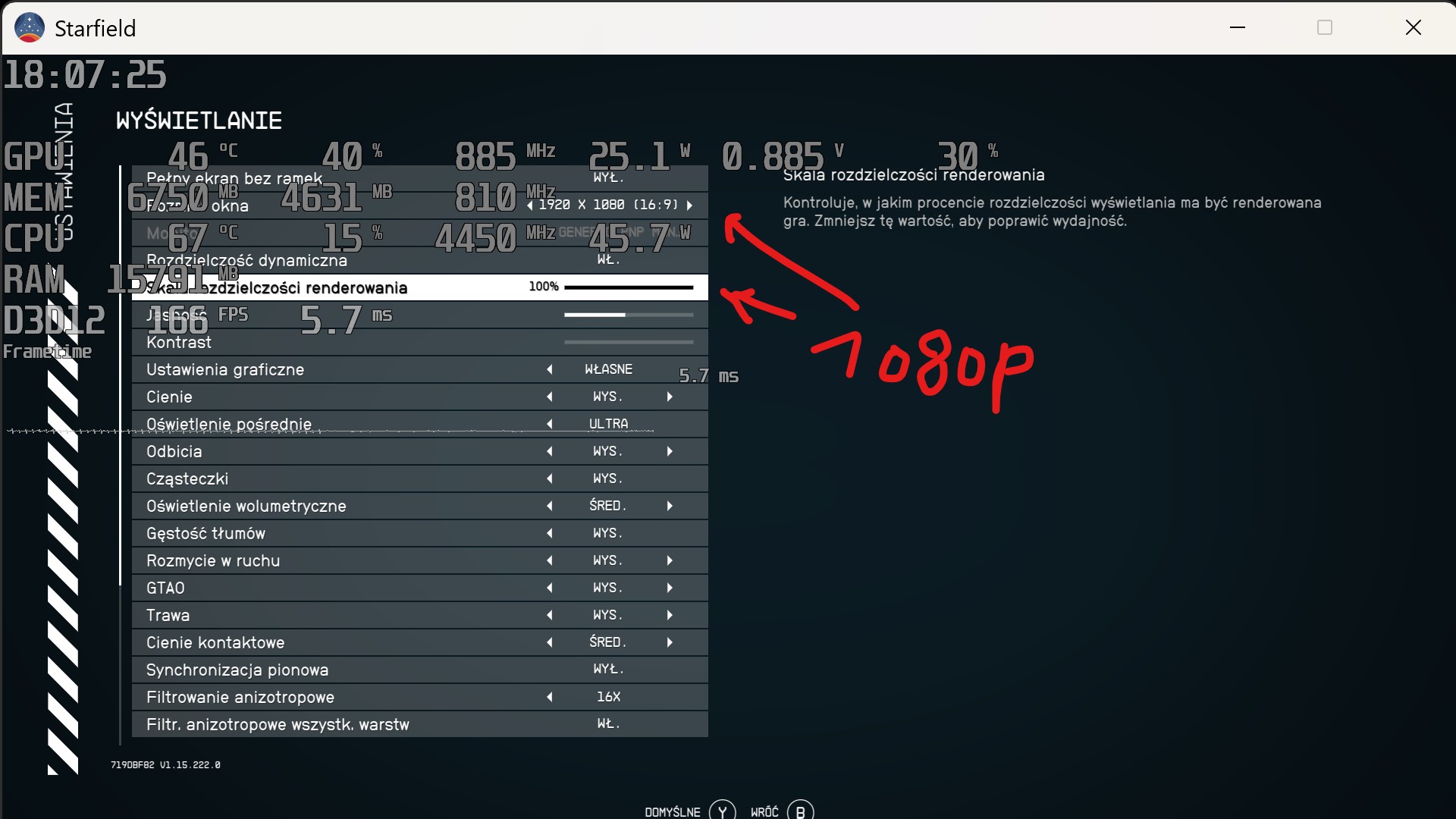
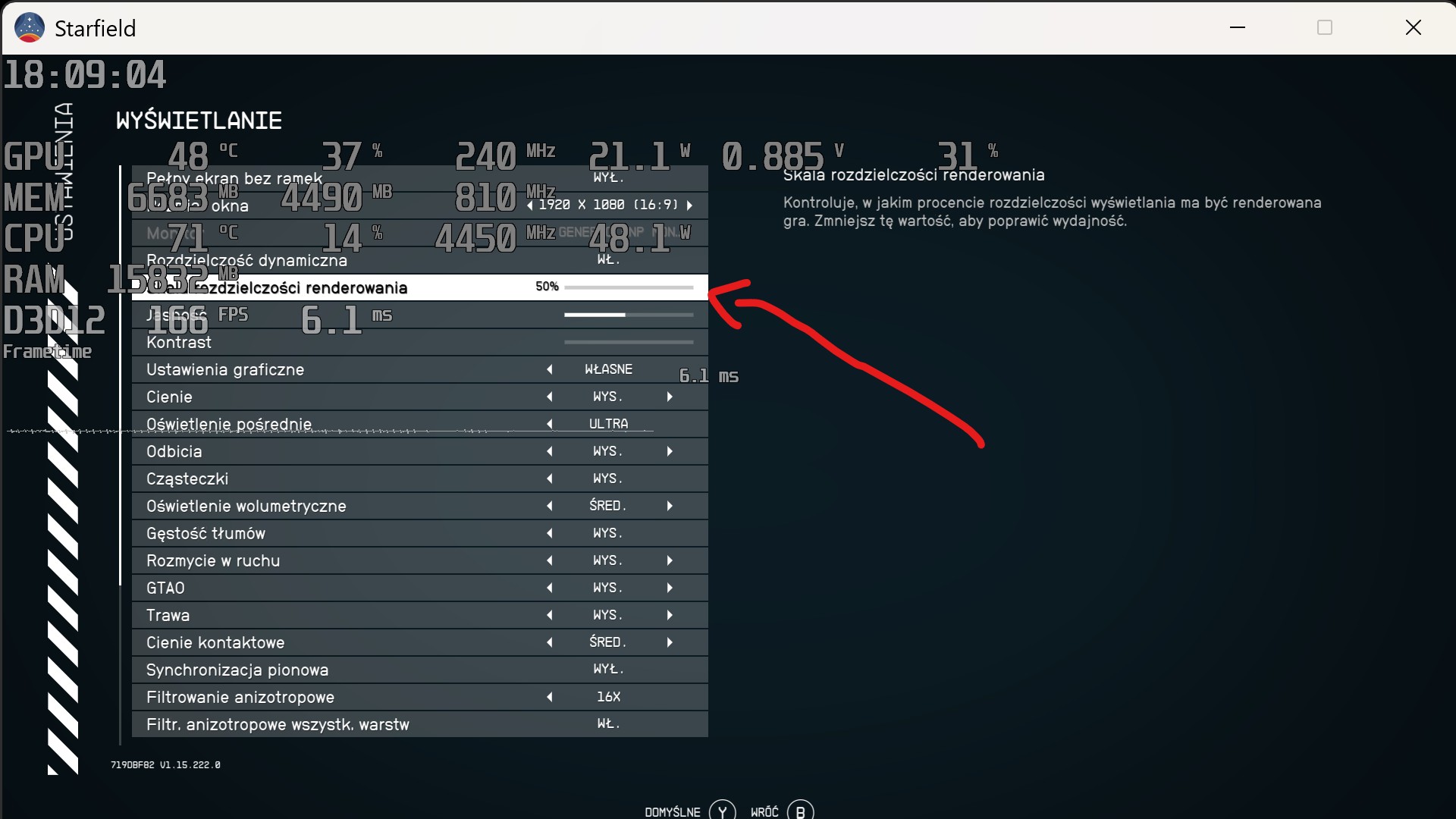
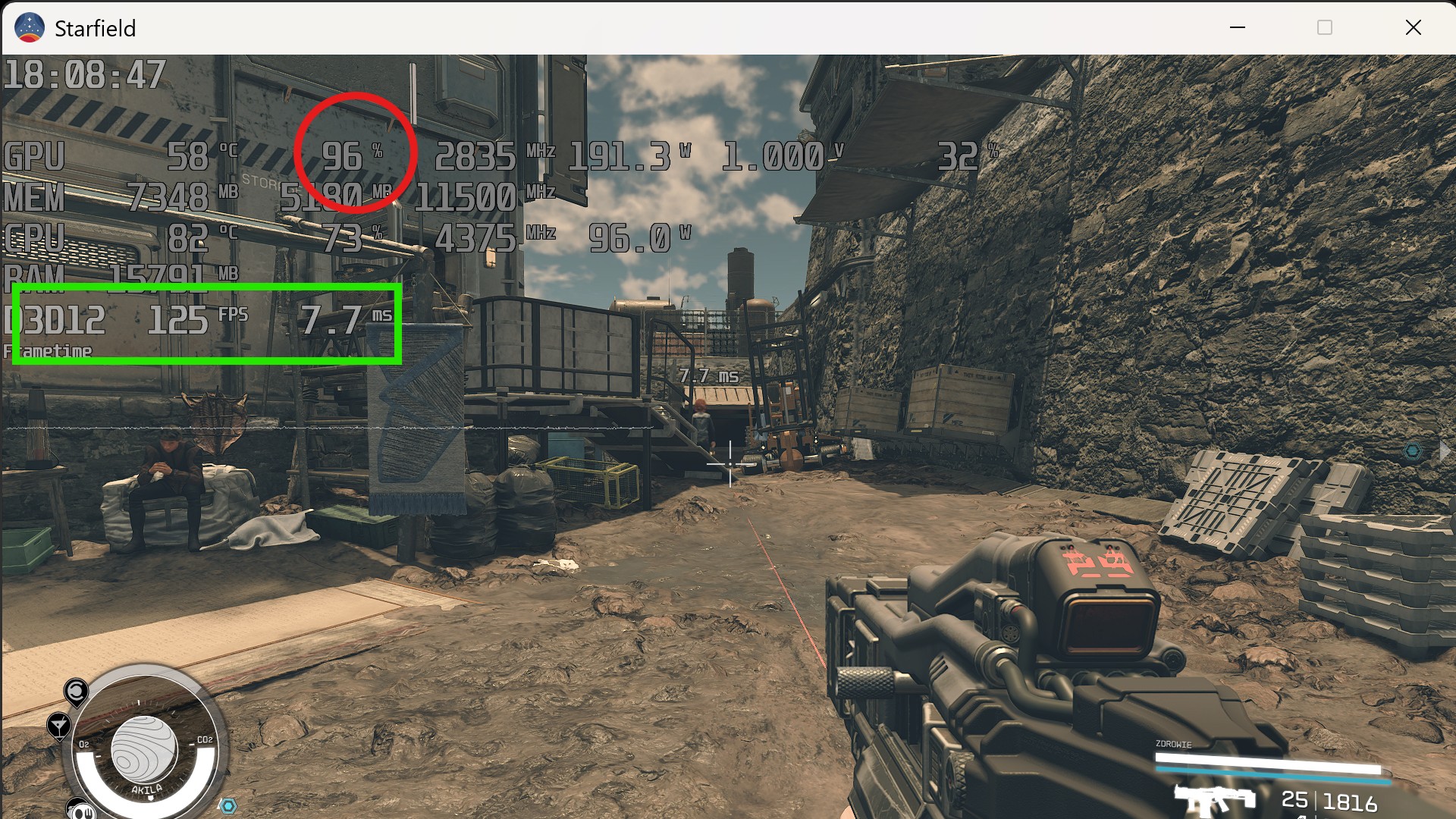
Starfield 1080p vs. 50% of 1080p:

7VHHlF31Dvu7oRha.jpg
Z9xuJWM7mAbxOci5.jpg
gbYObaEw7cdZRENQ.jpg
0SniDkjBWxbnS077.jpg


GPU usage, frames per second.

FPS here is jumping 124-126fps.
 
Last edited:
Interesting observation, but I think current leaks point to it having a weaker CPU than you have in your GPD device!!
I see. If that's the case, I do pray all developers optimize their games for portable mode. I'm ok for 900p as long as it plays all games 60fps (except for ps6 games)
 
In THEORY in some games some things can scale with resolution and lower CPU usage (Crysis 2007 is such example) but for most modern games this is not the case.
On PC because games are typically console ports - although Crysis 2007 certainly wasn't - but this whole discussion was driven by talk of a PS6 Portable with 4 lower clocked cores - than the console PS6 - having games that wouldn't play on the portable - even with lower resolution base for PSSR - because the games needed the CPU of the console PS6.

That isn't going to happen because the engines are tailored to hardware and the simulation won't artificially block a new set of draw calls on the CPU from going beyond 45fp because 3 cores of the CPU haven't finished a 1/45 of a second workload that could have been split or moved to the GPU.

Even in your example you aren't getting a true 50% (960x540?) resolution where the GPU has actually switched modes and the framebuffer resources change completely, you are still just moving an in-engine slider that has resourced a 1080p viewport and set a request to render to 50% resolution back buffers, then rescale to 1080p. When you set to 50% resolution does the VRAM requirement drop by 75-25%.or is it still using the same textures, and same sized backbuffers, but just rendering to 1/4 of the pixels in the final viewport before scaling back to 1080p?
 
On PC because games are typically console ports - although Crysis 2007 certainly wasn't - but this whole discussion was driven by talk of a PS6 Portable with 4 lower clocked cores - than the console PS6 - having games that wouldn't play on the portable - even with lower resolution base for PSSR - because the games needed the CPU of the console PS6.

That isn't going to happen because the engines are tailored to hardware and the simulation won't artificially block a new set of draw calls on the CPU from going beyond 45fp because 3 cores of the CPU haven't finished a 1/45 of a second workload that could have been split or moved to the GPU.

Even in your example you aren't getting a true 50% (960x540?) resolution where the GPU has actually switched modes and the framebuffer resources change completely, you are still just moving an in-engine slider that has resourced a 1080p viewport and set a request to render to 50% resolution back buffers, then rescale to 1080p. When you set to 50% resolution does the VRAM requirement drop by 75-25%.or is it still using the same textures, and same sized backbuffers, but just rendering to 1/4 of the pixels in the final viewport before scaling back to 1080p?

It doesn't matter if the output changes, internal resolution is different and GPU usage (and power) drops significantly.

Here is comparison between 1080p (100%) vs. 720p (100%, lowest you can set) and native 4k:

M1trJD1.png
4JPOtqG.png

gIUq2aB.png
fdZO0vQ.jpeg


4K is GPU limited while 1080p and 720p are CPU limited to ~130fps.
 
Last edited:
It doesn't matter if the output changes, internal resolution is different and GPU usage (and power) drops significantly.

Here is comparison between 1080p (100%) vs. 720p (100%, lowest you can set) and native 4k:

M1trJD1.png
4JPOtqG.png

gIUq2aB.png
fdZO0vQ.jpeg


4K is GPU limited while 1080p and 720p are CPU limited to ~130fps.
I can't see any of those images in the UK, and just to be clear, the tensors for PSSR are already much lower than 720p, so the PS6 portable won't be rendering anything like that high to feed PSSR.
 
Last edited:
I see. If that's the case, I do pray all developers optimize their games for portable mode. I'm ok for 900p as long as it plays all games 60fps (except for ps6 games)
Expect sub 720p reconstructed to 1080p, judging from the performance of certain modern games on PS5. On the plus side, PSSR2/FSR4 should be more than capable of native/better than native results so that will not matter for most games. Game engines that don't play nice with reconstruction will look ugly, but that's the case with any reasonable handhelds (sub 700gm with atleast an hour of battery life).
 
Last edited:
I can't see any of those images in the UK, and just to be clear, the tensors for PSSR are already much lower than 720p, so the PS6 portable won't be rendering anything like that high to feed PSSR.

It will get below 720p for sure with good ML upscaling but it won't help performance in places where CPU is the limit.

And that 4 core Zen 6 should be fine for PS5 ports, it will have so much higher IPC than Zen 2 core. But vs. base PS6? I'm not sure...
 
Expect sub 720p reconstructed to 1080p, judging from the performance of certain modern games on PS5. On the plus side, PSSR2/FSR4 should be more than capable of native/better than native results so that will not matter for most games. Game engines that don't play nice with reconstruction will look ugly, but that's the case with any reasonable handhelds (sub 700gm with atleast an hour of battery life).
I'm ok with it. If they run 720p but has PSSR and FS4 to make the image quality clean I'm down.
 
I mean, you probably won't believe me and I really don't want a full back and forth, so I just ran your comment through ChatGPT:

What they get right (credit where due)
  1. Z-buffering moved to hardware very early
    • Yes: since the mid-/late-90s (N64, PS1 add-ons, PC accelerators), depth testing and stencil tests are GPU fixed-function.
    • CPUs have not been doing per-pixel depth tests for real-time 3D games for decades.
  2. Hidden surface removal used to exist on the CPU
    • Early engines did CPU-side visibility (BSPs, portals, PVS, painter's algorithm).
    • Static BVHs / BSP trees are still used — but for culling, not depth resolution.
So far, all fine.

Where the argument goes off the rails

❌ Mistake #1: Conflating z-buffering with CPU wait states

"So no, the zbuffer is still the wait state limiting factor for a CPU at lower resolution"

This is incorrect.

A CPU does not stall because the GPU is doing depth testing.

Modern (and even older) pipelines are:
  • Asynchronous
  • Deeply buffered
  • Decoupled by command queues, fences, and frame latency
The CPU:
  • Submits command buffers
  • Advances simulation
  • Prepares the next frame(s)
The GPU:
  • Executes those commands later
  • Performs depth tests internally
There is no CPU wait state tied to the z-buffer unless:
  • You explicitly insert a GPU → CPU sync (readback, fence wait)
  • Or the driver queue is completely full
Depth testing alone does not block the CPU.

❌ Mistake #2: Misunderstanding why low resolution exposes CPU limits

"At lower resolution the zbuffer ties the CPU and GPU simulation together"

No — resolution has almost nothing to do with CPU↔GPU coupling.

Lower resolution reduces:
  • Pixel shading cost
  • ROP bandwidth
  • Z fill cost
What it does not reduce:
  • Draw call count
  • State changes
  • Simulation complexity
  • Animation, AI, physics
  • Visibility determination
  • Command submission overhead
So when you drop resolution and FPS doesn't go up, that means:

The CPU is the bottleneck — not because of z-buffering, but because the GPU finished early.

The GPU is waiting on the CPU, not the other way around.

❌ Mistake #3: Incorrect console vs PC distinction

"Just because games on PC aren't CPU limited at low resolution, doesn't mean they would be on a console"

This is backwards.

Consoles are more likely to be CPU-limited at low resolution because:
  • Fixed hardware → engines are tuned to push GPU harder
  • CPU cores are weaker per-core than high-end PCs
  • Draw call scaling is more sensitive
In fact:
  • Most console engines deliberately target GPU saturation
  • CPU headroom is precious and tightly budgeted
  • Simulation does not magically escape CPU limits
If consoles were immune to CPU bottlenecks:
  • 30 FPS caps wouldn't exist
  • CPU-heavy scenes wouldn't tank performance
But they do.

❌ Mistake #4: Overstating "primary core runs everything"

"Game logic runs by the primary CPU core"

This hasn't been broadly true for over a decade.

Modern engines:
  • Run simulation, animation, culling, physics, audio, streaming across many threads
  • Still have a main thread, yes — but it is often command orchestration, not "all logic"
And critically:
  • The main thread is not blocked by z-buffer operations
  • It is limited by its own workload and synchronization, not GPU depth tests
The correct model (short & precise)
  • Z-buffering is GPU-internal and asynchronous
  • Lowering resolution removes GPU pressure
  • If FPS doesn't increase → CPU or submission bottleneck
  • CPU bottlenecks come from:
    • Simulation
    • Draw call submission
    • State changes
    • Synchronization
    • Engine architecture
Not from depth testing.

We can easily probably do a whole back and forth via ChatGPT but, I mean, we can make this rather easy. I can provide proof that lowering resolution on modern game engines provides minimal to no performance gain when CPU limited. Can you provide counter proof?


Clear info about z-buffer work:


I've got no issue with using AIs like Copilot and ChatGPT in general, but you proxying my point while not advocating for the point that you obviously don't understand the significance of the advent of hardware accelerated z/stencil buffering to 3D graphics, how the last fragment to be shaded in a game frame can't be completed - without tearing - unless it passes that test, and how that becomes the main delay in the critical path of low resolution when shader units and ROPs are in abundance to accelerate the fragment shaders, is hardly the same thing as me conducting the same discussion with ChatGPT myself and correcting it on it misunderstanding contexts, failing to remember that Opengl/Vulkan are both Client/Server models, and that the client submission is single threaded on the main CPU core.

It didn't even seem from your response like ChapGPT accepted that the CPU primary core and GPU for an interactive game logic/simulation is in lockstep - where the GPU can't predict the future before the gamer has interacted with the present rendered frame. So if you think that wall of info covered up your lack of real game rendering knowledge from your previous comment, then whatever,

but it doesn't change the reality that a frame can't correctly finish rendering a v-synched frame in a game to advance the CPU logic until the very last fragment from the projected geometry passes or fails its zbuffer/stencil test, so at low resolution - as we tend to zero - the zbuffer/stencilling becomes the most important constraint on the critical path - even if combined with BVH hidden surface removal lowering the overdraw per pixel to an optimal one and a half.
 
Top Bottom